Hulu’s rich library of movies, shows, and live sports is a treasure trove for fans around the globe. However, it is geo-blocked. For streamers who want to access Hulu’s offerings from other regions, getting the best VPN for Hulu is essential.
The best VPN does not only bypass geo-restrictions to unblock Hulu, but also ensures fast speeds, robust data encryption, and a wide server network in the US. A reliable Hulu VPN provides a seamless experience, free from buffering and potential security threats while unblocking Hulu’s extensive catalog.
Wondering which VPN works for Hulu? After testing over 50 VPNs, I believe ExpressVPN is the most reliable VPN that work for Hulu. It distinguishes itself with lightning-fast speeds, unmatched security features, and an expansive network of servers in US.
Join me to learn about the top VPNs that work seamlessly with Hulu with peace of mind and without any compromise on quality.
Quick Overview: Best VPN for Hulu in 2024
Here’s a quick overview of the top picks for the best VPN for Hulu in 2024:
1. ExpressVPN — Best VPN for Hulu
It stands out for accessing Hulu, offering fast and reliable connections without interruptions and strong security. ExpressVPN provides an excellent streaming experience for Hulu subscribers.
➔ Get a special VPNRanks offer: $6.67/mo - Save up to 49% with exclusive 1-year plans + 3 months free
2. Surfshark — Budget-friendly VPN for Hulu
A cost-effective VPN for streaming Hulu that allows an unlimited number of device connections making it ideal for families or shared accommodations with heavy streaming needs. Consistently unblocks Hulu with high-speed servers.
➔ Get a special VPNRanks offer: $2.49/mo - Save up to 77% with exclusive 2-year plan + 30-day money-back guarantee
3. NordVPN — Largest Server Network VPN for Hulu
The largest server network VPN for streaming Hulu with superior unblocking capabilities utilizes a unique protocol that delivers ultra-smooth UHD streaming, even across long distances. Offers high-speed connections and servers optimized for streaming.
➔Get a special VPNRanks offer: $3.99/mo - Save up to 63% with exclusive 2-year plan + 3 months free for a friend
4. CyberGhost — User-friendly VPN for Hulu with Unique Features
CyberGhost provides servers optimized for Hulu, ensuring smooth HD streaming. CyberGhost ensures you can access Hulu with minimal buffering and solid security.
➔Get a special VPNRanks offer: $3.99/mo - Save up to 63% with exclusive 2-year plan + 3 months free for a friend
5. Private Internet Access — Secure VPN for Hulu
It boasts a vast network of US servers, guaranteeing stable and consistent connections for Hulu. It is a strong choice for privacy-conscious users and offers secure Hulu access.
➔Get a special VPNRanks offer: $3.99/mo - Save up to 63% with exclusive 2-year plan + 3 months free for a friend
Learn more:
Why Do I Need a VPN for Hulu?
You need a VPN for Hulu because it is a geo-restricted platform that can only be accessed in the US. If you try to access Hulu outside US, you will get the following error message on your screen:
“That isn’t available to watch in your location.”
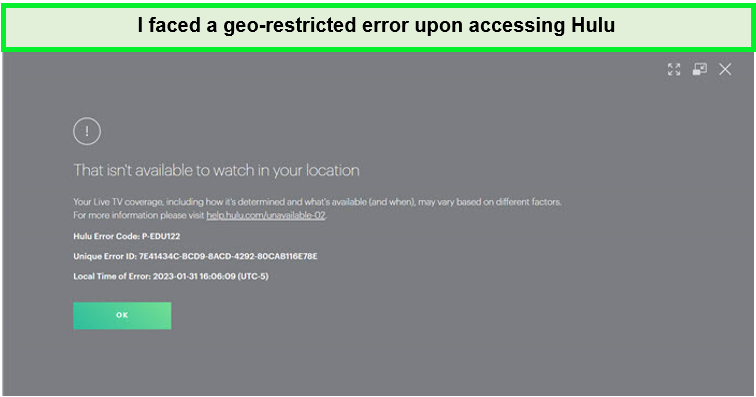
If you try to access Hulu, you’ll receive this geo-restriction error.
This error message can easily be bypassed with the best VPN Hulu. Using a VPN that works with Hulu allows you to securely change your Hulu location, giving you access to the content you love on any network.
Using a VPN for Hulu also has the following benefits:
- Bypass ISP Throttling: ISP throttling may slow your internet speed, especially during streaming. A Hulu VPN bypasses ISP throttling by hiding your online activities, ensuring smooth access without lag.
- Enhance Privacy and Security: When accessing Hulu on public Wi-Fi, which might be insecure, a VPN protects against potential cyber threats, keeping your connection safe and your activities private.
- Access More Content: While you might be familiar with Hulu’s US library, a VPN opens up access to international libraries, such as USA’s, allowing you to explore a broader range of shows and movies.
But what VPN works with Hulu, you might ask. I recommend using ExpressVPN. Connect to ultra-fast servers across 105 countries, including the US, and start streaming Hulu with added privacy and unlimited bandwidth.
5 Best Hulu VPNs in 2024 [In-Depth Analysis]
While many VPNs claim to work with Hulu, only a select few consistently bypass Hulu’s VPN blocks. Wondering which VPN will work with Hulu? I tested 50+ VPNs regarding server locations, speed, security, and overall performance to determine that.
Below are the recommended best VPNs for Hulu that work:
1. ExpressVPN — Best VPN for Hulu

- Ultra-fast servers in 105 Countries
- Excellent unblocking capability for Netflix, Hulu & more
- Best-in-class encryption trusted security, and advanced protection features that block ads, trackers, and harmful sites.
- Connect up to 8 devices simultaneously
- 24/7 customer support through live chat
- 30-day money-back guarantee
ExpressVPN stands out as the best Hulu VPN, thanks to its unmatched combination of speed, reliability, and security features. Renowned for its high-speed servers, ExpressVPN ensures that buffering and lag are things of the past, enabling a seamless Hulu experience even when accessing content in UHD or 4K.
The VPN offers extensive servers in 105+ countries. With a robust server network that spans over 25+ locations within the United States, ExpressVPN offers multiple points of connection to bypass Hulu’s geo-restrictions effectively, which makes ExpressVPN Hulu a perfect combination.
I used the New York server to test Hulu with ExpressVPN and watched the content without buffering. This Hulu VPN works with not just Hulu but also many other geo-restricted services like Netflix, Amazon Prime, and Paramount Plus.
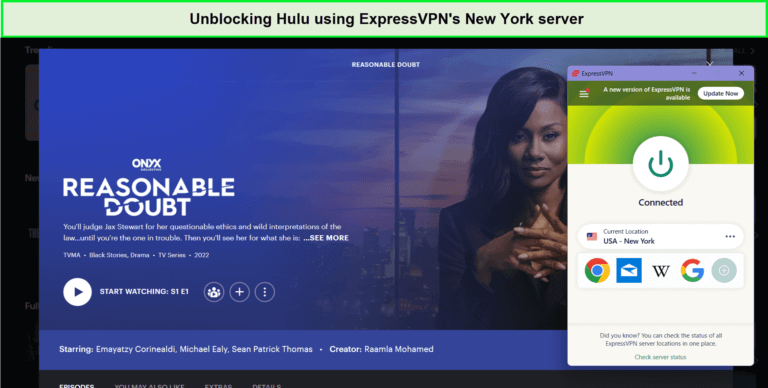
ExpressVPN is the best VPN to watch Hulu.
During the ExpressVPN speed test, I achieved an 89.42 Mbps downloading speed and 84.64 Mbps uploading speed on a 100 Mbps connection.
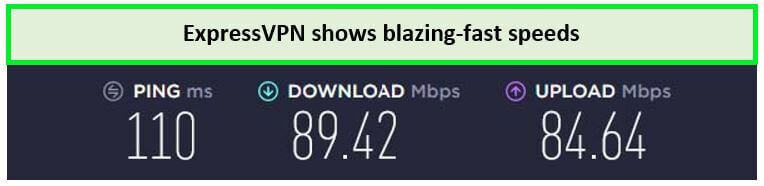
ExpressVPN showed exceptional speeds on tests, which makes it the best VPN for streaming Hulu.
ExpressVPN supports up to 8 simultaneous connections, allowing you to enjoy secure and private internet access across multiple devices. Whether it’s Android, iOS, Windows, or macOS, ExpressVPN offers easy-to-use apps for various platforms.
Its MediaStreamer feature extends VPN benefits to devices like smart TVs and gaming consoles, allowing easy access to Hulu on Android TV.
When it comes to security, ExpressVPN excels with its AES 256-bit encryption, ensuring that your online activities remain private and secure. Including a kill switch and a strict no-logs policy further reinforces the protection of your data, allowing you to stream with confidence and peace of mind.
The ExpressVPN free trial allows you to explore its full suite of features risk-free. Coupled with a 30-day money-back guarantee, ExpressVPN ensures that you can confidently make an informed decision about your VPN service.
For a thorough understanding of its outstanding service, I recommend reading my detailed ExpressVPN review.
Exclusive Deal:
Unlock the ultimate Hulu experience with the VPNRanks exclusive ExpressVPN offer! $6.67/mo - Save up to 49% with exclusive 1-year plans + 3 months free
- Unblocks Hulu, Netflix, and other services
- Ultra-fast speed, even streaming in HD or 4K quality
- Lightway Protocol
- Best VPN for Hulu per Reddit
- Allows 8 simultaneous connections
- 24/7 live chat support
- 30-day money-back guarantee
- Free trial only available on mobile devices
2. Surfshark — Budget-friendly VPN for Hulu
- Ultra-fast servers in 105 Countries
- Excellent unblocking capability for Netflix, Hulu & more
- Best-in-class encryption trusted security, and advanced protection features that block ads, trackers, and harmful sites.
- Connect up to 8 devices simultaneously
- 24/7 customer support through live chat
- 30-day money-back guarantee
Surfshark is a budget-friendly VPN for Hulu. For viewers seeking a seamless experience on Hulu, Surfshark’s robust server network is a key asset.
With 3200+ servers in 100 countries, including 600+ servers in the US, Surfshark facilitates reliable access to Hulu. While testing, I accessed Hulu with Surfshark using the Charlotte server and enjoyed buffer-free access to the latest Hulu titles.
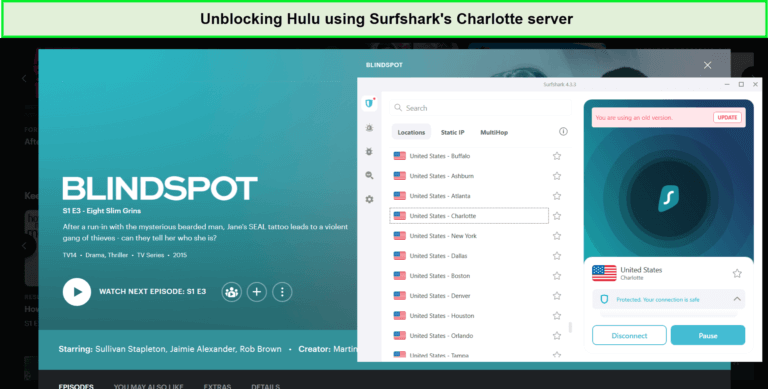
Unblocking Hulu content using Surfshark servers was not an issue at all.
The service’s speed is another highlight, ensuring users can enjoy their favorite shows and movies without the annoyance of buffering. Surfshark’s servers are optimized for high-speed streaming, making watching content in HD and 4K quality possible, which is more than sufficient for Hulu’s Ultra HD requirements.
The Surfshark speed test showed quite good results, as I recorded an 81.32 Mbps downloading speed and a 76.12 Mbps uploading speed over an internet connection of 100 Mbps.

I achieved blazing-fast speed results while unblocking Hulu.
Surfshark allows unlimited simultaneous connections, providing secure and private internet access across various devices. Whether you’re using Android, iOS, Windows, or macOS, Surfshark offers user-friendly apps for various platforms. Surfshark also allows easy access to Hulu on iPhone.
Its Smart DNS feature also brings VPN advantages to devices such as smart TVs and gaming consoles, upgrading your Hulu streaming experience on larger screens. Through Surfshark, I could unblock Hulu on Roku.
Security is also a top priority for Surfshark. It offers industry-leading AES-256-GCM encryption, a strict no-logs policy, and a kill switch feature. These security measures ensure your online activities remain private and secure, allowing for peace of mind while streaming.
A Surfshark free trial is available, allowing you to test its comprehensive suite of features without risk. With a 30-day money-back guarantee, Surfshark ensures that you can choose your VPN service with assurance.
Exclusive Deal:
VPNRanks readers can enjoy Surfshark for only $2.49/mo - Save up to 77% with exclusive 2-year plan + 30-day money-back guarantee.
- Unblocks Hulu, Netflix, and other services
- Affordable Hulu Live TV VPN
- Smart DNS feature
- Unlimited simultaneous connections
- Support WireGuard
- 24/7 live chat support
- 30-day money-back guarantee
- Reasonable prices
- Some servers take too long to connect to
- No free version
3. NordVPN — Largest Server Network VPN for Hulu

- 6000 servers in 60 countries
- WireGuard protocol (NordLynx)
- 6 Simultaneous Connection
- DoubleVPN
- 24/7/365 Live Chat Support
- 30 Days Money Back Guarantee
NordVPN has the largest server network VPN for Hulu, with a total of 6000 servers across 61 countries, along with 1970+ servers in the US. NordVPN’s vast server network is your ticket to a seamless experience if you seek uninterrupted access to Hulu’s extensive library.
The expansive server network facilitates reliable Hulu access and enhances quality. With this VPN, expect superior unblocking capabilities and high-speed connections optimized for streaming. I tested Hulu with NordVPN and could access it easily. While testing, I used the Denver server and unblocked Hulu within 10 seconds, making NordVPN Hulu a perfect combo.
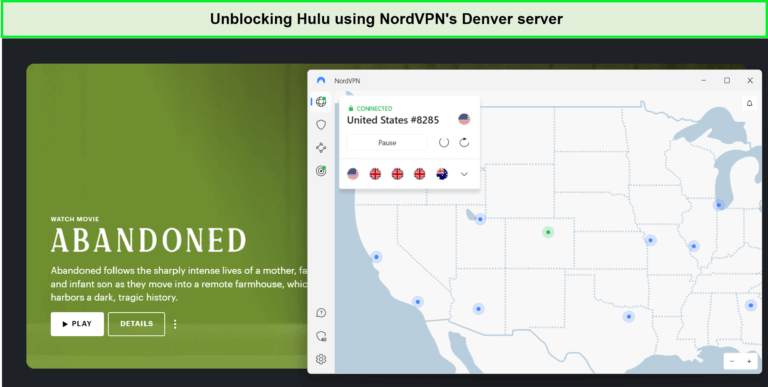
Unblocking Hulu was super easy using NordVPN’s fleet of servers.
I also decided to conduct a NordVPN speed test, which provided me with a download speed of 83.82 Mbps and an upload speed of 44.64 Mbps on 100 Mbps internet connections to access its content in HD.
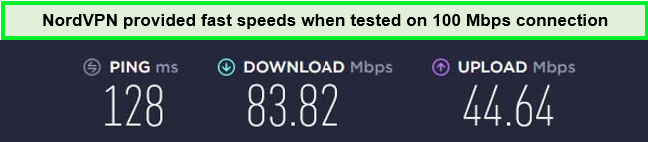
NordVPN proved to be one of the best Hulu VPNs.
With one NordVPN subscription, you can connect up to 6 devices simultaneously. It also offers apps for all popular streaming devices, such as Windows, iOS, Android, and more. I faced no issues setting up NordVPN on FireStick, Kodi, Roku, and multiple other devices to enjoy Hulu with family.
NordVPN’s commitment to security is evident in its military-grade encryption and strict no-logs policy. The service includes advanced features such as Double VPN, which routes your traffic through two servers for an extra layer of protection, and CyberSec, which blocks ads and potential threats online.
For those looking to try NordVPN risk-free, a 30-day money-back guarantee is available, offering a full refund if unsatisfied with the service. Additionally, a NordVPN free trial offers the full suite of features without an immediate commitment.
For more details on how this VPN enables seamless streaming, I recommend reading the NordVPN review.
Exclusive Deal:
VPNRanks readers can get NordVPN for $3.99/mo - Save up to 63% with exclusive 2-year plan + 3 months free for a friend.
- Unblocks Hulu and works with Disney+, Netflix, and other streaming platforms
- Smart DNS feature
- Dedicated IP
- Ultra-fast speed, even streaming in HD or 4K quality
- 24/7 live chat support
- 30-day money-back guarantee
- No free version
- Slow desktop app
4. CyberGhost — User-friendly VPN for Hulu with Unique Features

- 11651 Servers Servers in 100 Countries
- 7 Simultaneous Logins
- 45 Days Money-Back Guarantee
- Strict No Logs Policy
- 24/7 Live Chat Support
- Strong Protocols & Encryption
CyberGhost is known as the user-friendly VPN for Hulu with unique features, which are specifically designed to unlock Hulu and provide a smooth viewing experience without the hassle of manual configuration.
With 11651+ servers in 100 countries, including 1458 servers in the United States, CyberGhost boasts one of the most extensive networks available. The sheer size of CyberGhost’s network also means less server load and better user speeds. While testing, I used the Seattle server and streamed Hulu content buffer-free.
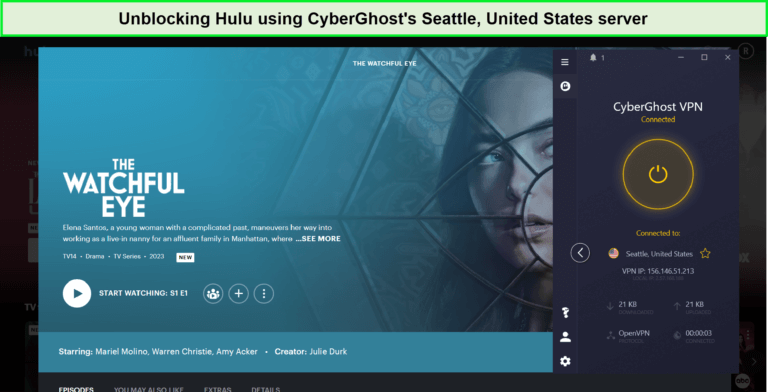
CyberGhost’s apps were pretty user-friendly and allowed me to stream Hulu in HD.
The CyberGhost speed test provided a download speed of 75.47 Mbps and an upload speed of 69.34 Mbps when tested on a 100 Mbps internet connection.
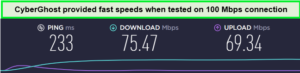
Enjoy decent speed using CyberGhost.
When it comes to security, CyberGhost doesn’t skimp on features. It offers AES 256-bit encryption, a strict no-logs policy, and an automatic kill switch. These features protect your online activities, ensuring your streaming habits and personal information remain private and secure.
Pricing for CyberGhost is transparent and competitive to cater to a global audience. This is backed by an extended 45-day money-back guarantee and the CyberGhost free trial, giving the confidence to test its features without any financial commitment.
For detailed insights, I invite you to read my detailed CyberGhost review.
Exclusive Deal:
VPNRanks readers can get CyberGhost for $2.03/mo - Save up to 84% with exclusive 2-year plans + 4 months free.
- Unblocks Hulu, Netflix, and other services
- Speedy connections
- Easy-to-use UI for beginners
- 1400+ US-optimized servers
- Strong security and privacy features for streaming
- Allows 7 simultaneous connections
- 24/7 live chat support
- Limited payment options
- macOS and iOS lack some features
- Difficult to use on Linux
5. Private Internet Access – Secure VPN for Hulu

- Does Not Keep Any Logs
- 24/7 Customer Support
- 7 Days Money Back Guarantee
- 35000+ Servers in 84 Countries
- SOCKS 5 proxy
- Compatible with Leading Devices
Private Internet Access is a secure and reliable VPN for Hulu because of its robust security features and formidable server network. PIA ensures that your online viewing is protected and unrestricted, no matter where you are.
It has one of the largest server networks with 35000+ servers in 84+ countries and servers in all 50 states of the US. During testing, I had no issues accessing Hulu with the Atlanta server of PIA, as it unblocked the platform within 14 seconds, and there was no buffering.
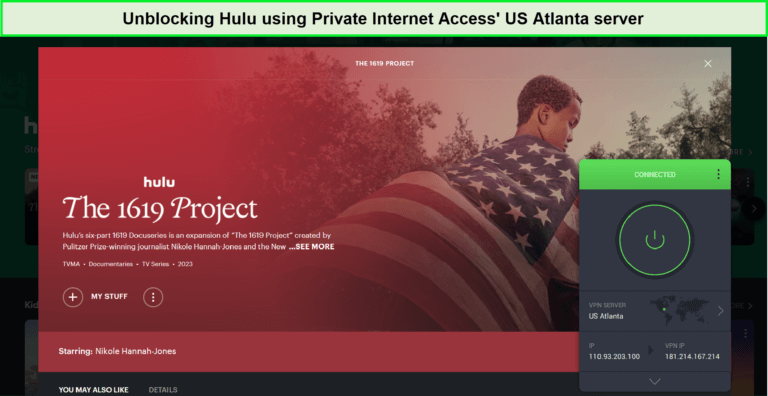
Here, you can see how I’ve used PIA VPN to unblock the Hulu account.
When I conducted the Private Internet Access speed test, it gave a download speed of 65.78 Mbps and an upload speed of 57.16 Mbps on a 100 Mbps base connection.
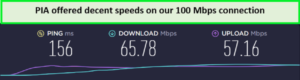
PIA’s servers provided adequate speeds for streaming.
Another great thing is that PIA supports unlimited simultaneous connections, so you can stream on multiple devices simultaneously. I could easily set up PIA on Roku, routers, and other devices without affecting the speeds.
Security is where PIA truly shines. The VPN provider uses military-grade encryption to safeguard your internet traffic, ensuring your viewing habits and personal information remain private. In addition to its strict no-logs policy, PIA features an automatic kill switch that cuts off your internet connection if the VPN drops, preventing any data leaks.
Plus, with a 30-day money-back guarantee, you can test-drive this VPN’s rapid services without risk. There’s also a PIA review available to check its features before buying.
Exclusive Deal:
VPNRanks readers can get PIA for $2.11/mo .
- Unblocks Hulu, Netflix, and other services
- HD streaming all day long
- Security and privacy features are top-notch for streaming
- WireGuard protocol for fast speeds
- Allows unlimited simultaneous connections
- 24/7 live chat support
- 30-day money-back guarantee
- Located in the US
- No free version
- Some downtime issues
- Some servers take time to connect
Best VPNs for Hulu – Quick Comparison
When choosing a VPN for Hulu, I recommend that it is essential to compare the top contenders side-by-side. Here, I have added a concise comparison of what VPNs work with Hulu, highlighting their strengths and suitability for accessing Hulu content:
| VPNs |  |
 |
 |
 |
 |
|---|---|---|---|---|---|
| Ranking for Hulu | 1 | 2 | 3 | 4 | 5 |
| US Servers | 24 US servers | 600+ US servers in 25 cities | 1,970+ US servers in 16 US locations | 1453 US servers in 11 US locations | 1267 US servers |
| services | Hulu, Netflix, BBC iPlayer, Amazon Prime, Max, Disney+ | Hulu, Netflix, BBC iPlayer, Amazon Prime, Max, Disney+ | Hulu, Netflix, BBC iPlayer, Amazon Prime, Max, Disney+ | Hulu, Netflix, Amazon Prime, Disney+ | Hulu & Netflix |
| International server Speed | 89.42+ Mbps | 81.32+ Mbps | 83.82+ Mbps | 75+ Mbps | 86+ Mbps |
| Compatible Devices | Smart TV, Android, iOS, Windows, Mac, Linux, PS4&5 and more | Smart TV, iOS, Nintendo, Android, Windows, Xbox, Roku, routers, etc | Smart TV, Windows, macOS, iOS, Android, Firestick, Roku, PS, etc | Windows, macOS, iOS, Android, Kodi, etc | Windows, macOS, iOS, Android, Firestick, etc |
| Simultaneous Device Connections | 8 | Unlimited | 6 | 7 | Unlimited |
| Lowest Price | $6.67/mo | $2.49/mo | $3.99/mo | $3.99/mo | $3.99/mo |
How I Selected and Chose the Best VPN for Hulu?
My testing methodology for selecting the best VPNs for Hulu in 2024 is rigorous and user-focused. I consider a multitude of factors that are crucial for an exceptional VPN for Hulu:
- Access to Hulu: Selected VPNs with servers in the US to unblock Hulu, ensuring global access to its content.
- Advanced Security: Prioritized VPNs offering AES encryption with ChaCha20 for enhanced speed and security, protecting users’ data from third parties.
- Optimal Performance: Tested for lag and buffer-free streaming on Hulu, choosing VPNs that minimize speed reduction while supporting 4K and HD viewing.
- Additional Features: Looked for SmartDNS, efficient tunneling protocols, and split tunneling functionality to support a better experience.
- Simultaneous Connections: Choose VPNs that allow multiple devices to connect simultaneously, suitable for families or sharing with friends.
- Value for Money: Selected VPNs offer a strong balance between cost and features, including affordability and comprehensive money-back guarantees.
- Reliable Servers: Ensured VPNs have a significant presence in crucial locations, with at least 10 server locations in the US for consistent access.
- Fast Speeds: Required a minimum of 25 Mbps to support UHD streaming without interruptions, ensuring a smooth Hulu experience.
- Device Compatibility: Verified that VPNs offer user-friendly apps for various devices, including smart TVs, through Smart DNS.
- Customer Support: Emphasized the importance of 24/7 live chat for immediate assistance, ensuring users receive help when needed.
- Wide Platform Support: Selected VPNs that work with Hulu and other major services, offering flexibility and variety.
- Privacy and Security: Insisted on industry-standard security features like 256-bit AES encryption, kill switches, no-logs policies, and DNS leak protection for user safety.
- Ease of Use: Choose VPNs with intuitive interfaces across all major devices, simplifying the connection process for hassle-free Hulu access.
- Comprehensive Coverage: Focused on VPNs that provide good value with affordable plans, allowing multiple simultaneous connections and offering money-back guarantees for user satisfaction.
Does Hulu Work with a VPN?
Yes, Hulu is compatible with VPN usage. A reliable VPN for Hulu can circumvent geo-restrictions and unlock the complete content catalog.
First, opt for your preferred VPN, complete the download, and register your account. Upon logging in, select a US server to begin streaming Hulu as if you were accessing it from within the United States.
Choosing a VPN with an extensive server network is advisable for seamless streaming. ExpressVPN, for instance, boasts thousands of servers worldwide, including more than 25 server locations in the US, ensuring ample server options for your streaming needs.
How Does Hulu Block VPNs?
If your device’s location differs from your IP address while using Hulu, the service can detect this and block your access, even if you use a VPN. The streaming platform keeps a blacklist and checks incoming connections against it. Moreover, Hulu can identify encrypted traffic and detect IP, DNS, and WebRTC leaks, which are typical signs of VPN usage.
Free VPNs, which typically have a limited number of servers, are blocked more frequently by Hulu due to their inability to offer many alternative IP addresses. In contrast, premium VPNs boast extensive server networks worldwide, allowing users to switch servers if one is blacklisted, thereby evading Hulu’s restrictions.
Furthermore, the best VPNs that work with Hulu, like ExpressVPN, provide obfuscated servers designed to hide the fact that you’re using a VPN, enabling you to stream Hulu content undetected.
How to watch Hulu with VPN? [Easy Steps]
- Register for a reputable VPN subscription like ExpressVPN, and sign up for a plan.
- Install the VPN application on your preferred device.
- Connect to a server in the United States.
- Go to the Hulu app or website.
- Access Hulu and start streaming your favorite content.
Can I Unblock Hulu With a Free VPN?
Yes, it is possible, but I do not recommend using a free VPN for Hulu. During testing, free VPN for Hulu lacks the resources to change their server IPs promptly, often getting Hulu VPN blocked.
Furthermore, free VPNs often use slow servers, leading to buffering and interruptions. They might record and sell information to unapproved parties. Cybercriminals may also use the illusion of an alluring free VPN service to conceal harmful viruses.
While free VPNs may suffice for data protection, accessing Hulu from requires a premium service like ExpressVPN. This VPN effectively bypasses anti-VPN measures and unblocks Hulu with ease.
How to Get Around Hulu Home Location Error?
Within 30 days of joining the service, Hulu requests that users set up a home network to prevent account sharing and grant access to local channels. Additionally, it restricts the devices that can be used to observe when you’re not at home.
A family member living in another house won’t be able to stream on their gaming console if you share your password with them. Instead, they will get the following error message:
“Your Hulu subscription allows you to use this type of device only on your home network. If you have moved or your internet service provider has changed, please update your Home Location in your Hulu Account settings on a computer.”
or
“Video not available in this location.”
Other possible causes of these issues include using a shared wifi network, a VPN that is incompatible with Hulu, not checking in on your smartphone, or Hulu not being able to recognize your current network.
To get around the Hulu Home Location error, you must update your home network to resolve this problem. This can be challenging if you use a VPN since, most likely, your IP address changes each time you log in to the service. Select the dedicated or static IP address option if your VPN offers it because the IP address won’t change.
After you’ve connected to the network or VPN server you wish to utilize to stream Hulu:
- Log out of Hulu.
- Re-log using a game console or streaming device like Firestick, Roku, Chromecast, Apple TV, or Smart TV.
- Open the Hulu account page on your desktop computer or smartphone app.
- Select Settings and Privacy.
- To configure your new network, click Set or Change Home.
Note: In addition to the Hulu Home location error, if you encounter Hulu Error Code p-dev320 while streaming, refer to the detailed guide for comprehensive fixes.
Is It Legal to Use a VPN for Hulu?
Yes, it is legal to use a VPN for Hulu. If you use Hulu with VPN to watch films or TV series on the platform, you won’t face any legal repercussions, even though the streaming service may ban IP addresses linked to VPNs. To put it briefly, using a VPN to view Hulu content may be prohibited by Hulu, but it is not unlawful.
Please remember that VPN use is prohibited in several nations, such as Belarus, Iraq, North Korea, and Turkmenistan. In China, Egypt, Oman, Russia, Turkey, and the UAE, using the best VPNs that work with Hulu is permissible, subject to certain limitations.
Why is Hulu Not Working With VPN?
It is possible that Hulu is not working with VPN because the service is good at detecting VPN involvement. It tends to block users who use a VPN.
You might have encountered error messages like “error playing this video” or “It looks like you’re using an anonymous proxy.” These error messages typically appear in a format similar to the following:
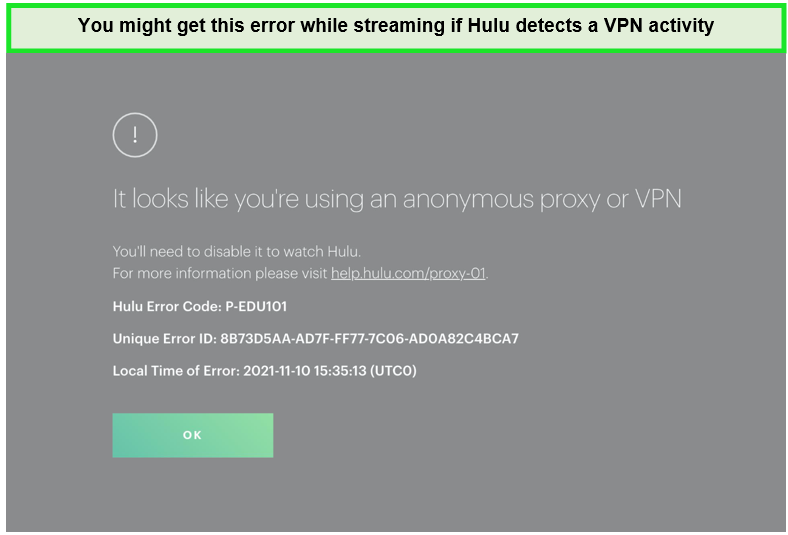
An error message occurred while accessing Hulu.
If you’re using one of the best VPNs for Hulu, but you’re still facing issues, there are several troubleshooting steps you can take to fix the problems of Hulu not working with VPN:
- Check Your VPN Server: Connect to a different server in the US.
- Clear Your Browser’s Cache and Cookies: Clearing your browser’s cache and cookies can solve many problems.
- Disable IPv6: Some VPNs don’t support IPv6 traffic, which can lead to access issues.
- Use a Dedicated IP Address: Hulu is less likely to detect a dedicated IP address.
- Contact VPN Customer Support: They can provide server recommendations or further assistance to resolve the issue.
- Try a Different VPN Protocol: Switching VPN protocols can help bypass blocks.
- Update Your VPN App: Ensure you’re using the latest version of your VPN app.
Bonus: If you are unable to solve the streaming errors on Hulu after following the above troubleshooting tips, you can cancel your Hulu subscription using a VPN anytime.
Can I Watch Hulu + Live TV With a VPN?
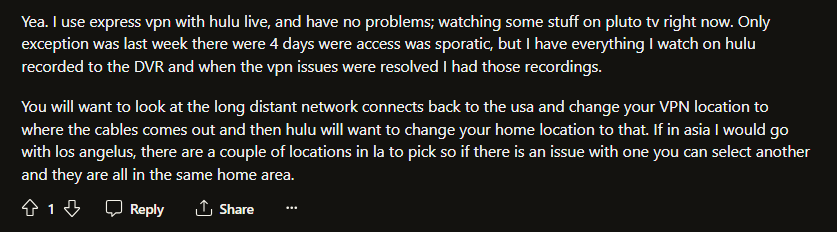
Yes, you can watch Hulu Live TV with a VPN. However, not all VPNs may work reliably with Hulu due to their efforts to block VPN traffic. It’s essential to use the best VPN for Hulu live TV, like ExpressVPN, which regularly updates its servers to bypass Hulu’s geo-restrictions.
Here’s what a Redditor says about using ExpressVPN with Hulu + Live TV:
⚠ Which VPNs Don’t Work with Hulu?
As I mentioned earlier, not all VPNs can unblock Hulu. The following VPNs do not work with Hulu as of the time of writing this guide:
- Zenmate — Failed to work with Hulu during my testing.
- Hotspot Shield — Prompted me to the proxy error almost instantly.
- Hola VPN — Due to its peer-to-peer network, it could not unblock Hulu.
- CactusVPN — unblock Hulu despite offering a decent server network.
- IronSocket — Could not bypass the Hulu proxy error.
- Unotelly — It doesn’t offer optimized servers for Hulu.
- Buffered — Failed to unblock Hulu even after multiple attempts.
- TunnelBear — Its US servers were unable to unblock Hulu.
What Best Shows, Movies, and Live Sports Can You Access with the Best VPN for Hulu?
Here are some of the popular shows and movies that you can access using the best VPN Hulu:
Bonus: If you are done watching the above shows, check out my list of what to watch on Hulu right now to make the most of your subscription.
What are the Best Hulu Movies, TV Shows, and Sports You Can Access in April 2024?
The best movies, sports, and shows in April 2024 on Hulu are:
| Solar Opposites Valentine’s Day Special | 2024 NFL Pro Bowl Games |
| The NHL All-Star Game 2024 | The Eye |
| America’s Sweethearts | Big Momma’s House |
| Call Me By Your Name | The Descent |
| Eat Pray Love | The Eye |
| Gnomeo and Juliet | Hitch |
| Twilight | Predator |
| True Crime NYC | The Lost City |
| Blendid | The Space Race |
| Cleaning Up | Beach Hunters |
Other Hulu VPNs That Did Not Make the Cut:
Here are some providers that did not meet my criteria for the best Hulu VPNs:
- Mullvad VPN: This is respected for its intuitive apps and strong privacy features but falls short for Hulu streaming due to its inability to unblock Hulu and other major platforms like Amazon Prime Video and Disney+.
- Ivacy VPN: Offers robust features and a wide server network but doesn’t cut for Hulu streaming because of inconsistent performance in overcoming geo-restrictions on top streaming services.
- PureVPN: Has a broad server coverage and streaming-focused features but is not the top choice for Hulu due to occasional struggles with bypassing Hulu’s geo-blocks, affecting seamless streaming.
- SlickVPN: Provides solid privacy protections but lacks mobile apps and user-friendly desktop software, and importantly, it fails to connect to key streaming services including Hulu, limiting its utility for streaming enthusiasts.
- HMA VPN: Features user-friendly apps and good speeds but doesn’t qualify as the best for Hulu because it cannot unblock Hulu, coupled with poor customer support and missing advanced security features.
More VPN Guides By VPNranks:
- Best VPN for Showmax – Unlock Showmax worldwide with seamless streaming and unbeatable security.
- Best IPTV VPN – Experience buffer-free IPTV streaming with ultimate privacy and speed.
- Best VPN for HBO Max – Access HBO Max from anywhere with lightning-fast streaming and privacy.
- Best VPN for F1 TV Pro – Unblock F1 TV Pro and race ahead with seamless VPN service.
- Best VPN for Viki – Discover Viki’s global library with a dependable VPN solution.
- Best VPN for Telenet Play Sports – Never miss a moment of the action – stream Telenet Play Sports seamlessly with a trusted VPN.
FAQs – Best VPN for Hulu
Is there a VPN that works with Hulu?
Yes, ExpressVPN is a highly recommended VPN with Hulu, offering lightning-fast speeds and unlimited bandwidth to optimize your streaming experience. Give it a try risk-free with a 30-day money-back guarantee.
What VPN is best for Hulu?
For optimal Hulu streaming, ExpressVPN reigns supreme with its blazing speed and reliable bypassing of geo-restrictions, ensuring uninterrupted access to your favorite shows. Experience hassle-free streaming with ExpressVPN’s top-notch security and global server network.
Can Hulu detect my VPN?
Yes, Hulu detects VPN and also tracks your IP addresses. If they detect an IP address connected to a VPN, they will block it and add it to a list of blocked addresses, preventing future access. Choose a reliable streaming VPN like ExpressVPN that works with Hulu.
How does Hulu block VPNs?
Hulu uses IP address monitoring to detect VPN and proxy usage. When an IP address shows signs of being associated with a VPN or unblocking tool, Hulu adds it to a blocklist, preventing future access attempts from that IP address. This proactive approach helps Hulu maintain its geo-restrictions and content licensing agreements.
Which VPN is recommended by Redditors that works with Hulu?
Redditors recommend ExpressVPN for Hulu, boasting compatibility with various streaming platforms. Users affirm its reliability with BBC iPlayer, Netflix, and minimal connectivity issues.
What is the VPN error on Hulu?
Hulu has the ability to detect when users are utilizing IP address masking software such as proxies or VPNs. If you attempt to access Hulu while using one of these tools, you may encounter an error message with the code BYA-403-011, prompting you to disable your proxy tool to gain access to the service.
Does Hulu allow VPNs?
Hulu’s terms of service don’t mention especifically about the use of VPNs or proxies. However, they’ll notify and block users who violate this rule, but there’s no mention of account suspension or termination. There have been no reported cases of users being penalized for VPN usage beyond encountering an error message.
How can I unblock Hulu with a VPN?
- Install a trusted VPN on your device. I suggest ExpressVPN for its reliability.
- Select a US server after the VPN is installed to ensure access to Hulu’s content.
- Visit the Hulu website, then log in or create a new account.
- Search and enjoy your desired show or movie on Hulu, now accessible thanks to the VPN setup.
Can anyone recommend a VPN that works with Hulu?
For those seeking a VPN compatible with Hulu, ExpressVPN is a top recommendation. It stands out as the optimal VPN for Hulu, offering rapid speeds and unlimited bandwidth, ensuring a smooth streaming experience. With ExpressVPN, users can enjoy Hulu’s vast library, including TV episodes and original content, without experiencing ISP throttling.
Why does Hulu care if I use a VPN?
Hulu is vigilant in detecting users’ IP addresses, often blocking VPN-provided IPs. Additionally, repeated sign-ins from multiple accounts using the same IP address may trigger Hulu to suspect VPN or proxy server usage.
Does ExpressVPN work for Hulu?
ExpressVPN lets you securely access Hulu. Streaming with ExpressVPN enhances your viewing experience by reducing lag and bypassing bandwidth throttling by your internet service provider.
Will using Hulu and a VPN slow my connection?
Yes, VPNs can slow your connection while using Hulu to some degree due to the time it takes to send data through the VPN server and encrypt and decrypt data in transit. However, I noticed a tiny speed drop while using ExpressVPN and always recommend it to stream Hulu.
Wrapping Up!
Due to licensing issues, Hulu is only available for US audiences. However, you can easily bypass the geo-restrictions using a VPN. For this, I tested 50+ VPNs and recommended the best VPN for Hulu for you.
A VPN that works for Hulu will enhance your streaming experience, protect your privacy, and allow you to access a wider range of content. I recommend using ExpressVPN as it is the fastest and offers premium features for streaming.

While your post is very informative, isn’t VPN blocks by Hulu a thing of the past? Perhaps I am residing in USA and don’t come across this issue a lot. Only time I needed a proxy was when I had to travel to Singapore. But even on my travels, I never faced any issues accessing Hulu.
I tried expressvpn from Singapore to access Hulu and it recognized that I am using a VPN and wont allow me to watch anything. How did it do that? I have been using express for many years now and it works perfectly when accessing HBO. I was even able to access my usa netflix account using expressvpn. Is there a way around this problem, can you pls advise?
Streaming providers are aware of big VPN players and ban their IPs. They do it by blocks, marking that blocks of certain IP addresses belong to this or that well-known VPN provider, expressVPN is one of the biggest around so I’m not surprised that happened. You might want to try a smaller but reliable provider, I’m using Surfshark for streaming, it’s mentioned in this article, had no problems accessing geo-blocked content and the speeds are good for HD stream.
I want to purchase a VPN for securing my privacy. But I love stream boxes. The question which I want to ask you guys is there any way to combine the advantages of a vpn on public network. I am not a tech savvy for networking but I am eager to learn. Can I route my phone and desktop through VPN while I route apple TV and the like through public?