Does ExpressVPN Work on PS4?
- Updated: March 21, 2024
- 4 User Reviews
- Gerald Hunt

Yes, you can use ExpressVPN on PS4, however, you will not be able to download ExpressVPN directly onto your PS4 since gaming consoles are incompatible with VPN apps.
To use ExpressVPN with your PS4, you will need to either install ExpressVPN directly onto your router, set up a hotspot connection from your computer and connect your PS4 to it, or provide a VPN connection to your PS4 via an ethernet cable.
If none of this makes sense to you, let me assure your that’s it quite easy—as long as you have a bit of technical knowledge.
To help you use ExpressVPN with your PS4 in under ten minutes, I’ve compiled this easy step-by-step guide to get you started.
So without waiting any more, let’s get started.
Why Would I Use ExpressVPN on PS4?
ExpressVPN is the top-rated VPN in the entire industry. Its performance is unlike any other VPN out there.
Now, before I tell you why you should use ExpressVPN, here are some of the benefits of using a VPN with your PS4:
- You can play online games with low pings
- Download the latest gaming titles as soon as they’re released in different regions
- Beat price discrimination to purchase games for cheap
- Unblock and watch streaming services like Netflix on your PS4
Now that you know what are the benefits of using a VPN with your PS4 are, let’s check out some of the features that you get with ExpressVPN.
Feature-wise ExpressVPN is insanely well equipped and it’s among high top-rated VPNs. For starters, you get access to 3000+ servers in 94 countries. That’s more than enough to help you join any gaming server, download games for cheap, or stream Netflix in HD quality. As we talk about gaming ExpressVPN is the best VPN for league of legends and other games like Mobile legends, CS:GO and PUBG etc.
If we talk about speeds, ExpressVPN is quite fast. When I ran a quick speed test, ExpressVPN managed to output a downloading speed of 76.87Mbps with my 100Mbps connection.
Another reason to love ExpressVPN is that it offers DDoS protection. Best of all, ExpressVPN offers 5 simultaneous connections so you and your friends can play online games together.
As for pricing, ExpressVPN costs only $6.67/mo - Save up to 49% with exclusive 1-year plans + 3 months free. If you think ExpressVPN is expensive, you’ll love the fact that it comes with a 30-day money-back guarantee, and you can subscribe to ExpressVPN using PayPal – the most popular and efficient payment processor.
Learn more about this VPN service by reading out the detailed ExpressVPN review.
How to Setup ExpressVPN on PS4?
Setting up ExpressVPN with a PS4 is quite easy. As long as you have a bit of technical knowledge, you should have no trouble whatsoever. To use ExpressVPN with a PS4, you will have to either:
- Set up ExpressVPN on your router and connect your PS4 to it.
- Run ExpressVPN on your PC and then provide a virtual Wi-Fi connection to your PS4.
- Provide a VPN connection to your PS4 via an ethernet cable using your PC.
Before I discuss how to use ExpressVPN with a PS4, just keep in mind that you will need a bit of technical knowledge to properly follow the steps below.
Read Also:
Set Up ExpressVPN for PS4 Via Wi-Fi Router
ExpressVPN supports quite a few popular router brands and models. If you wish to set up ExpressVPN on your router, you can follow this ExpressVPN router setup guide. It is still one of the most popular methods for configuring ExpressVPN for Chromecast, Smart TVs, PS4, Xbox, and other devices that are less easy for direct VPN configuration.
In our setup guide, you’ll be able to find detailed steps to configure ExpressVPN on ASUS router, TP-Link, D-Link, and Linksys routers.
In case you don’t want to deal with manual configurations, you can purchase a pre-configured ExpressVPN router from FlashRouters.com starting from $149.99.
Note: Setting up ExpressVPN on a router has its benefits and issues. You will be able to use ExpressVPN with your PS4, however, all other devices in your home will also involuntarily start using ExpressVPN.
Set Up ExpressVPN For PS4 Via Virtual Wi-Fi Hotspot
If you don’t wish to install ExpressVPN on your router, then you try the alternative method that involves using your computer to provide a hotspot connection running ExpressVPN to your PS4. This method is also comparatively easier than the previous method.
To create a virtual hotspot connection using a Windows computer, follow the steps listed below:
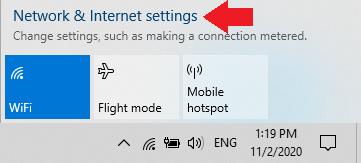
Step 1: To begin, right-click the network icon located at the bottom right of your screen. When a small window pops up, click on the “Open Network & Internet settings” option.
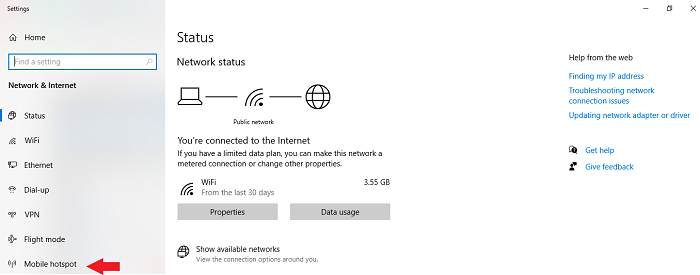
Step 2: Click on the Mobile hotspot option.
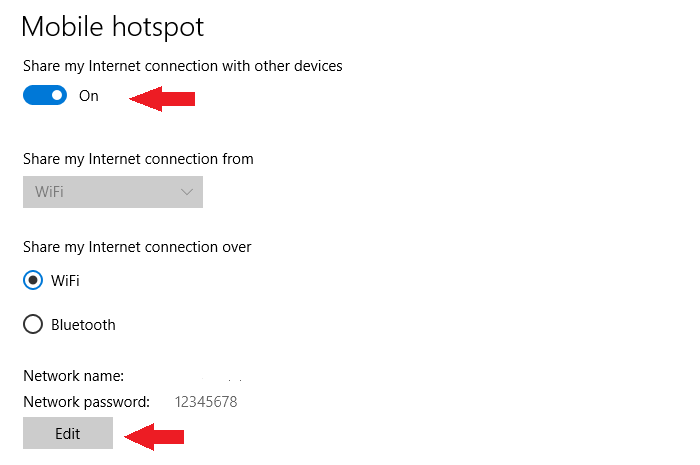
Step 3: Next, enable the hotspot option by using the toggle switch. If you don’t mind the default username and password, you can move on to the next step. But if you want to change it, click on the Edit option.
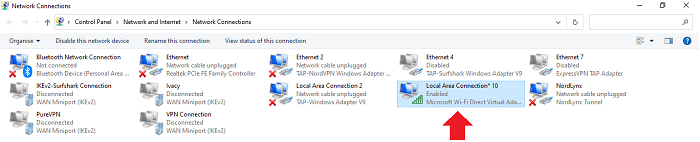
Step 4: Now, in the Network Connections settings, you will see a new network adapted that should show up when you enabled the hotspot option just now.
Step 5: Next, right-click on the network adapter of ExpressVPN and then click on the Properties option.
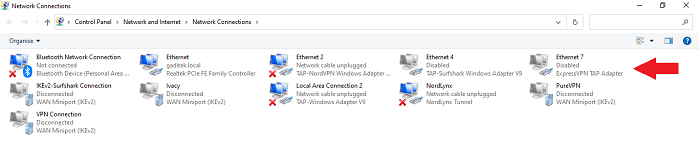
Step 6: When you click on properties, a new window will show up. Click on the Sharing tab and tick mark the option that says: Allow other network users to connect through this computer’s internet connection. Next, click on the dropdown menu and choose the hotspot connection that you enabled earlier.
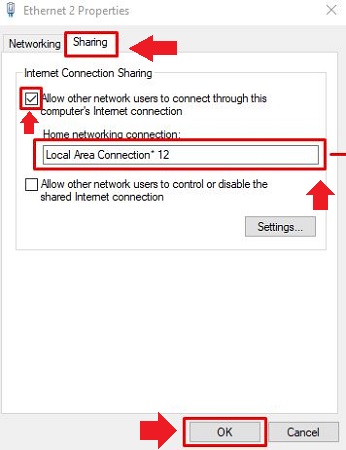
Step 7: Lastly, click on the OK button, and you’ll be done.
Set Up ExpressVPN For PS4 Via Ethernet Cable
Lastly, if you wish to try the third method, you’ll need a Windows computer with an ethernet port that’s connected to the internet via Wi-Fi.
Here’s how you can get started:
Step 1: Just as I showed you earlier, start by right-clicking the network icon. When you see a small popup tray, click on Open Network & Internet settings.
Step 2: After that, click on the Change adapter options to see a new pop-up window.
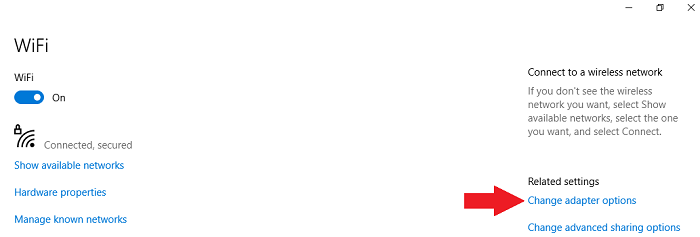
Step 3: Right-click on the network adapter of ExpressVPN and click on Properties.
Step 4: Click on the Sharing tab and click on the check box beside the option that says: Allow other network users to connect through this computer’s Internet connection. After that, select the name of the ethernet network that you wish to share. Once everything’s done, click on OK.
Step 5: Lastly, using an ethernet cable, connect your PS4 to your computer. Finally, you can launch the ExpressVPN app on your computer to start using unrestricted internet.
You can use this method to set up and use ExpressVPN with Smart TVs, Xbox, and other devices. As ExpressVPN is the best VPN for Xbox and Smart TVs both.
More VPN Guides by VPNranks
- Best VPN for FireStick: Seamless streaming on your Firestick with maximum security.
- Best VPN With Port Forwarding: Your Digital Fortress: Best VPN With Port Forwarding Pioneering Security
- Best VPN for MapleStory: Unlock MapleStory’s full potential with our top-rated VPN
FAQs
Now that you know what it takes to set up ExpressVPN on PS4, We’ll now check out some of the most frequently asked questions regarding ExpressVPN and PS4.
How do I install ExpressVPN on PS4?
Since you can’t directly install ExpressVPN on PS4, you will need to either set up ExpressVPN on a router, provide a virtual hotspot connection, or use an ethernet cable to provide a VPN connection to your PS4.
How can I use a free VPN on PS4 without a computer?
To use a VPN on your PS4 without your computer, you will need to set up ExpressVPN or any other VPN on your router. Once a VPN is configured onto your router, you can then connect your PS4 to the new Wi-Fi connection. Moreover, for more best free VPN for gaming options, you can check out our guide for free VPNs for PS4.
Better Alternate to ExpressVPN for PS4
ExpressVPN is without a doubt a super powerful and versatile VPN service. However, it is quite expensive compared to other VPNs. As an alternative, you can try Surfshark which costs only $2.49/mo - Save up to 77% with exclusive 2-year plan + 30-day money-back guarantee. But despite costing so less, Surfshark offers 3200+ servers, unlimited multi-logins, and a 30-day refund policy.
If you can afford the expensive monthly cost, ExpressVPN is perfect for you. But if you’re on a budget, Surfshark will fit your needs perfectly.
I hope you now know how to set up ExpressVPN on PS4. If you have any questions, leave a comment below.
Check out other VPNs for PS4 in our Best VPN for PS4 blog.

I just reset COD and seems to work now, thanks!
Thank you so much for your feedback.
I’ve done the above with hotpspot ps4 for call of duty for when I play with my american friends, but location in call of duty still says england even though I’ve changed to USA. Done all the steps. Don’t get it! ?
Hello, Please ensure that your Windows device’s IPv6 is completely disabled and then try again.