
With over 500 million registered players and 200 monthly regulars, Fortnite is one of the most popular games in 2024. Given Fornite’s popularity, IP bans, ISP throttling, and DDoS attacks often target its players.
But don’t worry; for reducing lag, lowering ping, bypassing geo-restrictions, and protecting your privacy, you need the best VPN for Fortnite.
The best VPN not only offers fast connection speeds, strong security features, and a wide network of servers but combines these elements to lower the ping and enhance your Fortnite sessions, allowing you to play with friends around the globe while safeguarding your data.
You might wonder, “What VPN works for Fortnite?” Well, that’s ExpressVPN. Renowned as the best premium and safe VPN option, It offers high-speed connections, robust security measures, and a vast network of Fortnite servers.
Keep on reading for a more detailed and personalized recommendation of the best VPN for Fortnite for you.
Quick Overview – Best VPN for Fortnite
Though there are several VPNs, just a few work effectively with Fortnite. Take a look at the best VPN for Fortnite:
Why Do You Need a VPN for Fortnite?
You need a VPN for Fortnite to enhance your gaming experience i.e., access the game from anywhere and protect yourself against DDoS attacks. Additionally, if you’re facing an IP ban or geographic restrictions, a VPN enables you to change your IP address to bypass these blocks.
The best VPN for Fortnite also reduces lag, improves ping, and combats ISP throttling, maintaining a consistent connection speed during gameplay. Connecting to a server close to Fortnite’s servers can achieve a lower ping, leading to a more responsive gaming experience.
Here’s a more detailed look into why you need a VPN for Fortnite:
- Bypass IP Bans: A VPN enables you to change your IP address, allowing you to continue playing Fortnite even after an IP ban, maintaining your gaming streak without interruption.
- Lower ping: Opt for a VPN with a broad server network, selecting a closer server to Fortnite’s location to reduce ping and enhance your gaming experience.
- Get rid of ISP throttling: By using the fastest VPN, you’ll experience seamless, lag-free Fortnite gaming as it counters your ISP’s habit of slowing down your connection during crucial moments.
- Protection from DDoS Attacks: Use a highly secure VPN to avoid potential DDoS attacks, safeguarding your system from malicious cyber threats initiated by envious players or cyber criminals.
- Access Fortnite from restricted regions. Fortnite has been subject to restrictions and even outright bans in places like schools, workplaces, and countries like Iraq and China. Players can use a VPN to bypass geographical restrictions or censorship that may prevent them from accessing Fortnite servers or content.
6 Best VPNs For Fortnite in 2024 – Detailed Analysis
A VPN must provide you with a sizable and geographically diverse fleet of servers, quick speeds, security, and more to be considered the best VPN for Fortnite.
With these factors in mind, I have put together a list of the top 6 Fortnite VPNs for 2024:
1. ExpressVPN – Best VPN for Fortnite
ExpressVPN stands out as the best VPN for Fortnite for its unparalleled speeds and robust security features. It ensures a seamless and secure gaming experience, with access to fast servers across the globe, making it the go-to VPN for competitive and casual play alike.
Boasting multiple servers in 105 countries, its extensive network provides remarkable worldwide reach. This broad distribution enabled seamless geo-restriction circumvention, allowing for effortless access to content across different areas.
I had an amazing buffer-free Fortnite gaming session using ExpressVPN’s New York server.
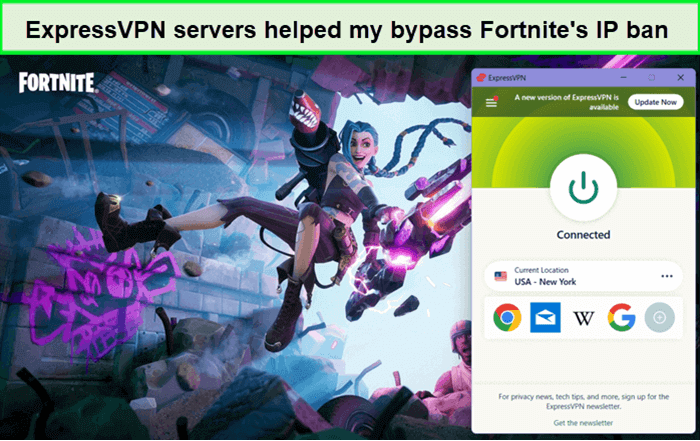
ExpressVPN servers provided excellent speeds for me to play Fortnite.
My ExpressVPN speed test revealed blazing-fast downloading speeds of 89.42 Mbps and uploading speeds of 84.64 Mbps on a 100 Mbps connection. The VPN has always provided a stable connection and has never been detected.
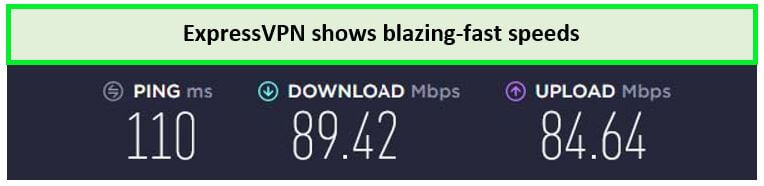
With this best Fortnite VPN, my connection had a speed drop of around 11%.
ExpressVPN offers 256-bit-AES encryption, which is the most advanced internet security. ExpressVPN’s kill switch disconnects you from the internet if your VPN connection drops unexpectedly. It protects the information from cyberattacks and provides incredible security by protecting you against DDOS attacks.
If you want to enhance further security, ExpressVPN’s Threat Manager prohibits all trackers and other potentially dangerous malware attacks from unwanted pop-up ads.
Thanks to the ExpressVPN free trial, you can test out this best VPN for Fortnite without having to worry about subscription costs. Users can also contact Live Chat Support, available 24/7 to resolve all sorts of queries.
Head to my ExpressVPN review for more details.
Exclusive Deal
VPNRanks readers can enjoy a special ExpressVPN offer! Get it for $6.67/mo - Save up to 49% with exclusive 1-year plans + 3 months free
Pros
- Military-grade encryption
- Threat Manager and Kill Switch feature
- Excellent at DDoS protection
- Lightway Protocol for lag-free gaming
- Can unlock several other games along with Fortnite
Cons
- Discount Campaigns end too soon
2. Surfshark – Budget-Friendly VPN for Fortnite
Surfshark is undoubtedly the most affordable VPN for Fortnite. It is a great VPN option for Fortnite players who want high speeds, strong security, and an excessive range of servers. And as one of the best VPNs for multiple devices, it also offers unlimited connections.
Surfshark’s cost-benefit does not come at the expense of performance. It offers 3200 servers in 100 countries, including 600+ servers in the US, which is a treat for Fortnite players in the country. I experienced a great performance by Surfshark while playing Fortnite:
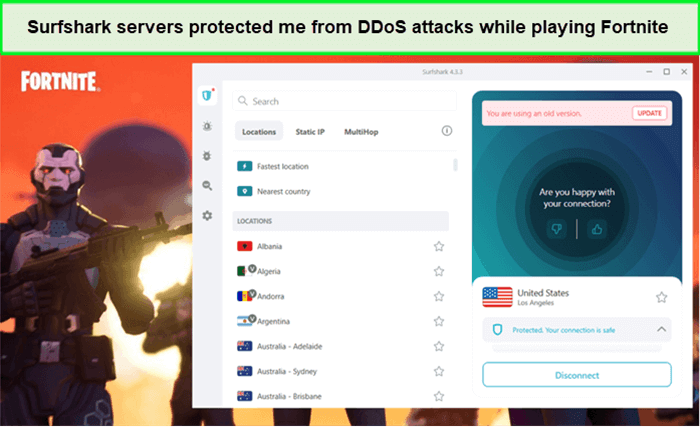
Unblocked Fortnite with Surfshark’s servers and play without any lagging or interruptions.
During my Surfshark speed test, it recorded a download speed of 85.42 Mbps and an upload speed of 48.64 Mbps on a 100 Mbps connection.
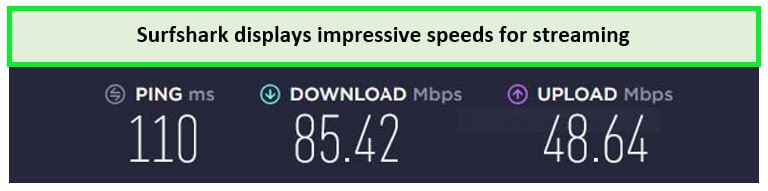
These speed results were enough to play without buffering.
Other features of this VPN include DNS/IP Leak Protection, MultiHop, and Camouflage Mode. Surfshark also offers WireGuard in a legitimate list of tunnels and uses AES-256 GCM encryption, a kill switch function, split tunneling, and more.
It also provides a Surfshark free trial for 7 days to mobile users (iOS and Android) with 24/7 live chat support.
Read my detailed Surfshark review for more details.
Exclusive Deal
VPNRanks readers can enjoy a special Surfshark offer! Grab it now at $2.49/mo - Save up to 77% with exclusive 2-year plan + 30-day money-back guarantee.
Pros
- Unlimited connections
- WireGuard protocol
- Adheres to no-log policy
- Suite of features
- AES-256 encryption
- Compatible with all operating systems
- Affordable VPN for Fortnite
Cons
- Does not have a free version
- Does not have split tunnelling on iOS
3. NordVPN– Secure VPN for Fortnite
NordVPN offers the most secure VPN servers for Fortnite gaming. Whether blasting aggressive opponents or just chilling online, its unmatched security and privacy features keep you secure and hidden. The NordVPN Fornite encrypted connections protect you from DDoS attacks by hackers and speed throttling by your ISPs.
Many players regard NordVPN as the best VPN server for Fortnite. It offers more than 6000 servers in 61 countries, including 1970+ servers spread across 15 US locations. The latency was also minimal in all these locations, and I never got detected while playing the games despite hours-long sessions.
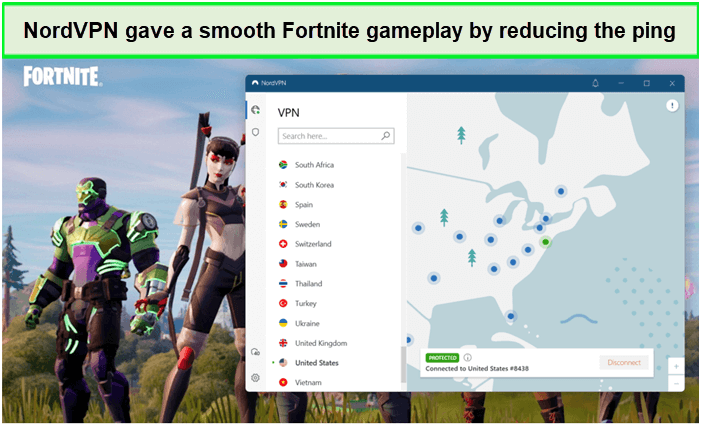
During my gameplay, there wasn’t a single instance when my internet connection dropped.
During the NordVPN speed test, it recorded a download speed of 86.18 Mbps and an upload speed of 42.13 Mbps on a 100 Mbps base connection, making it one of the best VPNs for Fortnite.
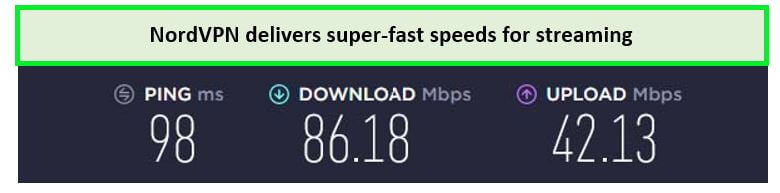
NordVPN’s Atlanta server delivered outstanding speeds while on Fortnite.
Besides that, NordVPN offers everything that one expects from a premium VPN. It includes advanced 256-bit encryption, 24/7 live support, obfuscation technology, DDoS Protection, and excellent privacy and security policies, making it the best secure VPN.
In terms of compatibility, you can use this secure VPN on Amazon FireStick, Kodi, macOS, iOS, Android, and Windows. Combined with its 6 simultaneous connections, NordVPN’s extensive compatibility ensures you can enjoy Fortnite seamlessly on any device you choose.
The VPN supports its service with a 30-day money-back guarantee and also offers 7-day NordVPN free trial, providing a risk-free opportunity to evaluate its performance with Fortnite.
To learn more details about the features, visit my NordVPN review.
Exclusive Deal
VPNRanks readers can enjoy a special NordVPN offer! Grab it now at $3.99/mo - Save up to 63% with exclusive 2-year plan + 3 months free.
Pros
- WireGuard (NordLynx) tunnelling protocol
- Largest server network across the globe
- Kill switch for foul-proof security and privacy
- Low pings
- Strong encryption
- Kill switch
- 24/7 customer support via live chat & email
Cons
- No router compatible app
- Does offer a free trial
4. CyberGhost – User-friendly VPN for Fortnite
CyberGhost is a user-friendly VPN for Fortnite with dedicated servers for gaming, streaming, and torrenting. It offers easy-to-use apps for all widely-used devices, including Windows, Mac, Android, and iOS. The interface that this provider offers is perfect for first-time VPN users.
This Romanian-based VPN provider has a massive network of 11651+ servers in 100 countries, including 1445 US servers in New York, Atlanta, Chicago, Dallas, and more. I used the New York server that offered blazing-fast speed and could easily play Fortnite without buffering or throttling issues.
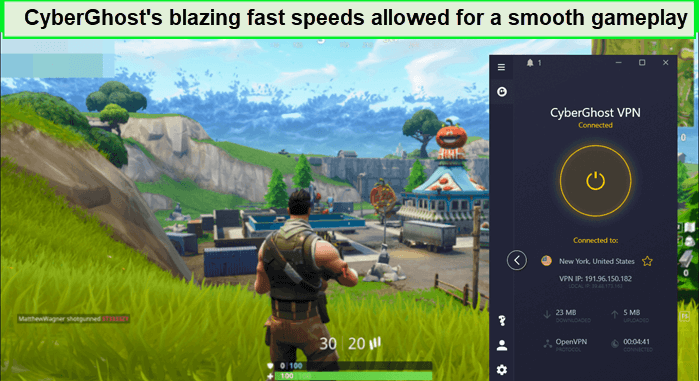
Unblocked Fortnite easily using CyberGhost gaming-optimized servers.
To evaluate the CyberGhost speed test, I connected CyberGhost to its US servers. I achieved a download speed of 75.12 Mbps and an upload speed of 39.48 Mbps, which was more than enough for a smooth gaming experience.
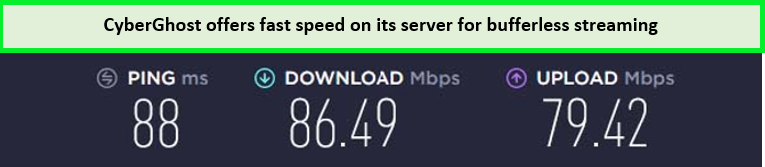
I received a fast streaming speed with CyberGhost on a 100 Mbps connection.
CyberGhost offers a Smart Rules feature that allows you to use the VPN on selected apps. Other amazing features of CyberGhost include a built-in two-mode kill switch, Split tunneling, and DNS IP leak protection. Moreover, you can use CyberGhost on 7 devices simultaneously.
This VPN shows its commitment to user satisfaction with a generous 45-day money-back guarantee and a CyberGhost free trial for all new users.
Please refer to my CyberGhost review to learn more about this provider.
Exclusive Deal
VPNRanks readers can enjoy a special CyberGhost offer! Grab it now at $2.03/mo - Save up to 84% with exclusive 2-year plans + 4 months free.
Pros
- Gaming optimized servers
- Huge server network
- Strong AES 256-bit encryption
- WireGuard tunneling protocol to increase gaming speed
- 7 simultaneous connections
- 45-day money-back guarantee
Cons
- WireGuard option does not work on macOS devices
- iOS apps have limited features
- Does not work in China
5. Private Internet Access– Reliable VPN for Fortnite
Private Internet Access is considered to be the reliable VPN for Fortnite for its advanced features and high customizability. As a reliable VPN, PIA offers stable speeds, low pings, and robust security to the game without any worries.
PIA has a mammoth network of 35000 servers in 84 countries, and the amazing thing is that this VPN offers servers in all 50 states of the US. I used the New York server to bypass an IP ban situation in Fortnite, and the VPN successfully unblocked the game.
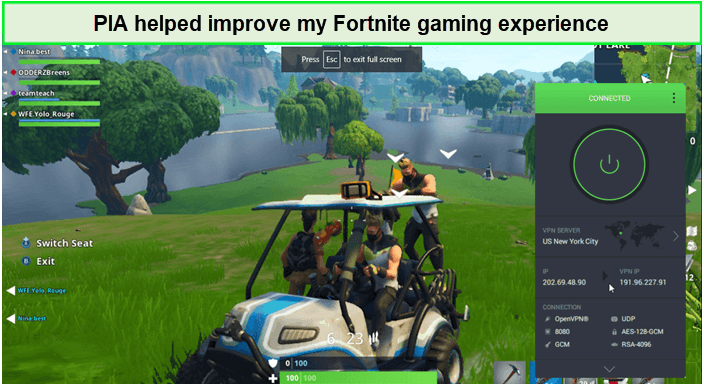
PIA’s servers were terrific as they lowered pings considerably, and I continued gaming seamlessly.
Upon conducting the PIA speed test, I achieved a download speed of 65.78 Mbps and an upload speed of 57.16 Mbps on a 100 Mbps connection.
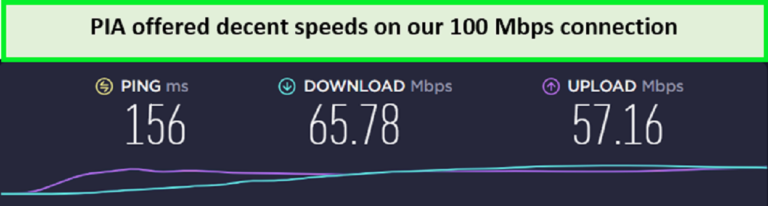
PIA servers provided adequate speeds for gaming.
The VPN offers a 256-bit encryption mechanism with advanced protocols like OpenVPN and IKEv2. It also offers a strict no-logs policy that ensures your identity is never compromised. And PIA’s P2P servers can carry out your torrenting activities without fear of your original identity getting leaked.
With a single PIA account, you can secure unlimited devices simultaneously, and the provider offers easy-to-use apps for all widely-used devices, including Windows, Mac, Android, and iOS.
PIA is a decent VPN service, and the pricing matches the value. It also offers a 30-day money-back guarantee for most plans. There’s also a PIA free trial on mobile if you want to check out this service before getting a subscription.
Learn more about this provider in my detailed Private Internet Access review.
Exclusive Deal
VPNRanks readers can enjoy an exclusive PIA deal! $2.11/mo
Pros
- Offers ideal speed for gaming
- Reduces ping
- A built-in feature called MACE blocks ads
- 10 simultaneous connections
- Supports torrenting traffic
Cons
- Registered in the US (Member of the 14 Eyes)
6. IPVanish – Fast VPN for Fortnite
IPVanish is the fastest VPN service for Fortnite gaming, boasting an extensive server network with servers spread across various countries. This vast server footprint contributes to a smooth gaming experience by reducing ping and optimizing gameplay.
Consisting of 2200+ servers in 75 countries, with 1,106 servers in the USA, IPVanish ensures a high-speed, low-ping, uninterrupted Fortnite gaming session. It is also considered one of the best VPN with port forwarding offering users enhanced control over their network connections and optimized performance for gaming activities
Notably, the IPVanish servers list offers a range of game-optimized servers, with my recommended server being Los Angeles for uninterrupted gameplay.
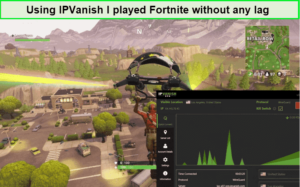
I could easily play Fortnite games with friends via IPVanish servers.
During my IPVanish speed test result, I recorded a good download speed of 70.05 Mbps and an upload speed of 32.15 Mbps on a 100 Mbps connection. With such speeds, you can expect to enjoy your Fortnite gameplay with minimal lags.
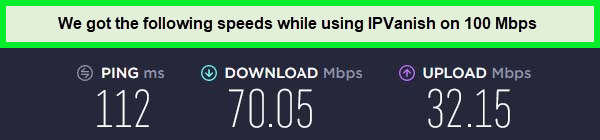
The speeds were fast enough to unblock any streaming platform.
Security is a top priority for IPVanish, evidenced by their advanced features like Automated Split Tunneling, Kill Switch, Ad-blocker, and robust AES 256-bit Encryption. These features collectively create a secure and seamless browsing experience, ensuring user privacy and peace of mind.
The VPN’s compatibility is extensive, catering to a diverse user base with support for popular operating systems like Windows, macOS, Android, and iOS. While setting up IPVanish on Firestick and other devices such as Kodi and Roku may require manual configuration, the VPN’s versatility and user-friendly don’t cause issues like IPVanish not working on your device.
The IPVanish free trial coupled with a 30-day money-back guarantee gives users the flexibility to cancel IPVanish subscriptions anytime. The availability of 24/7 customer support enhances the overall user experience by providing technical assistance when needed.
For a more detailed analysis of this VPN’s features, consider reading an in-depth IPVanish review.
Exclusive Deal
VPNRanks readers can enjoy an exclusive IPVanish deal! $2.99/mo - Get 3 Months Extra + Save 77% on 2-year plan
Pros
- Globally optimized servers for low-latency Fortnite gaming.
- Maintains a strict no-logs policy
- Offers an automatic kill switch and WiFi protection
- Low-latency servers for smooth and responsive gameplay
- Unlimited multi login providing flexibility for your gaming needs
- 24/7 live chat is available for technical assistance
Cons
- They do not accept Bitcoin as a payment method.
- Can not unblock all streaming platforms.
- Claims 24/7 customer support, but tickets can take one or two days.
How I Choose The Best VPN for Fortnite?
I made sure that for a VPN to qualify to be the best VPN for Fortnite, it has to follow these criteria:
- Severs and Locations: A VPN must have various servers in different countries to provide a wonderful and buffer-free Fortnite experience. By doing this, you can select a server closer to Fortnite and avoid getting stuck on a crowded server.
- Average Gaming Speed: Optimal VPNs, like the ones I’ve chosen, prioritize minimal latency and high speeds, ensuring your gaming experience remains unaffected by bandwidth throttling. These are some of the fastest VPNs you can sign up for.
- Security and Privacy: Trustworthy VPNs adhere to stringent privacy standards, refraining from tracking user activity or sharing data with third parties, safeguarding credentials, and online behavior.
- Additional Gaming Features: Enhance your Fortnite experience with added cybersecurity measures and features such as ad blockers, making gaming, browsing, and streaming more enjoyable.
- Price: I steer clear of overpriced services, prioritizing the quality-to-price ratio. My recommended VPNs not only offer affordability but also provide a one-month money-back guarantee for added assurance.
How to Play Fortnite or Remove an IP Ban with a VPN
Here is a quick guide on how to circumvent the Fortnite IP ban using a VPN:
- Choose a reliable Fortnite VPN like ExpressVPN. The setup is swift, requiring just a minute of your time.
- Install the VPN on your device or configure it on your router, ensuring a seamless connection.
- Connect to a server in the US.
- Open the Fortnite game on your device, now equipped with the new IP address, and immerse yourself in the gaming experience.
- With the VPN-enabled IP address, you’re ready to rejoin the Battle Bus and continue your Fortnite journey.
Where Are Fortnite Servers Located?
Fortnite’s server locations are important in reducing your pings and overall game experience. Here is the Fortnite server location:
- Ohio, USA
- Virginia, USA
- California, USA
- Oregon, USA
- London, UK
- Ireland
- Canada
- Australia
- Tokyo, Japan
- South Korea
- Mumbai, India
- Singapore
- Frankfurt, Germany
- Paris, France
- Sao Paulo, Brazil
How to Choose the Best Fortnite Server Location?
The key to achieving the lowest ping, synonymous with the best Fortnite server locations, necessitates proximity to the game servers or a wired connection. However, these solutions can be inconvenient.
Thankfully, there’s a seamless alternative. Obtain a premier VPN like ExpressVPN, boasting an expansive server network. Launch the VPN app, opt for the fastest protocol (such as Lightway Protocol advanced version of WireGuard), and select a server close to or within Fortnite’s server location.
Once connected, launch Fortnite on your device of choice and relish an optimal gaming experience.
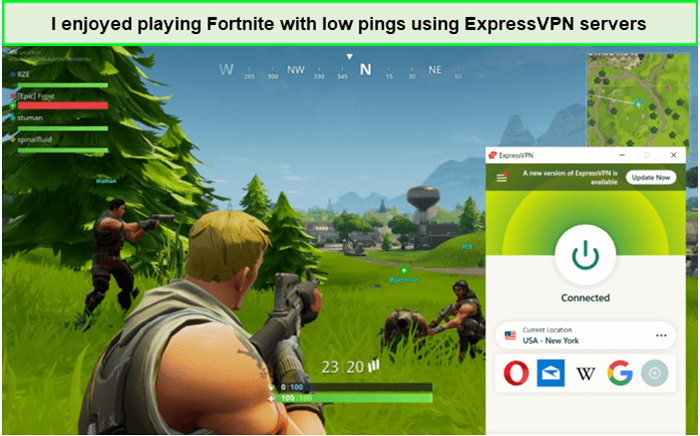
Pro Tip: Opting for a USA-based server often yields top-notch connection speeds, given the abundance of servers in the country, minimizing the chances of encountering crowded servers.
Can I Use a Free VPN for Fortnite?
No, a free VPN is not recommended due to its inadequate privacy and security features. These services often underperform, potentially compromise your data, and leave your network susceptible to threats.
For budget-conscious users seeking a secure option, consider a reliable freemium VPN like Atlas VPN, one of the best free VPNs for Fortnite for safe gaming. However, remember that most of AtlasVPN’s features and servers are blocked behind a paywall – so you’ll only be getting the bare minimum features, which will probably cause increased ping and lag.
Alternatively, opt for a premium VPN such as ExpressVPN, leveraging their 30-day money-back guarantee to ensure a top-tier Fortnite experience, as only premium VPNs deliver optimal performance and security.
VPN Not Working With Fortnite?
VPN can stop functioning with Fortnite because of several factors, but there are ways to solve each one of these problems. Let’s take a look at some of the quick fixes:
- Change Your IP Address: Sometimes, an IP address can get banned from the game, but this can be solved by switching to another IP address. You just have to switch to a different server, and the VPN will assign a new IP address to you. Try to choose a server close to your location to maintain minimal latency in the connection.
- Update Your VPN Client: Use the most recent version of the VPN, which includes all the new updates that can improve the overall experience. Updates equip the VPN with new technologies that make them harder to trace and detect.
- Check Whether Fortnite’s Anti-Cheat System Is Running: EasyAnitCheat and BattleEye are the two systems Fortnite uses to detect all sorts of cheating. The game does not launch if these systems are not properly installed. It could be because of an error during the update or installation. You can check whether these systems are installed by looking in the binary folder of the game location for files that are named:
- FortniteClient-Win64-Shipping
- FortniteClient-Win64-Shipping_EAC
- FortniteClient-Win64-Shipping_BE
- FortniteLauncher
- If these files are installed, look for whether the systems are running from the Windows Task Manager and Activity Monitor of the Mac after launching Fortnite. Reinstall the game if these systems are not running.
- Uninstall and Reinstall the VPN: Sometimes, issues with your VPN software can cause connection problems. If you’re still having trouble after trying the other solutions, uninstalling and reinstalling your VPN software might help.
If you’re unsure how to uninstall and reinstall your VPN software, I recommend contacting your VPN’s customer support for assistance.
VPN Guides for Other Games by VPNRanks
FAQs – Best VPN for Fortnite
Which VPN is best for Fortnite?
ExpressVPN is the best VPN for Fortnite and is highly recommended for optimal gaming experience. Its lightning-fast speeds, extensive server network, and robust security features make it an ideal choice to enhance your gaming experience.
Can a VPN get you banned on Fortnite?
Yes, using a VPN in Fortnite can lead to bans or suspensions, as it might trigger anti-cheating mechanisms, even though Epic Games’ policies don’t explicitly label VPN use as a bannable offense. The risk of adverse actions due to potential interference with anti-cheating systems remains a concern.
Is it okay to use a VPN for Fortnite?
Yes, using a VPN for Fortnite is completely fine, but Epic Games’ Terms of Service explicitly state that VPN usage for playing violates their rules. While not illegal, it can result in consequences ranging from warnings to permanent bans due to various reasons that Fortnite prohibits VPN usage.
How do I bypass the Fortnite IP ban?
To bypass a Fortnite IP ban, alter your IP address using a reputable VPN. Opt for a top-tier VPN like ExpressVPN, renowned for its gaming-friendly attributes, ensuring uninterrupted Fortnite gameplay without any disruptions.
Are VPNs bannable on Fortnite?
Yes, VPNs can be banned on Fortnite if you get caught cheating during gaming while using a VPN service.
Why do I keep getting kicked from Fortnite for using a VPN?
Epic Games can block access to their Fortnite servers using your IP address, preventing you from playing the game. They can restrict your access to the Fortnite activity if they determine that you are not playing fairly or if you are connecting to their servers using an identified VPN IP address.
Can Fortnite detect VPN?
No, Fortnite can’t detect a VPN if you’re connected to a premium VPN. A VPN gives you random but unique IP addresses. Fortnite can never detect your IP address, even if Fortnite bans you. So, if you’re banned, this is your chance to get back to your gaming form by connecting to a VPN such as ExpressVPN.
Conclusion
So, that was all for my best VPN for Fortnite. Playing Fortnite with a VPN allows you to log in from a location with lower pings and latency. VPN allows you to access the gaming site from restricted places like schools or workplaces.
Essentially, it increases the chances of winning the game and improves the overall stats. But users have varying preferences, which means no single VPN would suit them all. However, if you want the best gaming VPN with an amazing service, I highly recommend ExpressVPN because of its large fleet of servers and incredible speeds, which would make it a good fit for most users.
Have fun using the best VPN for Fortnite!