
Are you seeking the best VPN to optimize your World of Tanks experience? In the fast-paced realm of online gaming, where milliseconds can sway the tide of battle, selecting the best VPN for World of Tanks is important. Lag and connectivity issues can disrupt your gameplay, but I’ve got you covered.
In the intense multiplayer battles of World of Tanks, a seamless connection is vital to maintaining your edge on the battlefield. Utilizing a top-tier VPN can be invaluable for players seeking to optimize their gaming experience. By using a VPN in the game, you can effectively reduce lagging and gain access to servers from various regions, enhancing your strategic gameplay and ensuring smoother tank battles.
ExpressVPN is the best gaming VPN for World of Tanks, boasting a vast global server network. Renowned for its reliability, it effectively addresses issues like high ping and persistent game lag, ensuring uninterrupted and seamless gameplay.
Quick Overview: Best VPN for World of Tanks
Are you unsure of the best VPN for World of Tanks? Thanks to the numerous servers these VPNs provide, you may stream your preferred games to the devices of your choice:
Why Do You Need a VPN for World of Tanks?
A VPN can quickly stop your network provider from slowing down your internet and make World of Warcraft ping times lower by connecting to close servers. It also makes sure your internet traffic flows better for smoother gaming.
Using a VPN can promptly prevent any bandwidth throttling imposed by your network provider. Additionally, connecting to a nearby server can reduce high ping times in World of Tanks (WoT) and optimize traffic routing for improved performance.
Finally, the best VPN for World of Tanks can defend against DDoS attacks, a frequent danger in online gaming. When your real IP address is hidden, hostile actors find it considerably harder to target you with such assaults. A VPN World of Tanks provides improved privacy, less lag, and higher security, making it a necessary tool for ardent players.
3 Best VPNs for World of Tanks [Detailed Analysis 2024]
I extensively reviewed 26 VPN services to determine the best VPN for World of Tanks. Following rigorous evaluations that closely assessed connection speeds, server dependability, and privacy safeguarding, three providers emerged as clear frontrunners.
These top picks stand out for their expansive server networks, competitive pricing, robust security measures, and fast connection speeds, essential for the best World of Tanks gaming experience.
1. ExpressVPN – Best VPN for World of Tanks

ExpressVPN is the best VPN for World of Tanks. It has extensive servers across 105+ countries, including 25+ server locations in the US, and ensures reliable and lightning-fast connections.
This VPN for World of Tanks offers various features, including a Kill Switch, split-tunneling, and server obfuscation, enhancing gaming privacy and security. Thanks to its robust AES 256-bit encryption, it further guarantees uninterrupted constant bandwidth.
I had the best time playing World of Tanks using ExpressVPN’s New Jersey – 1 server:
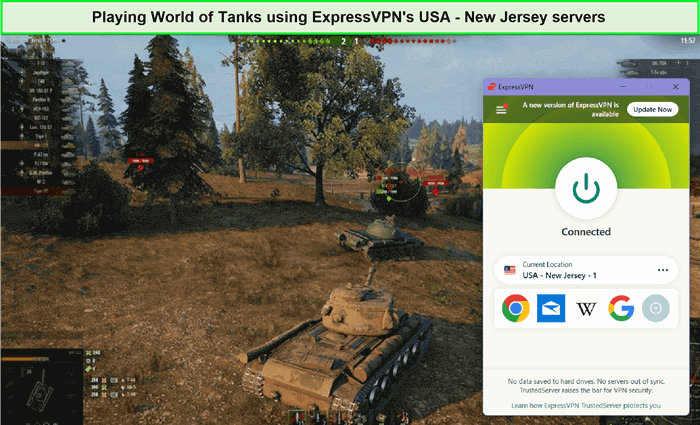
I enjoyed using VPN to play WoT without any delays.
ExpressVPN demonstrates impressive download and upload speeds, as evidenced by the ExpressVPN speed test. I received a download speed of 89.42 Mbps and an upload speed of 84.64 Mbps on a 100 Mbps connection, perfect for lag-free tank warfare.
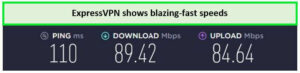
I received high speeds while enjoying ExpressVPN WoT together.
ExpressVPN protects your privacy by not keeping your internet active and enforcing a strict no-logs policy. It also has a great option for getting around ISP throttling and is a compatible WoT VPN for many different platforms like Windows, Apple, Fire Stick, Kodi, and iOS.
In addition, it offers a 30-day money-back guarantee, so you have nothing to lose. Its 24/7 live chat support will assist you if you encounter any issues.
For more information, check the ExpressVPN review in detail.
Exclusive Deal
VPNRanks readers can enjoy exclusive VPN deals! $6.67/mo - Save up to 49% with exclusive 1-year plans + 3 months free
Pros
- Unblocks World of Tanks effortlessly
- Ensures top-notch security and privacy
- Bypasses ISP throttling for seamless gaming
- 24/7 live chat customer support
Cons
- Doesn’t offer a free plan
2. Surfshark – Budget-friendly VPN for World of Tanks
Surfshark is one of the budget-friendly VPNs for World of Tanks. It boasts a vast network of 3200+ servers spread across 100 countries, ensuring global coverage for a lag-free gaming experience.
Playing World of Tanks using Surfshark’s Dallas server was an amazing experience using this VPN:
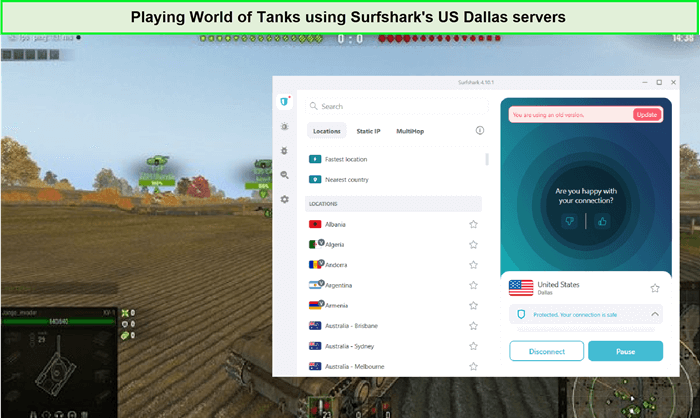
It was pretty smooth to play World of Tanks with Surfshark.
Surfshark offers unlimited bandwidth, allowing uninterrupted streaming for extended gaming sessions. The best part? You can connect infinite devices simultaneously, ensuring all your gaming gear is protected.
What sets Surfshark apart is its impressive download speed of 81.32 and upload speed of 76.12 Mbps on a 100 Mbps connection. Thus, the Surfshark speed test offers amazing results.
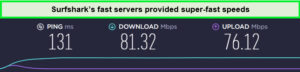
This best VPN for lower WoT ping offers outstanding download and upload speeds.
Surfshark offers advanced customization with Whitelister and split tunneling, enhancing your VPN experience. Utilizing robust encryption technologies like AES 256-bit, IKEv2, WireGuard, Shadowsocks, and OpenVPN, Surfshark ensures privacy and security for your online activities.
For more details, check out the detailed Surfshark review.
Exclusive Deal
VPNRanks readers can enjoy exclusive VPN deals! $2.49/mo - Save up to 77% with exclusive 2-year plan + 30-day money-back guarantee
Pros
- The most affordable VPN World of Tanks
- Unblocks World of Tanks effortlessly
- Unlimited simultaneous connections
- Strict no-logs policy
Cons
- Some servers may have occasional slowdowns
3. NordVPN – Secure VPN for World of Tanks
NordVPN is a secure and reliable VPN for World of Tanks. It provides an extensive server network across 6000+ servers across 61 countries, ensuring superior accessibility and reliability for users worldwide.
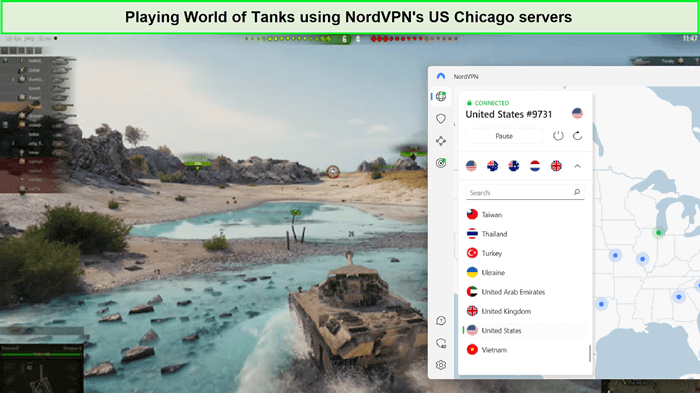
There was no lag or buffering issue while playing World of Tanks using NordPVN.
Additionally, NordVPN utilizes the cutting-edge NordLynx protocol, offering breakneck connection speeds and robust encryption to secure your internet activities. The NordVPN speed test delivered a download speed of 83.82 Mbps and an upload speed of 44.64 Mbps.
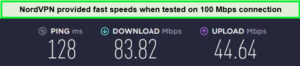
NordVPN offers the best speed test on its servers.
This best WoT VPN offers high security when gaming online. Features like Double VPN and Onion over VPN shield your data from prying eyes. You can enjoy limitless streaming bandwidth, allowing for uninterrupted gaming sessions. To enhance protection for your online activities and data, it uses 256-bit AES military-grade encryption.
NordVPN surpasses expectations by offering support for up to 6 simultaneous connections, allowing all gaming devices to operate securely under one protective shield. It’s a versatile VPN for World of Tanks, compatible with various platforms, including iOS, Android, Xbox, Smart TVs, Kodi, Fire Stick, Mac, PS4, and Roku.
Try NordVPN now and secure your tank battles with the largest and most secure VPN on the market! With one click, you can read a detailed NordVPN review.
Exclusive Deal
VPNRanks readers can enjoy exclusive VPN deals! $3.99/mo - Save up to 63% with exclusive 2-year plan + 3 months free
Pros
- Extensive server network for optimal speed
- Robust security features
- 6 simultaneous connections
- Affordable pricing plans
Cons
- Occasional server congestion during peak hours
Testing Methodology: How to Choose the Best VPN for World of Tanks
Using a comprehensive testing methodology, I meticulously selected these VPNs for World of Tanks. My criteria include:
- Server Network: My chosen VPNs offer vast server networks spanning numerous countries to provide World of Tanks players with various server options. This extensive network ensures low latency and quick server access, enhancing gaming performance.
- Speed & Connectivity: Speed and connectivity are important for gamers. The VPNs were tested extensively for download and upload speeds, ensuring they offer fast and stable connections, minimizing lag and allowing for smooth World of Tanks gameplay.
- Security Features & Compatibility: Security is my priority, so the best VPN World of Tanks includes robust features like encryption protocols and compatibility with gaming devices. This ensures data remains private and protected, even during intense tank battles.
- Bypassing Abilities: My selected WoT VPNs excel at bypassing geo-restrictions and ISP throttling. They maintain stable connections, provide uninterrupted gameplay, and allow players to access World of Tanks servers worldwide. I suggest using ExpressVPN, the best VPN for World of Tanks.
- Pricing: I also considered affordability. The VPNs I recommend offer competitive pricing plans and discounts, ensuring players get exceptional value for their money while enjoying top-tier gaming experiences.
How to Use World of Tanks VPN to Reduce Lag [Quick & Easy Steps]
Experience a seamless journey with World of Tanks VPN by following these simple, quick, and easy steps to reduce WOT Lag:
- Get an ultra-fast WoT VPN boasting numerous global servers, with ExpressVPN as my top pick.
- Install the VPN on your device and connect to the nearest server for optimal performance.
- Experience seamless tank warfare devoid of lags or interruptions!
Quick Comparision: Best World of Tanks VPNs
My thorough research has culminated in selecting the best VPN for World of Tanks. Each was chosen for its exceptional performance and attributes designed to enhance gaming sessions. As identified, World of Tanks’s leading VPNs are ExpressVPN, Surfshark, and NordVPN.
| VPN services |  |
 |
 |
| Avg Speed (Mbps) | 89+ Mbps | 82+ Mbps | 84+ Mbps |
| Simultaneous Connections | 8 | Unlimited | 6 |
| Encryption | AES 256-bit | AES 256-bit | AES 256-bit |
| Money-back guarantee | 30 days | 30 days | 30 days |
| Devices Supported | Windows, iOS, Android, Linux, Smart TVs, MacOS, Routers | Windows, Android, Routers Linux, Smart TVs, MacOS, iOS, | Windows, Linux, Smart TVs, Android, Routers MacOS, iOS, |
| Access to Streaming Platform | HBO Max, Netflix, BBC iPlayer, Hulu, and Disney+ | Apple TV+, Canal+, YouTube, Sling TV, Netflix US, and Hulu | Canal+, HBO Max, YouTube TV, Amazon Prime Video, and Netflix |
They excel in providing rapid speeds, stable connections, low in-game ping, and robust security measures. Whatever your specific requirements, preferences, or budget constraints, any WoT VPN could be suitable. Furthermore, they all come with a 30-day money-back guarantee, allowing you to try each and decide which best suits your needs before committing.
How to Fix World of Tanks Lag Spike Issues?
Here are the tips to fix WoT lag spikes with a VPN:
- Limit Background Network Activities: Halting downloads, stopping streaming services, and closing non-essential apps can free up bandwidth, potentially reducing lag spikes in World of Tanks.
- Prioritize World of Tanks in System Settings: Increase the game’s priority via Task Manager to ensure it has sufficient system resources. Alternatively, designate World of Tanks for High Performance in your system’s Graphics settings.
- Optimize PC for Gaming: Activate Game Mode in the Control Panel to streamline system resources for gaming. Adjust your system for optimal performance and ensure the power setting is High Performance to combat lag.
- Select the Best Server: Choosing a server closer to your location can decrease ping times and enhance your gaming experience by ensuring a faster and more stable connection.
- Adjust In-Game Settings for Better Performance: Lowering graphical settings, turning off certain visual effects, and optimizing settings such as shadow quality and water effects can lead to smoother gameplay.
- Consider Reinstalling World of Tanks: A fresh install might resolve issues caused by corrupted game files. This step is recommended if other solutions have not effectively reduced lag.
Solutions for Addressing WoT Lag Issues
To improve gaming performance, update your OS, drivers, and the game, switch to Ethernet from Wi-Fi, close background processes, and lower graphics settings.
If connecting to a VPN doesn’t resolve lag spikes in World of Tanks (WoT), other strategies are worth considering. This is particularly true if your gaming setup isn’t optimal. Below, I explore additional methods to mitigate lag and enhance your WoT experience.
Enhancing World of Tanks: Blitz Performance
For those playing World of Tanks: Blitz on mobile devices, lag can still be a nuisance. Here are tips to improve your gaming experience:
- Adjust Graphics Settings: Lowering the graphics settings or manually tweaking them can improve game performance on less powerful devices.
- Close Other Apps: Ensure no other apps run in the background to free up resources for WoT: Blitz.
- Turn Off Battery Saver Mode: This mode can limit the resources available to the game, so disabling it can improve performance.
- Clear App Cache: Removing unnecessary files from the app cache can boost performance.
- Reinstall the Game: Installing WoT Blitz on internal storage rather than an SD card and ensuring updates are installed in the same location can improve performance.
- Factory Reset: Resetting your device to factory settings can help as a last resort, but remember to back up your data first.
- Use a VPN: A VPN can help bypass your network provider’s bandwidth throttling and might improve ping times and overall game performance.
More Guides By VPNRanks:
- Best VPN for Lost Ark: Boost Lost Ark gaming with low latency, secure VPN for seamless play.
- Best VPN for Valorant: Achieve optimal performance and security while playing Valorant with the top VPN solution tailored for gamers.
- Best VPN for League of Legends: Enjoy League of Legends without lag.
- Best VPN for Gaming: Enjoy an uninterrupted gaming experience with the best VPN for gaming enthusiasts.
- Best VPN for World of Warcraft: Conquer Azeroth without lag with the ultimate VPN for World of Warcraft.
- Best VPN for Free Fire: Dominate the battlegrounds of Free Fire with top-tier VPN protection.
FAQs – Best VPN for World of Tanks
Can I use a VPN on World of Tanks?
Yes, you are permitted and even encouraged to use a VPN while playing World of Tanks. Using a VPN allows you to conceal your IP address and potentially enhance your ping during play.
Does World of Tanks work with VPN?
Yes, World of Tanks works with a VPN. Using a VPN can benefit World of Tanks players by reducing lag, enhancing Security, and allowing you to access servers from different regions for a more versatile gaming experience. However, choosing a reliable and fast VPN is essential to ensure seamless gameplay.
What is the best VPN to use for World of Tanks?
ExpressVPN is a top-tier gaming VPN boasting an extensive global server network. Renowned for its reliability, it effectively addresses issues like high ping and persistent lagging in World of Tanks, ensuring a stress-free and seamless gaming experience. Moreover, it offers affordability, providing exceptional service without breaking the bank.
Can I use a free VPN with World of Tanks?
While you can technically use a free VPN with World of Tanks, it’s not recommended. Free VPNs often have limitations like slower speeds, data caps, and security concerns. Investing in a reliable paid VPN for a smoother gaming experience is better, and for that, I recommend ExpressVPN.
Which VPN has the lowest ping while playing World of Tanks?
ExpressVPN effortlessly decreases ping time, optimizes traffic routing, and bypasses bandwidth throttling, enabling you to relish the smoothest World of Tanks experience.
What VPN do most gamers use?
ExpressVPN stands out as the premier choice for gamers, recognized for its remarkable speed, robust privacy safeguards, and extensive international server network.
What is the best cheap VPN for gaming?
The best budget-friendly VPNs for gaming typically include options like ExpressVPN, Surfshark, and NordVPN. These providers offer affordable plans while delivering reliable performance, fast speeds, and strong security features suitable for gaming purposes.
Why is my ping so high on World of Tanks?
Elevated ping times in World of Tanks are often attributed to congested routers, switches, or gateways that mediate between your local network and the Wargaming server cluster you’re connecting to.
Which country tanks are best in World of Tanks?
In World of Tanks, Soviet tanks are highly esteemed, especially their heavy tanks, which are known for their formidable armor and potent firepower. Additionally, Soviet vehicles are praised for their user-friendliness, making them an ideal choice for newcomers.
Does your geographic location affect your World of Tanks gameplay when using a VPN?
Yes, your geographic location can impact your World of Tanks gameplay when using a VPN. VPNs can allow you to connect to servers in different locations, potentially affecting factors such as latency, server performance, and matchmaking.
However, using a premium VPN like ExpressVPN strategically improves your gaming experience by reducing ping or bypassing regional restrictions.
Best VPN for Gaming recommended in 2024?
As of 2024, some of the best VPNs recommended for gaming include ExpressVPN, NordVPN, and Surfshark. These providers offer fast speeds, reliable connections, and robust security features, enhancing the gaming experience by reducing ping times and protecting against DDoS attacks.
What is the best country to use in World of Tanks?
Germany is the best country to use in World of Tanks. The German tech tree prioritizes gun accuracy above all else, making tank destroyers a favorite among many players. Nonetheless, don’t be deceived by this focus, as there are numerous remarkable features to explore within other vehicle classes.
Will a VPN increase WoT ping?
A VPN can increase or decrease your World of Tanks (WoT) ping, depending on various factors. A well-optimized VPN with servers close to your location can reduce ping by providing a more direct route. However, an overcrowded or poorly configured VPN server may increase ping. Choosing the right VPN server is key to minimizing ping in WoT.
What are the advantages and disadvantages of using a VPN while playing World of Tanks?
Using a VPN while playing World of Tanks has more benefits than drawbacks.
Advantages:
- Reduced Ping: VPNs can help decrease ping by connecting you to servers closer to the game server’s location.
- Bypassing Geo-Restrictions: VPNs allow you to access World of Tanks servers from different regions, potentially unlocking exclusive content or events.
- Enhanced Security: VPNs encrypt your internet traffic, protecting your personal information from threats like hacking or DDoS attacks.
Disadvantages:
- Slower Connection Speeds: While VPNs can sometimes improve connection speeds, they may also introduce latency due to encryption and routing through VPN servers.
Overall, a VPN for World of Tanks can offer benefits such as improved ping and enhanced security.
How can I enhance my ping performance in World of Tanks?
To address high ping in WoT, consider these steps: Ensure your operating system, drivers, and the game are updated. Switch from Wi-Fi to Ethernet for a more stable connection. Close any unnecessary background processes and reduce graphics settings in the game.
What might be preventing me from connecting to a server in World of Tanks?
The game may be undergoing technical maintenance, which you can verify in the ‘Announcements’ section at the top left corner of the page. Alternatively, try disabling your Firewall, as it may be blocking the game. Another option is to connect to World of Tanks using a gaming VPN, such as ExpressVPN.
Final Thoughts!
A VPN can be your secret weapon when dominating the battlefield in World of Tanks. My extensive testing and recommendations have highlighted top-tier VPNs. Thus, ExpressVPN is the best VPN for World of Tanks, each offering unique strengths to enhance your gaming experience.
This VPN provides fast and stable connections, robust security features of WoT, and the ability to bypass geo-restrictions and ISP throttling. With its pricing plans and money-back guarantees, you can game with confidence.
So, elevate your tank warfare today and choose the best VPN that suits your needs. Your victories await!