
If your VPN not working in Cameroon, you have come to the right place. As we know, VPNs are essential tools, providing users with enhanced security, privacy, and unrestricted access to online content.
However, the experience of using a VPN can sometimes be hindered by a variety of factors, ranging from technical glitches to governmental regulations. This is particularly evident in Cameroon, a country that has faced challenges with VPN functionality.
If your VPN is not working with Cameroon, several factors may contribute to this issue. Network restrictions imposed by the government, Internet Service Providers (ISPs) throttling VPN traffic, technical glitches, outdated VPN software, and inconsistencies in the VPN’s server connections could be some of the reasons.
In this blog, we delve into the complexities surrounding the issue of VPNs not working in Cameroon. We explore the possible reasons behind this problem and suggest what you can do to fix it while using the best VPN for Cameroon.
4 Quick Ways to Fix VPN Not Working in Cameroon
Is your VPN not working in Cameroon? Don’t worry, here are four quick solutions to get you back on track:
- Check Your Settings: Double-check your VPN settings to ensure they’re configured correctly for use in Cameroon. Make sure you’ve selected the right server location and protocol for optimal performance.
- Update Your VPN Software: Outdated VPN software can cause connectivity issues. Check for any available updates and install the latest version to ensure compatibility with Cameroon’s network environment.
- Switch Server Locations: Sometimes, specific server locations might face connectivity problems. Try switching to a different server location within your VPN app to see if that resolves the issue.
- Change your VPN Provider: If your VPN is still not working smoothly in Cameroon, considering a change of VPN provider could be a viable solution. Some VPN services might have better compatibility and stronger performance in the region. Switching to a different provider could potentially resolve the connectivity issues you’re facing and provide you with a more reliable and effective VPN experience in Cameroon.
By following these simple steps, you’ll be well on your way to enjoying a reliable and secure VPN experience in Cameroon.
Why is my VPN not working in Cameroon? Top of Form
There could be several potential reasons that may prevent your VPN from working effectively in Cameroon. Firstly, the Cameroonian government might impose network restrictions on VPN usage as part of its efforts to regulate internet access and control content dissemination. Additionally, Internet Service Providers (ISPs) could intentionally throttle VPN traffic, leading to slow or disrupted connections. Technical glitches within the VPN software itself can also hinder its performance, necessitating troubleshooting or updates. Outdated software might not be compatible with recent network changes in Cameroon, resulting in connectivity issues.
“VPN Connection Failed.”
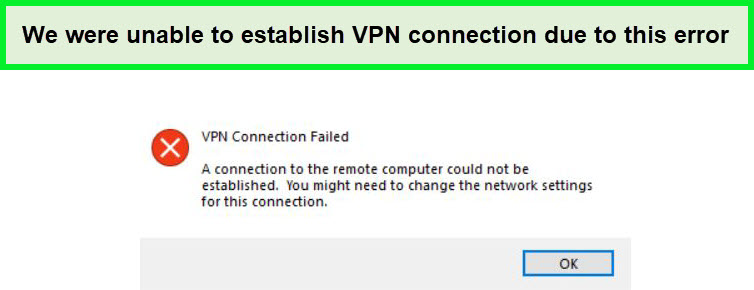
you could not establish a VPN connection in Cameroon due to this error.
Another factor to consider is that not all VPN providers are equal in their capabilities. Some VPN services might not effectively function in regions like Cameroon, which can impact the overall user experience. Additionally, if your VPN’s IP addresses have been blacklisted or blocked by specific websites or services, accessing them might prove challenging.
To address these issues, it’s advisable to start with troubleshooting steps, such as updating your VPN software or switching server locations. If the problems persist, seeking assistance from your VPN provider’s customer support can provide insights and potential solutions. If all else fails, considering alternative VPN providers with a proven track record of reliable service in Cameroon might be a pragmatic approach.
How to fix your VPN when is not working in Cameroon
Here are the potential solutions you can employ to fix your VPN when it is not working in Cameroon:
Try a different server
When you encounter problems with VPN not working in Cameroon, it’s possible that the server you initially connected to is facing technical difficulties, heavy traffic, or might be blocked by local network restrictions.
To try a different server, open your VPN app and explore the list of available server locations. Look for servers that are geographically close to Cameroon or are explicitly labeled as optimized for the region. After selecting a new server, initiate the connection and test your internet connectivity. If the issues persist, you can repeat this process by trying several different servers until you find one that provides a stable and reliable connection.
Clear your browser cookies
Clearing your browser cookies is a troubleshooting step that can potentially help in resolving VPN connectivity issues in Cameroon. While it might not directly impact the functionality of the VPN itself, clearing cookies can address certain problems related to website access and online interactions that can be affected by using a VPN.
To clear cookies, access your browser settings and find the option to clear browsing data. Typically, you can select to clear cookies, cached images and files, and other site data. Remember that clearing cookies will log you out of websites and reset site-specific preferences, so be prepared to re-enter passwords and customize settings after doing so.
Update your VPN client
Updating your VPN client can be a crucial step in resolving VPN connectivity issues in Cameroon. VPN software updates often include improvements, bug fixes, and compatibility enhancements that can directly impact the performance of the VPN in challenging network environments.
To update your VPN client:
- Check for Updates: Open your VPN client and look for an option to check for updates. This is usually available in the settings or preferences section of the app.
- Install Available Updates: If an update is available, follow the prompts to install it. Make sure your device is connected to the internet during this process.
- Restart VPN: After updating, restart your VPN client to ensure the changes take effect.
- Test Connectivity: Once the update is complete, attempt to connect to the VPN and test its functionality. Check if you’re able to establish a stable and secure connection in Cameroon.
Change your VPN provider To ExpressVPN
If the issues persist, switching to a different VPN provider might be a solution. While it might seem drastic, changing your VPN provider can sometimes be the most effective solution when other troubleshooting steps have been exhausted.
With a strong reputation for bypassing geo-restrictions and providing seamless access to content, ExpressVPN is known for its ability to navigate challenging network landscapes as it is the best VPN whenever you face VPN not working in Cameroon. This makes it an ideal candidate for resolving your VPN connectivity issues in Cameroon. ExpressVPN’s extensive network of 3000 servers in 105 + countries, including servers near your location, could potentially offer a smoother online experience by ensuring faster connections and better compatibility.
Additionally, ExpressVPN’s excellent customer support is readily available to address any concerns or technical hiccups you might encounter. Their commitment to continuous improvement ensures that their service remains up-to-date with network changes and security enhancements, which can play a crucial role in overcoming the connectivity challenges you’re facing.
ExpressVPN’s Kill Switch is a vital safety feature that ensures your internet connection remains secure even if your VPN connection drops unexpectedly. It instantly halts internet traffic to prevent any data leakage or exposure to potential risks, providing an added layer of protection for your online activities.
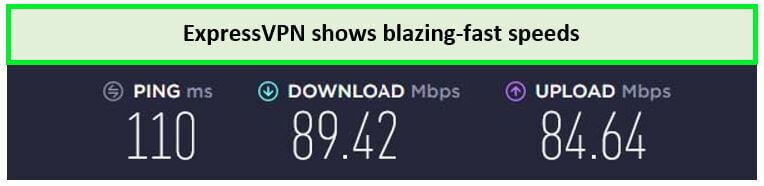
On a 100 Mbps connection, ExpressVPN proved to be the fastest VPN, delivering 89.42 Mbps of download speed and 84.64 Mbps of upload speed on the ExpressVPN speed test.
Moreover, you can get an ExpressVPN free trial, allowing you to evaluate its performance in Cameroon firsthand before making a commitment. Their user-friendly apps and easy setup process ensure a hassle-free transition, making the switch a practical solution to address your VPN not working issue in Cameroon. Whether you want to use ExpressVPN with Firestick or any other smart TV, its MediaStreamer feature makes installation and streaming easier for you.
With its vast network of servers, you can stream different libraries of Netflix with ExpressVPN without any proxy errors.
By considering ExpressVPN as your VPN provider, you’re opting for a service with a proven track record in handling complex network scenarios and delivering reliable connectivity. This move could potentially offer a smoother, more secure, and efficient online experience, specifically tailored to the unique challenges you’re encountering in Cameroon.
For more details, head to our comprehensive ExpressVPN review.
How does my VPN get detected in Cameroon?
VPN detection methods used in Cameroon, as in many other countries, involve various technical and behavioral factors that can reveal the use of a VPN. Here are some common ways your VPN might get detected in Cameroon:
- Deep Packet Inspection (DPI): ISPs and government authorities often use DPI to analyze and identify the type of traffic passing through their networks. DPI can detect the distinctive patterns of VPN traffic, leading to the identification of VPN usage.
- IP Address Blacklisting: Some VPN servers’ IP addresses might be flagged or blocked by local authorities or ISPs. If your VPN server’s IP is on the blacklist, your connection might be disrupted or blocked.
- VPN Protocol Signatures: Different VPN protocols leave specific signatures in the network traffic. Authorities can analyze these signatures to identify the used protocol, indicating VPN usage.
- Traffic Analysis: Unusual traffic patterns, such as a sudden increase in encrypted traffic, might raise suspicions and trigger a further investigation into VPN usage.
- Unusual Port Usage: VPNs often use non-standard ports for their encrypted traffic. This non-standard port usage can be detected and flagged as VPN traffic.
- DNS Leaks: If your DNS requests are leaking outside the VPN tunnel, it can reveal the actual websites you’re accessing, potentially indicating VPN usage.
- Behavioral Analysis: Frequent connections to servers in specific geographic locations or consistent use of encrypted connections can be behavior patterns associated with VPN usage.
- Blocked Websites: Some websites or services might be inaccessible without a VPN. If you suddenly gain access to these services, it could indicate VPN usage.
To maintain your VPN’s effectiveness and minimize detection, follow these steps:
- Choose a reputable VPN provider with obfuscation technology for disguised traffic.
- Opt for servers optimized for your region or labeled “obfuscated” or “stealth.”
- Use strong encryption protocols like OpenVPN or WireGuard.
- Employ split tunneling to route specific traffic through the VPN.
- Keep your VPN software updated for the latest security features.
FAQ: VPN not working in Cameroon
How to use a VPN in Cameroon?
To use a VPN in Cameroon, follow these simple steps for secure and private online browsing:
- Choose a reliable VPN provider. We highly recommend
- Download and Install the VPN app on your device.
- Open the VPN app and log in using your credentials.
- Choose a server location from the list provided. For optimal performance, select a nearby server or one optimized for Cameroon.
- Click the “Connect” button to establish a secure connection. The app will encrypt and route your internet traffic through the chosen server.
- Once connected, you can surf the web, access blocked content, and communicate privately without revealing your actual location in Cameroon.
Why is my VPN not working when I connect to the internet?
If your VPN is not working when you connect to the internet, several reasons could be behind the issue. It’s essential to troubleshoot these common factors:
- Server Connectivity: Ensure you’ve connected to a VPN server.
- Network Restrictions: Your location might have strict network restrictions or firewalls that block VPN connections.
- VPN Protocol: Switch between protocols like OpenVPN, L2TP, or IKEv2 to find the one that works best in your situation.
- ISP Throttling: Some ISPs throttle or limit VPN traffic, leading to slow or unstable connections.
- VPN Software: Ensure your VPN app is up-to-date and compatible with your operating system.
Why is my VPN not working with Netflix?
If your VPN isn’t working with Netflix, it could be due to geolocation restrictions, server blacklisting, or protocol detection. Some VPNs prioritize streaming while others may not bypass Netflix’s blocks consistently. Choose a VPN known for streaming, use optimized servers, and keep your app updated. Contact your provider’s support if issues persist, but note that VPN-Netflix compatibility can change over time.
VPN not working Guide for Other Countries For American Users
In case you’re facing VPN not working in other countries, here are guides for few other countries For American Users:
- VPN not working in El Salvador
- VPN not working in Botswana
- VPN not working in Afghanistan
- VPN Not working in Ecuador
Conclusion
In conclusion, encountering difficulties with a VPN not working in Cameroon can be attributed to a combination of factors such as government restrictions, ISP throttling, technical glitches, and server issues. The complex interplay of these elements within Cameroon’s unique network environment can create challenges for seamless VPN usage.
However, by following troubleshooting steps like switching servers, updating software, or even considering a different VPN provider, users can increase their chances of overcoming these obstacles.
As the digital landscape continues to evolve, it’s important to remain adaptable and well-informed to ensure a secure and unrestricted online experience, even in regions where VPN functionality faces hurdles.