
Australia, the land Down Under, is not just about kangaroos, koalas, and iconic landmarks like the Sydney Opera House. It combines vibrant urban landscapes, serene beaches, and untamed outback adventures. But amidst these scenic settings, a less visible realm demands attention: the digital landscape. In this era where internet presence is as significant as physical, cybersecurity has become a paramount concern.
In this context, Australia’s involvement in the 5-Eyes surveillance alliance and strict data retention laws bring digital privacy to the forefront. For residents and those accessing Australian content remotely, utilizing the best VPN for Australia is essential for safeguarding personal information from government scrutiny and ISP tracking and overcoming online barriers.
During my comprehensive testing of over 50 VPNs, I discovered that ExpressVPN is the best fit for Australia. It excels in protecting online activities from external monitoring, offering strong encryption to thwart ISP and hacker intrusions. Moreover, ExpressVPN is highly effective at circumventing geo-blocks, making it a go-to for accessing restricted content and ensuring smooth streaming experiences globally.
I’ve also explored other best Australia VPNs. Whether you’re vacationing or staying longer, it’s crucial to be prepared. Beyond its famed wildlife, Australia’s digital landscape poses its own risks, which a reliable VPN can mitigate, ensuring a safer and more enjoyable experience.
Quick Overview – Best VPN for Australia
In my quest to identify the best VPN for Australia, I conducted extensive testing on numerous VPNs, evaluating factors such as speed, security, server coverage in Australia and globally, user-friendliness, and more. After thorough analysis, I have compiled a quick overview of the top 6 VPN service Australia provider:
ExpressVPN – Best VPN for Australia:
A top choice for its comprehensive coverage, ExpressVPN boasts over 3000+ servers in 105 countries, including 7 servers in Australia. Known for high-speed connections and top-notch encryption, it ensures fast, secure internet access, ideal for both streaming and privacy.
➔ Get a special ExpressVPN offer today: AU$ 10.2/mo (US$ 6.67/mo) - Save up to 49% with exclusive 1-year plans + 3 months free.
Surfshark – Budget-Friendly VPN for Australia:
Offering affordability without compromising on quality, Surfshark has over 3200+ servers in 100 countries, including 20 in Australia. It provides good speeds and strong security, making it a great choice for budget-conscious users looking for a balance between cost and performance.
➔ Get a special Surfshark offer today: AU$ 3.81/mo (US$ 2.49/mo) .
NordVPN – Most Safest VPN for Australia:
NordVPN is acclaimed for its security, hosting more than 6000+ servers in 61 countries, including 190+ servers in Australia. Also, features like double VPN and Onion over VPN underscore its commitment to security, making it the safest option for users prioritizing privacy.
➔ Get a special NordVPN offer today: AU$6.1/mo (US$ 3.99/mo) - Save up to 63% with exclusive 2-year plan + 3 months free for a friend.
CyberGhost – Fastest VPN for Australia:
Specializing in speed, CyberGhost’s network encompasses over 11651 servers in 100 countries, including 213 servers in Australia. It’s particularly suited for streaming HD content and gaming, thanks to its fast server speeds and reliable performance.
➔ Get a special CyberGhost offer today: AU$3.11/mo (US$ 2.03/mo) - Save up to 84% with exclusive 2-year plans + 4 months free.
IPVanish – Top Tier VPN for Australia:
IPVanish delivers excellent overall performance with more than 2200+ servers in75 countries. It’s known for reliable speeds suitable for streaming and secure browsing. Alongside strong encryption, its user-friendly interface makes it a top-tier choice for a range of users.
➔ Get a special IPVanish offer today: AU$ 3.23/mo (US$ 2.11/mo) !
Private Internet Access – Reliable VPN for Australia:
With one of the largest server networks, over 35000 + P2P-optimized servers in 84 countries. It offers 5 server locations in Australia. It offers dependable speeds and strong encryption, making it a reliable choice for those seeking a balance of speed, security, and accessibility.
➔ Get a special PIA offer today: AU$ 3.23/mo (US$ 2.11/mo) .
Note: To learn more about these VPNs, refer to the detailed analysis of the 6 best VPNs section of this article. To learn more about some frequently asked questions, jump ahead to the FAQs.
What to Look in a VPN for Australia?
Here are the main factors that you should look into when selecting the best VPN in Australia:
| Privacy Tools | No-logs policy, independent audit |
|---|---|
| Security Protocols | Kill switch, Threat Protection |
| Tunneling Protocols | WireGuard |
| Optimized Servers | Obfuscated, RAM-only |
| Encryption Type | AES-256 |
| Unblocking Capabilities | Stan, 7 Channel, ABC TV, ABC TV Plus and more |
Comparison Table: Best VPN for Australia in 2024
To help you decide better, here’s the comparison of all the best Aussie VPNs below:
| VPNs |  |
 |
 |
 |
 |
 |
|---|---|---|---|---|---|---|
| Ranking for Australia | 1st | 2nd | 3rd | 4th | 5th | 6th |
| Server Count | 3000+ servers | 3200+ servers | 6000+ servers | 11651+ servers | 2200+ servers |
2200+ |
| Australian servers | 7 server locations | 20 servers | 190+ servers |
209 servers |
50 servers |
5 server |
| Average Speed (Base: 100 Mbps) | 89+ Mbps | 85+ Mbps | 86+ Mbps | 75+ Mbps | 86+ Mbps | 65+ Mbps |
| Unblock Streaming services | Stan, Kayo, Foxtel Now, 7plus, 9Now, Netflix, Hulu, HBO Max, BBC iPlayer, and more. | Stan, Kayo, Foxtel Now, 7plus, 9Now, Netflix, Hulu, HBO Max, BBC iPlayer, and more. | Stan, Kayo, Foxtel Now, 7plus, 9Now, Netflix, Hulu, HBO Max, BBC iPlayer, and more. | Stan, Kayo, Foxtel Now, 7plus, 9Now, Netflix, Hulu, HBO Max, BBC iPlayer, and more. | Stan, Kayo, Foxtel Now, 7plus, 9Now, Netflix, Hulu, HBO Max, BBC iPlayer, and more. | Stan, Kayo, Foxtel Now, 7plus, 9Now, Netflix, Hulu, HBO Max, BBC iPlayer, and more. |
| Compatible Devices | iOS, Nintendo, Android, Windows, PlayStation, Xbox, routers, and more | Smart TV, Firestick, iOS, Nintendo, Android, Windows, routers, and more | Apple TV, Xbox, iOS, Nintendo, Android, Windows, routers, and more | PlayStation, Xbox, iOS, Nintendo, Android, Windows, routers, and more | PlayStation, Xbox, iOS, Nintendo, Android, Windows, routers, and more | PlayStation, Xbox, iOS, Nintendo, Android, Windows, routers, and more |
| Simultaneous Device Connections | 8 | Unlimited | 6 | 7 | Unlimited | 10 |
| Security features | AES, encryption, kill switch, split tunneling, TrustedServer technology, Threat Manager | AES, encryption, kill switch, WhiteLister (split tunneling), Multi-hop, Camouflage Mode, CleanWeb | AES, encryption, kill switch, split tunneling, Double VPN, Obfuscated servers, Threat Protection | AES, encryption, kill switch, split tunneling, Dedicated IP | AES, encryption, kill switch, split tunneling | AES, encryption, kill switch, split tunneling |
| No-log Policy | Keeps no logs | Keeps no logs | Keeps no logs | Keeps no logs | Keeps no logs | Keeps no logs |
| Money-Back Guarantee | 30 days | 30 days | 30 days | 45 days | 30 days | 30 days |
| Current Deal | AU$ 10.2/mo (US$ 6.67/mo) - Save up to 49% with exclusive 1-year plans + 3 months free | AU$3.81/mo (US$ 2.49/mo) - Save up to 77% with exclusive 2-year plan + 30-day money-back guarantee | AU$6.1/mo (US$ 3.99/mo) - Save up to 63% with exclusive 2-year plan + 3 months free for a friend | AU$3.11/mo (US$ 2.03/mo) - Save up to 84% with exclusive 2-year plans + 4 months free | AU$ 4.57/mo (US$ 2.99/mo) - Get 3 Months Extra + Save 77% on 2-year plan | AU$ 3.23/mo (US$ 2.11/mo) |
6 Best VPNs For Australia in 2024 [In-Depth Analysis]
To identify what is the best VPN in Australia, I embarked on an extensive testing journey, evaluating over 50 VPNs based on criteria like speed, server network, security features, and user experience. After rigorous analysis, I have pinpointed 6 VPNs that stand out as the most effective and reliable choices.
Each of these VPNs excels in its unique way, ensuring that users in Australia enjoy top-notch internet freedom and security. Here’s an in-depth look at what makes each of these VPNs the best fit for Australian users in 2024.
1. ExpressVPN – Best VPN for Australia


- Ultra-fast servers in 105 Countries
- Excellent unblocking capability for Netflix, Hulu & more
- Best-in-class encryption trusted security, and advanced protection features that block ads, trackers, and harmful sites.
- Connect up to 8 devices simultaneously
- 24/7 customer support through live chat
- 30-day money-back guarantee
ExpressVPN is the best VPN for Australia, with its perfect blend of speed, security, and extensive server availability. As an Australian user, I found ExpressVPN’s robust network provides an unparalleled online experience, whether for browsing, streaming, or gaming.
ExpressVPN’s network is impressive, boasting over 3000+ servers in 105 countries, including 7 server locations in Australia like Sydney, Melbourne, and Perth. The extensive ExpressVPN server list offers Australian users ample options for accessing both local and international content, ensuring a seamless experience. Not only does it have Australian servers, but with its global servers, you can enjoy Netflix with ExpressVPN in Australia, unlocking a world of entertainment.
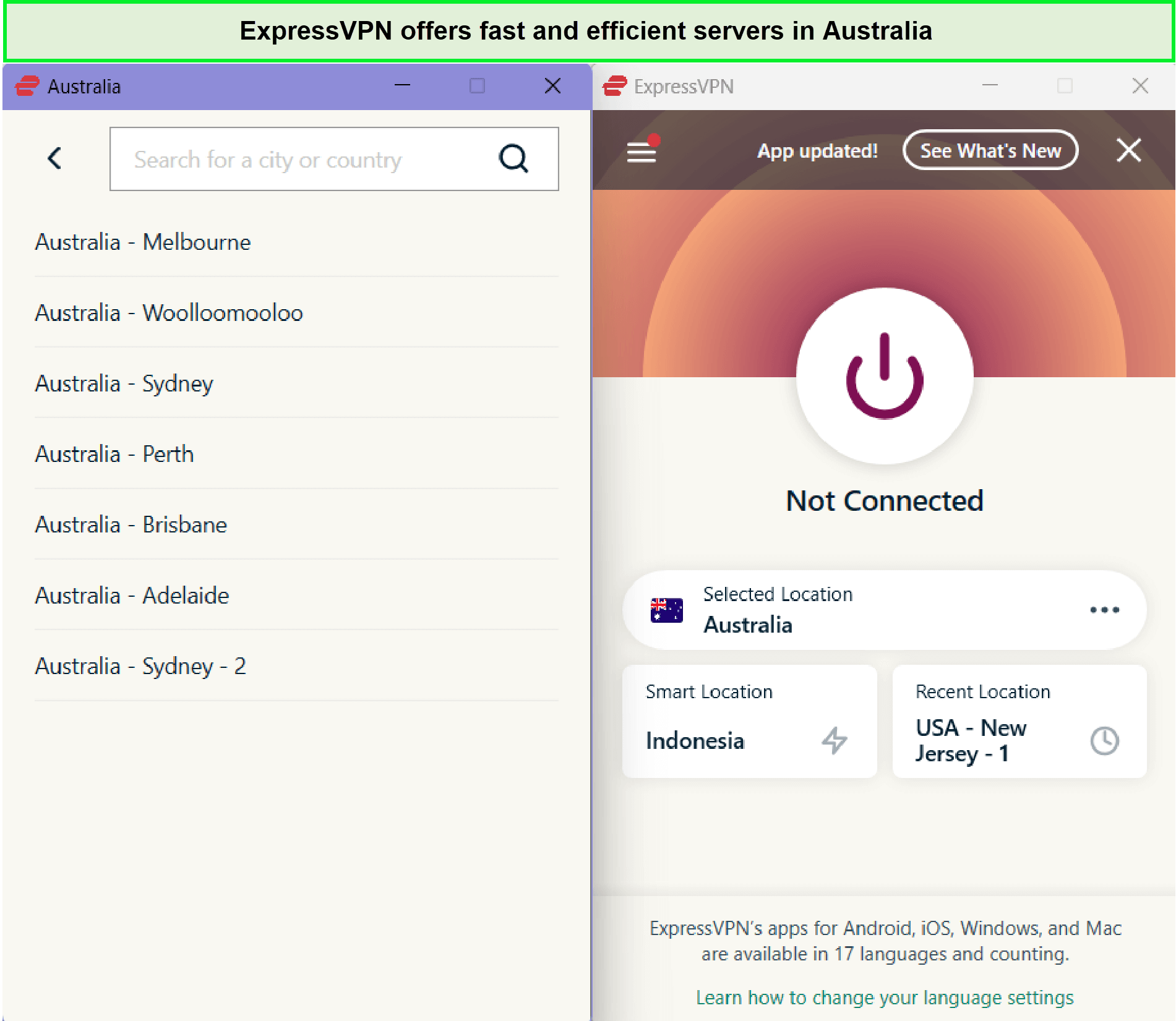
ExpressVPN offers 7 server locations in Australia.
While using the VPN, ExpressVPN’s servers proved excellent for unblocking geo-restricted streaming platforms, which is essential for Australian content. It’s the best VPN for streaming in Australia, providing access to local favorites and international hits on platforms like Hulu and BBC iPlayer.
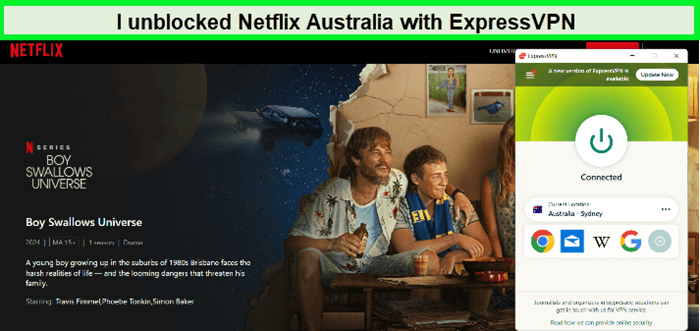
ExpressVPN is the best VPN for Netflix Australia!
This VPN earns the title of the best for Australia due to its seamless compatibility with streaming platforms like Kayo Sports, making it the optimal choice for accessing Kayo Sports outside Australia. Additionally, you can also enjoy access to 9Now and Stan with this versatile VPN service.
ExpressVPN speed test in Australia yielded impressive results: download speeds of 89.42 Mbps and upload speeds of 84.64 Mbps on a 100 Mbps connection. This speed ensures high-definition streaming without buffering, which is crucial for an enjoyable viewing experience.
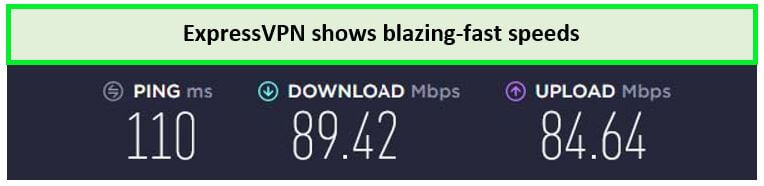
I achieved these test results on a 100 Mbps base connection.
ExpressVPN shines on various devices. Whether it’s ExpressVPN on Samsung TVs in Australia, laptops, Windows PCs, Macbooks, or mobile devices, the compatibility is seamless. This versatility makes it a practical choice for diverse user needs.
In Australia, where cybersecurity is vital, ExpressVPN excels. The importance of security in the Five Eyes, Nine Eyes, and Fourteen Eyes jurisdiction is met with features like 256-bit AES encryption, Adblocker, Parental Control, Kill Switch, DNS Leak, etc.
ExpressVPN Threat Manager in Australia is an added layer of security that blocks all apps and websites on your device from communicating with a set of third parties known to engage in malicious behavior or track activity.
The Lightway protocol further enhances ExpressVPN’s performance, ensuring fast and secure connections. This feature is particularly beneficial for Australians seeking a swift and reliable VPN service.
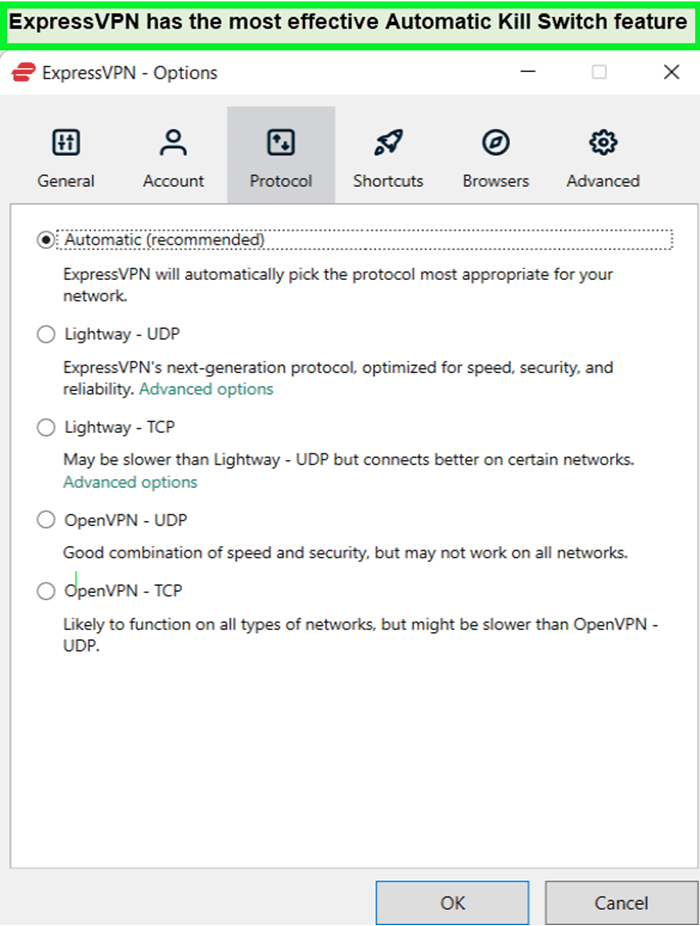
After enabling the Automatic kill switch feature, ExpressVPN quickly disconnected the internet from the device if the net speed slowed to avoid data leakage.
Regarding pricing, ExpressVPN costs in Australia are reasonable, given its quality. Additionally, the ExpressVPN free trial in Australia offers a 7-day risk-free opportunity to test its features. After testing the compatibility of the VPN in Australia, if you like the VPN services, then you can continue. Otherwise, you can cancel ExpressVPN in Australia
ExpressVPN’s all-around performance is exceptional. If you are still looking for more information about the best VPN Australia, then you can read the ExpressVPN Review Australia.
Exclusive Deal
VPNRanks readers can enjoy the exclusive VPN deals Australia! AU$10.2/mo (US$ 6.67/mo) - Save up to 49% with exclusive 1-year plans + 3 months free.
- Numerous servers in five Australian locations
- Unblocks geo-restrictions on any streaming services
- TrustedServer Technology
- Spotless reputation
- Offers options for anonymous payment
- 24/7 customer live chat support
- 30-day money-back guarantee
- Doesn’t offer a free plan
2. Surfshark – Budget-Friendly VPN for Australia

- 3,200+ servers in 100 countries
- RAM-only servers (no hard disks)
- Unlimited simultaneous connections
- Unblocks Netflix and More
- 24/7 Customer Service
Surfshark has earned its place as a budget-friendly VPN for Australia, offering a perfect mix of affordability and functionality. For just AU$ 3.81/mo (US$ 2.49/mo) - Save up to 77% with exclusive 2-year plan + 30-day money-back guarantee, it provides an impressive server network and high-speed streaming capabilities, all within a modest budget.
The vast network of Surfshark, with over 3200+ servers across 100 countries, including 20 servers in Australia, ensures Australian users have plenty of options. The Surfshark server list includes major cities like Perth, Sydney, Adelaide, and Melbourne, facilitating both local and global content access.
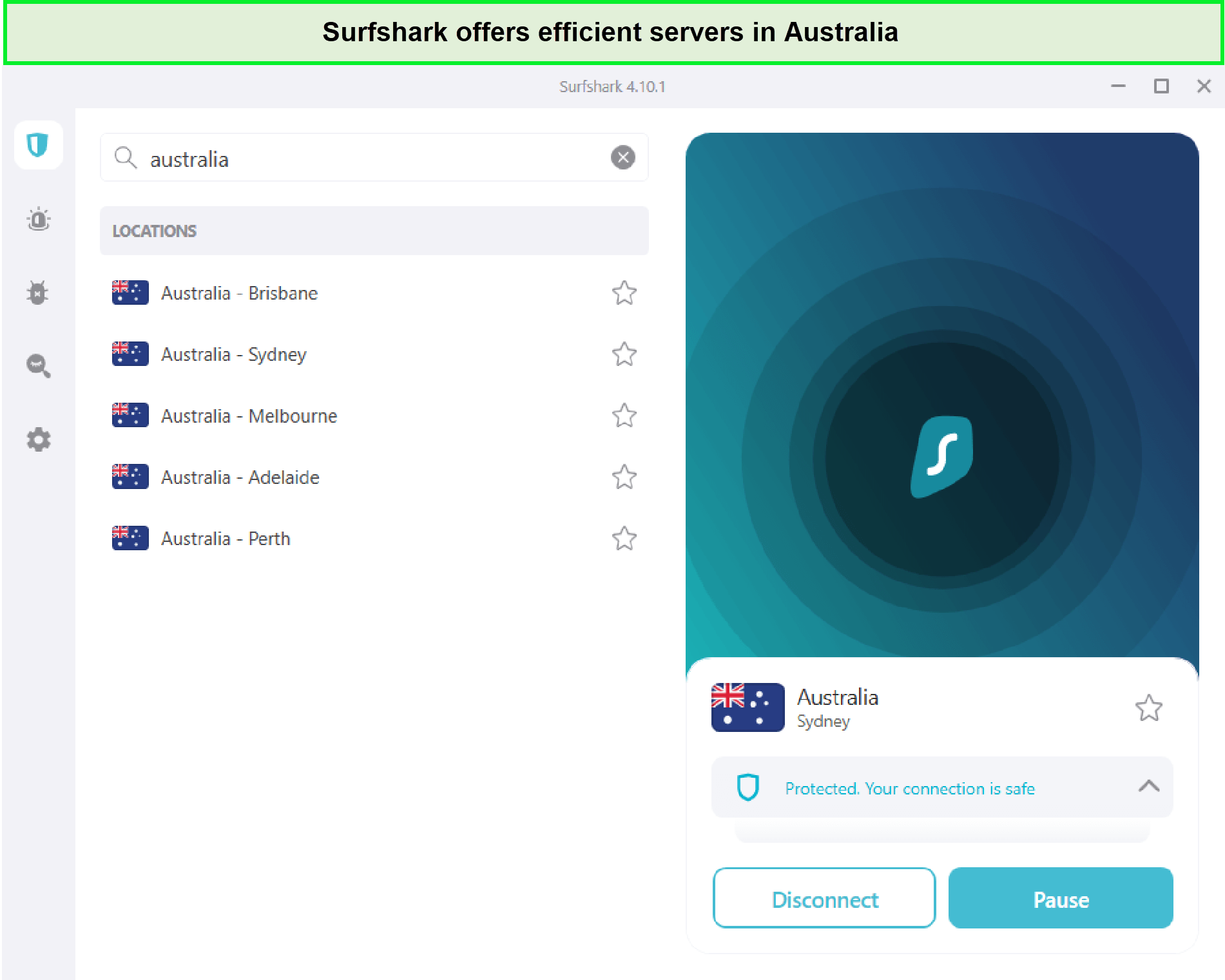
Surfshark offers 40 Australia VPN servers.
My experience with Surfshark’s unblocking capabilities was noteworthy. I used Surfshark for the Australian platforms, and it worked flawlessly, especially when I used it to watch Fox8 Outside Australia. And the good part of the VPN is that it is not compatible with its Australian servers. I used its US servers and connected Surfshark to Netflix in Australia. It easily connected and offered me flow-free streaming.
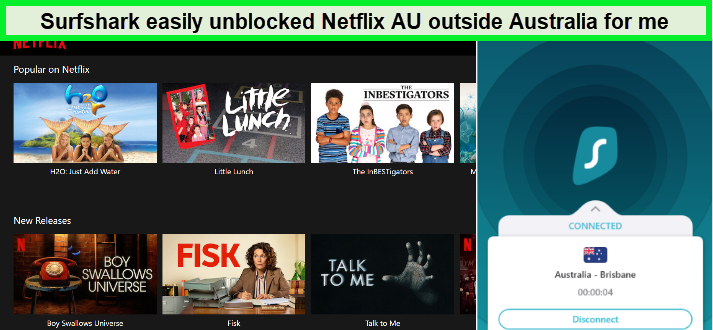
With the help of Surfshark, I watched the Australian Netflix!
In terms of speed, Surfshark didn’t disappoint. A quick Surfshark speed test in Australia gave me download speeds of 85.42 Mbps and upload speeds of 48.64 Mbps on a 100 Mbps connection, ensuring smooth and buffer-free streaming.
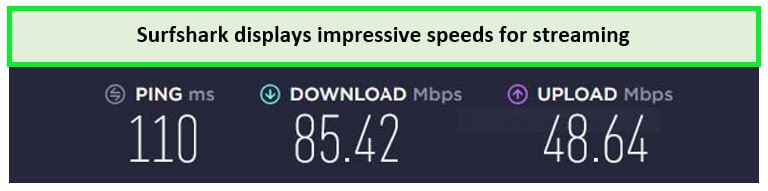
I witnessed only a 15% speed reduction in the test, which is quite impressive for a VPN service.
In addition, Surfshark is compatible with a broad range of operating systems, including Windows, macOS, iOS, Android, and Linux. Its user-friendly apps are easy to download on Firestick, computers, NVidia Shield, Smart TVs, Apple TV, smartphones, and other commonly used devices.
For security, Surfshark provides robust features like AES-256 encryption and an Internet Kill switch. With a strict no-logs policy and successful DNS and IP leak tests, it ensures privacy and safety for users, making it a reliable and cheap VPN in Australia.
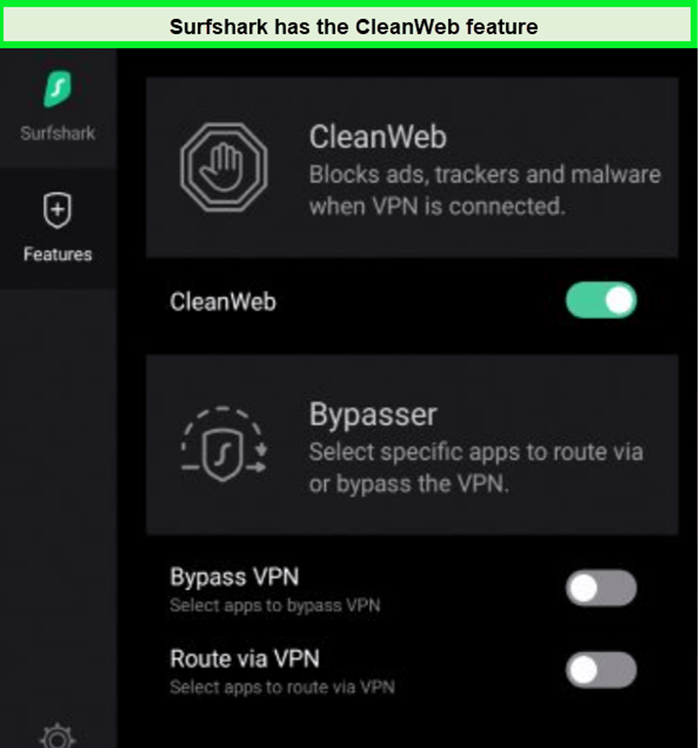
The CleanWeb feature of Surfshark is a game-changer, effectively blocking ads and malware and enhancing my browsing experience without unwanted interruptions or security risks.
The Surfshark’s WireGuard protocol is not just secure but also makes the internet speed the same after connecting the device with the VPN!
When it comes to value, Surfshark costs in Australia are impressively low, and the Surfshark free trial in Australia offers a great opportunity to test its capabilities without any commitment.
Although it is the best value VPN Australia, if you are looking for more information about it, then you can read Surfshark Review Australia.
Exclusive Deal
VPNRanks readers can enjoy a special Surfshark offer! AU$3.81/mo (US$ 2.49/mo) - Save up to 77% with exclusive 2-year plan + 30-day money-back guarantee
- Affordable prices
- Cheap VPN Australia
- Offers unlimited simultaneous connections
- Unblocks various international and Australian streaming services
- Free trial for iOS and Android users
- 24/7 live chat support
- The logging policy is not audited
3. NordVPN – Most Safest VPN for Australia

- 6000 servers in 60 countries
- WireGuard protocol (NordLynx)
- 6 Simultaneous Connection
- DoubleVPN
- 24/7/365 Live Chat Support
- 30 Days Money Back Guarantee
NordVPN has solidified its status as the most safest VPN for Australia, renowned for its unbeatable security and user-friendly interface. This makes it my top recommendation for those in Australia who prioritize security without compromising on functionality.
NordVPN’s impressive network includes over 6000+ servers in 61 countries, including 190+ dedicated servers in five locations in Australia. Not just this, the NordVPN server list extends to almost all the regions, ensuring fast, stable connections for secure browsing and global content access in Australia.
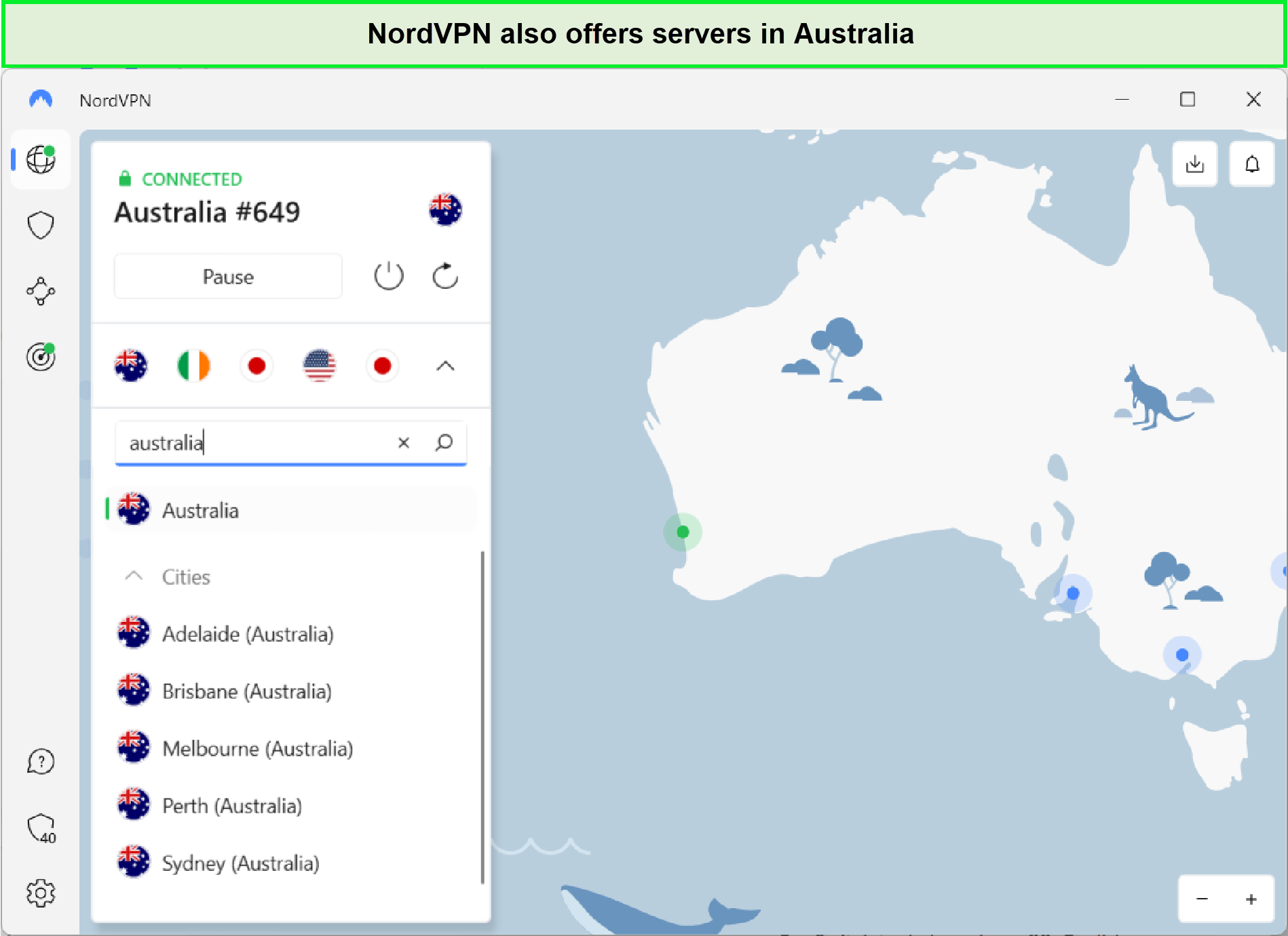
NordVPN offers 190+ servers in Australia.
Accessing international streaming platforms with NordVPN is a breeze. I’ve effortlessly watched shows on Hulu and BBC iPlayer, and found it incredibly effective for Netflix with NordVPN in Australia. It’s a versatile tool for overcoming geo-restrictions.
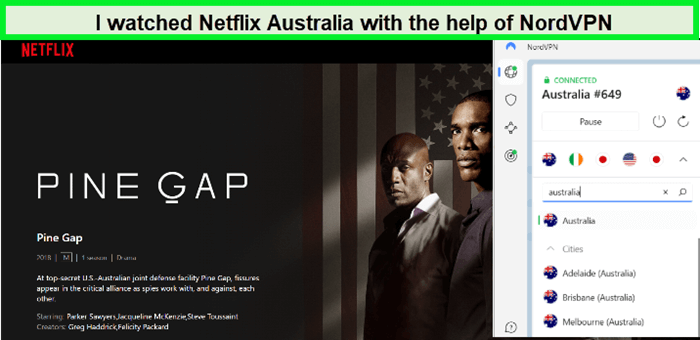
With the help of NordVPN Australia Netflix’s streaming become possible for me!
When it comes to speed, NordVPN stands among the most secure and fastest VPNs in Australia. In my tests, it achieved a download speed of 86.55 Mbps and an upload speed of 49.42 Mbps on a 100 Mbps connection, ensuring a smooth HD streaming experience.
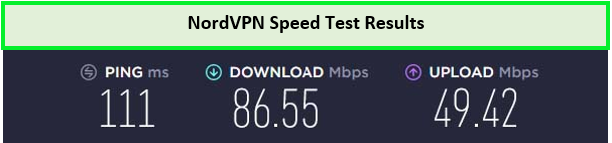
This speed is sufficient to enjoy bufferless and consistent streaming.
Compatibility with devices is another of NordVPN’s strengths. It works seamlessly across Windows PCs, Macbooks, Android Phones, and more. For streaming on big screens, NordVPN with Firestick in Australia enhances the viewing experience significantly.
NordVPN’s security features are top-notch, offering AES-256 encryption and a no-logs policy. Its obfuscation technology in Australia and Double VPN provide an extra layer of security, essential for navigating the Australian digital landscape.
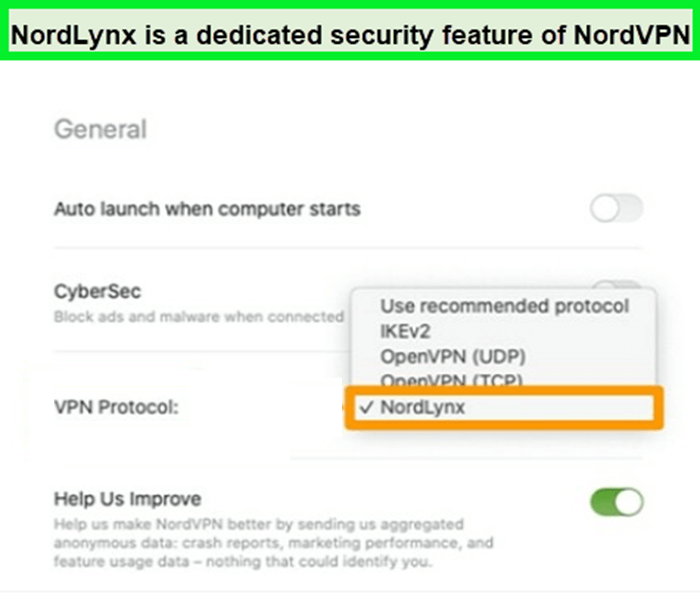
NordLynx improved connection, faster speeds, and better security measures.
NordVPN costs in Australia are reasonable. With advanced features and reliable performance, it’s a great investment for those seeking a secure VPN. Plus, the NordVPN free trial in Australia offers a risk-free way to test its capabilities.
The NordVPN review in Australia rates it highly as a secure VPN best Australia for its exceptional balance of security, speed, and user-friendliness. It’s an ideal choice for Australians who need a dependable VPN for both privacy and accessing diverse content.
Exclusive Deal
VPNRanks readers can enjoy a special NordVPN offer! AU$6.1/mo (US$ 3.99/mo) - Save up to 63% with exclusive 2-year plan + 3 months free for a friend
- 190+ Australian servers
- Obfuscation technology
- Offers an adblocker
- Independently audited logging policy
- NordLynx for exceptional speed
- Free trial for mobile users
- The map interface in the app takes up a lot of screen space
4. CyberGhost – Fastest VPN for Australia

- 11651 Servers Servers in 100 Countries
- 7 Simultaneous Logins
- 45 Days Money-Back Guarantee
- Strict No Logs Policy
- 24/7 Live Chat Support
- Strong Protocols & Encryption
CyberGhost stands out as the fastest VPN for Australia, notable for its swift performance and user-friendly interface. It’s my go-to recommendation for Australians who value quick, reliable connections along with ease of use.
Boasting an extensive network of over 11651+ servers in 100 countries, including 213 servers in Australia located in Melbourne, Brisbane, and Sydney. CyberGhost ensures Australians have vast choices for both local and international content. This impressive CyberGhost server list guarantees a reliable connection every time.
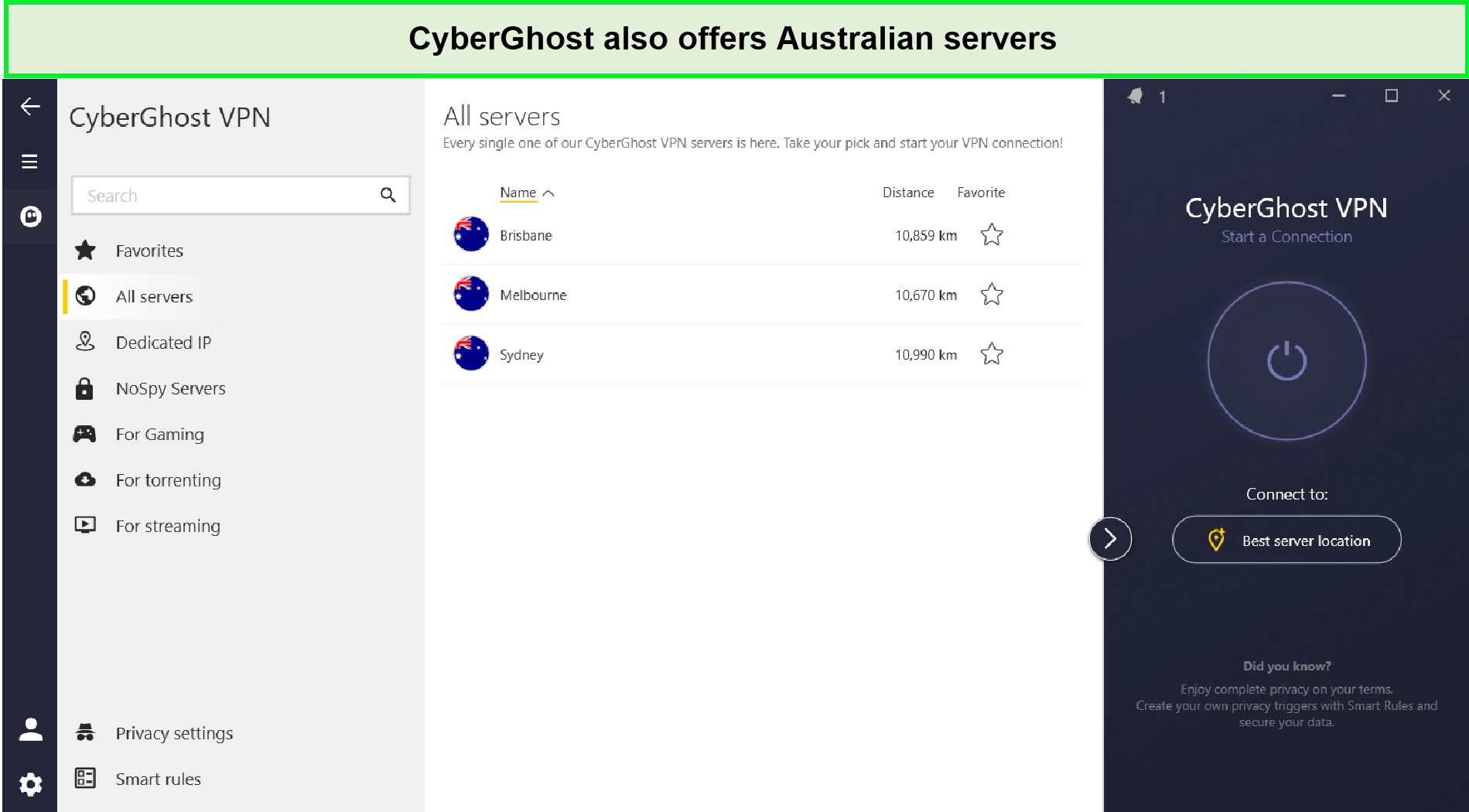
CyberGhost has a huge server network of 213 Australian servers.
When it comes to streaming, CyberGhost excels. I used CyerGhost to watch Stan outside Australia throughout the streaming; the device’s internet speed did not slow down. Also, I use CyberGhost for Netflix in Australia here also, the VPN made my streaming buffer free and enjoyable.
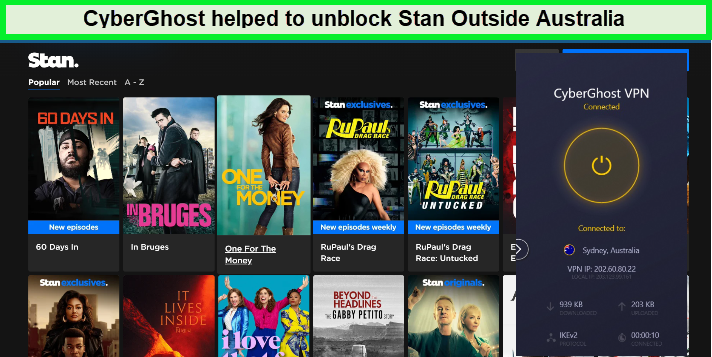
I was able to stream Stan outside Australia in HD using CyberGhost servers.
In my CyberGhost Speed Test in Australia, the results were impressive: download speeds of 75.47 Mbps and upload speeds of 69.34 Mbps on a 100 Mbps connection. It’s clear why it’s renowned for its speed.
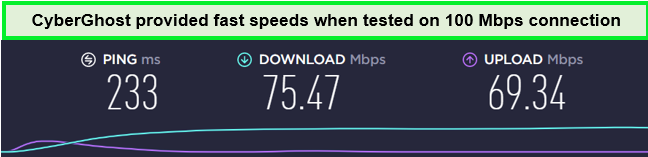
CyberGhost was not as fast as the top VPNs on our list.
CyberGhost’s compatibility extends to various devices. From laptops to Android TVs and iPhones, it functions seamlessly. Particularly noteworthy is CyberGhost on FireStick in Australia, enhancing streaming experiences significantly.
CyberGhost doesn’t skimp on security, either. Features like AES 256-bit encryption and a no-logs policy ensure that your online activities in Australia are secure and private, safeguarding you from cyber threats.
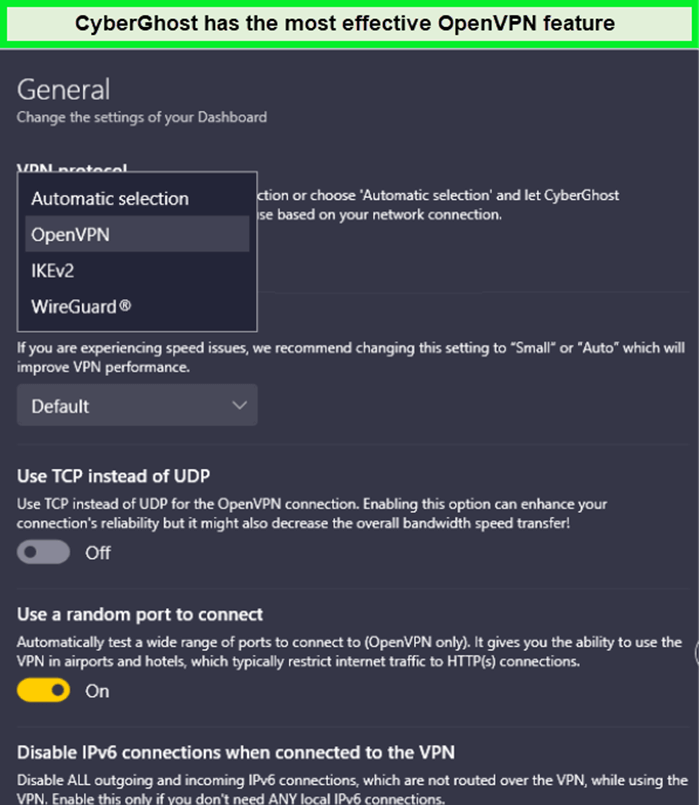
CyberGhost’s OpenVPN feature encrypts the data and reroutes it through its secure VPN servers.
The CyberGhost free trial in Australia is a great way to experience its capabilities without commitment, making it an attractive option for those testing the waters of VPN services.
Wrapping up, my CyberGhost review Australia finds it an excellent choice, combining extensive server options, top-notch speed, device compatibility, and robust security, all at a value-for-money price, perfect for Australian VPN users.
Exclusive Deal
VPNRanks readers can enjoy a special CyberGhost offer! AU$3.11/mo (US$ 2.03/mo) - Save up to 84% with exclusive 2-year plans + 4 months free
- Largest server network in the world
- 213 servers in Australia
- Dedicated streaming servers
- Free browser extension
- 24/7 live chat support
- 45-day refund guarantee
- Some servers offer slow speeds
5. IPVanish – Top Tier VPN for Australia

- PPTP, L2TP/IPSec & OpenVPN protocols
- 40,000+ IPs & 1000+ servers in 60+ countries
- 10 Multi logins
- 7-Day Money Back Guarantee
- 256bit AES encryption
IPVanish secures its place as a top-tier VPN for Australia, particularly for those seeking unlimited simultaneous connections. Its combination of robust performance and user-friendly interface makes it my top recommendation for Australians in need of a versatile and reliable VPN.
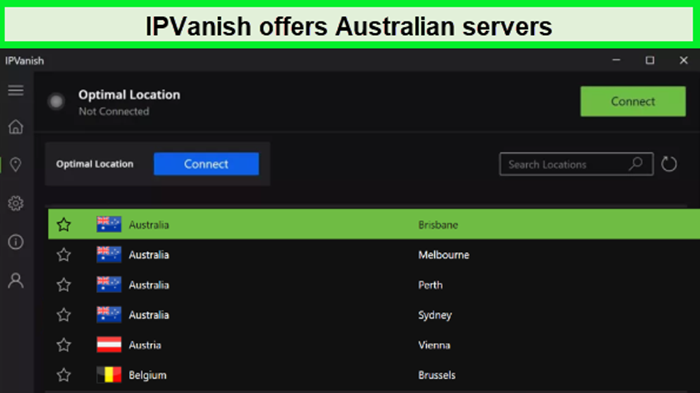
IPVanish possesses 50+ servers for Australia.
With its extensive IPVanish server list, featuring over 2200 servers in 75 countries, including 50 servers in Australia, IPVanish ensures Australian users have reliable and fast connections, ideal for both local browsing and international content access.
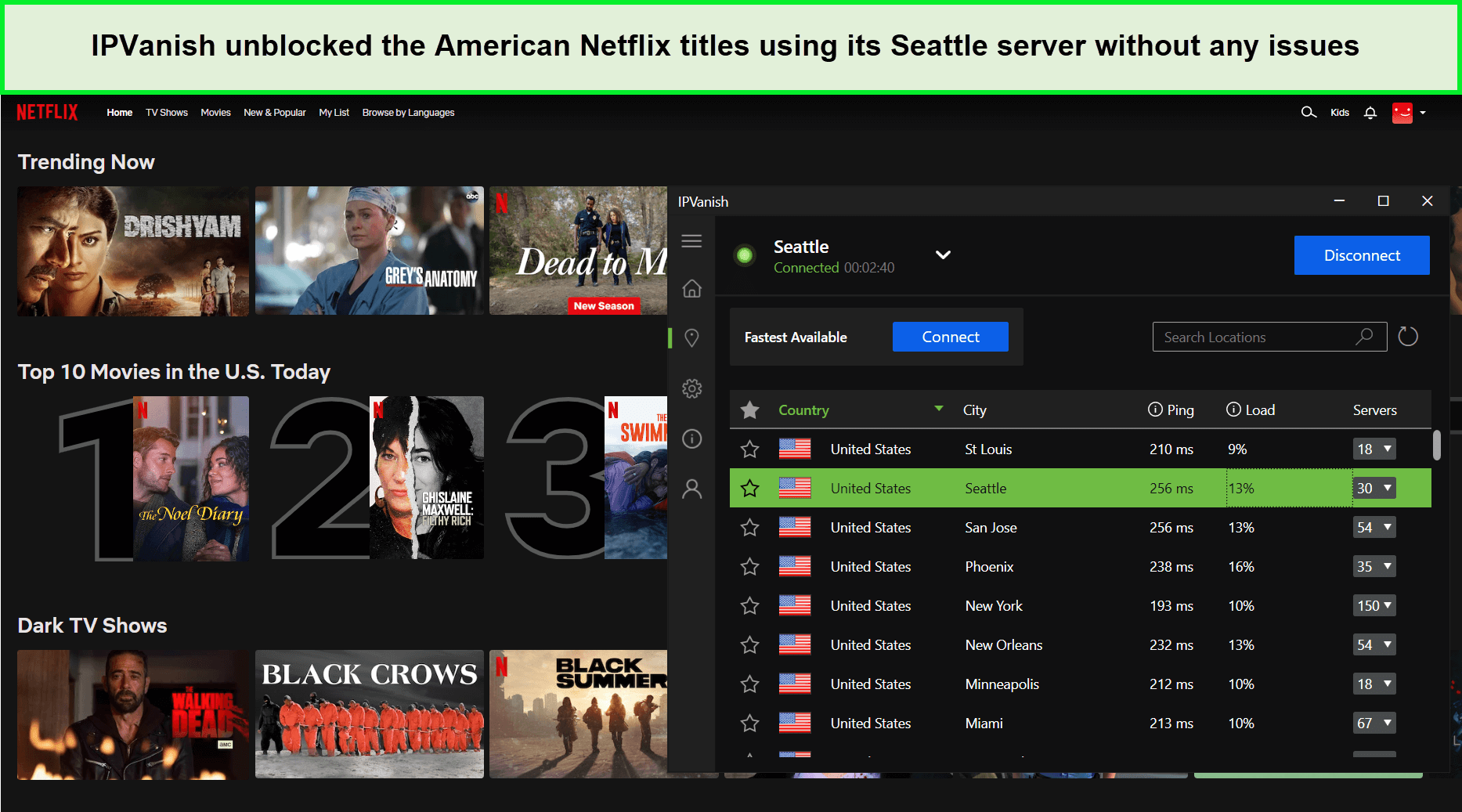
IPVanish unblocked American Netflix for us within seconds.
For streaming enthusiasts, IPVanish effortlessly worked with popular platforms. Accessing international content, especially Netflix with IPVanish in Australia, is a seamless experience. Not just this, its wide range of Australian servers allows users to watch Optus Sports Outside Australia without sowing any hurdles.
Torrenting with IPVanish is equally efficient. Its high-speed, P2P-optimized servers make torrents with IPVanish in Australia a swift and secure activity. This capability is perfect for users who frequently download large files or share content.
Speed is where IPVanish truly shines. The IPVanish speed test in Australia revealed a remarkable download speed of 86.75 Mbps and an upload speed of 73.67 Mbps. Such speeds ensure a smooth, buffer-free streaming and downloading experience.
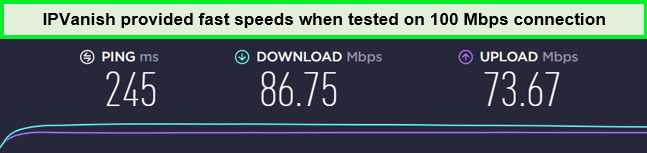
These speed rates are enough to stream video in ultra-HD quality without buffering.
Device compatibility is a strong suit of IPVanish. Recognized as one of the reliable best VPNs for multiple devices in Australia, it works flawlessly on a variety of platforms, including Windows PCs, Macbooks, iOS, and more. IPVanish on Firestick in Australia particularly enhances streaming experiences.
IPVanish’s commitment to security is evident in features like AES-256 encryption, a no-logs policy, and an automatic kill switch. The various IPVanish protocols add extra layers of security, making online activities in Australia secure and private.
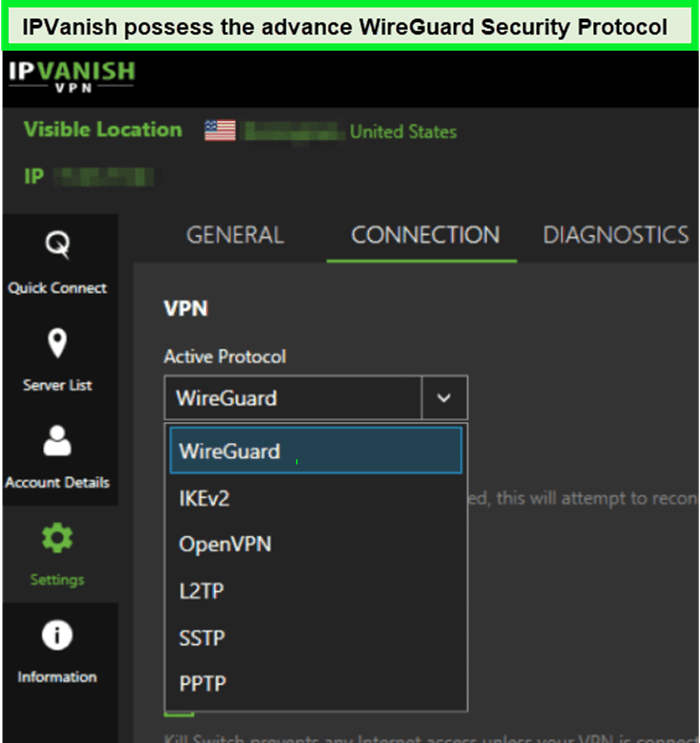
The WireGuard offers strong security that performs well and internet traffic anonymity.
The option of an IPVanish free trial in Australia lets users explore its capabilities risk-free, with the flexibility to cancel the IPVanish subscription in Australia if it doesn’t meet their needs.
In summary, my IPVanish review Australia rates it highly for its extensive server options, exceptional speed, broad device compatibility, and robust security, positioning it as an excellent VPN choice for Australian users.
Exclusive Deal
VPNRanks readers can enjoy a special IPVanish offer! AU$ 4.57/mo (US$ 2.99/mo) - Get 3 Months Extra + Save 77% on 2-year plan
- Unlimited multi-logins
- 50 servers in Australia
- Don’t leak your IP and DNS requests
- Works with multiple streaming services
- Supports P2P
- 30-day refund policy
- Doesn’t work in China
- It’s harder to connect with a few servers
6. PIA VPN – Reliable VPN for Australia

- Does Not Keep Any Logs
- 24/7 Customer Support
- 7 Days Money Back Guarantee
- 35000+ Servers in 84 Countries
- SOCKS 5 proxy
- Compatible with Leading Devices
Private Internet Access (PIA) is highly recommended as a reliable VPN for Australia, offering a unique blend of privacy, speed, and reliability. Australian users particularly favor it for its robust performance in secure torrenting and streaming.
PIA’s vast network includes over 35000+ servers in 84 countries, including 5 server locations (Sydney, Perth, and Melbourne) in Australia. This expansive network ensures fast and stable connections, ideal for both streaming and torrenting in Australia.
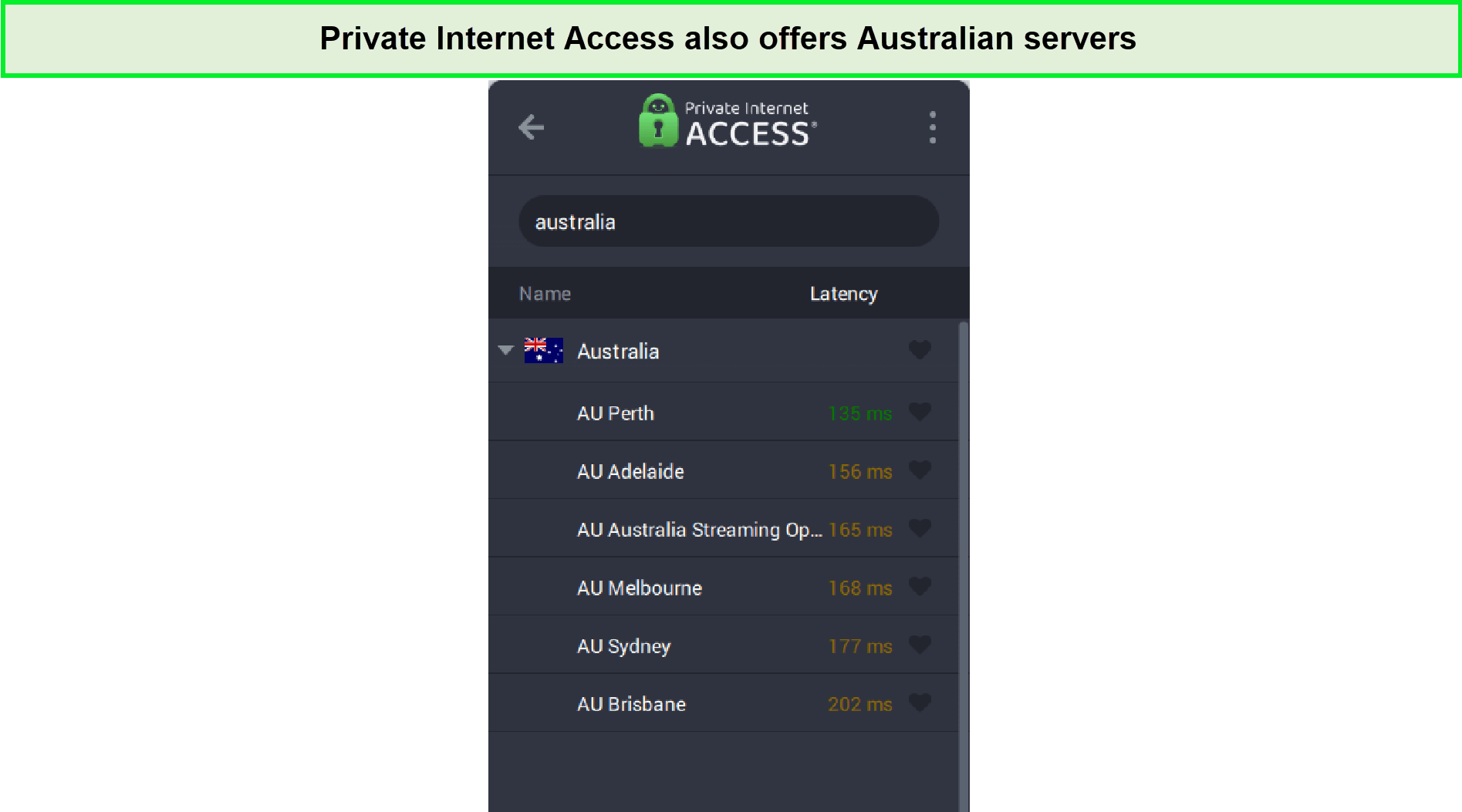
Private Internet Access offers multiple server locations in Australia.
When it comes to accessing Australian content from abroad, PIA truly shines. With PIA, I was able to watch Australian TV Plus outside Australia, which means you can enjoy your favorite Australian shows and channels no matter where you are in the world. Additionally, PIA provides seamless access to ABC iView outside Australia, ensuring that you don’t miss out on any of the fantastic content offered by this platform.
Also, if you want to stream the show Mr. Bates vs The Post Office Australia or Australian Open securely and without restrictions, IPVanish is the ideal VPN choice. With its wide range of servers and top-notch security features, IPVanish ensures that you can enjoy this captivating series from anywhere while keeping your online activities private and protected.
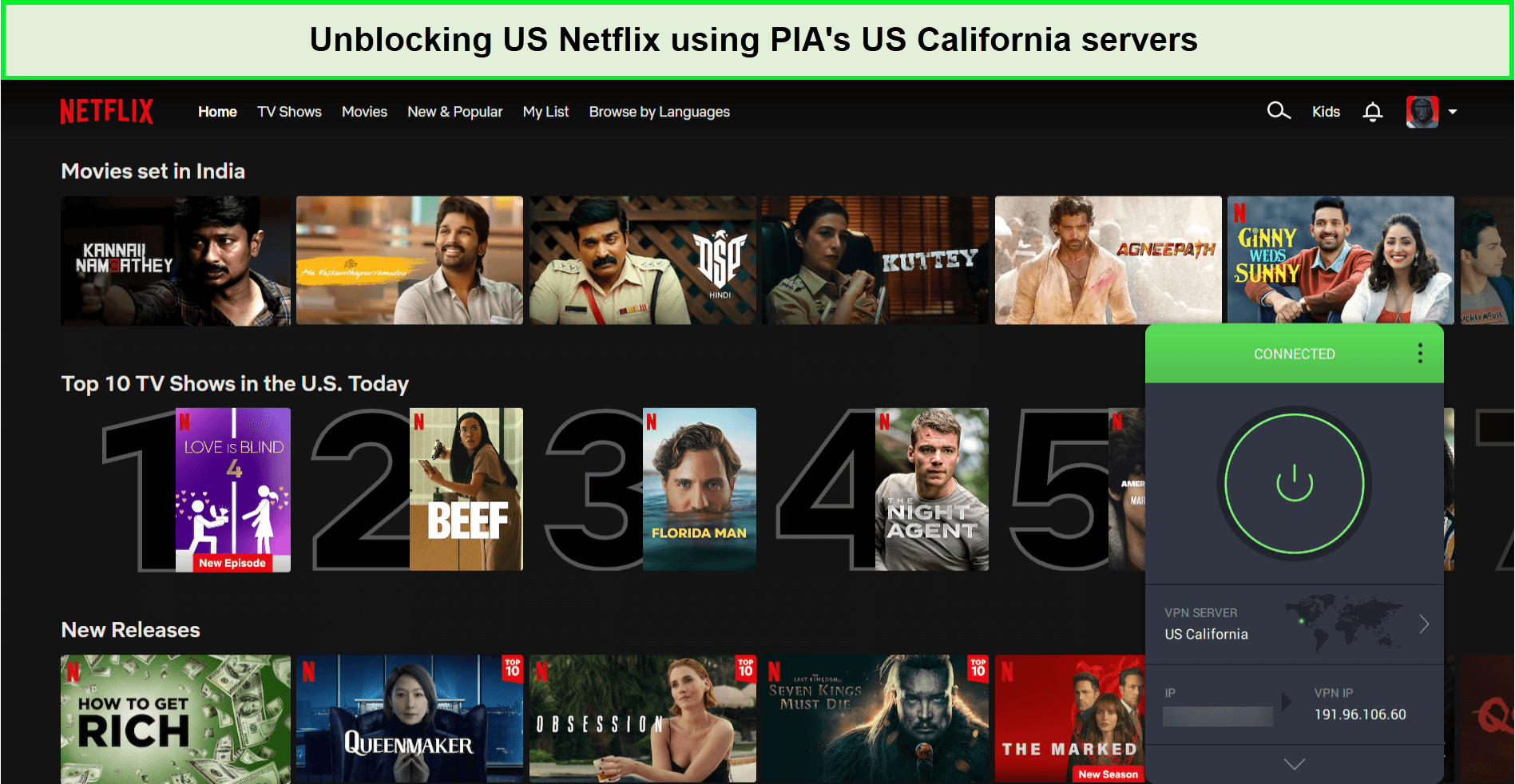
PIA turned out to be the most reliable best VPN to watch Australian TV for me!
PIA is your ultimate solution for streaming the best of Australian and international content, both in and outside of Australia. If you’re in Australia, you can rely on PIA for Netflix in Australia and watch American geo-restricted shows and movies locally without facing any issues.
Additionally, if you’re an Aussie wanting to enjoy the New Zealand streaming platform ThreeNow, PIA has you covered in Australia. With PIA, you can unlock ThreeNow in Australia effortlessly, expanding your streaming options and ensuring that your entertainment needs are met, no matter your location.
PIA excels in speed, too. My PIA speed test in Australia showed download speeds of 65.78 Mbps and upload speeds of 57.16 Mbps on a 100 Mbps connection, perfect for HD streaming without any buffering.
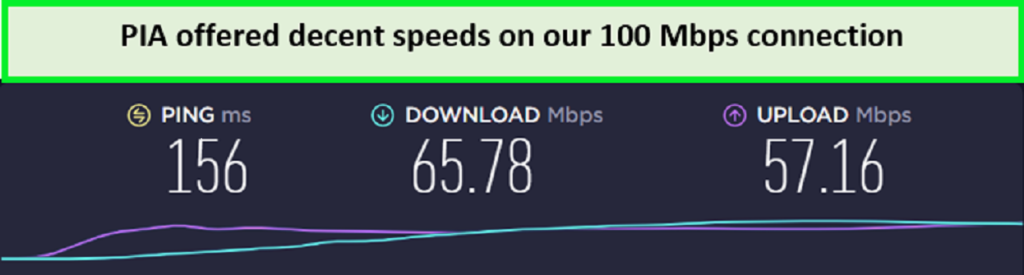
I achieved these results on a 100 Mbps connection.
PIA supports numerous streaming devices, allowing the use of PIA on Firestick in Australia for seamless streaming. It’s also compatible with Smart TVs, gaming consoles, and smartphones. For comprehensive network protection, connect PIA on a router in Australia, securing all connected devices.
Security-wise, PIA ensures my online privacy and safety with AES-256 encryption and a no-logs policy. The PIA kill switch feature is particularly reassuring, safeguarding my data even if the VPN connection drops unexpectedly.
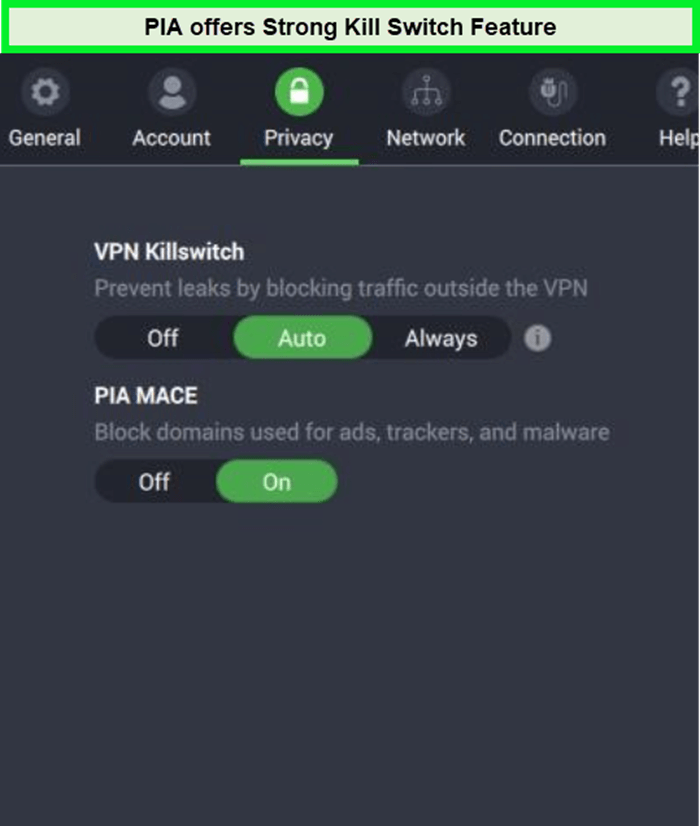
The feature prevents data leaks when the internet speed slows.
Trying out PIA’s free trial in Australia is a great way to experience its capabilities. The affordable pricing and the option to cancel if not satisfied add to its appeal.
In conclusion, as detailed in the Private Internet Access review Australia, PIA is a comprehensive choice for Australians. Its combination of server variety, speed, device compatibility, and robust security makes it an excellent VPN choice in Australia.
Exclusive Deal
VPNRanks readers can enjoy a special PIA offer! AU$3.23/mo (US$ 2.11/mo)
- SOCKS5 proxy and port forwarding
- Best VPN Australia: unlimited proxy
- Reliably unblock various streaming services
- 5 server locations in Australia
- A wide server network
- 10 simultaneous connections
- 30-day refund guarantee
- No free trial
Testing Methodology: How I Tested the Best VPNs for Australia
Here is the criteria and processes that I used to evaluate the best VPN for Australia, from conducting speed tests to performing security audits. My insight into this rigorous Australia VPN testing methodology helps you understand what makes a VPN stand out in my reviews, ensuring transparency and trust:
- Servers: The best VPN to Australia should provide an extensive server network, offering multiple server options for seamless and rapid connections. In my testing, the standout VPNs consistently offer more than 2 server locations within Australia.
- Speeds: No one wants a service that starts buffering during an intense streaming session. While VPNs can slow down speeds due to external servers and encryption, I found that the speed reduction ideally should not exceed 20-25%.
- Geo-blocking: Beyond security, the best VPN in Australia should enable access to unlimited geo-restricted content globally at high speed. Many VPN services I tested struggle to bypass geo-blocks for streaming Netflix and other restricted platforms.
- Torrenting: A good VPN should offer P2P-compatible servers for hassle-free torrent downloads. I also ensure that it provides safe and secure P2P file sharing.
- Security & Privacy: The best VPN for Australia must be secure and anonymous. I conduct a thorough review of their privacy policy and security features to ensure protection from government surveillance.
- Third-party audits: Most VPNs for Australia I list here have undergone independent safety audits. That’s why I find them reliable for use both within Australia and internationally.
- Ease of use: In the testing, I check whether the features offered by these VPNs are user-friendly. They are easily usable by a first-time VPN user without any issues.
- Money-back guarantee: A safety net to opt out of the subscription if the service doesn’t meet expectations is crucial. All the top-rated VPNs I suggest come with a tried and tested money-back guarantee.
Why do you Need a VPN for Australia?
You need a VPN for Australia because it secures your online activities and shields your data from potential threats, which is especially vital when using public Wi-Fi connections. A VPN encrypts your internet connection, ensuring a safer browsing experience. This encryption is crucial for maintaining personal privacy and preventing others from accessing your online activities, location, or identity.
Moreover, a VPN allows you to get an Australian IP address, which is essential for accessing region-restricted content. This capability is especially beneficial for blending seamlessly into the local Australian online landscape, crucial when accessing Australian websites and services while maintaining your privacy and security.
Also, In the current remote work trend, the importance of VPNs in Australia has grown, particularly for businesses. It’s an essential tool for keeping sensitive business data private from corporations, government agencies, or hackers. For Australian gamers, a VPN is invaluable in unblocking region-restricted gaming applications and safeguarding their gaming devices from cyber threats.
How do I get a Australian VPN?
Using the Australian VPN service is an easy and effective way to access websites and services like Foxtel Now, 7plus, and Kayo when traveling abroad.
Here is the step-by-step guide that helps you using Australia VPN:
- Select a VPN Provider: Opt for a VPN service with strong Australian servers, like ExpressVPN.
- Download the VPN App: Get the app for your device – compatible with smartphones, PCs, and more.
- Connect to an Australian Server: Choose from cities like Sydney, Melbourne, Adelaide, Perth, or Brisbane.
- Browse Securely: Enjoy safe access to Australian content and enhanced privacy with your new VPN connection.
Other Promising VPNs for Australia That Didn’t Make the Cut
Strong on privacy, but with no Australian servers, it’s less suitable for users needing fast local connections.
| VPN Providers | Why they did not fit for the best VPN for Australia? |
|---|---|
| Atlas VPN | It offers unlimited data and good speeds but lacks server locations in Australia, limiting access to local content. |
| PrivateVPN | Strong on privacy, but with no Australian servers, it’s less suitable for users needing fast local connections. |
| Proton VPN | High on security and privacy with no data limits, but its lack of Australian servers and slower speeds make it less ideal for Australian users. |
Data Logging & Anti-Piracy Laws in Australia
Australia’s data retention laws, known as the Metadata Retention Law, require telecommunication companies to store customers’ activity data for 2 years. This encompasses details such as time, date, location, internet and phone use duration, email, and IP addresses.
As an Australian resident, I’m cognizant that this information is readily accessible to law enforcement agencies. If you’re concerned about the risk to your identity and anonymity, using a reputable VPN like ExpressVPN can be a vital step in safeguarding them.
ExpressVPN assists by masking your identity, encrypting internet traffic, and concealing your IP address. This effectively complicates the ability of ISPs and third parties to track and collect data about your activities. When I connect to ExpressVPN, my internet traffic goes through a secure tunnel, encrypting my online activities from prying eyes, thus ensuring my security while browsing online.
However, it’s important to note that a VPN isn’t a foolproof solution. You can still be tracked through cookies or your browser. To maintain optimal online hygiene, I make it a habit to regularly clear my browser’s cache and cookies, a practice I strongly recommend for enhancing online privacy.
Can I Use a Free VPN for Australia?
Yes, you can use free VPNs like Windscribe and TunnelBear in Australia for basic online privacy and accessing geo-restricted content. The best free VPNs for Australia are suitable for occasional use, offering a chance to understand VPN functionalities without committing to a paid subscription.
However, no-cost VPNs come with drawbacks such as slower speeds, limited server options, and data caps. They may compromise your privacy by displaying ads or monetizing your data. Also, weaker encryption and privacy policies with free VPNs raise security concerns, which could lead to potential data breaches.
For a more robust and secure experience, a premium VPN like ExpressVPN is advisable. It provides fast speeds, extensive server coverage, and strong encryption. ExpressVPN’s 30-day money-back guarantee and 7-day free trial make it a risk-free choice for those seeking comprehensive VPN protection in Australia.
VPNs to Avoid in Australia
Not all VPNs for Australia can be trusted, as some may compromise your security or might not even work effectively in certain countries. Here, I’ll highlight a couple of free Australian VPNs you should avoid:
Hola: I discovered that Hola, an Israeli-based VPN provider, operates as a free Australian VPN by utilizing bandwidth from a peer-to-peer network. This poses significant security and privacy risks. There’s a potential for users to be exposed to DDoS and cyberattacks from other networks.
Based on these concerns, I strongly advise avoiding Hola. For more insights, I recommend checking out the Hola VPN Review Australia I came across.
HideMyAss: Considering the UK’s Snooper’s Charter, which requires service providers to keep detailed logs of users’ online activities, UK-based HideMyAss appears to be an unsuitable choice for anyone concerned about privacy. In my opinion, if privacy is your priority, using a VPN before accessing the web is essential.
To understand more about why this VPN might not be a good fit, you can refer to HideMyAss Review Australia, which I found informative.
FAQs – Best VPN Australia
Is it worth getting a VPN in Australia?
Yes, it is definitely worth getting a VPN in Australia. The increasing use of VPNs both within the country and by Australians traveling overseas highlights the importance of selecting a reliable service that aligns with your specific needs. Whether you aim to watch Australian TV from any location or want to protect your online privacy, especially on unsecured public Wi-Fi networks, a VPN is an essential tool.
Which VPN has the most servers in Australia?
When it comes to the VPN with the most servers in Australia, ExpressVPN stands out with its extensive network. It offer a wide range of servers specifically optimized for Australian users, providing reliable and fast connections throughout the country.
Do I really need a VPN in Australia?
Yes, you really do need a VPN in Australia. Utilizing a VPN (virtual private network) is one of the most effective methods to ensure your devices have a secure and private internet connection. A VPN not only facilitates access to restricted websites overseas but is also particularly beneficial when using public Wi-Fi networks, offering an additional layer of security against potential cyber threats.
Is VPN legal in Australia
Yes, using a VPN is legal in Australia. It’s important, however, to always adhere to the local laws of other countries when using the internet. Despite VPNs offering protection, especially on public Wi-Fi networks, there remains a possibility for others to view or access your personal information. Hence, while VPNs are legal and provide an added security layer, mindful internet usage is still advisable.
Which VPN works with Netflix Australia?
ExpressVPN is the top choice for a VPN that works effectively with Netflix Australia. Additionally, several other VPNs also perform well for this purpose.
| NordVPN | Surfshark | CyberGhost |
| PrivateVPN | ProtonVPN | IPVanish |
| Private Internet Access | Atlas VPN |
What is the fastest VPN for Australia?
The fastest VPN for Australia is ExpressVPN, renowned for its exceptional performance. It’s best in class regarding security, offering a vast array of very fast, secure VPN servers. ExpressVPN works seamlessly with streaming sites like Netflix and comes with a reassuring 30-day money-back guarantee, making it an excellent choice for users in Australia.
Which VPN changes location to Australia?
I recommend ExpressVPN for obtaining an Australian IP address. Here’s how I do it:
- Connect to the ExpressVPN mobile app or desktop client.
- Select a server located in Australia and wait for a stable connection to be established.
- Once connected, I have an Australian IP address, allowing me to enjoy unrestricted access to various websites and content specific to Australia.
Which VPN is best for Australia Reddit?
ExpressVPN is the most recommended VPN by Australians, according to Reddit. Reddit Australia confirmed that NordVPN was found to be the most reliable VPN in Australia in terms of services to local citizens while traveling abroad. It performed well for streaming Netflix, Hulu, and HBO Max. It even offered amazing deals along with a 30-day money-back guarantee, which helped seal the deal.
Is it legal to use a VPN for Netflix in Australia?
Yes, using a VPN for Netflix in Australia is legal. You can use a VPN in Australia to unblock all the geo-restricted content as well as to protect your online data. However, I only recommend using reliable VPNs like ExpressVPN.
How much does a VPN cost in Australia?
The cost of a VPN in Australia depends on the provider and the selected plan. Generally, for a quality VPN that offers robust security features, the price range typically falls between approximately $2AUD to $10AUD per month.
Which VPN has servers in Australia?
ExpressVPN boasts several dedicated servers in Australia, enabling seamless switching between virtual IP addresses. This allows you to access websites as though you were physically present in your selected server location within Australia.
Wrapping Things Up
In the ever-evolving digital landscape of the Land of Oz, online users face numerous challenges. Accessing geo-restricted content, safeguarding privacy on public Wi-Fi, and protecting against data breaches are common hurdles.
To address these concerns, I extensively tested various tools and delved into what VPN Australia is and its specific features tailored to the Australian online landscape, which I have thoroughly discussed in this article. By using the best VPN for Australia, you can enjoy secure, private, and unrestricted online experiences, thanks to the encryption of internet traffic and access to global servers.
When it comes to selecting the best Australian VPN, ExpressVPN stands out as the top choice. ExpressVPN offers a comprehensive suite of security features, an extensive server network that includes servers in Australia, and lightning-fast speeds, ensuring a seamless online experience.