How can I watch BBC iPlayer from NZ? Accessing BBC iPlayer in NZ can be challenging due to geographical restrictions. However, with the right tools and knowledge, you can enjoy your favorite BBC shows and movies seamlessly.
BBC iPlayer offers a vast library of British TV shows, movies, and live broadcasts, making it a coveted streaming service for viewers outside the UK. Unfortunately, due to licensing agreements, the service is not directly accessible in New Zealand.
This is where a VPN becomes essential. A premium VPN, like ExpressVPN allows you to connect to a server in the UK, thereby bypassing geographical restrictions and enabling you to access BBC iPlayer as if you were in the UK.
In this guide, I will cover everything you need to know about watching BBC iPlayer in NZ. From choosing the right VPN to creating a BBC iPlayer account and troubleshooting common issues, I’ve got you covered.
Whether you’re a British expat longing for a taste of home or quality British content, my guide will ensure you get uninterrupted access to BBC iPlayer.
How to Watch BBC iPlayer in NZ? [Quick Steps]
To know how can I watch BBC iPlayer from NZ? Follow the below steps to watch BBC iPlayer in NZ:
- Select a VPN like ExpressVPN.
- Download and install the VPN on your device.
- Open the VPN application and connect to a server located in the UK. (Recommended: London).
- If you don’t have an account, sign up on the BBC iPlayer’s website.
- Once connected to a UK server, you can start streaming your favorite shows on BBC iPlayer right from New Zealand.
Note: Take advantage of ExpressVPN’s special deal – get 3 extra months FREE on 12-month plan, and save 49%!
BBC iPlayer is a free British TV streaming service. However, to watch its content, you need to create an account. Hop directly to the easy steps to sign up for BBC iPlayer to get started.
Why Do You Need a VPN to Watch BBC iPlayer in New Zealand?
BBC iPlayer employs geo-restrictions to limit its content to the UK audience. Therefore, to watch its content library in New Zealand, you would need the assistance of a VPN.
A VPN masks your IP address, making it appear like you are accessing the internet from the UK. It encrypts your internet connection, protecting your data from hackers and surveillance.
With a VPN, you can enjoy a buffer-free streaming experience thanks to optimized servers.
IP addresses are associated with particular locations or countries, so if you connect to a VPN and change your IP to a British IP address, you can easily bypass the geo-restrictions in New Zealand.
This way, BBC iPlayer won’t know that you’re watching from New Zealand and allow you access to its content.
Otherwise, if you try to watch BBC iPlayer from New Zealand without a VPN, you will get the following geo-restriction error message:
“BBC iPlayer only works in the UK. Sorry, it’s due to rights issues.”
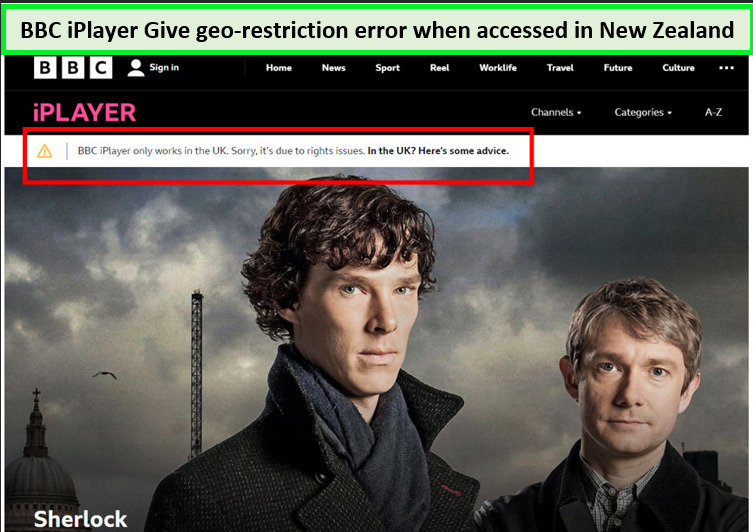
BBC iPlayer restricts its services to users in the UK only due to licensing restrictions.
Therefore, if you are in New Zealand, use a VPN like ExpressVPN to change your location to the UK and unblock BBC iPlayer. A VPN will mask your original IP address and provide you with the one acceptable by the streaming platform.
How To Sign Up For BBC iPlayer Account in NZ? [Step-by-Step Guide]
How do I make a BBC iPlayer account in New Zealand? Signing up for BBC iPlayer from New Zealand is straightforward. Even though BBC iPlayer is free, you must make an account to watch its content.
Follow these steps to sign up for BBC iPlayer while you’re in New Zealand:
- Go to the BBC iPlayer website and click the Sign-in option.
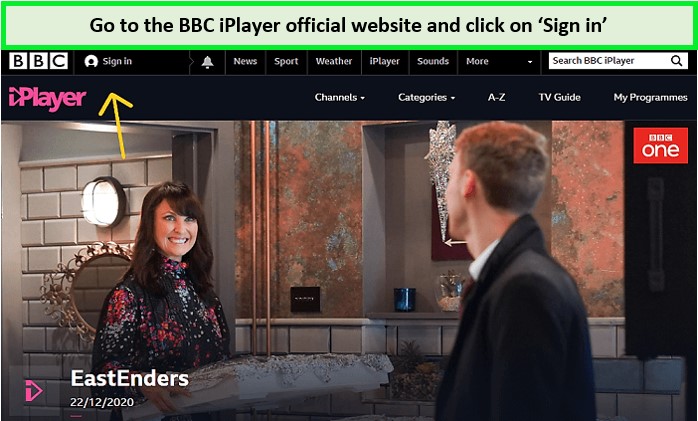
Go to the BBC iPlayer website and click on Sign in
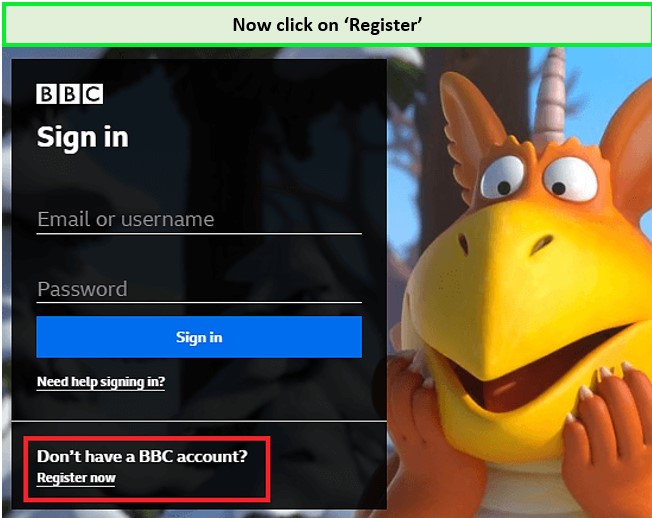
- A new window will open. Click on Register Now.

Click on ‘Register Now’
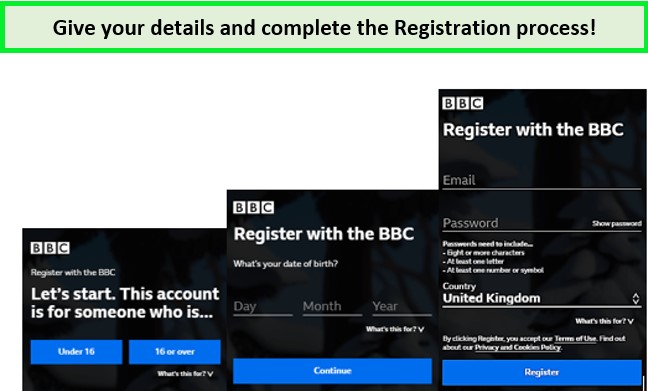
- When you register, it will ask for your personal information, including your age, date of birth, name, email ID, address, and postal code. You can use any UK postal code from the internet.
You need to provide your personal details!
- After entering all the details, click on the Register button, verify your email, and you are good to go.
Can I use a Free VPN for BBC iPlayer in New Zealand?
Yes, you can! If you’re looking for a cost-friendly option to watch BBC iPlayer in NZ, free VPNs work best for BBC iPlayer. However, the idea of using a free VPN is appealing, free VPNs often have restricted bandwidth and limited server options.
This can significantly impact streaming quality and you might encounter buffering, lower video resolutions, and potentially inconsistent access to BBC iPlayer.
What are the Best VPNs for BBC iPlayer in NZ? [Quick Comparison]
Wondering which VPN works with BBC iPlayer? Here are some of the best VPNs to watch BBC iPlayer online in New Zealand 2024:
| VPNs | Logos | Price | Server count | Simultaneous Connections | Streaming reliability | Devices Supported |
| ExpressVPN |  |
NZ$ 11.19/mo (US$ 6.67/mo) - Save up to 49% with exclusive 1-year plans + 3 months free | 3000 in 105 | 8 | Excellent | macOS, iOS, Android, Windows, Linux |
| Surfshark |  |
NZ$ 4.18/mo (US$ 2.49/mo) - Save up to 77% with exclusive 2-year plan + 30-day money-back guarantee | 3200 in 100 | Unlimited | Good | iOS, Android, Windows and Linux |
| NordVPN |  |
NZ$ 6.7/mo (US$ 3.99/mo) - Save up to 63% with exclusive 2-year plan + 3 months free for a friend | 6000 in | 6 | Good | iOS, Android, Windows and Linux |
| CyberGhost |  |
NZ$ 3.41/mo (US$ 2.03/mo) - Save up to 84% with exclusive 2-year plans + 4 months free | 11651 in 100 | 7 | Good | iOS, Android, Windows and Linux |
| IPVanish |  |
NZ$ 5.02/mo (US$ 2.99/mo) - Get 3 Months Extra + Save 77% on 2-year plan | 2200+ servers in 75+ countries | Unlimited | Good | iOS, Android, Windows and Linux |
What are the Best VPNs to watch BBC iPlayer in New Zealand?
For your ease and convenience, I have tested 40+ VPNs based on their fast speeds and unblocking capabilities in New Zealand and came across these 5 VPNs that lived up to my expectations.
Among my top picks were ExpressVPN, known for its lightning-fast speeds and excellent unblocking capabilities, and NordVPN, which Offers robust security features and a wide range of UK servers.
In addition, there’s also Surfshark, which is great for streaming with dedicated streaming modes and affordable plans.
Following are the top 5 VPNs to watch BBC iPlayer in NZ:
1. ExpressVPN – Best VPN to Watch BBC iPlayer in NZ

- Ultra-fast servers in 105 Countries
- Excellent unblocking capability for Netflix, Hulu & more
- Best-in-class encryption trusted security, and advanced protection features that block ads, trackers, and harmful sites.
- Connect up to 8 devices simultaneously
- 24/7 customer support through live chat
- 30-day money-back guarantee
ExpressVPN is the best choice to watch BBC iPlayer from New Zealand. Its unmatched ability to bypass geo-restrictions, combined with exceptional streaming speeds, makes it one of the best BBC iPlayer VPN in New Zealand.
ExpressVPN offers a network of 3000+ servers in 105 countries, including multiple servers located in Uk.
For the best experience, I recommend using ExpressVPN’s UK servers located in Docklands, London, and Wembley. These servers are optimized for streaming, ensuring you get high-quality video without buffering.
With these UK-based servers, you will have no trouble watching BBC iPlayer or other Euro channels in NZ. During testing, I connected to ExpressVPN’s London server to access BBC iPlayer in a matter of minutes.
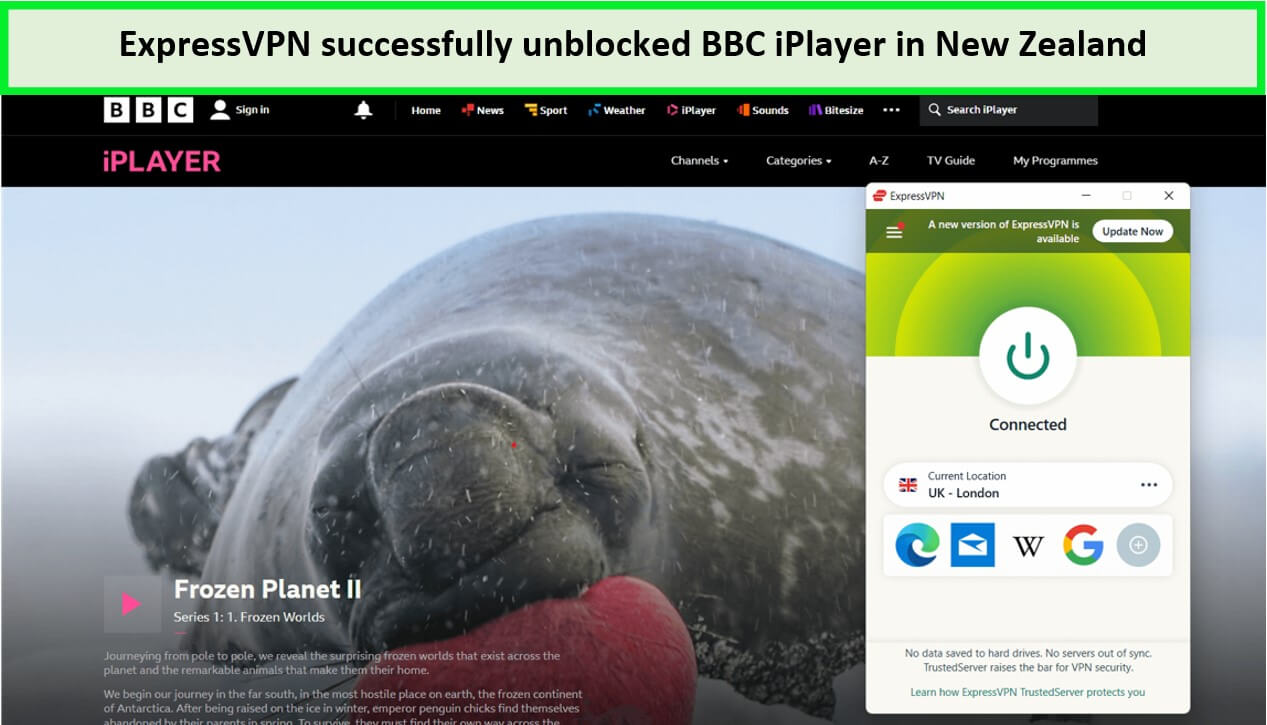
ExpressVPN swiftly unblocked BBC iPlayer in NZ
ExpressVPN is not just about BBC iPlayer. Its servers boast impressive speeds, making it ideal for accessing other geo-restricted streaming platforms as well.
With ExpressVPN, expect minimal lag and fast load times, enhancing your streaming experience across various platforms.
On a 100 Mbps base connection, the ExpressVPN speed test showed a fast download speed of 87.18 Mbps and an upload speed of 52.13 Mbps.
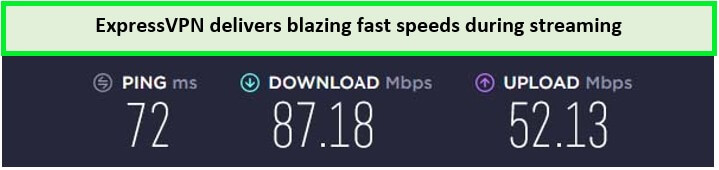
ExpressVPN speed results on a 100 Mbps base connection.
Apart from servers and speed, I was really impressed with ExpressVPN’s device compatibility and apps. It supports 8 simultaneous connections.
Aside from mainstream devices like Samsung TVs, Roku, and FireStick, there is a MediaStreamer Smart DNS feature available for devices that don’t have native VPN support, like Apple TV and gaming consoles.
The VPN also offers apps for various operating systems like Windows, Linux, iOS, and more. Do check out my ExpressVPN review NZ before making your purchase to ensure your satisfaction.
Security is paramount with ExpressVPN. It offers AES-256 encryption, a no-logs policy, along with ExpressVPN’s kill switch which ensures that your data remains protected during temporary VPN connection drops.
Moreover, it provides TrustedServer technology, DNS leak protection, split tunneling, and more. So, whether you’re streaming or browsing, your data is protected from prying eyes.
For more details, don’t hesitate to check out my blog on how does ExpressVPN work with BBC iPlayer in New Zealand?
Exclusive Deals:
ExpressVPN is available for NZ$11.19/mo (US$ 6.67/mo) - Save up to 49% with exclusive 1-year plans + 3 months free. There is also a 30-day money-back guarantee during which you can test the service. There’s a 7-day free trial in New Zealand, too, for mobile subscribers.
- Fast-speed British servers
- Unblocks BBC iPlayer instantly
- Consistent and fast connections
- 24/7 live chat support
- No-logging policy
- Slightly pricier
2. Surfshark – Budget-friendly VPN to Watch BBC iPlayer in NZ

- 3,200+ servers in 100 countries
- RAM-only servers (no hard disks)
- Unlimited simultaneous connections
- Unblocks Netflix and More
- 24/7 Customer Service
Surfshark emerges as the most budget-friendly VPN for streaming BBC iPlayer in NZ, offering an unbeatable combination of affordability and performance. It’s an ideal choice for those who want to enjoy British TV without breaking the bank for just NZ$ 4.18/mo (US$ 2.49/mo) - Save up to 77% with exclusive 2-year plan + 30-day money-back guarantee.
It offers 3200+ servers in 100 countries and more than 3+ server locations in UK. For optimal streaming of BBC iPlayer, Surfshark’s UK servers in London, Edinburgh and Manchester come highly recommended.
These servers are specifically optimized for streaming, ensuring you can watch your favorite shows without interruptions or buffering.
With Surfshark, you can easily change your IP address to the UK – Edinburgh server to ensure all the claims are true. Afterward, I opened the service and could easily stream BBC iPlayer live.
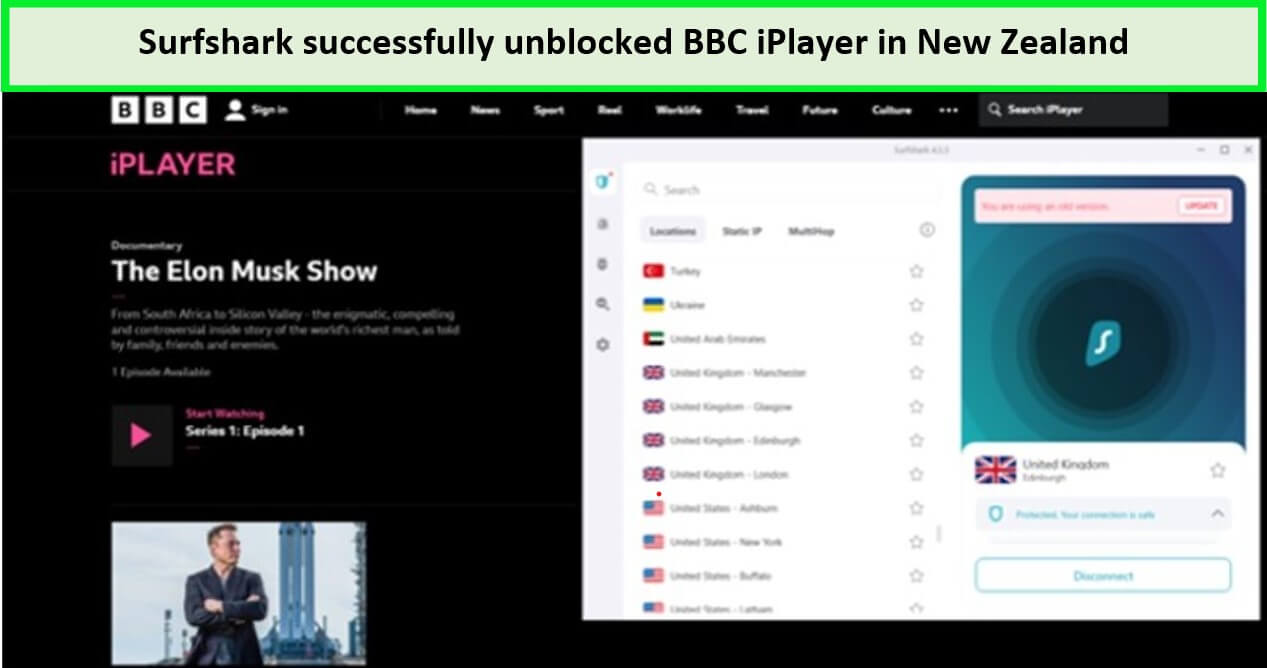
I was able to unblock BBC iPlayer with Surfshark.
Surfshark isn’t just great for BBC iPlayer; it’s also effective for accessing other geo-restricted streaming platforms in New Zealand, ensuring a smooth and enjoyable viewing experience.
During Surfshark speed testing, it offered me a download speed of 81.32 Mbps and an upload speed of 76.12 Mbps, which was great considering my base connection of 100 Mbps.
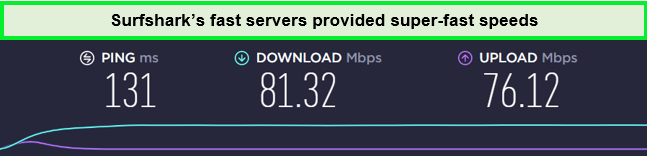
Surfshark speed test result on a 100 Mbps connection.
The biggest perk of having Surfshark is that it offers unlimited simultaneous connections. With a single account, you can have as many device connections as you want and share the account with your friends and family in New Zealand.
Moreover, it is the best multi-device VPN with apps for all major operating systems like Windows, Android, iOS, and popular devices like Firestick, and Smart TVs. For devices that don’t have native VPN support, like Apple TV and gaming consoles, there’s a Smart DNS feature as well.
Security is a top priority with Surfshark. It offers AES-256 encryption, a strict no-logs policy, Kill Switch, and a MultiHop feature, allowing you to connect via multiple countries simultaneously for added security.
It also offers a DNS leak protection and Camouflage Mode that hides users’ VPN traffic, making it look like regular internet traffic. This ensures that your online activities, whether streaming or browsing, are always secure.
Despite its affordable plans, Surfshark also comes with a 30-day money-back guarantee and a 7-day free trial in New Zealand, so you can easily test it with BBC iPlayer.
Exclusive Deals:
VPNRanks readers can get at NZ$ 4.18/mo (US$ 2.49/mo) - Save up to 77% with exclusive 2-year plan + 30-day money-back guarantee! All plans are covered by a 30-day money-back guarantee.
To find out more about this service, explore my Surfshark review NZ.
- Affordable pricing
- Unlimited simultaneous connections
- DNS leak protection and no-logging policy
- Unblocks BBC iPlayer along with many UK-based channels
- Accepts cryptocurrency payments
- Some servers are subject to slow speeds
3. NordVPN – Largest Server VPN to Watch BBC iPlayer in NZ

- 6000 servers in 60 countries
- WireGuard protocol (NordLynx)
- 6 Simultaneous Connection
- DoubleVPN
- 24/7/365 Live Chat Support
- 30 Days Money Back Guarantee
For viewers in New Zealand eager to access BBC iPlayer, NordVPN stands out as the safest VPN option. Renowned for its advanced security features, NordVPN ensures that your streaming activities are not only successful but also highly secure.
NordVPN NZ offers 6000+ servers in 61 countries including 440+ servers in the United Kingdom. NordVPN’s UK servers, particularly those in London, Edinburgh, and Glasgow, are optimized for streaming.
They offer a reliable connection to BBC iPlayer, ensuring that viewers in New Zealand can enjoy their favorite British shows without any lag or buffering.
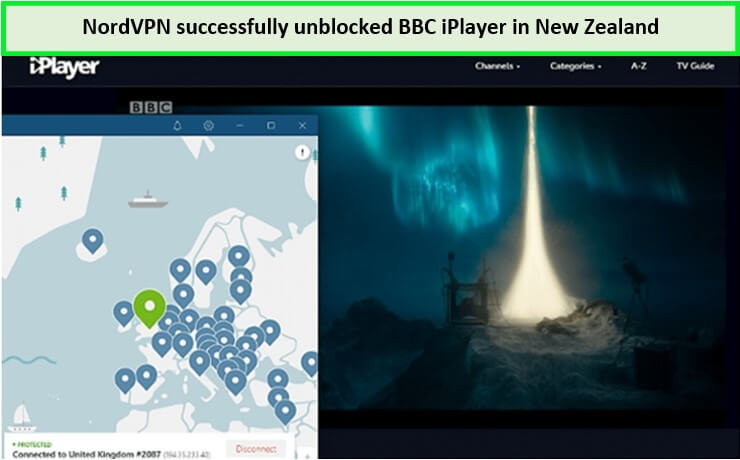
NordVPN unblocked BBC iPlayer from New Zealand.
NordVPN excels in providing high-speed streaming, essential for a smooth viewing experience. This speed is not limited to BBC iPlayer; it extends to other geo-restricted streaming platforms in New Zealand.
NordVPN speed test results showed a fast speed of 83.82 Mbps on a 100 Mbps base connection along with 44.64 Mbps upload speed, which was more than enough for streaming in 4K.
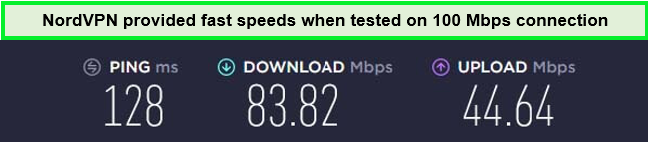
NordVPN offers super-fast speed on its servers for Ultra-HD streaming.
This VPN supports 6 simultaneous device connections on a single account, and there are intuitive apps for various operating systems like Android, iOS, macOS, Windows, etc. It is also compatible with various devices like Amazon Firestick, Roku, gaming consoles, and Smart TVs.
NordVPN’s commitment to security is unmatched. It offers military-grade AES-256 encryption, a kill switch, Double VPN for an extra layer of protection, and a strict no-logs policy.
It also provides a Threat Protection feature, and a Dark web Monitor, and that protects your data during temporary VPN outages. These features ensure that your online presence is anonymous and secure, whether you’re streaming or browsing.
Exclusive Deals:
It is available for NZ$ 6.7/mo (US$ 3.99/mo) - Save up to 63% with exclusive 2-year plan + 3 months free for a friend. Just like other VPN services, it also offers a 30-day money-back guarantee to its users in case you want to try it risk-free.
Read my in-depth NordVPN review NZ for more information about this provider.
- Over 5000 servers, including 440+ in UK
- Reliably unblocks BBC iPlayer and other UK TV channels
- Fast streaming speeds
- Robust security and privacy features
- 24/7 live chat support
- The desktop app takes a lot of screen space
4. CyberGhost – User-friendly VPN to Watch BBC iPlayer in NZ

- 11651 Servers Servers in 100 Countries
- 7 Simultaneous Logins
- 45 Days Money-Back Guarantee
- Strict No Logs Policy
- 24/7 Live Chat Support
- Strong Protocols & Encryption
For those in New Zealand looking to unblock BBC iPlayer, CyberGhost stands out as the most user-friendly VPN. Its intuitive interface and easy setup make it ideal for both VPN novices and seasoned users who want hassle-free access to their favorite British content.
CyberGhost has a large network of 11651+ servers in 100 countries, including 700+ servers in the United Kingdom, with servers in London and Manchester, that are tailored for streaming.
They provide a stable and fast connection to BBC iPlayer, ensuring that viewers in New Zealand can enjoy a seamless streaming experience.
During testing, I connected to CyberGhost’s London – UK server, and it instantly unblocked the service.
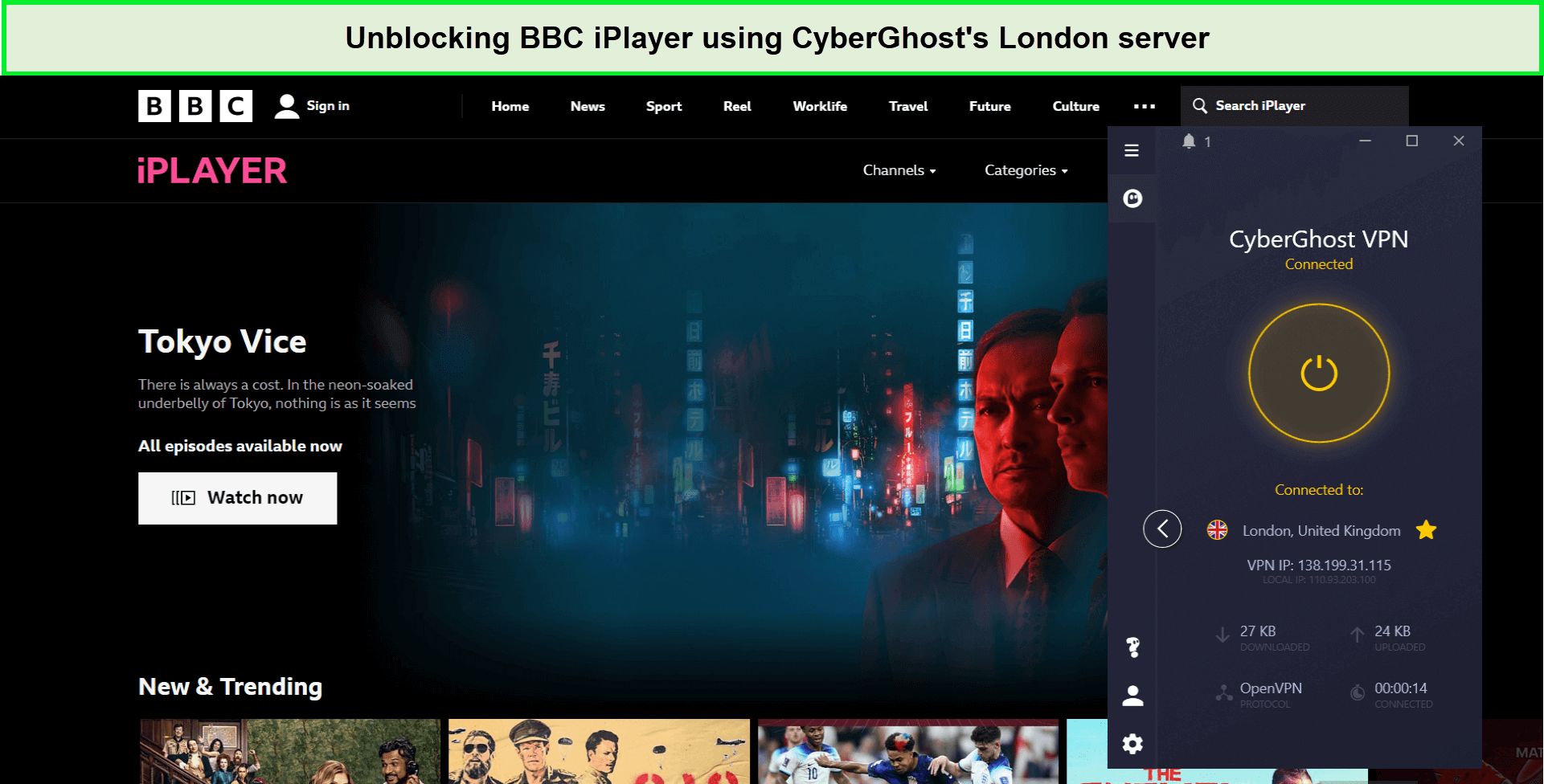
With CyberGhost’s BBC iPlayer optimized server, I could easily unblock the service and stream shows.
CyberGhost is not just about user-friendliness; it also offers impressive streaming speeds. This makes it a great choice for accessing other geo-restricted streaming platforms in New Zealand.
During CyberGhost speed testing, it gave me a download speed of 75.47 Mbps and an upload speed of 69.34 Mbps on a 100 Mbps base connection. There was a speed drop of around 25-30%, but it did not hamper my streaming, as I had a bufferless experience.
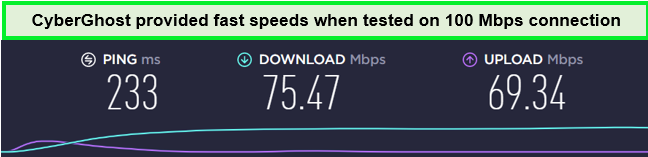
CyberGhost servers offer fast speed for streaming and browsing without any lag.
CyberGhost allows up to 7 device connections simultaneously so that you can share one account with your friends and family under one subscription. It also supports various operating systems such as Windows, Android, iOS, macOS, and more.
It is also compatible with devices like Apple TV, Firestick, gaming consoles, and more.
CyberGhost takes your online security seriously. It offers robust AES-256 encryption, a strict no-logs policy, and an automatic kill switch. These features ensure that your online activities remain private and secure, providing peace of mind while streaming.
Exclusive Deals:
It is available for only NZ$ 3.41/mo (US$ 2.03/mo) - Save up to 84% with exclusive 2-year plans + 4 months free. Unlike other VPNs, it offers an extensive 45-day money-back guarantee, meaning you can test it for over a month and get your refund if you are unsatisfied.
Find out more about this VPN in my in-depth CyberGhost review.
- Streaming dedicated servers for BBC iPlayer
- Robust security and privacy features
- Consistently unblock BBC iPlayer and other UK-based streaming services
- Largest server fleet across the globe
- 24/7 live chat support
- Some of its servers are slow
5. IPVanish – Reliable VPN for Streaming BBC iPlayer in NZ

- PPTP, L2TP/IPSec & OpenVPN protocols
- 40,000+ IPs & 1000+ servers in 60+ countries
- 10 Multi logins
- 7-Day Money Back Guarantee
- 256bit AES encryption
IPVanish stands out as one of the most reliable VPNs for streaming BBC iPlayer in NZ, known for its consistent speeds and top-notch video quality.
It’s the ideal choice for viewers in New Zealand who prioritize a smooth and uninterrupted streaming experience.
IPVanish offers a server network of 2200+ servers in 75+ countries and 100+ servers in the UK, particularly those in London and Manchester, are highly recommended.
These servers are optimized for streaming, ensuring you can enjoy your favorite British shows with minimal buffering and high-quality resolution.
One of the reasons behind its reliability is its consistency! During testing, I tried multiple servers and found all working with BBC iPlayer.
However, just to name one, IPVanish’s Birmingham server outperformed in my testing, giving me full access to BBC iPlayer content without any issues.
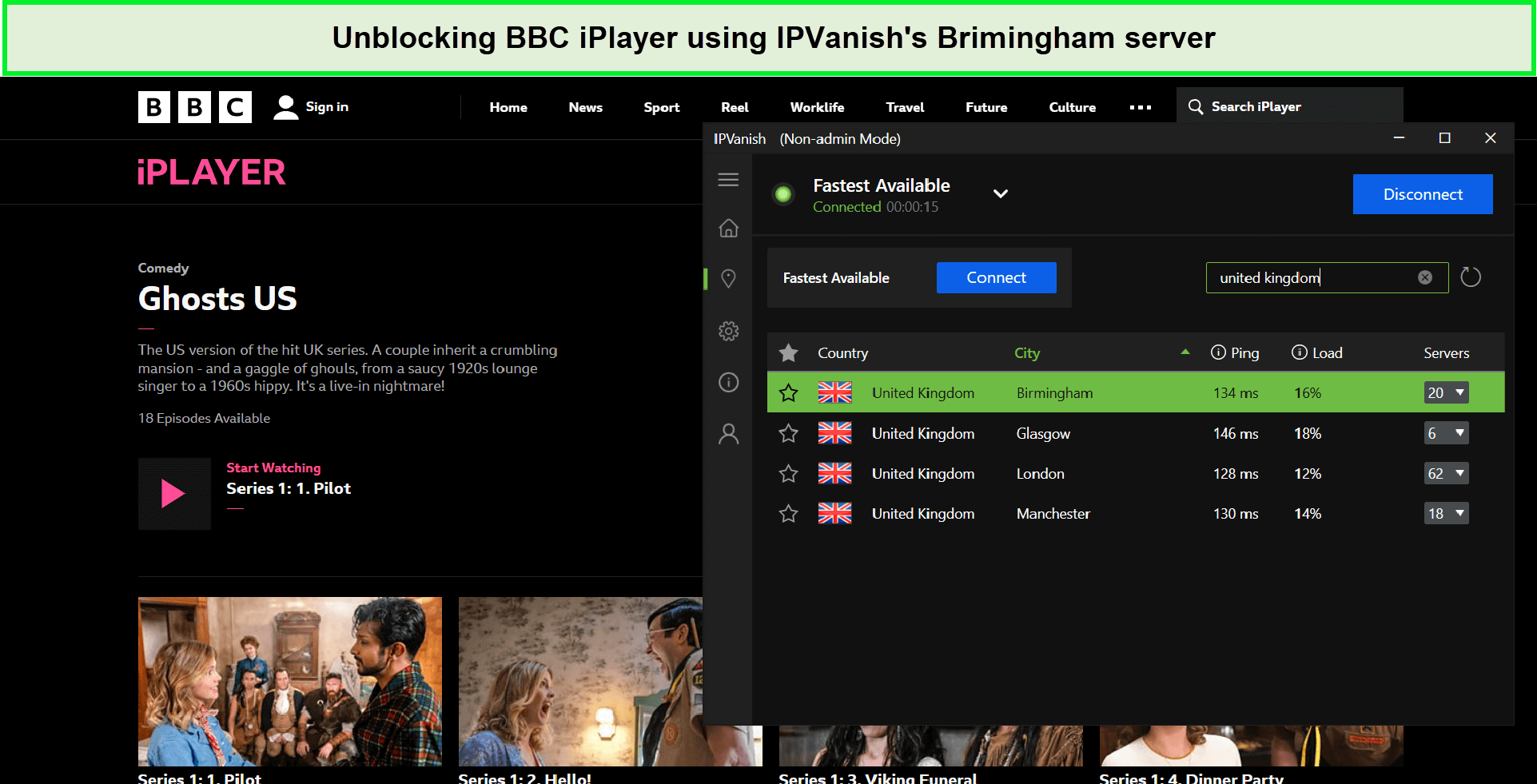
I had no trouble bypassing BBC iPlayer’s geo-restrictions with IPVanish.
IPVanish isn’t just reliable for BBC iPlayer; it also excels in accessing other geo-restricted streaming platforms in New Zealand.
IPVanish maintains excellent streaming speeds, ensuring a seamless viewing experience across various content platforms.
While streaming BBC iPlayer with IPVanish, I did not experience any buffering or lag. The IPVanish speed test results recorded an average download speed of 75.12 Mbps and an upload speed of 39.48 Mbps on a 100 Mbps base connection.
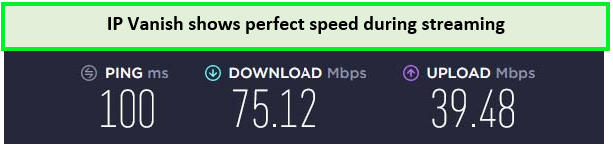
IPVanish Speed Test Result!
In terms of connectivity, IPVanish supports unlimited simultaneous device connections per account.
There are apps available for all popular operating systems, such as Android, Windows, macOS, iOS, and various devices like gaming consoles, routers, Amazon Firestick, and more.
With IPVanish, your online security is a top priority. The VPN offers strong AES-256 encryption, a strict no-logs policy, and an automatic kill switch, ensuring your streaming and browsing remain private and secure.
Not just this, IPVanish also offers other advanced security features such as continuous file syncing, data sharing controls, AES-256-bit encryption, unmetered device connections, no data transfer caps, and so much more.
Exclusive Deals:
IPVanish is quite affordable, available at a price of NZ$ 5.02/mo (US$ 2.99/mo) - Get 3 Months Extra + Save 77% on 2-year plan on its annual plan, and offers a 30-day money-back guarantee in case you wish to cancel the subscription after an unsatisfactory experience for Kiwis.
To learn more about this service, you can always read my IPVanish Review.
- Unlimited simultaneous connections
- Fast and consistent streaming speeds
- Consistently unblock BBC iPlayer while in New Zealand
- 24/7 live chat support
- Some of its servers are slow
How to Choose the Best VPN for Accessing BBC iPlayer in New Zealand?
Do you want to know which VPN is ideal for watching BBC iPlayer while staying in New Zealand? There is a testing criteria listed below, based on which I picked my top VPNs to unblock BBC iPlayer in NZ.
- The VPN can give optimum speed while streaming BBC iPlayer in NZ.
- It is smoothly able to unblock BBC iPlayer while in New Zealand and other geo-restricted areas.
- It is compatible with major operating systems such as macOS, iOS, Android, Windows, and Linux.
- It allows 5 or more simultaneous connections with a single subscription account.
- It has strong encryption protocols like AES 256-bit encryption and IP/DNS leak protection to keep the communications encrypted.
How Much Does BBC iPlayer Account Cost in New Zealand?
Are you wondering, is there a monthly fee for BBC iPlayer? No, there is no monthly fee. A BBC account is absolutely free to sign up for.
The only associated cost is a TV license, which costs NZ$249.99/yr. A TV license fee is mandatory to watch television legally in the UK. But being in New Zealand, you can easily get evade it via a VPN.
BBC iPlayer is a free streaming service. However, your mobile or internet operator may charge for the data you use on their network. You can contact your mobile/network provider to inquire about the data cost.
Also, if you ever change your mind, you can easily cancel your BBC iPlayer account without using a password or an email address.
So, if you have been wondering, how can I watch BBC in New Zealand? Well, you can simply connect to ExpressVPN in New Zealand and enjoy unlimited access to BBC iPlayer without worrying about registration charges.
What Channels does BBC iPlayer have?
What channels does BBC iPlayer have? There are a variety of channels available on BBC iPlayer, such as:
| BBC News | BBC Alba | CBeebies |
| CBBC | BBC Parliament | BBC Entertainment |
| BBC Earth | BBC Brit | BBC Four |
| BBC Three | BBC Two | BBC One |
What to Watch on BBC iPlayer in New Zealand in 2024?
Are you wondering what to watch on BBC iPlayer in NZ? There is a ton of content that is available on BBC iPlayer from all the different genres such as drama, film, Reality TV, Game shows, documentaries, and sports.
I have listed my top picks; check those out over the weekend.
What Shows can I watch on BBC iPlayer?
Here is a list of the top shows on BBC iPlayer that you can watch on BBC iPlayer in 2024:
| Extras | Doctor Who The Infinite Quest | Sherlock All Seasons |
| Drugs Map of Britain | Murder Trial | The Bold Type |
| Wolf | The Met: Policing London Season 4 | Death on the Tyne |
| The Power of Parker | The Night Manager | David Wilsons Crime Files |
| Liz Bonnin’s Wild Caribbean | Strictly Come Dancing 2024 | The Australian Wars |
What Movies and Documentaries can I watch on BBC iPlayer?
Wondering what films are currently available on BBC iPlayer? Here is a list of the top best horror movies and documentaries that are currently available on BBC iPlayer in 2024:
|
Top Movies and Documentaries on BBC iPlayer |
|
| 99 Homes | Shakespeare: Rise of A Genius |
| The Train | Big Oil v The World |
| Panorama Boohoo’s Broken Promises | Dark Land: The Hunt for Wales’ Worst Serial Killer |
| Roman Kemp The Fight For Young Lives | Your Anti-Bullying Week Stories |
| The BFG | The Shining |
| The Ones Below | Hocus Pocus |
| The Billion Dollar Scam | Coco |
What Sports can I watch in BBC iPlayer in 2024?
Here is a list of all the upcoming and ongoing best BBC iPlayer sports in New Zealand that you can watch in 2024:
| Ospreys vs Cardiff Rugby | Dragons v Scarlets | Tonga vs England |
| Scottish Women’s Premier League | Royal Ascot 2024 | World Series 2024 |
| Women’s Ashes 2024 | The Ashes 2024 |
What’s New on BBC iPlayer in February 2024?
Here’s a list of the latest releases for you to enjoy on BBC iPlayer in February 2024:
| Six Nations League | Six Nations Under 20s Championship | Fermanagh vs Kildare |
| West Ham Women vs Arsenal Ladies | Africa Cup of Nations Quarter Final | Wales U20 vs Scotland U20 Six Nations |
| France U20 vs Ireland U20 Six Nations | Cape Verde v South Africa AFCON Quarter Final | Italy vs England Six Nations |
| Domino Day Series 1 | Death in Paradise Season 13 | Dr Xand’s Con or Cure Series 2 |
| Click | All Passion Spent | Rick Stein’s India |
| Pilgrimage | Scam Interceptors Series 2 | Russell Maliphant’s Vortex |
| National Lottery’s Big Night of Musicals | Eurovision Song Contest 2024 – The Draw | Lu & the Bally Bunch |
| Jules and Greg’s Wild Swim | England’s Forgotten Queen: The Life and Death of Lady Jane Grey | Putin vs the West: At War |
| The Traitors Australia All Episodes |
What Devices are Compatible with BBC iPlayer NZ?
BBC iPlayer is available on a broad range of devices, including tablets, mobile phones, personal computers, and smart televisions. Check out the full list below:
| Windows and Mac | Chromecast |
| Android | Firestick |
| Sky | BBC iPlayer on PS5/PS4 |
| iOS | iPad |
| Apple TV | Xbox |
| Roku | Smart TV (for specific brands and supported devices, check this list) |
| Browsers |
How to Watch BBC iPlayer in NZ on Android?
Follow these steps to download and watch BBC iPlayer on Android device in New Zealand:
- Subscribe to a reliable VPN service (I recommend ExpressVPN in New Zealand).
- Download a VPN and set it up on your device.
- Connect to a UK server to get a British IP address. (Recommended: London)
- Create a new Google Account with the UK set as the region.
- Now, log out of your existing ID and log in with the new ID with the UK region.
- Visit Google Play Store and search for BBC iPlayer app.
- Tap on the Install button on the screen, and the app will start downloading right away.
- Once downloaded, sign up for a free account, and enjoy watching BBC iPlayer free of cost.
For more information, you can read my guide on BBC iPlayer on Android in New Zealand.
How to Get BBC iPlayer in NZ on iOS?
Can you watch BBC iPlayer on iPhone? Follow these steps to download BBC iPlayer app in New Zealand on your iOS device:
- Subscribe to a reliable VPN for BBC iPlayer (I recommend ExpressVPN in New Zealand).
- Download the VPN on your device and log in.
- Connect to a UK server. (Recommended: London)
- Go to Settings on your iPhone > click on your Apple ID profile.
- Click on the Media and Purchases option > tap Country/ Region > select the United Kingdom, and click Agree.
- Enter the required details, including a UK address and a phone number. You can provide any random address from the internet because Apple doesn’t verify it.
- After changing the region to the UK, go to the App Store and download the BBC iPlayer app.
- Sign in and watch BBC iPlayer on iPad/iPhone in NZ.
How to Watch BBC iPlayer on Windows & Mac?
Can I watch BBC iPlayer on my Mac? You can watch BBC iPlayer on your Mac and Windows. Follow the steps below to watch BBC iPlayer on Windows and Mac.
- Subscribe to a premium VPN service (I recommend using ExpressVPN in New Zealand because of its fast speed).
- Download and install the VPN app on Windows & Mac.
- Open the VPN app, and connect to a UK server (Recommended: London).
- Now go to BBC iPlayer website.
- Login with your credentials.
- Start streaming your favorite content of BBC iPlayer on Windows and Mac.
How to Use BBC iPlayer in NZ on Roku?
Follow these steps to watch BBC iPlayer on your Roku account.
- Set up a VPN on your router. ExpressVPN is my top choice because of its easy router setup.
- Connect to a UK server.
- Connect your Roku to the VPN-enabled router, and connect it to your TV.
- Sign in to your Roku account.
- Visit Roku’s Channel Store and search for BBC iPlayer app.
- Install the app, sign in, and start watching BBC iPlayer in New Zealand.
Note: After setting up a VPN on your router, make sure that the Roku is connected to the same router connection. Otherwise, iPlayer will not allow you to access the content.
How Can You Watch BBC iPlayer on Firestick in New Zealand?
Can I watch BBC iPlayer in New Zealand on Firestick? Yes, you can! To watch BBC iPlayer on Firestick in New Zealand, just follow the mentioned below easy steps:
- Turn on your Firestick and click on the Apps from Unknown Sources. Make sure that it’s on. The option is located under Settings > Device > Developer Options
- If you don’t have the Downloader app, you must download it.
- Download ExpressVPN
- Connect to UK server (Recommended: London)
- Restart the Amazon Firestick if you turned on the “Apps from Unknown Sources” setting
- Search the BBC iPlayer app and install it
- Launch the BBC iPlayer app and enter your login credentials
Note: Read my detailed guide on BBC iPlayer on Firestick in New Zealand to know more.
How to Cast BBC iPlayer in New Zealand on Chromecast?
To watch BBC iPlayer on Chromecast in New Zealand, just follow the below-mentioned easy steps:
- Download and set up ExpressVPN.
- Choose a server in the UK (Recommended: London)
- Open the BBC iPlayer on your device
- Find a title, open it, and wait for the cast icon to appear
- Click on the cast icon, and that’s it.
Now, if you want to get BBC iPlayer on Chromecast from a laptop or desktop, here are the steps:
- Download and set up ExpressVPN.
- Choose a server in the UK (Recommended: London)
- Enable the Chromecast extension. If you don’t have it, download and install it
- Go to bbc.co.uk and sign in
- Choose a title and click on the cast icon
Note: Read my detailed guide on BBC iPlayer on Chromecast in New Zealand to know more.
How To Watch BBC iPlayer in NZ on Apple TV?
Can you get BBC iPlayer on Apple TV? Yes, you can get and watch BBC iPlayer on Apple TV in New Zealand. I have mentioned below easy steps which you can follow:
- Connect your Apple TV to your TV
- Open the Region section in the device’s settings. Go to General > Region
- Select the UK and provide all the necessary details
- Go to the App Store, look for the BBC iPlayer app, and download it
- Download and set up ExpressVPN on your router.
- Connect the Apple TV to the router on which you installed the VPN
- Open the BBC iPlayer app and sign in
- Enjoy!
Start following the simple steps above and you will get to watch BBC iPlayer on Apple TV!
Can I Watch BBC iPlayer from NZ on Smart TV?
I have mentioned below easy steps which you can follow to watch BBC iPlayer in NZ on Smart TV:
- Change the region of your smart TV from New Zealand to UK. If you don’t know how to do that, visit the official website of your TV’s brand.
- Download and set up ExpressVPN on your router.
- Connect your smart TV to the router on which you installed the VPN
- Look for the BBC iPlayer app and add it to your list of channels
- Open the BBC TV app, sign in, and enjoy your TV shows on BBC iPlayer.
Note: Follow my guide about BBC iPlayer on Smart TV to read more information.
Why Can’t I Watch BBC iPlayer even with VPN?
Here are some possible reasons with possible solutions as to why your VPN isn’t working with BBC iPlayer:
-
- The BBC has blocked the VPN’s servers- Try using a different server.
- The GPS location of your device and the IP address location do not match- Try to connect from a laptop or PC when the IP address is the same, and you will not face the issue of a different GPS location on the device.
- BBC iPlayer has placed a cookie on your device to inform its services that you are not in the United Kingdom- Delete the cookies on your browser and clear your browsing history.
- Your VPN uses virtual servers. BBC iPlayer may see the server’s exact location- Switch to a VPN that offers more servers to avoid proxy error.
- Your true IP address is being exposed- To avoid this. Enable the leak prevention option in your VPN’s options menu.
BBC iPlayer in New Zealand – FAQs
How can I watch BBC iPlayer for free in NZ?
Accessing BBC iPlayer for free from New Zealand can be challenging due to regional restrictions. While some free VPNs may be available, they often lack the speed and reliability needed for smooth streaming. For a more consistent experience, consider using a reputable paid VPN like ExpressVPN, which offers a trial period or a money-back guarantee to explore the service risk-free.
How can I watch British shows in NZ?
To watch British shows in New Zealand, use a reputable VPN like ExpressVPN. Connect to a UK server to bypass regional restrictions and gain access to streaming services like BBC iPlayer. This ensures you can enjoy a wide range of British content from the comfort of your location in NZ.
Is using VPNs illegal to watch BBC iPlayer NZ?
No, it is not illegal to use a VPN to watch BBC iPlayer in New Zealand. Since BBC iPlayer is a geo-restricted service, VPNs (Virtual Private Networks) allow viewers to watch BBC iPlayer in New Zealand. All you need to do is set up a VPN on your computer or router, connect to a British server, sign up for a BBC iPlayer account, and enjoy streaming in New Zealand.
How do I get around BBC VPN block in New Zealand?
It is entirely easy to get around the VPN block. Follow the below steps:
- Subscribe to a premium VPN service such as ExpressVPN that guarantees high speed while streaming BBC iPlayer with effective security protocols.
- Disconnect your current server and connect to another server.
- Clear the browser history and delete cookies. Now, try to reconnect.
How do I watch BBC iPlayer on a non-smart TV in New Zealand?
BBC iPlayer has apps for all connected TVs, game consoles, set-boxes, and streaming platforms like Virgin Media, Freesat, and YouView. You don’t need a smart TV to watch BBC iPlayer New Zealand. You can watch BBC iPlayer on a normal TV by connecting your PlayStation or Xbox console.
Here’s how:
- Connect your device with a VPN-enabled router.
- Launch the app and follow the on-screen instructions.
- Hit the red button on your remote from a BBC channel.
- Enjoy streaming.
Final Thoughts
That is everything you need to know about how to watch BBC iPlayer in NZ free of cost. Due to geo-restrictions, BBC iPlayer is only available inside the UK. To access your favorite shows on BBC iPlayer, all you need is a reliable VPN.
Unfortunately, streaming services in New Zealand, like BBC iPlayer are getting better at detecting and blocking VPNs. Luckily, there are trustworthy VPNs like ExpressVPN that can unblock BBC iPlayer VPNs and offer fast speed so you can enjoy high-quality videos.