
Surfshark uses fast and high-quality servers that are optimized for security and speeds in UK. All of their servers have at least a 1Gbps connected port, meaning that a lot of traffic can be handled by the physical connection. A few even go to 2x10Gbps/server.
Surfshark is one of the most budget-friendly and top-performing VPNs, particularly when compared to the industry’s leading choices in the UK. Remarkably, this VPN offers impressive speed and efficiency in the UK, making it a strong contender for the title of the best VPN for UK.
When we conducted our Surfshark speed test in UK, we noticed that its uploading speeds were not as impressive as its downloading speeds. But it didn’t really matter because this is the case with almost every VPN. However, in terms of real-world performance, Surfshark is fast, and you might not even notice it running in the background.
To present you with accurate and comprehensive speed test results for Surfshark in UK, we used our internet connection of 100 Mbps and conducted a Surfshark speed review on eleven (11) different servers.
So, without any further delays, let’s get testing!
Surfshark Speed Test Results in UK
If you’re in a hurry and unwilling to stick around for the whole article, then fret not and check out this brief table in which we’ve compiled the Surfshark speed test in UK results for our users:
| Country Servers | Download Speed | Upload Speed | Pings |
|---|---|---|---|
| Australia – Perth | 76.54 Mbps | 60.43 Mbps | 132 ms |
| Canada – Montreal | 77.17 Mbps | 55.32 Mbps | 265 ms |
| Germany – Frankfurt | 72.68 Mbps | 59.21 Mbps | 117 ms |
| Hong Kong | 70.91 Mbps | 62.11 Mbps | 264 ms |
| India | 76.26 Mbps | 54.38 Mbps | 211 ms |
| Italy – Milan | 80.88 Mbps | 50.67 Mbps | 263 ms |
| The United Kingdom – London (local server) | 82.36 Mbps | 55.15 Mbps | 139 ms |
| The United States – New York | 83.27 Mbps | 65.59 Mbps | 251 ms |
| United Arab Emirates | 78.16 Mbps | 67.37 Mbps | 234 ms |
| France – Paris | 77.69 Mbps | 56.89 Mbps | 200 ms |
| The Netherlands | 80.17 Mbps | 61.28 Mbps | 165 ms |
For a detailed review of the VPN’s speeds, check out our in-depth Surfshark speed comparison in UK below.
Surfshark Speed Test in UK (In-Depth) for 2022
Before we jump right into the results, we must notify one important thing. We run a blazing-fast internet connection, way faster than any VPN can normally match. This means that the speeds you’d see below for each server will be the maximum you should expect – our connection speed doesn’t cap them.
Also, even though we used its best WireGuard protocol during testing in UK, Surfshark failed to show stellar performance. We discovered that it reduced our download speed by 30% and upload speed by 50.21%, respectively. The download percentage isn’t bad, but the upload results can be improved. Well, it wasn’t expected by Surfshark’s fastest protocol now, was it?
To see how Surfshark performs on multiple servers, we connected to eleven (11) server locations including UK server, as mentioned earlier. Here’s how our testing went:
1. Australia – Perth
| Without VPN | With VPN |
|---|---|
 |
 |
Now that you have the screenshots of the Surfshark speed test results in UK, let’s analyze them quickly:
| Metrics | Speeds without VPN | Speeds with VPN |
|---|---|---|
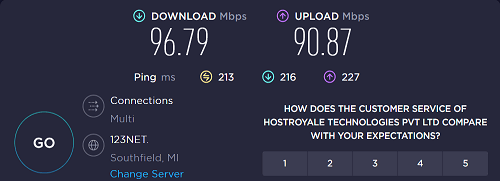
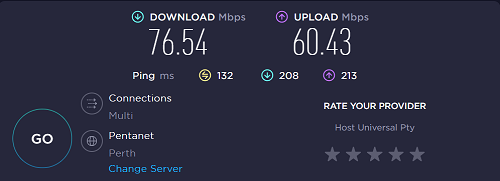
| Download speeds | 96.79 Mbps | 76.54 Mbps |
| Upload speeds | 90.87 Mbps | 60.43 Mbps |
| Pings | 213 ms | 132 ms |
With our 100 Mbps connection, Surfshark’s downloading speed didn’t suffer too much in UK. With only a ping of 132 ms, we got a download speed of 76.54 Mbps. This didn’t seem like a significant Surfshark speed drop. Moreover, our upload speed dropped by around 40% and reached 60.43 Mbps.
2. Canada – Montreal
| Without VPN | With VPN |
|---|---|
 |
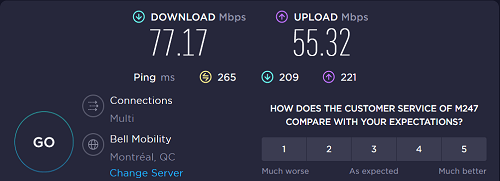 |
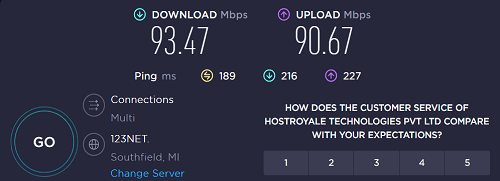
When we conducted a speed test of Surfshark on Ookla in UK, we got the speeds as shown in the screenshot above, with and without a VPN connection. So, what does this result tell us? Let’s find out.
| Metrics | Speeds without VPN | Speeds with VPN |
|---|---|---|
| Download speeds | 93.47 Mbps | 77.17 Mbps |
| Upload speeds | 90.67 Mbps | 55.32 Mbps |
| Pings | 189 ms | 265 ms |
With the Montreal server, we saw an increase of 1% in our download speed when compared to the Australian server above in UK. However, the response time (pings) was quite high, at around 265 ms. To be more precise, with the Canadian server, we got a download speed of 77.17 Mbps, and an uploading speed of 55.32 Mbps.
3. Germany – Frankfurt
| Without VPN | With VPN |
|---|---|
 |
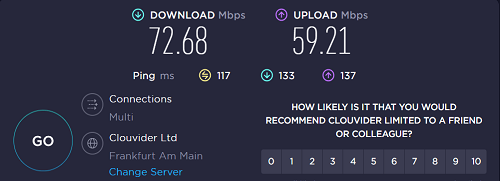 |
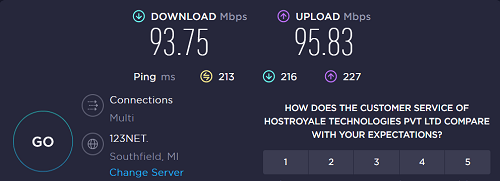
In this Surfshark VPN speed test, we connected to the VPN’s German server and got the following results in UK. Here is a quick summary of the screenshots above:
| Metrics | Speeds without VPN | Speeds with VPN |
|---|---|---|
| Download speeds | 93.75 Mbps | 72.68 Mbps |
| Upload speeds | 95.83 Mbps | 59.21 Mbps |
| Pings | 213 ms | 117 ms |
With this server, we realized that there is no Surfshark speed limit in UK. Our download speed was great (as usual), and the pings actually dropped by a significant number! However, the upload speeds had reduced by 41%, which was a bit disappointing.
4. Hong Kong
| Without VPN | With VPN |
|---|---|
 |
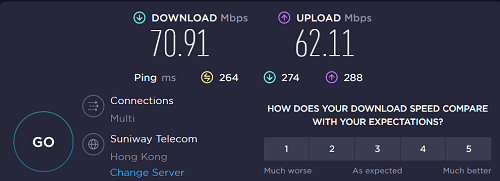 |
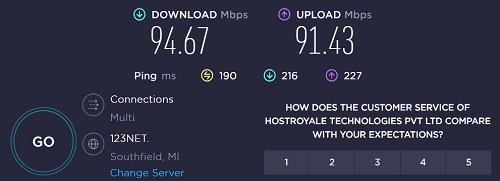
Next up was Surfshark’s Hong Kong server that we tested in UK. Here’s a quick analysis of its speeds in its HK location:
| Metrics | Speeds without VPN | Speeds with VPN |
|---|---|---|
| Download speeds | 94.67 Mbps | 70.91 Mbps |
| Upload speeds | 91.43 Mbps | 62.11 Mbps |
| Pings | 190 ms | 264 ms |
Now, the response time was significantly high as compared to the VPN servers above in UK. However, the download speeds weren’t bad at all. We got a Surfshark speed drop of almost 30% but were still able to stream without any lags. These results made Surfshark one of the best streaming VPNs on our list. However, we’d say that there’s some room for improvement.
5. India
| Without VPN | With VPN |
|---|---|
 |
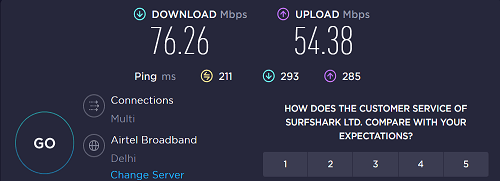 |
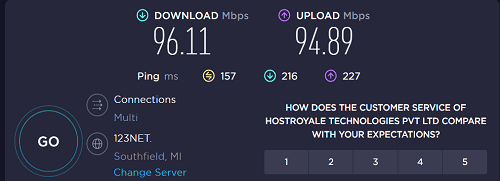
In response to the new data retention law of India, Surfshark shut down all its physical servers in in UK. However, it still offers a virtual server location on which we conducted our Surfshark speed test:
| Metrics | Speeds without VPN | Speeds with VPN |
|---|---|---|
| Download speeds | 96.11 Mbps | 76.26 Mbps |
| Upload speeds | 94.89 Mbps | 54.38 Mbps |
| Pings | 157 ms | 211 ms |
One of the first things we wanted to do when we got Surfshark was to test out its speeds on long-distance server locations. When we connected to the virtual India server in UK, we managed to get a download speed of 76.26 Mbps, an upload speed of 54.38 Mbps, and pings of around 211 ms. Even though the server wasn’t actually available in the country, streaming India’s popular platform, Hotstar in UK turned out to be a terrific experience.
6. Italy – Milan
| Without VPN | With VPN |
|---|---|
 |
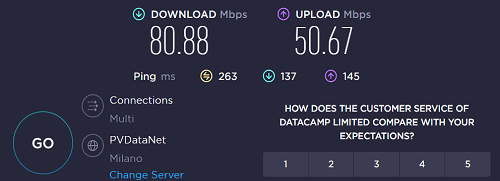 |
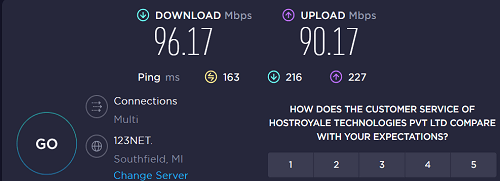
On our 100 Mbps connection, the above-mentioned speeds are what we received on our Milan server in UK. While we didn’t feel any Surfshark speed limit, here’s our analysis:
| Metrics | Speeds without VPN | Speeds with VPN |
|---|---|---|
| Download speeds | 96.17 Mbps | 80.88 Mbps |
| Upload speeds | 90.17 Mbps | 50.67 Mbps |
| Pings | 163 ms | 263 ms |
With the Italian server of Surfshark, we got a super-fast download speed of 80.88 Mbps. Using these speeds, we enjoyed downloading torrents and faced no long pauses. However, its uploading speeds were reduced to almost 50% and the pings were quite high as well, making this server an unreliable choice for gaming in UK.
7. The United Kingdom – London (local server)
| Without VPN | With VPN |
|---|---|
 |
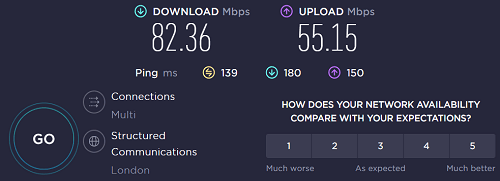 |
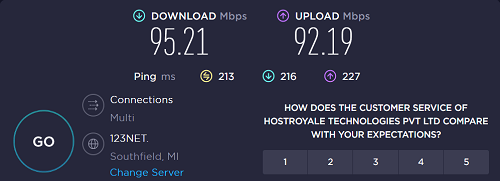
You must’ve heard that the speeds on local servers are always higher than on other servers. And this can be proved by the Surfshark speed comparison on its UK server below:
| Metrics | Speeds without VPN | Speeds with VPN |
|---|---|---|
| Download speeds | 95.21 Mbps | 82.36 Mbps |
| Upload speeds | 92.19 Mbps | 55.15 Mbps |
| Pings | 213 ms | 139 ms |
Even though the probability of traffic overload on this server was high, the speeds that we received were unexpected and GREAT! On the UK server, we got a downloading speed of 82.36 Mbps, and an uploading speed of 55.15 Mbps with pings maxing at 139 ms. How cool is that?
8. The United States – New York
| Without VPN | With VPN |
|---|---|
 |
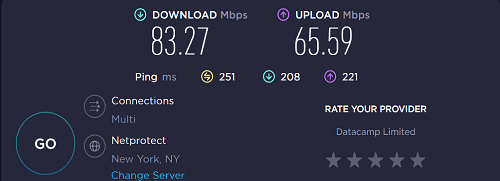 |
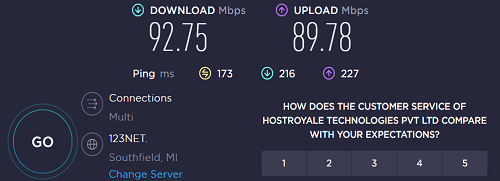
Here are the results of US server speed in UK:
| Metrics | Speeds without VPN | Speeds with VPN |
|---|---|---|
| Download speeds | 92.75 Mbps | 83.27 Mbps |
| Upload speeds | 89.78 Mbps | 65.59 Mbps |
| Pings | 173 ms | 251 ms |
With the New York server, we got the fastest speeds amongst all servers in our guide. With a blazing-fast download speed of 83.27 Mbps, we could enjoy smooth streaming, fast torrenting, and advanced gaming in UK. As for pings, it reached 251 ms. We also tried Unblocking HBO Max in UK with Surfshark’s US server and it worked quite fine.
9. United Arab Emirates
| Without VPN | With VPN |
|---|---|
 |
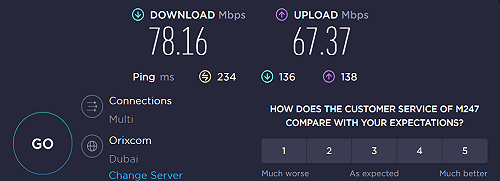 |
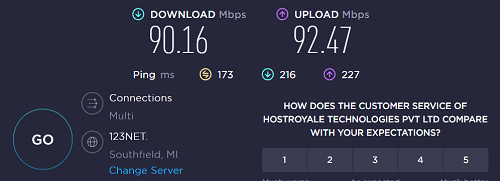
Next, we connected to Surfshark’s UAE server in UK. While the country has high internet censorship and actively blocks VPNs, we faced no issue connecting to the server and the speeds were great as well:
| Metrics | Speeds without VPN | Speeds with VPN |
|---|---|---|
| Download speeds | 90.16 Mbps | 78.16 Mbps |
| Upload speeds | 92.47 Mbps | 67.37 Mbps |
| Pings | 173 ms | 234 ms |
While connected to a server in the Middle East in UK just like the rest. We were able to obtain a download speed of 78.16 Mbps using the UAE server. We were also pleased to notice that the upload speed was 67.37 Mbps. Oh, and the maximum ping time was 234 ms.
10. France – Paris
| Without VPN | With VPN |
|---|---|
 |
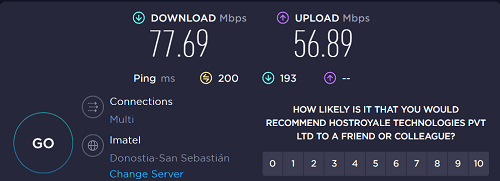 |
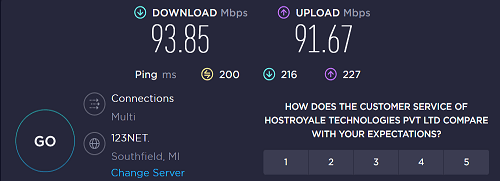
The second last server belonged to the European Union to be checked in UK. However, it did not disappoint in terms of speeds at all. Let’s analyze them in our Surfshark speed test below:
| Metrics | Speeds without VPN | Speeds with VPN |
|---|---|---|
| Download speeds | 93.85 Mbps | 77.69 Mbps |
| Upload speeds | 91.67 Mbps | 56.89 Mbps |
| Pings | 200 ms | 200 ms |
Now, it was astonishing to see that the pings of our local connection and the Paris server were exactly the same in UK . However, the speeds were not. On our connection, we got a download speed of 77.69 Mbps and an upload speed of 56.89. Doesn’t seem too bad, does it?
11. The Netherlands
| Without VPN | With VPN |
|---|---|
 |
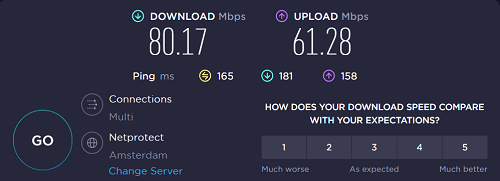 |
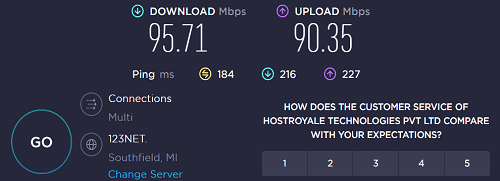
The final server we tested was in the Netherlands in UK . Being one of the safest jurisdictions, the speeds were great as well. Let’s check it out:
| Metrics | Speeds without VPN | Speeds with VPN |
|---|---|---|
| Download speeds | 95.71 Mbps | 80.17 Mbps |
| Upload speeds | 90.35 Mbps | 61.28 Mbps |
| Pings | 184 ms | 165 ms |
On this server, we faced a speed drop of almost 20% on our download speeds in UK which was not at all bad. The upload speeds were great as well, and the pings were relatively low. In short, this is a great server to perform all your activities after the US.
Does Surfshark Have a Speed Test in UK ?
Yes, Surfshark offers a built-in speed test on its Windows app in UK , but mostly, internet speed testing sites and apps do the job. You can run a speed test on multiple platforms for much more accurate results.
To use Surfshark’s built-in Windows speed test tool, here is what you need to do in UK:
- Disconnect from Surfshark’s server (Yes, you need to!)
- Visit the Settings of your Windows app of Surfshark.
- Navigate to VPN Settings and click on Speed Test.
- Click on ‘Run Test’ in UK
- Once the test stops running, you’ll find the result of each server in UK on Surfshark’s list. You’ll be able to see the upload and download speeds along with latency.
Factors to Consider While Conducting a VPN Speed Test in UK
There are multiple factors you need to consider before conducting a Surfshark VPN speed test in UK. To help you further, here are some of the most important areas that can directly impact your connection speed:
- Internet speed: Often, it seems like a VPN is slowing down your connection when, in reality, it’s your internet connection that’s slow in the first place. So, ensure testing your connection before connecting to a VPN first in UK .
- Distance from server location: The highest speeds usually come from server locations near your residence. A significant speed drop can be expected if you live in the in UK and connect to an Indian server.
- Hardware of the VPN server: You are likely to get slow Surfshark speed if the server is overcrowded. Server overload is expected when you connect to the locations of countries with high traffic, like the US, Canada, or UK. While users may consider this one of Surfshark’s cons, the VPN offers over 600 servers in the US, so you never have to actually go through this problem.
- VPN encryption: Another reason for a VPN to affect speeds is encryption. When you use a VPN, your traffic is encrypted to protect your data from spies in UK. Robust encryption algorithms can result in slow Surfshark speed. However, the speed drop is minimal with this premium VPN in UK .
- VPN protocols: Every VPN protocol is not equal. Surfshark’s fastest protocol is WireGuard in UK , using which is one way to speed up Surfshark. Then a few offer better speeds than the rest like OpenVPN (UDP), while others are stable like OpenVPN (TCP). With this VPN, you also get IKEv2 along with the others mentioned above.
A Bit About Surfshark in UK
It’s unusual for a cheap VPN to be one of the most popular options in the industry in UK . But Surfshark took the challenge and grew to become a top contender with 3200+ servers worldwide and 4 server locations in UK; you can also get TalkTalk TV outside UK.
The VPN started from the ground up, offering user-friendly apps, a robust privacy policy, and excellent streaming capabilities. Works best with unblocking all the streaming platforms, including TVNZ, Netflix, and DStv in UK.
Its most affordable plan starts at just GB£ 1.99/mo (US$ 2.49/mo) - Save up to 77% with exclusive 2-year plan + 30-day money-back guarantee in UK. Best of all, Surfshark has a 7-day free trial and a 30-days money-back guarantee in UK.
You can cancel your Surfshark UK subscription anytime and get a full refund. But that’s not all. There are many other features you can check out in our in-depth Surfshark review.
- Excellent server performance in UK
- Unlimited simultaneous connections in UK
- Inexpensive VPN service in UK
- WireGuard protocol to speed up Surfshark in UK
- No logging policy with powerful security in UK
- P2P compatible
- Customer support can be improved in UK
- Inconsistent speeds on a few servers in UK
More Speed Test Results
- ExpressVPN Speed Test
- NordVPN Speed Test
- CyberGhost Speed Test
- IPVanish Speed Test
- PureVPN Speed Test
FAQs in UK
Is Surfshark speed good in UK ?
Surfshark offers good speed, Netflix compatibility, and a solid number of country locations in UK . VPNRanks’ tests show incredible speeds in UK.
Why is my Surfshark VPN slow in UK ?
Applications like file-sharing clients, antivirus, and other VPN services may use similar resources on your PC that Surfshark requires. This can potentially slow your connection down. You can temporarily disable those apps and check if they help with the connection speeds in UK .
Can Surfshark speed up internet in UK ?
Yes, you can connect to Surfshark’s WireGuard protocol to speed up your connection in UK . If you’re currently using the OpenVPN protocol, Surfshark will allow you to switch between UDP (User Datagram Protocol) and TCP (Transmission Control Protocol). Surfshark allows that so you can check which one offers faster speeds.
Does Surfshark limit speed in UK ?
Surfshark users do not face any speed, data, or bandwidth limitations in UK . However, please keep in mind that you may experience slower speed and response time (pings) with a VPN than those without a VPN.
Is Surfshark VPN better than NordVPN?
Yes, Surfshark is a better option among the two simply because of its robust security measures, independent audits, and affordable price. Other than that, both are equally impressive and are at the top of our best VPNs for 2022 list.
Wrapping Up!
This is all from us on the surfshark speed review in UK . On all the 11 server locations we tested, no server decreased our speeds by more than 30%. That’s truly phenomenal.
As for upload speeds, well, they were not the best. During our extensive Surfshark speed test in UK , we just couldn’t find any server that could offer us uploading speeds above 65 Mbps.
If we talk about real-world usability experience, we would say that Surfshark’s speeds didn’t bother us at all even on using in on different devices like Surfshark on Firestick and Roku etc. in UK. We were still able to stream in HD quality, play games without too much latency, and even download torrents with Surfshark in UK was relatively quickly.
All in all, we recommend using Surfshark for its great speeds and promising performance in UK. You can also test its servers by availing of its 30-day money-back guarantee before you finally subscribe to it at an incredibly budget-friendly cost starting from GB£ 1.99/mo (US$ 2.49/mo) .