Our Verdict
Surfshark is a good and safest VPN for downloading torrents in UK. It offers P2P-optimized services on all its servers, along with robust AES 256-bit encryption and reasonably-fast speeds. Moreover, its Camouflage Mode, kill switch, and privacy-oriented no-logging policy keep your P2P activity anonymous from your ISP in UK. All these features provide users with the best experience for Surfshark torrent in UK.
When torrenting files in UK, it’s important to keep your identity secure using the best VPN for UK. A VPN encrypts your traffic and hides your IP address so that P2P users and your ISP cannot trace and target you with copyright violations and malware.
But sadly, every VPN doesn’t support torrenting traffic in UK, and most of them don’t offer the adequate security required to torrent safely and anonymously. That’s where the Surfshark comes in.
Surfshark is one of the most powerful VPNs for torrenting in UK making Surfshark torrent in UK a great combo. Its P2P-supported server network and fast speeds make Surfshark a great choice for online filesharing in UK. We tested its service by analyzing its logging policy, the standard for encryption, and torrenting bitrate (average) and compared it to 40+ other VPN services.
In this guide, we’ll discuss all elements of P2P activity with Surfshark and the benefits and drawbacks of P2P activity with this VPN. So, how can you torrent with Surfshark in UK? Let’s find out in the guide below!
Surfshark Torrent in UK Performance – Quick Overview
Here’s a quick table for you to judge Surfshark torrent in UK performance in one glimpse:
| Server Count | P2P-Optimized Servers | Average Bitrate | Port Forwarding | Logging Policy | Jurisdiction |
|---|---|---|---|---|---|
| 3200+ 5 server locations in UK | All servers | 8.4MiB/s | Not offered | Doesn’t collect identifiable data | The Netherlands |
Surfshark Torrent in UK: How to Safely Torrent with Surfshark
Follow the steps below to safely torrent with Surfshark in UK:
- Register to Surfshark and install the VPN in UK. If you don’t like the service after subscribing to it, then you can always use its 30-day money-back guarantee and claim a refund within a month of service.
- Make sure to enable the kill switch. You can find the feature in ‘Preferences’ in macOS. As for Android and Windows, the option will be available under ‘VPN Settings.’
- Change to the OpenVPN protocol. Despite Surfshark offering WireGuard, OpenVPN is faster and the top suggested protocol for torrenting, as per our tests.
- Connect to any VPN server. All Surfshark’s servers are P2P-optimized. However, for a faster connection, we suggest you opt for a server that’s closers to your actual physical location.
- Test the VPN for IP leaks in UK. You can use our IP checking tool to confirm that Surfshark has successfully changed your IP address.
- Go to your torrent client. Surfshark works on multiple torrent clients, such as uTorrent, Transmission, Vuze, and BitTorrent. But, qBittorrent safe to use as per our testing.
- Download your preferred files.
- Keep your VPN connected. The torrent client you’re using may continue sharing files with other torrent users even after you’ve finished downloading. Disconnect from the VPN only when you’re sure you’ve totally closed your torrent client.
Is Surfshark Really Good for Torrenting in UK?
Yes, Surfshark enables fast and straightforward torrenting in the UK with unlimited bandwidth and rapid speeds, all within an affordable budget. Its entire server network supports P2P activities, except in countries where torrenting is forbidden.
If you connect to any of those servers, Surfshark’s app will redirect your traffic to its torrent-friendly servers, making it one of the best VPNs for torrenting in UK, especially considering its budget-friendly prices.
In short, Surfshark is pretty safe and a reliable choice for casual torrenters looking for an all-around-effective VPN in UK. Furthermore, it’s also one of the cheapest VPN services in UK that work great at unblocking global streaming platforms. This means that you can enjoy accessing Netflix with Surfshark in UK, Amazon Prime Video, Hulu, and Disney+ with Surfshark.
Following is a table consisting of the pros and cons of Surfshark, considered specifically for torrenting in UK:
- Torrent support on the entire server network
- No-logging policy
- Robust protocols and encryption
- No IP, DNS, and WebRTC leaks
- Automatic kill switch
- Massive server network of 3200+ servers
- Offers a Camouflage Mode, MultiHop, Whitelister, and more
- Users won’t get any port forwarding support from Surfshark
- Surfshark offers slower torrent speeds than a few P2P VPNs
- May subject users to IPv6 leaks
- Every server isn’t P2P-optimized
Is Surfshark Fast Enough for P2P Activities in UK?
Yes, Surfshark is fast enough for a reliable torrenting experience in UK, as per our regular Surfshark speed tests in UK. However, you cannot compare it to the fastest VPN services on the market, like ExpressVPN.
Following is a table that outlines Surfshark speed results while performing P2P activities in UK:
| Avg. Speed Loss (US Server) | Avg. Speed Loss (Global Server) | Avg. Torrenting Bitrate |
| 17% | 25% | 8.4MiB/s |
By connecting to a local US server, we faced a speed drop of only 17% with Surfshark. Even though that’s not the fastest in the market, it’s still pretty fast. Using a local server, your IP address would be safe, and you’ll get faster speeds than an international connection.
Let’s not forget that Surfshark international servers are also really fast in UK. When we connected to its Canadian server, we measured an average speed drop of only 25%.
Why is Surfshark Good for Torrenting in UK?
Surfshark is good for torrenting because its servers are P2P-friendly and offer AES 256-bit encryption with reasonable torrent speeds in UK.
While you can get a detailed workaround in our Surfshark review in UK, here are a few reasons why Surfshark VPN torrenting in UK is a great combo:
- Hide your IP address: Your IP address can be viewed or accessed by anyone checking out the seeders’ list while torrenting in UK. The exposed IP can put you at risk as you can easily be targeted for DDoS attacks. Also, it can reveal your location from potentially unwanted and unexpected visits in New Zealand.
- Hide torrent activities from your ISP: If your concern is your Internet Service Provider snooping and monitoring your torrent downloads, then you immediately need to subscribe to Surfshark. The VPN will encrypt your data and pass it through a VPN server. This way, your ISP won’t be able to see which websites you’re visiting and what you are downloading in UK.
- Bypass bandwidth throttling: When Internet Service Providers detect torrenting activities in your online traffic, they throttle your connection to slow down your download speed. Since Surfshark hides your torrenting activities, your ISP wouldn’t be able to throttle your download speed in UK.
- Unblock restricted torrent sites: Another reason to use the Surfshark torrent in UK combination is to access restricted torrent clients easily. Some countries block torrent sites in UK because they play a significant part in distributing copyrighted content. But, Surfshark unblocks qBittorrent, uTorrent, and Bittorrent, and lets you torrent with them anonymously.
- Extensive torrent-friendly server network: Surfshark’s entire server network, consisting 3200+ servers in 100 countries 91 server (3 Server Locations) in UK, supports P2P connections. While all Surfshark torrenting servers offer fast speeds, we highly recommend using the ones near your location for a more optimized connection in UK.
- Robust zero-logging policy: Surfshark equips a strict no-logging policy in place. The provider does not store any personal information of the user, allowing safe browsing and torrent downloading. However, you will find it collecting the number of unsuccessful connection tries, aggregated execution data, and what’s your VPN usage.
- Extensive range of security features: The VPN offers a wide range of security features that are useful while torrenting. Surfshark’s kill switch blocks your internet if the VPN connection drops, the Camouflage Mode makes VPN traffic look like regular HTTPS traffic, and MultiHop provides multi-encryption by passing your traffic through more than two servers. Please note that there are no specific Surfshark torrent in UK settings. You can simply enable these features from the Settings tab in the app.
- Whitelister: Surfshark’s Whitelister is a pretty useful feature for torrenting. Using this feature, you can route just your torrent client through the VPN server and encrypt it. This way, you’ll be absolutely secure while torrenting.
- Pricing: Surfshark is one of the most affordable VPNs out there, costing GB£2.01/mo (US$ 2.49/mo) - Save up to 77% with exclusive 2-year plan + 30-day money-back guarantee. Moreover, it offers a 30-day money-back guarantee. If you’re unsatisfied with the Surfshark torrenting setup in UK and service for any reason, you can cancel Surfshark in UK and request a refund within 30 days. For mobile devices, you can even get a Surfshark free trial in UK.
If you face any issues while torrenting with this VPN in UK, you can quickly refer to our Surfshark not working guide in UK and get it back to work within a few minutes!
Surfshark’s Best Server for Torrenting in UK?
Surfshark’s best server for torrenting completely depends on the country you reside in. That’s because the physical distance between where you’re located and your VPN server determines your connection speeds. Similarly, the number of users connected to a single server may also slow down your activity. The server can only process so much data at once, after all.
However, if you really want a specific option, then you can use Surfshark’s 24/7 live chat support to ask for the best Surfshark torrenting servers based on your country, torrent client, and Internet Service Provider.
How to choose a good Surfshark server for P2P in UK?
You can always click on the Quick Connect button to choose a fast server for downloading torrents. You can also click on ‘Nearest Country’ above the servers list to get a server close to your physical location for fast speeds in UK.
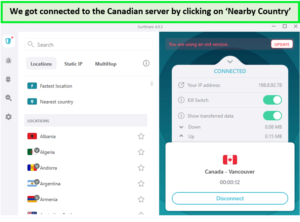
The server was quite fast for torrenting when tested.
When you click on this feature, the VPN will choose one of the best Surfshark P2P locations closest to your country. For example, if you’re in UK, just like us, then you’ll immediately be connected to a UK server.
However, if you are looking for a specific list of torrent-friendly servers to connect in UK, then we have compiled that for you. Following are some Surfshark server locations that are best for P2P activities:
- Austria
- Canada
- Denmark
- France
- Germany (Berlin, Frankfurt)
- Italy
- Luxembourg
- Netherlands
- Norway
- Poland (Warsaw)
- Singapore
- Spain
- Switzerland
- UK
- US
Please note that we got this list directly from Surfshark’s customer support representatives, so you won’t be facing any issues while torrenting with these servers.
Drawbacks of Using Surfshark for Torrenting in UK
As mentioned a couple of times above, Surfshark torrenting works great together in UK. But, there are a few issues you need to address:
1. Surfshark doesn’t allow seeding in UK
Surfshark doesn’t allow seeding on its server network in UK. While we actually had 0 upload speeds while torrenting, we still confirmed it through their customer support representatives. While there were some exceptions while using uTorrent, the upload speeds were pretty low (2-3 KB/s).
2. Surfshark doesn’t offer port forwarding support in UK
Surfshark does not support port forwarding because of obvious security risks in UK. This practically means that it’s not as effective or easy to seed torrent files as various best VPNs. In fact, a few anecdotal reports suggest that Surfshark doesn’t support seeding at all.
Instead of relying on these reports, we addressed the issue on Surfshark’s live chat support and got the following answer in UK:
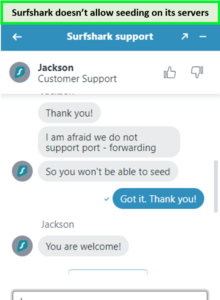
We got the reply on seeding while torrenting with Surfshark in a few minutes.
Basically, they’re apprehensive that if they open up random ports, then they might create security vulnerabilities that hackers can exploit. Various torrenters prefer port forwarding as it enables them to connect to more peers.
What Do People Think About Torrenting with Surfshark in UK?
When in doubt, visit Reddit and see how people address a certain issue. In our case, we wanted to see what Reddit says about Surfshark torrent in UK together.
Despite the unavailability of port forwarding, Redditors really do love Surfshark. Let’s look at a few answers below:
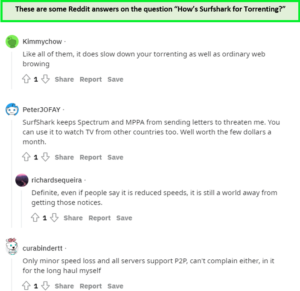
The list was long, but these were the best reviews of all!
How Can you Compare Surfshark to Other P2P-Friendly VPNs in UK?
Surfshark is a good VPN for torrenting casually in UK. With fast speeds, it encrypts your connection and secures your identity. However, there are better VPNs available for torrenting. like ExpressVPN Torrent in UK and NordVPN Torrent in UK, offer faster speeds while torrenting and have powerful P2P features.
We tested the average bitrate of Surfshark and compared it to 10 other torrent-friendly VPNs in UK. Surfshark offered an average bitrate of 8.6MiB/s, compared to ExpressVPN’s 9.2MiB/s and NordVPN’s 8.4MiB/s.
All these VPN alternatives also equip features like a kill switch, split tunneling, and robust encryption. However, for more details, the following table will help you compare Surfshark with its competitors in UK:
| VPN | Number of P2P Servers | Average Bitrate | Port Forwarding | Logging Policy |
|---|---|---|---|---|
| ExpressVPN | 3000+ and 4 server locations in UK | 9.1MiB/s | Yes | No logs |
| Surfshark | 3200+ and 4 server locations in UK | 8.4MiB/s | No | No logs |
| NordVPN | Hundreds of dedicated P2P servers and 440+ servers in 4 locations in UK | 8.7MiB/s | No | No logs |
| CyberGhost | Multiple torrent-optimized servers and 723 servers from 3 server locations in UK | 7.5MiB/s | No | No logs |
| PIA | 35000+ and 100 VPN servers in UK | 7.3MiB/s | Yes | No logs |
As per this comparison. it doesn’t look like Surfshark is doing a bad job at all in UK. In fact, Surfshark torrent in UK seems like a good combination.
What Protocol Will Be Most Privacy Focused For Torrenting Through Surfshark in UK?
The OpenVPN protocol is a better option than WireGuard while using Surfshark in UK. Even though WireGuard is mostly faster and more secure than OpenVPN, we highly recommend you use OpenVPN with Surfshark for comparatively faster speeds while downloading torrents.
OpenVPN is a widely used protocol, great for security and speeds alike. It offers two ports: UDP and TCP. However, UDP is the better port for torrenting with Surfshark as it offers a faster connection in UK. Whereas, TCP is more on the reliable end.
FAQs – Surfshark Torrent in UK
Which VPN is best for torrenting in UK?
Does Surfshark save torrent logs in UK?
Surfshark does not monitor or save any torrent logs or user data since they have a strict no-logging policy in UK. In short, whichever torrent client you use, Surfshark won’t collect user data for any reason.
Is Surfshark safe for torrenting in UK?
Yes, Surfshark is quite safe for torrenting in UK. Its AES 256-bit encryption ensures that your connections are absolutely secure and safe. And since it comes with a no-logging policy, we can assure you of guaranteed anonymity. It has all the features that can make it reliable VPN for torrenting in UK. And that’s not all. Surfshark’s prices are also super-affordable.
Is VPN good for torrenting in UK?
To bypass geo-restriction barricades and protect your privacy while torrenting in UK, using a VPN is a sensible choice. With a VPN, your entire internet traffic is encrypted to ensure that no one knows what you’re doing, even while torrenting.
Does BitTorrent work with Surfshark in UK?
We found that Surfshark is a safe and secure choice for torrenting. It supports torrenting across all its servers and works effectively with a wide range of torrent clients including uTorrent, BitTorrent, and qBittorrent.
Conclusion
After conducting extensive testing, the answer to using Surfshark for torrenting has become much more evident in UK: Surfshark is a highly capable VPN that is convenient to use and effective for safe downloading P2P content from a secure website for torrenting. It has a great privacy policy, security features, and utilities that make the torrenting experience smoother and safer for users.
Nonetheless, if you’re considering purchasing Surfshark for torrents, you shouldn’t be disappointed. Surfshark unblocks qBittorrent, uTorrent, and other clients within seconds and is a great option for every torrent fan out there. But, if you’re looking to get port forwarding support from Surfshark, then you might have to switch to any other premium option.
We hope you liked our Surfshark torrent in UK guide. In case of any questions, just jot them down in the comments, and we’ll get back to you!
