
Is Showtime available in the UK? Unfortunately, the Showtime streaming service is only available in the United States and its related territories. However, you can still watch Showtime in the UK using a reliable VPN. A US server of a premium VPN service like ExpressVPN will let you bypass all geo-restrictions and easily watch Showtime in the UK.
Showtime is an American cable and satellite television channel that offers original TV shows, top Showtime movies, boxing, mixed martial arts, and stand-up comedy specials. The most popular Showtime titles are The Chi, I love that for You, The Man Who Fell To Earth, Couples Therapy, and more.
However, despite the rising demand worldwide, Showtime is not accessible in the UK without a US IP address. So, viewers traveling to the UK or planning to relocate might have to bid farewell to their favorite content since the transmission of Showtime is limited to only the US region.
Never fear, though. This guide will answer your most pressing query about how can I stream Showtime in the UK via VPN. We will also recommend three of the best Showtime VPNs in the UK for smooth and fast streaming. So, let’s get started:
How to Watch Showtime in the UK? – Quick Steps
The process is quite simple to watch Showtime in the UK. Just follow these quick steps to watch Showtime in the UK:
- Subscribe to a VPN service (Our recommendation is ExpressVPN as it has 23+ servers in the US).
- Download and set up the VPN on your device.
- Launch the VPN app and connect to a US server. The New York server works well with Showtime.
- Visit Showtime’s website and start streaming Showtime in the UK.
Note: Since Showtime is a paid-for streaming service, you need to subscribe to its account in the UK and pay a reasonable Showtime cost in the UK to access its library.
Why do you need a VPN to watch Showtime in the UK?
You need a VPN to watch Showtime in the UK because it’s geo-restricted in the UK and exclusive to viewers with US IP addresses. Since you can’t possibly get a US IP address while in the UK, a VPN helps create an encrypted tunnel between your device and the websites you visit. As a result, you will be assigned a temporary US IP, allowing you to secure your connection and stream geo-restricted titles in HD while in the UK.
If you try and play any of Showtime shows in the UK, you’ll see the following error message:
“Access to this resource is forbidden by access policy.”
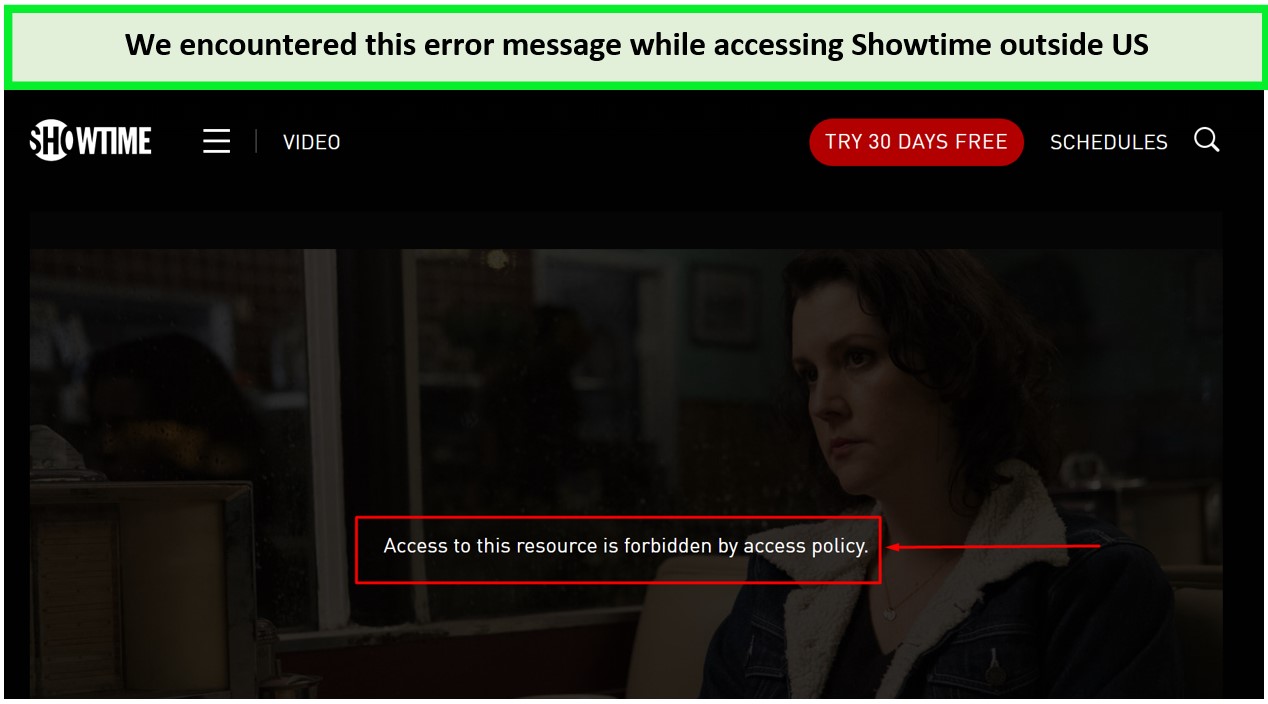
Our access was restricted when we tried streaming “Yellowjacket” on Showtime in the UK.
As annoying as this issue might seem, it is very easy to get over. By using a reliable VPN in UK, you can obtain a US IP address and watch Showtime from UK. All it takes for you to connect your device with a server in Showtime available countries (like USA) and you’re good to go.
Best VPN to Watch Showtime in the UK – In-depth Analysis
The geo-restrictions imposed by Showtime are relatively easy to break with a VPN. Unlike Netflix, which has strong anti-VPN technologies in place, most VPNs worth their salt can stream Showtime in the UK. We tested 40+ VPNs with Showtime in the UK, and only 3 of the providers stood out, offering the best performance overall.
Let’s discuss them in detail:
1. ExpressVPN – Best VPN For Showtime in the UK

Key Features:
- 3000+ servers in 105 countries, 25+ server locations in US
- MediaStreamer feature
- Unlimited bandwidth for streaming in Ultra-HD
- 5 simultaneous connections
- 30-day money-back guarantee
Consistently maintaining the top position on our list, ExpressVPN is the best VPN to watch Showtime in the UK – thanks to its impeccable services, high-quality servers, and lightning-fast speeds. It operates a vast network of 3000+ servers in 105 countries and optimized servers in the 25 US locations.
Upon testing in the UK, we found its New York server more effective against Showtime’s geo-blocking. With it, we could easily access Showtime and watch the entire “The Chi” series without buffering in the UK.
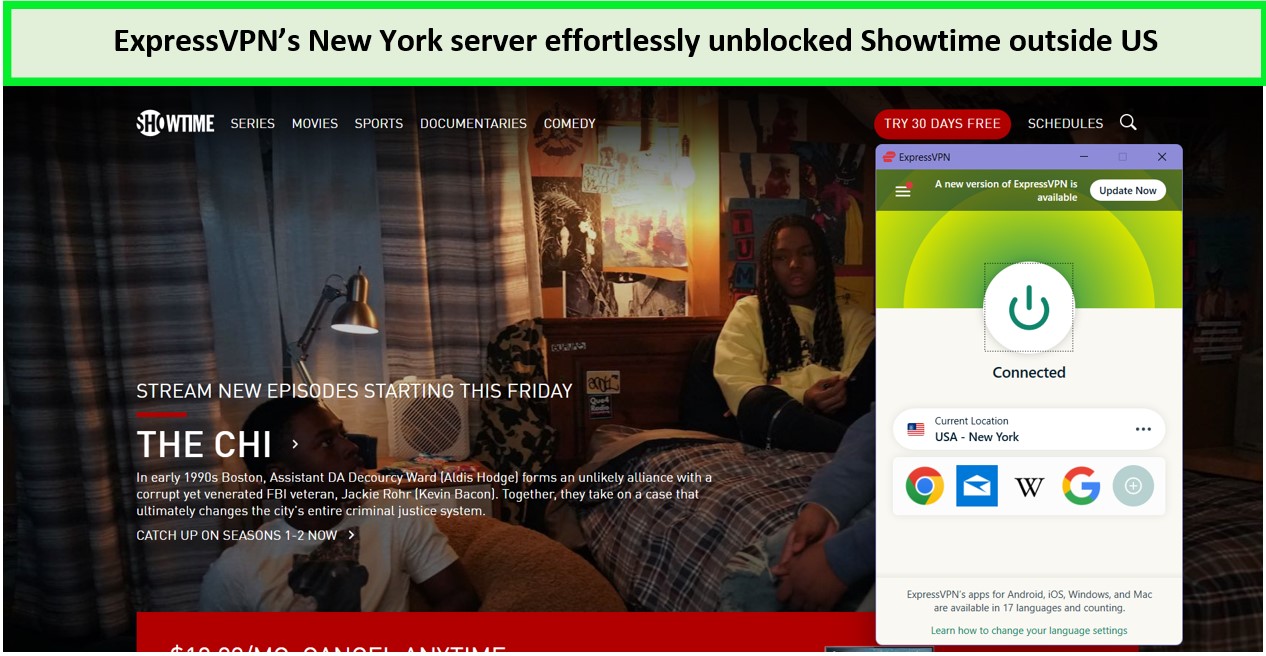
We had an amazing experience streaming “The Chi” on Showtime with ExpressVPN’s New York server.
Other than Showtime, ExpressVPN can also unblock Cinemax, Vudu, and ESPN+. When we tested with AMC, ExpressVPN worked surprisingly well and has proven itself the best VPN for AMC in UK.
ExpressVPN also offers a Smart DNS feature called “ExpressVPN MediaStreamer.” With this feature, you can install ExpressVPN on Roku and unblock Showtime in the UK on other devices that don’t offer native VPN support, such as Smart TVs, Xbox, PlayStation, and routers. and watch one of your favorite shows and movies available on showtime like Saw X
and you can also watch one of you favourite content available on different channels and regions like The Simpson , National Treasure , Evacuation , Greed , Alone Season 1 Episode 5 Greed , Alone Season 1 Episode 5 , Emergency , The Duchess and Her Magical Kingdom , Nancy Drew, The Chosen on The CW, Screw, Stolen in Plain Sight which enhances your watching experience.
With so many servers, ExpressVPN can deliver HD streaming speeds of up to 80+ Mbps. To be exact, the ExpressVPN speed test showed a download speed of 89.38 Mbps and an upload speed of 84.66 Mbps on a 100 Mbps connection.
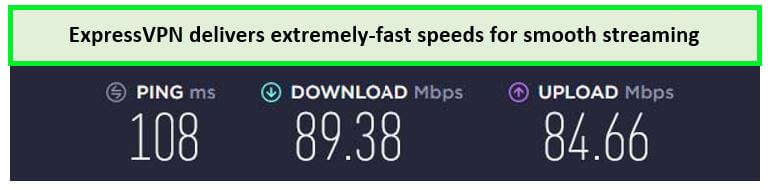
With these speed results, you can stream 4K video quality without any buffering in the UK.
Here are the speed test results we got with other US servers of ExpressVPN:
| Recommended Servers | Speed Result |
|---|---|
| New Jersey – 3 | 88 Mbps |
| San Francisco | 86.25 Mbps |
| Los Angeles | 87.94 Mbps |
ExpressVPN is compatible with a number of operating systems, such as Windows, iOS, Android, macOS, and Linux. This allows you to use ExpressVPN on Firestick, smartphones, NVidia Shield, Android TV, laptops, and other preferred devices.
As for security, ExpressVPN packs a number of incredible security features like Lightway Protocol, ExpressVPN’s kill switch, AES 256-bit encryption, and DNS/IP leak protection in the UK.
In addition, users will get five simultaneous connections and live chat support at a price of just GB£ 5.33/mo (US$ 6.67/mo) - Save up to 49% with exclusive 1-year plans + 3 months free. In case of dissatisfaction, a 30-day money-back guarantee is there to help you get a refund after canceling your ExpressVPN subscription within the defined time. To delve deeper into ExpressVPN’s features and benefits, or if you want to explore additional details about this VPN read our ExpressVPN review in UK guide.
- 25+ US server locations
- Fast speeds for HD quality streaming in the UK
- Easy to set up with multiple apps
- MediaStreamer for smooth streaming in the UK
- Slightly expensive than other services
2. Surfshark – Budget VPN For Showtime in the UK
Key Features:
- 3200 servers in 100 countries, 600+ in 25+ US cities
- Smart DNS
- Unlimited bandwidth for Ultra-HD streaming
- Unlimited simultaneous connections
- 7-day free trial for Android and iOS
Ideal for streamers on a budget, Surfshark is a budget-friendly VPN to watch Showtime in the UK. It offers extra-ordinary VPN services for a price as low as GB£1.99/mo (US$ 2.49/mo) - Save up to 77% with exclusive 2-year plan + 30-day money-back guarantee.
It has a network of 3200+ servers in 100 countries with 600+ servers in the United States.
If we talk about Surfshark’s well-performing server, its Denver server stood out for delivering a download speed of 76+ Mbps which is quite fast. With this server, we could easily bypass Showtime and binge-watch all the episodes of “Yellowjackets” in the UK.
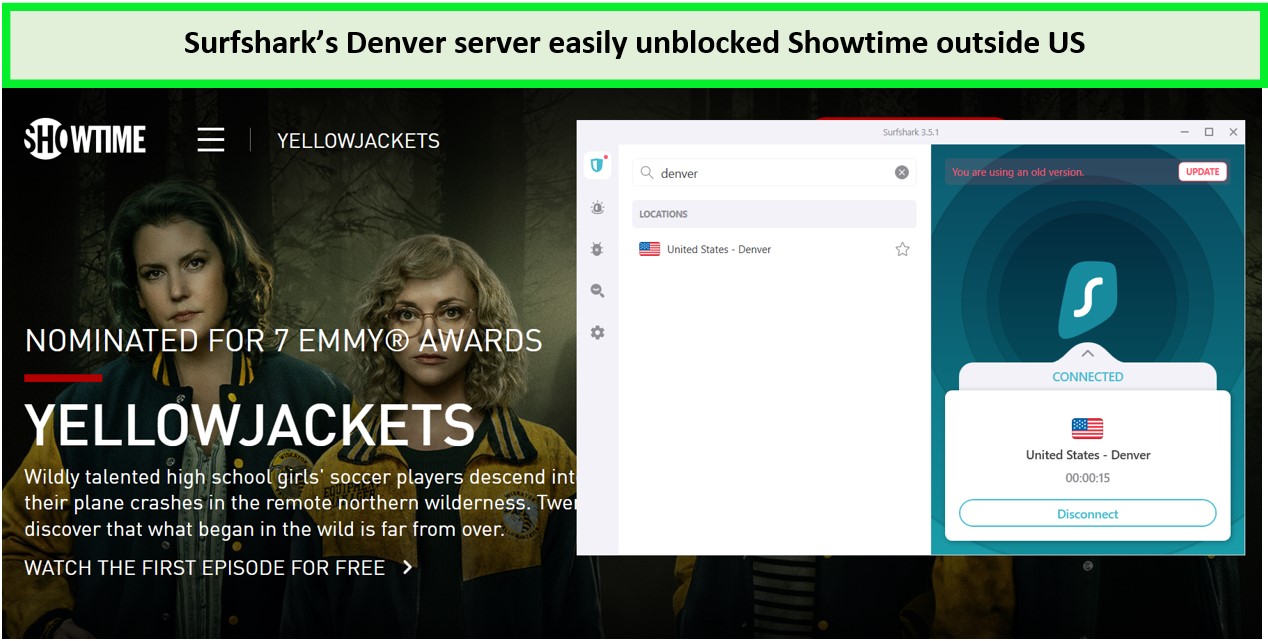
Surfshark’s Denver server works really well with Showtime in the UK.
Besides Showtime, Surfshark can also be used to change your Netflix region in UK or unblock geo-restrictions from sites like Sling TV, and Amazon Prime Video in UK. It also turns out to be the best VPN for Comedy Central in UK. Its handy Smart DNS tool also lets you install Surfshark on Apple TV and other devices without native VPN support. It is also the best VRV VPN in UK too.
As per Surfshark speed test results, we witnessed a download speed of 85.42 Mbps and an upload speed of 48.64 Mbps on a 100 Mbps connection.
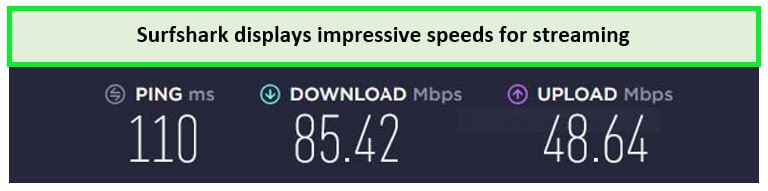
The speed drop on the Surfshark Detroit server was almost 15%.
Here are the speed test results of Surfshark’s recommended American servers:
| Recommended Servers | Speed Result |
|---|---|
| Latham | 76.45 Mbps |
| Boston | 74.25 Mbps |
| Denver | 75.74 Mbps |
The best thing about Surfshark is that it offers unlimited multi-logins on a single Surfshark account. It is also compatible with different devices such as Windows, Android, iOS, macOS, Linux, and more. That said, you can get Surfshark on Firestick, smartphones, Smart TVs, Android TV, laptops, PCs, and other preferred devices.
You can easily get stan in the UK or any other location to enjoy a wide range of entertainment options.
Another awesome feature of Surfshark is its built-in ad-blocker called CleanWeb. This prevents annoying ads from popping up on your browser. Its other security features include AES 256-bit encryption, a kill switch, Multi-Hop, WhiteLister, and built-in protection against DNS/IP Leaks.
With a price tag of GB£1.99/mo (US$ 2.49/mo) - Save up to 77% with exclusive 2-year plan + 30-day money-back guarantee, Surfshark is a great choice for Showtime fans in the UK on a budget. Wait, there’s more; all its plans are backed with a 30-day money-back guarantee with new mobile subscribers are entitled to Surfshark’s 7-day free trial in UK.
Learn more about it through our Surfshark review.
- Affordable pricing
- Consistentlu unblock Showtime and other US-based streaming services in the UK
- Unlimited simultaneous connections
- Strong security and privacy in the UK
- Occasional slow speeds
3. NordVPN – Fastest VPN For Showtime in the UK
Key Features:
- 6000 servers in 61 countries, 1970+ servers in 15 US locations
- SmartPlay
- Unlimited bandwidth with uninterrupted Ultra-HD streaming in the UK
- Six simultaneous connections
- 7-day free trial for Android
NordVPN is a clear choice for streaming Showtime in the UK, boasting the largest server network of 6000+ servers in 61 countries. This includes around 1970+ servers in the United States.
Speaking of servers, NordVPN’s Miami server outperformed during our test, as it effectively unblocked Showtime in the UK within seconds. With laudable consistency in speed and impressive video quality, we could easily stream Showtime’s highly-celebrated movie “Ray Donovan” in the UK.
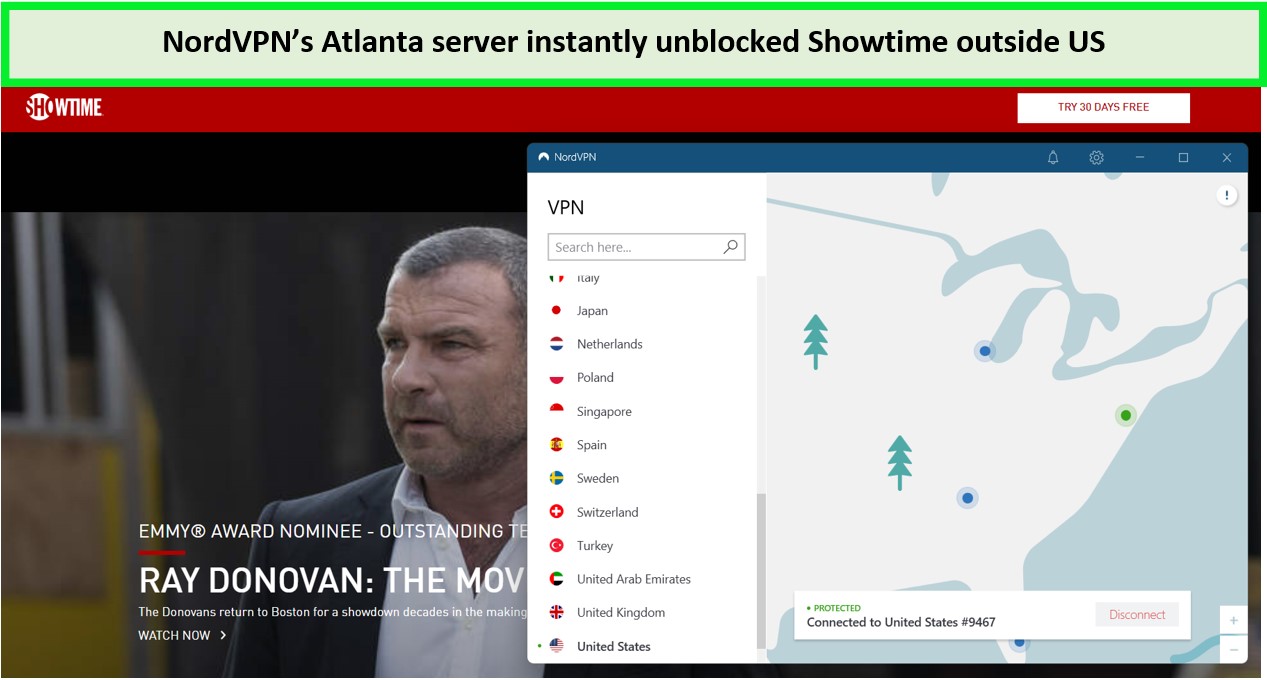
With NordVPN Atlanta, we could easily stream Ray Donovan and other movies without any buffering.
With strong unblocking capabilities, NordVPN makes accessing other US channels easier while traveling abroad. It is the best VPN for H&I in UK and best VPN for BBC America in UK too.
In our performance test, we used NordVPN to unblock PBS outside the US, American Netflix, and Crackle outside US. Its SmartPlay feature allows establishing VPN-like connections on devices that do not have native VPN support. For example, you can install NordVPN on Roku and stream Showtime in the UK on the big screens.
As for speed, the NordVPN speed test displayed commendable results, delivering a download speed of 86.18 Mbps and an upload speed of 42.13 Mbps on a 100 Mbps connection.
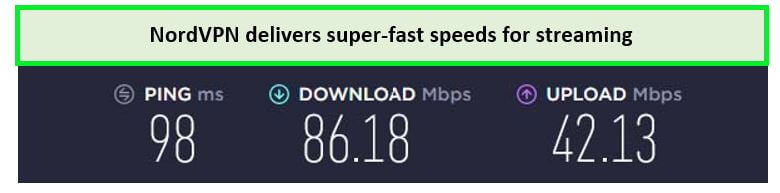
These speed results are enough to load 4K videos without buffering.
Besides the Atlanta server, here are our top recommended NordVPN servers for streaming Showtime:
| Recommended Servers | Speed Result |
|---|---|
| New York | 87.85 Mbps |
| New Jersey | 88.34 Mbps |
| Miami | 91 Mbps |
With support for upto six simultaneous connections, NordVPN has wide compatibility with various operating systems, such as Windows, Linux, macOS, iOS, Android, and more. You can also use NordVPN on PS4, Firestick, smartphones, PCs, laptops, and other devices.
For security, NordVPN is regarded as one of the best secure VPNs, offering military-grade 256-bit encryption, Multi-Hop feature, Obfuscation technology, and DNS/IP leak protection. It uses NordLynx protocol to maintain the rare balance between security and speed in its services in the UK.
NordVPN is available for just GB£3.19/mo (US$ 3.99/mo) - Save up to 63% with exclusive 2-year plan + 3 months free for a friend, and all its subscriptions are backed with a 30-day money-back guarantee. This way, you can try it risk-free for 30 days and get your NordVPN refund.
Learn more about this VPN through our NordVPN review.
- Largest sever network in the US and abroad
- Reliably unblock Showtime and other streaming sites in the UK
- Six simultaneous connections
- Strong security and privacy in the UK
- Windows app takes a lot of screen space
Should I use a free VPN to unblock Showtime in the UK?
Yes, you can use a free VPN to watch showtime in the UK, but it’s not recommended. Free VPN services in the UK usually have subpar security and privacy standards. They don’t have enough servers to support the bulk of streamers, resulting in poor connection speed and buffering. Besides, some free VPN services in the UK are notorious for logging users’ data and selling it to third-party advertisers.
Therefore, it’s advisable to stick to a premium VPN service in the UK such as ExpressVPN to watch Showtime in the UK. This VPN provider frequently refreshes its server network so you won’t have to get locked out of streaming again.
How do I subscribe to the Showtime streaming service directly through Showtime.com in the UK?
To subscribe to Showtime in the UK, you will need a US-based credit card and billing information. This can be acquired from your US-based relative or any of your acquaintances.
Once you have got the details, follow these steps to subscribe to Showtime in the UK directly through its website:
- Subscribe to a reliable VPN service. We recommend ExpressVPN.
- Download the VPN app and connect to its US server.
- Head to Showtime’s official website from your computer or mobile device.
- Click “Start Your Free Trial” and follow the on-screen instructions to create your Showtime account.
- Enter your US-based billing information and sign up for a free trial.
- You can now enjoy streaming your favorite shows and movies on Showtime in the UK.
Note: After the free trial ends, your subscription will continue, and you will be charged through your Showtime account. If you don’t want to continue paying for it, you must cancel before your free trial period ends.
How to subscribe Showtime Gift Card in the UK
If you don’t have a standalone streaming subscription for Showtime, you can subscribe directly through a gift card at www.showtime.com/redeem. Your Showtime gift card will be applied as a credit to your new account. Since Showtime is a geo-restricted service, you will have to spoof your location first via VPN before subscribing to it in the UK.
Here’s how to subscribe to Showtime in the UK using a gift card:
- Purchase a Showtime gift card from a reliable source. You can get it from www.mygiftcardsupply.com or Amazon.
- Once you purchase, you will receive a gift code in your email.
- Now, subscribe to ExpressVPN and download its app.
- Connect to a US server and head to the Showtime website.
- Click on ‘Start Free Trial,’ and select “Have a gift code? Redeem it here” at the bottom of the box.
- Enter the gift card code you received in your email and click on “Redeem.”
- Follow all the on-screen instructions and create a new Showtime account.
- Voila! You’re now a subscribed member of Showtime.
How do I access Showtime with an Apple subscription in the UK?
Another way to subscribe to Showtime in the UK is through an Apple account. Fortunately, Showtime supports in-app purchases, allowing users to pay for the streaming service directly from their iTunes account.
Here’s how to subscribe to Showtime in the UK with an Apple subscription:
- Connect your Apple TV to a VPN-enabled router or use ExpressVPN‘s Media streamer feature.
- Once connected, select the Showtime icon from the Apple TV main menu.
- Click on the free trial option, and you will be asked to provide your iTunes credentials.
- Enter your Apple credentials and create a password to create your Showtime account.
- Choose the monthly or yearly subscription plan and create a new account by following the on-screen instructions.
- After subscribing, you can use your Showtime credentials to sign in and access Showtime on other devices as well.
Note: Once the Showtime free trial period ends, you will be charged from your iTunes account on a monthly basis.
How much does Showtime cost in the UK?
Showtime costs $10.99/month (9.11 GBP) with a 30-day free trial. If you choose an annual plan, it will cost you $99/year after your free trial period ends.
Showtime is also available through multiple streaming services at different prices. For example, Prime members can subscribe to Showtime at $10/month with a 7-day free trial. Users can also get Showtime as a premium Add-on with their Hulu subscription, priced at $10.99/month (9.11 GBP).
Here are the complete details of all the pricing packages offered by Showtime:
| Showtime Standalone | $10.99/month (9.11 GBP) with a 30-day money-back guarantee |
| Showtime with Prime Video | $10.99/month (9.11 GBP) with a 7-days free trial |
| Showtime with Hulu | $10.99/month (9.11 GBP) with a 7-days free trial |
What devices can I watch Showtime on while in the UK?
Below are the devices you can use to watch the Showtime streaming service in the UK:
- Fire TV Stick
- Android TV
- Apple TV
- Roku Samsung Smart TV
- Xbox One / Xbox Series X|S
Be sure to connect to ExpressVPN before downloading Showtime on these devices in the UK.
How do I download the Showtime app on Android in the UK?
You might not find a Showtime app on your Android device because it’s geo-restricted. However, a quick connection to a VPN tool will help you find Showtime on Google Play Store from the UK.
Here’s how to get the Showtime app in the UK on Android devices:
- Get ExpressVPN and download its app on your Android device.
- Connect to an ExpressVPN US server (preferably a New York server).
- Create a new Google ID for the US region and visit Google Play Store > Profile.
- Sign in to Google Play Store with your new Google ID.
- Install the Showtime app and sign in with your credentials.
- Pick a title and enjoy streaming.
Note: We often come across questions like ‘does the Showtime app work in the UK?’ The answer is yes, it does work only if your device is connected to a VPN service. If you still can’t make it work, remove caches and cookies from your device and try connecting to VPN while in the UK.
How do I download Showtime on iOS in the UK?
To download Showtime on iOS, you first need to set your Apple region to the US and connect to a VPN app.
Here’s how to get Showtime in the UK on iOS devices:
- Subscribe to ExpressVPN and set it up on your device.
- Connect to ExpressVPN’s US server.
- Visit the Apple ID, then Settings, and Change the region to the US.
- Visit App Store and search for the Showtime app.
- Download the app and enjoy streaming it in the UK.
What are the top 10 movies on Showtime in the UK right now?
Here are the top 10 list of best movies streaming on Showtime in the UK right now:
- Psycho
- Children of Men
- Eternal Sunshine of the Spotless Mind
- Hereditary
- Moonlight
- Ex Machina
- Hustlers
- First Cow
- The Contractor
- 13 Minutes
- Stillwater
- Lamb
What are the Top Picks on Showtime?
Here are some of the best and popular content to view on Showtime:
- The Ring Two
- Born in Synanon
- Thriller 40
- Geddy Lee Asks: Are Bass Players Human Too?
- Baby Shark’s Big Movie
- David Benavidez vs Demetrius Andrade Title Fight
- Bellator: Amosov vs Jackson
- All Access: Benavidez vs Andrade
- The Lady Confesses
- THE CURSE 2023
- Pain Hustlers
- The Starling Girl
- Mercy
- Stillwater
- The Tudors
- Penny Dreadful
- The Green Room with Paul Provenza
What’s new on Showtime in UK in December 2023
Here are some new features of Showtime:
- The Woman in the Wall
- Beau Is Afraid
- The Survivalist
- Fellow Travellers
- No Escape
Additional VPN guides available exclusively on VPNranks!
- How to get American Netflix in UK: Access American movies and TV series on Netflix with a VPN.
- Watch FuboTV in UK: Access US content on FuboTV from the comfort of your home with a VPN.
- Watch Vudu in UK: Unlock Vudu Globally with a VPN, Anytime.
- Watch Tubi TV in UK: Unlock Tubi with a VPN and enjoy USA content.
- Watch TBS in UK: Stream your favorite TBS shows and sports with a VPN.
More Showtime Streaming Guides
Here are some of the best and most popular content to view on Showtime:
- How to Watch A Gentleman in Moscow in UK on Showtime: One room. A world of change. A timeless story.
- How to Watch The Woman in the Wall in UK on Showtime: you can watch this movie on showtime by following these simple quick guide.[/customlinker]
- How to Watch 81st Golden Globe Awards Outside USA on Showtime on Showtime: bypass geographical restrictions and access Showtime.
FAQs
How can a VPN allow Showtime to stream in the UK?
A VPN establishes an encrypted tunnel between your device and Showtime, spoofing your actual location and making it seem like you’re within the United States. As a result, you will secure your connection and stream geo-restricted titles in the UK. With an effective VPN like ExpressVPN, you’ll have access to 25+ US servers to stream hundreds of Showtime originals with unlimited bandwidth in the UK.
Can you watch Showtime on Amazon Prime in the UK?
Yes, you can watch Showtime on Amazon Prime for 7-days free and pay $10.99/month (9.11 GBP) after your trial ends. Since Showtime is only accessible in the United States and its territories, you will have to use a VPN to watch Showtime in the UK.
How to cancel my Showtime subscription in the UK?
Follow these steps to cancel your Showtime subscription in the UK:
- Go to Showtime’s website from your computer or mobile device and sign in.
- Navigate to Account Settings and select Your Account.
- Select ‘Cancel Your Subscription‘ and follow the instructions.
- Your Showtime subscription is now stand canceled.
Is it illegal to use a VPN to unblock Showtime in the UK?
No, it is not illegal to use a VPN to unblock Showtime or any other streaming services in the UK. That said, using a VPN might go against Showtime’s terms of service, but such a violation won’t get you in any legal trouble.
Conclusion
Showtime has probably created some of the best original series to watch online. Unfortunately, this channel is limited for viewership in the US, and people who live in the UK have no access to its content. But as we’ve discussed in this blog, a VPN is always ad dependable choice to watch Showtime in the UK.
A VPN lets you unblock Showtime in the UK and stream your favorite content just by changing your actual location to the US. Among all the VPNs we have listed above, ExpressVPN is our top recommendation. This VPN offers four super-fast US servers, great speeds, and top-notch unblocking capabilities in the UK that work great for enjoying Showtime in the UK.