
We all use browsers for our online activities. But do you know popular browsers like Chrome track users even when on incognito mode? Well, yes! That’s why using the best VPN with browser extensions in Australia is highly recommended.
The popular NordVPN offers a Chrome browser extension, catering to over a million users worldwide. You can easily set up and use NordVPN, the best secure VPN for Chrome on Windows, Linux, and Mac via the Chrome extension.
NordVPN Chrome extension in Australia allows fast browsing without trackers, ads, and other distractions. With special threat protection technology, you can experience a bug-free and malware-safe browser. Your IP address and internet traffic stay protected on the NordVPN Chrome extension in Australia.
In this blog, we will discuss the features, functionalities, and benefits of the NordVPN Chrome extension in Australia.
How Beneficial Is the NordVPN Chrome Extension in Australia?
The NordVPN browser extension for Chrome shields your IP by changing the address and safeguards your entire online traffic with the VPN proxy. Using the split tunneling feature, you can easily choose the websites you want to secure.
NordVPN Chrome extension has basic features of the NordVPN app. You can access restricted or blocked websites from the NordVPN-protected web browser. All your activities within Chrome are encrypted and hidden from your Internet Service Provider.
As per our observation, NordVPN Chrome is easy to use and incredibly fast. With a NordVPN subscription in Australia plan, you get access to the Chrome add-ons, which can be used simultaneously on up to 6 devices.
We discovered that the NordVPN Chrome extension in Australia doesn’t secure internet traffic outside Chrome. Without complete device encryption, the NordVPN Chrome extension is less secure than the full NordVPN app.
Pros
- 5667 Servers available in 59 countries
- Ultra-fast speed
- Masks public IP addresses
- Smart WebRTC leak protection
- Ads and tracker blocking mechanism
- Malware and malicious websites blocking
- TLS v1.3 encryption for HTTP traffic security
- 30-day money-back guarantee
- No bandwidth restrictions
Cons
- Reroutes traffic inside the Chrome browser only
- Reroutes traffic inside the Chrome browser only
- Unable to select a particular VPN server location or city
- Lacks HTML5 geo-spoofing
- No WireGuard or OpenVPN protocol support
- Unstable access to US Netflix
- VPN Kill switch unavailable
The NordVPN Chrome Extension in Australia Uses TLS v1.3 Encryption
In the NordVPN app, all your traffic gets shielded with AES-256 encryption. Also regarded as the best Chrome VPN in Australia, NordVPN allows you to switch between OpenVPN and Wireguard protocols. Whereas NordVPN Chrome extension in Australia uses TLS v1.3 to secure the traffic coming from your VPN browser alone. TLS v1.3 protocol is commonly used to protect HTTP websites.
We have observed that all the requests sent over TLS or simply the browser traffic were completely encrypted between the NordVPN server and the browser extension. No plain text lookups were found for the web pages that were visited using the Chrome browser.
However, the NordVPN domain was prominent in the TLS handshake, proving that it only encrypts the traffic from the NordVPN chrome browser. For instance, your original IP address will be visible while transferring data from any other app on the device.
Additional Chrome Security Features
NordVPN Chrome extension in Australia offers lesser features than the main VPN app, such as no VPN encryption protocol selection, double IP masking/double VPN, and city-level server options.
Furthermore, the most critical feature for ensuring security and privacy, the NordVPN kill switch in Australia mode, is totally missing in the Chrome extension. But you do get some additional security benefits in the form of the following security features:
- Bypass List: Using this feature, you can easily determine which of the websites you visit must connect to the VPN. It is quite useful when using a website that requires your true IP address or geographical location for identification purposes.
- WebRTC Blocking: The popular Googe Chrome and Firefox browsers provide video-calling and file-sharing services using the WebRTC protocol. With the NordVPN Chrome extension in Australia, you can completely disable WebRTC traffic.
- Ad Blocking: NordVPN browser extension blocks advertisements, pop-ups, and auto-play. It also detects websites hosting malware and protects against such entities.
Zero-Logs Policy & IP Leak Test Results in Australia
NordVPN Chrome extension in Australia retains your privacy by no data or activity logging. An independent company audited NordVPN logging policy in Australia and found no records.
Typically, VPN browser extensions are vulnerable to IP and DNS leaks as compared to their full apps. Even the top trending Chrome add-ons can turn out unsafe due to malware infections.
On testing the NordVPN chrome extension in Australia safety, the public IP address was tested before and after connecting to the NordVPN server using the browser plugin. Furthermore, the WebRTC leaks were also tested by turning on the Block WebRTC setting.
During the analysis, the NordVPN Chrome extension in Australia masked the IP address, and no leaks were identified.
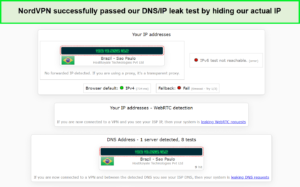
No leaks were detected with the NordVPN Chrome extension test.
Very Fast On Both Local & International Connections in Australia
NordVPN Chrome extension is one of the fastest browser plugins available. Its desktop VPN app is also very fast. For assessing the performance of the NordVPN Chrome extension, it was tested on local and international connections.
We present the findings by recording the average download speeds from the NordVPN speed test in the table below:
| Server Location | Average Download Speed (Mbps) | Average Speed Loss (%) |
| UK (Nearby Server) | 98.17 | 2.87% |
| USA (Global/International) | 96.44 | 4.58% |
| Germany (Global/International) | 98.69 | 2.35% |
| Australia (Global/International) | 66.55 | 34.15% |
NordVPN servers for Chrome don’t affect the overall connection speed, especially with nearby servers. For instance, on trying to connect the NordVPN browser plugin from the UK to the US, the total speed loss recorded was only 4.58%.
Whereas on the Germany server, the speed loss was around 2.35%, which proves that the NordVPN browser extension performs equally fast on the local connections and even faster on the international servers.
NordVPN Chrome Works With US Netflix, But Not Reliably in Australia
The full NordVPN app works with 10+ Netflix regions in Australia, including Japan, the UK, and the US. Tests of NordVPN full app version show that it works smoothly on Netflix for over 100 server locations.
In contrast, on observing the NordVPN Chrome extension, it was found to be less reliable and consistent than the full desktop app. The reconnection attempts were needed more often in the Chrome extension for the US Netflix.
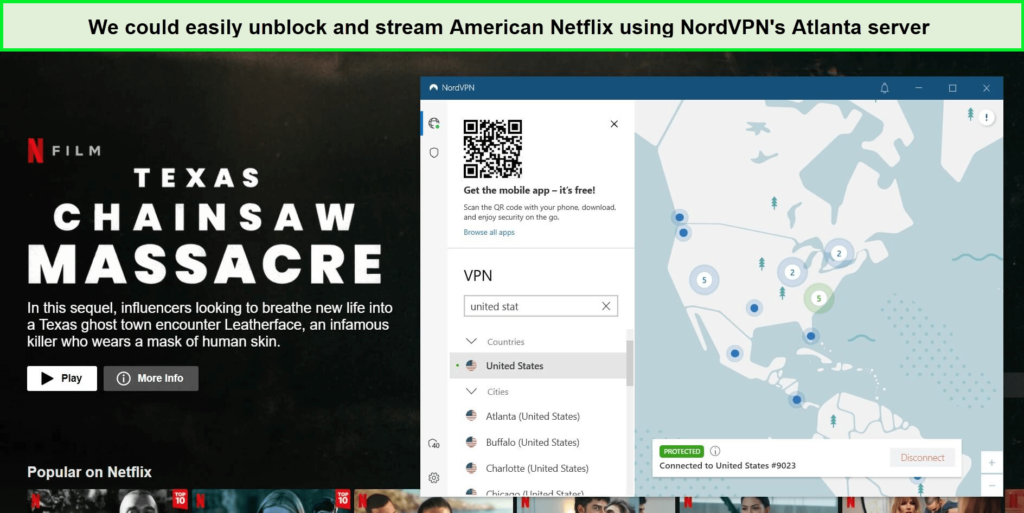
we had no trouble accessing American Netflix with NordVPN when connected to its desktop app.
Is NordVPN Free On Chrome in Australia?
No, NordVPN is not free on Chrome. Although, there are some free proxy extensions available that offer free VPN services for your browser. The biggest user concern is the data logging strategy due to the weak security.
Chrome extension with NordVPN is totally free to download and install, but it needs a subscription plan to avail of services. However, it offers a 30-day money-back guarantee for you to reclaim a complete refund after canceling your NordVPN subscription in Australia if you don’t like the services.
How to set up a NordVPN extension on Google Chrome in Australia?
NordVPN extension is easy to use and set up on Windows, Mac, Linux, and Chromebook devices. To download and use the NordVPN Chrome browser extension on your preferred platform, follow the steps ahead:
- Launch the NordVPN website and subscribe to a suitable plan. You get the Chrome extension for free, but to use its services, you need an account.
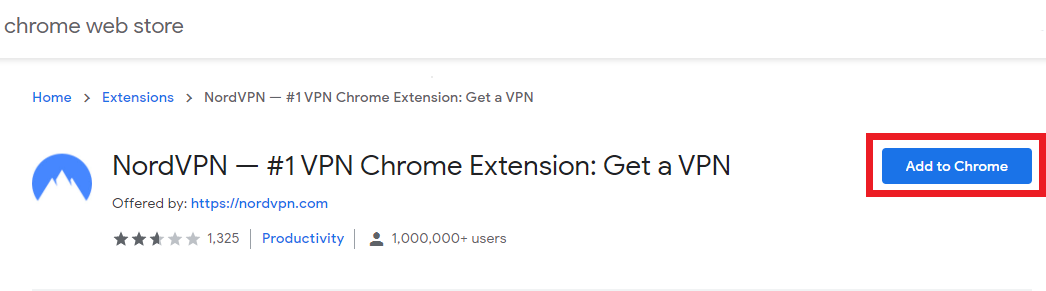
- Visit the Chrome Web Store or NordVPN website to download the NordVPN Chrome extension. Click on Add to Chrome button next to NordVPN.
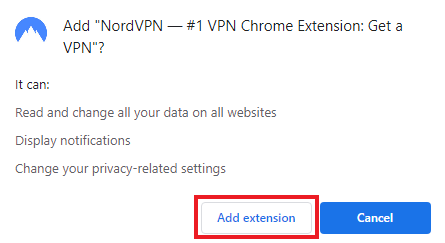
- NordVPN extension may require your permission to read and change data on websites. Click on Add Extension.
- You will get a notification for the successful addition of the extension.
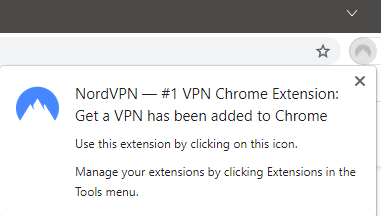
- After successful installation, you will find the NordVPN logo in the top-right corner of the toolbar. You can then log in or sign up with the NordVPN account by clicking on the NordVPN logo.
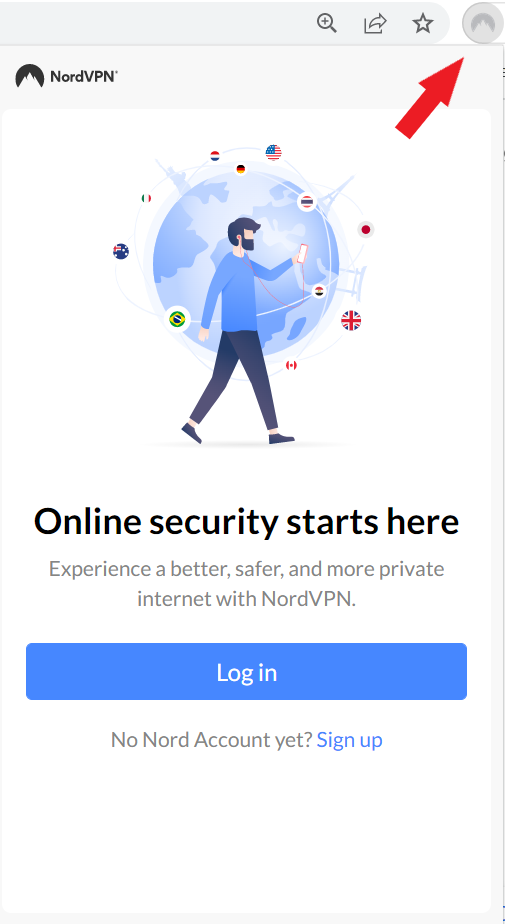
- Enter your account details set during registration to log in.
- After getting the extension and successfully logging in, you can adjust the extension settings according to your own preferences.
Check what all of these features are for:
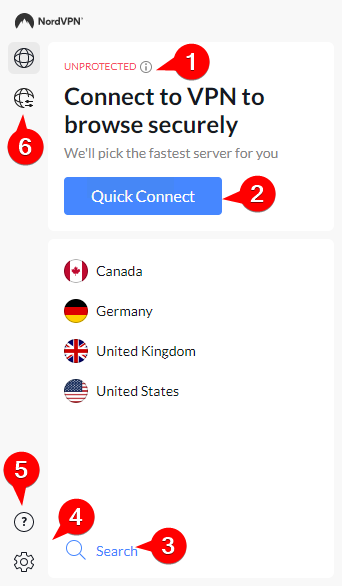
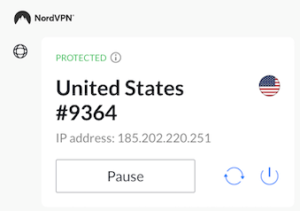
Protected status: After you connect to a NordVPN server, you can find your connection status displayed as Protected.
- Quick Connect: This Lets you connect to the quickest servers using the NordVPN extension. You’ll instantly connect to a NordVPN server when you click on Quick Connect.
- Search for a specific country: The Quick Connect option decides your server location, allowing you to select the country for the NordVPN server.
- Extension settings: You can get extra features here, like activating the Threat Protection Lite and blocking WebRTC.
- Support Assistance: You can find more information about the extension here and an option to chat live with an agent.
- Connection settings: To get connected automatically, you open your browser.
- Press the Settings symbol on the bottom-left side.
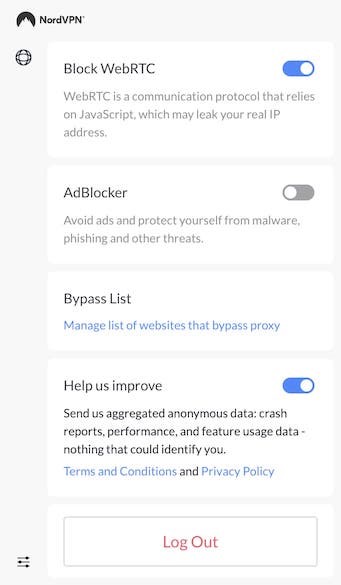
You can enable ad-blocking and also add sites to the Bypass list.
How to Disable NordVPN on Chrome extension in Australia?
You can disable your proxy connection by clicking on the Power symbol in the main menu of the extension. To completely disable NordVPN on Chrome:
- Open the Extension by clicking on the top-right corner of the browser.
- Press the Disconnect button.
- Right-click on the NordVPN extension, and choose the Remove from Chrome option from the list to uninstall the extension.
NordVPN Chrome Not Working in Australia? Here’s How to Fix It
Worried about your NordVPN Chrome extension in Australia not working? Try fixing the issue with the troubleshooting tips compiled next.
- Log out and restart Chrome: The most effective and simplest fix. To log out from NordVPN, just open the Extension and navigate to the Settings menu. Close Chrome completely. Now restart the whole process from the start.
- Connect to a different server: Unfortunately, you can’t select a particular server on the NordVPN Chrome extension in Australia. This could lead you to be assigned a faulty or overcrowded server automatically.
Check if the server works properly. If the server doesn’t work on connecting, try to connect to a server in a different country. Now you may reconnect to your desired location. You will be assigned a functional server if all works in your favor.
- Reinstall the extension: If the extension doesn’t work at all, you should reinstall the extension completely. Remove the extension from Chrome and reinstall it.
- Clear Chrome’s cache and cookies: By clearing Chrome’s cache, you can fix some NordVPN Chrome extension in Australia issues, like Netflix streaming. To clear the cache, open Chrome’s preferences menu. Select Settings, choose Security and Privacy and then click on Clear Browsing Data. All the information about websites stored in your browser will be deleted.
- Use the Bypass feature: Your IP address or location gets involved by some sites to add an extra layer of security. If your NordVPN’s Chrome extension doesn’t work with one specific website, make your site bypass the extension. Open Extension Settings and enter the website into the Bypass List.
- Check for conflicts between Chrome extensions: Your NordVPN Chrome extension in Australia may affect other extensions, like firewall, etc. You can detect the root cause by disabling your browser add-ons.
- Update to the latest Chrome version: Chrome automatically updates the system to resolve common issues and bugs, compromising your extension performance. Ensure your latest Chrome version by opening the Chrome menu and selecting Help. Open About Chrome and review the details.
- Use the main application: If none of the other solutions make your extension work, try to connect it to websites via the full NordVPN app. You can work reliably by selecting city-level servers and finding the one that works excellently for you.
- Contact NordVPN’s support: You can contact customer support for NordVPN’s Chrome extension, being a part of the complete VPN subscription package.
Select the support symbol in the bottom right corner of the NordVPN website. Explore the chat option first. To get in touch with a human agent, select get me a human and discuss your issues. If the issue persists, go through our comprehensive NordVPN not working guide in AU.
NordVPN Chrome Keeps Asking For a Password in Australia
After you open the NordVPN Chrome extension for the first time, you will have to enter your account details. NordVPN may repeatedly ask you to enter your password even after signing in, which is a common bug reported by some users.
To resolve this issue, make sure you have the latest extension version. Check if you are entering the correct username and password to log in. Additionally, if you have NordVPN running on other devices, ensure that you are not using more than 6 devices simultaneously without exceeding the limit.
If nothing else works, try to remove NordVPN from your device firewall to prevent it from being blocked. But if the problem persists, it can most likely be due to a Google Chrome issue as it automatically updates itself. These updates sometimes interfere with the proxy and VPN.
Try using the full NordVPN account to avoid all such issues.
FAQs – NordVPN Chrome Extension in Australia
Does NordVPN have a Chrome extension in Australia?
Yes, NordVPN has a Chrome extension in Australia that acts like a VPN proxy to protect your browser traffic. It modifies and hides your IP on the network and lets you select the sites you want to secure with split tunneling. You can also block ads and specify sites in the Bypass list.
Should I install the NordVPN browser extension in Australia?
Yes, you can install the NordVPN browser extension in Australia, as it is reliable, fast, and safe for browsing. It securely masks your IP address and unblocks US Netflix. However, it doesn’t encrypt entire device traffic like the full NordVPN account.
Does NordVPN work with Google Chrome in Australia?
Yes, NordVPN works with Google Chrome in Australia. NordVPN has over 5600 servers operating in 59 countries that users can select manually. On top of this, the Quick Connect feature automatically connects Chrome users to the best server available.
Why NordVPN extension is not working in Australia?
If your NordVPN extension is not working in Australia, it can be due to multiple reasons. We suggest keeping the following points in check to fix the issue:
- NordVPN can connect up to 6 devices at once. If you are running NordVPN on other devices, ensure you never exceed the limit.
- Other extensions can interfere with your NordVPN proxy. Therefore, disable all extensions and applications that may disrupt your proxy.
- After you close the extension with an active VPN connection, it will need some time to load when you reopen it. Wait for some time for the connection to establish.
Should you use NordVPN’s Chrome extension in Australia?
Yes, you should use NordVPN’s Chrome extension in Australia if you need to protect your browser traffic and improve the overall browsing experience. The standard browser extensions have limited features and are more susceptible to IP address leaks.
The NordVPN proxy only secures your IP address and allows you to access blocked content easily. It also protects you from trackers, snoopers, and advertisers by blocking malicious sites and links. Your data stays safe and healthy.
Whereas with the full NordVPN account, you get complete security software
Conclusion
With many browsing options available online, you may unknowingly put your data security and personal privacy at risk. NordVPN Chrome extension in Australia is ideal for securing your browsing activities and protecting your privacy online. It lets you do your job without any distractions and external monitoring.
The tests proved that the NordVPN browsers are super fast and secure for all nearby and international server locations. We recommend you try the NordVPN Chrome extension in Australia to grab a secure browsing opportunity with amazing features at a reasonable price. For detailed insights, check out our NordVPN review in Australia.
Experience a safe and reliable setup with NordVPN proxy.