The Firestick remote is crucial for managing your Amazon Fire TV, but sometimes, it may stop working for you due to unresponsiveness, connectivity problems, or remote incompatibility.
In short, there can’t be anything more frustrating than a remote that suddenly stops functioning while watching your favorite program. However, I’ve got you covered.
This article outlines easy steps to diagnose and resolve your FireStick remote not working issues in Australia. So, without any further delays, let’s get into it!
FireStick Remote Not Working in Australia – Quick Fixes
How to get FireStick remote to work when it malfunctions? Determine the reason first for your FireStick remote not working problem, then jump onto the fixing techniques. Whether it’s an update failure, battery issue, or problem with the volume, it can be easily resolved.
Some of the remote fixing tips in Australia are given ahead:
1. Replace the Batteries in your Remote:
Though it may seem a simple suggestion, low-on-power batteries can create issues in FireStick remotes. Your FireStick may seem small but may have a large power consumption whenever you click the buttons. Remote controls heavily rely on batteries to keep running.
Therefore, the initial step is to check if the batteries in your Firestick remote are dead. Should they be exhausted, promptly replace them with new ones.
2. Identify the problem:
The Fire TV remote includes a troubleshooting mode to identify issues easily. To activate it, press the rewind and right buttons together for three seconds, followed by the menu button.
The LED will glow green in this mode. Each LED color indicates a different issue: slow red for low batteries, fast red for a remote error, orange for unpairing, white if the device is off, and blue for no issues. Exit the mode by pressing play/pause and up together, then the menu button.
3. Pair the Remote with Fire TV or FireStick:
Ensure that your Firestick remote is properly paired with your Fire Stick or Fire TV, as it may unpair accidentally. Press and hold the Home button on the remote for 5 seconds until its LED light flashes. Next, hold the Home button on the Firestick device until the remote’s LED light stops flashing, indicating successful pairing.
4. Inspect for Obstructions:
Bluetooth devices like the Fire Stick remote typically range around 30 feet, though various factors can reduce this distance. If the remote functions only when very close to the TV or behind it, consider using a Fire Stick extender to improve its position.
Additionally, if your Fire TV device is stored inside a cabinet, removing it might enhance the remote’s connectivity and functionality.
5. Check for Interfering Devices:
Inspect your area for devices that might interfere with your Fire Stick, such as:
- Unshielded coaxial cables
- Wireless speakers
- Microwave ovens
- Wireless phones
- Other wireless devices
Move your Amazon Fire device away from these or turn them off individually to locate the source of interference.
6. Verify Remote Compatibility:
Ensure your Fire TV remote is compatible with your Fire Stick or Fire TV model. Check the product description before purchasing a remote to confirm compatibility.
7. Use a Smartphone as a Remote:
Download your smartphone’s Amazon Fire TV Remote app to control your device. Ensure your hardware and OS are compatible:
- Fire TV for Fire tablets: 8th generation and later.
- Fire TV for iOS: iOS 11 and newer.
- Fire TV for Android: Android 6.0 and newer.
Now, follow the steps given below to use your smartphone as a remote:
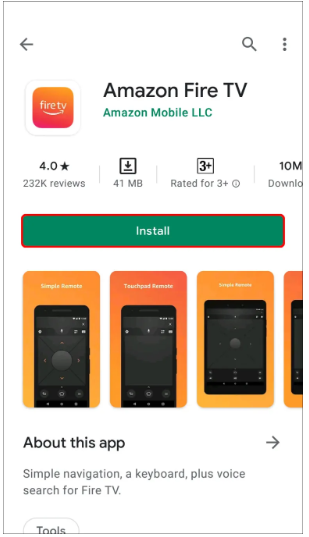
- Search and download the Fire TV app on your phone.

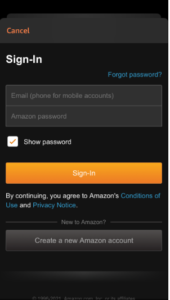
- Switch on the TV using the remote or pressing Power. Enter your credentials and log in to your Amazon Fire TV smartphone app account.
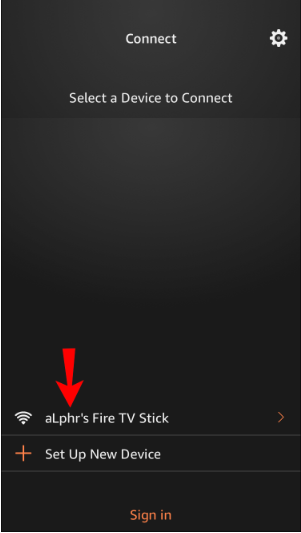
- Pick your Fire TV device from the smartphone app.
- Get the code displayed on the TV and enter it into the smartphone app.
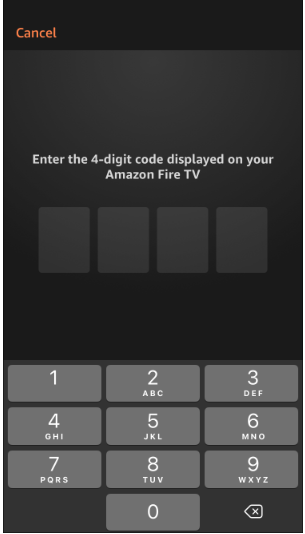
8. Reset Your FireStick Remote:
If none of the above steps work, try resetting the remote. To do this, remove the batteries from the remote and press and hold the Home button for 10 seconds. Then, put the batteries back in and try to pair the remote with the Firestick again.
What Are the Reasons for a Fire Stick Remote to Stop Working in Australia?
Several factors can cause a FireStick remote to malfunction in Australia, including:
- Battery Issues: Problems like low power or incorrectly inserted batteries are common culprits.
- Pairing Issues: The remote must be paired with the Fire Stick, especially if it’s a replacement.
- Range Limitations: Fire Stick remotes use Bluetooth and can theoretically work up to 30 feet away, but the practical range may be shorter.
- Obstructions and Interference: Physical barriers or electronic interference can reduce functionality.
- Compatibility: Ensure replacement remotes are compatible with your Fire Stick.
- Physical Damage: External or internal damage can also impair remote function. The remote can become completely useless, whether it’s the damaged parts or the water absorption.
What Are the Effects of a Broken FireStick Remote in Australia?
If your Firestick remote breaks, you’ll lose the ability to control your Firestick device, making it impossible to adjust volume, change channels, or navigate the interface.
You’ll also be unable to connect the Firestick to any apps, such as casting apps for Android and iOS. This situation can be particularly disruptive during activities like watching movies or TV shows.
Troubleshooting a Non-Working FireStick Remote with an LG TV in Australia
Here’s a list of all the tips that you require to fix your FireStick remote not working on LG TV issues in Australia:
- Check TV Input: Ensure your LG TV is set to the input connected to the Firestick. Use an LG TV remote app if the physical remote is missing.
- Inspect Batteries: Verify that the batteries in the Firestick remote aren’t depleted.
- Re-Pair the Remote: Try pairing the remote again by holding the Home button until the LED flashes, then do the same on the Firestick device.
- Consider Remote Replacement: If these steps fail, the remote may be defective and need replacing.
What Does Reddit Have to Say About Troubleshooting a FireStick Remote?
A recent community thread about troubleshooting a FireStick remote discussed several solutions that were tested first-hand by Redditors. Here are the fixes they suggested:
- If the remote is not working, pair it with the Firestick again by pressing and holding the Home button for 5 seconds until the LED light flashes.
- If it still doesn’t work, reset the remote by unplugging the Fire TV, pressing and holding the Left, Menu, and Back buttons simultaneously for 12 seconds, then releasing the buttons and waiting 5 seconds. Put the batteries back in and press the Home button. If it’s not paired, press the Home button for 10 seconds.
There’s nothing more frustrating than a FireStick Remote not working! You settle in for a night of streaming bliss, only to be met by an unresponsive hunk of plastic. Don’t worry; most of the time, it’s a simple fix like dead batteries or a quick pairing issue. A restart of the FireStick itself can also sometimes work wonders.
Before you start throwing pillows in defeat, try my easy troubleshooting steps and get yourself back to browsing shows in no time!
Beware Firestick Users!
Online ISPs and government authorities often track user activities and traffic to discover personal and sensitive data. While you browse, stream, or play on any unsafe platform, you are vulnerable to all kinds of cyberattacks and threats.
However, with a reliable VPN in Australia, your online identity is fully secure, and your traffic is securely encrypted. Therefore, I recommend using ExpressVPN, the best VPN for Firestick, with ultra-fast servers spread over 105 countries worldwide.
You can experience remarkably safe and enhanced performance with the special Lightway protocol and other latest technologies. With this VPN, your investment is secure if you go for the ExpressVPN free trial in Australia. You can claim a complete refund within 30 days to get it all back if you are not satisfied with their services.
More FireStick Guides By VPNRanks
- Change your location on FireStick in Australia – Use my guide and change your FireStick location to enjoy geo-blocked content now!
- Best VPN for FireStick in Australia – Check out my list of the best FireStick VPNs!
FAQs – FireStick Remote Not Working in Australia
How do I fix an unresponsive Firestick remote in Australia?
If your Fire TV remote still isn’t working and doesn’t have a troubleshooting mode in Australia, try these steps:
- Replace the batteries with new alkaline ones for optimal performance.
- Position the remote closer to the device, ideally within 10 feet.
- Unplug your device and then plug it back in to reset it.
- Reset your Fire TV remote by following the specific reset instructions for your model.
Why is my Firestick remote not working even with new batteries in Australia?
To resolve issues with an Amazon Firestick remote that isn’t working in Australia, consider these steps: Reset the remote or your Firestick device, ensure there are no obstructions between the remote and the Firestick, replace the batteries in the remote, or try unpairing and then re-pairing the remote to the device.
How do you reset a Firestick remote?
To reset a Basic Edition Fire TV Remote, follow these steps: Hold the Home button, release it, and then press the Menu button nine times. Remove the batteries from the remote, and unplug your Fire TV from the power supply and HDMI input. Wait 60 seconds. Afterward, reinsert the batteries into the remote and reconnect your Fire TV to power and HDMI.
How do I resync my Fire Stick remote?
To pair your remote with a Firestick, follow these steps:
- Unplug the Firestick from its power source.
- Reconnect the Firestick and wait for it to boot to the menu screen fully.
- Hold the “Home” button on the remote for 10 seconds to initiate pairing.
- After pairing, allow about 20 seconds for the remote to become operational.
How to operate a Fire TV without a remote in Australia?
You can use Fire TV by using your smartphone as a remote in Australia. Here’s how you do that:
- Download and install the Fire TV app on your smartphone.
- Connect your smartphone to the same Wi-Fi network as your Fire TV.
- Launch the Fire TV app on your mobile device.
- Select your Fire TV from the list of devices displayed in the app.
- Follow the on-screen instructions to connect and control your Fire TV.
Is it possible to replace a Fire TV remote?
If your Fire TV remote is lost and you need a replacement, purchasing a new one is your best option. The 1st-gen Alexa Voice Remote, available on Amazon, is compatible with Fire TV devices from the 1st to the 3rd generation.
Conclusion
Firestick and Fire TV are being used by people worldwide. Users generally experience minor issues with these devices that can be resolved with basic solutions. However, some of the cases need advanced techniques to tackle the complexity.
With your FireStick remote not working in Australia, your TV becomes inoperable and useless. Luckily, you have a wide range of options to try and test remote connection with your TVs. The most common and practical solution to make remotes work is unplugging, resetting, and repairing them.
It is recommended to check and change battery frequency as this is one major root cause often neglected. However, if nothing else works for you, contact Amazon customer service immediately.