Internet Service Providers may create some annoyance for those who want to bypass geo-restrictions in UK. For that, they may block your VPN facility for some time. So, don’t get panic! Go through our useful and time-saving tips to maintain a VPN service over your Network.
Many of our readers reported issues with their routers blocking their VPN services. This could hinder their privacy and other day-to-day online tasks relying on a VPN connection. That’s why we have gathered some important information about such a blockage.
So, is your router blocking VPNs in UK? Well, don’t worry. This guide will assist you in fixing issues and telling you about how to bypass router blocks. So whether you’re using an Asus router, Netgear or CenturyLink, this guide will sort out all of your VPN-blocking concerns.
Besides this, we’ll also have a look at some of the best VPNs for different routers. So keep yourself in it. so, without any delays, let’s get started!
Quick fix on Router Blocking VPNs in UK: How to unblock VPN when blocked by the Router (ISP)
You can check our quick fix on Router Blocking VPNs in UK for those in a hurry. So let’s get into it.
As many times you may have seen, when you connect with the VPN in UK, your internet goes offline. This is the biggest sign that your internet providers have restricted VPN access over your Network. Here is what you can do:
1. Adjust Your IP Address:
It’s completely possible to change your IP address. To do it, You need a trustworthy VPN like ExpressVPN in UK. Afterward, make sure to follow our steps.
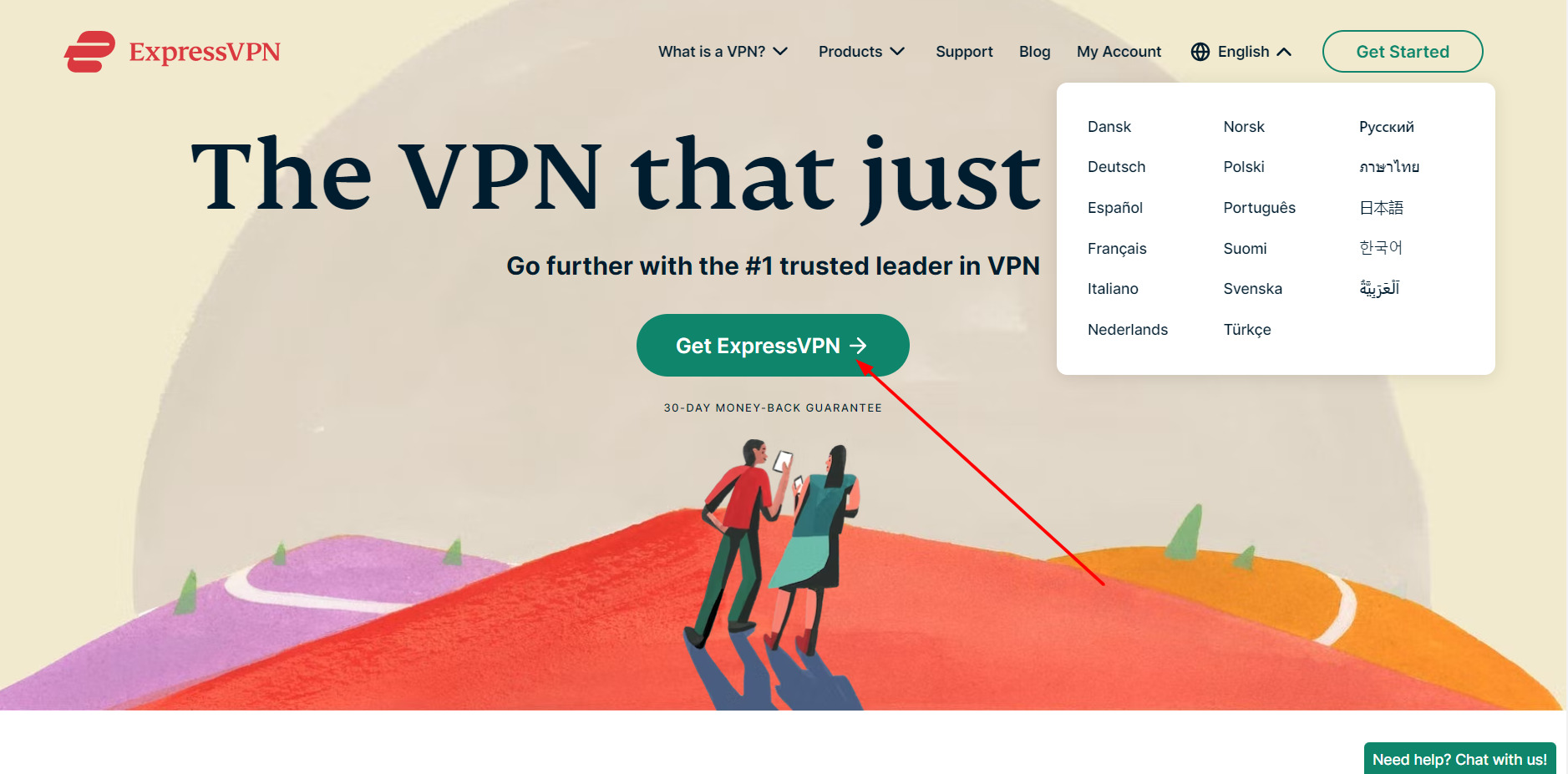
- Access VPN in your browser.
- Go to router manuals, then the configuration page.
- Find your router among all the router models.
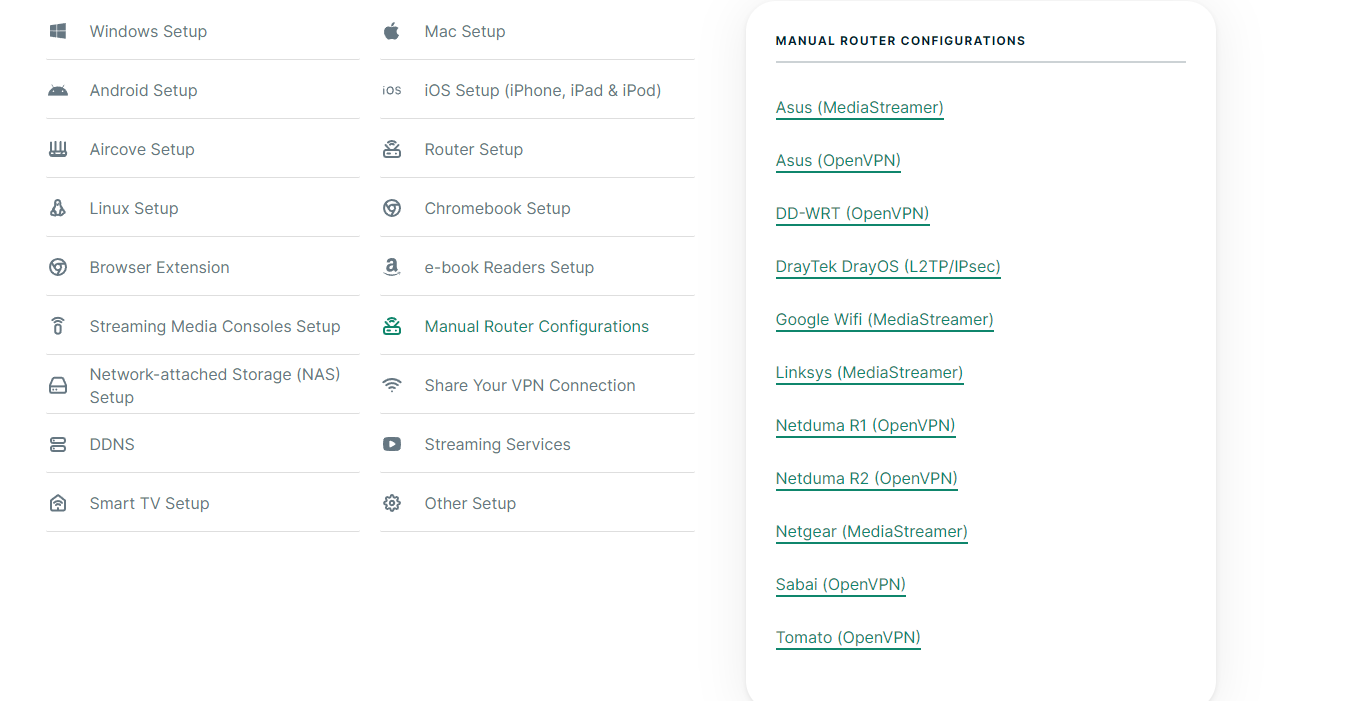
- After finding your router, you need to download the OpenVPN configuration file for your specific server.
- Go to your router setup.
- Make a new VPN Network Profile.
After that, your IP address will be completely changed. This will help you bypass all the restrictions from any region on the globe.
2. Select A Different Protocol:
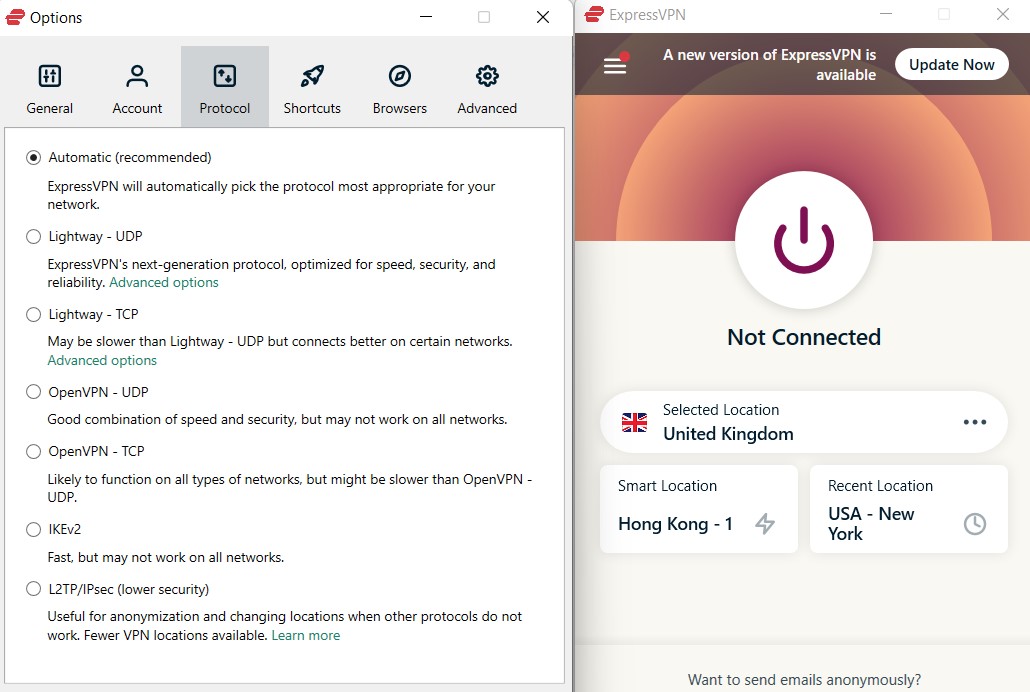
Several routers block standard VPN protocols in UK, such as Point-to-Point Tunneling (PPTP) and SSTP.
The VPN tool may have the option to allow these protocols to communicate freely, but it’s easier to modify settings there.
The best thing Britishers can do is switch between the available protocols until they find one that works. OpenVPN universal protocol is the best option since it is the most up-to-date protocol.
It’s tough for ISP to detect and block OpenVPN. We recommend using this one.
3. Modify Router Settings:
You can try to modify your router setting according to your needs. Try out some simple tips to modify router settings.
Removing firewalls from your router can ultimately help communicate your router freely and independently. So make sure to remove all firewalls. Making changes, like altering your server’s locations and choosing different protocols, will benefit you in enabling a VPN over your Network.
You can also try to disable the Windows native Firewall to make the router communicate freely. One of the most dedicated solutions is to get a good VPN in UK. We’ll recommend ExpressVPN to ensure your better connection and performance. Try it today.
Isn’t that easy enough for you? Try these hacks today if you’re also facing a block. You can also check the reason why is my Router Blocking VPNs in UK.
Best VPNs for Routers in UK In-Depth Analysis
After countless hours of research and experiments, we have chosen some of the best VPNs for routers in UK through our testing mythology. Right now, they are the most preferred VPNs in the market.
Here is an in-depth analysis of the best VPNs for Routers in UK till now. Let’s keep going:
1. ExpressVPN – Best Router blocking VPN in UK

Key Features
- Super fast 3000+ servers in 105 countries including 4 server locations in UK.
- Dedicated router app: Yes
- Private DNS
- Device-based split-tunneling for routers
- Price: 2-Year Subscription for GB£5.32/mo (US$ 6.67/mo) - Save up to 49% with exclusive 1-year plans + 3 months free
- Public WIFI safety
ExpressVPN is the best router-blocking VPN in UK, with leading encryption technology and numerous compelling features. With over 3000+ servers in 105 countries including 4 server locations in UK., ExpressVPN delivers a unique experience to users. It is the most reliable and the best VPN for Routers in UK, as it has all the essential features required for router security.
ExpressVPN offers the first Wi-Fi router in the market with built-in VPN protection by default, named Aircove. It has all the ExpressVPN security features as well.
We have tested ExpressVPN for weeks, and after all research and testing, we put ExpressVPN on the top of over list. It also offers IP/DNS leak protection that secures you from all kinds of IP leaks in UK. When tested using its US server, the VPN did not leak our actual IP address at all:
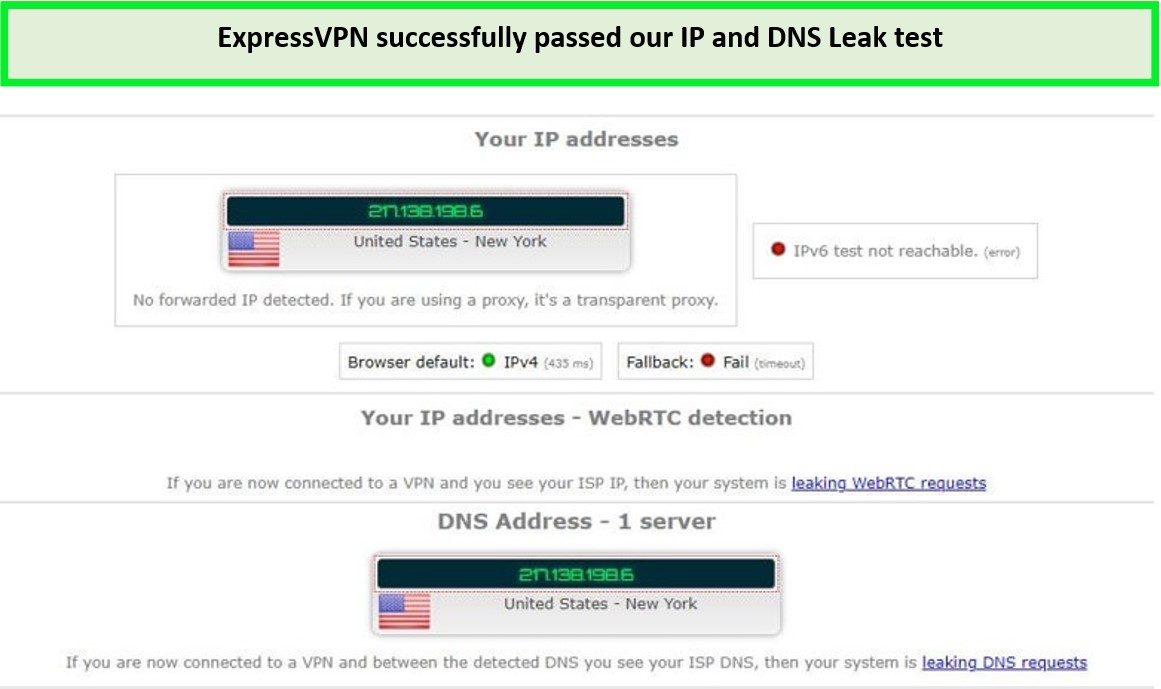
ExpressVPN successfully concealed our IP and DNS requests while using the internet.
To ensure whether or not, ExpressVPN can access any site in UK, we tried to connect with many different regions and countries after installing ExpressVPN on routers. The results were surprisingly good; VPN was bypassing restrictions in seconds.
We were astonished by the amazing ExpressVPN speed. With a connection of 100Mbps, ExpressVPN managed a downloading of 89.42Mbps and an uploading of 84.64 Mbps.
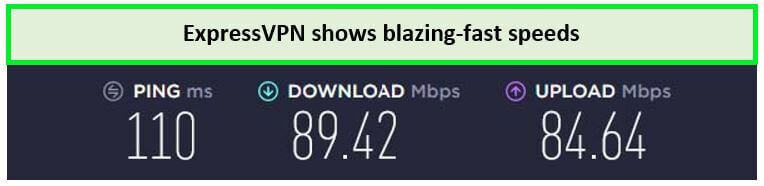
These speed results are enough to stream videos in high resolution.
ExpressVPN showed impressive speed with Lightway protocol, with an ideal 10-170ms ping between our sessions. Although, OpenVPN isn’t like Lightway protocol. So, our goal was to aim for better streaming and gaming, So we preferred the Lightway protocol.
Regarding unblocking streams and media, ExpressVPN has a huge collection of servers around the globe and a MediaStreamer. So if you’re planning to watch a movie on US Netflix with ExpressVPN, you can easily access the US server and start watching it. Furthermore, ExpressVPN can easily unblock HBO, ESPN, CBC, Youtube TV, and many more streaming services.
By buying a Single subscription to ExpressVPN, you’ll be allowed to connect with 5 devices simultaneously. These devices can be your Windows laptop, Macbook or Andriod or IOS Phone, higher-end Router, Android TV, or even Nvidia Sheild.
ExpressVPN uses AES-256 encryption technology to ensure the User’s privacy. AES-256 is the most high-end type of encryption, which is nearly impossible to decode. Also, the ExpressVPN kill switch feature provides security to the data even if the VPN connection drops for some reason. These features minimize the risk of getting data breaches.
Another great feature related to security is threat manager; this feature allows users to make a connection without the interference of third parties. These third parties can track your data, but ExpressVPN doesn’t allow them to track your activity.
In terms of cost, ExpressVPN costs about GB£5.32/mo (US$ 6.67/mo) - Save up to 49% with exclusive 1-year plans + 3 months free. To add more value for their customers, It provides a 7-day ExpressVPN free trial in UK on their Android and iOS apps.
ExpressVPN also has 24/7 customer support at your service. Also, if you have issues, you can ask them. You can get your money back under their 30-day cash-back guarantee if you want a refund.
So check our detailed ExpressVPN review UK and buy your Subscription today to enjoy all the features of ExpressVPN.
- Quality Performance
- Dedicated Router App
- Easy to install on Routers
- Threat Manager
- Maintain a Static IP address over any location
- Strong Encryption
- A bit on the expensive side
- Slows With OpenVPN
2. Surfshark – The Most Affordable Router blocking VPN
Key Features
- 3200+ servers in 100 countries including 4 server locations in UK.
- AES-256-GCM encryption
- Private DNS and leak Protection features
- Dedicated router app: No
- Price: GB£1.99/mo (US$ 2.49/mo) - Save up to 77% with exclusive 2-year plan + 30-day money-back guarantee
- Compatible devices: Windows, iOS, Android, Linux, game consoles routers, and more
Surfshark is a budget-friendly router-blocking VPN with an incredible unblocking speed and affordable price plans starting at just GB£1.99/mo (US$ 2.49/mo) - Save up to 77% with exclusive 2-year plan + 30-day money-back guarantee in UK. Having 3200+ servers in 100 countries including 4 server locations in UK., Surfshark provides all the essential security features at cheap rates in UK.
To obtain the best information, we installed SurfsharkVPN on our router and reviewed it for many days. During our evaluation, SurfsharkVPN didn’t leave any mark of exception.
To test the servers, we connect to the nearest US server. After establishing a link with the US server, we found that almost every geo-blocked US website worked efficiently. Besides unblocking sites, Surfshark also maintained high anonymity on every site.
We tested its DNS/IP leak protection feature by connecting to its US server, and the VPN did not leak our IP address at all:
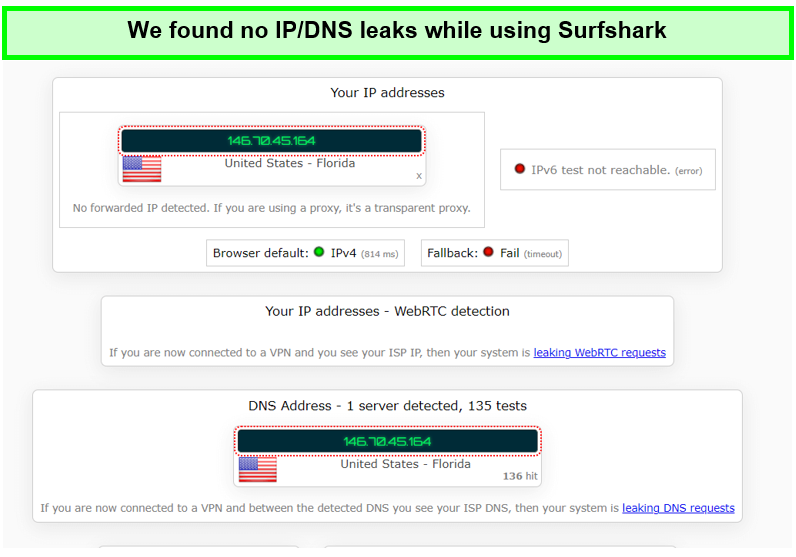
Surfshark successfully kept our IP address hidden when tested for IP Leaks.
We also checked all the essential security over a wide range of experiments, and Surfshark maintained our privacy at its peak. All the features like the kill switch, Private DNS, Clean Web, Zero-log Policy, and Camouflage mode were very useful and working perfectly.
Surfshark likes to keep things updated and comes with the strongest encryption technology. Surfshark chooses AES-256 encryption technology, which is top-notch security technology.
For security and surveillance, Surfshark uses an Obfuscation tool, or you can simply call it a Camouflage tool, which masks your identity so your ISP can’t detect your internet traffic. It’s a great tool for privacy measurements.
Also, to ensure its lightning speed, we took a Surfshark speed test on over a 100Mbps connection, and it turns out to manage a downloading speed of 81.32Mbps and an uploading speed of 76.12Mbps.
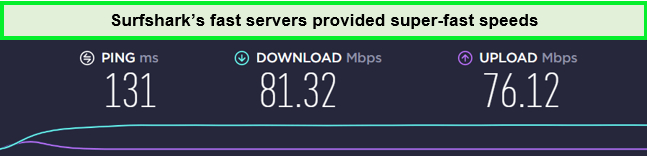
We achieved more or less the same speed results with all of its US servers.
Surfshark can access any geo-blocked content within seconds in UK. So if you’re planning for Netflix US with Surfshark tonight, It’ll help to bypass it. Just connect to any US server, and you’re good to go. Not only this, but you can bypass other streaming sites like ESPN, Hulu, Disney Plus, Amazon Prime, Youtube TV, and many more.
Surfshark can connect with many devices at once. Surfshark can easily connect with any 5 to 10 devices simultaneously. These devices can be your Phone, Windows Laptop or PC, Linux or another operating system, Android TV, Firefox, and many more.
In terms of pricing, Surfshark is a budget-friendly competitor on our list. It offers exciting, affordable options and a Surfshark free trial of 7 days for Android and iOS users.
For any query, Surfshark has 24/7 chat support. Also, if you don’t like anything related to the service, then you can easily go for a refund. It’s offering a 30-day cash-back guarantee on every package.
Check our Surfshark review for more details.
- Supreme Performance
- Dedicated Router App
- No DNS leaks
- Maintain a Static IP address globally
- Top-end Encryption
- Budget-Friendly price
- Weak Social Media Presence
- Not a great Customer Support
3. NordVPN – Most Secure Router blocking VPN
Key features
- 6000+ servers in 61 countries including 440+ servers in UK
- Private DNS.
- Onion over VPN
- Dedicated router app: No
- Price: GB£3.18/mo (US$ 3.99/mo) - Save up to 63% with exclusive 2-year plan + 3 months free for a friend
- Compatible devices: Windows, Mac, Linux, iOS, Android, routers
NordVPN is the most secure router-blocking VPN. Having the largest server network of over 6000+ servers in 61 countries including 440+ servers in UK. NordVPN promises fast streaming with unmatchable speed in UK. It has the most diverse option of servers for your Router.
Even though NordVPN doesn’t offer a dedicated router app, it partners with Flashrouters to support various routers. Check how you can manually install NordVPN on your routers.
To ensure whether NordVPN features work or not, we conducted experiments for a couple of weeks. In the end, the results were really amazing, and the features worked incredibly well.
NordVPN comes with a DNS/IP leak protection feature which we tested for you. We connected to its UK server, and the VPN did not leak our actual IP address to users:
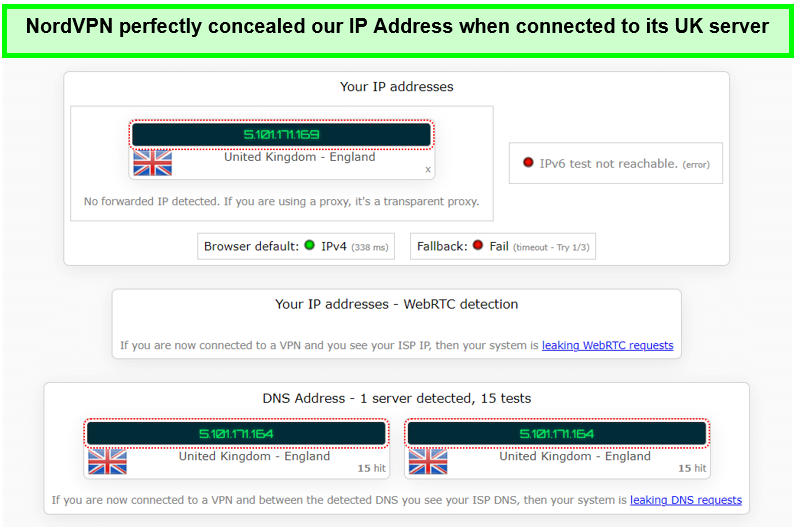
NordVPN successfully passed our IP & DNS leaks test.
Also, we have tried to overcome all the privacy features like Kill Switch, Zero Log Policy, Threat Protections, and many others. All these features were functioning fantastically. To make security more precise, NordVPN uses an AES-256 encryption mechanism. This type of encryption is highly accurate when it comes to securing data.
Also, for security purposes, NordVPN uses an Obfuscation tool that helps to hide identity from your ISP. This tool enhances privacy and minimizes security risks.
We tested the NordVPN speed over a 100Mbps connection, and NordVPN managed a downloading speed of 83.82Mbps and an uploading speed of 44.64Mbps.
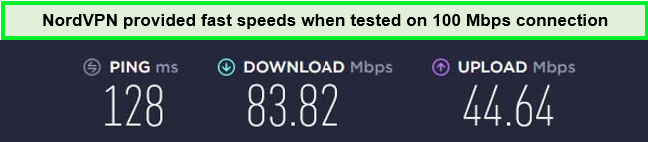
NordVPN delivered fast-speed results during our speed test.
So if you’re thinking of streaming any geo-blocked content or bypassing streaming sites like Netflix US, just connect to the nearest geological Server and access the site in UK.
Just like that, you’ll be able to access not only Netflix US with NordVPN but also you can access other sites like CBC, HBO, Amazon Prime, Disney Plus, and many others sites. With NordVPN, the stream works efficiently without any interruptions.
NordVPN can easily connect to 6 devices simultaneously. So if you’re planning for a subscription, you’ll be glad to know that NordVPN can connect to Windows, iOS, and Linux operating systems. Also, you can connect this to your Android or iOS Phone, Android TV, Firefox, or Nvidia Shield.
You can easily get these features by buying a Subscription, which costs around GB£3.18/mo (US$ 3.99/mo) - Save up to 63% with exclusive 2-year plan + 3 months free for a friend. You can even get a refund under NordVPN’s 30-day cash-back guarantee.
For further information, check our NordVPN review UK.
- Largest Number of Servers
- Quality Performance
- Dedicated Router App
- Leak Protections
- Maintain a Static IP address over any location
- High-End Encryption
- Slow App
- OpenVPN isn’t User friendly
Why is my Router Blocking VPNs in UK?
There’s a chance that your Router blocks your VPN connection in UK. As for some networks, when you connect with a VPN, it says that the Network is blocking VPN, so try to change the Network and try again.
Errors like these can be temporary, so if you wait for a while, there’s a chance that it can go away all by itself. Just try to be patient, Don’t get panic. Wait for some time, and then try again. This may solve the problem.
Also, these errors can be caused by the firewall settings. Some Wi-Fi networks don’t like VPNs. Therefore they restrict VPN access on their Network. So if you’re getting it for the first time, it may be because of the firewall settings.
Besides, if you waited and tried again after a while, the error disappeared. Then, try to switch networks or get yourself some mobile data.
FAQ – Router Blocking VPNs in UK
Do some routers block VPNs in UK?
Yes, many routers have issues with standard VPN protocol or your router setting blocking VPN completely. Most routers block standard VPN protocols like PPTP and SSTP in UK. If you modify the settings and change them to communicate individually, you can solve this problem.
So, for that, we’ll recommend you use OpenVPN. It’s a bit slow, but it’s up-to-date, which can benefit you in solving such annoying problems. This may also answer your question can ISP block VPNs? Yes, it can.
ExpressVPN is the best VPN in UK and uses all the modern protocols to facilitate the users. If you’re experiencing such a problem, then Try using ExpressVPN in UK.
How do I stop my Wi-Fi from blocking VPN in UK?
Here’s what you can do to prevent your Wi-Fi from blocking your VPN in UK:
- Choose an effective and powerful VPN like ExpressVPN
- Configuring a manual VPN connection.
- Tweaking the DNS settings
- Get a static/dedicated IP address
- Change your tunneling protocols
- Switch to a different server
That’s all. By doing these steps, you can stop your Wi-Fi blocking VPN.
What to do if VPN is blocked by ISP in UK?
If you can’t connect to the internet while using a VPN in UK, your ISP might restrict its access. You can fix this issue by connecting to a different server, protocol, or port. We recommend using ExpressVPN’s server, which is equipped with advanced technology to bypass powerful restrictions.
Conclusion
Internet Service providers can choose to block VPN services over the Network in UK. Leaving a full chance for Router blocking VPNs in UK. Many ISP has configured their system like that. So, nobody can use a VPN over their service. Routers like Asus, Netgear, and others can block VPNs.
Try our suggested VPN for more enhanced speed and unblocking features in UK. That said, stay with us for more useful guides, and tell us about what you like. We would love to help you anytime.
