ExpressVPN works flawlessly when it comes to using it on Amazon Firestick in Canada. In fact, ExpressVPN now offers a custom app for Amazon Fire TV devices. This makes it super easy to install and access awesome streaming platforms like Disney Plus, Netflix, BBC iPlayer, etc.
In this guide, we will be discussing how to install ExpressVPN on FireStick in Canada, Amazon Fire TV Stick, and other Amazon devices. This allows you to protect your online privacy while streaming your favorite movies and TV Shows with the best FireStick apps in Canada. You can also use it with Fire TV Cube, and Fire TV Stick Lite as well.
Moreover, Users can enjoy streaming videos in HD quality without buffering in Canada.
Why Use ExpressVPN on Firestick in Canada?
ExpressVPN excels as the best VPN for FireStick in Canada, prioritizing privacy, security, and seamless streaming on your Firestick device within the country. Here are some key reasons why you should use ExpressVPN on Firestick:
Offers Excellent Speeds
ExpressVPN on Firestick is a killer combination, offering exceptional speed that sets it apart as one of the fastest VPNs available. With a network of over in Canada VPN servers distributed across 105 countries, it is optimized for speed. This ensures a seamless streaming experience in HD and 4K, surpassing the performance of the average VPN. The best VPN for Fire TV Cube can also be set up for safe streaming with Amazon Fire TV Cube.
Whether you’re streaming videos or downloading files, ExpressVPN server speeds in Canada guarantee a flawless, lightning-fast internet experience.
Easily Unblocks Geo-restricted Streaming Services
Using ExpressVPN on FireStick offers the advantage of easily unblocking geo-restricted content in Canada. ExpressVPN stands out among the best VPN for Firestick in Canada that consistently provides access to popular streaming services like Netflix, BBC iPlayer, and more.
By creating an account and installing the VPN, you can connect to a server of your choice and change your Netflix region in Canada to another, So get a US IP address in Canada, and effortlessly unblock Netflix libraries from multiple countries, including the US, UK, Canada, Netherlands, Germany, Japan, India, and more.
ExpressVPN effortlessly bypasses geo-restrictions on Netflix US and grants access to other restricted services like BBC iPlayer, HBO Max, and Disney+. This makes it the best VPN for streaming in Canada, because of its unmatched ability to unlock a wide range of content.
Offers Reliable Security and Privacy Protection
Using ExpressVPN on FireStick in Canada offers enhanced security as one of its key benefits. ExpressVPN incorporates advanced security and privacy features like an ExpressVPN kill switch Canada, DNS/IP leak protection, the ExpressVPN Threat Manager in Canada, and robust AES 256-bit encryption. Moreover, it strictly adheres to a no-logs policy, ensuring your privacy remains intact. With ExpressVPN, your online activities are kept anonymous, secure, and private.
When using third-party Kodi add-ons and other applications that may contain pirated content on your FireStick TV, there is a risk of being caught. Therefore, it becomes crucial to hide your streaming activities from your Internet Service Provider (ISP) and the government by utilizing a VPN, especially in Canada.
Easy to Use
Not all VPN users are programmers or advanced internet users, in fact, they are mostly lay persons who do not have much understanding of the complexities that make VPNs work, which is why it is crucial that any high-quality VPN should be easy to install and use by people who do not have such specialized skills.
In addition to offering cutting-edge features like a Network Lock Kill Switch and VPN Split Tunneling, ExpressVPN maintains a smooth and user-friendly app interface, that makes it very easy to use ExpressVPN on FireStick in Canada.
How to Install ExpressVPN on FireStick in Canada
ExpressVPN is available on the Amazon app store, so there’s no trouble installing ExpressVPN on FireStick devices in Canada. You can even sideload the ExpressVPN app if you are unable to access or find the right app on the Amazon Appstore. We’ll teach you both methods:
Method 1: Install the app from Amazon Store in Canada
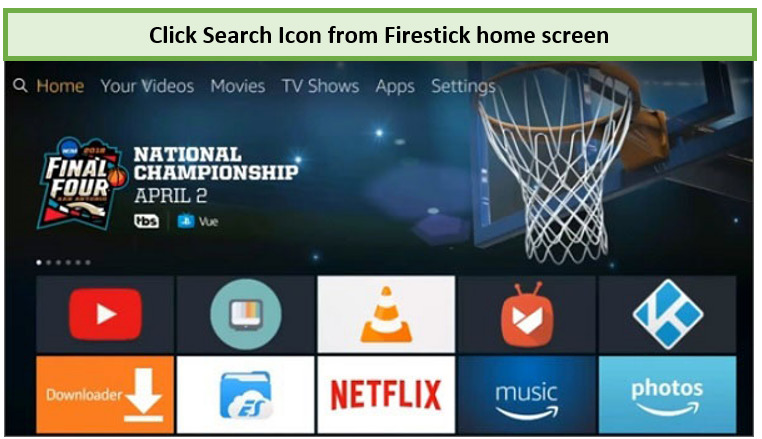
Step 1: Purchase ExpressVPN or try its free trial in Canada. Click the Search icon from the FireStick Home screen (magnifying glass icon on top left corner).
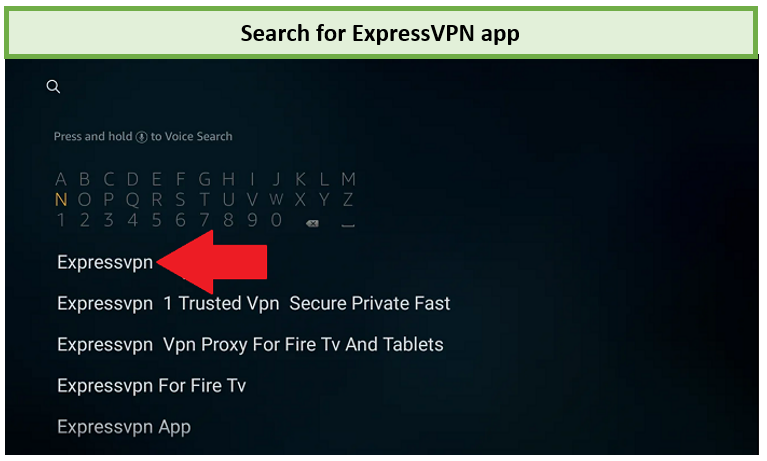
Step 2: Enter “ExpressVPN” in the search field and click on it.
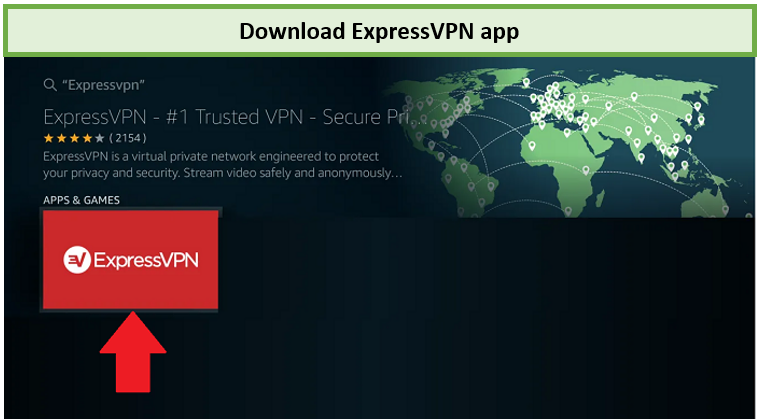
Step 3: Select “Download” or “Get” to download and install the ExpressVPN app.
Step 4: Launch ExpressVPN by Clicking on “Open.”
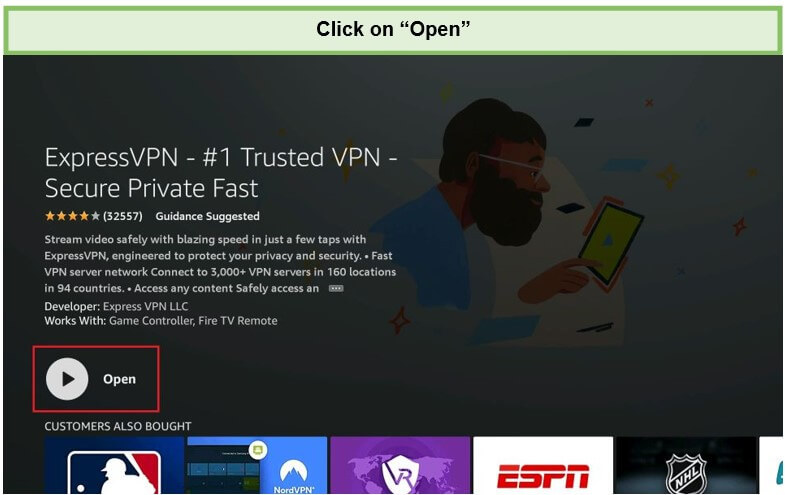
You will now have to set up your account on ExpressVPN or signup for ExpressVPN free trial to be able to connect to any VPN server location and enjoy unrestricted access to services like Netflix. You can refer to our guide to learn how to watch Netflix with ExpressVPN in Canada.
Method 2: Sideloading the ExpressVPN APK on FireStick in Canada
This method applies to those who couldn’t find ExpressVPN on the Amazon store in Canada. In this case scenario, you can download the ExpressVPN APK file and install it. Here’s how to do it:
Step 1: Go to the Search option on the main menu.
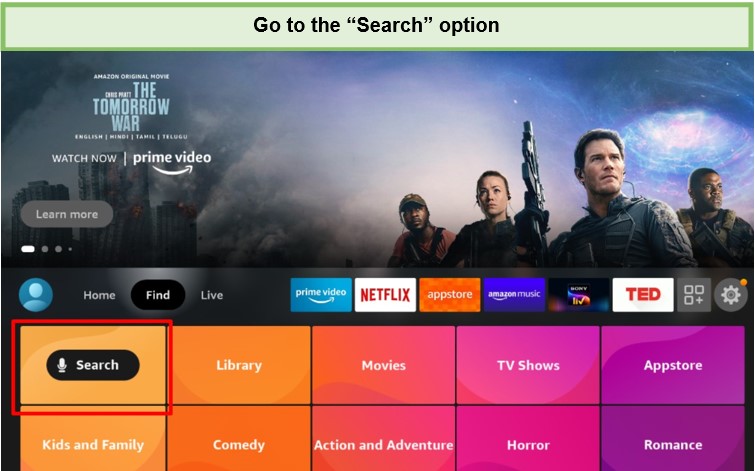
Step 2: In the search results, enter Downloader and then select Downloader.
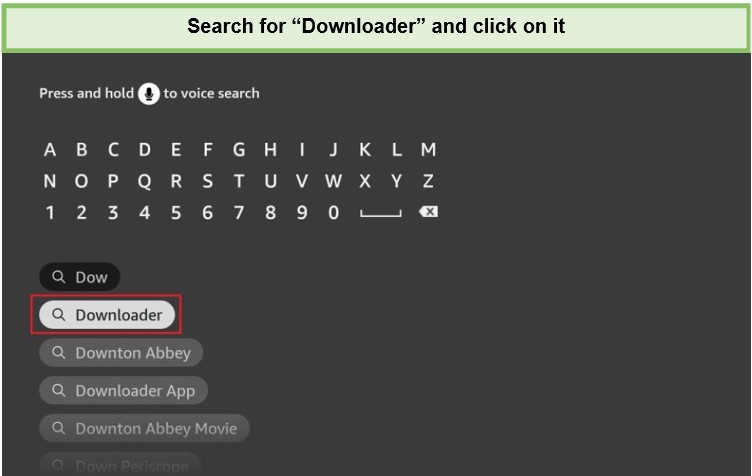
Step 3: You can see “Downloader” from the list of options.
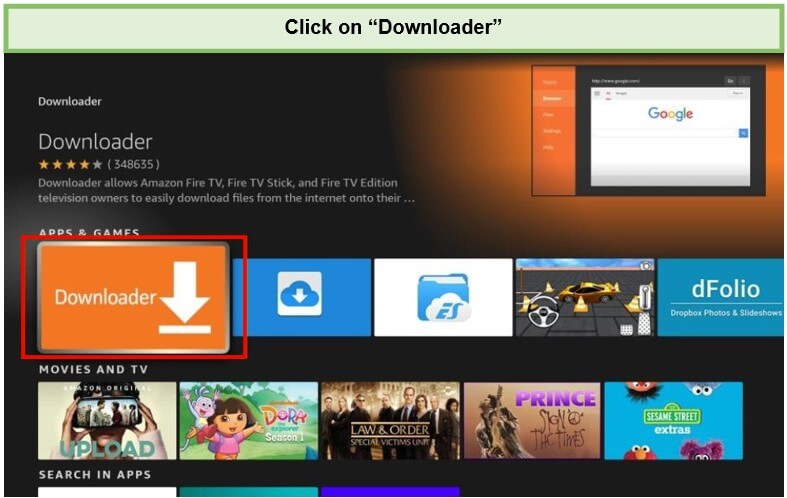
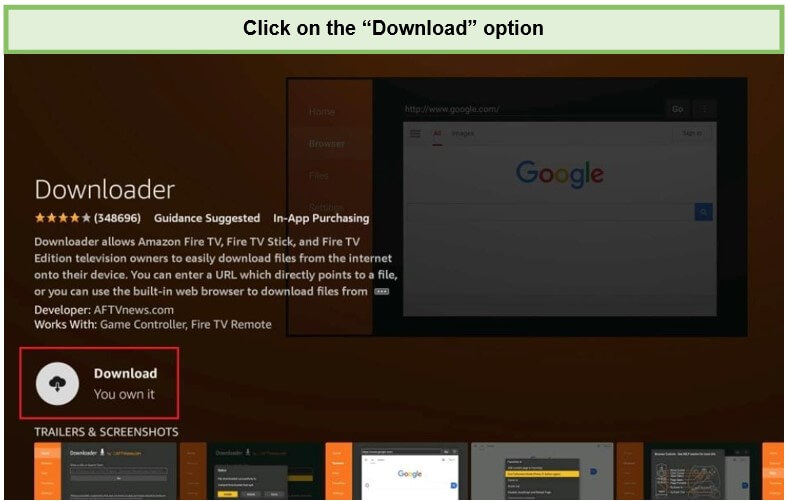
Step 4: Click “Get” or “Download” to install the app on your Firestick.
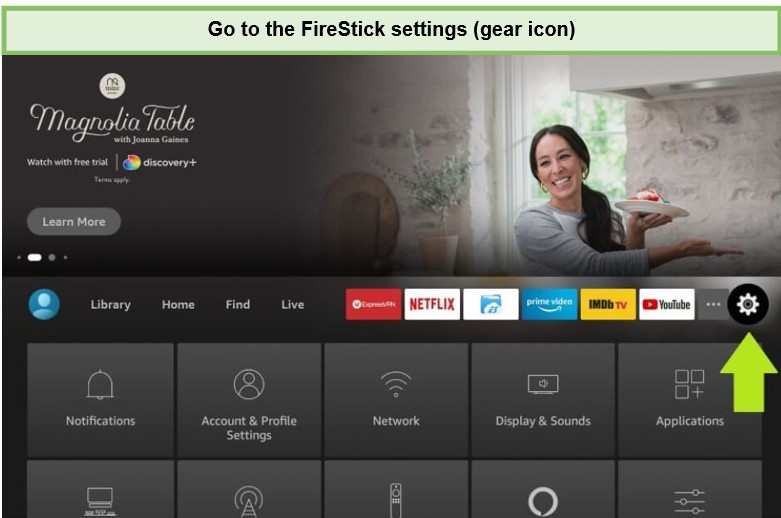
Step 5: After installing the Downloader app, go to the home screen and click on FireStick Settings.
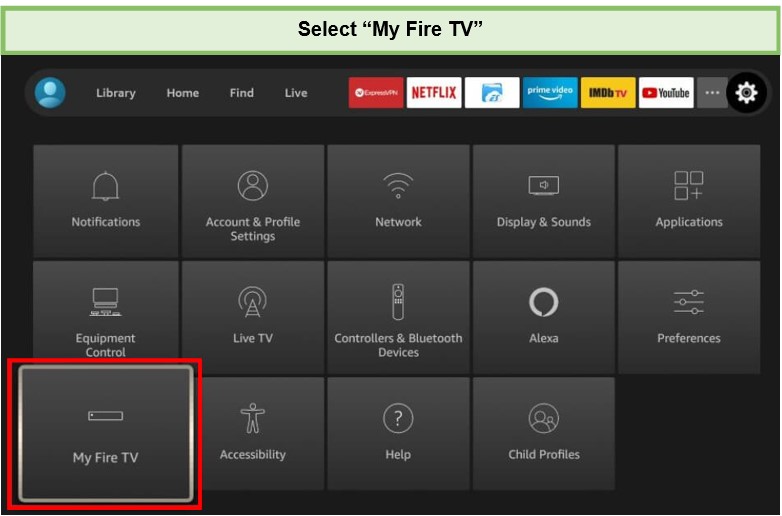
Step 6: Next, select “My Fire TV.”
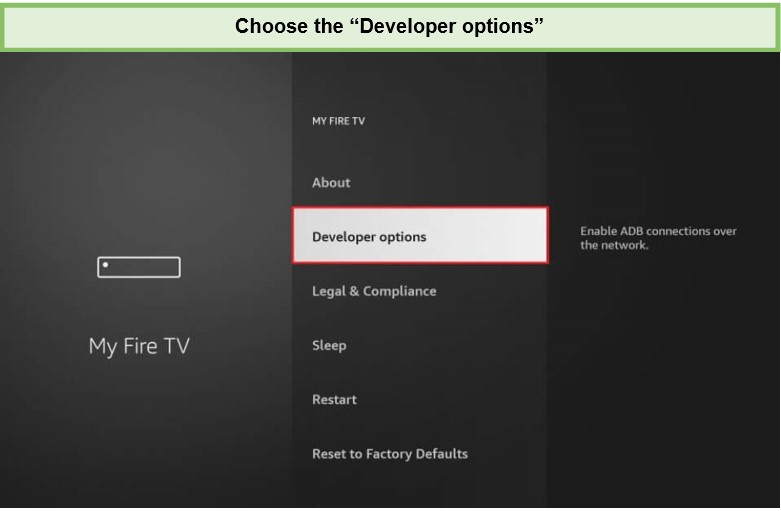
Step 7: Click on the “Developer options.”
Step 8: Launch “Install Unknown Apps.”
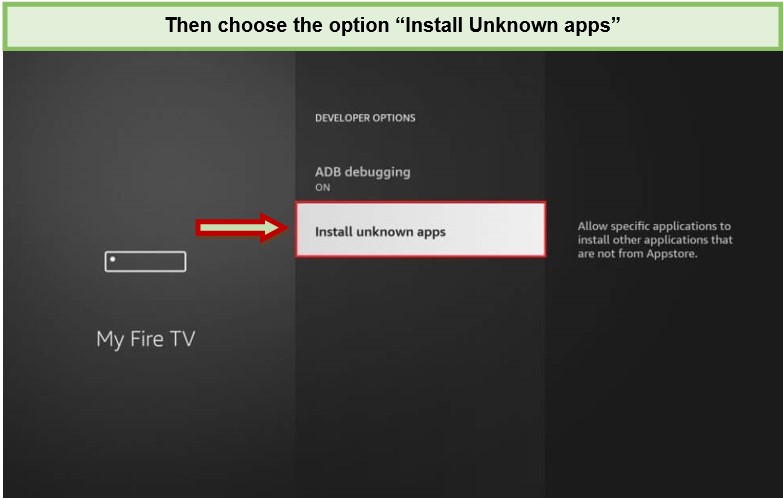
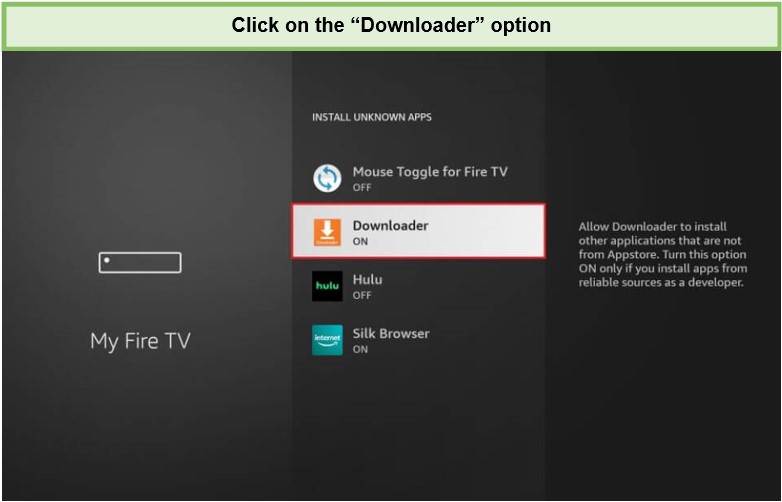
Step 9: Next, click the “Downloader” application and set its status to ON.
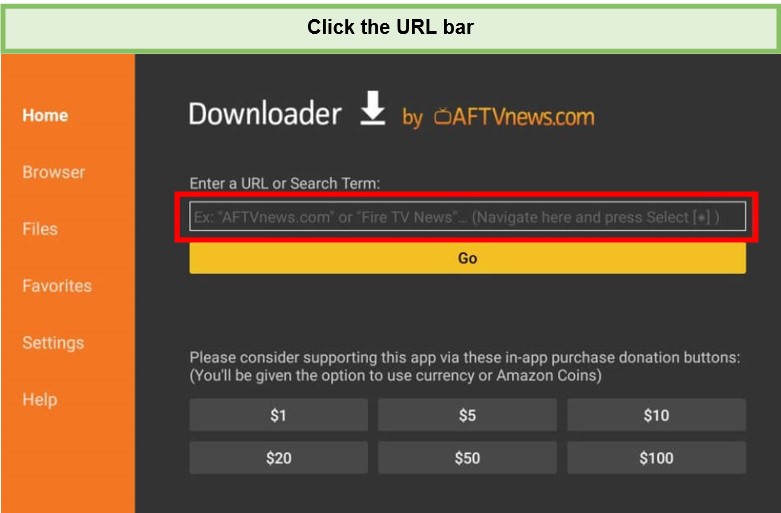
Step 10: Now you can open the Downloader app on your FireStick. (When you open the Downloader first time, you will see some prompts. Ignore them all). After that, Click the address bar, as seen in the image below.
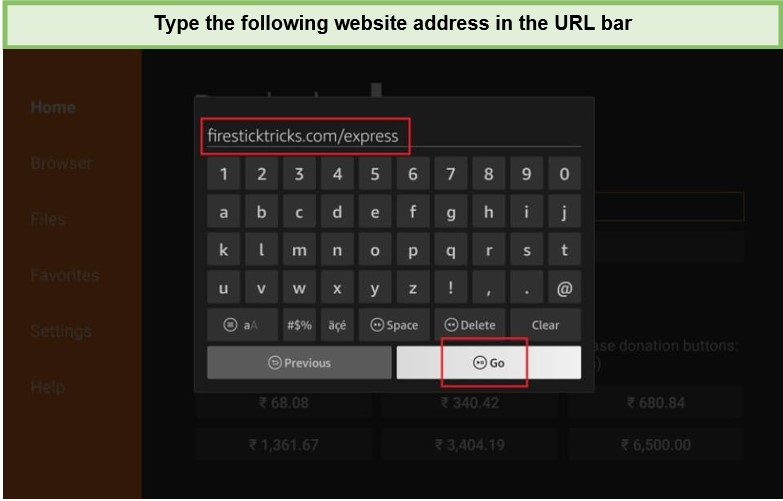
Step 11: Enter the ExpressVPN URL for FireStick “firesticktricks.com/express“ and click on Go.
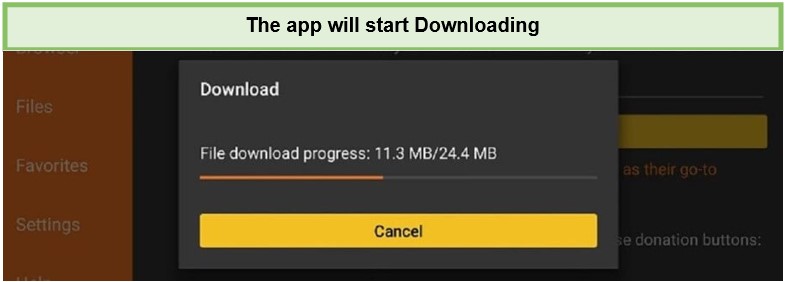
Step 12: The ExpressVPN FireStick APK app will start downloading.
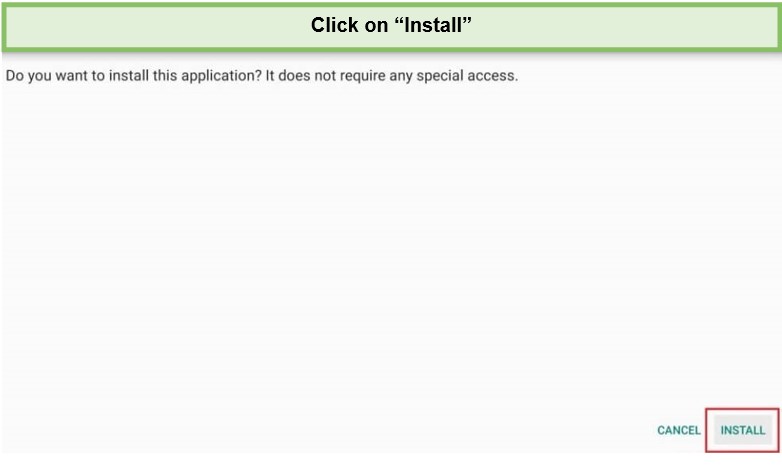
Step 13: Click Install when the download is finished.
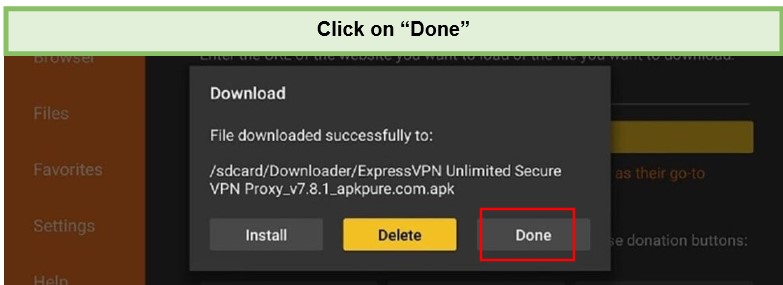
Step 14: After installation, select Done.
That’s it. That’s all it takes to get ExpressVPN properly installed on your FireStick device in Canada. In case you wish to install ExpressVPN for Kodi in Canada, here’s a setup guide to easily install ExpressVPN on Kodi in Canada.
ExpressVPN Features for Amazon FireStick Users in Canada
- 3000+ fast speed servers in 105 countries
- 88 Mbps on a 100 Mbps base connection
- 5 simultaneous connections
- Split tunneling, 24/7 chat support team, kill switch
- 30-day money-back guarantee
- Unblocks Netflix, Hulu, HBO Max, BBC iPlayer, Amazon Prime Video, Disney+, and more
- Compatible with Windows, Mac, Android, iOS, Amazon Firestick, routers, browsers, and more
ExpressVPN is based in the British Virgin Islands, far from the jurisdiction of intrusive governments, the so-called 14 Eyes countries. This VPN provider has a good server network with 3000 servers in 105+ countries.
It is known for its strong stance on protecting user privacy through its no-log policy. It also offers a 30-day money-back guarantee, so you can try ExpressVPN free trial in Canada before committing to a full subscription. This is a great, no-risk option for checking ExpressVPN for FireStick free in Canada.
Through the ExpressVPN Mediastreamer feature, you can even use your VPN on devices that normally don’t support their usage such as game consoles, routers, and some streaming devices. If you set up ExpressVPN on your router in Canada, all your devices at home, including the Firestick, will be covered with VPN protection. Learn how to set up ExpressVPN on the Mikrotik router in our ExpressVPN configuration for Mikrotik in Canada router guide.
The main advantage of router configuration is that it allows you to easily transfer the VPN network on complicated devices such as pfSense which will require extensive configuration otherwise. Having said that, now you can easily set up ExpressVPN on pfSense in Canada with just a few simple steps.
With ExpressVPN, you will face no such issues as it provides a secure and stable connection having the power to bypass restrictions on all kinds of streaming services and websites.
How to Use ExpressVPN on FireStick in Canada
Here’s how to use ExpressVPN on FireStick in Canada after successfully installing the ExpressVPN app on your Fire TV device. To run it smoothly, update ExpressVPN on FireStick in Canada timely.
1. Go to “All My Apps” and access the ExpressVPN Firestick app you just downloaded.
2. Launch the app and Enter your login credentials to sign in.
3. The app will request your consent to configure your Firestick after you sign in. When Firestick asks for a connection request, simply click OK twice.
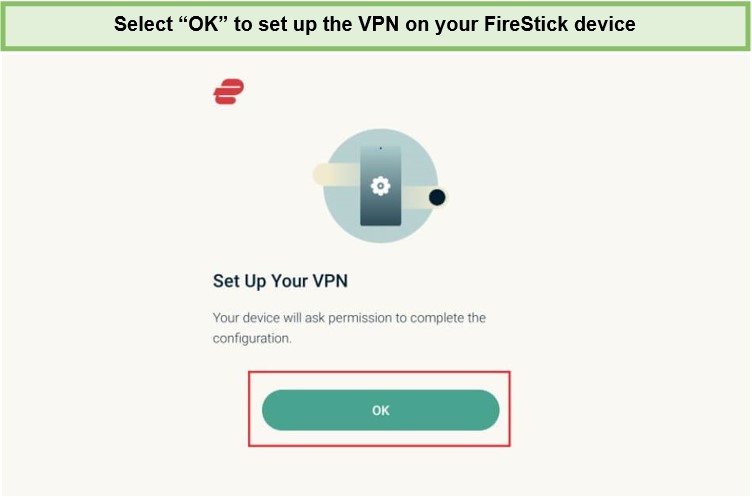
4 . You can now see the VPN app’s home screen.
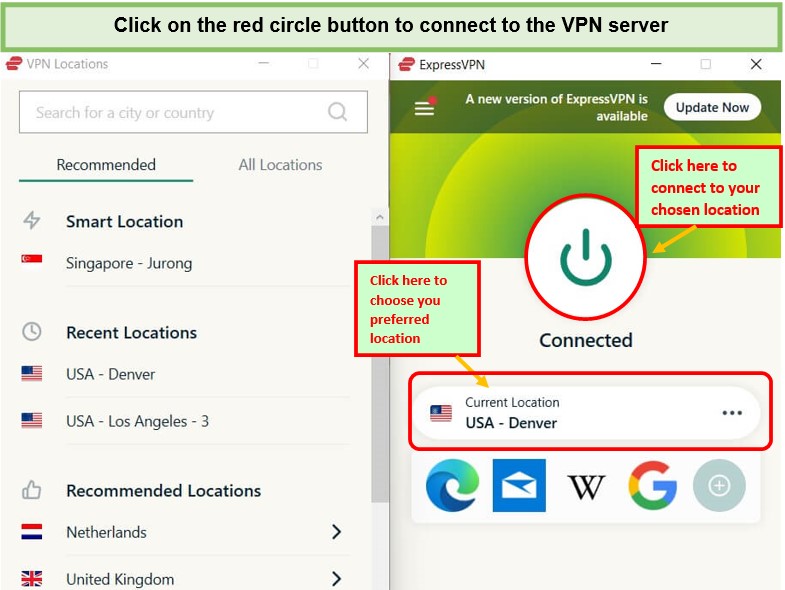
5. To connect the VPN on your Firestick or Fire TV, click the red circle button.
Selecting ExpressVPN Server on Fire TV / Stick in Canada
ExpressVPN is quite simple to use, just click on the power button, and your Fire TV Stick will connect to a VPN server.
- To select a server, click on the server listed on the screen.
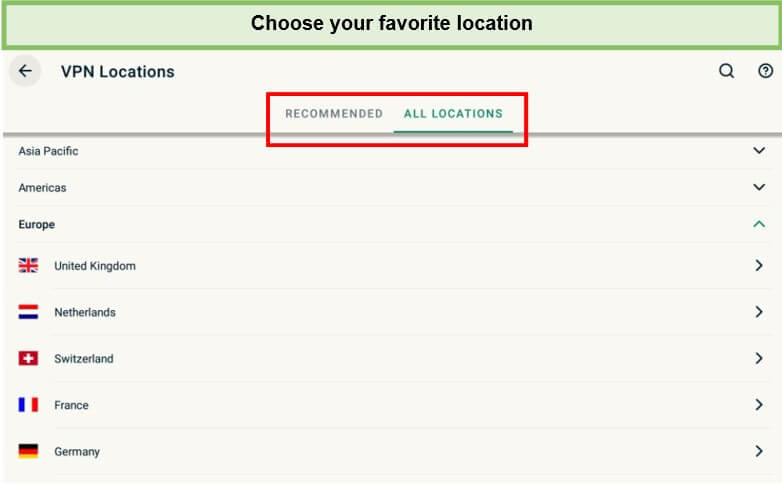
- You can either go to “All Locations” or choose one of the servers listed in the “Recommended” section. Its servers are organized into regions, countries, and even cities.
ExpressVPN Not Working on Fire TV Stick in Canada? Here’s How to Fix It
ExpressVPN not working on Fire TV Stick in Canada? No problem, here are some of the common issues you can face while installing ExpressVPN along with their fixes:
-
Connect to different servers:
If ExpressVPN suddenly stops working on your Firestick in Canada, the service you’re attempting to access has most likely blacklisted the IP address Express has assigned to you.
ExpressVPN might work with your Firestick if you switch to a different server and receive a new IP address that hasn’t been blocked.
-
Clear the cache/data on your Firestick.
By clearing your services cache, ExpressVPN Firestick will return to its default settings. This might correct the issue preventing ExpressVPN from working.
Go to applications > Managed installed Application > Select the app you are having trouble with (e.g Netflix)> Clear cache.
DO NOT click on clear data it will remove your cache including your login details.
-
Switch to a different protocol
Another reason why ExpressVPN may not work on Firestick in Canada is that the protocol no longer offers a secure connection,
VPNs employ several protocols. These are the guidelines that the VPN adheres to in order to give you an anonymous internet connection. Some of these protocols place a higher priority on security than others do on speed. Try switching to a different protocol to see if it fixes the problem.
To do so, go to Settings > Protocols. You can now choose whatever protocol you like. After that, save the settings and connect to a VPN.
-
Update FireStick:
Follow the instructions below to update your Firestick.
- Go to the Firestick’s settings.
- Select “My Fire TV” > “About”.
- After that, click on “Check for Updates”.
- If there is an update requirement on your Firestick, select the Install Update option.
If the above-mentioned troubleshooting steps didn’t work for you, I highly suggest checking out our ExpressVPN not working guide in Canada. You’re not going to regret it one bit.
Other Related Guides By VPNRanks
- Best VPN for Amazon Fire Tablet in Canada: Access geo-restricted content seamlessly on your Kindle Fire.
- Best VPN for Fire TV Cube in Canada: Unlock global content on your Fire TV cube with a VPN.
- Firestick Remote not working in Canada: Navigate the frustration of a malfunctioning Firestick remote with ease.
- How to update Firestick in Canada: Unlock the latest features by updating your Firestick effortlessly.
FAQs – ExpressVPN on FireStick in Canada
Does ExpressVPN work with Firestick in Canada?
Yes, ExpressVPN works with Firestick devices in Canada including, Fire TV 2nd Generation, Fire TV 3rd Generation, and Fire TV Cube. ExpressVPN on your Fire Stick will allow you to access all popular streaming services, including Netflix, Amazon Prime Video, Hulu, BBC iPlayer, HBO, and even Kodi.
How to download ExpressVPN on Firestick in Canada?
To download ExpressVPN on Firestick in Canada follow these steps:
- Go to the Downloader option under the main menu.
- Choose Allow to enable Downloader access to your images, media, and files.
- Click OK to continue. Type in the installer URL for the ExpressVPN APK. (Get in touch with the ExpressVPN Support Team to get the URL.)
- Click Install to complete the installation process.
Why can’t I find ExpressVPN on my FireStick in Canada?
You may not find ExpressVPN on your Firestick because the first-generation Amazon Fire Stick does not support some VPNs. Even when it succeeds, sideloading ExpressVPN Firestick using the APK on these devices is unreliable, even though it is technically possible. To overcome the restrictions placed on the first-generation Amazon Fire TV devices, you should instead utilize a VPN on your router.
Can You Use ExpressVPN with Firestick for Free in Canada?
Yes, ExpressVPN is available for free on the Fire TV Stick and all of your other devices for a limited time. There is ExpressVPN’s 30-day, no-questions-asked money-back guarantee to use it for free. Following this period, you must pay the lowest subscription price of just $6.67/month.
How much is ExpressVPN for Firestick in Canada?
ExpressVPN is one of the oldest VPN services in the market since 2009 and has a large network of fast-speed servers spread across 94 countries. Its best plan is available for $6.67/month.
How do I know if ExpressVPN is working on Firestick in Canada?
To check if your VPN works on Firestick in Canada, use ExpressVPN’s IP Address Checker to find your IP address. If your connection was successful, the IP address displayed would correspond to the place you are using a VPN to connect to. Additionally, a notice stating that “Your IP address is secured” will appear.
Does ExpressVPN work on all Firestick devices?
Yes, ExpressVPN works with all current-generation Firestick devices, which include Firestick, Firestick 4K, and Firestick 4K Max. It is worth noting that as long as the internal operating system (OS) of older devices continues to receive updates, ExpressVPN will also provide updates to ensure compatibility with those devices, even as new Firestick models are released.
Wrapping Up
ExpressVPN is an amazing VPN service that works great on all Amazon devices. Since it is available on the official Amazon store, you will not have any difficulty downloading this service. With fast speeds and the ability to unblock most streaming apps, you can enhance the quality of your bingeing sessions by installing ExpressVPN on Firestick in Canada.
You can learn more about this VPN in our ExpressVPN review Canada.