
What would occur if you face VPN not working in Canada issue? Learn what steps to take if your VPN isn’t working in Canada. A VPN (Virtual Private Network) can be a useful tool for secure web browsing and unblocking geo-restricted content. However, there are a number of reasons a VPN connection could go wrong, including server or network issues.
This post will examine some of the typical root causes of VPN connection issues and provide potential fixes. Whether it’s an issue with your device, network connection, or a VPN service provider, we’ll provide practical tips to help troubleshoot and fix VPN not working in Canada issue.
You can quickly access websites restricted to a certain region while in Canada if you use a great VPN. In other words, you can stream films and TV shows from websites that aren’t typically accessible to Americans. Some VPNs are untrustworthy in the United States because they cannot conceal your location. However, if you live in the United States and wish to see content available in other countries, the VPNs listed below are an excellent option.
If you’re in a hurry and don’t have time to read our entire blog, we highly recommend a premium VPN like ExpressVPN – it works in Canada as of July 2023 and is reasonably priced.
Quick Solutions to Your VPN not working in Canada
This post will lead you through some of the most common VPN issues and how to solve them. We’ll go into more detail later, but for now, here’s a quick rundown of VPN not connecting in the USA: Solutions;
| VPN Issues | Possible Cause | Solution |
| The internet cannot be accessed | Firewalls, blocked ports, out-of-date VPN software, or even a broken router are common reasons why a VPN connection fails. | Ensure your VPN software is up to date, the necessary ports are not blocked, and your firewall permits VPN access. |
| Slow speed | A busy server, geographic distance from the server, network configuration, or VPN protocol could all contribute to slow VPN connections. | Use a faster network or VPN protocol, or connect to a server that is physically near to you or one that is faster. |
| Netflix VPN/proxy ban | The primary cause of VPN users’ inability to watch Netflix is Netflix’s blocking of VPN servers. | Clear your cache and cookies, switch servers, use a streaming-specific server, or go incognito. |
| Emails won’t send | It’s possible that Your email service can be preventing your VPN from working., or that your VPN is blocking an unsecured email port. | Change your email port, use an alternative VPN server, or turn on split tunneling. |
Why is my VPN not working in Canada
If your current VPN doesn’t function in Canada, a website may immediately disable your connection if it detects that you are attempting to stream shows from a location that is not supported. Unlocking content from any location in the world is still possible with the aid of a reliable VPN.
Your existing VPN probably isn’t concealing your location, so it doesn’t work in the US. The VPN servers you can access using your current VPN may be blocked by the streaming website you’re attempting to access. You can watch episodes uninterrupted by switching to a reliable or fastest VPN in Canada.
Use ExpressVPN right now to watch on-demand videos from any service while in Canada. It provides approximately 3000 servers in 105 countries and is offered in 25 cities in the United States.
The US servers, with their fast speeds and ability to circumvent geo-restrictions. With ExpressVPN, all you have to do to watch TV from anywhere is connect to a server in a compatible region. When we tried ExpressVPN with Netflix, we could access the USA content library. ExpressVPN Netflix Canada works best together to improve your streaming encounter.
Here you can see how we’ve unblocked American Netflix using ExpressVPN’s New York servers:
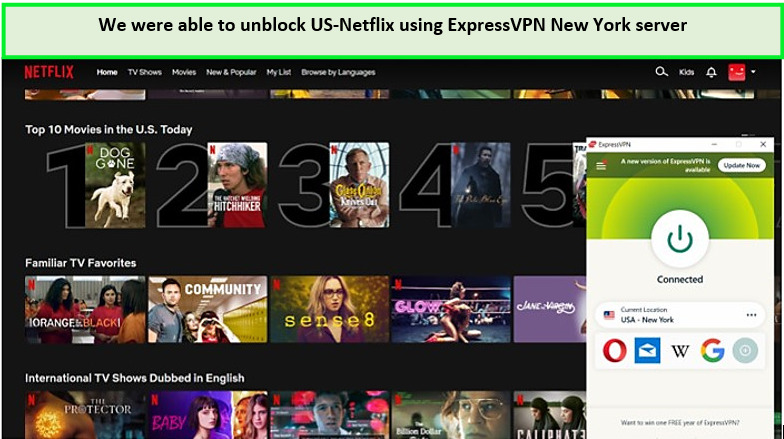
We were able to unblock Netflix-US using ExpressVPN effortlessly.
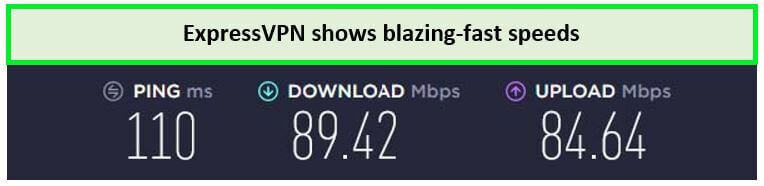
This speed is enough to stream in high resolution.
Chromecast, Roku, iOS, and gaming consoles are all compatible with ExpressVPN. If you want greater connectivity, you can download ExpressVPN Firestick; however, before doing so, read our blog on how to set up ExpressVPN with routers and other gadgets.
You may access websites that are geo-restricted with ExpressVPN, including HBO Max, Hulu, Comedy Central, Disney Plus, Showtime, Amazon Prime Video, and others. We were able to stream Disney Plus with ExpressVPN rather easily.
ExpressVPN offers a 12-month plan for CA$ 9.15/mo (US$ 6.67/mo) - Save up to 49% with exclusive 1-year plans + 3 months free. A 30-day money-back guarantee is offered with each package. Customers can sign up for ExpressVPN’s 7-day free trial in Canada if they use it on a mobile device.
To find out more about the service provider, see our ExpressVPN review Canada.
How to fix your VPN when it is not working in Canada
Here is an easy guide for fixing VPN problems in Canada:
1. Try a different server
The best VPN services provide a wide variety of servers per nation. Disconnect from the server you’re attempting to use and try a different one if it isn’t functioning. This is a simple but important tip to remember if your VPN is not connecting in Canada.
Most premium providers, like ExpressVPN, have thousands of servers in their networks. This indicates that plenty of solutions are available if you encounter a banned server.
2. Clear your browser cookies
Websites can learn where you live with the use of local cookies that are stored on your computer or mobile device. To prevent the website you’re viewing from recognizing your prior IP address, clear all of your cookies.
- Consider clearing your cache as your first step.
- If you use a VPN to access a device and find that the service is still unavailable to you.
- Open your browser on a desktop system and go to Advanced Settings. Then, choose “Delete cookies and information” from the menu.
- Delete your cookies and data on your smartphone or tablet by going to Storage Settings, finding the cache setting, and then doing so to get the same result.
- Everything will be in its proper location when you return to the device.
- You can then launch a new screen after this is finished. While you’re doing this, make sure your VPN is turned on. Hopefully, you can now view all the TV shows and films you want. If not, continue on for other solutions.
3. Update your VPN client
You might have uploaded incorrectly, causing the program to malfunction if you’ve just realized that your VPN is no longer functional. The VPN app may need to be reinstalled to fix these problems.
This guarantees that you use the latest VPN software, including any bug-fixing updates. Additionally, it implies that the software will be installed from scratch, meaning that whatever problems or errors you may have picked up in the past will be eliminated.
4. Change your VPN provider
It’s crucial to choose a provider that integrates with other streaming platforms right away. Various VPN providers have already given up on various platforms, so you won’t be able to access geo-restricted content on those services’ servers. But some top-notch VPNs do make an effort to support streaming services continuously.
ExpressVPN is a top VPN illustration. This VPN provider is reasonably priced, and it almost always performs flawlessly. We advise ExpressVPN if you’re looking for a VPN to watch.
How does my VPN get detected in Canada?
Streaming websites and applications may disrupt the server you’re utilizing if your current VPN doesn’t conceal your true location. Region-locked content cannot be accessed since bad VPNs take a long time to replace their failed servers.
A blacklisted (broken) server can be successfully replaced by the top VPNs available for downloading in Canada. So even if a website disables your VPN server, a replacement will go live fairly quickly.
VPN not working Guide for Other Countries For Canadian Users
In case you’re facing VPN not working in other countries, here are guides for few other countries For Canadian Users :
- VPN not working in Sudan For Canadian Users
- VPN not working in Mexico For Canadian Users
- VPN Not working in Cameroon
- VPN not working in Zimbabwe For Canadian Users
- VPN not working in Turkey For Canadian Users
- VPN Not working in Syria
- VPN not working in Uganda For Canadian Users
- VPN not working in Saudi arabia For Canadian Users
- VPN not working in Maldives For Canadian Users
- VPN not working in Philippines
- VPN not working in Azerbaijan
- VPN not working in Portugal
FAQ: VPN not working in Canada
How to check if VPN is working in Canada?
A VPN test is the simplest way to determine whether your VPN connection is working properly in Canada. Check your IP address both before and after connecting to the VPN. If it is showing your actual location instead of the VPN country you’ve connected to, then your VPN isn’t working.
How to use a VPN in in Canada?
Choose a geo-restricted website or service to access before you begin using a VPN in the United States. To unlock content while in the United States, use a premium VPN service like ExpressVPN to connect to the website and sign in to your account.
Why is my VPN not working with Netflix?
There could be a number of reasons why a VPN isn’t connecting to Netflix, including network connectivity issues, firewall or antivirus software obstructing the VPN connection, outdated VPN software, or server issues on the VPN provider’s end. Troubleshooting the exact issue resolving VPN connectivity issues in the USA.
Conclusion
Simply put, several typical troubleshooting VPN connection issues in the USA can prevent a VPN not working in Canada, but the majority of them can be fixed by problem-solving methods such as checking login credentials, changing network settings, and updating software.
To avoid these concerns and ensure a seamless VPN experience, it is best to choose a premium and reputable VPN provider, such as ExpressVPN. These providers give improved security, quicker speeds, and more consistent connections, all of which are necessary for a satisfying VPN experience.
It’s always important to research and select the best VPN provider to avoid connection issues.