CapCut, a free video editing app, gained popularity alongside TikTok and became a cornerstone for content creators as it is easy to use and has amazing features available for free. However, the app’s popularity means that accessing CapCut might be challenging in some countries due to geo-restrictions and bans in several countries due to concerns over user behavior and foreign influence.
There is also the fact that Cybersecurity researchers have identified several malicious websites exploiting the global TikTok bans to distribute info stealers through fake CapCut installation files targeting users in Japan.
If you find CapCut blocked in your country, using the best VPN for CapCut in Japan is a simple solution. By using a CapCut VPN, you can bypass blocks by changing your IP address and easily download the all-in-one video editing app.
ExpressVPN is the top choice for CapCut thanks to excellent unblocking capabilities and high-speed servers. As the best VPN for CapCut in Japan, its advanced encryption ensures your location remains private, safeguards your data and protects you from hackers.
Quick Overview: Best VPN for CapCut in Japan
If you’re short on time and want to discover what is the best VPN for CapCut in Japan, here’s a quick guide:
1. ExpressVPN: Best VPN for CapCut in Japan
ExpressVPN is recognized for its exceptional speed and performance, making it the top choice for CapCut users in Japan. With thousands of servers in 105 countries, this VPN ensures fast and reliable connections. ExpressVPN supports up to 8 simultaneous device connections and offers a 30-day money-back guarantee.
➔ Get a special VPN offer today: JPY 1047.17/mo (US$ 6.67/mo) - Save up to 49% with exclusive 1-year plans + 3 months free
2. Surfshark: Budget-Friendly VPN for CapCut in Japan
Surfshark offers an economical solution for CapCut users. Despite its affordable cost, Surfshark provides impressive performance with 100+ servers in over 100 countries, supporting unlimited simultaneous connections.
➔ Get a special VPN offer today: JPY 390.92/mo (US$ 2.49/mo) - Save up to 77% with exclusive 2-year plan + 30-day money-back guarantee
3. NordVPN: Largest Server Network VPN for CapCut in Japan
NordVPN boasts a large server network with over 61 servers worldwide, ensuring extensive accessibility and fast speeds for CapCut users in Japan. It offers robust security features and allows up to 6 simultaneous connections. NordVPN also provides a risk-free refund policy.
➔ Get a special VPN offer today: JPY 626.42/mo (US$ 3.99/mo) - Save up to 63% with exclusive 2-year plan + 3 months free for a friend
Learn more:
Why Do You Need a VPN for CapCut in Japan?
You need a VPN for CapCut in Japan to bypass geographical restrictions, censorship, and protection from cybersecurity threats. A VPN changes your IP address to make it appear like you are accessing the internet from a different country.
This allows you to circumvent any government, office, or school-imposed filters or firewalls that may block access to CapCut in Japan.
There have been specific phishing campaigns targeting CapCut users in Japan, where threat actors use phishing websites loaded with malware to exploit users. The malware from these sites can perform actions like stealing passwords and other personal data without the user’s knowledge
CapCut is a sister application of TikTok, as they are both developed by the same company, ByteDance. Due to previous controversies regarding the company’s user privacy policies, some countries have both apps banned.
Regardless of such bans, if you wish to use CapCut for video editing, you can use a compatible VPN for CapCut in Japan. A CapCut VPN encrypts your online traffic and makes you untraceable by changing your IP address. This way, you can unblock this app and use it with ease.
The best VPN for CapCut in Japan will let you obtain easy access to the app while simultaneously protecting your online identity by safeguarding your data.
3 Best VPNs for CapCut in Japan – Detailed Analysis 2024
For your convenience, I researched and came up with 3 recommendations that I found to be the best VPN for CapCut in Japan. My recommendations promise amazing performance, take user privacy very seriously, and provide optimum security for your data.
1. ExpressVPN – Best VPN for CapCut in Japan


- Ultra-fast servers in 105 Countries
- Excellent unblocking capability for Netflix, Hulu & more
- Best-in-class encryption trusted security, and advanced protection features that block ads, trackers, and harmful sites.
- Connect up to 8 devices simultaneously
- 24/7 customer support through live chat
- 30-day money-back guarantee
ExpressVPN is the best VPN for CapCut in Japan because of its remarkable speed and reliability. Its vast server network and premium security features make it an excellent choice for accessing CapCut, ensuring smooth, buffer-free editing and sharing experiences.
With thousands of servers in 105 different countries, ExpressVPN offers a robust connection perfect for content creators looking to use CapCut safely. The presence of multiple servers means that users can always find a fast and reliable connection.
During my personal streaming test, I found that ExpressVPN provided an exceptionally stable connection on CapCut. Whether editing a video or browsing through extensive libraries of effects and sounds, the experience was seamless and efficient, without any lag or interruptions.
ExpressVPN is great for CapCut and excels in unblocking other popular apps and services. Users can enjoy access to platforms like YouTube, Instagram, and TikTok, essential for sharing content created on CapCut.
I conducted an ExpressVPN speed test in Japan on a 100 Mbps connection and achieved impressive download speeds of 89.42 Mbps and upload speeds of 84.64 Mbps. This performance is ideal for uploading high-quality videos quickly and efficiently.
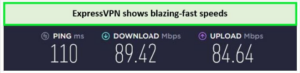
I received superb speed test results on ExpressVPN with CapCut in Japan.
Device compatibility is comprehensive with ExpressVPN. It supports many devices, including iOS, Android, Windows, and macOS. This ensures that no matter your device, you can get the most out of CapCut without any compatibility issues.
ExpressVPN’s security features are top-notch, featuring AES-256 encryption, a no-logs policy, and a reliable kill switch, ensuring that your online activities remain private and secure while using CapCut.
Moreover, ExpressVPN pricing is reasonable, offering a 30-day money-back guarantee and a free trial. This allows users to test the service risk-free. If you feel like it is not the right fit, simply cancel your ExpressVPN subscription in Japan and get a full refund.
Users can take advantage of the ExpressVPN free trial in Japan to test its features without any financial commitment.
Exclusive Offer:
Grab the best deal on ExpressVPN now! JPY 1047.17/mo (US$ 6.67/mo) - Save up to 49% with exclusive 1-year plans + 3 months free
For more detailed insights and performance metrics, be sure to check out the ExpressVPN review in Japan
- Unblocks CapCut and other streaming services
- 7-day free trial for mobile users
- No logs policy
- Bypass ISP throttling
- Discounts valid for only a short time
2. Surfshark – Budget-Friendly VPN for CapCut in Japan

- 3,200+ servers in 100 countries
- RAM-only servers (no hard disks)
- Unlimited simultaneous connections
- Unblocks Netflix and More
- 24/7 Customer Service
Surfshark is an affordable VPN for CapCut in Japan, providing a cost-effective solution without compromising on features or performance. Its extensive server network and unlimited device policy make it a favorite for users who want high-quality VPN services on a budget.
With over 3200 servers in 100 countries, Surfshark ensures you have reliable and speedy access to CapCut. This broad server availability is perfect for accessing and utilizing CapCut in Japan or abroad.
In my experience using Surfshark with CapCut, the connection was consistently stable. I edited several videos, applying various effects and transitions without experiencing any slowdowns or disruptions, which was impressive given the affordability of the service.
Surfshark excels at unblocking a range of services beyond CapCut. It effectively allows access to global content platforms such as YouTube, TikTok, and Instagram, which are crucial for publishing and sharing video content created with CapCut.
I performed a Surfshark speed test in Japan on a 100 Mbps connection and recorded excellent results with a download speed of 81.32 Mbps and an upload speed of 76.12 Mbps. These speeds are sufficient for handling high-definition video editing and uploads on CapCut.
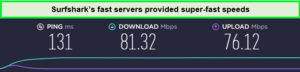
Surfshark provides fast speeds that are helpful for run-time video editing on Capcut in Japan.
Compatibility is broad with Surfshark; it supports devices and operating systems, including iOS, Android, Windows, macOS, and more. This wide-ranging support ensures that regardless of your device, you can access CapCut without issues.
Surfshark’s security features are robust, offering AES 256-bit encryption, a kill switch, and a strict no-logs policy, all ensuring your digital safety and privacy while using CapCut.
Furthermore, Surfshark’s pricing is very competitive, including a 30-day money-back guarantee. For new users, there’s even a Surfshark free trial in Japan, allowing you to try before you buy.
Exclusive Offer:
Unlock Surfshark’s capabilities for cheap! JPY 390.92/mo (US$ 2.49/mo) - Save up to 77% with exclusive 2-year plan + 30-day money-back guarantee
To find out more about this VPN, make sure to read the detailed Surfshark review in Japan.
- Unlimited device connections
- No-logs policy
- Fast speeds
- Affordable pricing
- Smaller server network compared to others
3. NordVPN – Largest Server Network VPN for CapCut in Japan

- 6000 servers in 60 countries
- WireGuard protocol (NordLynx)
- 6 Simultaneous Connection
- DoubleVPN
- 24/7/365 Live Chat Support
- 30 Days Money Back Guarantee
NordVPN stands out as the largest server network VPN for CapCut in Japan, offering an extensive range of servers that ensure excellent connectivity and high-speed performance. Its vast server network makes it a top choice for users needing reliable access to CapCut to create and share content seamlessly.
With more than 6000 servers in 61 countries, including multiple servers in Japan, NordVPN provides robust options to ensure you always have access to fast and secure connections. This extensive network is ideal for content creators looking to use CapCut without any geo-restrictions.
During my personal tests, NordVPN allowed me to use CapCut efficiently. The editing process was smooth, with quick uploads of clips and downloads of effects, demonstrating NordVPN’s ability to handle data-intensive tasks effortlessly.
I conducted a NordVPN speed test in Japan on a 100 Mbps connection, receiving download speeds of 83.82 Mbps and upload speeds of 44.64 Mbps. These speeds are ideal for uploading high-definition videos quickly and streaming tutorials without buffering.
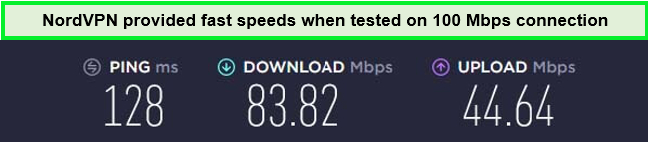
NordVPN provided amazing speeds on Capcut in Japan during my testing.
Device compatibility strongly suits NordVPN, supporting iOS, Android, Windows, macOS, and more. This ensures you can access CapCut and other apps on any device without hassle.
NordVPN’s comprehensive security features include AES-256 encryption, Double VPN, Onion over VPN, and a strict no-logs policy, providing top-tier security while you browse and create content online.
Moreover, NordVPN costs in Japan are very reasonable, with most plans backed by a 30-day money-back guarantee.
Users interested in trying the service can also take advantage of the NordVPN free trial in Japan, allowing you to test its capabilities thoroughly before making a financial commitment.
Exclusive Offer:
Take advantage of a special deal with NordVPN: JPY 626.42/mo (US$ 3.99/mo) - Save up to 63% with exclusive 2-year plan + 3 months free for a friend
For more in-depth information, consider reading the NordVPN review in Japan.
- Double VPN feature
- No-logs policy
- Speed test available
- Good value for money
- Occasional slower speeds on some servers
How to Choose the Best VPNs for CapCut in Japan
If you are someone living in Japan and want to use CapCut smoothly, you need to change your IP address to the IP address of another location where Capcut is readily available. To do that, you need a VPN. Here’s how you can choose the best VPN for CapCut in Japan:
- Vast Server Network: Choose a VPN with many servers in global locations so you have options for servers. More locations would give you a diverse range to choose from.
- Speed: Most VPNs promise to provide high-speed connections but fail to do so. This is why it is important to choose a VPN that has speed test results available. ExpressVPN is a good CapCut VPN for smooth video editing.
- Strong Encryption: If you want to protect your data and ensure privacy, opt for a VPN with AES 256-bit encryption. This is military-grade encryption that experts trust.
- Security Features: Again, security should be any VPN provider’s priority, as no one wants to compromise private information. Make sure that the VPN for your choice has a kill switch and IP/DNS leak protection.
- Bypassing Abilities: If you use a VPN to access geo-restricted sites, you need a service with good bypassing abilities. This way, you can unblock restricted websites and applications.
- Easy to Use: If you are a first-time VPN user, opt for a VPN that has a simple user interface and is easy to navigate. This way, you can download and install it yourself without any hassle. It is also good if they have active customer support to guide you.
How Do I Install a VPN on CapCut in Japan
If you are looking for how to unblock CapCut with a VPN in Japan, follow these simple steps to unblock the app:
- Subscribe to a VPN of your choice. I recommend ExpressVPN.
- Download and install the ExpressVPN app on your device.
- Connect to a server in a country where CapCut is available without restrictions.
- Go to the Play Store or App Store and download the CapCut app in Japan.
- Start editing your videos using CapCut!
VPNs to Avoid While Accessing CapCut in Japan
While using a free VPN might seem appealing, such VPNs often fail to encrypt your data, putting your privacy at risk adequately. These services can leave your personal information exposed and vulnerable. Below are some VPNs you should avoid when accessing CapCut in Japan.
- Hola VPN: It is a prime example of an unsafe VPN, as it does not encrypt your connection. It keeps logs and shares them with third parties. Hola VPN is unreliable and has faced controversies for the same reason. Choosing this VPN means endangering your privacy. Following the link, you can read a detailed Hola VPN review in Japan.
- Hoxx VPN: It has faced backlash because it fails to fulfill its claims. It has unreliable connections and slow speed. But the worst of all is their privacy practices, which are lacking in all accounts. So, if you care about your security and online identity, this VPN is not a good option. You can further read the Hoxx VPN review in Japan to know more about this VPN.
- HideMyAss: HMA was previously found sharing data with government organizations. This raised concern for the safety of user data, and the company faced a lot of scrutiny. Here is a detailed HideMyAss review in Japan if you want to read more about this VPN.
More VPN Guides From VPNRanks:
- Best VPN for OpenVPN – Safeguard your online activities with reliable OpenVPN compatibility.
- Best VPN for Metamask – Protect your digital assets and transactions with MetaMask-optimized VPN.
FAQs – Best VPN for CapCut in Japan
Is CapCut a safe app?
CapCut is not inherently unsafe or malicious, but it does collect user data extensively. The app is owned by ByteDance, which means data gathered via CapCut can be shared with other ByteDance services like TikTok and third-party entities. While there are no current security concerns reported, users concerned about data privacy might consider alternatives. For children under 13, the app is not recommended, as CapCut commits to deleting data collected from users below this age limit.
In which countries is CapCut unavailable?
CapCut is not available in the following countries where TikTok is banned or has restricted functionality:
- India – TikTok and other apps by its parent company ByteDance, including CapCut, are banned.
- China – Mainland China uses Douyin instead of TikTok; similar restrictions likely apply to CapCut, requiring the use of localized versions or services.
- Afghanistan – TikTok is banned due to content concerns, which likely extends to CapCut given its similar nature.
Which VPN provider is best for CapCut?
ExpressVPN is the best VPN provider for CapCut, offering fast speeds and airtight security. It is highly compatible with major streaming sites, including Netflix in the US and UK, making it a versatile choice for both streaming and using CapCut.
Other good options include NordVPN, which provides robust service, Surfshark as a budget-friendly choice, and CyberGhost, known for its great security, fast speeds, and extensive server network.
Does CapCut need a VPN in Japan?
Yes, CapCut may require a VPN in Japan if it is blocked by government, office, or school censorship using filters or firewalls. A VPN like ExpressVPN can help by changing your IP address and making it appear like you are accessing the internet from a different country, thus bypassing these restrictions.
A VPN can allow you to access certain features or content that might be restricted in your region while enhancing your online privacy and security when using CapCut or any other app in Japan.
Can I use a free VPN for CapCut in Japan?
Yes, you can use a free VPN for CapCut in Japan, but it is not advisable due to potential security and privacy risks. Instead, consider using the free trial of ExpressVPN. This service offers more reliable and secure features suitable for Windows, Mac, and iOS, ensuring safe and effective access to CapCut.
Not only do free VPNs endanger your private data, but they also have limitations such as limited bandwidth, slow speed, and annoying pop-ups and ads. They make the whole process of editing unfeasible.
Why is my VPN not working on CapCut in Japan?
There may be many reasons why your VPN is not working with CapCut in Japan:
- Location Detection: CapCut might detect that you’re outside an approved region if your VPN is not effectively hiding your location. This can lead to your VPN CapCut connection being blocked.
- Blacklisted Servers: The VPN servers you are using may be blacklisted by CapCut, preventing access.
To resolve these issues, consider the following steps:
- Update your VPN
- Change servers
- Contact customer support
- Reset your VPN
- Check internet speed
- Verify DNS leak
- Re-enter credentials
If these measures do not fix the problem, consider switching to a more reliable VPN provider, such as ExpressVPN.
How do I install a VPN on CapCut in Japan?
Installing a VPN for CapCut in Japan involves subscribing to a VPN service, downloading the VPN app on your device, connecting to a server where CapCut is available, and then opening the CapCut app for use. A reliable VPN like ExpressVPN can enhance your video editing experience with CapCut.
Can I download CapCut with VPN?
Yes, you can download CapCut with a VPN. Using a VPN, you can change your virtual location to a place where CapCut is available, allowing you to download and access the app even if it’s blocked in your current location.
How does a VPN protect my data when using CapCut?
A VPN like ExpressVPN encrypts your internet traffic, making it unreadable to third parties. This prevents your ISP, government agencies, or hackers from tracking your online activities. By routing your connection through secure servers, a VPN ensures that your CapCut usage remains private and safe.
Can a VPN improve my connection speed on CapCut in Japan?
Yes a VPN can improve your connection speed on Capcut and help avoid ISP throttling in Japan, which may occur if your ISP limits bandwidth for streaming or downloading large files. By encrypting your traffic, a VPN like ExpressVPN prevents your ISP from seeing your activities and potentially throttling your connection, leading to better speeds for CapCut.
Final Thoughts
I hope to have successfully answered your question regarding the best VPN for CapCut in Japan in 2024. CapCut is a free application that has gained immense popularity among users. This video editing app is from the same company as the popular social media app TikTok. Its popularity is due to its amazing features, which you can use free of cost.
I’ve carefully evaluated what other experts say about using VPNs with CapCut and taken their insights to heart. I recommend ExpressVPN as the optimal choice for CapCut users in Japan due to its extensive server network that ensures access to the app worldwide, along with top-notch privacy features and impressive speeds.
This ends my best VPN for CapCut guide!
