If you are a frequent VPN user and facing speed fluctuations on different servers, you might be wondering “Does VPN on a router affect internet speed in Singapore?” When using a VPN, it is common to experience a reduction of approximately 50% in your internet speed, and that’s natural.
The functioning of a VPN causes it to slow down the internet connection speed, and regrettably, there is no alternative solution. Nonetheless, there are a few strategies you can experiment with to attain the maximum speed. In this guide, we will analyze the VPN speed test for routers in Singapore with our top recommended premium VPNs; ExpressVPN.
When you use a VPN, your internet traffic is encrypted and directed through a remote server in a location of your choice, which also allows you to change your IP address in Singapore. This procedure is primarily responsible for the reduction in internet speeds that you may encounter when connecting to a VPN server. The encryption and decryption of your traffic, as well as the time it takes for your data to travel to the VPN server and back to your device, all contribute to this delay.
VPN speed test for routers in Singapore? [Quick Overview]
Here’s a quick overview of the VPN speed test for routers in Singapore:
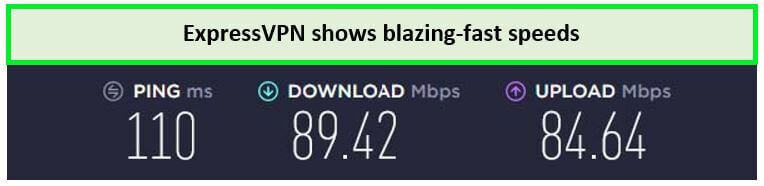
- ExpressVPN: Fastest VPN provider for routers in Singapore. Offers a fast downloading speed of 89.42 Mbps and an uploading speed of 84.64 Mbps on a 100 Mbps connection. Its Lightway protocol ensures minimal speed loss.
- Surfshark: Budget-friendly VPN for routers in Singapore. Comes with inexpensive pricing plans and offers fast speeds. You can get an incredible downloading speed of 81.32 Mbps and an uploading speed of 76.12 Mbps on a 100 Mbps connection.
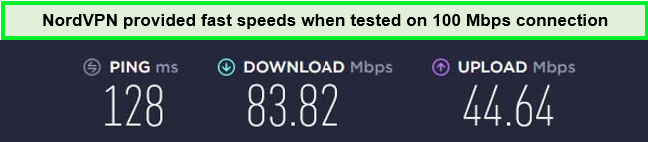
- NordVPN: Reliable performer for routers in Singapore. A perfect combination of efficiency and security, it can deliver a fast downloading speed of 83.82 Mbps and an uploading speed of 44.64 Mbps on a 100 Mbps connection.
Fastest VPNs with speed test for routers in Singapore – In-depth Analysis | FAQs
Why do you need to use VPN with the fastest speed on routers in Singapore?
Configuring a VPN on a router in Singapore is a great way to secure your entire network and get access to geo-restricted content on any device you want. Here’s why you need to use a VPN with the fastest speed on routers in Singapore:
- Secure Multiple Devices Simultaneously
With a VPN router in Singapore, you can establish a secure and encrypted connection that protects multiple devices simultaneously. You have the option of connecting through either Wi-Fi or Ethernet, depending on your device and preferences. Since they can accommodate multiple devices, VPN routers for home offer a more secure internet browsing experience for all household members.
- Great Convenience
After installing your VPN router and connecting to it, there’s no need to manually sign in to your VPN every time. You only need to enter your sign-in details once, allowing you to automatically connect with multiple devices. This eliminates the inconvenience of reconnecting every time you go online and provides a secure browsing experience.
- Enhanced Compatibility
A VPN router enables you to connect a wide range of devices, irrespective of the operating system they use. It supports numerous operating systems such as macOS, Windows, Linux, iOS, and many more. This eliminates the concern of compatibility issues with your VPN router when connecting new devices.
- Complete Automation
Using a VPN router in Singapore, you can effortlessly connect to your VPN service like OpenVPN protocol routing, automatically. You don’t have to create a unique password for each device since you can access your VPN connection automatically once you’re connected to the router.
- Protect Devices with no Native VPN Support
Although many popular devices do not natively support VPN usage, a VPN router offers an optimal solution. Devices such as PlayStation, Xbox One, Roku, Apple TV, and Smart TVs fall into this category. With a VPN router, these devices can benefit from secure and anonymous internet connections.
- Unblock Geo-restricted Content and Restricted Apps
A VPN router enables you to connect freely to content and apps that require you to be in a specific location. By connecting to a remote IP address, you can make it appear as if you’re connecting from an authorized location, allowing access to such content.
Fastest VPNs with speed test for routers in Singapore – In-depth Analysis
After conducting extensive testing and analysis of over 160 VPN apps, we have identified the top 3 fastest VPNs with speed test for routers in Singapore. Let’s begin our comprehensive analysis:
1. ExpressVPN – Fastest VPN provider for routers in Singapore
Key features:
- Top Speed: 89.42 Mbps downloading speed
- 3000+ servers in 105 countries, including 25+ server locations in the US
- Simultaneous Connections: 5 devices
- Unlimited bandwidth for Ultra HD and 4K streaming
- DDoS protection
ExpressVPN is the fastest VPN provider for routers in Singapore as it offers unmatched speeds. Its Lightway protocol is designed in a way that enhances your overall speed while providing essential VPN encryption and protection.
Moreover, it hosts an extensive network of 3000+ servers located in 105 countries, featuring 25+ US server locations. Thanks to the abundance of servers available, you can always find a less crowded server to enjoy maximum speed for your high bandwidth-consuming activities like streaming, gaming, and torrenting.
Experience the power of ExpressVPN and unlock the benefits of using a VPN with a D-Link router. Enjoy enhanced security, unrestricted access to global content, and seamless browsing across all your devices, ensuring your online activities remain private and protected.
According to the ExpressVPN speed test in Singapore, it’s incredibly fast and doesn’t adversely affect your overall connection speed. We conducted a speed on a 100 Mbps connection after configuring ExpressVPN on the router. Surprisingly, it delivered an outstanding download speed of 89.42 Mbps and an upload speed of 84.64 Mbps. You can also run a VPN speed test online to gauge its real-time performance.
{%CAPTION%}
By utilizing ExpressVPN’s Smart DNS, your online streaming experience can be further enhanced for seamless and uninterrupted streaming.
ExpressVPN is compatible with a variety of operating systems and devices, including Android, iOS, macOS, Windows, and Linux as well as Roku, Firestick, Apple TV, Gaming Consoles, and Smart TVs.
On a single account, ExpressVPN allows 5 simultaneous connections. However, you can increase this limit by configuring the fastest ExpressVPN protocol on your router with setup guides provided by the company.
You can enjoy secure and private internet access with ExpressVPN, thanks to its state-of-the-art features like AES 256-bit encryption No-Logs Policy, Kill Switch, and Server Obfuscation.
ExpressVPN is available for only SGD 9.08/mo (US$ 6.67/mo) - Save up to 49% with exclusive 1-year plans + 3 months free, with a 30-day money-back guarantee for new subscribers. Additionally, smartphone users can also take advantage of the ExpressVPN 7-day free trial in Singapore.
Read our in-depth ExpressVPN review Singapore for more details.
- Offers the fastest VPN speeds on routers in Singapore.
- Can secure your entire network without slowing down the connection speed.
- Unblocks all popular streaming services.
- Unlimited bandwidth.
- Slightly more expensive than other premium VPNs.
2. Surfshark – Budget-friendly VPN for Routers in Singapore

Key features:
- Top Speed: 81.32 Mbps downloading speed
- 3200+ servers in 100 countries, including 600+ US servers
- Simultaneous Connections: Unlimited devices
- Unlimited bandwidth for Ultra High Definition streaming
- DDoS protection
Surfshark is a budget-friendly provider for routers in Singapore due to its incredibly low subscription plans. Although it offers unlimited simultaneous connections on a single account, you can configure it on a router with the WireGuard protocol to conveniently secure all of your devices with the fastest speeds in Singapore.
Thanks largely to its vast network, you can leverage fast speeds and unlimited bandwidth with Surfshark. It offers a global network of 3200+ servers in 100 countries, including 600+ servers in the US.
Surfshark delivers swift speeds and reliable connections. During our speed test on a 100 Mbps connection, we achieved an impressive download speed of 81.32 Mbps and an upload speed of 76.12 Mbps on the Surfshark speed test in Singapore. Additionally, Surfshark’s Smart DNS proxy can further increase this speed for optimized performance.

{%CAPTION%}
This reasonably priced VPN is compatible with various operating systems, including Android, Linux, Windows, iOS, and macOS. Additionally, you can use it on multiple streaming devices, such as Apple TV, Roku, Firestick, Smart TVs, and Gaming Consoles. We were also really impressed by its compatibility with various routers, allowing us to easily configure Surfshark on our router in Singapore.
Surfshark is equipped with the latest security and privacy features to ensure your online safety in Singapore. Its top features include AES 256-Bit encryption, CleanWeb, Network Kill Switch, Multi-hop servers, and a No-logs policy.
You can currently get Surfshark for as low as SGD 3.39/mo (US$ 2.49/mo) - Save up to 77% with exclusive 2-year plan + 30-day money-back guarantee, which includes a 30-day money-back guarantee. Additionally, mobile users can take advantage of a Surfshark 7-day free trial in Singapore.
For more information, you can refer to our detailed Surfshark review Singapore.
- Unlimited simultaneous connections
- Can be configured on Wi-Fi routers in Singapore
- Offers fast speeds for online streaming
- Pocket-friendly subscription costs
- Unblocks geo-restricted content without any hassle
- Occasionally, certain servers may experience slower speeds
3. NordVPN – Reliable performance for routers in Singapore
Key Features:
- Top Speed: 83.82 Mbps downloading speed
- 6000+ servers in 61 countries, including 1970+ servers in the US
- Simultaneous Connections: 6 devices
- Unlimited bandwidth for Ultra HD streaming
- DDoS attack prevention
NordVPN delivers reliable performance for routers in Singapore with fast speeds and stable connections. Its Nordlynx protocol is designed to enhance your connection speed and provide the highest level of protection. in Singapore
With over 6000 servers located in 61 countries, including 1970+ in the US, it boasts one of the largest VPN networks available. By connecting to its vast network of servers, you can prevent ISP throttling, which results in better speeds for online streaming, torrenting, and gaming in Singapore.
NordVPN’s speed is fast, as shown in our speed test on a 100 Mbps connection. During the NordVPN speed test in Singapore, it demonstrated lightning-quick speeds, achieving a fairly quick download speed of 83.82 Mbps and an upload speed of 44.64 Mbps.
{%CAPTION%}
You can use NordVPN client apps on macOS, iOS, Windows, Linux, and Android. With its SmartPlay feature, you can configure NordVPN on Firestick, Roku, Apple TV, Gaming Consoles, and Smart TVs. With a single subscription, you will get 6 simultaneous connections. However, if you are looking to use it on more devices, simply configure NordVPN on a router in Singapore and enjoy unlimited protection.
NordVPN offers excellent protection for privacy and security, including advanced features like AES 256-bit encryption, Obfuscated Servers, Kill Switch, Threat Protections, and a No-logs policy.
NordVPN offers a long-term plan that allows you to subscribe for just SGD 5.43/mo (US$ 3.99/mo) - Save up to 63% with exclusive 2-year plan + 3 months free for a friend, and each subscription comes with a 30-day money-back guarantee. If you sign up through a smartphone, you can take advantage of a 7-day NordVPN free trial in Singapore.
For additional information and technical specifications, refer to our detailed NordVPN review in Singapore.
- Offers stable and reliable servers
- Unlimited bandwidth and fast speeds for online activities
- Best-in-class features for speed and security
- Unblocks all popular streaming services in Singapore
- Slow or unresponsive desktop client applications
How do I test my router VPN in Singapore?
Testing the router’s VPN speed is very easy. If you already have the VPN configured on your devices you can instantly test your router VPN but if not, follow the steps below to set up the VPN on your router first and then you can test your router VPN in Singapore:
- First of all, go to your router’s firmware setting by typing in the default IP address of 192.168.1.1. If it is not the IP address for your router, manually type the router’s IP address.
- Upon entering the router’s IP in the browser’s search box you will be prompted to a sign-in page, asking for your router’s username and password.
- In the sidebar, tap on advanced set-up and turn on the VPN service option.
- Sign in with your DDNS account. You can get a free DDNS account that will allow your internet connection to be prepared for the sudden IP Address change.
- Once your DDNS account is logged in, go back to the VPN setting and download the required configuration files for Windows.
- Download the VPN client app you have subscribed to on your device.
- Import the router VPN configuration files you just downloaded on your VPN app.
- Rename your network connection.
- Connect to your VPN and brows.
- To conduct an internet speed test for VPN on your router in Singapore, open https://fast.com/ in your browser. It will display the Router VPN speed.
How we choose VPN with fastest VPN speed test for routers in Singapore
When selecting a VPN, there are several crucial factors to consider, including its speed. If you intend to use a VPN with a router in Singapore, it is vital to choose one that supports and offers router configuration and is compatible with most, if not all, routers. Therefore, the VPN should be capable of delivering fast speeds for optimal performance.
In this guide, we have compiled a list of the best fast-speed router VPNs that excelled in our VPN speed tests in Singapore. We carefully selected these VPNs based on the following criteria:
- No Two Servers Perform Equal: You need to keep in mind that no VPN has servers that perform equally when it comes to speed. So, we chose the VPNs that offer a large number of advanced servers that provide fast speed when working on a router.
- Choice of VPN Protocol: A VPNs’ default choice of VPN protocol also affects its speed and connectivity. So, a VPN must offer such a VPN protocol that does not affect in any negative way on the connection speed and still provide the best security features.
- Extra Security: The fastest router VPN should go the extra mile to provide the best security features to provide an extra sense of security. Hence, features like AES 256-bit encryption, OpenVPN protocol, No logs policy, and a Kill switch are a must.
- Native Factors: To Work best on a router a VPNs’ native factors like IKEv2/IPsec, WireGuard, and PPTP, should be advanced and powerful yet they should not cause any problems or slow down the VPN router’s speed.
We have recommended the VPNs that pass our methodology of choosing the fastest VPN speed test for routers and still provide the best service to its users. ExpressVPN is the Top-priority VPN that provides the fastest speed test results when configured on a router in Singapore.
FAQ – VPN speed test for routers in Singapore
Do I need VPN on my own router in Singapore?
Yes, if you want to secure all of your devices and have access to geo-restricted content and websites, you do need a VPN on your router in Singapore. Apart from this, if you configure a VPN on your router you would not have to install the VPN and set it up on your different devices as the router VPN will cover all the connected devices to the router.
Is VPN on router in Singapore a good idea?
Everything comes with its pros and cons. So, deciding if it is a good idea to install a VPN on your router depends on your own needs. There are many good things attached to having a VPN on a router like all of your internet’s traffic is routed through the VPN tunnel.
You do not have to set up the VPN on each device and it will also make the battery life of your devices longer as a PN is not running in the background eating all your charging.
What is the difference if you use a router VPN in Singapore and a VPN in Singapore?
The difference between a router VPN and a simple VPN is pretty obvious. A router VPN is a VPN that can be configured directly on a router and it protects all of the devices on the network without needing individual installations.
On the other hand, a standard VPN does not offer router configuration and you need to install it on each device individually. A router VPN is more convenient and protects all devices in Singapore, while a standard VPN is more flexible but only protects the device on which it is installed.
Conclusion
By installing a VPN app on your smartphone, laptop, or PC, you can bolster your privacy and security. Nevertheless, if you desire to protect all devices in your network, including those that do not support VPN functionality, setting up a VPN on your router in Singapore is an excellent option.
However, there are reservations of VPN users on speed loss inflicted by VPN encryption. In this article, we have explored the best VPNs for routers in Singapore that will provide you with the best and fastest VPN experience. We have also discussed how to conduct a VPN speed test for routers in Singapore so that you can have a clear picture of how your VPN is performing, and whether you need to upgrade to a premium VPN.
ExpressVPN is a great choice that offers a perfect mix of speed and security. You can also configure it on your Wi-Fi router and enjoy fast speeds on your entire network.
