To find your default gateway IP Address in South Korea, you’ll need a trusted VPN like ExpressVPN for a stable and secure connection while managing these network tasks. A default gateway IP address is crucial for network management and troubleshooting. It is the primary route for data packets between your local network and the internet.
I’ll help you grasp the significance of this gateway and provide a seamless guide to locating your default gateway’s IP address on various devices and operating systems. I recognize the importance of network security, and finding your default gateway is a step towards safeguarding your online activities.
By following my guidance, you can ensure that your connection to the digital world is efficient and secure. Let’s embark on this journey to simplify the complexities of network configuration and enhance your online experience.
- Comprehensive Device Coverage: Step-by-step guides for finding the default gateway IP on various devices.
- Router Access Focus: Importance of using the default gateway to access router settings.
- Security and Customization: Discusses benefits of custom gateway settings.
- Troubleshooting: Covers common issues with gateways and troubleshooting solutions.
How to Find Your Default Gateway IP Address in South Korea [Easy Steps]
Discovering steps to find your default gateway IP address in South Korea is essential for troubleshooting and managing your network. Follow these steps to locate it on various devices:
Windows:
Finding your Default Gateway IP address on Windows can be done in two simple ways: using Command Prompt or using Network Settings. Below, we provide step-by-step instructions for each method.
- Press Win + R to open the Run box.
- Type cmd and press Enter.
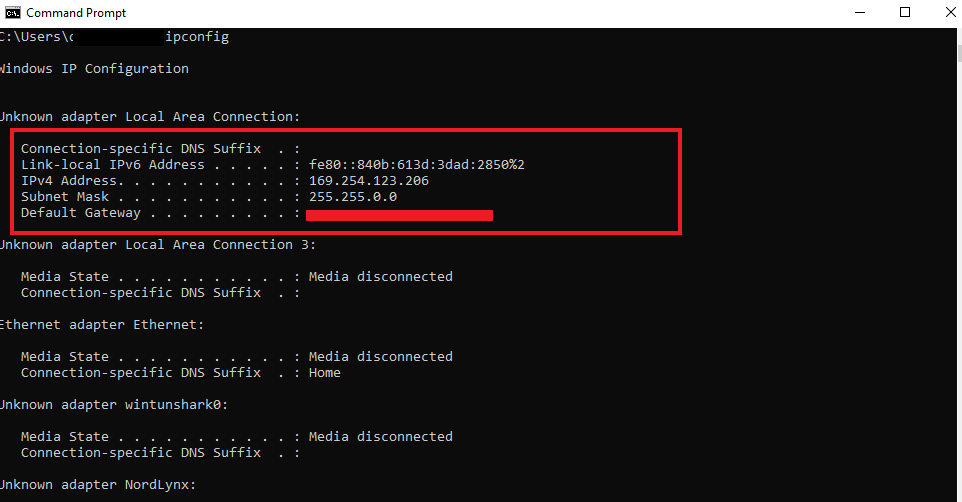
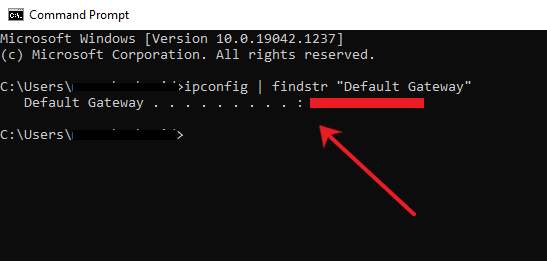
- In the Command Prompt window, type ipconfig and press Enter.
- Look for the line labeled Default Gateway. This will display your router’s IP address, often something like 192.168.1.1.
Using Network Settings you can also use the Control Panel to find your default gateway:
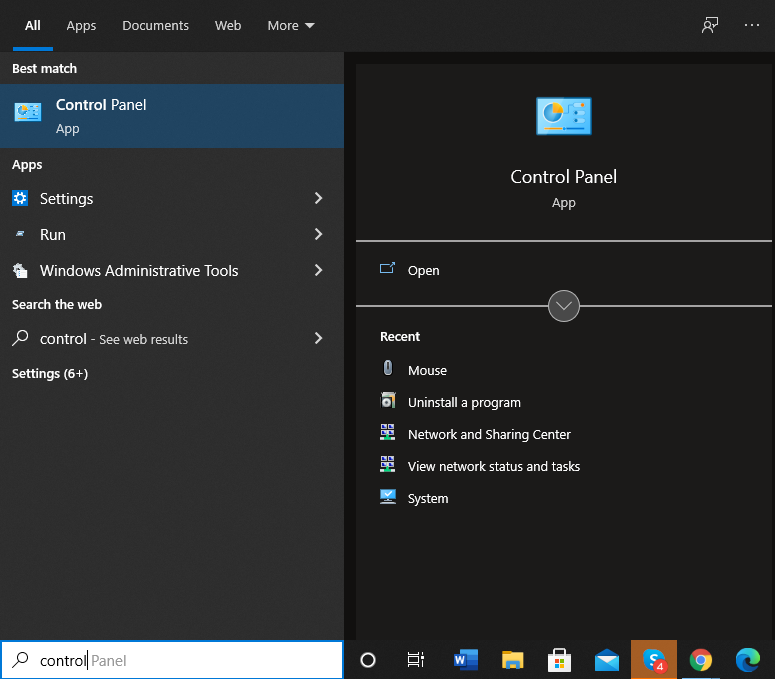
- Search for Control Panel using the Windows search box and open it.

Access Control Panel in Windows to manage settings.
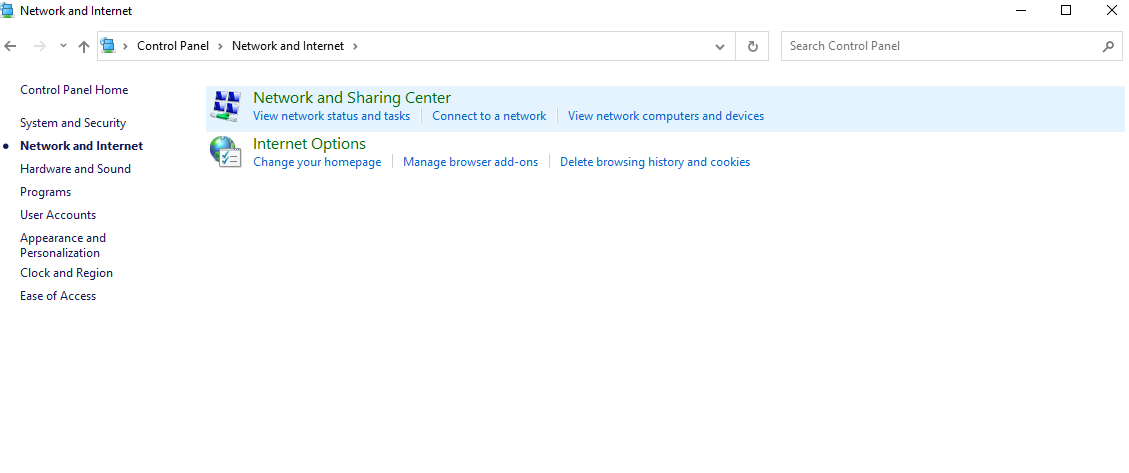
- Go to Network and Internet and click View network status and tasks.

Navigate to Network and Internet settings.
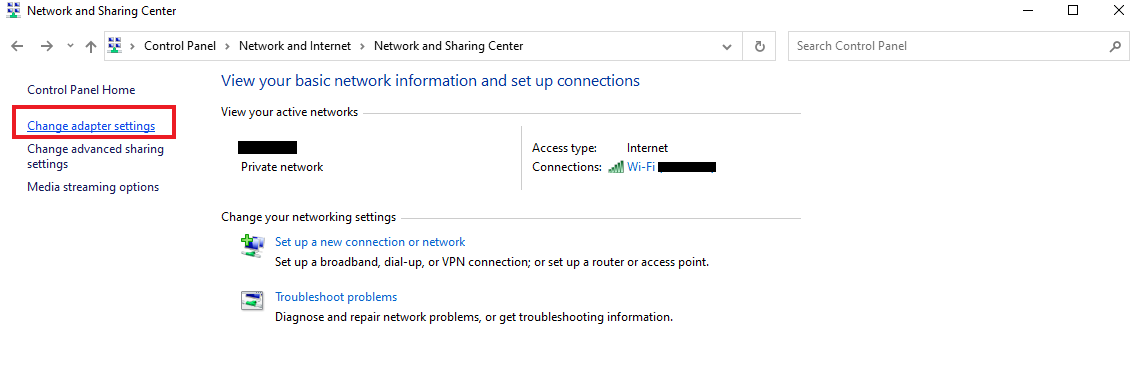
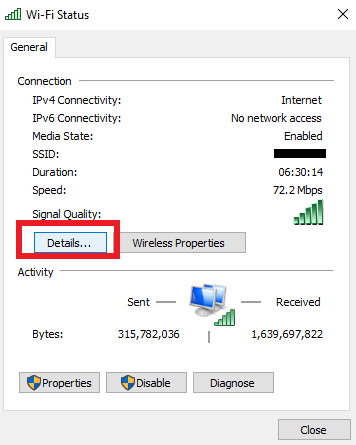
- Click on your network name next to Connections.

Select Wi-Fi connection to access network details.
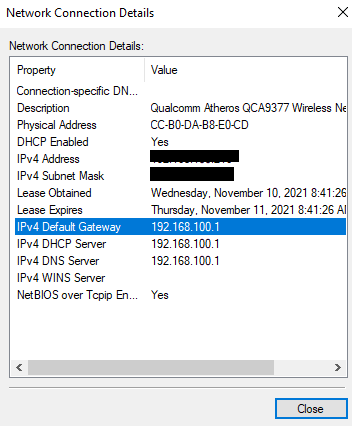
- Click on Details.
- Your Default Gateway IP address will be listed next to IPv4 Default Gateway.

View default IPv6 gateway IP address.
macOS:
To find your default gateway IP address in South Korea on macOS, you can use either System Preferences or Terminal. Here’s Here’s how to do it:
- Click the Apple menu and select System Preferences.

Select network connection to modify settings.
- Click on Network, select your connection, and click Advanced.
- Click Details.
- Go to the TCP/IP tab to see the IP next to Router.

Find IP address details on a Mac device.
Here’s how to set default gateway IP address using Terminal on macOS:
- Open Spotlight by pressing
Cmd + Space. - Search for Terminal and press Enter.
- Type
netstat -nr | grep defaultinto Terminal and press Enter. The gateway IP address will be listed next to default, under Gateway.
iOS:
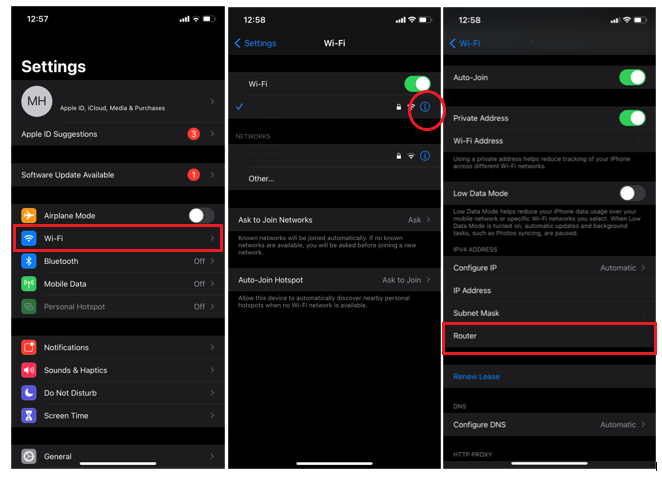
If you’re wondering how to find default gateway from IP address on iOS, follow these steps:
- Go to Settings and select Wi-Fi.

Open wifi connection settings to connect.
- Tap the i icon next to your connected network.
- Your default gateway address will be displayed under Router.

Locate default gateway address under ‘Router’.
Android:
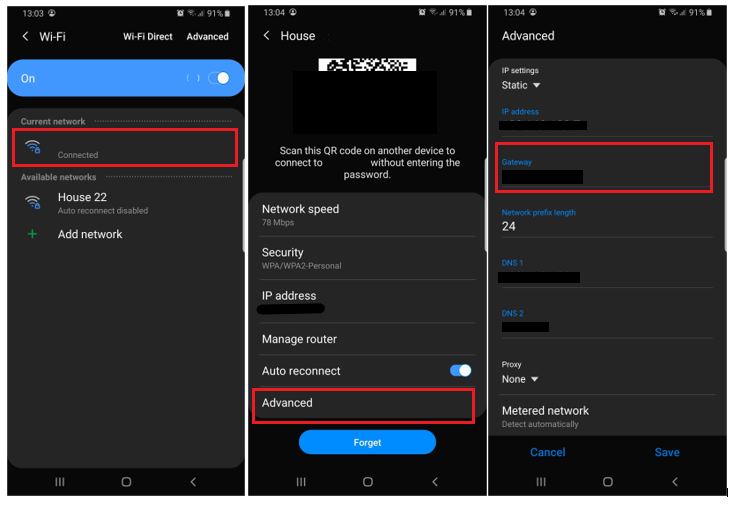
To find your Default Gateway IP address on Android, follow these steps:
-
- Open Settings and select Connections.

Open connection settings for further network options.
- Tap on Wi-Fi.

Enable Wi-Fi to find default gateway IP address.
- Choose your current network connection.
- Tap View more to access additional options.

Wi-Fi network configuration to locate gateway address.
- Change the IP setting from DHCP to Static.

Change IP settings from DHCP to Static.
- Your default gateway IP address will be displayed under Gateway.

Default gateway address appears under network settings.
- Open Settings and select Connections.
Router Interface:
- Open a web browser and type 192.168.0.1 or 192.168.1.1.
- Enter your router’s username and password.
- Find the default gateway IP in the network or status section.
What is a Default Gateway IP Address, and How Does It Work in South Korea?
A default gateway IP address is the node your device communicates with to access external networks or the internet. It usually belongs to your router and serves as an intermediary between your local network and other networks. When a device on your network tries to communicate with another network, the data first passes through the gateway.
A default gateway IP is an essential component in the digital ecosystem, acting as a pivotal access point connecting a local network to the broader internet. It serves as a navigator for data, directing outbound traffic from the local network to the desired locations across the internet.
When configuring or troubleshooting network settings, it’s crucial to know the gateway IP address of the router – the lifeline for internet connectivity. Using a trusted VPN like ExpressVPN can enhance the security and stability of your connection, ensuring seamless network management and protecting your data.
Why is a Default Gateway IP Important in Networking in South Korea?
A default gateway IP is crucial in networking because it serves as the access point or IP router that a networked device uses to send information to another network or the internet.
Without a default gateway, devices within a local network would be unable to communicate with devices outside their immediate subnet, severely limiting network functionality and access to external resources.
The default gateway essentially enables seamless connectivity and communication across diverse network segments, making it an indispensable component in both small and large-scale network infrastructures. If you’re eager to know, Is 192.168 1.1 a default gateway?” the answer is yes, it is commonly used by many routers as their default gateway.
I’m excited to share that ExpressVPN’s privacy policy and core server technology, TrustedServer, has been validated again in a new independent KPMG's recent audit.
You can get a dedicated IP services in 27 locations that’s yours alone, enhancing privacy to the next level. It’s so secure that even ExpressVPN can’t trace it back to you. This feature lets you access work resources remotely, reduces those annoying CAPTCHAs, and provides a smoother browsing experience—all while connected to the VPN.
Differences Between Default Gateway IP Addresses and Other Regions
When you find your default gateway IP address in South Korea, it may differ from those in other regions primarily due to variations in network infrastructure, ISP configurations, and regional IP allocation policies.
In, default gateways typically follow the standard IPv4 format like 192.168.1.1 or 192.168.0.1, similar to many other regions.
Additionally, regional regulations and internet traffic management practices can influence how default gateways are set up and managed. These differences can affect network performance, connectivity, and online experience. For a detailed understanding, you might refer to a list of IP addresses by city, which can shed light on the distribution and allocation of IP addresses.
If you’re wondering what are the key components of a local area network (LAN) that includes a default gateway? A typical LAN comprises devices like computers and printers, networking hardware such as routers, switches, and hubs, and the default gateway that connects the internal network to external networks, including the Internet.
Understanding the IP address range within your network is essential for effective management, and knowing the South Korea ASN can provide insights into regional IP address management.
Comparison of Static vs Dynamic Default Gateway IP Addresses in South Korea
| Feature | Static Default Gateway IP Address | Dynamic Default Gateway IP Address |
|---|---|---|
| Assignment | Manually assigned and remains constant | Automatically assigned by DHCP server and can change periodically |
| Stability | Provides a stable and predictable network environment | Can change periodically, offering less stability |
| Ideal Use Case | Hosting servers or critical network devices | Home networks and typical consumer setups |
| Security | More vulnerable to security threats as it is fixed and can be targeted more easily by cyber attackers | Enhanced security as it is harder for attackers to target a changing IP address |
| Management | Easier troubleshooting due to consistent connectivity | Easier to manage, reducing the need for manual configuration |
| Configuration Effort | Requires manual configuration | Automatically managed by the DHCP server |
Default Gateway IP vs. Public IP Address: What’s the Difference?
The default gateway IP is used within your local network, while a public IP address is used to communicate with the outside world.
| Comparison | Default Gateway IP | Public IP Address |
|---|---|---|
| Network Scope | Local (within your home or office) | Global (visible on the internet) |
| Assigned by | Router (internally assigned) | Internet Service Provider (ISP) |
| Accessibility | Only accessible within the local network | Accessible from anywhere online |
| Purpose | Facilitates internal network traffic | Identifies your network on the internet |
| Visibility | Hidden from external users | Visible to external services and users |
Common Issues with Default Gateway IP Addresses in South Korea
Here are some typical issues you may encounter with default gateway connectivity, along with ways to solve them:
- Unable to Access the Internet: This can happen if the default gateway IP is misconfigured or not properly set. Verify the settings in your router and device.
- Limited Connectivity: If your device can only connect locally but not to the internet, check the physical connection to the router or inspect the IP settings.
- Error Messages About Gateway Unavailability: This often indicates a configuration error. Restart your router and verify the IP setup.
How to Troubleshoot Default Gateway Connectivity Issues in South Korea?
When troubleshooting connectivity issues, one of the first things you should check is whether you can ping your default gateway. If you can successfully ping it, you know that the connection between your device and the router is functioning correctly, which means the issue is likely beyond your local network.
If you experience slow internet, network errors, or cannot connect to the internet, troubleshooting the default gateway can often resolve the problem. Here are some common issues and how to fix them:
- Verify IP Configuration: Ensure that the default gateway IP address is correctly configured on your device. Incorrect configurations can lead to network errors.
- Review Firewall Settings: Your firewall may block communication with the default gateway. Check your settings to ensure no blocking rules are active.
- Examine Physical Connections: Inspect all network cables and connections to verify they are secure and undamaged.
- Restart Router: Restarting your router can help reset the connection and fix minor network glitches.
If these steps do not resolve the issue, consider seeking assistance from IT professionals who can look into more advanced network settings.
Benefits of Customizing Your Default Gateway IP Address in South Korea
Customizing your default gateway IP address in South Korea can offer several significant benefits, enhancing my network’s efficiency and security. Here’s why it’s worth considering:
- Improved Network Security:
- Enhanced Protection: By changing the default gateway IP address from its factory settings (e.g.,
192.168.1.1), I reduce the risk of unauthorized access. Cyber attackers often target default IP addresses, so customizing it can add an extra layer of security. - Reduced Vulnerabilities: Custom IP addresses make it harder for potential intruders to guess and exploit my network, thereby mitigating common vulnerabilities.
- Enhanced Protection: By changing the default gateway IP address from its factory settings (e.g.,
- Better Network Management:
- Avoid IP Conflicts: Customizing my gateway IP can help prevent IP address conflicts, especially in environments with multiple devices or networks.
- Simplified Troubleshooting: A unique gateway IP can simplify network management and troubleshooting, making it easier to identify and resolve issues quickly.
- Optimized Network Performance:
- Efficient Routing: Custom IP settings can optimize routing paths and improve overall network performance, ensuring smooth and reliable connectivity.
- Enhanced Control: Customization allows better control over network configurations, leading to more efficient resource allocation and management.
- Tailored Network Configurations:
- Specific Needs: Customize the gateway IP to fit specific network requirements, whether for a home network or a complex business environment.
- Adaptable Setup: Tailoring network settings allows for a more adaptable and responsive setup, accommodating future network expansions or changes.
If you’re curious about how to check IP, you can do so by accessing your network settings or using online tools to reveal your current IP address.
How to Secure Your Network in South Korea?
To secure your network, especially your home Wi-Fi, you can take a few key steps:
- Secure Your Router: Your router is the gateway to your network, and if it’s unsecured, hackers can access all your connected devices. Protecting the router is crucial to keeping your private data safe.
- Install a VPN on Your Router: You can add an extra layer of security by installing a VPN directly on your router. This way, the VPN encrypts the internet connection for every device connected to your network, hiding your IP address and making your data safer from hackers.
- Encrypt Your Data: When you use a VPN, it encrypts all the data moving through your network. This means even if someone manages to compromise your router, they won’t be able to see or use your data.
- Strengthen Wi-Fi Security: By setting up a VPN on your router, you improve the overall security of your home or office Wi-Fi network. This helps protect all the devices connected to it, giving you a secure connection for every device without having to install separate security apps on each one.
Best Practices for Managing Default Gateway IPs in Corporate Networks
Managing default gateway IPs effectively is crucial for maintaining the security and efficiency of corporate networks, ensuring seamless connectivity while mitigating potential risks.
- Regular Monitoring: Continuously monitor the default gateway and state IP address to detect and resolve issues promptly, ensuring network stability.
- Proper Configuration: Ensure the default gateway IP address is correctly configured to prevent connectivity problems and optimize performance.
- Firmware Updates: Regularly update router and modem firmware to benefit from the latest security patches and performance improvements.
- Network Segmentation: Use network segmentation to improve security and manage traffic efficiently, reducing the load on the default gateway.
- ISP Collaboration: Work closely with ISPs to understand their specific configurations and optimize the default gateway settings for better performance.
- Security Measures: Implement robust security measures, such as firewalls and intrusion detection systems, to protect the gateway from unauthorized access and cyber threats.
- Backup Plans: Have contingency plans and backup configurations to restore connectivity in case of gateway failures quickly.
FAQs – Find Your Default Gateway IP Address in South Korea
Can I change my default gateway IP address in South Korea?
Yes, you can change your default gateway IP address in South Korea, though it typically requires access to your router’s admin panel. Once logged in, navigate to the network settings and manually input a new gateway IP.
Is the gateway IP address the same as a router IP?
Gateway IP address is the same as a router IP address. A router IP address manages and forwards data packets to devices on the same network. A gateway IP address works as a gate between the network. For enhanced security and privacy, using a reliable VPN like ExpressVPN is recommended
How can I find the default gateway IP address for IPv6 networks?
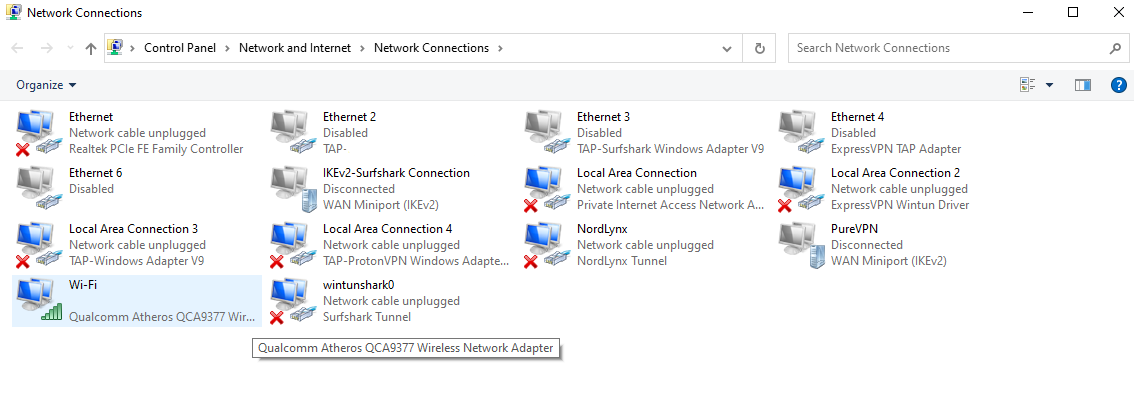
To find the default gateway IP address for IPv6 networks, go to Change adapter settings” on your computer, select your main internet connection, and click on Details” to locate the IPv6 Address” and IPv6 Default Gateway.” This will display your gateway IP address.
Is 192.168 0.1 a default gateway in South Korea?
Yes, 192.168.0.1 is a default gateway commonly used by routers and modems like D-Link for accessing the admin panel and configuring network settings.
What is my default gateway IP address in South Korea?
To find your default gateway IP address in South Korea, open Command Prompt on Windows and type ipconfig, or go to System Preferences > Network on macOS and check the TCP/IP tab. On mobile devices, access Wi-Fi settings and view the network details.
Is the default gateway IP address the same on all devices?
No, the default gateway IP address can vary across networks and routers, but it is usually consistent for devices on the same local network.
How do I hide my IP address?
To hide your IP address, you can use a reliable VPN like ExpressVPN, which masks your real IP and lets you choose another one. This helps protect your privacy and allows you to access region-blocked content.
How to change your default gateway IP address in South Korea for different routers?
To change your default gateway IP address in South Korea, log in to your router’s web interface using its current IP, navigate to the network settings, and update the default gateway IP. Consult your router’s manual for specific instructions. For enhanced security while making these changes, use ExpressVPN to protect your connection.
Wrapping Up
I understand the urge to find your default gateway IP Address in South Korea; it’s the cornerstone of a smooth and secure internet experience. Whether on a computer or mobile device, it’s easy to locate your router’s IP address for a more efficient online experience.
Regularly checking and configuring your default gateway can prevent connectivity issues and enhance network performance. You can maintain a robust and efficient network with just a few simple steps. So, stay connected and enjoy seamless browsing like never before – the internet is yours to explore! For added security and privacy, consider using ExpressVPN.