The BBC iPlayer is geo-restricted and cannot be accessed if you go in Japan. If you attempt, you’ll likely get one of two errors: “This content is not available in your location” or “BBC iPlayer is only available in the UK. Sorry, it’s due to rights issues.” The reason for this is simple: the network only has the right to display its programs in the United Kingdom.
While, NordVPN is the world’s largest VPN provider, with millions of subscribers. As a result, this question, does NordVPN work with BBC iPlayer in Japan comes as no surprise.
Based on my testing, NordVPN undoubtedly provides strong security for private surfing and fast speeds for buffer-free HD streaming and unlocks BBC iPlayer in Japan within seconds. It also has many dependable UK servers, so if you’re in Japan, you may connect to one to safeguard your internet activities and watch BBC iPlayer uninterruptedly.
Does NordVPN Work with BBC iPlayer in Japan?
Yes. I tested NordVPN with BBC iPlayer, and the results were awesome which clearly showed that NordVPN work with BBC iPlayer app in Japan. You just have to read this guide till the end to see the results.
However, many VPNs promise to offer unrestricted access to BBC iPlayer and similar sites, but only some are true to their words, and NordVPN is one of the few ones that do. What’s best is that NordVPN provides a 30-day money-back guarantee so you can watch BBC iPlayer free for 30 days.
How to Watch BBC iPlayer with NordVPN in Japan?
If you’re in Japan and want to watch BBC iPlayer securely, you’re in luck. NordVPN is a robust VPN service that not only enhances your online privacy but also provides fast speeds for a smooth streaming experience.
Here’s a quick and easy guide to get you started:
- Select a NordVPN Plan: First, visit the official NordVPN website and choose the plan that’s right for you. NordVPN offers a variety of plans to suit different needs and budgets.
- Connect to a UK Server: If you’re already in the UK, connect to NordVPN’s UK servers (I recommend the Edinburgh server). This will ensure your internet connection is secure while maintaining the best possible speeds for streaming.
- Enjoy Streaming on BBC iPlayer: Navigate to the BBC iPlayer website or app, sign in or sign up if you haven’t already, and you’re all set! Remember to enter a valid UK postcode if prompted during sign-up.
Note: Take advantage of NordVPN’s special deal for VPNRANKs readers– get JPY625.76/mo (US$ 3.99/mo) - Save up to 63% with exclusive 2-year plan + 3 months free for a friend!
Why You Should Use NordVPN for BBC iPlayer Streaming in Japan?
For streaming BBC iPlayer securely in Japan, NordVPN stands out as one of the best choices for several reasons. By using NordVPN, you can get a UK IP address in Japan, allowing you to enjoy your favorite British content without any geographical restrictions.
Curious to know how does NordVPN work with BBC iPlayer in Japan? Well, Here is the list of NordVPN features that make it a recommended choice for BBC iPlayer:
Strong UK Server Presence
NordVPN stands out with its extensive network of over 440 servers in the UK. This abundance of servers is crucial for ensuring a reliable and high-speed connection in Japan, addressing potential issues related to server overload.
I didn’t struggle to select a reliable server from NordVPN’s robust network, allowing me to effectively obtain a UK IP address.
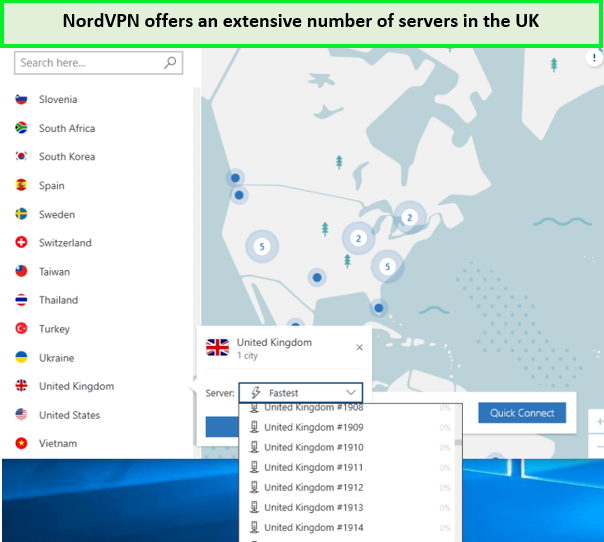
Does NordVPN work with BBC iPlayer in Japan? Yes, it has a huge server network through which you can unblock BBC iPlayer!
Advanced Encryption and Security Features
With NordVPN, your online activity is secured by AES 256-bit encryption, the same standard used by governments and security experts worldwide. Additionally, NordVPN offers a suite of security features, including an automatic kill switch, DNS leak protection, and a strict no-logs policy, ensuring your privacy is always protected.
SmartPlay Technology
NordVPN’s SmartPlay technology is designed to bypass geo-restrictions and provide a smooth streaming experience. This feature is particularly useful for accessing BBC iPlayer content, as it effortlessly unblocks the service without any additional configuration required from the user.
Fast Streaming Speeds
NordVPN is known for its fast connection speeds, which are essential for streaming high-definition content without buffering. I found that this VPN provider has optimized its servers for streaming which allowed me to enjoy my favorite BBC iPlayer shows in crisp HD without interruptions.
Multi-Platform Support
Whether watching on a computer, smartphone, or smart TV, NordVPN provides you with dedicated apps for various platforms. This means you can enjoy BBC iPlayer securely, no matter which device you prefer.
Simultaneous Connections
With the ability to connect up to 6 devices simultaneously on a single NordVPN account, you can secure all your devices simultaneously. This feature is perfect for households with multiple users who want to stream content from BBC iPlayer or other services.
Customer Support
NordVPN provides excellent customer support, including 24/7 live chat assistance. If you ever encounter an issue while streaming BBC iPlayer, you can get help quickly and easily.
By choosing NordVPN for BBC iPlayer access in Japan, you’re not only getting secure access to your favorite content but also a premium streaming experience with no compromises on speed or privacy.
Interested to know more about does NordVPN work with BBC iPlayer? Learn more about its fascinating features in our detailed NordVPN review for users in Japan.
Testing NordVPN with BBC iPlayer
Using a selection of NordVPN’s UK servers, I conducted tests to stream BBC iPlayer on various devices, including desktops, smartphones, and tablets. So, if you’re worried about can I watch BBC iPlayer with NordVPN in Japan? Don’t fret. You can watch BBC iPlayer with NordVPN. As you can see, I tested NordVPN’s Edinburgh server and could stream the shows without interruption on BBC iPlayer.
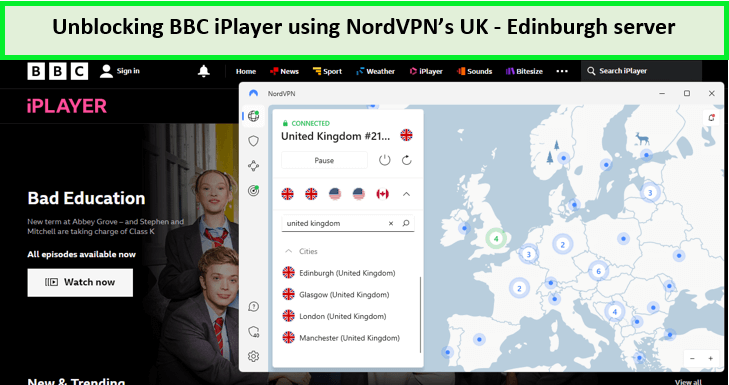
NordVPN servers unblocked iPlayer in Japan with ease.
Moreover, I evaluated the connectivity, speed, and picture quality of each server. The results were impressive: NordVPN provided seamless access to BBC iPlayer content without noticeable buffering or quality degradation.
Which NordVPN Server Works with BBC iPlayer app in Japan?
Finding the right NordVPN server is crucial for a seamless streaming experience on BBC iPlayer app in Japan. NordVPN offers a vast network of UK servers that are optimized for streaming, and while many of them work well, some servers may offer better performance than others.
Here are some of the best NordVPN server for BBC iPlayer that you can connect to and stream your favorite shows from anywhere in Japan:
Recommended NordVPN servers for BBC iPlayer:
- London #1840-1847
- London #1850-1863
- London #1865, 1869, 1873
- London #1875-1878, 1880-1881
- London #1900-1901, 1903-1904, 1911, 1913, 1917, 1919-1920
- Edinburgh
These servers have been selected based on user feedback and my testing. I hope it answers your question: does NordVPN work with iPlayer, because with these servers you can easily watch it. They are known to work well with BBC iPlayer, providing fast and stable connections for uninterrupted streaming.
How to Connect to the Best Server:
- Open your NordVPN app and log in with your credentials.
- Navigate to the server selection tool and select the United Kingdom from the country options.
- You can choose a specific server number from the list or let NordVPN connect you to the best server automatically.
For those times when you might encounter a server that isn’t working with BBC iPlayer, NordVPN’s customer support is available 24/7 to assist you in finding a server that will grant you access to your desired content.
Is NordVPN Not Working with BBC iPlayer in Japan? [Tested Troubleshooting Tips]
If you are experiencing NordVPN with BBC iPlayer not working streaming issues, you can always disconnect from the VPN and reconnect. BBC iPlayer’s geo-blocks are some of the toughest among all the streaming platforms.
However, if you are facing extensive buffering or lags, you can always refresh the page and start the video again. You can also try and switch time zones on your device to match the UK. Similarly, most of the time, the problem is not with the VPN but with BBC iPlayer, or your internet connection.
Still, if BBC iPlayer with NordVPN is not working in Japan, here are some troubleshooting tips I have compiled:
- Switch Servers: Sometimes, certain servers may be blocked or overloaded. Connecting to a different UK server on NordVPN to get a fresh IP address.
- Clear Cache and Cookies: Your browser’s cache and cookies might reveal your location to BBC iPlayer. Clearing them could resolve the issue.
- Change Protocols: NordVPN offers various protocols such as NordLynx and OpenVPN. Switching between these within the app settings may help bypass the block.
- Use a Dedicated IP: NordVPN provides the option for a dedicated IP, which can reduce the likelihood of being detected by BBC iPlayer’s anti-VPN technology.
- Update the App: Ensure you’re using the latest version of the NordVPN app, as updates often include improvements and new IPs.
- Contact Support: If you’ve tried all the above and still can’t access BBC iPlayer, reach out to NordVPN’s customer support for assistance.
These tips should help you resolve any issues with NordVPN and BBC iPlayer, allowing you to get back to enjoying your favorite content. There are some more reasons of NordVPN not working in Japan and their troubleshooting tips for you to check.
How does BBC iPlayer know You are using a VPN in Japan?
If you use a free VPN to stream BBC iPlayer with basic encryption protocols, BBC iPlayer can guess that you are using a VPN or proxy via your IP address and will block access immediately.
That is why you should use premium paid VPNs like NordVPN to unblock BBC iPlayer or any other location. So, does NordVPN work with BBC iPlayer in Japan perfectly? Yes, NordVPN offers strong encryption and DNS leak protection, so BBC will not discover you are using a VPN.
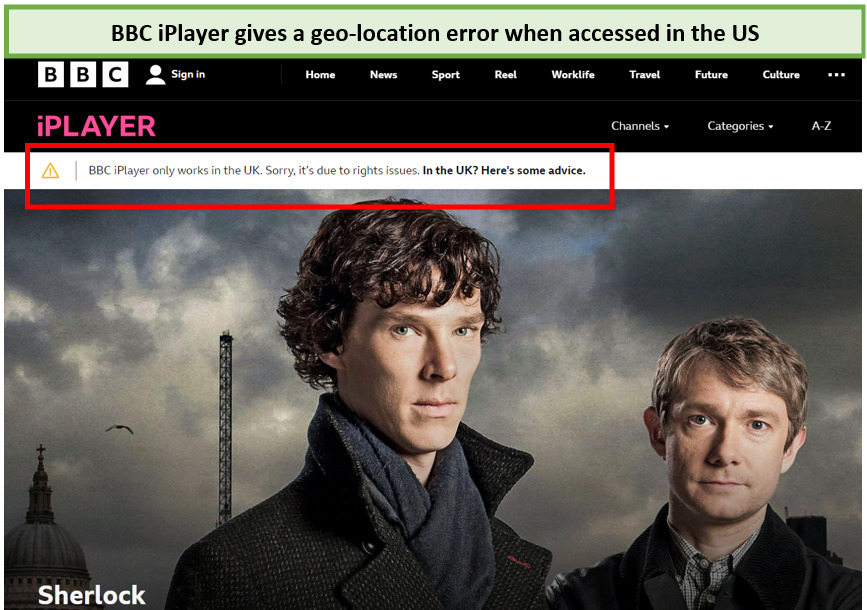
BBC iPlayer shows you this geo-restricted error when it detects a VPN usage.
When you use a VPN, you connect to a different IP address and make it look like you are trying to watch BBC iPlayer from within the UK. Your IP address contains much information, like your geolocation (the country from where you have the IP address).
That is why when you visit a foreign website, it automatically translates the language for you. Therefore, websites don’t know exactly who you are, but they can guess your location.
VPN Alternatives for BBC iPlayer Unblocking in Japan
As discussed above, not all VPNs can bypass BBC iPlayer’s firewall. There are very few other services with strong unblocking capabilities like NordVPN. If you are looking for BBC iPlayer VPN alternatives, here are some top options I recommend:
ExpressVPN

- Ultra-fast servers in 105 Countries
- Excellent unblocking capability for Netflix, Hulu & more
- Best-in-class encryption trusted security, and advanced protection features that block ads, trackers, and harmful sites.
- Connect up to 8 devices simultaneously
- 24/7 customer support through live chat
- 30-day money-back guarantee
ExpressVPN is the recommended VPN to watch BBC iPlayer from anywhere in Japan. Thanks to its exceptional unblocking capabilities, it can easily bypass geo-restrictions, granting you access to a wide variety of content typically available in the UK at 89.42 Mbps.
ExpressVPN boasts a vast selection of servers across the globe. It has 3200+ servers in 100 countries, including 4 UK server locations.
Security is paramount with ExpressVPN. It employs 256-bit AES encryption, ensuring your online activities remain private and secure. Moreover, its no-logs policy, kill switch feature, and DNS leak protection provide an additional layer of security, keeping you safe from any potential data breaches.
Check out the in-depth ExpressVPN review for users in Japan for more details.
Surfshark

- 3,200+ servers in 100 countries
- RAM-only servers (no hard disks)
- Unlimited simultaneous connections
- Unblocks Netflix and More
- 24/7 Customer Service
Surfshark is another great VPN if you want to enjoy BBC iPlayer from abroad. It offers 3 server locations in the UK – London, Manchester, and Glasgow. Surfshark has over 3200+ servers in 100 countries. During testing, Surfshark performed amazingly as it instantly unblocked BBC iPlayer from anywhere.
When it comes to security, Surfshark doesn’t disappoint. With AES-256-GCM encryption, a kill switch, and a strict no-logs policy, your online activities remain secure and private. Additionally, the CleanWeb feature blocks ads, trackers, and malicious links, ensuring a smooth and safe streaming experience.
Check out the latest Surfshark review for users in Japan for more details.
FAQs
Is BBC iPlayer free?
Yes, BBC iPlayer is available for free. When joining, you must give a valid UK postcode, such as SW1A 1AA for Buckingham Palace.
Does NordVPN have a kill switch?
NordVPN is no exception; its kill switch could be configured to terminate particular programs when the VPN connection is lost. Users may also use an internet kill switch, which stops them from accessing the internet unless NordVPN is connected.
Is it legal to use NordVPN to access BBC iPlayer?
Yes, using NordVPN to access BBC iPlayer is legal in most countries. In reality, even in China, customers are simply restricted to specific providers rather than being barred from using VPNs entirely. This means you can encrypt your connection and stream your favorite stuff while on vacation without fear of being caught.
Final Verdict
To summarize, using NordVPN to watch BBC iPlayer is not only possible but also quite simple once you know the right steps. As one of the most reliable VPN services on the market, NordVPN provides the necessary features for a smooth streaming experience. With unlimited traffic, excellent speeds, and modern protocols, of NordVPN you can enjoy your favorite BBC iPlayer shows from anywhere.
Moreover, NordVPN’s ability to unblock other streaming platforms is a significant advantage. Whether you want to stream ITV or BBC iPlayer, NordVPN covers you. So, if you were wondering, does NordVPN work with BBC iPlayer in Japan — the answer is a resounding Yes.