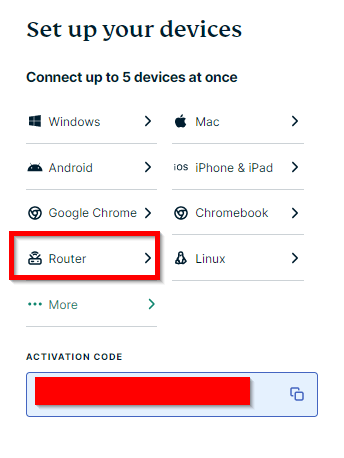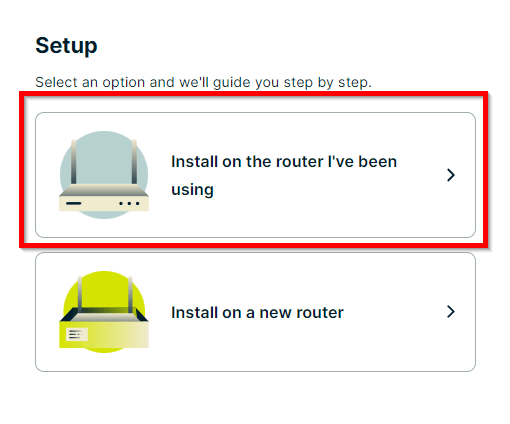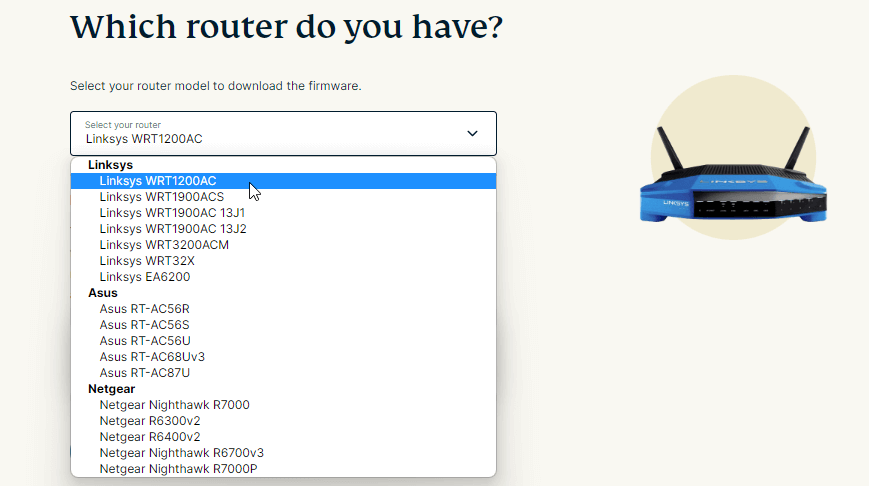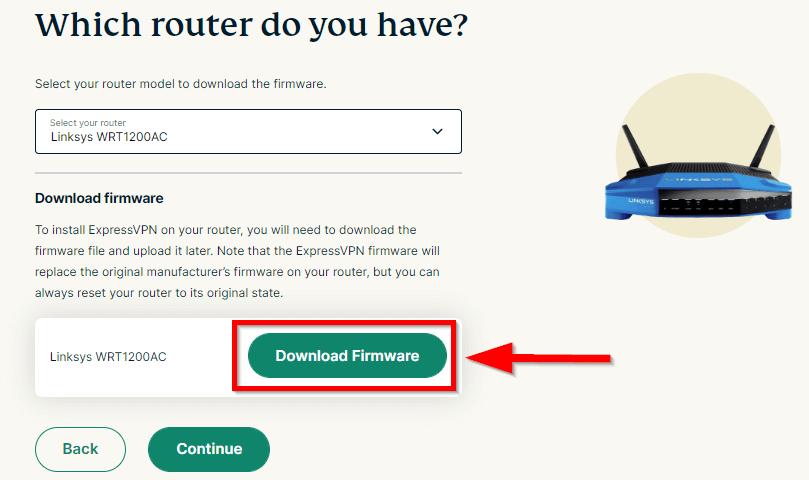
Are you tired of struggling to protect every device in your home? The ExpressVPN router setup in Italy is your perfect solution. With VPN protection for your WiFi, ethernet, IoT gadgets, smart TVs, gaming consoles, tablets, and other connected devices, you can ensure online privacy for everything from individual devices to your entire home network.
After doing many VPN reviews in Italy, I found that ExpressVPN is the best choice for router setup. It offers custom firmware for popular brands like ASUS, Netgear, and TP-Link. Users rave about its ease of manual installation, fast speeds, top-notch security features, and ability to unblock streaming platforms like Netflix US.
Setting up a VPN on your router is crucial. With approximately 75% of cyber attacks increasing due to open internet and poor security protocols, using a reliable VPN like ExpressVPN is essential. It allows you to enjoy region-restricted services, secure every device, and maintain a remote IP address for safe browsing.
Key Takeaways
- Router Compatibility: Lists compatible routers for ExpressVPN custom firmware.
- Firmware Installation: Detailed step-by-step tutorial guides for installing ExpressVPN firmware.
- OpenVPN Setup: Instructions for manually setting up OpenVPN on routers.
- Troubleshooting: Provides common issues and their solutions during setup.
Quick Guide: ExpressVPN Router Setup in Italy
Securing your entire network with ExpressVPN is easy and ensures all connected devices benefit from encrypted protection. Before using my ExpressVPN router setup in Italy, ensure your router is compatible and ready for configuration.
Follow these simple steps to secure your online activity in Italy:
- Download the Firmware: For a seamless setup, ExpressVPN provides router firmware for ASUS, Linksys, and Netgear models.
- Locate the VPN settings: Navigate to the VPN settings, which will vary based on your router model.
- Select a VPN provider: Choose your preferred VPN provider.
- Activate the VPN service: Enable the VPN service within the settings.
- Verify the VPN connection: Check if the VPN is functioning correctly on your router.
ExpressVPN Router — Intuitive Setup Perfect for Beginners in Italy

| Feature | Description |
|---|---|
| Custom Firmware for Easy Installation | It makes setup straightforward with custom router firmware. |
| Extensive Server Network | 105+ countries for unblocking global services. |
| Advanced Security Features | Military-grade encryption and Network Lock (kill switch) protect your data 24/7. |
| Unblocks Major Streaming Platforms | Netflix, Disney+, ESPN+, Hulu, HBO Max, Amazon Prime Video, BBC iPlayer, and more. |
| Names of Supported Routers | Works with Asus, Netgear, Linksys, TP-Link, Xiaomi, D-Link, DD-WRT, Netduma, Sabai, Tomato, Windows, Mac, iOS, Android, Chromecast, Apple TV, and more. |
In this ExpressVPN router setup in Italy, I’ll mention all the attractive features that make ExpressVPN the most suitable VPN for your router, providing detailed explanations along the way.
Installation Process
ExpressVPN provides custom firmware for several router models, simplifying the installation process. While most VPNs require manual setup on routers, ExpressVPN’s firmware makes it more accessible. During my testing, I flashed my ASUS RT-AC87U and Netgear Nighthawk R6400v2 routers within 10 minutes.
Their official website has detailed setup guides for configuring the VPN on your router. Additionally, you can manually connect on routers supporting OpenVPN and LT2P protocols or DD-WRT and Tomato devices. It worked perfectly on my Archer C7 TP-Link.
For those seeking ultimate convenience, pre-configured ExpressVPN routers can be ordered online. These routers often support the latest WPA3 and WiFi 6 standards and come with high-performing OpenWRT firmware. However, this option is typically unnecessary, given the straightforward setup (especially with custom firmware).
User-Friendliness
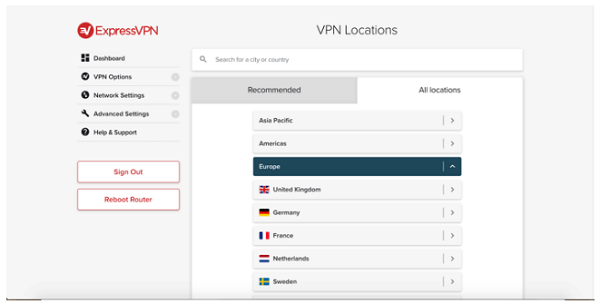
ExpressVPN’s custom firmware makes using it on routers simple. Once flashed, you can control the VPN through an intuitive web app, allowing you to switch between servers or use Smart Location to connect to the fastest one nearby.
The step-by-step tutorials make it easy to understand each feature, and 24/7 live chat support is available for any help needed. When I tested the chat feature, a representative promptly guided me through the router setup.
Generally, ExpressVPN allows eight devices to connect simultaneously per account. However, after setting it up on your router, you can connect as many devices as your network can handle. Just be mindful of your router’s maximum device limit.
Speed and Performance
ExpressVPN delivered impressive speeds during my router tests, never dropping below 75 Mbps on servers I tried — a mere 16% decrease from my usual 90 Mbps. Gigabit-ready routers can reach up to 1000 Mbps, ensuring smooth UHD streaming.
Torrenting is reliable, too, as ExpressVPN works well with popular clients like BitTorrent and uTorrent. Some ISPs throttle speeds for high-bandwidth activities, but advanced encryption keeps your traffic hidden and prevents slowdowns.
Unblocking and Streaming Abilities
The vast server network across 105 countries makes circumventing geo-blocks on popular streaming platforms easy. I could watch all Shameless seasons on Netflix without issues. ExpressVPN’s obfuscation feature helps circumvent even the strictest firewalls, like the Great Firewall of China, and VPN blockers on streaming platforms like Amazon Prime Video and BBC iPlayer.
Security and Privacy Measures
Every device connected to your router is protected by military-grade AES 256-bit encryption and 4096-bit RSA keys. Perfect Forward Secrecy technology changes encryption keys for each session, further minimizing risks.
The VPN offers Lightway, OpenVPN, and L2TP/IPsec tunnelling protocols. OpenVPN is best for secure banking, while the faster Lightway is ideal for gaming and streaming.
Network Lock (kill switch) provides 24/7 protection by cutting your internet connection if your VPN drops. I detected no leaks during testing, ensuring my real location remained hidden.
ExpressVPN has a strict no-logs policy and operates in the British Virgin Islands, beyond the 5/9/14 Eyes jurisdiction. TrustedServer tech (RAM-only servers) erases all browsing data with each reboot. Also, its No log policy is validated by KPMG, making it a trustworthy VPN for router use.
Pricing and Refund Policy
The cost of ExpressVPN depends on the plan you are signing up for. These days, it is offering the best deal at EUR 4.35/mo (US$ 4.99/mo) - Save 61% With Exclusive 2-Year Plan + 4 Months Free.
The 30-day money-back guarantee makes getting a refund easy if you’re unsatisfied. Cancelling via live chat took about five minutes, and my refund was processed in two days.
Dedicated IP
ExpressVPN’s Dedicated IP feature gives you an exclusive IP address, simplifying how you access online services. From remote work to personal browsing, having a static IP ensures fewer disruptions, all while keeping your data encrypted and secure. It’s your personalized key to smoother, hassle-free online experiences.
ExpressVPN Compatible Router List in Italy – Supported Routers
I was keen to explore the range of routers that work well with ExpressVPN in Italy, and here’s the ExpressVPN router compatibility list I compiled:
| Router Type | Custom Firmware | Manual Configuration | Setup Guide |
|---|---|---|---|
| ASUS | ASUS RT-AC56 (U/R/S); ASUS RT-AC68U; ASUS RT-AC87U (up to v3) | Yes (other models) | Yes |
| Netgear | Netgear R6300v2; Netgear R6400v2; Netgear Nighthawk R6700v3; Netgear Nighthawk R7000; Netgear Nighthawk R7000P | Yes (other models) | Yes |
| Linksys | Linksys EA6200; Linksys WRT1200AC; Linksys WRT1900AC(S); Linksys WRT3200ACM; Linksys WRT32X | Yes (other models) | Yes |
| FlashRouters | Yes (pre-installed) | Possible | Yes |
| Aircove | Yes (pre-installed) | Possible | Yes |
| TP-Link | No | Yes | Yes |
| D-Link | No | Yes | Yes |
| Xiaomi | No | Yes | Yes |
| Sabai | No | Yes | Yes |
| DD-WRT (firmware) | No | Yes | Yes |
| Netduma (firmware) | No | Yes | Yes |
| Tomato (firmware) | No | Yes | Yes |
Recommended Routers for ExpressVPN in Italy
If you want a router that is easily compatible with ExpressVPN, consider its custom router, the Aircove. This router is designed to provide excellent speeds and native connections to all of ExpressVPN’s servers.
If you prefer another model, you can shop on FlashRouters.com to get a VPN set up to work with ExpressVPN. Below are some popular VPN-compatible routers and the reasons for their recommendation:
| ExpressVPN Supported routers | Reason for Recommendation |
|---|---|
| Asus RT-AX86U | High performance, excellent speeds, and robust features. |
| Asus RT-AX68U | Great balance of price and performance, reliable for VPN. |
| Asus RT-AX88U (AX6000) | Top-tier speeds are ideal for heavy users and large homes. |
Alternatively, you can use any router with an integrated OpenVPN client or one compatible with custom firmware like DD-WRT, OpenWRT, Tomato, or Merlin.
However, manually flashing a router with custom firmware can be complex and might trick the router if not done correctly. If you’re not confident in your technical abilities, seek professional assistance or opt for a pre-installed router.
Use IP and DNS leak test tools to ensure your VPN connection is leak-free. Regularly update your router’s firmware and adjust settings for optimal performance.
How Do I Setup ExpressVPN on My Router in Italy?
Setting up ExpressVPN on your router provides comprehensive network security for all your devices in Italy. Follow these simple steps to get started quickly and easily.
Installing ExpressVPN’s Custom Router Firmware in Italy
In this ExpressVPN router setup in Italy, I added the method that makes setting up ExpressVPN on your router easier than you might think.
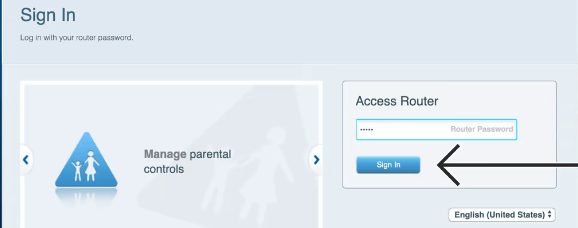
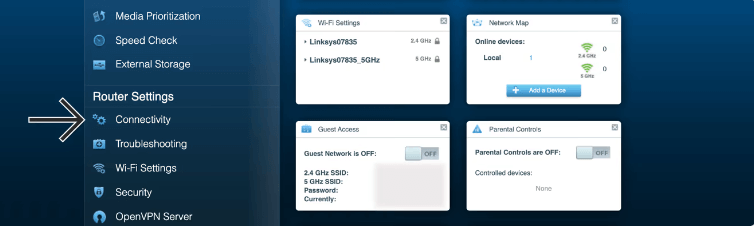
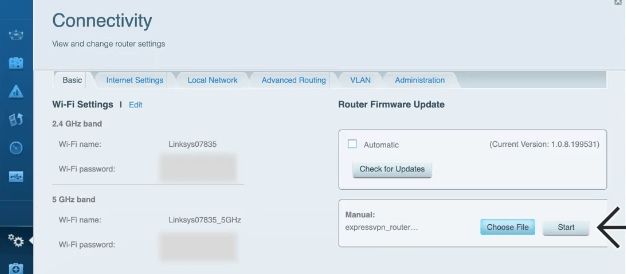
Here’s a quick guide to flashing your router with ExpressVPN’s custom firmware based on my experience with the Netgear Nighthawk R6400v2:
- Complete Initial Internet Setup: Ensure your router is connected to the internet.
- Download the Firmware: Find and download the relevant firmware from the ExpressVPN website.
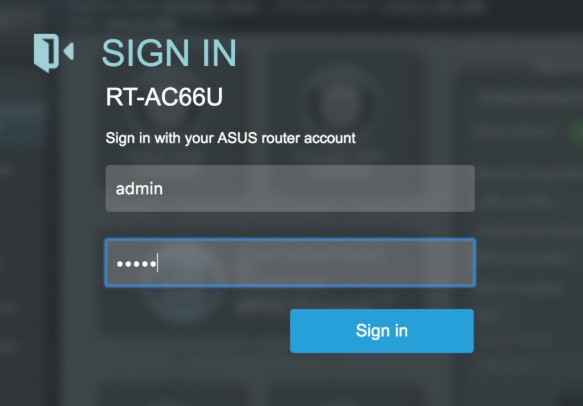
- Access Admin Panel: Log in to your router’s admin panel via your browser (typically at 192.168.1.1).
- Start Flashing: In the Administration” section under the Advanced” tab, click Browse,” navigate to the folder with the downloaded firmware, select the file, and hit Update.”
- Reconnect Router: After installation, you may need to reconnect your router using the factory settings.
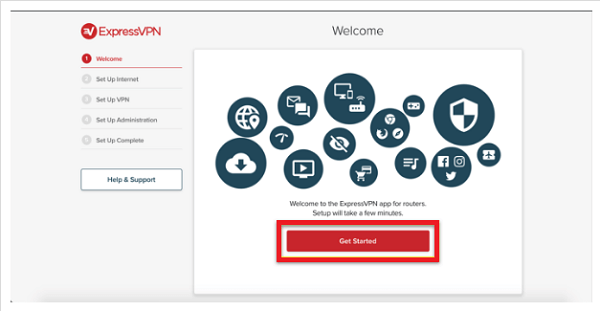
- Finish Setup: Go to ExpressVPN Router setup in Italy and follow the instructions to complete the setup.
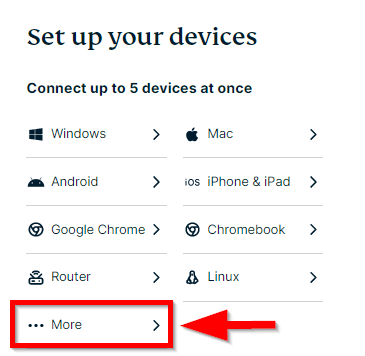
- Select Server and Manage Device Groups: Log into your ExpressVPN account and choose Router” from the list of devices.
Manually Setting Up ExpressVPN on Your Router in Italy
This custom approach saves time and reduces complexity, making it a breeze even for those who aren’t tech-savvy. The ExpressVPN router app enhances the experience by providing a straightforward interface for managing connections.
Here’s how I configured my Archer C7 TP-Link in Italy:
- Access Setup Page: ExpressVPN router login with credentials.
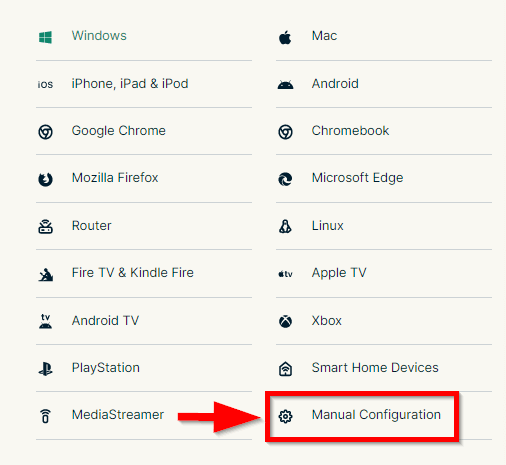
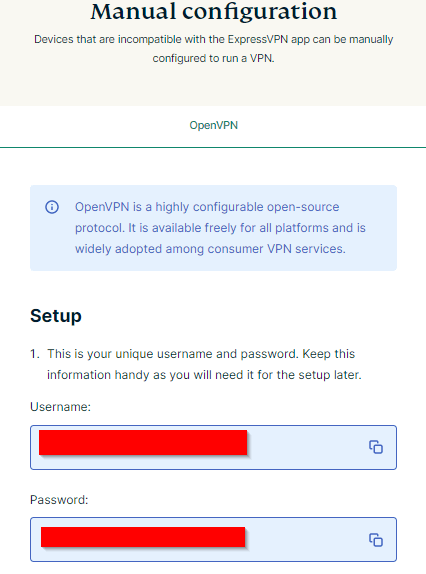
- Copy Server Settings: Copy the VPN server settings, username, and password for OpenVPN, L2TP, or PPTP configuration.
- Change Connection Type: In your ExpressVPN router dashboard, go to the Network” tab and change your connection type to L2TP or OpenVPN (recommended).
- Input VPN Settings: In the Advanced Routing” tab, input the VPN settings from the website.
For those who have a TP-Link router, like I do, worry not. Although there’s no custom firmware for TP-Link, the manual configuration of the ExpressVPN TP-Link router is straightforward. The TP-link ExpressVPN setup process is well-documented, ensuring a hassle-free experience.
How to Configure ExpressVPN on a Mikrotik Router in Italy?
Setting up ExpressVPN on a Mikrotik router can enhance your online privacy and gaming experience. Follow these steps:
- Download Configuration Files: Log in to your ExpressVPN account and download the configuration files for your preferred server location.
- Access Mikrotik Router: Open your web browser and enter the IP address of your Mikrotik router to access the admin panel.
- Upload Configuration Files: Go to Files” and upload the downloaded configuration files.
- Configure VPN Settings: Navigate to PPP” > Interface” and add a new OVPN Client”. Fill in the required fields (e.g., server address, port, user credentials). Apply and save the settings.
- Activate VPN: Enable the VPN interface and check the connection status.
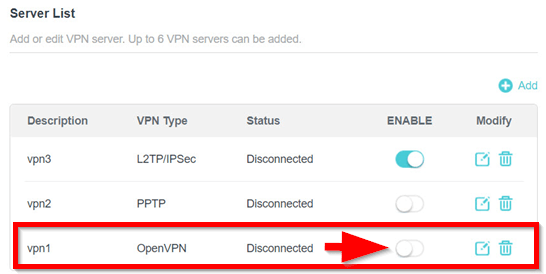
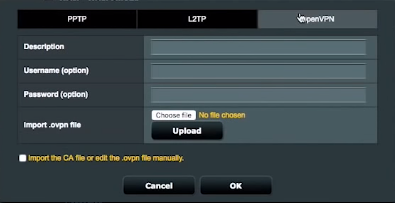
How to Set Up OpenVPN on a Router with ExpressVPN in Italy?
To help you out, I have included a basic outline of all the necessary steps to set up an ExpressVPN connection manually on a router using the OpenVPN protocol:
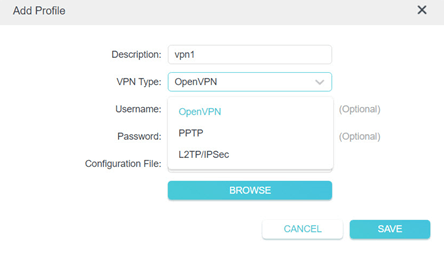
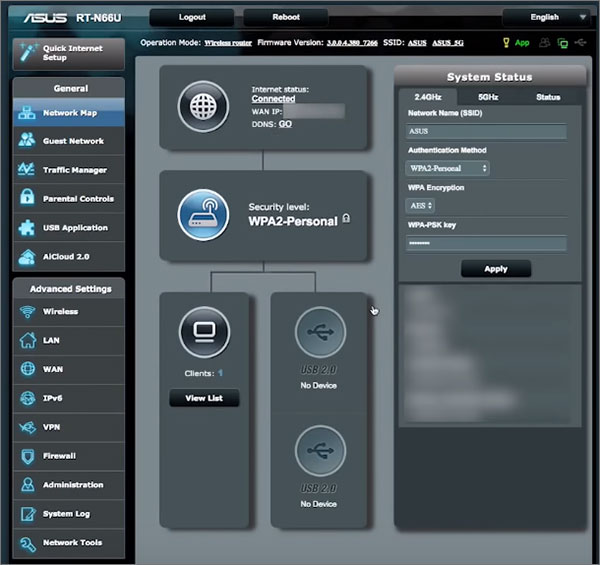
- Access Your Router’s Admin Panel: Log into your router’s admin interface via a web browser.
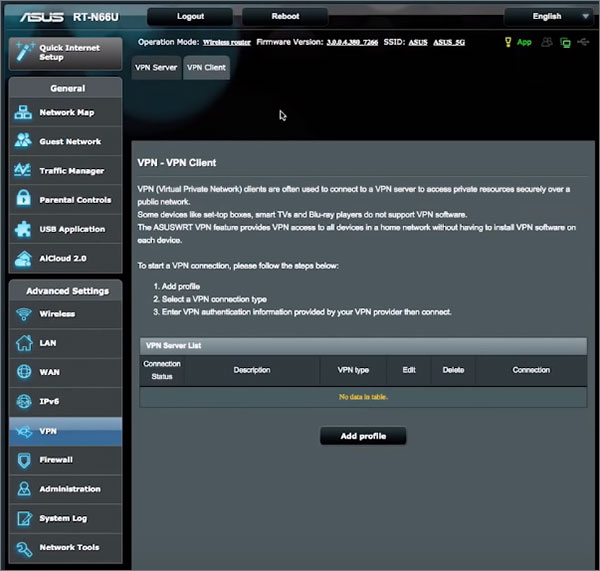
- Locate VPN Client Settings: Find the ‘VPN client’ section in the router’s interface.
- Set Up the Server: Click ‘Add’ under the server list to add a new VPN connection.
- Enter Configuration Details: Input the following:
- Description: Name the connection (ExpressVPN).
- VPN Type: Select ‘OpenVPN’.
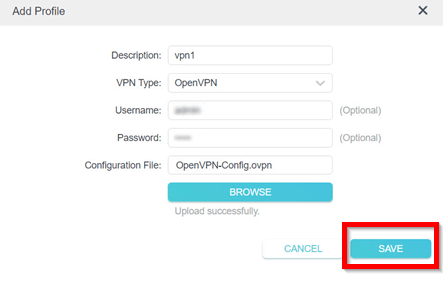
- Username: Your ExpressVPN account username.
- Password: Your ExpressVPN account password.
- Encryption settings as recommended by ExpressVPN.
- Configure DNS and IPv6 Settings: Enter ExpressVPN’s DNS nameserver addresses and disable IPv6.
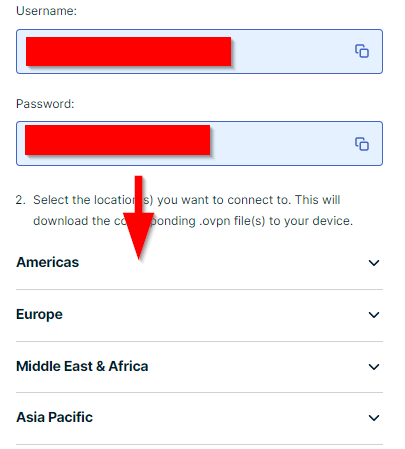
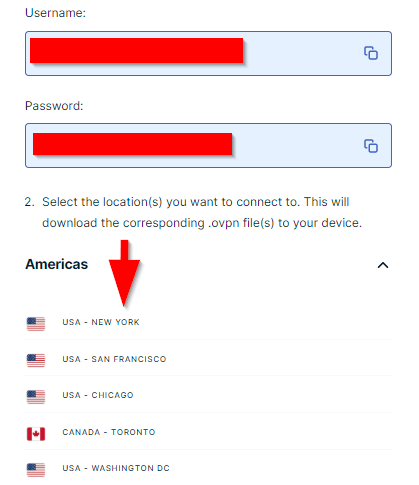
- Download Configuration File: Download the OpenVPN (.ovpn) configuration file from ExpressVPN’s website.
- Import Configuration File: Upload the downloaded .ovpn file in the router’s admin panel.
- Additional Configuration: Input any extra commands specified by ExpressVPN.
- Activate the VPN Connection: Save your settings and enable the VPN connection.
- Select Devices (if necessary): Specify which devices should use the VPN in the ‘Device list’ section.
How to Set Up ExpressVPN on DD-WRT in Italy?
You might need to contact the manufacturer for confirmation if it’s not listed as compatible on the VPN provider’s website. Some routers, like the ExpressVPN Aircove, have built-in VPN functionality, simplifying the process. To connect an ExpressVPN Aircove, follow the specific instructions for seamless integration.
Here’s a guide on how to set up a VPN on your router:
- Get Your ExpressVPN Credentials: Visit the ExpressVPN setup page, sign in, and download the OpenVPN configuration files (.ovpn).
- Configure Your Router: Log into your router’s admin panel. Go to the ‘Services’ tab and select the ‘VPN’ sub-tab. Enable ‘Start OpenVPN Client’ to reveal the configuration panel.
- Enter OpenVPN Client Details:
- Server IP/Name: Found in the .ovpn file.
- Port: Typically 1194 (found in the .ovpn file).
- Tunnel Device: Select TUN.
- Tunnel Protocol: Choose UDP.
- Encryption Cipher: Select AES-256 GCM.
- Hash Algorithm: Select SHA512.
- User Pass Authentication: Enable this option.
- Username and Password: Use your ExpressVPN account details.
- Additional Config: Enter the following commands:
- persist-key
- persist-tun
- fragment 1300
- mssfix 1450
- keysize 256
- Configure Keys and Certificates: Open the .ovpn file with a text editor.
- TLS Auth Key: Copy the text between <tls-auth> and </tls-auth>.
- CA Cert: Copy the text between <ca> and </ca>.
- Public Client Cert: Copy the text between <cert> and </cert>.
- Private Client Key: Copy the text between <key> and </key>.
- Save and Apply Settings: Click ‘Save’, then ‘Apply Settings’ to start the VPN connection.
- Check the Connection Status: Go to ‘Status’ > ‘OpenVPN’. If the connection is successful, it should indicate “CONNECTED SUCCESS”.
How to Setup ExpressVPN on Router? [ExpressVPN Router Setup TP-Link]
Setting up TP Link ExpressVPN can significantly enhance online privacy and security. Follow these steps for a smooth installation and configuration process.
- Check Compatibility: Ensure your TP-Link router supports VPN functionality. You can find this information on the router’s manual or the TP-Link website.
- Log into the Router Admin Panel: Open your web browser and enter
192.168.1.1ortplinkwifi.netto access the TP-Link admin panel. Log in using your router’s username and password. - Navigate to VPN Settings: Once logged in, go to the VPN section of the admin panel. This is typically found under the ‘Advanced’ or ‘Security’ settings.
- Add a New VPN Connection: Select the option to add a new VPN connection. Choose the OpenVPN protocol for this setup.
- Download ExpressVPN Configuration Files: Log into your ExpressVPN account, select the router as your device, and download the OpenVPN configuration files (.ovpn) for your preferred server location.
- Upload Configuration Files: In the TP-Link admin panel, upload the downloaded ExpressVPN configuration files.
- Enter Your Credentials: Input your ExpressVPN username and password when prompted.
- Save and Connect: Save the settings and connect to the VPN. Your TP-Link router should now be configured to use ExpressVPN, providing VPN protection for all devices connected to your network.
Following these steps for installing ExpressVPN TP Link router, you can ensure a secure and private browsing experience across all your connected devices.
How to Set Up ExpressVPN on Netgear Routers?
Setting up ExpressVPN on Netgear routers involves installing alternative firmware like DD-WRT, as Netgear’s default firmware doesn’t support OpenVPN. Follow these steps to enable VPN functionality on your Netgear router:
- Verify Compatibility: Ensure your Netgear router model is compatible with DD-WRT firmware by checking the DD-WRT database.
- Download DD-WRT Firmware: Visit the DD-WRT website, find your router model, and download the appropriate firmware file.
- Flash the Firmware: Access your router’s admin panel, usually by entering.
192.168.1.1in a web browser. Navigate to the firmware upgrade section and upload the DD-WRT firmware file. - Reboot the Router: Once the firmware is uploaded, reboot the router to complete the flashing process.
- Configure OpenVPN: Log into the DD-WRT admin panel, go to the ‘Services’ tab, and select ‘VPN’. Enable the ‘Start OpenVPN Client’ option.
- Enter VPN Details: Input the server IP/Name, port, tunnel device, protocol, encryption cypher, and other details as specified by ExpressVPN.
- Upload Certificates: Open the ExpressVPN OpenVPN configuration file (.ovpn) and copy the certificates into the appropriate fields in the DD-WRT admin panel.
- Save and Apply: Save the settings and apply changes to start the VPN connection.
- Verify Connection: Check the status in the ‘Status’ > ‘OpenVPN’ section to ensure the connection is active.
Using Netgear Routers with ExpressVPN in Italy
Netgear routers have their own firmware that doesn’t include an OpenVPN client. To set up this router to be VPN compatible, you will need to install alternative firmware. If you are considering updating your Netgear router with DD-WRT firmware to enable VPN functionalities, you must first verify the compatibility of your specific model with this firmware.
Comparing Router Performance with and without ExpressVPN
Here’s a comparison of router performance with and without ExpressVPN to help you make an informed decision:

Tips for Managing Multiple Devices with ExpressVPN on a Router
Managing multiple devices with ExpressVPN on a router can streamline your network security. Here are some practical tips to enhance usability:
- Device Prioritization: Use Quality of Service (QoS) settings to prioritize bandwidth for critical devices.
- Split Tunneling: Configure which devices use the VPN and which connect directly to the internet to optimize performance.
- Network Segmentation: Create separate networks (e.g., guest networks) to efficiently manage different device groups.
Why Should You Use ExpressVPN on Router in Italy?
You should use ExpressVPN on the router because ExpressVPN makes sure to secure private web traffic from snooping, censorship, and interference. It also serves as a proxy, so you can enjoy browsing the web anonymously no matter where you are.
Here are some other reasons why you should use ExpressVPN on your router other than searching for the best router for ExpressVPN in Italy:
- VPN protection 24/7: A router with ExpressVPN installed can save time as you’re always protected with a VPN. You’ll never have to remember to connect because any device connected to your Wi-Fi network is protected with a VPN connection.
- Cover all devices: ExpressVPN on your router covers all the devices connected to your WiFi, including streaming devices, gaming consoles, and smart TVs that typically cannot run VPN software.
- Protect From Cyber Attacks: Approximately 2,200 cyberattacks occur daily. Setting up a VPN on your router helps shield your data from malicious threats and ensures comprehensive protection.
- Unlimited connections: There is no restriction on how many devices can be connected to the VPN router, and it counts as one of the five simultaneous connections that you can connect to ExpressVPN with one subscription.
- High speed: With the OpenVPN protocol, you get a reliable and secure VPN connection on your router. ExpressVPN router speeds were impressive on various routers, with minimal reduction in performance. It supports Gigabit-ready routers for seamless UHD video streaming, requiring just 25 Mbps for smooth 4K playback.
- User-friendly: Use the Connect” button and forget about complicated setups. Want to block a particular device from the VPN? No issue. You have total control thanks to the Device Groups function.
How to Use ExpressVPN on Routers? Insights from Reddit
Setting up ExpressVPN on a TP-Link router like the Archer AX-20 can be challenging. First, access the TP-Link admin panel via 192.168.1.1 in your browser. Navigate to VPN client settings, download the OpenVPN configuration files from ExpressVPN, and upload them. Enter your ExpressVPN credentials and save the settings to activate the VPN.
For those running an OpenVPN server, adding ExpressVPN can be tricky. A user with a TP-Link AX10000 faced issues configuring the router as both an OpenVPN server and an ExpressVPN client. Add the VPN client setup and input the credentials and configuration files from ExpressVPN. Note that many routers can’t run both server and client VPNs simultaneously.
Regular firmware updates for your TP-Link router ensure security and performance. If manual configuration is too challenging, seek professional help or buy a pre-configured router. Detailed guides and community insights on platforms like Reddit can be beneficial. Leveraging these resources can help you enjoy secure, unrestricted streaming services.
Troubleshooting and Optimizing Your ExpressVPN Router Setup in Italy
Proper setup and maintenance are key to ensuring your ExpressVPN router performs optimally. Follow these steps to troubleshoot and fine-tune your configuration:
- Verify the VPN Connection: Ensure the VPN is operational by confirming it provides an IP address in the intended location. Use an IP-checking tool to verify a leak-free connection.
- Check for DNS and IPv6 Leaks: Use a DNS leak test tool to prevent exposure to your DNS requests. Similarly, confirm that IPv6 is disabled or properly configured to prevent any leaks.
- Final Steps for Routers Without User Pass Authentication: If your DD-WRT does not have User Pass Authentication, use the
auth-user-pass /tmp/auth.txtCommand in the ‘Additional Config’ text box. - Optimize Router Settings: Adjust your router’s settings for optimal performance. This includes setting up Quality of Service (QoS) for bandwidth management and ensuring your WiFi channels are set to avoid interference.
- Update Router Firmware: Regularly check for firmware updates for both your router and the ExpressVPN custom firmware. Keeping your firmware up-to-date ensures you have the latest security patches and features.
- Monitor VPN Connection Status: Periodically check the status of your VPN connection in the router’s admin panel to ensure it remains active and stable.
- Test Internet Speed: Use an internet speed test tool to verify that your connection speeds are satisfactory and that the VPN is not significantly impacting your performance.
Following these simplified steps, you can easily set up and troubleshoot ExpressVPN on your router, ensuring robust protection and smooth performance for all your devices.
Other VPNranks Guides in Italy:
- Best VPN for Routers in Italy: Empower your entire network with unparalleled security and freedom using ExpressVPN as your best VPN for routers.
- Best VPN With Port Forwarding in Italy: Beyond Encryption: Best VPN With Port Forwarding, Your Secure Gateway.
- Set up ExpressVPN on Smart TV in Italy: Unlock global streaming content and protect your privacy with ExpressVPN on your Smart TV.
- Set up ExpressVPN on Chromecast in Italy: Stream securely and access geo-blocked content with ExpressVPN on your Chromecast.
- Set up ExpressVPN on Xbox in Italy: Level up your gaming experience with ExpressVPN on Xbox for fast and secure connections.
FAQs – ExpressVPN Router Setup in Italy
Do I need a special router for ExpressVPN in Italy?
No, you don’t need a special router for ExpressVPN in Italy. It’s compatible with many routers and offers custom firmware for several popular models. You can also configure Express VPN on routers supporting OpenVPN, LT2P, and DD-WRT.
What is the best-reviewed router for ExpressVPN in Italy?
The best-reviewed router for ExpressVPN is the Linksys WRT3200ACM, followed closely by the Netgear 6700v3 and Netgear R7000 in Italy. These routers support ExpressVPN’s custom firmware with advanced security and connection management features.
Why does my ExpressVPN router keep disconnecting in Italy?
Your ExpressVPN router may disconnect due to server maintenance in Italy. Try switching to another server. If issues persist, follow these steps:
- Disconnect from ExpressVPN to check your internet connection.
- Verify ExpressVPN login credentials.
- Change the connection protocol in the router’s admin panel.
- Add ExpressVPN as an exception to your antivirus and firewall.
Should I install ExpressVPN on my router in Italy?
Installing ExpressVPN on your router secures all connected devices with AES 256-bit encryption. It also lets you circumvent geo-blocks on devices that don’t support VPNs, and the Device Groups feature makes managing connections easy.
Which is ExpressVPN compatible routers in Italy?
Among the routers compatible with ExpressVPN, my top recommendation for the best VPN router is the ExpressVPN Aircove in Italy. This router comes with ExpressVPN pre-installed, eliminating the need for manual setup. It also offers excellent speeds and coverage, making it a reliable and convenient choice for securing your entire network.
How do I connect my router to a VPN in Italy?
If you’re having trouble connecting to your ExpressVPN router, first ensure that you’re connected to the correct Wi-Fi network of the router running ExpressVPN rather than using an Ethernet cable in Italy. Confirm that your router and device are correctly connected with an Ethernet cable and that the Wi-Fi is turned off for a LAN connection.
Why is my ExpressVPN router unable to connect?
Ensure your internet connection is active, update router firmware, and verify VPN configuration settings. If issues persist, try changing VPN servers or contact ExpressVPN support for further assistance.
Final Thoughts
ExpressVPN is one of the VPNs that are suitable for setting up your router. If you’re unable to connect to your ExpressVPN router, ensure you’ve followed the instructions in the ExpressVPN router setup in Italy. Check that you’re connected to the correct Wi-Fi network associated with your ExpressVPN router.
If issues persist, verify your router model’s compatibility with ExpressVPN by referring to the ExpressVPN router list. Explore the ExpressVPN router support resources or contact their 24/7 live chat support. They provide comprehensive support to help troubleshoot connection problems and ensure your VPN router functions seamlessly.