Geographic restrictions often limit the content available through streaming apps on Smart TVs. However, using NordVPN on my Smart TV in Spain, I bypass these limitations and access my favorite TV shows and movies regardless of location.
By altering the IP address to that of a selected server, NordVPN on my Smart TV facilitates access to region-locked content and secures my internet connection with strong encryption. This dual functionality makes NordVPN one of the best VPNs for Spain, enhancing viewing options and online privacy.
The method to install NordVPN on Samsung TV can vary depending on the model and operating system. Installation with the NordVPN Android TV app is straightforward for Android OS TVs.
For others, configuration might involve setting up the VPN through a WiFi router or utilizing a smart DNS service. I’ll guide you through how to get NordVPN on Samsung TV.
How I Connect NordVPN on My Smart TV in Spain [4 Different Methods]
Here are the following 4 methods I frequently use to install NordVPN on my Smart TVs:
- Download the NordVPN App for Android
- Using NordVPN SmartDNS Feature
- Using Amazon Firestick
- VPN-Enabled Router Configuration
Below, I’ve provided step by step-by-step guide for how to install NordVPN on Samsung smart TV with the above methods:
Method 1: Download the NordVPN App for Android in Spain
The Google Play Store offers a quick and easy method for downloading NordVPN’s native Android app. This ensures a simple installation process for Android TV using the Android operating system from Sony, Hisense, Phillips, and TCL.
Here is how to install NordVPN on Samsung TV:
- Sign up for NordVPN for Samsung Smart TV if you are not a subscriber.
- Navigate to the Google Play Store on the Smart TV.
- Search for “NordVPN” within the store.
- Select the app and install it on the Smart TV.
- Open the NordVPN app and log in using the provided credentials.
- Connect to the desired server location to start streaming securely.
Note: If you are still confused about how to download NordVPN on Samsung TV, refer to my NordVPN on Android TV in Spain guide for detailed step-by-step instructions.
Method 2: Set up NordVPN through SmartDNS Proxy in Spain
If your Smart TV does not support Android OS, utilizing NordVPN SmartDNS for Samsung TV can be a great alternative. It allows you to use the VPN’s private DNS servers to select the region for resolving your requests.
This method is faster and simpler than installing NordVPN to access geo-restricted content on your router. However, unlike a VPN, SmartDNS does not encrypt your traffic, which means it doesn’t provide the same level of security.
Here’s how to activate SmartDNS on your Samsung TV:
- Log in to your NordVPN account and find the SmartDNS settings.
- Connect your Samsung Smart TV to the same network as the SmartDNS-enabled device.
- Navigate to ‘Settings’ > ‘Network’ > ‘Network Status‘ on your TV.
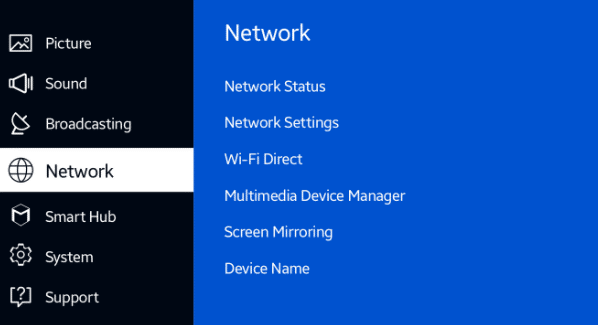
Open Network Status from Smart TV Setting Menu
- From IP Setting, locate the DNS settings and choose ‘Enter Manually‘.
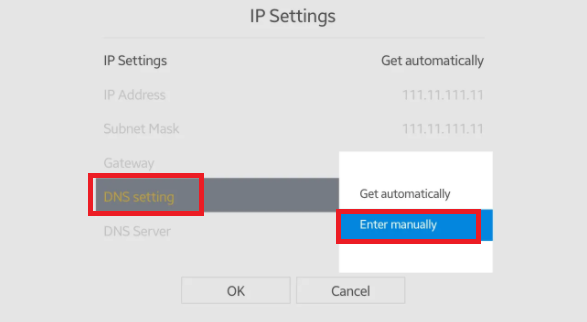
Choose to enter Manually.
- Input the NordVPN SmartDNS server addresses. (The NordVPN DNS server addresses: 103.86.96.100 and 103.86.99.100.)
- Save the settings and restart the Smart TV.
Method 3: Download the NordVPN App For Amazon Fire Devices in Spain
If you use an Amazon Fire Stick or Fire TV with your Smart TV, you can also download the NordVPN app specifically designed for Amazon Fire devices from the Amazon App Store.
Here is how to use NordVPN on Samsung TV using Amazon Fire Stick or Fire TV devices:
- Sign up for NordVPN if not already done.
- Navigate to the “Apps” section on the home screen of the Amazon Fire device.
- Search for “NordVPN” and install the app from the Amazon App Store.
- Log in with your credentials, or sign up by scanning the QR code on the screen.
- Click OK to confirm the connection request and check the box if prompted that says, “I trust this application.”
- Enjoy secure streaming and access a wider range of content on Smart TVs, including Amazon Fire OS devices.
Method 04: Configure NordVPN on Your Samsung Smart TV via Router
Setting up NordVPN on the router secures all devices connected to your network, including Smart TVs and gaming consoles like PlayStation and Xbox. However, the process to configure NordVPN on the router in Spain varies based on the router’s brand and firmware.
To configure NordVPN on a VPN-compatible router:
- Confirm that your router supports VPN functionality.
- Access the router’s admin panel and locate the VPN settings section.
- Enter the necessary details for a NordVPN server along with your NordVPN credentials.
- Save the configuration and restart the router for the changes to apply.
- Connect your Samsung Smart TV to the router’s network to benefit from NordVPN’s protection.
Note: If you don’t have a VPN-compatible router, pre-configured routers are available through NordVPN’s partnership with FlashRouters. NordVPN eases this process by offering detailed tutorials for numerous routers, complete with screenshots.
Can I Share a NordVPN Connection Over Ethernet or WiFi in Spain?
Yes, you can share a NordVPN connection from a computer to your Smart TV over Ethernet or WiFi by setting up a virtual router or using Internet Connection Sharing.
These methods provide alternatives to connect Smart TVs, such as Samsung TV NordVPN, ensuring privacy and access to a broad range of streaming content.
Sharing a NordVPN Connection Over Ethernet
If you want to use NordVPN on Samsung Smart TV but your TV lacks direct VPN support, you can share a VPN connection from your PC or Mac. Follow these steps to learn how to put NordVPN on Samsung TV by establishing a connection over ethernet:
For Windows Users
- Connect to NordVPN on the computer.
- Open the Network and Sharing Center and go to ‘Change adapter settings.’
- Right-click on the TAP-NordVPN Windows Adapter and select ‘Properties,’ then enable the sharing option.
- Choose ‘Ethernet‘ from the Home Networking Connection dropdown menu.
- Connect the Smart TV to the computer using an Ethernet cable.
- The Smart TV will now use the NordVPN connection.
For Mac Users
- Use the NordVPN IKEv2 application and go to System Preferences > ‘Sharing.’
- Select ‘Internet Sharing‘ and choose the VPN adapter.
- Enable Internet Sharing and connect the Mac to the Smart TV with an Ethernet cable.
- Start the NordVPN connection.
Sharing a NordVPN Connection Over WiFi
Here is how you can share a NordVPN connection over WiFi to extend VPN protection to Smart TV devices:
For Windows Users
- Open Settings, go to “Network & Internet” then select “Mobile hotspot.”
- Toggle the hotspot on and go to “Change Adapter Options.”
- Right-click the NordVPN adapter, select “Properties,” then enable sharing.
- Choose the newly created hotspot and connect the Smart TV to this WiFi network.
For macOS Users
- Open System Preferences and select “Sharing.”
- Click on “Internet Sharing,” choose “WiFi” and then check “WiFi” in the list.
- Check “Internet Sharing” to activate and connect the Smart TV to the Mac’s WiFi network.
Why is NordVPN an Excellent Choice for Samsung Smart TV in Spain?
NordVPN is an excellent choice for Samsung Smart TV users for several compelling reasons:
1. Access to Geo-Restricted Content:
NordVPN’s large network of over 6000 servers in 61 locations is instrumental in bypassing content restrictions, allowing access to a wide range of streaming services.
While testing, I used Netflix with NordVPN in Spain on my Smart TV and the results were impressive.
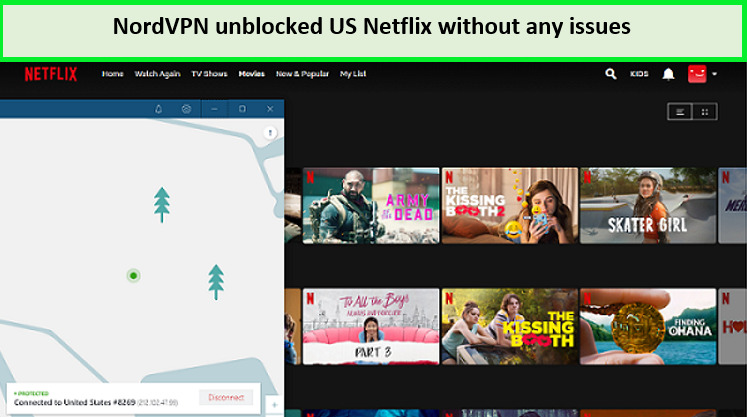
I easily unlock Netflix using NordVPN on my Smart TV
2. Superior Performance and Speed:
With optimized servers for high-speed connections, the NordVPN Samsung TV combo ensures smooth and buffer-free streaming. My NordVPN speed test in Spain recorded a download speed of 93.42 Mbps and an upload speed of 87.68 Mbps on a 100 Mbps connection.
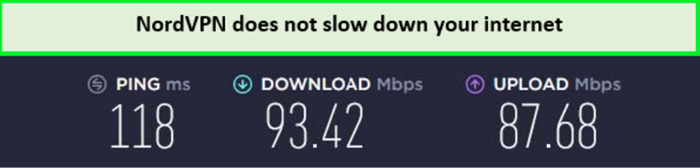
NordVPN delivers fast-speed results for streaming on Smart TV.
3. Online Security & Privacy
Security is a top priority with NordVPN, which protects internet connection with robust 256-bit encryption. It also comes with a NordVPN Internet Kill Switch in Spain that cuts off the internet connection in case of a sudden drop in the VPN connection.
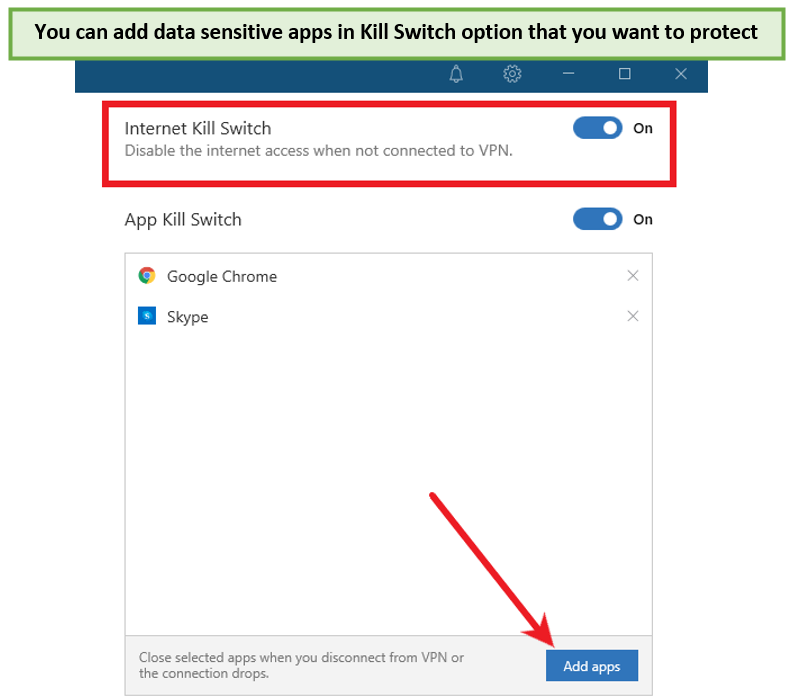
NordVPN follows a zero-log policy, so it doesn’t keep a record of your online activities and data, giving maximum anonymity to the user. This level of security guarantees that your private data remains safe from prying eyes while using your Samsung Smart TV with NordVPN.
4. User-Friendly Interface:
The NordVPN app is designed with simplicity, making it easy for all users to navigate and configure settings. This user-friendly interface ensures you can quickly set up and start using NordVPN on your Samsung Smart TV.
5. Excellent Customer Support:
Should you encounter any issues or have questions about using NordVPN with your Samsung Smart TV, round-the-clock customer support is available. Their knowledgeable team can assist you anytime if NordVPN not working in Spain, ensuring a hassle-free VPN experience.
For a deeper understanding of this premium service, I recommend reading my in-depth NordVPN review in Spain, which delves into its features and why it stands out.
Best Deals for NordVPN Smart TV users in Spain
NordVPN offers a variety of competitive deals that make it an attractive option for Smart TV users seeking to enhance their streaming experience. Here are some top offers and promotions for NordVPN Samsung Smart TV devices:
- 2-year plan: This is the most cheapest subscription plan at EUR 3.72/mo (US$ 3.99/mo) - Save up to 63% with exclusive 2-year plan + 3 months free for a friend. It offers amazing plans even after NordVPN’s lifetime plan discontinuation in Spain.
- 1-year plan: The one-year plan costs around $4.92/ mo and saves you about 58%. You only have to pay around $59.04 yearly on this plan.
- 1-month plan: This is the most expensive plan of NordVPN for $11.95/mo with no discount.
Thanks to their 30-day money-back guarantee, you can try the NordVPN free trial in Spain. Smart TV users can test the service’s compatibility and effectiveness without financial commitment.
You can always cancel NordVPNs subscription in Spain and get a refund in case you think that the service isn’t meant for you.
Redditors’ Views for NordVPN on Smart TVs
How to Connect NordVPN to Smart TV?
byu/kissucker inNetflixViaVPN
Redditors say connecting to a VPN on a Smart TV is impossible. They recommend using a Smart DNS service or a VPN router to connect a NordVPN to your Smart TV, as I mentioned above. Users with Android TVs can download a VPN app directly onto the TV.
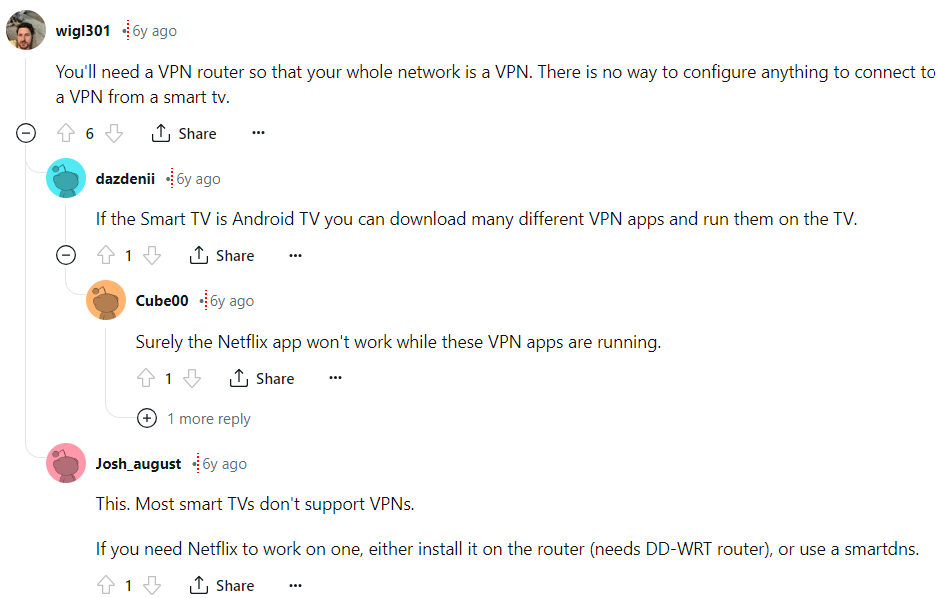
While some users report encountering issues with Netflix while using a VPN, my testing has shown positive results for using Netflix with NordVPN on my Smart TV. It’s always a good idea to check for updates and try different servers if you encounter any problems.
More NordVPN Set Up Guides on VPNRanks
| Device | Description |
|---|---|
| Set up NordVPN on Firestick in Spain | Learn how to install and configure NordVPN on your Firestick for secure streaming. |
| Set up NordVPN on Roku in Spain |
Discover the steps to utilize NordVPN on Roku via a VPN-compatible router. |
| Set up NordVPN on Kodi in Spain |
Follow my guide to integrate NordVPN with Kodi for enhanced privacy and access to geo-restricted content. |
| Set up NordVPN on Ps4 in Spain |
See how to use NordVPN on your PS4 through a router or network sharing for safer gaming. |
| Set up NordVPN on pfSense in Spain |
Detailed instructions on configuring NordVPN on pfSense for advanced network protection. |
FAQs: NordVPN on my Smart TV in Spain
Can I install NordVPN on my Smart TV in Spain?
Yes, you can use NordVPN on Samsung TV, but not directly due to the Tizen OS, which is incompatible with direct VPN downloads. Instead, NordVPN can be installed on a router or used via SmartDNS to your Samsung Smart TV.
How do I connect my VPN to my Smart TV in Spain?
To connect a VPN to your Smart TV, follow these steps:
- Choose a NordVPN that supports Smart TVs running on Android OS.
- Go to the Play Store on your Google TV, search for the NordVPN app, and download it.
- Open the downloaded app, sign in with your credentials, and connect to a VPN server of your choice.
What Smart TV Apps Can NordVPN Unblock in Spain?
NordVPN can unblock many streaming services on Smart TVs, including Netflix, Amazon Prime Video, BBC iPlayer, Crunchyroll, Disney+, ESPN+, HBO Max, Hulu, Netflix, Paramount+, Peacock, and Sky Go. It enhances the streaming experience by unlocking additional libraries and exclusive shows across different regions.
How do I watch TV with NordVPN in Spain?
To watch TV with NordVPN, subscribe to NordVPN and download the app onto your device. Once installed, log in with your credentials and hit the “Quick Connect” button to establish a secure connection to the best available server. This setup will allow you to access various streaming services securely.
Will NordVPN slow my connection on my Smart TV?
Using Nord VPN on Samsung TV does not involve any speed or bandwidth limits; however, the nature of VPN technology might lead to a slight decrease in your internet speed. This reduction is generally due to the extra distance data travels to the VPN server and the encryption process. Still, NordVPN is optimized to minimize this impact as much as possible.
Is NordVPN Compatible With Amazon Fire Devices?
Yes! NordVPN offers a dedicated app for Amazon Fire devices, which can be downloaded from the Amazon App Store. This allows you to use NordVPN on Smart TVs through Amazon Fire Stick or Fire TV.
Does NordVPN Offer a Dedicated IP Option in Spain?
NordVPN provides a dedicated IP option, which assigns a unique IP address to your connection. This can be beneficial for accessing IP-restricted networks, avoiding blacklists, and improving VPN connection stability.
Can I use a free VPN on my Smart TV in Spain?
While free VPNs are available for Android devices in the Google Play Store, they lack support for Smart TVs, especially those not running on Android. These VPNs generally offer poor streaming performance, with slow speeds and limited access to popular platforms like Netflix and BBC iPlayer. Additionally, free VPNs may compromise your privacy by logging and potentially selling your data.
Conclusion
Using NordVPN on my Smart TV, I can enjoy my favorite shows and movies without the constraints of geographic restrictions. NordVPN offers flexible setup options, such as router configuration and SmartDNS, allowing users to enhance online security and a more diverse experience on their Smart TV.
So, follow these steps I mentioned for how to connect NordVPN on Samsung Smart TV in Spain to enjoy a secure internet connection and stream geo-restricted platforms on your big screen anytime.
