
The answer to “Does Apple TV Work With ExpressVPN in Spain” is YES. Yes you can use Apple TV with ExpressVPN in Spain but it requires a little bit of smart work. Unlocking geo-restricted content is a breeze with a reliable VPN like ExpressVPN and Apple TV. All it takes is a bit of savvy maneuvering within your settings to access MediaStreamer, a powerful tool designed to bypass those pesky barriers.
Apple TV is a digital media player and streaming device developed by. It is designed to deliver all kinds of digital content to your TV. Apple TV allows users to watch movies, TV shows, and other video content from popular streaming services such as Netflix, Hulu, Amazon Prime Video, and Disney+. It also provides access to music services like Apple Music and Spotify, as well as apps and games from the App Store.
Users can get access to geo-restricted Apple TV by choosing one of the top Apple TV VPNs to gain access to geographically restricted material all across the world with a US IP Address in Spain. ExpressVPN is the best tool you can utilize for this task, according to our tests. Express works with virtually any streaming platform you can imagine and is safe, quick, and dependable.
How to Watch Apple TV with ExpressVPN [Step by Step – Guide] in Spain
MediaStreamer is a SmartDNS service that ExpressVPN offers for Apple TV (and other streaming devices). The first step in using it is to register your IP address with ExpressVPN. This is how:
- To access your Dashboard, log in to the ExpressVPN website and go to My Account.
- Choose DNS Settings from the menu.
- Click Register my IP address under the IP address registration section. In order to avoid having to go through this procedure each time your IP address changes, it is also advised that you turn ‘automatically register my IP address’ on.
- The next step is to find your DNS MediaStreamer information.
- When you are back on your Dashboard, choose Set Up Devices from the menu.
- Your MediaStreamer DNS server IP address will be displayed when you choose Apple TV. Take note of it because you’ll need it for the following step.
- With your MediaStreamer information in hand, you may proceed to the Apple TV itself to finish the setup.
- Open the Settings app on your Apple TV and go to Network > Wi-Fi. There, choose your Wi-Fi connection (or your wired connection if you’re using Ethernet), then click Connect.
- Choose Manual under Configure DNS from the menu.
- The IP address of the MediaStreamer DNS server should now be entered. If you previously manually changed your DNS settings, it’s wise to keep track of them in case you decide to stop using ExpressVPN and revert to your old configuration. (You can always set it back to Automatic if necessary.)
- Click Done after manually entering your IP address.
- In order for the modifications to take effect, restart your Apple TV.
Why do you need ExpressVPN for Apple TV in Spain?
Utilizing a VPN has various advantages, including improved security and privacy as well as locating low-cost travel. In order to assist you decide whether you ought to utilize a VPN, we’ve put together a primer on its possible applications.
The most common justification for utilizing a VPN with Apple TV in Spain is to unlock geographically restricted content. ExpressVPN can help you if you want to access content that is only accessible in particular nations, like Netflix’s Studio Ghibli movies or live sporting events that aren’t broadcast in your area.
If you access Apple TV without a VPN in Spain, you’ll get the following geo-restriction error:
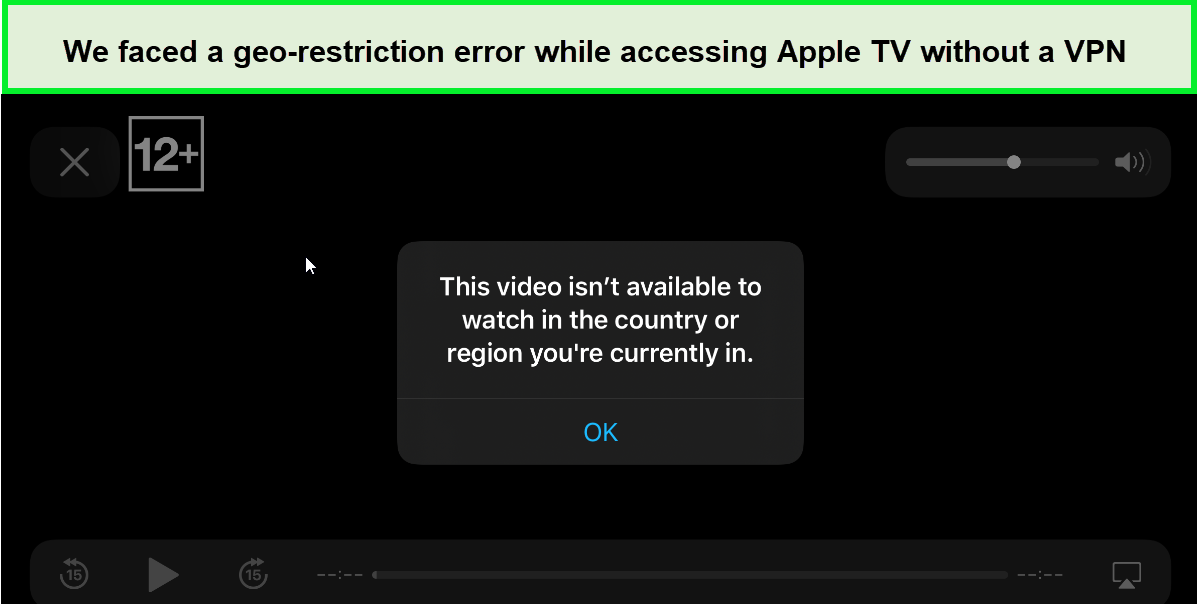
Without a VPN, you’ll get this geo-restriction error message while accessing Apple TV in Spain.
- United States and Canada
- Latin America and the Caribbean
- Europe, Russia, and Central Asia
- Africa
- Asia-Pacific
- Middle East and Türkiye
Here is a ranking of the best VPNs for Apple TV in Spain services, as of 2024:
- Fast servers are available in more than 105 countries with ExpressVPN, the best VPN overall for Apple TV in Spain. offers strong unblocking skills across all platforms.
- The most affordable VPN for Apple TV is Surfshark, a VPN with unlimited connections that is fairly priced. superior qualifications in security and privacy. excellent Apple TV performance.
- With Smart DNS, super-fast connections, the ability to unblock a broad variety of services and a 30-day money-back guarantee.
- NordVPN Best Apple TV VPN in Spain for Families: Private Internet Access, with a variety of quick servers, no logs, and security.
- User-friendly VPN for Apple TV, CyberGhost, offers a user-friendly interface and round-the-clock customer assistance.
Apple TV with ExpressVPN: Is ExpressVPN a good choice for Apple TV in Spain?
ExpressVPN with Apple TV in Spain are a match made in heaven. There are a number of reasons why and we’ll discuss all of them one by one. To start off, it’s one of the safest tools in the market. ExpressVPN’s kill switch in Spain offers DNS/IP leak protection, so your identity is always safe. In addition, it offers high-level AES 256-bit encryption to ensure users’ privacy is protected. And let’s not forget ExpressVPN’s strict no-logs policy in Spain, which makes sure your data is not stored or viewed.
Other reasons have been mentioned below:
Ability to Bypass Geo-restrictions
This tool is ideal for streaming geo-blocked content. For example, ExpressVPN and Netflix in Spain pair really well together. You can unblock a diverse library of entertainment content on the popular platform. But it’s not just Netflix. You will easily be able to stream your favorite shows on other streaming services like Disney Now, Paramount Plus in Spain, and HBO Max in Spain. And, of course, those who wish to watch exclusive Apple original content like the popular drama series Severance, can use ExpressVPN with Apple TV in Spain for seamless streaming.
MediaStreamer Feature
ExpressVPN’s MediaStreamer in Spain is a smart DNS service that allows you to unblock geographically restricted content, yes, but it also contributes to the VPN’s already lightning-fast speeds. To use this feature, you can set up ExpressVPN on your router and all your devices will be connected in one go. So, if you’re planning to use ExpressVPN with Apple TV, rest assured, the tool’s MediaStreamer service will facilitate the best connections, fastest speeds, and secure browsing.
Convenient Package
Apple TV with ExpressVPN free trial in Spain is one of the best deals out there in the market. Granted, ExpressVPN is slightly more expensive than similar VPNs, but the trial offers the utmost convenience to users, along with a 30-day money-back guarantee. Its lowest monthly cost is EUR 6.23/mo (US$ 6.67/mo) - Save up to 49% with exclusive 1-year plans + 3 months free. And with a plethora of features to bolster your streaming experience, ExpressVPN is, hands down, a good investment. ExpressVPN Apple TV in Spain is the only pairing you should aim for if looking for VPNs for this platform. Apart from Apple TV if you are looking for free VPN to stream movies on android. You can use reliablefree VPNs for android tv box in Spain
Unmatched Speeds
ExpressVPN’s vast network of servers is optimized for speed. Enjoy streaming your favorite content without buffering. Our ExpressVPN speed test in Spain helped us achieve an impressive89.42 Mbps download speed and a remarkable upload speed of 84.64 Mbps. ExpressVPN with Apple TV in Spain allows you to view anything and everything without buffering from anywhere in the world.
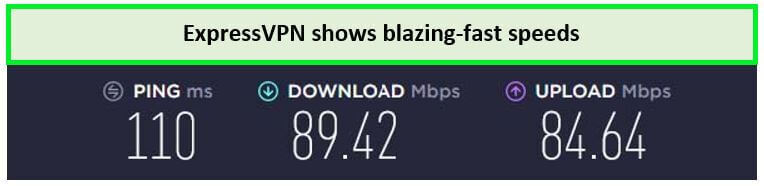
Streaming videos in 4K quality is a breeze with these fast speed rates in Spain
Apple TV not working with ExpressVPN: Try these fixes
Usually, ExpressVPN works smoothly almost with Apple TV almost all the time. However, there might be some instances where you find some issues. Sometimes, the connection won’t hold. Other times, it’d just be too slow. Therefore, if you find Apple TV not working with ExpressVPN in Spain, here’s how you can solve the issue:
- If you use ExpressVPN’s MediaStreamer, make sure your DNS address is entered correctly when configuring your Apple TV and that you have given ExpressVPN permission to log your IP address (by visiting to your ExpressVPN web dashboard as described above).
- If you use AirPlay, all of your devices must be connected to the same network for AirPlay to function. Therefore, both of those devices need to be linked to your home network in order to cast from your iPhone to your Apple TV in Spain. Additionally, keep in mind that not all media streaming apps support AirPlay.
- If you use ExpressVPN on a router, double-check your settings because it’s simple to make mistakes while setting up a VPN on a network. If you use OpenVPN, be aware that you must enter your OpenVPN credentials rather than your ExpressVPN ones.
- If you’re using your computer to share ExpressVPN: Connecting to various VPN servers will allow you to test ExpressVPN on your computer. Check each of those VPN sessions to see if your web connection is functional. If everything is in order there, you should double-check your Internet sharing settings to make sure everything is configured properly.
For more insights, reader our in-depth guide on what to do if you find ExpressVPN not working in Spain on your desired devices or platforms.
Changing Countries With ExpressVPN on Apple TV in Spain
The tvOS operating system, which powers Apple TV streaming devices, does not accept VPN apps. Therefore, even if ExpressVPN is one of the top Apple TV VPN services in Spain, you can’t install it directly on your media streamer. Nevertheless, there are a number of workarounds that may be used to configure ExpressVPN on Apple TV in Spain.
By modifying the DNS settings on Apple TV in Spain, you may configure ExpressVPN’s MediaStreamer feature, which enables you to unblock new streaming services. After that, you can share this VPN’s connection from your computer, install it on a router, or cast media using AirPlay from another device.
ExpressVPN will route your traffic through the US, as you are already aware. Additionally, it implies that in order to access apps available in that nation, you must manually change the location of your Apple TV. In order to change your country when using ExpressVPN on Apple TV, follow these steps:
Sounds complicated? However, there is no need to fear because we will re-explain everything. Therefore, here is how to set up ExpressVPN on your Apple TV in Spain.
- Open Settings > iTunes Store > Location on your Apple TV.
- Select the location of your choice (select “United States”).
- Configure ExpressVPN’s MediaStreamer in accordance with the guidelines above.
- Restart your Apple TV,
- Check out the App Store for US-only apps. That’s it.
FAQs – Apple TV with ExpressVPN in Spain
Is it legal to use a VPN with Apple TV in Spain?
The use of a VPN with Apple TV in Spain is legitimate and YES it is legal.
Using VPNs to get around geographic restrictions is frowned upon by several streaming services. Due to content licensing requirements, doing so might be against their terms of service, but it is not illegal. While the majority of streaming sites do not penalize VPN users, a select few may suspend or delete your account if you are discovered using a VPN to change your location.
Can I use a free VPN on Apple TV in Spain?
Yes, it is possible, however, using a free VPN for Apple TV in Spain may compromise your privacy. Like their premium counterparts, free services do not offer as many sophisticated security and privacy features. Some have a history of selling your personal information to third parties. Therefore, it is better to choose a premium VPN (like ExpressVPN) with a trustworthy money-back guarantee.
You may encounter numerous such restrictions even if you locate a free provider that works with Apple TV and doesn’t leak your info. The limitations of free VPNs on your bandwidth, speeds, and server locations force you to subscribe to a paying service.
Can I watch American Netflix on Apple TV with ExpressVPN in Spain?
With ExpressVPN, you can stream Netflix US on Apple TV in Spain. By using US servers, American Netflix can be unblocked. Simply follow the detailed instructions to set up ExpressVPN on your Apple TV. You can view TV series on other streaming services like Hulu, Disney+, and HBO Max with ExpressVPN in Spain.
Final Thoughts!
The process to install ExpressVPN on Apple TV in Spain is simple, provided you follow the appropriate instructions. You can set up ExpressVPN on your router or using the MediaStreamer, for example, to use it with Apple TV. Just make sure you have a VPN subscription before configuring it on your Apple TV.
Our recommendation for the best VPN for streaming in Spain Apple TV in Spain is ExpressVPN. Using Apple TV with ExpressVPN provides lightning-fast bandwidth and a vast server network to successfully and continuously unblock material on your Apple TV. Additionally, it has great privacy and security safeguards that protect your internet connection. ExpressVPN is supported by a 30-day money-back guarantee, so you can test it out risk-free. If you’re not completely happy with the service, you can easily get a refund.
You can watch Apple TV with ExpressVPN in Spain effortlessly if you follow the guides and have the smoothest streaming session.