
DNS leaks in a VPN service are one of the worst things that can happen to you. Reliable VPNs are supposed to protect you from any leaks happening in the first place. If you aren’t safe from privacy leaks even after turning on the VPN, what is the point of using a VPN at all?
Unfortunately, many substandard VPNs in the market have leaking DNS, leaving you exposed to the web. Using a leaky VPN is even more dangerous than using the internet without a VPN at all because in that case, you’re at least conscious of the possibility of your privacy leaking.
But when you have a VPN enabled, you’d naturally think you are safe from online threats and your privacy is intact while the VPN is actually leaking your DNS and compromising your privacy behind your back.
Fortunately, there are ways to prevent your DNS from leaking. In this article, I’m going to explain seven ways to make sure your VPN DNS leak in Spain doesn’t happen.
Run VPN DNS Leak in Spain [Test]
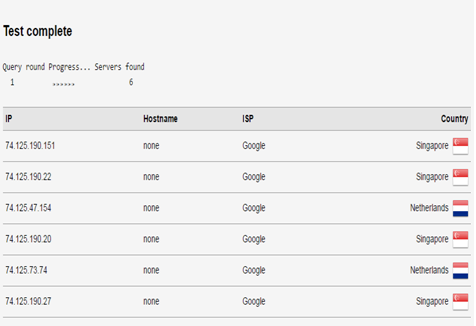
There are various tools you can use to perform a simple DNS leak test in Spain. To check whether your DNS is leaking while using a VPN, click here.
As soon as the test is completed you will be able to detect DNS leaks. If you see your actual location or place belonging to your ISP instead of the location where the VPN server is based, then you’re a victim of a DNS leak.
7 Ways for DNS Leak Protection in Spain
If you have detected a DNS leak on your system while being connected to a VPN in Spain, then you don’t need to worry as these seven methods will help you to prevent DNS leak at all times in Spain:
1. Use a VPN With DNS Leak Protection Option
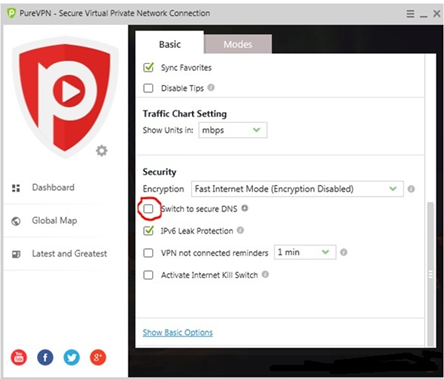
The simplest way to prevent DNS leaks is to get a built-in DNS leak protection option. This powerful feature actively monitors user’s DNS requests, ensuring that requests are transmitted through the VPN DNS server. You can check the DNS leak protection feature in your VPN from settings. We have done DNS leak test with ExpressVPN and we were amazed seeing the results, we have discussed in ExpressVPN Review in Spain. Just go to its settings and look for an option to prevent a DNS leak. Also, ExpressVPN is the best VPN with the Smart DNS in Spain and provides complete security with high connectivity speeds.
When you find the option, mark it activate to get protected against DNS leaks. Enjoy!
2. VPNCheck – Pro Version
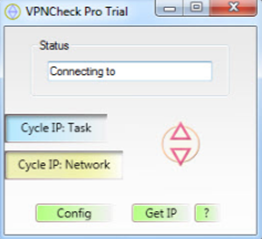
The VPNCheck (Pro version) offers a DNS leak fix. It protects users from DNS leaks, identity theft, and data snooping. You can simply download VPNCheck – Pro version from their official website and follow these simple steps:
- Install and run the program
- On the main window click on “Config.”
- From the ‘Config’ Windows checkmark on the “DNS leak fix box.” You can list programs like Utorrent so that if the VPN connection fails, ISP can’t monitor your online activities
- Now finally go back to the main window and activate the ‘Cycle IP task’ and ‘Cycle IP Network’ to begin. Enjoy DNS-leak free experience!
3. Disable Teredo
Teredo in Windows is a transition technology that allows communication between two IP protocols “IPv4” and “IPv6.” The protocols are present on the internet but sometimes need a transition technology like Teredo to communicate. But unfortunately, Teredo can cause DNS leaks.
To disable Teredo in Spain, perform the following easy steps:
- Open the command prompt and enter this command:
netsh interface teredo set state disabled
- Now you have successfully disabled the Teredo. In case you decide to enable Teredo at some point in the future, enter the following line in the command line to reactivate it:
netsh interface teredo set state type=default
4. Manual Setup DNS Server
Manual setup of DNS server is the simplest way to get rid of DNS leaks in Spain. The following steps will help you to get rid of DNS leaks by manually setting up a DNS server on your system:
- Disable the DNS leak protection feature of your VPN.
- Go to Control Panel >Network Settings>Network Connections.
- Right-click on the network adapter that you’re using and click on its properties.
- From the list select Internet Protocol Version 4 (TCP/IPV4) and click on properties.
- Click on the radio button “Use the following DNS Server Address”. Enter the following DNS server address:
- Preferred DNS: 209.222.18.222
- Alternate DNS: 209.222.18.218
- You’re done. Enjoy!
5. Block Non-VPN Traffic
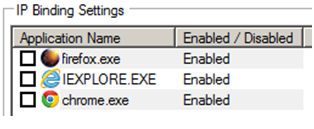
A preferable method to prevent DNS leak is to use a VPN with an IP Binding feature like “Hide My Ass”. It allows you to select specific applications that will exchange data through the secure encrypted tunnel. In case a user tries to access selected applications without a VPN running, the application won’t be able to access the internet.
6. Configure Firewall
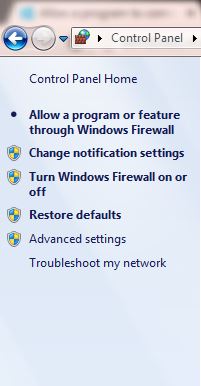
Configuring the firewall to block all non-VPN traffic will protect you against the odds of DNS leaks. The firewall comes as a feature in Windows. You can use the following steps to configure Windows firewall manually:
- Go to the Control Panel.
- Click on the Windows Firewall.
- From the left pane, you will see an option to “Allow a program or feature through Windows Firewall.” Use this feature to block all non-VPN traffic and you’re done!
7. Use Antivirus
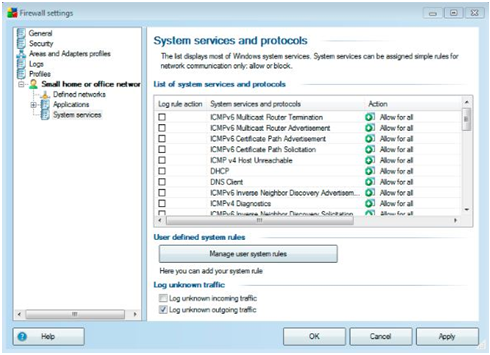
A decent anti-virus like AVG offers a firewall to block all unwanted network traffic in Spain. This method is easy and similar to manually set up a Windows firewall (mentioned above). The antivirus firewall will allow you to block all non-VPN traffic, ensuring that ISP’s DNS server is not being used at all.
Final Words
Online freedom is a right of every user in Spain. With various spying agencies including NSA and GCHQ actively monitoring Netizen’s personal information, VPN ensures reliable online data protection and anonymity to users. However, due to certain bugs in Windows, DNS leak neutralizes the benefits of VPN. But the above-listed 7 Ways for VPN DNS Leak in Spain Protection will protect you from DNS leaks at all times, so you stay safe on the web. you must check out our blog Best VPN with DNS leak protection in Spain.