
‘Is Kodi legal and safe in UAE to use?’ That is the most common question you will hear in entire Kodi communities. I tell you right here, right now. YES, Kodi is perfectly legal!
Kodi being an open-source and free software, it carries a lot of responsibilities.
Open-source means that every independent developer can create an addon that streams illegal content. Just watch out for that.
Therefore, this guide explains everything you need to know of legality of Kodi and explains its stance.
Intro to Is Kodi Legal and Safe in UAE – What is Kodi?
Kodi is a free open-source software, a powerful entertainment software that lets you stream almost anything in UAE.
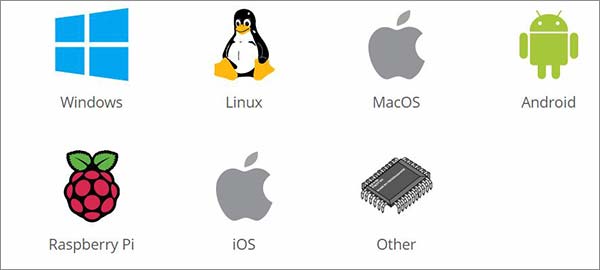
It is available for all major devices including Windows, Android, MacOS, iOS, Roku, XBox, Fire TV/Stick, Linux, and Raspberry Pi.
Once you’ve installed Kodi on these operating system, the first that you do is to get the best VPNs for Kodi in UAE in case you ought to view Movies and TV Shows with best Kodi addons in UAE.

Kodi was first launched in 2002 as XBMP (Xbox Media Player) for a short while, but then it was changed to XBMC (Xbox Media Center).
Being attached to just Xbox would present limitations, so it decided to change its name to Kodi in August 2014 and expand its features a little further.
Currently, Kodi 18 Leia is the new version of Kodi that was launched at the end of January 2019. This is how its interface looks like…
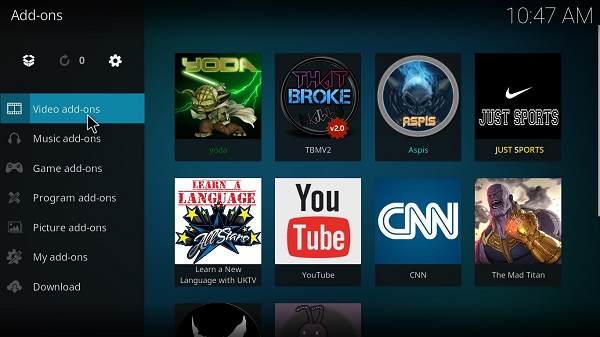
The ability of Kodi to stream anything in UAE comes directly from Kodi add-ons. These add-ons are distributed into free add-ons to subscription-only add-ons.
Streaming services and networks that develop add-ons for Kodi are rarely free and cost the exact subscription fee as it would charge its online users in UAE.
However, using third-party Kodi add-ons make a difference.
Here are a few pros and cons for Kodi in UAE:
Pros
- An open-source software that lets third-parties develop their own add-on
- Supports all audio and video file formats
- All your content (audio and visual) are accessed in one location
- View free videos (Movies, TV Series, Live Sports, Liv TV) with unofficial Kodi addons in UAE
- Kodi software is free of cost
Cons
- The software is widely used to view free copyright material
- Kodi users are mostly unaware of the legality issues with Kodi
- Very limited official Kodi add-ons
- Most official Kodi add-ons do not work
Is Kodi Legal in UAE?
Yes, Kodi is absolutely legal in UAE considering that you stick to official Kodi add-ons.
Kodi makes it easier for its users in UAE to access official Kodi add-ons by offering a built-in official repository when you install the Kodi app.
Anything that is not recommended by Kodi is to use a third-party Kodi add-on.
However enticing official Kodi add-on might be, it does not offer you free Movies and TV Shows in UAE.
Frankly speaking, not even half those add-ons work. Most people are into third-party add-ons and view free videos.
Kodi has joined hands with streaming giants such as HBO, Netflix, Hulu, and other services to end piracy in Kodi. But the nature of Kodi i.e. being an open-source software means that anyone can access program’s code.
Third Party Kodi Addons
Third-party Kodi add-ons are not in any way associated with Kodi.
Rather, these are developed by independent developers and bring your free Movies, TV Shows, Live TV, and Live Sports in UAE.
It fetches sources from Torrents and other free streaming websites on the internet.
Is Kodi Illegal in UAE?
We can pretty much summarize that watching free videos on Kodi is unwanted in UAE. However, not all third-party Kodi add-ons are illegal.
Some maintenance tool add-ons clear Kodi cache and help stop buffering issues in Kodi.
Third-party Movie and TV Shows add-ons are the ones that scrape material directly from Torrents and from around the internet in many different video qualities.
That is the sole reason why there has been a crackdown against third-party Kodi developers developing these add-ons.
Is Kodi Legal in UAE?
Of course Kodi is legal in UAE. What makes it illegal are what type of add-ons you install inside the media player.
There’s no doubt UAE has strict regulations when it comes to streaming free video content. But there is nothing secret about Kodi, it is perfectly legal. So don’t worry about it.
When Kodi is Illegal in UAE
Kodi is illegal in UAE when you have installed unofficial Kodi addons .
Similar to Kodi fully-loaded Kodi boxes where you have pre-installed unofficial Kodi add-ons, it allows you to watch copyright material for free and that’s what makes it illegal.

EU’s top court has placed a ban on Kodi boxes that have pre-installed Kodi third-party add-ons on them.
Installing a third-party add-on for yourself with any Kodi box is a lot safer than buying a fully-loaded Kodi box. It’s that simple.
Get an Android Box, install a third-party Kodi add-on yourself, get a Kodi VPN to hide whatever you view on Kodi, and stream all the latest content for free in UAE.
Do You Watch Illegal Apps and Addons?
Kodi has made it easier for you to distinguish between what is legal and illegal to watch on your Kodi in UAE.
If you’re trying to access legal Kodi add-ons then look for the Kodi Add-on Repository located under the option Install from Repository.
You will find various add-ons that are developed by the services providers themselves.
Is Kodi Safe?
Kodi itself takes guarantee of its official add-ons that are found under the Kodi repository.
However, it clearly takes no responsibility for third-party add-ons which are developed by independent developers.
When you install a third-party add-on in UAE, you don’t know what’s inside that you’re installing, only hoping to watch free Movies and TV Shows.
A few unofficial Kodi add-ons would deliberately hide a malware under their add-ons plugin file that would track your online activity in UAE.
Afterward, they would develop a similar add-on based on users’ activities. To sum up, It is pretty safe to use until unofficial add-ons are installed.
Kodi vs Dish Network
Kodi has bonded with many giant streaming services such as Netflix ever since they are accused for the actions of third-party add-ons.
A series of lawsuits were also filed by the Dish Network fighting against Zem TV and Phoenix, while forcing them to shut down their add-ons for good.
These were two add-ons from the pool of thousands that showed Live TV channels on Kodi in UAE.

Another lawsuit is currently in court where Canadian Telecommunications are fighting against TVAddons.
We also saw some of the abuse of power in an online copyright infringement case, but Adam Lackman, the man behind TVAddons is fighting hard to win the battle.
Official Kodi Addons
Here is a list of few official Kodi add-ons that works perfectly in UAE:
- iPlayer WWW
- NBC Live Extra
- Fox Sports Go
- Nasa
- com
- PBS Kids
- Plex
What is Kodi’s Stance Regarding Legal Issues?
Kodi has kept a keen distance from third-party add-ons and its developers.
They have maintained a strong stance that when Kodi is installed in its original state, it is perfectly legal as a web browser.
However, since Kodi is an open-source free it cannot prevent any Kodi user in UAE to not download unofficial add-ons.
It is rightly so, Kodi in its original and unaltered state is perfectly legal. To prevent Kodi users in UAE from installing unofficial add-ons, Kodi has provided a built-in Kodi repository that installs official add-ons.
Despite the fact, installation for unofficial add-ons have increased.
Are Kodi Boxes legal or illegal in UAE?
Kodi boxes are only illegal in UAE when it has pre-installed Kodi addons. These boxes are then referred to as fully-loaded Kodi boxes.
Android boxes or any other type of boxes that have Kodi third-party already installed are illegal in the market, and Kodi user needs to be aware of buying such boxes online in UAE.

As a result, the top European Court has ordered to ban fully-loaded Kodi boxes from the market.
Get updated on the best Kodi boxes for streaming in UAE and get to know which ones you ought to buy and which ones to avoid.
What can Kodi do about Third Party Addons?
Kodi is continuously been taking strong steps to curb the use of third-party add-ons.
Recently, it has teamed up with Netflix and other streaming networks to shut down major Kodi repositories including Ares Wizard, Colossus Repo, Smash Repo, and others.
Despite these efforts, new Kodi add-ons emerge that takes the place of the old Kodi add-ons. Hence, nothing is gained by the efforts made by Kodi or the streaming network giants.
They need to cut the source so that none of the Kodi developers would dare step foot in the third-party Kodi community ring.
What’s Compatible with Kodi in UAE?
Kodi is compatible with almost every device in UAE. Only a few devices such as Roku, you would need to apply the screening method.
The popularity of Kodi became evident when it’s readily available in every device. As soon as an unofficial add-on becomes a hit, it is installed I every Kodi device.
These are the devices where Kodi is compatible in UAE…
Kodi & the Legality of Add-ons
When it comes to the legal spectrum of Kodi, there is something important that every Kodi user needs to know.
Kodi offers a platform to its user to create their own add-on and make Kodi software better.
To make it easier for Kodi users, Kodi do provide an official repository where most of the official add-ons are located. However, that’s not actually most users in UAE are after.
Kodi users develop their own add-ons by adding copyright Movies and TV Shows, while distributing these add-ons into Kodi communities.
These add-ons allow you to watch pirated content in UAE and that’s what get Kodi users into trouble, unless they’re using a Kodi VPN in UAE.
How to Protect Yourself with VPN while using Kodi in UAE?
Viewing free copyright material on Kodi requires you to get complete online protection in UAE. Below are 5 best Kodi VPN providers in UAE that keeps your online identity hidden.
[ranking_table]
NordVPN – Reliable VPN to Protect yourself while using Kodi in UAE
The strongest VPN provider there is with double encryption. When you try to view free Movies or TV Shows on Kodi in UAE, you need a VPN that would protect your online identity and NordVPN with Kodi in UAE is perfect for safe and anonymous streaming.
While NordVPN gives you the strongest online protection, there isn’t a VPN better than Nord.
It has over 5,456 VPN servers around the world. View the detailed NordVPN Review in UAE.

Pros
- Double encryption
- 5,456 servers
- DNS leak protection
- Strict no policy
- Protects your IP address
Cons
- Double encryption makes it slow
PureVPN – User-friendly VPN for Kodi
PureVPN has incredible encryption that protects your online privacy whenever you’re connected to the Kodi and watching material through connecting PureVPN with Kodi in UAE safely.
Its 6500+ servers will further allow you to bypass geo-restrictions when you’re watching Live TV channels on Kodi.
Most of all, you can connect to 5 simultaneous devices. View the detailed PureVPN Review in UAE.
Pros
Cons
IPVanish – Popular VPN for Kodi
When you happen to use Kodi in UAE, there are two things that want your attention i.e. Online protection and speed.
IPVanish claims to offer both these features and more for Kodi users so they get uninterrupted streaming with complete online protection. Here’s the guide of how to install IPVanish on Kodi in UAE.
IPVanish will make your internet connection secure. View the detailed IPVanish Review in UAE.

Pros
- Unlimited bandwidth
- 256-bit encryption
- Zero traffic logs
- Anonymous torrenting
- User-friendly apps
Cons
- A US-based VPN provider
PrivateVPN – Secure VPN for Kodi
PrivateVPN protects and unlocks everything when using Kodi in UAE. It would keep your identity safe when streaming free videos on Kodi and unlock geo-restricted Live TV channels in UAE.
PrivateVPN would even unblock Netflix so you can stream the content legally in UAE. View the detailed PrivateVPN Review in UAE.

Pros
- IPv6 leak protection
- 2048-bit encryption
- 6 simultaneous connections
- Servers in 56 countries
- 30-days money-back guarantee
Cons
- None
Ivacy – Affordable VPN for Kodi
Ivacy is a perfect solution to counter hackers while streaming in UAE.
Ivacy keeps your online activity private, meaning that it will never compromise your online protection and hides anything that you do over the internet.
Secure and anonymous browsing is the top-notch feature that Ivacy provides. View the detailed Ivacy Review in UAE if you have any query and learn how to install Ivacy on Kodi in UAE.

Pros
- Unlimited server switching
- Split-tunneling
- Fast streaming
- 5-multi logins
- 256-bit encryption
Cons
- None
Is Streaming Legal in UAE?
Streaming online content is perfectly legal in UAE. The only question that arises is what type of content you stream.
If the owner of the media content has given you rights to stream their content, then it is considered legal.
However, trying to view copyright material for free without the permission of the owner is indeed illegal.
The official Kodi add-ons are developed exclusively by their owners i.e. iPlayer WWW Kodi add-on is developed by BBC itself, while NBC Live Extra add-on is created by NBC.
Therefore, there is no objection in streaming these add-ons since they are allowed by their owners.
However, viewing free copyright material for the latest Movies and TV Shows in UAE is unlawful.
More Useful Guides
- How to Jailbreak Firestick in UAE: Learn How to Jailbreak Your Firestick Like a Pro.
- Best Kodi Addons in UAE: Top Tips and Tricks for Jailbreaking Your Firestick Successfully.
Frequently Asked Questions (FAQs)
Is Terrarium TV legal in UAE?
Terrarium TV is an app available for FireStick and is currently not available for Kodi in UAE. It features Live TV channels for almost every country. Since it shows copyright video content, it is not legal in UAE. However, a VPN can hide your internet activity and can keep your online identity anonymous.
Is it against the law to watch movies online in UAE?
It is never against the law to watch movies online in UAE. Netflix, Hulu, HBO, and other streaming services provide Movies and TV Series online. It is however prohibited to watch Movies and TV Series online for free.
Is TV box legal in UAE?
Yes, TV Box is perfectly legal in UAE unless it doesn’t have Kodi add-ons pre-installed. Never buy a fully-loaded Kodi box and avoid getting into trouble. In fact, get a TV Box and install Kodi and its add-ons yourself.
Is Kodi Legal in UAE?
Kodi is perfectly legal in UAE. However, since Kodi is open-source, it allows independent developers to develop Kodi add-ons that may illegal. But Kodi itself is a legal software.
Is Kodi App Safe to Use in UAE?
Kodi app is safe to use in UAE if you happen to install official Kodi add-ons. However, you compromise your online privacy and activity if you download third-party add-ons. That is why we have a VPN that protects your online activity in UAE.
Is a Jailbroken Fire Stick Legal in UAE?
It’s perfectly legal to jailbreak FireStick in UAE. Most Kodi users would want to install Kodi on FireStick and therefore jailbreaks the device. It depends on how you use the software, and not the jailbreak process.
Is Kodi available on Roku in UAE?
Kodi is not yet available on Roku in UAE, but there are other ways to install . Screening method is one way to get Kodi on Roku, or you can use other devices such as Smart TV to get Kodi on Roku.
Is it Illegal to Watch a Movie Online for Free in UAE?
Only if the movie has given rights to its viewers to watch it for free online in UAE, then its fine. Otherwise, viewing any copyright material online for free is prohibited in UAE.
Is the XBMC Legal in UAE?
No, Kodi was previously called XBMC, and therefore is perfectly legal in UAE. How you stream Kodi is a different matter. Since Kodi is an open-source free software, you can install official and as well as unofficial Kodi add-ons. Kodi does not take any guarantee for unofficial add-ons.
The Takeaway
Many misconceptions prevail against Kodi, but actually, it is not the Kodi software which is responsible for copyright infringement and pirated materials, but it is third-party Kodi add-ons.
Kodi itself is legal in UAE when unaltered or in its original state. Kodi users in UAE can install unofficial add-ons to watch Free Movies and TV Shows.
With the above guide, you can know everything about is Kodi legal in UAE.