
NordVPN is one hot-tech service in the cybersecurity industry. You must have observed its popularity on the internet in form of sponsored content, advertisements, or our practical guides on the best-performing VPNs in Singapore. Being a security-centered service, NordVPN doesn’t disappoint the cyber community.
NordVPN comes with robust software packed with top-quality features in Singapore. One of its super-useful features is the double VPN, also called MultiHop, which guarantees advanced-level protection. NordVPN double VPN in Singapore is effective and handy for preventing cyber threats and trackers online.
To shed more light on the double VPN NordVPN interesting feature in Singapore, we will discuss what it is, where it is used, and how it helps. Check out more details in our NordVPN review Singapore.
NordVPN Double VPN in Singapore: What is NordVPN Double VPN?
Double VPN is an advanced security feature offered by VPN services that direct your internet traffic through two VPN servers, providing double encryption of your data. This process, also known as VPN server chaining, ensures that your online activity is concealed behind two servers instead of one.
Generally, a VPN works in the middle of the device and the internet. It is responsible for encrypting the traffic entering and leaving your device. Later, it is routed via a VPN-owned server. But what is Double VPN NordVPN in Singapore?
Double VPN goes one step ahead to provide advanced-level security by performing the entire process twice. The traffic is routed through two VPN servers and then encrypted twice. With this feature, user activities are hidden behind two different servers.
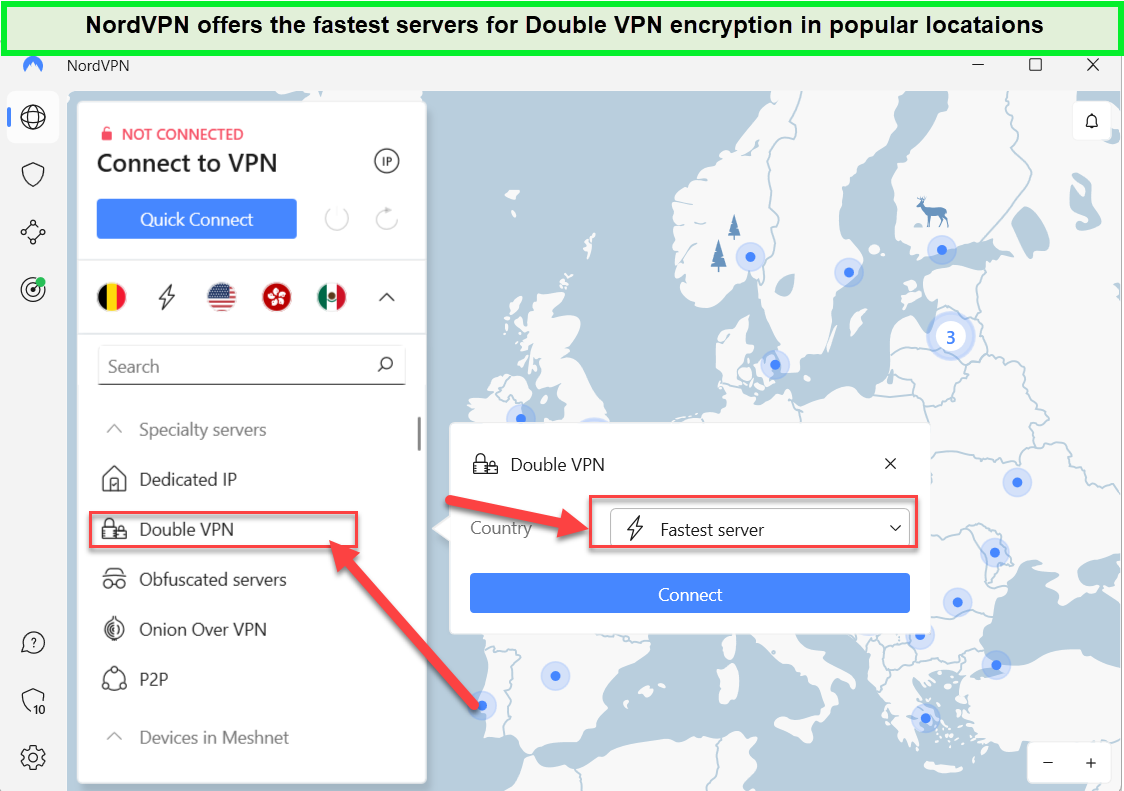
Connect to the fastest server to have your traffic encrypted twice.
What are the benefits of Double VPN in Singapore?
DoubleVPN encrypts user traffic twice to add an additional protective layer. When the packet reaches the first VPN server, its external encrypted layer is removed.
Then it is transferred to the second server, where the last encrypted layer is taken off. Finally, the packet is sent to the destination. In this way, your data becomes hard to decode and decipher by hackers and snoopers.
Double VPN ensures IP protection and provides enhanced privacy by dividing roles between the two servers. The first one has knowledge about you and the IP of the next server where your traffic will be delivered next. But it doesn’t know about the activities you are involved in, such as the sites you visit.
While your second server knows about the sites you are going to access or the activities you are about to perform on the network. It knows the IP of the first server you visited, which is commonly shared among NordVPN users. However, it lacks information about you, raising your privacy online.
With double VPN protection in Singapore, even your ISPs can’t determine your final destination on the network. You enjoy browsing, streaming, or gaming in a super private environment.
What are the disadvantages of using Double VPN in Singapore?
The main disadvantage of using double VPN protection in Singapore is the drop in performance when the servers go slow. Attaching an extra layer of encryption and then decryption is both time-consuming.
Moreover, transferring traffic through an additional server clearly slows down the process. You can’t visibly notice the difference if you are not involved in speed-reliant or high-bandwidth activities, like streaming or gaming. You may notice a visible drop in your smartphone battery drainage with double VPN usage.
Additionally, NordVPN retains a visible position in our list of the fastest VPNs in Singapore.
Another issue with double VPN protection in Singapore is that it restricts you while selecting locations. For instance, it may restrict you from using the second server located in a far-off country. Suppose you reside in Italy, and it allocates you a second server in the UK, making it hard to access geo-restricted content and causing trouble.
Which NordVPN servers support Double VPN in Singapore?
You might be surprised to know that not every NordVPN server supports the double VPN feature in Singapore. It is just available in 8 out of the 6000 countries where NordVPN servers operate.
NordVPN double VPN missing on most of the locations can be problematic. Therefore, we have listed down the countries where double VPN is accessible.
- Canada
- France
- Sweden
- Switzerland
- The Netherlands
- Taiwan
- UK
- US
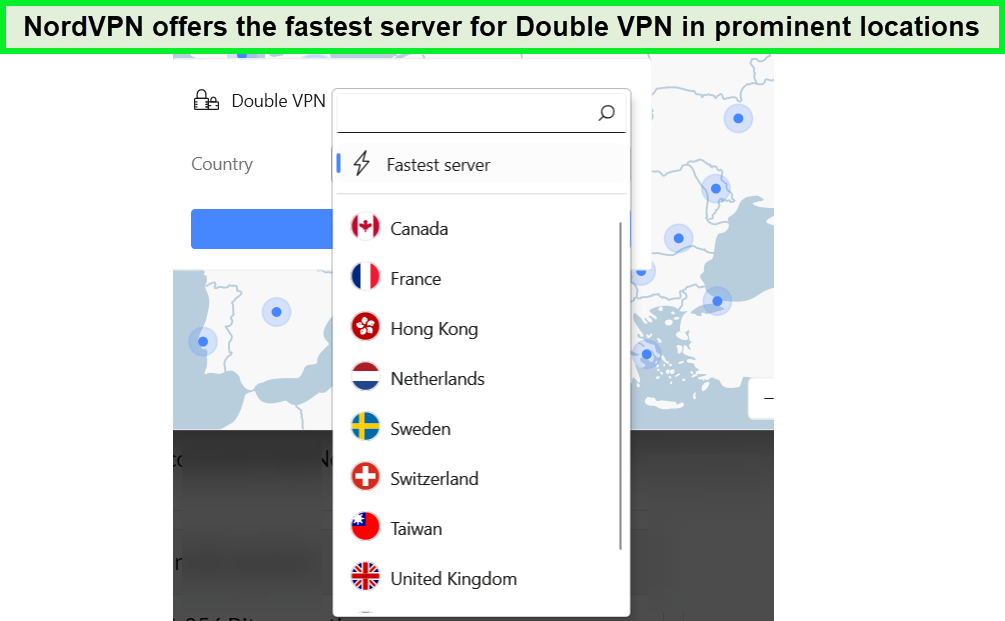
NordVPN-offers-fastest-servers-for-DoubleVPN.
Who should use NordVPN Double VPN in Singapore?
Just like the other features of any software, double VPN is not necessarily designed for all users in Singapore.
Double VPN protection has been designed to boost privacy on the network. It is suitable and worth using for individuals interested in gaining absolute anonymity online.
It can serve political activists or journalists from oppressive countries and those trying to dodge strict censorship in regions such as Russia or China.
However, if you are only interested in browsing the internet or streaming your favorite content online in Singapore with advanced privacy on NordVPN in Singapore, a double VPN wouldn’t be a good choice.
How do I use Double VPN with NordVPN in Singapore?
You can use a double VPN with NordVPN in Singapore by following the simple steps given ahead.
- Open the NordVPN app.
- Navigate to the Specialty servers in the drop-down list.
- Press on the Double VPN option to quickly join the fastest available servers on the network.
- Else, choose the server locations manually by clicking on the 3 dots.
However, if a double VPN is unavailable on the protocol selected, switching to OpenVPN TCP or UDP is advised.
NordVPN Double VPN Not Connecting in Singapore
Has NordVPN double VPN in Singapore gone wrong? – we have got you covered. If you have NordVPN double VPN not connecting issue in Singapore, there can be several reasons behind it. Any misconfiguration or regular internet speed can cause connectivity issues.
To resolve the problem, you can try the following techniques in sequence:
Solution 1: Connect to the best available server (fastest/nearest)
- Navigate to the Double VPN options from the list and press the three horizontal dots.
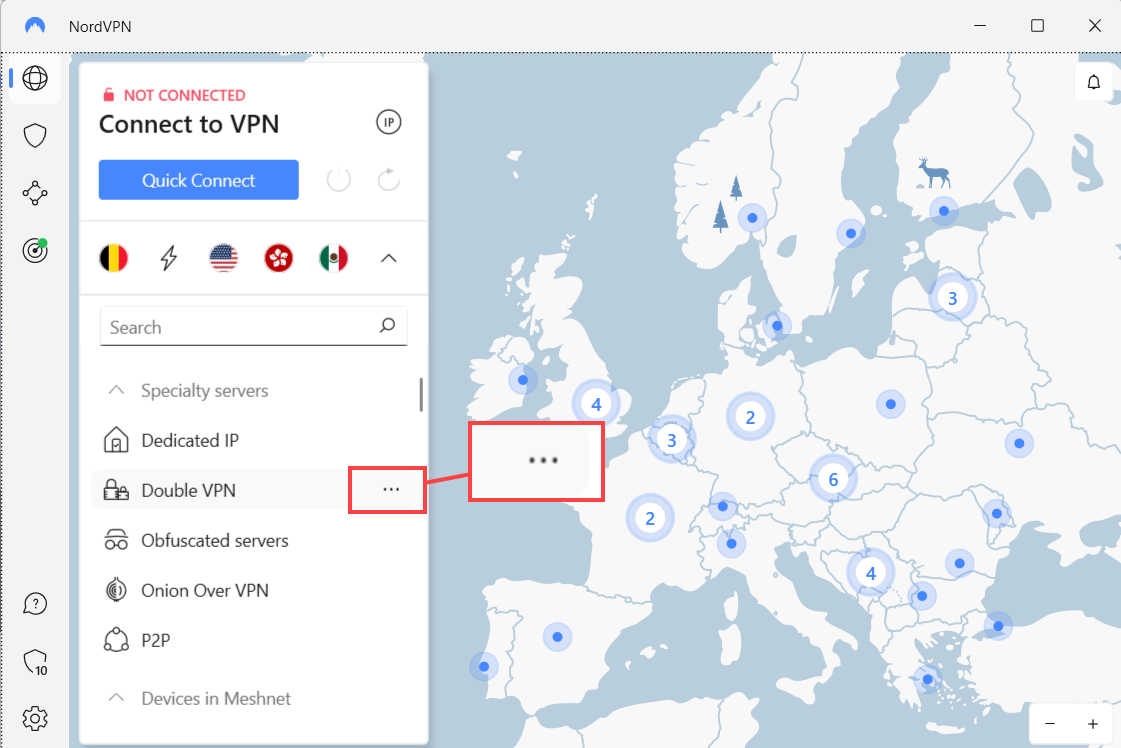
- Pick “fastest” against both Country and Server.
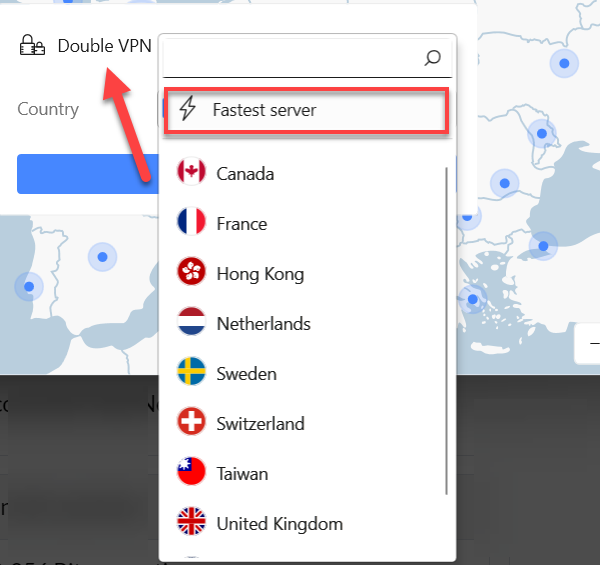
By connecting to the fastest server available, any internet speed issues will be resolved.
Solution 2: Change the Protocol
- Open Settings in NordVPN.
- Click on the Auto-connect option.
- Pick the VPN protocol option to set it as OpenVPN UDP or TCP.
Solution 3: Update NordVPN to Install the Latest Available Version
- Refresh the NordVPN app and try to reconnect to the double VPN.
Solution 4: Try a custom DNS server
Normally, NordVPN uses DNS servers for routing traffic safely without any data leaks. You may experience a slowdown in connection.
To resolve the delay, you can setup a custom DNS resolver in the few steps given ahead:
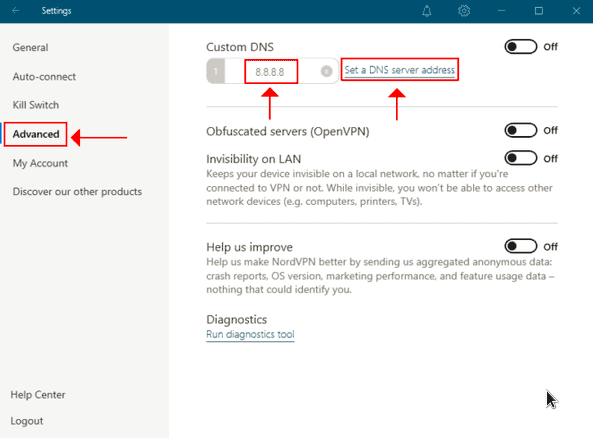
- Open Settings in NordVPN app
- Choose the Advanced tab
- Press the Set a DNS server address option
- Replace the custom DNS server address with 8.8.8.8 from 0.0.0.0.

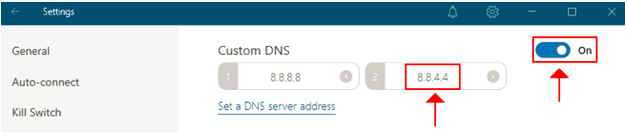
- Repeat the process again to add a second DNS server address. Set it to 8.8.4.4.
- In the top-right corner, turn the Custom DNS option On.
- Reconnect to double VPN
Solution 5: Install the NordVPN app again
- Some configuration issues are removed by reinstalling the app.
Solution 6: Check the internet connection speed
Double VPN doesn’t work on an internet connection unless it has more than the minimum speed limit
You need sufficient bandwidth to cover different distances and carry out operations. To fasten up your internet connection speed, you can try the following techniques:
- Run an internet speed test
- Try rebooting the router
- Place the device closer to the router
- Shift to a wired Ethernet connection
Google Public DNS Resolver has been used for the guide. You can pick the one that suits you.
Do any other VPNs offer a similar feature in Singapore?
The DoubleVPN feature is not available in every VPN service. Being an advanced security option, mostly the top providers offer this feature in Singapore.
Surfshark has a MultiHop mode, which is quite similar to doubleVPN. It lets you use pre-selected pair of two servers located in different countries to route your traffic. Additionally, it provides more locations for you to choose from than NordVPN in Singapore.
Another VPN with somewhat similar functionality in Singapore is ProtonVPN, which uses the Secure Core feature to pass the traffic through an ultra-secure server in Sweden, Switzerland, or Iceland. It then lets you route the traffic through the server of your choice, offering 63 different locations.
Expect a slowdown as your traffic is bound to route through specialized servers in Europe with Secure Core.
Can I Try NordVPN for Free in Singapore?
Yes, NordVPN comes with a 30-day money-back policy to claim a complete refund. It has no traditional free trial plans covering all sets of devices as many other free VPNs; however, NordPN offers a 7-day free trial in Singapore for Android devices.
Still wondering how to use NordVPN double VPN in Singapore risk-free?
Under the complete payback option, you can flexibly try and test every feature risk-free. If you don’t like the service for any reason, you can claim your refund within 30 days of purchase.
Considering the world-class services and top-notch features offered by NordVPN in Singapore, we would never resort to canceling the service. If you ever decide to leave the platform, it’s as simple as contacting customer support and requesting a refund. No long-form submissions, waiting times, or complications in the process.
FAQs – NordVPN Double VPN in Singapore
What is double VPN on NordVPN?
Double VPN is the advanced security feature offered by NordVPN to route your traffic via two different servers located in different regions and perform double encryption of data. It provides extra protection for your data and enhances privacy on the network. It follows VPN server chaining where all your activities online are masked behind two different servers, not just one.
Should I use NordVPN double VPN in Singapore?
Yes, you can use a double VPN for extra protection and anonymity in Singapore if you are living or traveling to a heavily restricted country with surveillance, monitoring, and strict censorship of content. It is ideal for journalists, activists, and common citizens looking for enhanced privacy for internet traffic. The double VPN feature makes it difficult for snoopers to track your activities by adding double encryption.
Is NordVPN Double VPN Better For Privacy than Onion Over VPN in Singapore?
Both Double VPN and Onion Over VPN are designed for different purposes with different functionalities. Double VPN routes and encrypts the traffic twice, adding an extra layer of protection to the regular network. While Onion Over VPN lets users securely access the Onion network. Therefore, we can’t claim one is better than the other in Singapore.
Conclusion
With a large fleet of servers and ever-increasing subscribers, NordVPN brings highly secure and top-quality features in Singapore. Besides the traditional functionalities, its Double VPN feature is our favorite due to the extra protection it offers to our online existence in Singapore. NordVPN double VPN in Singapore is easy to activate and use.
On a particular note, a double VPN should not be kept running all the time. We found different NordVPN Double VPN Reddit remarks with various reviews. However, it is highly recommended for individuals stuck in super-restrictive countries with strict bans and 24/7 surveillance.
If you want to elevate your online protection, consider getting on the double protection mode.