| Based in | USA [UNSAFE] |
| Price | $4.00/mo |
| Servers | 78 (35 Countries) |
| Logs | Does not keep logs |
| Multi-login | 5 Devices |
| Refund | 30 Days |
| Recommended | NO |
| Website | SlickVPN.com |
SlickVPN is a US-based VPN provider offering its service through 78 servers in 35 countries worldwide and 12 servers in UK. It provides unlimited bandwidth that also allows unlimited P2P traffic.
As per this SlickVPN review in UK, the service does not offer dedicated apps for mobile devices like Android and iOS. Similarly, the provider mainly hails from the US, which is one of the 5 eyes countries.
Therefore, I don’t recommend SlickVPN in UK because it does not offer appreciable connection speeds as well. Its pricing strategy is on the higher side compared to other VPNs like ExpressVPN.
Learn more about any other VPNs in our VPN reviews in UK guide for more information.
My Rating Criteria – SlickVPN review in UK
I have tested SlickVPN in UK according to my own rating criteria which include:
- Pricing – How much is SlickVPN in UK?
- Security – Protocols, Encryption & Other Features
- Jurisdiction – Belongs to Five Eye Country
- Speed – Not on the Higher Side
- Streaming – Does it Support Netflix, Other Streaming Services & Torrenting in UK
- Leaks – IP, DNS, WebRTC & Virus Tests
- Trustworthiness – Logging Policy, Customer Support & Trustpilot Ratings
- Compatibility – Supports Different Platforms and devices
Pricing – How much is SlickVPN in UK?
SlickVPN delivers relatively expensive pricing plans to its users.
Like many other providers in UK, Slick VPN offers three pricing packages: monthly, annual package, and a six-month plan. Each pricing plan offers considerable savings with a yearly plan being the cheapest of the lot.
Comparing the prices with other services, I would say SlickVPN offers competitive pricing as you can enjoy VPN protection for as low as GB£3.49/mo (US$4.0/mo) with a yearly plan.
Other established services offer similar pricing rates and some are even expensive. Likewise, its smaller duration subscription packages are also economical.
Apparently, the providers also offer a package known as SlickVPN CORE. This plan provides a starter-level VPN service along with some perks. However, the information surrounding this plan is a bit murky.
With a single account, you can connect up to 5 devices at the same time on this VPN. The service even lets you utilize two different IP addresses for this purpose.
This feature means users can secure their smartphones and PCs simultaneously with this VPN in UK.
Payment Methods
SlickVPN in UK, my research for this review reveals a pleasing sight as the provider accepts payment through popular methods.
Consumers can pay through credit cards (American Express, VISA, MasterCard, and Discover), PayPal, or Bitcoin. Each of these payment methods is available in almost every country and with the addition of Bitcoin, subscribers can subscribe to the VPN anonymously.

SlickVPN offers multiple payment options.
Refund Policy
SlickVPN offers a 30-day money-back guarantee on all its packages. I am pleased to see the lengthy refund period, as it provides sufficient time to test the service. Not many VPN services in UK offer thirty days for a full refund.
Therefore, this VPN is worth every penny as you get different features and online privacy at affordable rates.
Furthermore, if you want to get your hands on some awesome discounts and save money, we have some amazing deals on VPNs for you.
Security – Protocols, Encryption & Other Features
On the security front, SlickVPN has fulfilled all the necessary requirements.
in UK, while conducting this review, I uncovered that it offers three protocols to choose from for different platforms. These include PPTP, IPsec, and OpenVPN protocols.
With PPTP, you get MPEE 128-bit encryption. It isn’t the most secure protocol out there and is seen as obsolete by most operating systems.
However, PPTP allows fast connectivity because of basic encryption algorithms.
IPsec is far better at securing your device than PPTP. It utilizes 128-bit encryption algorithms and offers strong security for your device. IPsec works well on iOS and Mac OS X platforms.
OpenVPN is the fastest and most secure protocol you can use with this VPN. It uses the AES 256-bit CBC cipher and uses both UDP and TCP connections. SlickVPN OpenVPN will protect your data against the most dangerous cyber threats in UK.
Other Security Features
SlickVPN offers a comprehensive list of privacy features like Hydra (Multi-hop connection) and SlickVPN Swag. You can consider Hydra as a revolutionary technology that makes you untraceable on the web.
This multi-hop feature obfuscates your IP address by funneling your data traffic through multiple gateways. Evidently, this process slows down your bandwidth speed but it also anonymizes you to a greater degree.
So, if one is willing to compromise speed for added security, this option is definitely worth considering. On the other hand, SlickVPN Swag is a weekly giveaway organized by the VPN for customers and privacy seekers in general.
Through SlickVPNSwag, Netizens can win VPN routers, Netflix subscriptions, Amazon gift cards, and six months of free VPN service.
Jurisdiction – Belongs to 5 Eye Country
Unfortunately, SlickVPN jurisdiction is not user-friendly.
The United States of America is not a country any VPN service should call home. The country has a system in place for unrestricted mass surveillance.
More importantly, America leads the Five Eyes, an alliance of countries that spy on their citizens and share information. Unfortunately, I am not peddling some Illuminati conspiracy theory here. Edward Snowden and many other individuals have pretty much confirmed this entity.
The good news is that this VPN does not store any logs. So even if the US government mandates it, it cannot give away much of your information. Irrespective of that, one can never be too careful with regard to their online privacy. This is why I believe the jurisdiction is an area of concern.
This Slick VPN review would have been incomplete without a quick look at its server list.
SlickVPN Server
The VPN server list is illustrious as it offers over 150+ gateways in 40+ countries and 12 servers in UK. You get server choices in various major locations, United Kingdom, Australia, Canada, and different European regions.
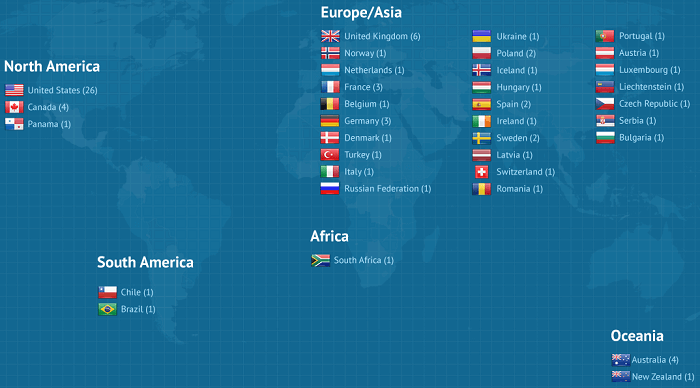
SlickVPN has servers in multiple locations for users in UK
According to the provider, the server list is continuously increasing as they are adding more servers from various locations. One thing that bears mention is that there are no servers in China.
Although there are numerous restrictions on VPN use in China, it is one area this VPN can look into.
That said, the current server list would allow you to access any geo-restricted website and streaming service in UK. Users can unblock services such as BBC iPlayer, Hulu, Pandora, Spotify, NBC, and much more.
Speed – Not on the Higher Side
In terms of speed, the service has to perform drastically well.
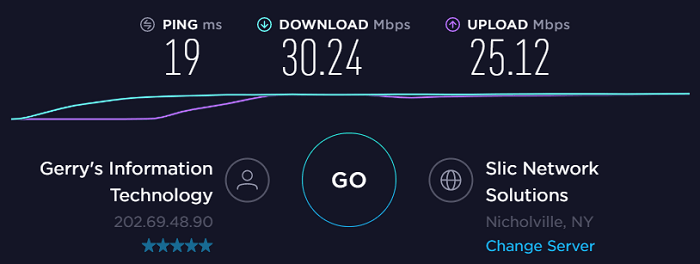
I conducted a speed test while using a 30 Mbps internet connection:
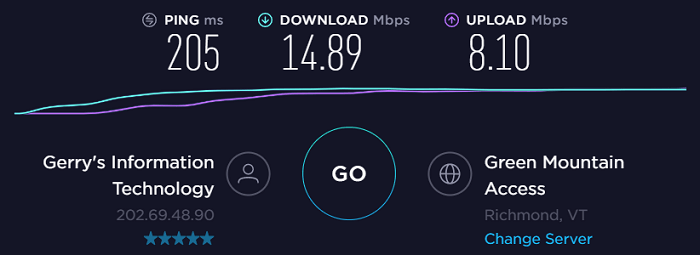
After connecting to its UK server, the speed dropped by 50% almost:
Streaming – Does it Support Netflix, Other Streaming Services & Torrenting in UK
SlickVPN is another VPN you can try out to access Netflix in UK.
It is hard to find VPN services in UK that have the capability to unblock Netflix. After all, Netflix has a powerful mechanism for detecting software trying to pass through its firewalls. Similarly, there are not many free VPNs for Netflix in UK that can bypass geo-restrictions.
SlickVPN takes an exception to this norm by guaranteeing Netflix access to the customer.
The company has made a “Netflix Pledge” to customers that a full refund will be given to users who find themselves barred from accessing Netflix through the VPN. This is quite considerate of the company and highlights its trustworthiness to the users.

Of course, after reading this bold claim, I had to test the SlickVPN Netflix service myself to see what’s what. I was particularly interested in knowing if this VPN unblocks the UK and the US libraries of Netflix.
My tests revealed that the VPN mostly delivers on its promise. However, in contrast, I had to put in more effort to search for a suitable UK server.
Ultimately, I was able to access both Netflix libraries with the VPN.
However, you cannot use SlickVPN with Kodi. Thus, you must use a Kodi VPN add-on service to achieve your mission hassle-free.
Torrenting may be a controversial subject for some,e but many users find it convenient to download files with heavier sizes since you can pause and resume the downloads at any time.
The ultimate catch with torrenting is that it leaves you exposed to a myriad of online threats. Luckily, VPN services can safeguard you from malicious threats lingering on the P2P section of the internet. Unfortunately, many VPNs shy away from torrenting due to copyright concerns.
Again, this VPN differentiates itself by openly supporting P2P activities on its servers. in UK, with this VPN connection, you can download unlimited torrents in a safe and secure manner.
Leaks – IP, DNS, WebRTC & Virus Tests
There is no denying that SlickVPN is a leak-proof service.
I tested its IP leak security feature through ipleak.org and received the following result:
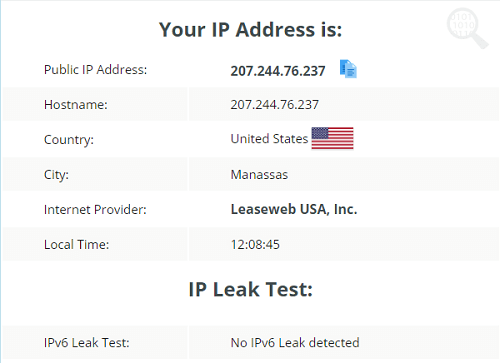
Luckily, I attained the same secure response while testing its DNS leak protection feature on dnsleaktest.com:
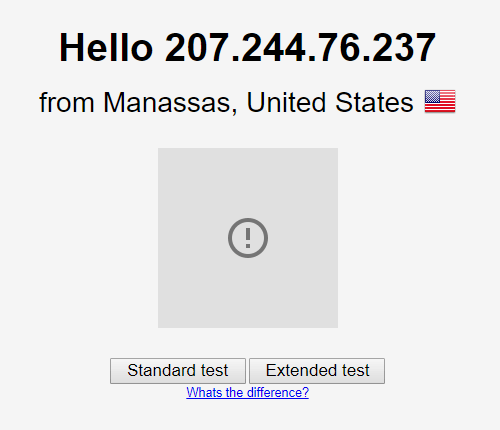
Lastly, I checked its WebRTC leak safety benefit and came across the same satisfactory response:
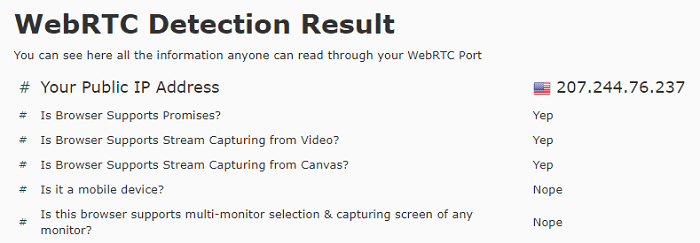
Trustworthiness – Logging Policy, Customer Support & Trustpilot Ratings
SlickVPN does not keep logs and provides a decent support feature.
One of the most impressive features of SlickVPN is that the service doesn’t keep any kind of activity logs.
It explicitly states that it does not track users browsing activities, nor does it record activities outside of the VPN connectivity. This is excellent from your privacy point of view.

The VPN’s website does record the website usage information along with the cookies and IP addresses of the visitors. But this is pretty much standard and every commercial website has similar procedures to operate their business.
What matters is that the providers do not log the sites you visit or the content you download.
Customer Support
One of the essential features of this Slick VPN review in UK is the level of customer support the provider offers.
Slick VPN caters to customer queries through two different methods. The first method is through tutorials and solutions to common issues. The second method is through the email ticketing system.
Sadly, there is no live chat feature to handle customer queries in real time. Therefore, you will have to resort to the following two options:
Tutorials
The tutorials are detailed and provide step-by-step guides to get new users up and running. They will help you configure the service on your preferred device. However, troubleshooting queries should be more in-depth and cover various aspects.
The list covers basic problems and provides quick solutions. But, for this VPN to rise above other established providers, it should look into expanding its Common Issues section for each operating system.
Email System
You can also get your queries resolved through their email ticketing system. To access the email system navigate to the ‘Contact Us’ section. Fill out the online form’s details, enter the details of your query, and hit submit. The provider mentions that it will respond within one business day.
I tested the email system for this review by inquiring about the encryption cipher used in the PPTP protocol. The response was quick as after a few hours, we received a reply. The VPN passed this test with excellence and if you run into a problem that cannot be answered using their tutorials, then we recommend contacting them through the email ticketing system.
Trustpilot Ratings
To learn about the first-hand customer experience of this service, I browsed the review site Trustpilot.
On it, many subscribers praise the VPN service in UK for its reliability.
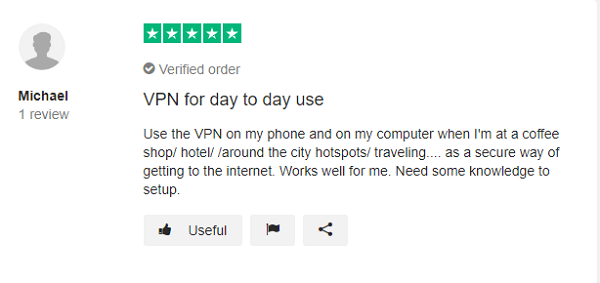
Other users opt for the VPN due to its low price.
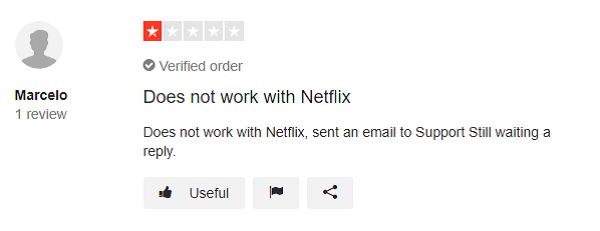
SlickVPN Reddit Review in UK
Reddit is a famous platform that provides unbiased information about different VPNs. As per the viewpoint of one Reddit user, you can use SlickVPN to unblock US Netflix in UK but you may face buffering issues at times as well.
Compatibility – Supports Different Platforms and devices
SlickVPN must offer dedicated apps for mobile-based operating systems like Android, and iOS.
In this day and age, online privacy is more of a concern on mobile devices than on Personal Computers. This is because Public Wi-Fi has become the hunting ground for hackers looking to steal sensitive information.
Keeping this in mind, VPNs should put in considerable effort to design capable Android and iOS apps.
Although you can configure this VPN through OpenVPN, it is a long and complicated procedure that will make many users turn away from this service in UK.
SlickVPN for Windows and Mac in UK
On a positive note, the providers offer a VPN client for Windows and Mac operating systems in UK. The software includes numerous features and you can download the app from SlickVPN’s website for free.
From the initial view, the client is well-designed. You have all your major options listed on the left side panel and tabs for further details.
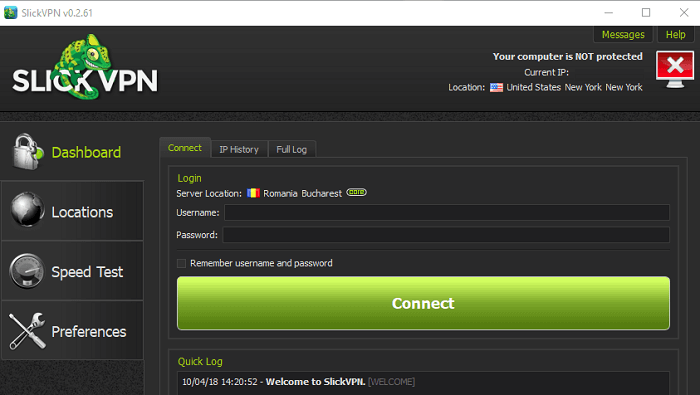
Another feature that I admired while conducting the review was server speed tests; when you connect to a server, check each server’s distance from your actual location.
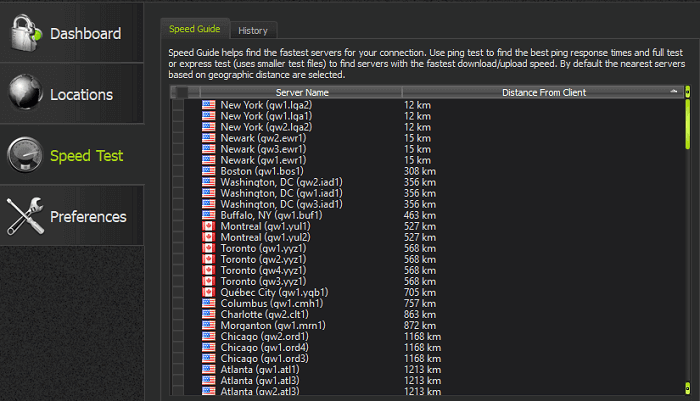
This way you can connect to the fastest server of your desired location.
SlickVPN Android
To use Slick VPN on Android, you will have to configure the service manually. The procedure is simple and subscribers have the option between PPTP or OpenVPN protocol on Android devices.
In addition, I found while conducting this review that you can set up the service using the OpenVPN app available on Google Play Store in UK. The process is simple and here’s how to use the OpenVPN protocol on this VPN:
- Download the ‘.ovpn’ files from the SlickVPN website
- Install the OpenVPN app from the Google Play Store
- Now import ovpn config files of the VPN onto the OpenVPN app
- Check any checkmarks shown during the installation process
- Your SV_mobile.ovpn profile should now be added
- Tap on the pencil icon to select the server of your choice
- Enter your login credentials and use the service
- You can check the logs for successful connection messages
If you are not interested in SlickVPN, have a look at this detailed guide on the best VPNs for Android in UK .
SlickVPN iOS
Just like on Android, you will have to configure SlickVPN on iOS devices manually. This service supports OpenVPN and IPsec protocol for iOS devices.
Alternatively, consumers can download the OpenVPN app from iTunes and then set up SlickVPN .ovpn files. The process is simple and anyone can configure the service following the tutorials illustrated by the VPN.
Comparison between ExpressVPN and SlickVPN in UK
If you want to discover the major attributes of both these VPN services in UK, have a look at the below-mentioned table:
| Features | ExpressVPN | SlickVPN |
|---|---|---|
| Price | $GB£5.77/mo(US$6.67/mo) | GB£3.49/mo(US$4.0/mo) |
| Servers | 3500 in 94 Countries | 78 Servers in 35 countries |
| Compatibility | All Devices | Windows, macOS, Android, Routers & Linux |
| Jurisdiction | The British Virgin Islands | US |
| Logging Policy | Zero Logs | Does not keep logs |
| Customer Support | Live Chat & Email Support | Tutorials, Email Ticketing System |
| Trustpilot Score | 4.6 | 3.5 |
| Website | ExpressVPN | SLICKVPN |
Alternatives to SlickVPN in UK
Not all users may have been impressed by this VPN. If you are one of those, check out the following alternatives:
- ExpressVPN Review UK
- Tunnel Bear Review UK
- FinchVPN Review UK
- VPNBook Review UK
- Surfshark Review UK
- PureVPN Review UK
- NordVPN Review UK
Do I Recommend SlickVPN in UK?
SlickVPN review in UK, does not leak your IP, DNS, or other data. However, it offers few features and no mobile applications for iOS and Android devices. Moreover, its jurisdiction is also a major downside of the service, leading to privacy issues.
You can easily use the service on Windows and Mac using its software. However, the lack of exclusive apps on Android and iOS is something that the company should seriously think about. Likewise, the server count needs a major boost because the other VPNs are offering servers in huge numbers.
I have to give SlickVPN a 2.7/5.0 stars rating based on the above analysis.
