I was highly concerned about my security and data protection while using it with Ubuntu. That’s why I decided to go on the hunt for the best free VPN for Ubuntu; however, free VPNs can be a gamble – are they really safe? After all, data leaks and malware are no joke!
Therefore I have checked and tested quite a few free VPNs which I can easily run on Ubuntu without exposing my data to the third party with complete security and a peace of mind.
Based on my findings, there are still some of the best free VPN services that I have tested that play nicely with Ubuntu. While they might limit my data usage or slow things down a bit, that’s a small price to pay for keeping my browsing activity private and secure.
ExpressVPN is the best VPN for Ubuntu (recommended) with a free trial. For free VPN users, it offers a no-questions-asked 30-day money-back guarantee, so you can use its premium service for 30 days and get your money back quickly. This VPN comprises of servers across 105+ countries, super-fast speeds, and military-grade AES 256-bit encryption. That’s not all. You can also get 3-months free on ExpressVPN’s annual subscription. Isn’t that amazing?
Best free VPN For Ubuntu in 2024 – Quick Overview
Here is the list of the best free VPNs for Ubuntu. Each VPN has been selected for its compatibility with Linux Ubuntu, offering features to suit various needs, from secure browsing to unrestricted access:
- ExpressVPN– Best Free Trial VPN for Ubuntu : Offer thousands of servers worldwide and excellent Ubuntu compatibility with 30 Days Money Back Guarantee
- Windscribe – Free VPN for Ubuntu for blocking malware, tracking, and ads: It provides users with a wide range of server locations and powerful tools to block ads and trackers, enhancing the Ubuntu browsing experience.
- ProtonVPN – VPN for Ubuntu with Unlimited bandwidth and free plan: Its strong commitment to privacy and security, decent speeds, and user-friendly interface make it the go-to VPN for unrestricted internet access.
- Hide.Me – Free Ubuntu VPN Best for lightweight and powerful features: Offers a solid 10GB of free data monthly, with exceptional security and privacy protections.
- TunnelBear – User-Friendly Free VPN Ubuntu Best for unlimited connections: Although it offers a modest 500MB of free data per month, its strong security features and global server network ensure a reliable and secure connection for Ubuntu users.
Best Free VPN for Ubuntu in 2024 [In-Depth Analysis]
After rigorously testing over 45 free VPN services, my in-depth analysis has identified the top contenders for the best free VPN for Ubuntu in 2024.
These VPNs stand out for their balance of speed, security, user-friendliness, and compatibility with Ubuntu, ensuring a seamless and secure browsing experience for users. Here’s a closer look at my findings:
1. ExpressVPN – Best Free Trial VPN for Ubuntu


- Ultra-fast servers in 105 Countries
- Excellent unblocking capability for Netflix, Hulu & more
- Best-in-class encryption trusted security, and advanced protection features that block ads, trackers, and harmful sites.
- Connect up to 8 devices simultaneously
- 24/7 customer support through live chat
- 30-day money-back guarantee
ExpressVPN is the best free trial VPN for Ubuntu, offering a unique combination of speed, security, and versatility. With all its premium features, you can risk-free use this service for 30 days.
Server Network
It’s not just a VPN; it’s a gateway to a safer, unrestricted internet experience. With servers in 105, ExpressVPN boasts one of the most extensive networks available. This vast array of servers ensures reliable and fast connections, making it ideal for streaming, browsing, and secure internet access.
Server Speed
ExpressVPN has a unique Lightway protocol that provides the finest security without speed limits to defeat ISP throttling. When doing the ExpressVPN speed test, it delivers a quick download speed and upload speed.
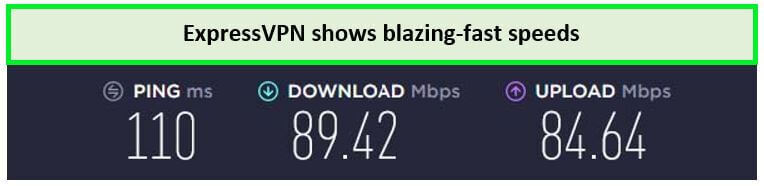
ExpressVPN provided exceptional speeds.
Security and Privacy Features
ExpressVPN has many cutting-edge security features, including the cutting-edge Lightway Protocol, OpenVPN, and IKEv2. It uses a Kill Switch and super-reliable IP leak protection on Ubuntu. With ExpressVPN, you can browse anonymously on Ubuntu, as this VPN has a strict no-logs policy.
Device Compatibility and Simultaneous Connections
ExpressVPN is compatible with various popular Linux distributions, such as Ubuntu, CentOS, Debian, Fedora, Raspbian, and Arch, Kali. This versatility sets ExpressVPN apart as one of the few VPNs with such broad compatibility.
This extensive compatibility, alongside the option to connect up to 8 devices simultaneously, means you can use VPN on multiple devices with a single subscription plan of ExpressVPN.
Customer Support
If you encounter any technical issues while using the VPN or ExpressVPN not working, their Live Chat feature offers real-time assistance from a customer service representative.
Free Trial and Pricing
Although the monthly pricing may seem steep initially, the top-tier service quality justifies the value proposition, with plans starting at $6.67/mo - Save up to 49% with exclusive 1-year plans + 3 months free. Prospective users will be glad that it offers a more extensive 30-day money-back guarantee allowing you to use the service as an ExpressVPN free trial.
For more information, you can read my ExpressVPN review.
- Strong encryption and privacy features.
- Support for multiple devices
- 8 simultaneous connections
- A 30-day money-back guarantee
- Short-term free VPN usage.
2. Windscribe – Free VPN for Ubuntu for blocking malware, tracking, and ads


- Strong Encryption Protocols
- Free Version Offered
- 3 Days Money Back Guarantee
- 50 Server Locations (11 in Free Version)
- Accepts Bitcoin Payments
- Offers OpenVPN encryption
Windscribe is a recommended Free VPN for Ubuntu for blocking malware, tracking, and ads. It stands out for its ease of use, making it an excellent choice for VPN newcomers and seasoned users who seek a balance between privacy and performance on their Ubuntu devices.
Server Network and Free Servers
Windscribe offers 500 servers across 60+ countries, with free users gaining access to servers in 10 countries, including the US, Canada, the UK, and more. This wide range of locations provides Ubuntu users ample opportunities to bypass geo-restrictions and enjoy a diverse content experience.
Server Speed
Windscribe’s server speeds are competitive, especially for a free VPN service. The Windscribe speed test on the free server provides 84.8 Mbps download speed for most online activities, including browsing, streaming in standard definition, and light downloading on Ubuntu.
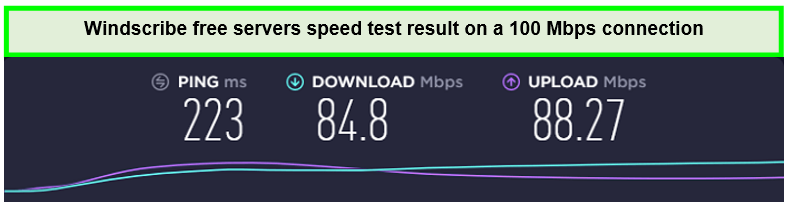
Windscribe has a lightning-fast speed to download and upload on over 100 Mbps.
Security and Privacy Features
Windscribe doesn’t skimp on security, offering strong AES-256 encryption with SHA512 auth and a 4096-bit RSA key. It also includes a robust no-logs policy, ensuring your online activities remain private. Additionally, Windscribe offers features like a kill switch and ad blocking, enhancing security and user experience on Ubuntu.
Device Compatibility and Simultaneous Connections
It is compatible with various devices, ensuring a versatile VPN experience. Windscribe provides guides to install its command-line (CLI) based Linux VPN on 6 distinct Ubuntu versions, including Fedora, Debian, and CentOS.
The free plan allows unlimited simultaneous connections, setting Windscribe apart from many other free VPN services and offering exceptional value for Ubuntu users.
Customer Support
Windscribe provides customer support through a comprehensive FAQ section, a subreddit for community support, and a ticket-based system for direct assistance. While it lacks live chat, the available resources are generally effective in resolving user queries and issues on Ubuntu.
Bandwidth Limit
One of the most appealing features of Windscribe for Ubuntu users is its generous bandwidth limit. The free plan starts with 2GB of monthly data, which can be increased to 15GB by confirming your email and tweeting about Windscribe. This is significantly more than free VPNs, making Windscribe suitable for more data-intensive online activities.
Free Trial and Pricing
The Windscribe free trial is a robust introduction to its service, with the option to upgrade to a premium account for access to all server locations and higher speeds.
For more details about the features of this free VPN Ubuntu, read the Windscribe review.
- Generous 15GB monthly data allowance with simple actions.
- Strong security and privacy features, including a no-logs policy.
- Unlimited simultaneous connections are a rarity among free VPN services.
- Wide device compatibility, ensuring a seamless experience on Ubuntu.
- Speeds can be inconsistent during peak times due to server load.
- Limited server locations for free users compared to the premium plan.
- No live chat option for immediate customer support.
3. ProtonVPN – VPN for Ubuntu with Unlimited bandwidth and free Plan

- Freemium Version to the Users
- Users can Cancel at any Time
- In-built Kill Switch
- Multi-Hoping Capability
- OpenVPN and IKEv2(For Mac)
- Tor Servers
ProtonVPN is a top VPN for Ubuntu with Unlimited bandwidth and free plan, setting it apart from many competitors. This feature is particularly appealing for Ubuntu users who require a VPN for extensive browsing, streaming, or downloading without worrying about hitting a data cap.
Server Network and Free Servers
ProtonVPN offers a well-distributed server network across 70 different regions, with free users accessing servers in 5 countries: the United States, Netherlands, Poland, Romania, and Japan. This selection allows Ubuntu users to bypass regional restrictions while maintaining respectable speeds.
Server Speed
ProtonVPN’s free servers maintain good speeds, considering the unlimited bandwidth. My ProtonVPN speed test offered a download speed of 75.59 Mbps on a 100 Mbps connection. The speed is adequate for browsing, streaming in standard definition, and other online activities on Ubuntu.
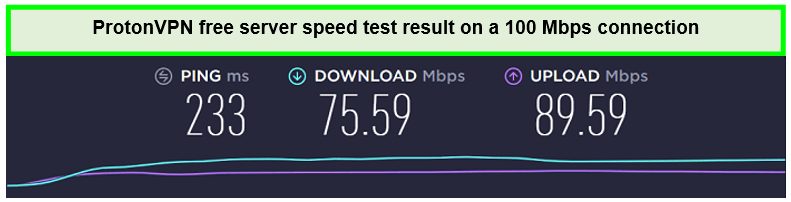
ProtonVPN speed test results on 100 Mbps
Security and Privacy Features
Security is a cornerstone of ProtonVPN’s service, featuring AES 256-bit encryption, a no-logs policy, and DNS leak protection. Additionally, it offers Secure Core servers that route your traffic through multiple servers before leaving the network, adding an extra layer of security for sensitive online activities.
Device Compatibility and Simultaneous Connections
ProtonVPN supports many devices, including Ubuntu, ensuring seamless integration across platforms. The free plan allows one simultaneous connection, which is standard for free VPN services and sufficient for individual users on Ubuntu.
Customer Support
ProtonVPN provides comprehensive customer support through an extensive online knowledge base and support tickets. While it lacks live chat support, the available resources are detailed and helpful for troubleshooting common issues on Ubuntu.
Free Trial and Pricing
Its free version essentially serves as an unlimited Proton VPN Free Trial, allowing users to evaluate the service indefinitely.
For those seeking advanced features like Secure Core servers, access to all countries, and higher speeds, ProtonVPN costs to accommodate different needs and budgets.
For more details about this free VPN for Linux Ubuntu, read the ProtonVPN review.
- Unlimited bandwidth, ideal for heavy internet users.
- Strong security features, including AES 256-bit encryption and a no-logs policy.
- Access to servers in three countries for free users.
- Supports a wide range of devices, including Ubuntu.
- Limited to one simultaneous connection on the free plan.
- Free users can access a limited number of server locations.
- No live chat support for instant assistance.
4. Hide.Me – Free Ubuntu VPN Best for lightweight and powerful features


- Robust Encryption
- P2P Compatibility
- Free Package
- Safe Payment Methods
- 14-day money back guarantee
- Easy to Use
Hide.me is highly recommended as a Free Ubuntu VPN Best for lightweight and powerful features. It’s ideal for those prioritizing security while seeking a cost-effective VPN solution.
Server Network and Free Servers
Hide.me boasts a global network of 2400 servers in 89 countries. While this may not be as expansive as premium services, it’s more than sufficient for basic online tasks and accessing geo-blocked sites.
For free users, Hide.me offers access to 8 servers in the United States, Canada, Europe, Asia, and Australia. This ensures that Ubuntu users enjoy relatively good speeds and reliability while accessing geo-restricted content or safeguarding their online activities.
Server Speed
While Hide.me’s free servers may not match the speed of its premium counterparts, they still offer commendable performance for browsing, streaming, and downloading. The VPN prioritizes maintaining good speeds of 49.24 Mbps download, ensuring Ubuntu users’ satisfactory experience.
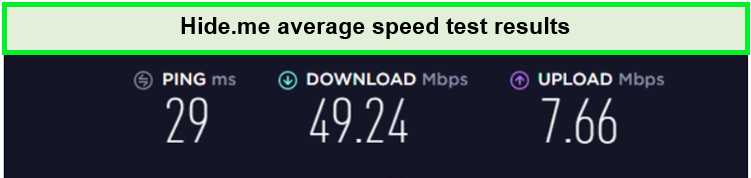
Hide.me speed results on a 100 Mbps connection
Security and Privacy Features
Security is where Hide.me excels, offering top-tier encryption with AES 256-bit encryption to protect your data. It also supports multiple VPN protocols, including WireGuard, IKEv2, and OpenVPN, giving users flexibility based on their security needs. A strict no-logs policy and IP leak protection further enhance user privacy and security on Ubuntu.
Device Compatibility and Simultaneous Connections
Hide.me is compatible with many devices, including Ubuntu, ensuring a seamless VPN experience across all your devices. The free plan allows one simultaneous connection, sufficient for individual users looking to secure their Ubuntu device.
Customer Support
Hide.me offers excellent customer support, with a comprehensive FAQ section, email support, and even live chat for immediate assistance. This ensures that Ubuntu users can quickly resolve any issues or queries.
Bandwidth Limit
The free version of Hide.me includes a generous 10GB monthly data allowance, significantly higher than many other free VPNs offer. This makes it more suitable VPN for Ubuntu free browsing and streaming activities.
Free Trial and Pricing
Hide.me’s free version is a robust trial, allowing users to test its features without financial commitment. For those needing more data or additional features like full server access, Hide.me offers competitive pricing plans to meet various needs and preferences.
For more details about this best free Ubuntu VPN, read the Hide.Me review.
- Strong security with AES 256-bit encryption and support for multiple VPN protocols.
- Generous 10GB monthly data allowance on the free plan.
- Good device compatibility, including support for Ubuntu.
- Excellent customer support with live chat availability.
- Limited to one simultaneous connection on the free plan.
- Free users have access to a limited number of server locations.
- Speeds can vary depending on server load and location.
5. TunnelBear – User-Friendly Free VPN Ubuntu Best for unlimited connections


- Multi-Login Features
- GhostBear Feature
- Secures from DNS Leaks Issues
- Offers Little Free Plan
- Blocker for Google Chrome
- Compatible with Leading Platforms
TunnelBear is a User-Friendly Free VPN Ubuntu Best for unlimited connections, making it an excellent choice for beginners and those seeking hassle-free online protection. This VPN service is renowned for its commitment to security and privacy alongside a global server network that ensures reliable and speedy connections.
Server Network
TunnelBear offers 5000 free servers spread across 48 locations. This extensive coverage allows Ubuntu users to easily bypass geo-restrictions and enjoy different regions content of Netflix with TunnelBear.
Server Speed
TunnelBear’s server speeds are commendable, especially considering it’s a free service. During my TunnelBear speed test on a 100 Mbps connection, I noted an average download speed of 55.27 Mbps and an upload speed of 40.21 Mbps,

This VPN offered the fastest speeds as compared to the other servers.
Security and Privacy Features
Now, come Is TunnelBear safe to use? Security is a forte for TunnelBear, which employs strong AES 256-bit encryption to protect user data. Additionally, it upholds a strict no-logs policy, ensuring that your online activities remain private. The VPN also includes a kill switch feature, further enhancing user security on Ubuntu.
Device Compatibility and Simultaneous Connections
TunnelBear supports many devices, including Ubuntu, making it versatile for users with multiple devices. It allows unlimited simultaneous connections on its free plan, enabling you to secure multiple devices with a single account.
Customer Support
TunnelBear provides responsive customer support through email. While it may not offer live chat support like some premium VPNs, the support team is knowledgeable and helpful, ensuring users receive assistance when TunnelBear is not working.
Bandwidth Limit
The free version of TunnelBear comes with a monthly bandwidth limit of 500MB, which might be restrictive for heavy users. However, this can be increased to 1 GB by tweeting about the service from your account.
Free Trial and Pricing
Its free version effectively serves as a TunnelBear free trial , allowing users to experience the features of this Ubuntu VPN free of cost.
For those requiring more bandwidth and server options, TunnelBear offers affordable pricing plans with the option to cancel your TunnelBear subscription.
For more details about its features, read the TunnelBear review.
- User-friendly interface, perfect for VPN beginners.
- Strong security and privacy features, including AES 256-bit encryption and a no-logs policy.
- Decent server speeds for browsing and streaming.
- Up to five simultaneous connections.
- Limited bandwidth on the free plan (500MB/month).
- No live chat support for instant assistance.
Testing Methodology: How to Choose the Best Free VPN for Ubuntu
Choosing the right free VPN for Ubuntu involves considering several key factors to ensure the best combination of security, performance, and usability. Here’s a concise guide to help you make an informed decision:
Evaluate Security Features
Ensure the VPN uses strong encryption (AES 256-bit is standard) and offers additional security features like a kill switch and DNS leak protection. A strict no-logs policy is crucial for maintaining your privacy.
Consider Bandwidth and Speed Limitations
Free VPNs often impose bandwidth limits. Assess how much data you need and choose a VPN that meets your requirements. Unlimited bandwidth options like ProtonVPN are available, but speed may vary.
Check Server Availability
The number of servers and their locations can significantly impact your VPN experience. More servers mean less congestion and better speeds, while more locations offer greater flexibility in bypassing geo-restrictions.
Assess Device Compatibility
Confirm the availability of a free VPN client for Ubuntu and check if it allows easy installation and configuration on your system. Additionally, consider whether the VPN supports other devices you want to secure.
Review the Simultaneous Connection Policy
Check how many simultaneous connections are allowed if you use the VPN on multiple devices. This can vary significantly between providers.
Investigate Customer Support Options
Good customer support can be invaluable, especially when setting up a VPN on Linux. Look for VPNs offering comprehensive support through FAQs, tutorials, email, or live chat.
Read User Reviews and Expert Opinions
User reviews and expert analyses can provide insights into the reliability, performance, and user experience of the VPN on Ubuntu.
Why You Should Use VPN for Ubuntu ?
Using an Ubuntu VPN free can enhance your online experience by providing increased security, privacy, and freedom. Here’s why you should consider using a VPN on your Ubuntu system:
Enhanced Security
VPNs encrypt your internet connection, securing your online activities from hackers, ISPs, and government surveillance. This encryption is crucial when using public Wi-Fi networks, where your data is more vulnerable to interception.
Improved Privacy
With a VPN, your IP address is hidden, making it difficult for websites, advertisers, and potential trackers to identify you or your location. This anonymity helps protect your browsing habits and personal information from being collected and sold.
Access to Geo-Restricted Content
A VPN allows you to bypass geographical restrictions by connecting to servers in different countries. This means you can access content that may be blocked in your region, such as streaming services, news websites, and social media platforms.
Safe File Sharing
If you share files over the internet, a VPN can protect your activities, ensuring that your transfers remain private and secure from prying eyes. This is particularly important for sensitive or confidential information.
Bypass Censorship
In regions with strict internet censorship, a VPN can provide a way to access the open internet, allowing you to use blocked services and websites freely and securely.
Reduced Online Footprint
By masking your IP address and encrypting your connection, a VPN reduces your digital footprint, making it harder for your online actions to be traced back to you. This is a key aspect of maintaining online privacy.
How Do I Download Free VPN on Ubuntu ?
Downloading and setting up a free VPN on Ubuntu is a straightforward process that enhances your online privacy and security. Here’s a step-by-step guide, using ProtonVPN as an example, to show you how to set up a free VPN client for Ubuntu:
- Select a reliable free VPN service that supports Ubuntu. ProtonVPN is a great option due to its strong security features and no data limits.
- Visit the ProtonVPN website and sign up for a free account. You’ll need to provide some basic information and verify your email address.
- Install OpenVPN by opening your terminal and entering sudo apt-get-install-OpenVPN.
- Log in to your ProtonVPN account and navigate to the “Downloads” section. Download the configuration files for the servers you wish to connect to.
- Open the terminal and navigate to the directory where you downloaded the VPN configuration files. Use the
openvpncommand to start the VPN connection. - After executing the command, you will be prompted to enter your ProtonVPN username and password. Once entered, your Ubuntu system will establish a secure VPN connection.
- To ensure you’re connected to the VPN, visit a website like https://ipleak.net to check your IP address and DNS requests.
Risks of Using a Free VPN for Ubuntu
Using a free VPN for Ubuntu has potential risks despite testing and reviewing their privacy policies for trustworthiness. Here are the concerns:
- Data Privacy: Some free VPNs may monetize by selling user data, underscoring the importance of reviewing privacy policies.
- Security Deficiencies: Free VPNs often lag in security features compared to paid versions, potentially leaving you vulnerable.
- Malware Risks: There’s a risk of malware or viruses with some dubious free VPNs, which may use trackers or malicious software.
If you don’t want to go more expensive and fancy you can easily grab the best premium VPN deal for yourself, the reasonable way to save your privacy and money simultaneously.
More Free VPN Guides
| Free VPN for Web 3.0 | Navigate the open web confidently with a Free VPN for your Web 3.0 journey. |
| Best Free VPN for Chrome | Discover the Best free VPN for Chrome to enhance your browsing security and access global content effortlessly. |
| Best Free VPN for Safari | Unlock seamless browsing with a Free VPN for Safari, ensuring unrestricted access to your favorite sites. |
| Best Free VPN for Windows | Explore the best free VPN for Windows to enhance your internet experience and access to geo-restricted content. |
| Best Free VPN for Mac | Safeguard your Mac devices with our top-recommended free VPNs. |
FAQs – Best Free VPN for Ubuntu
Are there free VPN for Ubuntu?
Yes, Ubuntu supports several free VPNs like ProtonVPN, Windscribe, and TunnelBear, with Windscribe often cited for providing the best overall experience. However, it’s important to note that free VPNs typically have certain restrictions, including data limits, slower speeds, and fewer server options than their paid counterparts.
Does Ubuntu come with a free VPN ?
No! Ubuntu does not come pre-installed with a free VPN. Users looking for VPN functionality must choose and install a VPN service themselves. Various VPNs are compatible with Ubuntu, offering free and premium options to meet security, privacy, and access needs.
Is it hard to install any VPN on Ubuntu ?
No! Installing a VPN on Linux Ubuntu is not difficult, especially with user-friendly options like hide.me. This VPN simplifies the process, allowing you to start by copying and pasting a single command into the terminal from their website. After installation, you only need a username and password to activate this VPN Ubuntu free.
How to stop ISP throttling with a free VPN on Ubuntu?
To prevent ISP bandwidth throttling using a free VPN, follow these steps:
- Obtain a trustworthy VPN from your device’s app store or the VPN provider’s website. I recommend ExpressVPN.
- Register for an account with the chosen VPN service.
- Log in and establish a connection to your preferred server location.
- Experience improved internet speed and performance!
How do I enable VPN on Ubuntu ?
To activate a VPN on Ubuntu, simply follow these streamlined steps:
- Type “Network” in the search bar to access the Activities Overview.
- Click on “Network” to open the panel.
- At the bottom of the list on the left, click the + button to add a new connection.
- Choose “ExpressVPN” (or your VPN provider) from the list of interfaces.
- Select your specific VPN connection type.
- Enter your VPN connection details, then click “Add” to finalize.
- To initiate the VPN, open the system menu on the right side of the top bar, click “VPN off,” and select “Connect.” You may need to re-enter your password. A lock icon will appear in the top bar once connected.
- If you encounter issues connecting, re-examine your VPN settings in the Network panel where you set up the connection. Click the settings button for more options, and select your VPN connection from the list.
- To turn off the VPN, choose “Turn Off” from the system menu in the top bar.
Conclusion
The best VPN for Ubuntu significantly enhances your online experience with added security and access to restricted content. For those prioritizing no-cost options, selecting the best free VPN for Ubuntu involves balancing security, performance, and usability to suit your needs.
ExpressVPN emerges as a leading option for its exceptional performance and security. Though technically not free, it offers a 30-day trial as a risk-free evaluation.