Experiencing connectivity issues with Surfshark while trying to access Netflix or facing general disruptions? Not to worry – I’ve explored the reasons behind why Surfshark VPN keeps disconnecting and compiled 10 fixes to resolve the Surfshark not working in France promptly.
Whether struggling to stream, download, or maintain a stable connection, these troubleshooting have proven effective repeatedly – to get your Surfshark VPN running smoothly again on Windows 10 or other devices.
If troubleshooting isn’t your preference, opting for another best VPN for France could be a solution. In my evaluations, ExpressVPN outperformed Surfshark across essential testing criteria, offering enhanced reliability and performance.
Surfshark Not Working In France [10 Quick Fixes]
If you’re facing issues with Surfshark VPN not working properly on your device, here are some fixes you can try:
- Connect to a different server: Experiment with varying locations of the server to alleviate overcrowding issues.
- Switch to a different network. Try connecting to a different Wi-Fi or wired connection to see if the problems persist.
- Change VPN protocols: Opt for OpenVPN in the Surfshark app, as it’s generally recommended for stable connections.
- Reset the Surfshark app: Resolve potential bugs or glitches by restoring the application.
- Update Surfshark’s app: Ensure you install the latest version for optimal performance.
- Turn off antivirus/firewall programs: Temporarily disable antivirus software, causing the Surfshark firewall blocking internet error.
- Disable IPv6 addresses: Turn off IPv6 addresses on your device settings to resolve Surfshark proxy connection errors.
- Disable TAP adapters: If you have other VPNs installed, you should disable their TAP adapters.
- Adjust custom DNS settings: Configure DNS settings for better control over DNS queries.
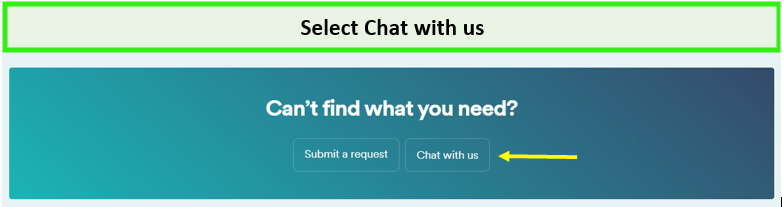
- Contact Surfshark support: Seek assistance from Surfshark’s support team for further troubleshooting.
Note: If you consider switching, try ExpressVPN as an alternative solution with reliable unblocking and enhanced security features.
How to Fix Surfshark Not Working in France [Comprehensive Solutions]
Various factors could be at play if you’ve encountered issues with Surfshark not working in France. Here are comprehensive steps to diagnose and resolve the most common problems with the Shark VPN service.
1. Switch servers
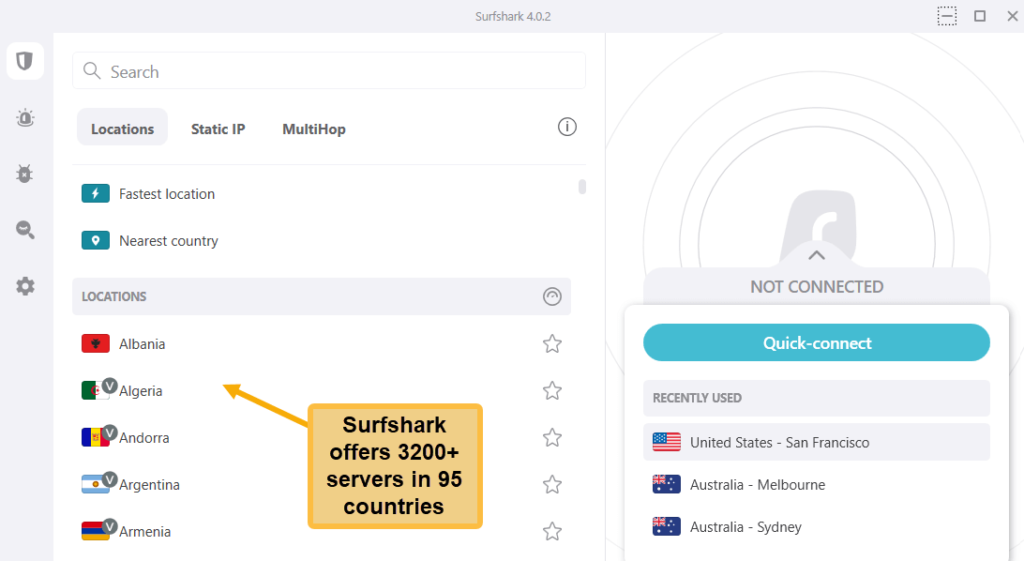
A common reason Surfshark not connecting is connectivity issues due to server downtimes and technical faults. If you’re experiencing slow Surfshark speeds in France, connect to a different server, preferably one closer to your location.
To do this, just launch the Surfshark app and choose a server location of your preference. Test multiple servers and check if the issue persists.
2. Verify Your Internet Connection
A faulty internet connection could be the root cause of most VPNs not working in France [Comprehensive Solutions]. Before diving into more complex troubleshooting, verify that your internet connection is stable.
- Disconnect from Surfshark and attempt to access the web.
- If you cannot do so, the issue may lie with your internet service provider or local network rather than the VPN.
- Try connecting to a different Wi-Fi or wired connection to see if the problems persist.
3. Change Protocols
Sometimes, simply switching protocols can resolve a Surfshark VPN connection error. Surfshark offers a variety of protocols, in fact it is one of the best VPNs for OpenVPN in France.
Here’s how you can change your VPN protocol on Surfshark’s Windows app:
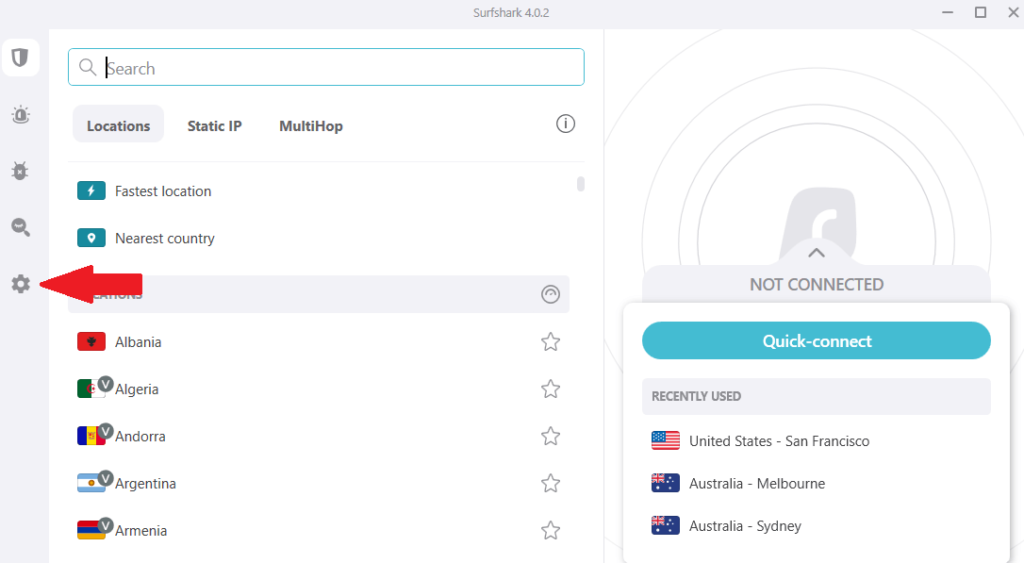
- Launch Surfshark > click Settings on the left.
- Click VPN Settings > scroll down to Protocol > select a protocol and try connecting to a location again.
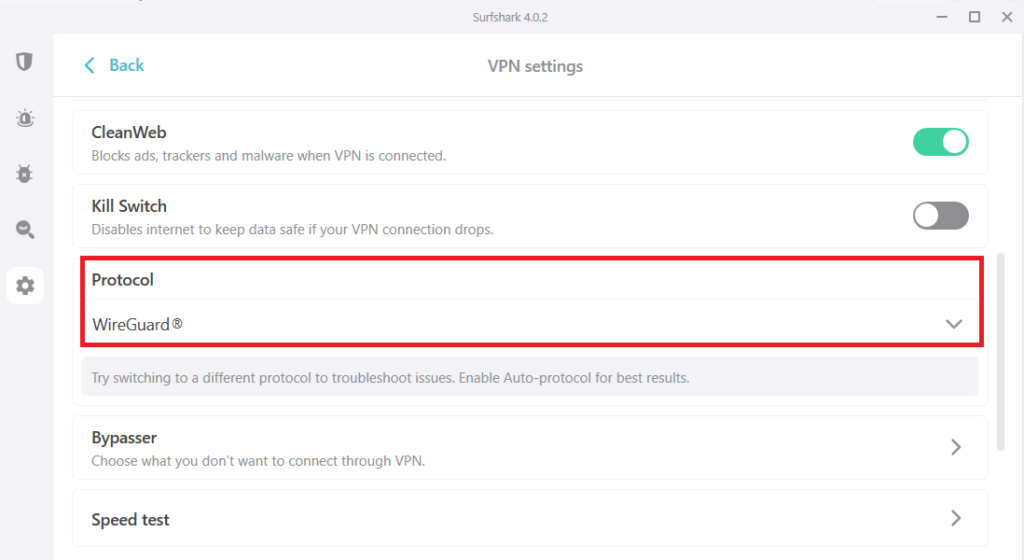
- Change your protocol from Automatic to WireGuard or OpenVPN (UDP).
4. Reset the app
Is Surfshark down? A malfunctioning app can certainly make it seem that way. Try restoring the Surfshark app to the default settings if you’ve tried other methods.
To restore Surfshark to factory defaults on Windows, follow these steps:
- Launch Surfshark > Settings.
- Under Settings, click Get Help > Troubleshooting Tools.
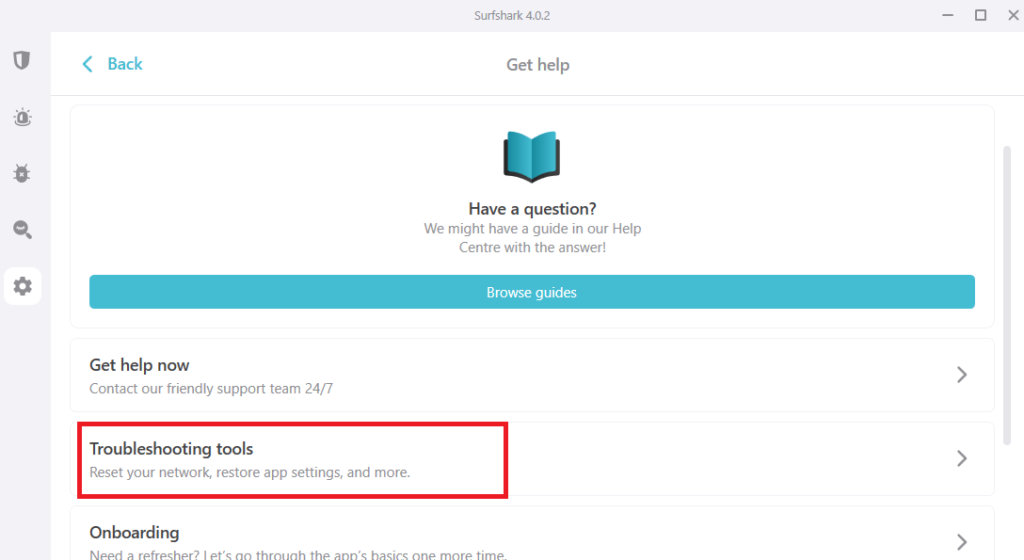
- When the new window opens, click Reset Network.
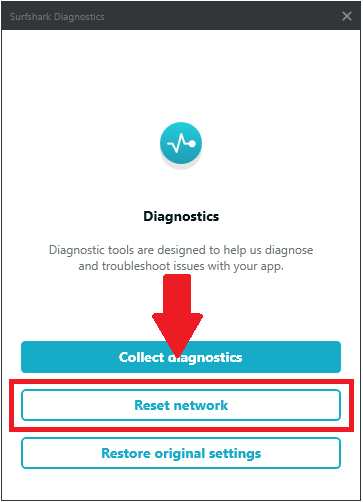
- Once the app has been restored, connect to a server location again. This trick seems to work if Surfshark is not working on Android or other phones.
Note: This step will probably sign you out, so make sure you remember your Surfshark login details before carrying out a reset.
5. Update the Surfshark app
Using an outdated version of the Surfshark app can lead to connectivity issues. An updated app ensures you have the latest features and security enhancements that can solve common problems, such as Surfshark stuck at 95 or proxy connection errors Surfshark.
To upgrade to the lastest version to ensure optimal performance:
- Open the Surfshark app and navigate to the Settings menu.
- Select App Settings and check for any available updates.
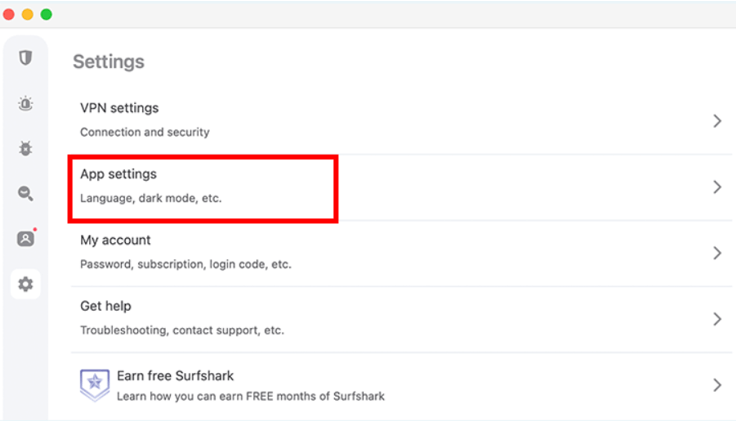
- If an update is available, follow the prompts to install the latest version of the app.
6. Disable Other Interfering Antivirus/Firewall Programs
Conflicts with firewall and antivirus software prevent the VPN from functioning correctly, causing the Surfshark firewall to block internet errors. These programs block VPN connections entirely or cause frequent disconnections, which can be a big reason the app couldn’t reach Surfshark systems.
To ensure that your security software isn’t interfering with your VPN connection, disable all your antivirus/firewall programs, and then try using Surfshark. If this works, then this proves that one or more of your security programs are causing the problem.
7. Turn off IPv6 on your device
IPv6 is a networking system that various internet networks may have. While Surfshark currently doesn’t support IPv6, you may face connection issues if you have it on your device.
You can check if you have IPv6 using the following steps:
- Check your IP address by clicking this page of Surfshark.
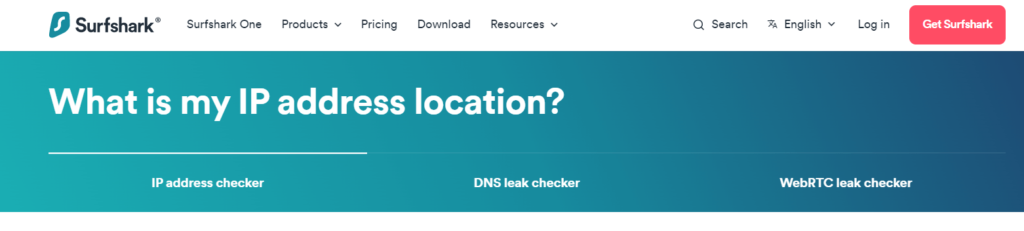
- It will check your public IP and display it to you. If you’ve IPv6, your IP address will be lengthy, consisting of numbers, letters, and dots.
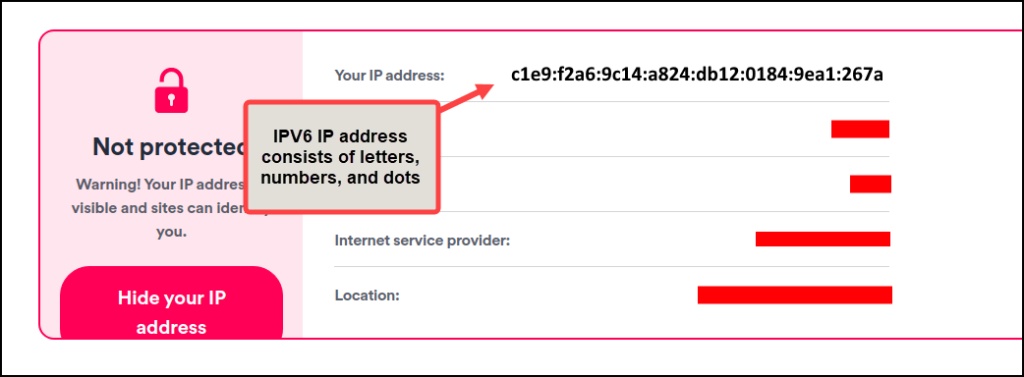
- If not, then you’ll see a shorter IP with dots and numbers only).
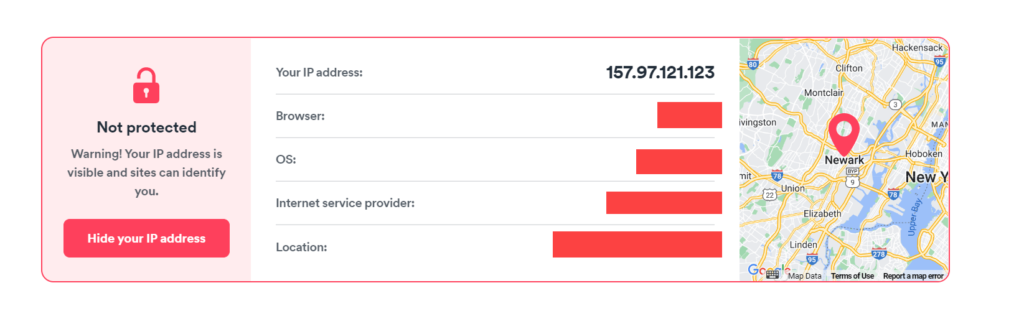
- If you find IPV6 activated on your network, disable it to use Surfshark without issues.
- The good news is that you can disable IPv6 easily on your Windows, macOS, and Linux devices.
8. Disable TAP adapters
Conflicts with other VPNs installed in your system/device can also interfere with your Surfshark connection. If you have other VPNs installed, you should disable their TAP adapters. If you do not, Surfshark may display this error “The App couldn’t reach Surfshark Systems“.
This is how you can do this on Windows:
- Open Control Panel > Network and Internet > Network and Sharing Center > Change adapter settings.
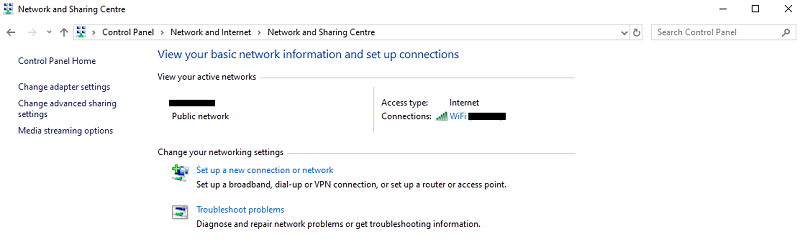
- You’ll find the TAP adapters of all installed VPNs as well as your physical network.
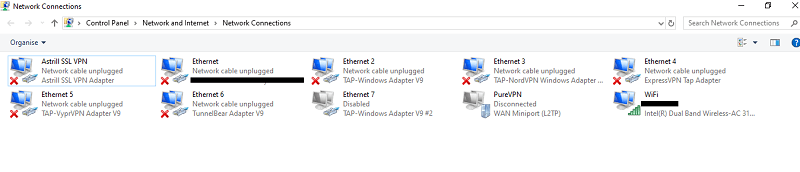
- Disable adapters of all VPNs other than Surfshark by right-clicking each and selecting Disable.
- After disabling the adapters of other providers, try connecting to Surfshark again.
9. Adjust Custome DNS Setting
Try custom DNS in case Surfshark smart DNS does not work for you. Custom DNS settings provide greater control over DNS queries, reducing reliance on Surfshark’s potentially slow DNS.
Access your router’s admin panel to change DNS values. Recommended Surfshark configuration: DNS1 – 162.252.172.57, DNS2 – 149.154.159.92.
Smart DNS feature can generate addresses, so you can also install Surfshark on Kodi in France with its Smart DNS feature.
10. Contact the Surfshark Support Team
If you’ve tried all the above steps and Surfshark is not working, contact Surfshark’s customer support. They can provide additional assistance, especially if you encounter a specific error like the app couldn’t reach Surfshark systems.
Expert Opinion! Switch to a Better Alternative
If you’ve exhausted all troubleshooting options for Surfshark without success, it may be time to explore a superior VPN. ExpressVPN consistently outperforms its competitors in my rigorous testing. Offering unparalleled speed, top-notch security, and an extensive server network, it sets the standard for premium VPN services.
While Surfshark prices in France [Comprehensive Solutions] are the most affordable in the industry, the benefits of ExpressVPN far outweigh the price difference.
Surfshark Issues and Fixes for Specific Situations
Surfshark may cause issues in certain situations on a few streaming platforms or devices/operating systems. It can be an issue with installation or a bad internet connection.
Here are some services, devices, and platforms that have previously caused problems for Surfshark users and, with quick fixes solve them:
Surfshark not working on Windows 10 in France [Comprehensive Solutions]
Several common issues could be causing Surfshark connectivity problems on Windows 10 and Windows 11, but they’re relatively easy to address:
- Disable IPv6: Since Surfshark doesn’t support IPv6, enabling it can disrupt your VPN connection.
- Restore the app: Navigate to the Settings section within the VPN app, then select Get Help and Reset VPN profile to restore the app to its default settings.
- Try different servers or protocols: Switching to alternative servers or protocols can help bypass port or IP blocking issues.
- Disable interfering apps: Ensure your VPN app is exempted from firewall and antivirus restrictions, and avoid running conflicting apps simultaneously.
Note: You can switch to ExpressVPN – the overall best VPN for Windows version wherther using Windows 10 or Windows 11.
Surfshark not working on FireStick in France
FireStick users might sometimes find that Surfshark isn’t working as expected. Here’s how to address common problems.
Confirm Compatibility:
Make sure your FireStick is compatible with Surfshark. First-generation FireSticks do not support VPN apps. You can check out Surfshark FireStick in France for more compatibility details.
Reinstall the Surfshark App
Uninstall and then reinstall the Surfshark app on your FireStick. This can resolve unexpected glitches:
- Go to the FireStick settings.
- Navigate to Applications and uninstall Surfshark.
- Reinstall Surfshark from the Amazon App Store.
Restart Your FireStick
A simple restart can sometimes fix Surfshark not working on FireStick:
- Hold the Select and Play/Pause buttons simultaneously for about five seconds.
- Wait for the device to restart.
Check Network Permissions
Ensure that your FireStick network settings are not restricting VPN use, which could lead to the Surfshark bypasser not working in France. Also, verify if you need to disable TAP adapters, which could interfere with VPN connections.
Surfshark not working on Prime in France
To watch Amazon Prime Video using Surfshark, you must be connected to a US server. However, this only works on computers, as Surfshark doesn’t unblock Prime on mobile devices.

I face no issue in unblocking Amazon Prime using Surfshark on my desktop
If you’re unable to access Prime on your computer with Surfshark, try these steps:
- Clear your browser cache and cookies.
- Try a different US server location.
- Restart your computer and try again.
- You should contact customer support to guide you toward an easy solution.
- If the problem persists, you should try better VPN options like ExpressVPN.
Surfshark not working with Torrent in France
Surfshark is generally efficient for torrenting in France, offering dedicated options. Torrenting issues with Surfshark can be frustrating, but these steps can help you find a solution.
- Use P2P-Friendly Servers: Surfshark has specific servers optimized for P2P file sharing. Make sure you’re connected to one of these servers. If you’re unsure, its best-optimized servers for torrenting are the Netherlands, the US, and Canada.
- Check the Number of Seeders: The problem might not be with Surfshark if the torrent is not downloading. Check the torrent file for an adequate number of seeders.
- Enable Kill Switch: Ensure Surfshark’s Kill Switch is enabled to prevent unprotected data from being transmitted if the VPN connection drops.
- Contact Support: If you’ve gone through these steps and Surfshark not working with Torrent persists, Surfshark’s support team can offer additional assistance.
- Switch to a Surfshark alternative: If you’ve encountered persistent issues, ExpressVPN is a top choice for torrenting due to its p2p servers and robust security features.
Why is Netflix not working with Surfshark VPN in France?
Netflix may not work with Surfshark VPN due to Netflix blocking the specific IP address assigned to you by Surfshark. However, it’s important to note that Netflix cannot block Surfshark VPN entirely; it can only target the IP addresses provided by Surfshark.
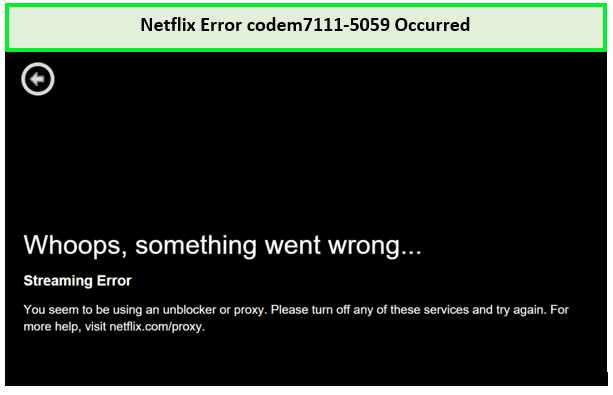
Netflix detects I’m connected via VPN servers.
To resolve this issue, follow these steps to enjoy your favorite content using Surfshark for Netflix in France.
- Check Server Compatibility: Not all Surfshark servers may work with Netflix. Ensure you’re connected to a server that works with Netflix in the US, UK, or Canada.
- Clear Browser Cache and Cookies: Netflix can store information in your browser that could lead to the detection of VPN usage. Clearing your cache and cookies might solve Surfshark not working with Netflix issues:
- Use Incognito Mode: An incognito or private browsing window can prevent Netflix from using stored data to detect VPN usage.
- Switch Devices: Some devices have more stringent checks for VPNs. If you’re having trouble on one device, try streaming Netflix on another with Surfshark for a smoother experience.
- Contact Surfshark Support: If you’ve tried all the above and still face issues, Surfshark’s customer support can offer specific advice for Surfshark not opening or connecting issues with Netflix.
- Consider opting for a Surfshark alternative if you’ve encountered persistent issues; ExpressVPN is a top choice, known for its compatibility with Netflix and overall reliability.
Surfshark Alternatives in France
If you’re experiencing persistent issues with the Surfshark website not working, it might be time to cancel Surfshark in France and consider some alternatives.
While Surfshark is one of the best cheap VPN services in France, no provider is without its occasional hiccups. Sometimes, users may encounter problems like Surfshark stuck at 95 or receive messages like “the app couldn’t reach Surfshark systems.”
In such cases, looking at other VPN options could be beneficial. Here are the most well-rounded VPN providers in the market:
| Feature |  |
 |
 |
|---|---|---|---|
| Servers Locations | 105 countries | 61 countries | 100 countries |
| Torrents / P2P allowed? | ✔ | ✔ | ✔ |
| Works with Netflix USA? | ✔ | ✔ | ✔ |
| Simultaneous connections | 8 | 6 | 7 |
| Works with | Windows, Mac, Android, iOS, Linux | Windows, Mac, Android, iOS, Linux | Windows, Mac, Android, iOS, Linux |
| VPN protocols | OpenVPN, IKEv2, L2TP/IPsec, Lightway | OpenVPN, IKEv2/IPsec, NordLynx (WireGuard) | OpenVPN, IKEv2, WireGuard |
| Lowest Price | EUR 6.27/mo (US$ 6.67/mo) | EUR 3.75/mo (US$ 3.99/mo) | EUR 1.91/mo (US$ 2.03/mo) |
| Money-back guarantee | 30 days | 30 days | 45 days |
| More Details | ExpressVPN review in France | NordVPN review in France | CyberGhost review in France |
Surfshark Not Working: Insights from Redditor
Surfshark faces significant challenges after a recent update, with Redditos reporting that they can’t connect to the internet after installing the software. Some users had to completely uninstall Surfshark just to get back online.
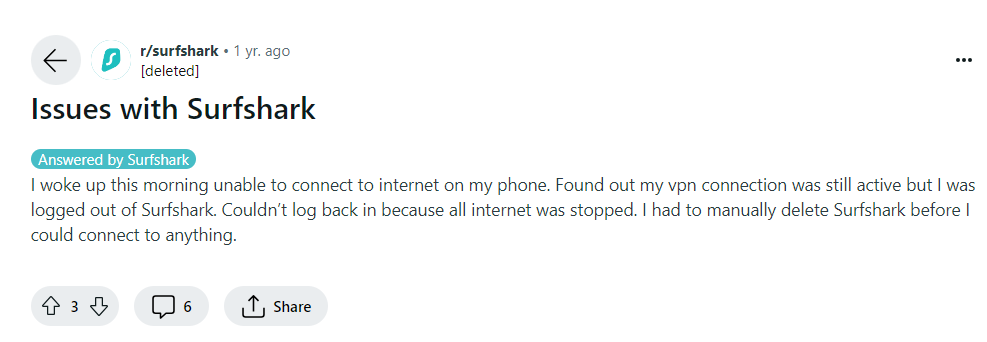
I suggest using official channels like email or live chat for efficient troubleshooting assistance from their support team, whether you’re experiencing WireGuard to OpenVPN issues or any other connectivity problems with Surfshark. If you’re seeking a dependable VPN, try ExpressVPN, which excels in various aspects.
FAQs – Surfshark Not Working in France
Why has Surfshark stopped working?
If Surfshark has stopped working despite checking network connections, disabling antivirus, and uninstalling other VPNs, consider fully reinstalling the app. An outdated Surfshark application might struggle to establish a connection, so reinstalling could resolve the issue.
Why isn’t Surfshark opening?
If Surfshark isn’t opening, consider trying the Surfshark extension on a different browser like Firefox or Edge, especially if you’re using Chrome. Sometimes, the issue may be with the browser rather than the extension itself. Reinstalling the Surfshark VPN extension on your browser could also help resolve the problem.
How do you reset Surfshark in France?
To reset Surfshark, open the app, navigate to Settings > Help > Diagnostics > Restore original settings. This action will provide a fresh start for the app and should resolve any background service issues.
How to fix Surfshark VPN not working in France?
To fix Surfshark VPN issues, consider changing servers, updating the app, clearing browser cache and cookies, or rebooting your computer. If problems persist, contact Surfshark’s support team for assistance.
Why Surfshark not working on iPhone?
If Surfshark doesnt work properly on your iPhone, it might be due to an outdated app version. Ensure you have the latest update installed to address network restrictions in each release. If the app is up-to-date and the issue persists, consider fully reinstalling the Surfshark application to resolve any underlying problems.
Why is Surfshark not connecting on my iPad in France?
If you’re experiencing difficulties connecting Surfshark VPN on your iPad in France, several troubleshooting steps can help. Try switching to a different VPN server, adjusting VPN protocols, ensuring your app is up-to-date, and disabling IPv6 on your device to resolve most connectivity issues.
Does Surfshark slow down the Internet in France?
Yes, Surfshark may cause a slight decrease in internet speed in France, as is the case with any VPN. However, as a premium VPN service, Surfshark ensures that the speed drop is minimal and hardly noticeable.
Which VPN is better than Surfshark in France?
For those prioritizing transparency, privacy, and user-friendliness, ExpressVPN is the top recommendation over Surfshark. ExpressVPN is renowned for its transparent practices, robust privacy features, and intuitive user interface, making it an ideal choice for individuals seeking a seamless and secure VPN experience.
Conclusion
Experiencing the Surfshark website not working can be frustrating. However, the tips mentioned above and tricks resolve the Surfshark not working in France issue swiftly. If these steps don’t work, contacting Surfshark’s support team can provide assistance to resolve the technical problems.
If problems persist, considering a Surfshark alternative like ExpressVPN might be worthwhile. ExpressVPN excels in various aspects and offers a risk-free trial through its 30-day money-back guarantee.
