France is a beautiful country with a rich history and culture and a strong emphasis on privacy. However, due to strict internet regulations and censorship, online users in France may face challenges. To navigate this digital landscape easily, it is crucial to find the best VPN for France.
A VPN protects your online privacy and allows you to access French TV and streaming services from anywhere in the world. It shields your browsing from cyber threats and ensures your online activity remains private. Therefore, it’s essential to choose a VPN that is secure, fast, and easy to use.
After testing various VPNs to find what VPN is best for France, I found ExpressVPN to be the best choice. It has exceptional performance and security capabilities, with a user-friendly interface and speedy servers. This blog will explore why ExpressVPN is the top pick and other best VPNs for France in 2024. Each VPN on the list is rigorously tested to meet your security, performance, and entertainment needs.
So, whether you’re a resident or a tourist visiting France, a reliable VPN is necessary to ensure your online safety and privacy.
Quick Overview – Best VPN for France
If you are wondering which is the best VPN to use in France, I recommend ExpressVPN. Additionally, I have compiled a list of other VPNs, including ExpressVPN, that offer enhanced privacy, help access geo-restricted streaming content, and provide robust internet security.
So whether you’re looking to protect your online privacy or access blocked content, here are the best VPNs for France:
ExpressVPN – The overall best VPN for France:
The Ultimate VPN for France, featuring over 105 servers globally with 2 in France. Offers fast speeds, advanced security, and excellent streaming capabilities. Ideal for accessing Netflix France and ensuring privacy with a no-logs policy.
➔ Get a special ExpressVPN offer today: EUR 6.26/mo (US$ 6.67/mo)
Surfshark – Budget-friendly VPN for France:
A cost-effective choice with 3200+ servers, including French locations. It supports unlimited devices, offers strong security, and excels at unblocking geo-restricted content. It’s great for those on a budget without sacrificing quality.
➔ Get a special Surfshark offer today: EUR 2.34/mo (US$ 2.49/mo) .
NordVPN – Secure VPN for France:
With 230+ servers in France out of 6000+, NordVPN is a fortress of online security, featuring double VPN and CyberSec. Fast and reliable for streaming and privacy-focused users.
➔ Get a special NordVPN offer today: EUR 3.75/mo (US$ 3.99/mo)
IPVanish – Reliable VPN for France:
Boasts 2200+ servers, with 30+ in France. Offers unlimited streaming and torrenting across numerous devices with optimal protection. A versatile choice for comprehensive security.
➔ Get a special IPVanish offer today: EUR 2.81/mo (US$ 2.99/mo)
CyberGhost – User-friendly VPN for France:
With 11651+ servers globally and 938 in France, CyberGhost is known for its user-friendly interface and modes tailored for gaming, torrenting, and streaming. Fast, secure, and great for getting a French IP.
➔ Get a special CyberGhost offer today: EUR 1.91/mo (US$ 2.03/mo)
Private Internet Access – Most Suitable VPN for Torrenting for France:
Offers a vast network of 35000+ servers, including 146 in France. Highlights include a zero-log policy and advanced features for torrenting, making it ideal for secure and unrestricted torrenting in France.
➔ Get a special PIA offer today: EUR 1.98/mo (US$ 2.11/mo)
Jump Straight to Testing Methodology | FAQs
What to Look in a VPN for France?
| Privacy Tools | No-logs policy, independent audit |
| Security Protocols | Kill switch, Threat Protection |
| Tunneling Protocols | WireGuard |
| Optimized Servers | Obfuscated, RAM-only |
| Encryption Type | AES-256 |
| Unblocking Capabilities | 6play, TV5MONDE, Starz, Canal, Paramount, Netflix and more |
Comparison Table: Best VPN for France in 2024
In our comparative analysis, we compare the best VPNs for France, examining their features, performance, and pricing. Whether you’re looking for a VPN for casual browsing, enhanced security, or specific applications like streaming or torrenting, our comparisons will help you find a VPN that fits your needs and budget.
| VPNs |  |
 |
 |
 |
 |
 |
|---|---|---|---|---|---|---|
| Ranking | 1 | 2 | 3 | 4 | 5 | 6 |
| Ratings | 9.7/10 | 9.5/10 | 9.2/10 | 8.6/10 | 7.9/10 | 7.5/10 |
| Servers in France | 5 | 4 | 230+ | 30+ | 938 | 146 |
| Servers Worldwide | 3000 in 105 countries | 3200+ servers in 100 countries | 6000+ servers in 61 countries | 2200+ servers in 75+ countries | 11651+ servers in 100 countries | 35000+ servers in 84 countries |
| Logs Traffic/Web Activity | Strict No Log Policy | Strict No Log Policy | Strict No Log Policy | Strict No Log Policy | IP address, when and where VPN was used | Strict No Log Policy |
| Kill Switch | Yes | Yes | Yes | Yes | Yes | Yes |
| Torrenting | Yes | Yes | Yes | Yes | Yes | Yes |
| IP Addresses | Dynamic, static | Dynamic, static | Static, shared, or dedicated | Dynamic, static | Static, shared | Dynamic |
| Split Tunneling | Yes | Yes | Yes | Yes | Yes | Yes |
| Monthly Plans | EUR6.26/mo (US$ 6.67/mo) - Save up to 49% with exclusive 1-year plans + 3 months free | EUR2.34/mo (US$ 2.49/mo) - Save up to 77% with exclusive 2-year plan + 30-day money-back guarantee | EUR3.75/mo (US$ 3.99/mo) - Save up to 63% with exclusive 2-year plan + 3 months free for a friend | EUR 2.81/mo (US$ 2.99/mo) | EUR1.91/mo (US$ 2.03/mo) - Save up to 84% with exclusive 2-year plans + 4 months free | EUR1.98/mo (US$ 2.11/mo) |
| Customer Support | Yes | Yes | Yes | Yes | Yes | Yes |
| Contract Lengths | Monthly, 6 months, or 2 years | Monthly, 6 months, or 2 years | Monthly, yearly or 2 years | Monthly, yearly, or 2 years | Monthly, yearly, and 3 years 3 months | Monthly, yearly or every 3 years |
| Location of Headquarters | British Virgin Islands | Netherlands | Panama | Dallas, Texas, United States | Bucharest, Romania | Greenwood Village, Colo., USA |
6 Best VPNs For France in 2024 [In-Depth Analysis]
I have researched and tested various VPN services to find the best VPN for France. My review includes speed tests, evaluations of user interfaces, and an analysis of server locations. This guide aims to simplify your search for the best VPN in France, ensuring optimal performance across multiple devices.
Here’s an overview of the top 6 VPNs for France 2024 that I’ve carefully selected to enhance your online experience with security and speed.
1. ExpressVPN – The overall best VPN for France

- Ultra-fast servers in 105 Countries
- Excellent unblocking capability for Netflix, Hulu & more
- Best-in-class encryption trusted security, and advanced protection features that block ads, trackers, and harmful sites.
- Connect up to 8 devices simultaneously
- 24/7 customer support through live chat
- 30-day money-back guarantee
ExpressVPN stands out as the overall best VPN for France, offering an unparalleled blend of speed, security, and ease of use. Renowned for its robust server network and exceptional streaming speeds, ExpressVPN is the go-to choice for accessing geo-restricted content.
ExpressVPN’s strength lies in its expansive server network, boasting over 3000 servers in 105 countries, including 2 in Paris and 1 server each in Alsace, Strasbourg, and Marseille in France. This vast network ensures reliable and fast connections, making it ideal for local and international content access.
For those looking for a VPN France to explore the world of entertainment, ExpressVPN is a game-changer. It can effortlessly bypass geo-restrictions whether it’s Amazon Prime, Disney+, Netflix, BBC iPlayer, and BT Sport in France, you can enjoy a diverse range of streaming services from around the globe.
Furthermore, you can also explore regional content like CBS in France and Canal Plus France from other countries, ExpressVPN makes it possible with its high-speed servers.
Also, it is the best VPN for Molotov France, allowing foreign users to easily access local French stations such as TF1, France 3, France 2, France 5, and M6. Using the Paris – 1 server, we faced no lag while accessing Netflix.
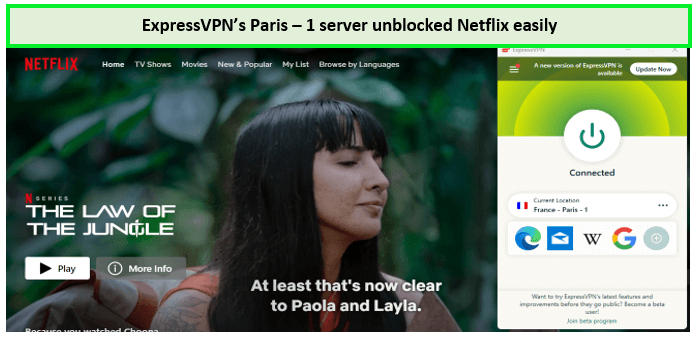
ExpressVPN is the best VPN with France servers for Netflix France due to its fast streaming speed and high-speed servers!
ExpressVPN excels in security features, with best-in-class encryption standards. It employs AES-256 encryption, kill switch, and Split Tunneling, ensuring your online activities remain private and secure. Additionally, its Server Obfuscation and TrustedServer technology mean your data is never stored, offering peace of mind for privacy-conscious users in France.
The provider has its headquarters in the British Virgin Islands and has an excellent reputation for protecting user privacy. Since it is located in a country far from 5 Eyes, 9 Eyes & 14 Eyes, it is France’s safest provider for privacy-conscious users.
To test how anonymous this provider really is, we ran a couple of DNS and IP address leaks while connected to ExpressVPN. We weren’t surprised that ExpressVPN surpassed each test with flying colors. In the below screenshot, you can see that our French IP address is completely hidden.
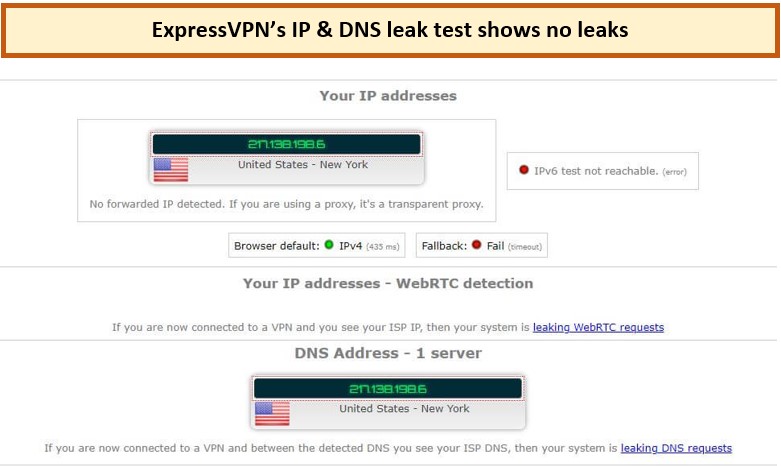
ExpressVPN does not leak your IP or DNS information, protecting your online security.
ExpressVPN streaming speeds are particularly noteworthy, enabling seamless viewing of HD and 4K content without buffering issues. On conducting the ExpressVPN Speed Test in France, we witnessed an incredibly fast performance with a download speed of 89.42 Mbps and an upload speed of 84.64 Mbps on a 100 Mbps connection.
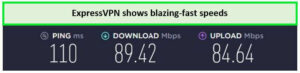
ExpressVPN offers lightning-fast speeds for streaming on French servers.
ExpressVPN has recently upgraded the system, allowing up to 8 device connections simultaneously. You can download Android, Windows, Linux, macOS, and iOS apps for personal computers, laptops, tablets, and smartphones with this VPN.
ExpressVPN pricing in France starts at EUR6.26/mo (US$ 6.67/mo) - Save up to 49% with exclusive 1-year plans + 3 months free, making it an affordable choice for those seeking a premium VPN experience. While it’s not the cheapest option on the market, its value in terms of speed, security, and reliability justifies the investment.
ExpressVPN offers a 30-day money-back guarantee if it doesn’t perform. Moreover, you get a 7-day ExpressVPN free trial in France to test the features before purchasing the subscription. For more details regarding the trial, you can read the details in best VPN Free trial in France.
To learn more about this service, see our ExpressVPN review in France.
Exclusive Deal
VPNRanks readers can enjoy exclusive VPN deals! EUR 6.26/mo (US$ 6.67/mo) - Save up to 49% with exclusive 1-year plans + 3 months free
- Works well in France and for unblocking French content when traveling.
- The fastest connections are ideal for HD streaming and downloads.
- Excellent security and privacy
- Most major streaming sites, including Netflix France, ZDF, Canal+, and France, are unblocked
- More costly than competitors
- Power users may be frustrated by the lack of sophisticated functionality.
2. Surfshark – Budget-Friendly VPN for France

- 3,200+ servers in 100 countries
- RAM-only servers (no hard disks)
- Unlimited simultaneous connections
- Unblocks Netflix and More
- 24/7 Customer Service
Surfshark is the most budget-friendly for France, especially for those seeking a balance between affordability and high-quality service. It’s well-known for its impressive server network and excellent streaming speeds, making it a top choice for accessing various geo-restricted streaming platforms without breaking the bank.
Surfshark’s appeal in France is bolstered by its extensive server network, which includes over 3200+ servers across 100 countries, including 3 server locations in France at Paris, Bordeaux, and Marseille. This network ensures that users in France can enjoy stable and fast connections, which is essential for both streaming and security.
If you are abroad and miss your home content, Surfshark is the best VPN for France TV that ensures seamless access and enhanced streaming experience. You can explore international content libraries without experiencing lag or buffering. It adeptly bypasses geo-restrictions, granting access to a wide array of streaming services like Netflix, Amazon Prime, BT Sports, UKTV, BBC iPlayer, and Disney+.
We have connected to the Surfshark’s Paris server, and it unblocked Disney Plus within a few seconds:
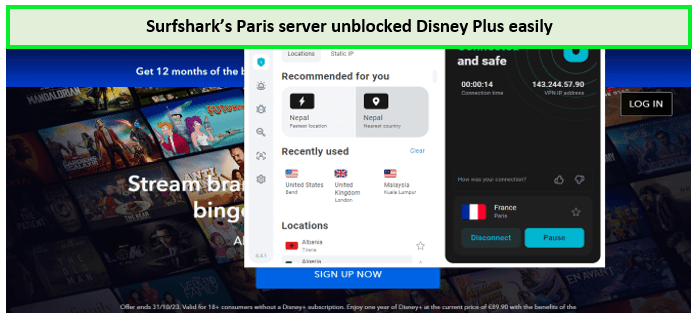
Surfshark is the best and most affordable VPN to unblock Disney Plus with France servers!
Surfshark doesn’t compromise on security despite its budget-friendly pricing. It offers AES-256-GCM encryption, ensuring that your online activities are shielded from prying eyes. Additionally, features like a kill switch, Multi-Hop, WhiteLister, and CleanWeb (ad-blocking) enhance your online privacy and security, making it a trustworthy choice for users in France.
The provider has its jurisdiction in the British Virgin Islands, a country that lies outside of the 14 Eyes and thus has a strict no-logs policy. We tested Surfshark by running a couple of DNS and IP address leak tests, as you can witness from one of our DNS leak test results, which ensures that Surfshark doesn’t leak your IP address.
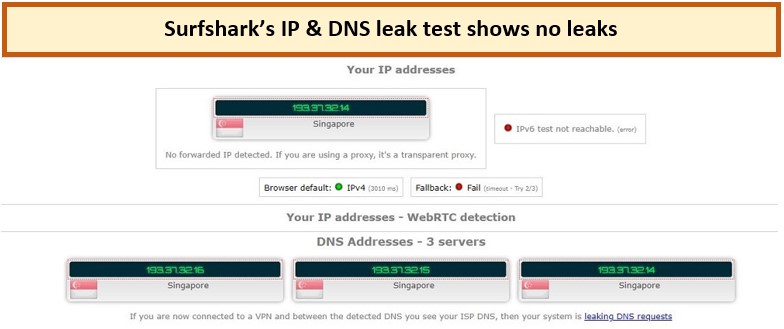
Surfshark comes with IP and DNS leak protection.
The VPN’s ability to provide consistent streaming speeds is a significant advantage, allowing users to enjoy their favorite shows and movies in high definition without interruptions. In our Surfshark speed test in France it provides a download speed of 88.48 Mbps and an upload speed of 79.42 on a 100 Mbps connection.
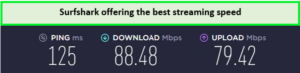
Surfshark offers reliable, fast speeds for streaming on French servers.
Perhaps the feature distinguishing Surfshark from the rest of the providers is its ability to support unlimited simultaneous connections. This means you can watch your favorite shows on any device, like Android phones, iPhones, iPad, Roku, PS4, Xbox, and many other devices.
Surfshark stands out for its competitive pricing structure, offering one of the best value-for-money VPN services in the market. Its pricing starts at EUR2.34/mo (US$ 2.49/mo) - Save up to 77% with exclusive 2-year plan + 30-day money-back guarantee, making it an accessible option for those who need a reliable VPN service without a hefty price tag.
You also have a 30-day money-back guarantee if it doesn’t perform. Plus, a 7-day Surfshark free trial in France to test the services on your smartphone.
Check out this Surfshark review in France for more details.
Exclusive Deal
VPNRanks readers can enjoy exclusive VPN deals! EUR 2.34/mo (US$ 2.49/mo) - Save up to 77% with exclusive 2-year plan + 30-day money-back guarantee
- Quick for smooth streaming
- Excellent unblocking ability
- No logs are kept.
- Security and privacy are given top priority.
- You may connect as many devices as you like.
- Smaller network than some of its competitors
- On rare occasions, the server is sluggish.
3. NordVPN – Secure VPN for France

- 6000 servers in 60 countries
- WireGuard protocol (NordLynx)
- 6 Simultaneous Connection
- DoubleVPN
- 24/7/365 Live Chat Support
- 30 Days Money Back Guarantee
NordVPN is highly recommended as the most secure VPN for France, particularly for those prioritizing security without compromising performance. Renowned for its robust server network and impressive streaming capabilities, NordVPN stands out as a reliable solution for accessing geo-restricted content while ensuring top-notch security.
NordVPN has an extensive server network, boasting over 6000+ servers in 61 countries, including 230+ servers in Paris and Marseille in France. This vast network facilitates stable and high-speed connections, crucial for streaming and general internet usage.
For users in France who are avid streamers but also conscious of online security, NordVPN offers the perfect balance. If you’re abroad and miss your home channels, NordVPN is the best VPN for TF1 France to gain access and enjoy seamless streaming.
It efficiently bypasses geo-blocks, providing access to a wide array of streaming services like ITV, YouTube TV US, Spotify, ESPN+, Hulu, Amazon Prime Video and US Netflix in France. NordVPN ensures that your streaming experience is not only smooth but also secure, thanks to its advanced security features.
We got connected to NordVPN’s Paris server and experienced no trouble while watching Amazon Prime content:
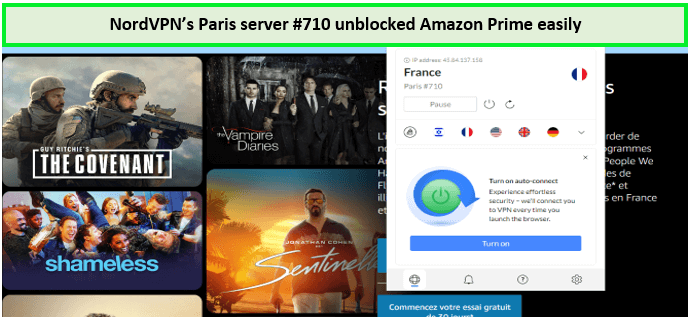
We easily unlocked the French Amazon library using NordVPN’s servers in France.
NordVPN is a Panama-based VPN service. It employs features like Double VPN, Onion Over VPN, Internet Kill Switch, CyberSec (malware and ad blocker), and a strict no-logs policy to enhance your security and privacy further, making it a trusted choice for users in France who value their online safety.
Moreover, it has military-grade AES-256 encryption, providing a secure split-tunneling feature and NordLynx protocol for your online activities. NordVPN takes the privacy of servers very seriously. When we tested the NordVPN connection for any potential DNS or IP leak, we knew we wouldn’t find any, but we went through with it for the sake of this review.
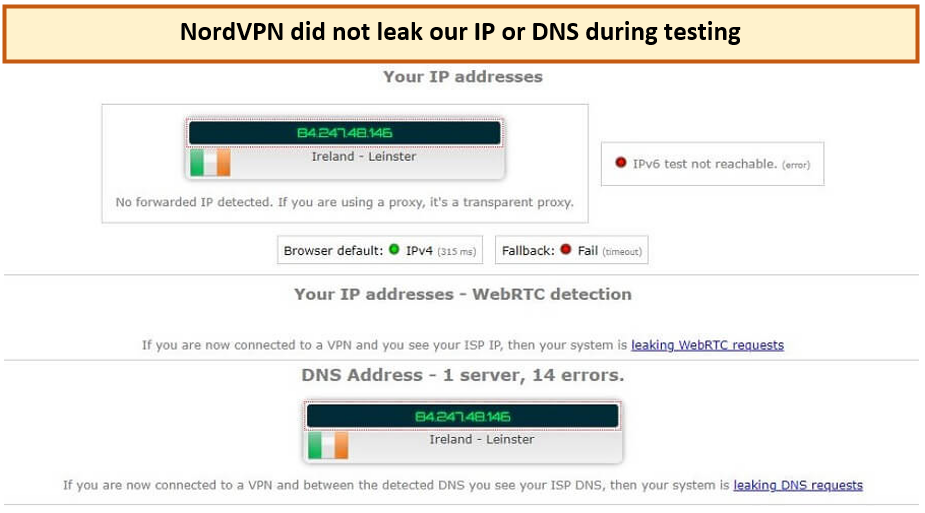
NordVPN protects your IP and DNS against potential leaks during connection.
The VPN’s performance in streaming is exceptional, allowing users to enjoy buffer-free viewing of their favorite content in HD and 4K. We tested its servers personally and got amazingly fast results overall. Our NordVPN speed test in France shows that it gives a download speed of 83.82 Mbps and an upload speed of 44.64 Mbps on a 100 Mbps connection.
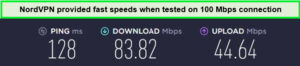
France VPN services provide fast speeds when tested on 100 Mbps.
You can easily configure NordVPN on your commonly used devices, such as Windows, macOS, iOS, Android, Router, Linux, PS4, Xbox, Amazon Fire Stick, and many others. You can connect up to 6 devices simultaneously with NordVPN.
NordVPN offers its premium services at competitive prices, catering to various user needs. Available for only EUR3.75/mo (US$ 3.99/mo) - Save up to 63% with exclusive 2-year plan + 3 months free for a friend representing excellent value for a VPN that excels in both security and performance.
All plans come with a 30-day money-back guarantee. Moreover, you get a 7-day NordVPN free trial in France to test the features.
Read the NordVPN review in France for more details.
Exclusive Deal
VPNRanks readers can enjoy exclusive VPN deals! EUR 2.34/mo (US$ 2.49/mo) - Save up to 77% with exclusive 2-year plan + 30-day money-back guarantee
- Over 180 servers in France, ideal for unblocking geo-restricted material One of the fastest VPNs on the market
- Trusted service with over a decade of industry experience
- Best VPN for France for Android
- The default security settings and privacy concerns are above average.
- No logs are kept.
- On mobile, it collects advertisement IDs.
4. IPVanish – Reliable VPN for France

- PPTP, L2TP/IPSec & OpenVPN protocols
- 40,000+ IPs & 1000+ servers in 60+ countries
- 10 Multi logins
- 7-Day Money Back Guarantee
- 256bit AES encryption
IPVanish is highly recommended as the fastest VPN for France, catering to users who prioritize speed for streaming, gaming, and general browsing. Renowned for its lightning-fast server network and exceptional performance, IPVanish is a top choice for those seeking quick access to geo-restricted content and a seamless online experience.
IPVanish’s standout feature in France is its high-speed server network, comprising over 2200+ servers in more than 75+ countries worldwide, including 39 French servers located in Paris, Marseille, and Bordeaux.
This robust network guarantees ultra-fast connections, essential for activities that demand high bandwidth, like HD streaming, online gaming, and large file downloads. Gamers will appreciate the low latency and fast ping times, enhancing their gaming sessions.
It effortlessly overcomes geo-restrictions, allowing access to a wide array of streaming services such as Netflix, CCTN, NHK, UKTV, CBC, MBC, NBC Live, Disney+, Hulu, and Sky Go in France, and also gets access to French streaming channels such as RTBF, TV5Monde, and France24. With IPVanish, users can enjoy their favorite content and games without lag or delay.
IPVanish also provides robust security features. It employs AES-256 encryption, ensuring your online activities are secure and private. Features like a kill switch, zero traffic logs policy, and IP address masking add an extra layer of security, making IPVanish a safe choice for users in France who don’t want to compromise on speed or security.
We tested the service for DNS or IP leaks and found that IPVanish completely hides your online presence.
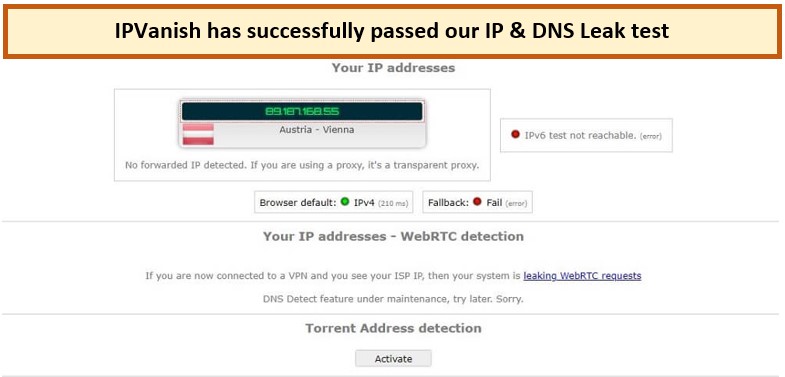
IPVanish offers IP and DNS leak protection in France.
IPVanish’s servers are optimized to provide the fastest possible speeds, ensuring a smooth and interruption-free online experience. Our IPVanish speed test in France shows a download speed of 75.12 Mbps and an upload speed of 39.48 Mbps on a 100 Mbps connection.
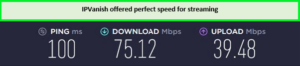
IPvanish offers good speeds for streaming on French servers.
IPVanish’s premium service is affordable at $2.40/month, making it a valuable choice for those seeking the fastest VPN experience without a significant investment. All IPVanish packages have a 30-day money-back policy and offer unlimited simultaneous connections.
Additionally, you get a 7-day IPVanish free trial in France to explore the features. Please visit the IPVanish review France for further details.
Exclusive Deal
VPNRanks readers can enjoy exclusive VPN deals! EUR 2.81/mo (US$ 2.99/mo) - Get 3 Months Extra + Save 77% on 2-year plan
- Due to its remote-friendly applications, it is preferred by Kodi and Firestick TV.
- During testing, impressive 4K streaming rates were achieved.
- Best VPN France for iPhone
- Over 60 countries are supported, making it ideal for unblocking geo-restricted material.
- Strong encryption ensures app security.
- Customer service might be a touch sluggish at times.
- Difficulties in unblocking major streaming platforms
5. CyberGhost – User-friendly VPN for France

- 11651 Servers Servers in 100 Countries
- 7 Simultaneous Logins
- 45 Days Money-Back Guarantee
- Strict No Logs Policy
- 24/7 Live Chat Support
- Strong Protocols & Encryption
CyberGhost is one of the top user-friendly VPN for France, ideal for both VPN novices and beginners. Known for its intuitive interface and robust server network, CyberGhost provides easy access to geo-restricted streaming content, all while ensuring a secure and private browsing experience.
CyberGhost offers a vast network of servers, featuring over 11651+ servers in 100 countries, including 687 servers located in Paris and Strasbourg within France. This extensive network ensures reliable and fast connections, essential for seamless streaming and efficient internet use.
For French users seeking a straightforward streaming experience, CyberGhost is an excellent choice. It adeptly navigates geo-restrictions, granting access to a wide range of streaming services like Netflix US and Fox-Sports, Euro-Sports, Nine, ABC, and Sling TV, BBC iPlayer, Disney+, and HBO Max in France.
CyberGhost combines this streaming capability with user-friendly applications, making it easy for anyone to connect and stream their preferred content. You can also enjoy local French stream content such as TF1 Series Films, 6ter, RMC Discovery, France Info, and IDF1.
CyberGhost easily bypassed the geo-restrictions imposed on Amazon Prime Video by connecting to the Paris server!
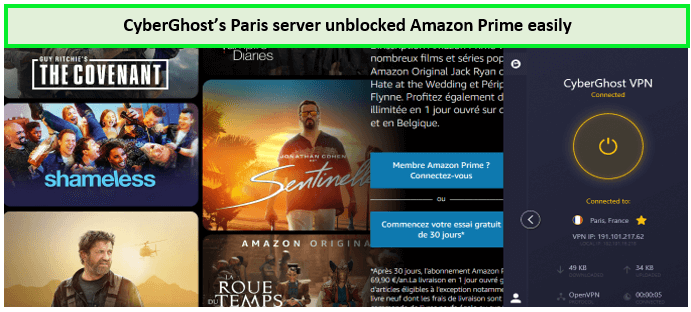
CyberGhost unblocked Amazon Prime within seconds!
Despite CyberGhost focus on user-friendliness, This Romania-based VPN service does not compromise on security. It offers top-tier AES-256 encryption, ensuring your online activities are protected from online threats. Features like an automatic kill switch, ad-blocking, and a strict no-logs policy further enhance your online privacy and security, making CyberGhost a reliable choice for France users.
For French users concerned about domestic surveillance, CyberGhost can be quite beneficial. As per the DNS and IP leak test results, our device wasn’t leaking any of those while connected to the CyberGhost network.
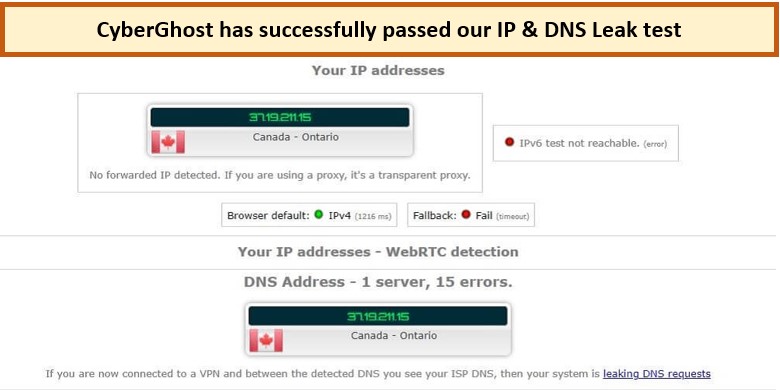
CyberGhost passed our leak test and it did not reveal our IP or DNS information.
The VPN’s streaming speed is noteworthy, enabling users to enjoy their favorite shows and movies without lag or buffering. Our CyberGhost speed test in France result is pretty impressive on 100 Mbps connection it provides a 70.56 Mbps download speed and an upload speed of 69.23 Mbps.
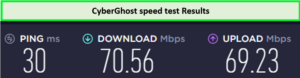
Enjoy decent streaming speed using the best France server.
In addition to all the features and services, you also get up to 7 simultaneous connections. The provider is also compatible with Windows, macOS, Android TV, Firestick, Linux, and Smart TVs.
CyberGhost is available at a price of EUR1.91/mo (US$ 2.03/mo) - Save up to 84% with exclusive 2-year plans + 4 months free with 45-day money-back policy, making it an accessible option for those seeking a high-quality, user-friendly VPN experience without a high cost.
Moreover, you can get a 7-day CyberGhost free trial in France to try the features beforehand. You can view more additional information about this provider from our CyberGhost review France.
Exclusive Deal
VPNRanks readers can enjoy exclusive VPN deals! EUR 1.91/mo (US$ 2.03/mo) - Save up to 84% with exclusive 2-year plans + 4 months free
- Over 320 servers are operated in France, making it ideal for viewing local content while traveling.
- Apps are incredibly simple to install and operate, as seen by their server speeds throughout testing.
- It does not function in China.
- Control over sophisticated features is limited.
6. Private Internet Access – Most Suitable VPN for Torrenting for France

- Does Not Keep Any Logs
- 24/7 Customer Support
- 7 Days Money Back Guarantee
- 35000+ Servers in 84 Countries
- SOCKS 5 proxy
- Compatible with Leading Devices
Private Internet Access (PIA) takes the lead as the best torrenting VPN for France, catering to users who prioritize P2P file-sharing capabilities alongside robust privacy and security features. Known for its extensive server network and impressive speeds, PIA stands out as a top choice for both torrenting enthusiasts and those seeking access to geo-restricted streaming content.
PIA’s strength in the French market lies in its vast server network, with over 35000+ servers in 84 countries globally, including 147 exclusive French servers. This extensive network ensures reliable and high-speed connections, which are crucial for efficient torrenting and smooth streaming experiences.
For users in France who are avid torrents or streaming enthusiasts, PIA offers an unmatched experience. It provides seamless access to popular torrenting platforms and bypasses geo-restrictions on streaming services like Netflix, HBO, Vudu, Yupptv US, Amazon Prime Video, and BBC iPlayer.
With PIA, users can enjoy a vast array of content worldwide without worrying about slow download speeds or buffering. You can access all local French channels like France24, French Guiana, French Polynesia, teleGrenoble Isère, and Euronews overseas for streaming without any trouble using these servers.
Netflix was unblocked in 1-2 minutes, when we tested to the PIA’s France server. The content streaming was smooth, and we faced no lag while accessing the platform.
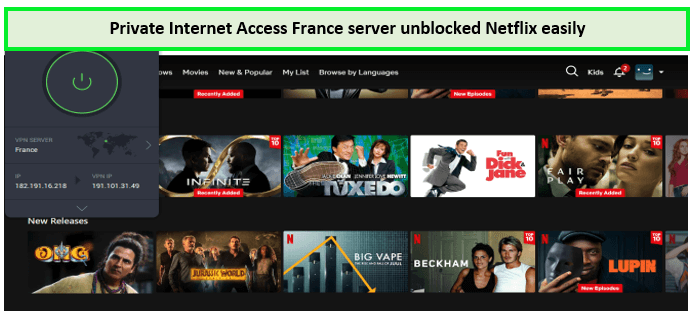
Netflix was unblocked in 2 minutes using the France server of the best France VPN!
Security is a key concern for torrent users, and PIA addresses this with robust security features. It employs military-grade AES-256 encryption to protect your online activities. Additional features like a kill switch, MACE (ad-blocker), and a strict no-logs policy ensure that your torrenting activities remain private and secure, making PIA a trustworthy choice for privacy-conscious users in France.
Even though the headquarters is located in the USA, the provider’s complete zero-log policy will keep you safe from every form of government surveillance and privacy violations. You can tell how efficient PIA’s DNS and IPv6 protection is by looking at the result of our recent DNS and IP leak test.
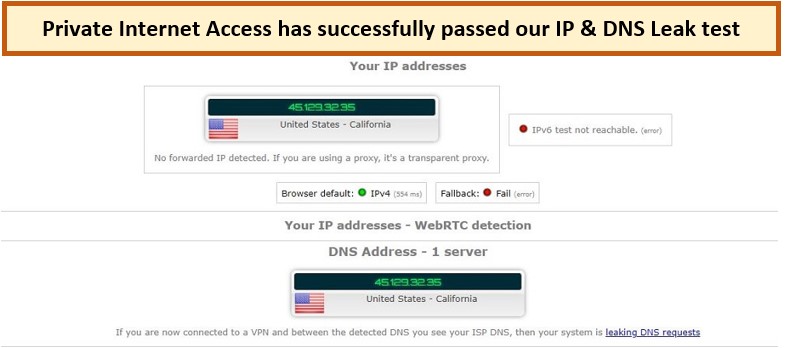
PIA is perfectly capable of hiding your IP and DNS information.
PIA’s servers are optimized for speed, making it easy to download and upload large files quickly and securely. Our Private Internet Access speed test in France on a 100 Mbps connection gives a reliable download speed of 65.78 Mbps and an upload speed of 57.16 Mbps without any buffering or interruption.
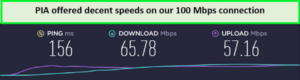
Private Internet offers Adequate speeds on French servers.
You can also set up Private Internet Access on various platforms such as macOS, Windows, Android, iOS, Android TV box, Firestick, Chromecast, Roku, etc. Moreover, you can connect up to 10 devices simultaneously with Private Internet Access.
PIA offers its high-quality services at only EUR1.98/mo (US$ 2.11/mo) , making it an attractive option for budget-conscious users in France. It is a reliable option for those seeking a top-tier VPN for torrenting and streaming.
Also, with the 30-day money-back policy and PIA free trial in France, you can use the services without worries.
Read our PIA VPN review France for more details.
Exclusive Deal
VPNRanks readers can enjoy exclusive VPN deals! EUR 1.98/mo (US$ 2.11/mo)
- Servers are accessible in over 80 countries, including France.
- Best France VPN with good, reliable speeds; you can broadcast without latency.
- Use it on up to ten devices at the same time.
- A strict no-logs policy keeps you anonymous.
- It does not function in China.
- If you choose a single month, it is rather pricey.
How We Tested and Selected Best VPN for France: Testing Methodology
To provide you with the 6 Top best VPNs in France, we had to judge 150+ VPN services based on the industry standards. Here are the factors that we tested each VPN against:
- Servers in France: To access French content abroad by lifting government censorship, you need the best VPN in France. For this reason, we searched and shortlisted VPNs having French servers to achieve high-speed connections and great accessibility in the homeland.
- Encryption: The recommended VPNs for France should offer state-of-the-art, most advanced, and secure encryption techniques and protocols. Best VPN with 256-bit Encryption in France and OpenVPN services in France give the users the best secure streaming experience, and these safeguard your data against the country’s Military Planning Law surveillance.
- Privacy: Only the best VPN in France, with a strict zero-log policy and an effective kill switch, can guarantee your online freedom and protection. They won’t offer law enforcement anything when they don’t have your connection logs and online activity records.
- Speed: One of the most common purposes of the VPN is to grant access to geo-blocked streaming services at lightning-fast speed for Ultra HD and 4K Ultra HD picture quality. Speed is a top priority in a France VPN. Only our best VPNs for France can help you get those results by not compromising on network speed.
- Money-back guarantee: You can opt to quit the service if it is not performing up to your standards rather than just getting stuck with it until the remaining subscription period is over. The best VPNs for France should offer at least a 30-day or more refund window.
- Compatibility: The best VPN for France should allow you to protect popular platforms such as Mac, Windows, Android, iOS, and Linux, so you can stream, torrent, and play games simultaneously.
Why Do You Need a VPN in France?
You need a VPN for complete internet freedom and online privacy in France. It also helps you bypass geo-restrictions and avoid government online surveillance in France. VPNs are not just about privacy. From securing public Wi-Fi connections to bypassing censorship and accessing region-specific content, the uses of VPNs are vast and varied.
We discuss practical scenarios where VPNs can be your digital ally, providing security and freedom in your online activities. You need a French VPN for the following reasons:
- Hide Your Data From Government Surveillance: France is a part of the 9-Eyes Alliance. Therefore, it can record and share your data with third parties. Moreover, online surveillance in France has increased since 2015, increasing tracking of citizen activities. With a VPN, you get data encryption making it impossible to be accessed by unauthorized individuals on the French network.
- Avoid ISP throttling: ISPs track user activities to manage the connections. Whenever it detects any torrenting or P2P activities, it throttles speeds. But if you use a VPN, all your activities will be hidden from your ISPs and you can enjoy unrestricted torrenting.
- Access Blocked Websites: Websites supporting racial discrimination, terrorism, political agendas, or other harmful content are blocked by the French government. But in some cases, certain safe websites also get banned and can’t be directly accessed. Therefore, you need a VPN to change your IP location and access the content after bypassing the restrictions.
- Unblock Popular Streaming Platforms: Although France is good for streaming activities, certain libraries are still unavailable in the country. You can easily unblock these libraries using a streaming VPN.
- Lift Torrenting Restrictions: Despite internet freedom, France has strict policies for piracy. Particularly, the French government prohibits torrenting activities in the region. Therefore, you must use a VPN to perform P2P activity without any fear.
How do I Setup a VPN in France?
Whether you are an expert looking for guidelines or a beginner with no configuration experience, we have got you covered. We bring the simple steps to set up a VPN in France.
Here’s a quick guide to setting up a VPN for France:
- Download a VPN: We suggest ExpressVPN as the best VPN to use in France, offering lightning-fast dedicated servers in France with complete anonymity and high-class security. After registering, download and install the app on your smartphone.
- Connect To an Available Server: After installing and signing in, the app displays server locations. Find and connect to a French server.
- Browse Worry-free: Geo-blocked material should be accessible via a French server. You can get the French Netflix library by going to Netflix.
French content you can watch with a VPN
France has a wide range of entertainment for streaming. Whether you enjoy quality films, sports, or simply relaxing with Netflix after work, there’s something for everyone.
Here’s what you can watch when you connect to a France VPN:
- You can stream Netflix France. Popular TV shows like High Heat, Rick and Morty, and Manifest are accessible, as are a plethora of outstanding movies like Gran Torino, The Fall, Hostel, and many more.
- In France, Disney+ is accessible. With a French IP address, you may access the whole Disney+ collection. see shows like Grey’s Anatomy and Prison Break, or see films like Jojo Rabbit and Prey.
- Take advantage of Amazon Prime Video. French Amazon Prime Video is great for watching movies like The Intouchables, Les Misérables, Black Venus, and others.
- Dive into the world of French events. The French Open, Tour de France, Ligue 1, and the Cannes Film Festival are all widely loved events, and France provides various streaming alternatives for these and many more events.
VPNs To Avoid for France
Sometimes, VPNs have been caught giving user data to authorities or illegally mining browsing history to sell to third-party advertisers. Here are some VPNs to avoid in France:
- Hide My Ass
HideMyAss is a UK-based free VPN that handed over the login data of a user accused of hacking Sony images after cooperating with the US and UK authorities. Although it claims to store no user data, this event raises questions about its policy. For more details, check our HideMyAss review France.
- Hola
Hola is a browser plugin to bypass geo-restrictions headquartered in Israel. It has been reported collecting and selling user data at several events. Moreover, it constantly monitors user activities and browsing history, compromising their privacy on the network. Find more information in our Hola review France.
- Betternet
Betternet is a free VPN, which appears to be a decent option, allowing fast speeds and multiple simultaneous connections. Despite being a free VPN, it earns money by running ads to maintain the rent and support team. You will most likely experience annoying ads, irrelevant suggestions, and app recommendations based on your cookies. Check complete details in our Betternet review France.
Is there a free VPN for France?
You may find a free VPN for France on Google or Reddit search, but we don’t recommend this practice. Although free VPNs charge nothing, they don’t offer free services. Free VPN service providers run businesses and must make money to maintain their services.
When obtaining a French IP address, free VPNs may not be the most secure option. VPNs like Windscribe, on the other hand, are one of the finest free VPNs available. Windscribe is your best choice for obtaining a free French IP address.
Here are some of the drawbacks of using free VPNs:
- Security risks: Free VPNs are sometimes less secure than commercial VPNs. They may utilize out-of-date techniques for encryption or have security flaws that expose your data.
- Concerns about privacy: Some free VPNs monitor your surfing behavior and sell it to other parties. This might jeopardize your privacy and security.
- Data Restrictions: Some free VPNs have data limitations, limiting how much data you can use per day or month. This might be an issue if you often use your VPN.
- Features that are restricted: Free VPNs sometimes provide fewer functionalities than premium VPNs. They may not, for example, provide streaming services or have servers in as many regions.
Geo-Restricted Platforms to Unblock with the Best VPN for France
Here are some of the geo-restricted platforms you can unblock with the best VPN for France:
| Stan in France |
| Vudu in France |
| NBC in France |
| JioCinema in France |
| ITV in France |
FAQs: Best VPN for France
Is it legal to use a VPN in France?
Yes, VPNs are totally legal in France, as they are in most other countries. Authorities will not prosecute people who just use VPN technology to access the web from their devices.
Is there a free trial for VPN in France?
Yes. On iOS and Android, you can sign up for a 7-day free trial. Furthermore, ExpressVPN has the most liberal money-back guarantee of any VPN. You have 30 days after purchasing this best VPN Free trial in France to obtain a refund.
Which VPN has server address in France?
ExpressVPN is the finest VPN for obtaining a French IP address, with next-generation 10Gbps servers and server locations in 94 countries worldwide. Find a French server location or allow ExpressVPN’s Smart Location function to find the optimal server for your network for you.
Can I access torrents with a VPN in France?
Yes, you can access torrents with a VPN in France. Thanks to its P2P VPN free optimized servers, ExpressVPN is the finest VPN for torrenting in France with an ExpressVPN free trial. Despite the fact that it is a premium VPN, there is a risk-free 30-day money-back guarantee that you may utilize to enjoy free torrent downloading for a month.
Which VPN Works in France?
ExpressVPN is my recommendation, however, NordVPN and Surfshark also work. Simply connect to a VPN server in France, browse Netflix, and the full library should be unblocked. If you’re experiencing problems and the VPN isn’t functioning, try a different server in France.
What is the best VPN option for Android in France?
ExpressVPN is the best VPN service for Android users in France due to its versatile features, such as advanced leak protection, split tunneling, network protection (kill switch), and quick access to your favorite streaming service apps. ExpressVPN’s Android application is available on Android 11, 10, Pie, Oreo, Nougat, Marshmallow & Lollipop.
If you are interested in VPNs for Android, then don’t forget to check out our Best VPNs for Android in France article for various ExpressVPN alternatives.
Can ISP in France see that I am using a VPN?
Yes, your ISP may see the IP address of your VPN server. However, it is unable to see anything else. This means that your ISP can probably know you’re using a VPN, but it can’t follow your online behavior, view the sites you visit, download files, or do anything else on the internet.
Can I watch French TV with a VPN?
Yes, you can watch French TV wth a VPN. We recommend using ExpressVPN. It’s global network of secure servers is optimized for streaming so you can enjoy smooth, buffer-free video streaming. Plus, ExpressVPN defeats ISP throttling so that you can enjoy the fastest possible speeds.
Wrapping Up!
As we move towards an increasingly connected world, the role of VPNs in ensuring online privacy and security becomes more crucial. Whether you are living in or visiting France, you deserve complete online internet freedom, and for that, you need to use the best VPN for France. No matter where you travel, you can access everything you want without worrying about geo-restrictions or internet spying.
If you want to gain a French IP address, you’ll need to use a VPN, which has servers in France, and ExpressVPN is one of them with fast servers in France. However, before you pay for a VPN, you should assess its level of security, connection speeds, and ability to circumvent geo-blocks – we recommend ExpressVPN. This best VPN for France ensures that your internet traffic is safe and secure and that you may easily view French material.
To learn more about how to access geo-restricted content and stay up to date with the latest updates in the streaming world, visit StreamingRant.
Stay informed and stay protected with the best VPN for France.