I’ve ventured to discover the best free VPN for Samsung Smart TV in Germany to boost the streaming experience and enhance privacy. The inherent challenge lies in Samsung Smart TVs’ Tizen OS, which does not allow for the direct installation of VPN applications.
Acknowledging the privacy risks and bandwidth limitations of free VPNs, it’s crucial to approach this matter cautiously. I’ve compiled a list of the Best free VPN for Germany that stand out for their reliability. This endeavor involved testing over 60 VPNs to assess their compatibility and effectiveness with Samsung Smart TVs.
I also highlight the importance of a reliable VPN to sidestep the limitations and risks associated with free services. My top recommendation, ExpressVPN, promises to transform your Samsung Smart TV experience. Although not free, it offers a 30-day money-back guarantee, making it worth considering.
Quick Overview: Best Free VPN For Samsung Smart TV In Germany [March 2024]
Here is a quick overview of the best free VPN for Samsung Smart TVs in Germany that ensure seamless streaming, robust privacy, and compatibility with your device:
ExpressVPN – The Best Free Trial VPN for Samsung Smart TV in Germany
Offers blazing-fast speeds and an easy-to-use interface to set up on Samsung Smart TVs with the assurance of a 30-day money-back guarantee serving as a free trial.
➔ Get ExpressVPN EUR 6.26/mo (US$ 6.67/mo) - Save up to 49% with exclusive 1-year plans + 3 months free!
Windscibe – Recommended Free VPN for Samsung Smart TV in Germany
Provides a decent monthly data allowance of 10GB and free servers in 11 countries. Offers manual setup for use with Samsung Smart TVs.
ProtonVPN – Best Free VPN for Samsung Smart TV in Germany with Unlimited Bandwidth
With unlimited bandwidth and 5 free servers, it is the ultimate choice for uninterrupted, limitless streaming on Samsung Smart TV.
Why use a Free VPN for Samsung Smart TV in Germany?
Using a free VPN for your Samsung Smart TV is perfect for bypassing ISP speed restrictions, maintaining confidentiality in viewing choices, or accessing content normally out of reach due to geographical blocks.
Integrating a VPN with your smart TV better your viewing experience by overcoming these hurdles.
- Bypass Geo-Restrictions: Unlock streaming platforms like Netflix, Hulu, Disney+, and more, along with region-specific apps in the TV’s app store that may not be available in your area.
- Avoid Bandwidth Throttling: ISPs can throttle your internet speed based on your activity. A VPN encrypts your traffic, preventing ISPs from slowing down your streaming speeds due to the content you access.
- Enhance Privacy and Security: With smart TV vulnerabilities up by 15%, a VPN is essential for security. A free VPN for Samsung Smart TV encrypts your data, protecting against third-party intrusions.
Best Free VPN for Samsung Smart TV in Germany [Detail Analysis – 2024]
In my quest for the best free VPN for Samsung Smart TV in Germany, I’ve tested over 60 VPNs and singled out the top three free options.
In my comprehensive analysis, I’ll share insights into how my recommended VPN for Samsung TV free services can enhance your streaming experience without compromising security or privacy.
1. ExpressVPN – Best Free Trial VPN for Samsung Smart TV in Germany

- Ultra-fast servers in 105 Countries
- Excellent unblocking capability for Netflix, Hulu & more
- Best-in-class encryption trusted security, and advanced protection features that block ads, trackers, and harmful sites.
- Connect up to 8 devices simultaneously
- 24/7 customer support through live chat
- 30-day money-back guarantee
ExpressVPN is the best free trial VPN for Samsung Smart TV in Germany with the assurance of a 30-day money-back guarantee. Its easy-to-use interface and dedicated app for routers make it a breeze to set up on Samsung Smart TVs.
Server Network & Streaming Performance:
With a massive network of servers in 105 different countries globally, it allows you to access content on Samsung Smart TVs around the globe.
While evaluating ExpressVPN, I tested its unblocking capabilities by accessing Hotstar on Samsung TV in Germany connected to India via the Singapore server. I established a seamless connection within a short period, granting me unrestricted access to all available content.
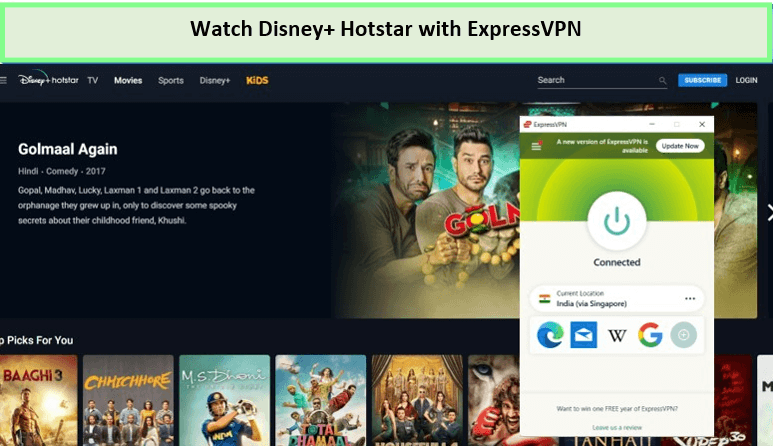
I used ExpressVPN on Samsung Smart TV to unblock Hotstar streaming!
Speed test:
ExpressVPN is designed to provide lightning-fast streaming in 4K HDR, enabling users to securely access websites and watch videos from any location while concealing their real IP address.
Over a 100 Mbps connection, the ExpressVPN speed test in Germany has an impressive upload speed of 84.66 Mbps and a download speed of 89.38 Mbps. The connection was stable and did not experience any buffering, providing an excellent streaming experience.
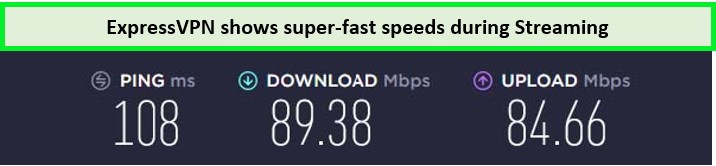
ExpressVPN performed well in my speed test, offering fast speed.
Security & Encryption:
ExpressVPN prioritizes user security and privacy in its services. It implements advanced military-grade 256-bit AES encryption, which provides a highly secure tunnel for all data transmitted through the VPN.
With ExpressVPN Kill Switch in Germany preventing data leaks, your data remains secure from unauthorized access. The no-logs policy ensures no records of online activities are stored.
Compatibility with Samsung Smart TV:
ExpressVPN does not directly install on Samsung Smart TVs, as these devices do not natively support VPN software. However, it offers a straightforward solution through its MediaStreamer service to set up ExpressVPN on Samsung Smart TV in Germany.
Free Trials & Pricing Plans:
ExpressVPN offers a premium service starting at EUR 6.26/mo (US$ 6.67/mo) - Save up to 49% with exclusive 1-year plans + 3 months free, with significant discounts on longer-term plans. While there is no traditional ExpressVPN free trial in Germany, new users can use a 30-day money-back guarantee to test their full-featured VPN service.
For more information, read my ExpressVPN review in Germany.
- Wide server diversity globally.
- Effectively unblocks all the geo-restricted content.
- Ultra-fast streaming speeds.
- High-level security with military-grade encryption.
- Strict no-logs privacy policy.
- MediaStreamer for using Samsung Smart TV VPN free trial.
- A bit more expensive than other VPNs in payment plans.
2. Windscibe – Recommended Free VPN for Samsung Smart TV in Germany

- Strong Encryption Protocols
- Free Version Offered
- 3 Days Money Back Guarantee
- 50 Server Locations (11 in Free Version)
- Accepts Bitcoin Payments
- Offers OpenVPN encryption
Windscribe is the recommended VPN for Samsung Smart TV free to download. It provides a 10GB monthly data allowance and boasts robust privacy features. The setup might require a few extra steps, but the effort is worth the access and protection you get.
Servers Network & Streaming Performance:
It offers 11 servers on its free version. These include the United States, the United Kingdom, Canada, France, Germany, the Netherlands, Switzerland, Hong Kong, Turkey, Norway, and Romania.
Among the services, it supports platforms such as Netflix, Hulu, Twitch TV, Sling TV, and BBC iPlayer. I checked its unblocking capability, connecting Windscribe with Netflix in Germany on my Samsung Smart TV via the Japan server.
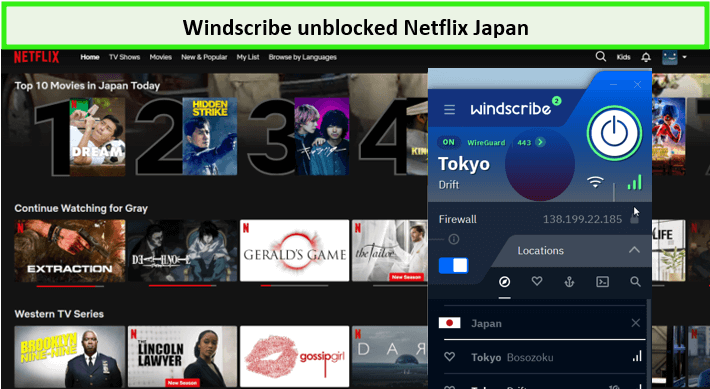
I had a lag-free streaming experience when connected to Windscribe’s Tokyo server.
Speed test:
I then went into the Windscribe speed test in Germany. At a 100 Mbps connection, I had an upload speed of 88.27 Mbps and a download speed of 84.8 Mbps.
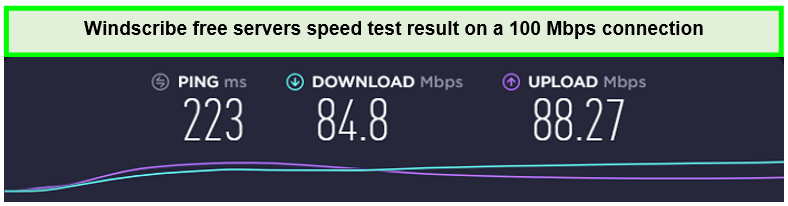
Windscribe-free US servers speed was quite good on a 100 Mbps connection.
Security & Encryption:
Windscribe provides robust security features, including AES 256-bit encryption, protecting your data from potential hacker attacks. With DNS leak protection and a strict no-logs privacy policy, Windscribe prioritizes your privacy while connected to the VPN.
Ease of Use and Samsung TV compatibility:
Windscribe stands out for its user-friendly interface and straightforward setup process, making it accessible even to VPN novices. While it doesn’t offer a dedicated app for Samsung Smart TVs, it supports manual configuration on routers, allowing users to enjoy free VPN Samsung TV benefits with relative ease.
Free Trials & Pricing Plans
Windscribe free trial in Germany is a great starting point for Smansung Smart TV users. It offers 10GB of monthly data if you confirm your email. Their Pro plan is $5.75 per month for unlimited access and more server locations.
Its premium version comes with a 3-day money-back guarantee to cancel your Windscribe subscription in Germany and get a refund.
Windscribe VPN for Samsung Smart TV Free is a great source for streaming. For more information, read my Windscribe review in Germany.
- 10 GB of free data across 10 different servers.
- Successfully unblocks geo-restriction on popular media channels.
- Compatible with Samsung Smart TV.
- High-speed streaming.
- Strong security and privacy features.
- Limited data on the free version.
- Potentially more expensive than other VPN options.
- Server limitation on its free version.
3. ProtonVPN – Best Free VPN for Samsung Smart TV with Unlimited Bandwidth in Germany

- Freemium Version to the Users
- Users can Cancel at any Time
- In-built Kill Switch
- Multi-Hoping Capability
- OpenVPN and IKEv2(For Mac)
- Tor Servers
ProtonVPN is the best free VPN for unlimited streaming on your Samsung Smart TV. Unlike many free VPNs, it offers unlimited bandwidth, meaning you can stream your favorite shows and movies without worrying about hitting a data cap.
Server Network & Streaming:
It offers free servers in only five countries: the US, Japan, Romania, Poland, and The Netherlands. I tested ProtonVPN’s unblocking capability for geo-restricted platforms connected to the US Denver server to unblock Hulu.
It took me 5 to 10 seconds to establish a successful VPN connection. However, all the content on this streaming platform was available soon after that.
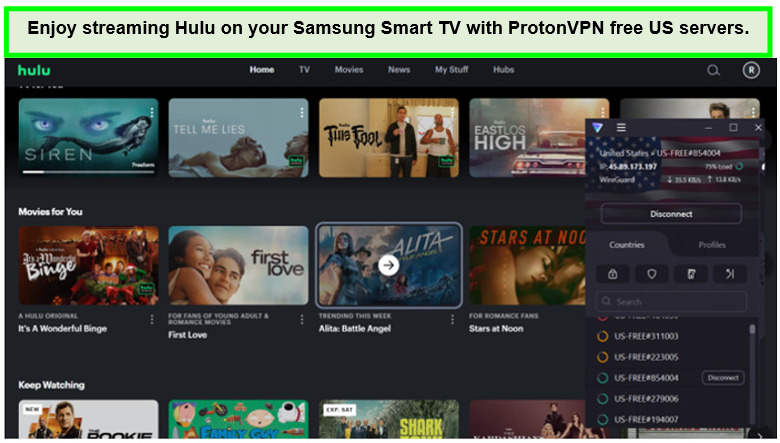
ProtoVPN offered me a reliable Hulu streaming experience on its free server.
Speed:
I then also conducted a ProtonVPN speed test in Germany over a 100 Mbps connection. I had a surprising upload speed of 89.59 Mbps and a download speed of 75.59 Mbps.
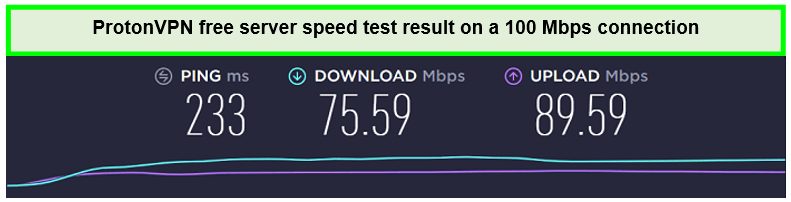
ProtonVPN Free US servers speed on a 100 Mbps connection.
Security & Encryption:
If you’re thinking, is ProtonVPN safe in Germany? So, let me tell you that Proton VPN offers a range of robust security features to keep your data completely secure. Its Secure Core servers and 256-bit AES encryption ensure that your online activities remain protected even against determined hacking attempts.
Proton VPN includes an obfuscation feature that helps mask your VPN traffic, making it harder for anyone to detect or block your connection. It also protects DNS leaks, ensuring your DNS queries remain secure and private.
Ease of Use:
ProtonVPN offers robust support for Samsung Smart TVs through manual configuration over a router, ensuring users can extend its privacy and security benefits to their TV viewing experience. While direct app support for Samsung Smart TVs isn’t available, the detailed setup guides provided by ProtonVPN make the process manageable for users.
Free Trial & Pricing Plans:
ProtonVPN free trial in Germany distinguishes with unlimited bandwidth, a rare find in the VPN market. For those seeking advanced features, ProtonVPN’s paid plans start at €4.99 in Germany,
Their 30-day money-back guarantee allows users to test the service risk-free and cancel ProtonVPN in case they are unhappy with the results.
For more information on ProtonVPN, read my ProtonVPN review in Germany.
- Can unblock geo-restricted content.
- Compatible with Samsung Smart TV.
- The free version offers unlimited data.
- Secure Core servers.
- Internet Kill Switch for upgraded protection.
- Samsung Smart TV VPN free trial is provided
- The free version has limitations on features and services.
Features to Look Out for in the Best Free VPN For Samsung Smart TV in Germany?
When selecting a free VPN for Samsung Smart TV, prioritizing certain features can significantly enhance your streaming experience. Here are the essential aspects to look for:
Server Locations in Multiple Countries
Choose a VPN wide array of server locations. This ensures smooth streaming without the frustration of buffering or delays. A vast network allows you to connect to servers closer to regions where your desired content is accessible, providing a seamless viewing experience.
High-Speed
High-speed connectivity is a crucial feature to seek in a free VPN for Samsung Smart TV. Since streaming on a smart TV often involves HD content, the VPN should be able to maintain high speeds to prevent buffering and ensure a smooth viewing experience.
Robust Security Protocols
A reliable free VPN for Samsung TV should employ robust security protocols like OpenVPN and L2TP/IPsec. These protocols ensure your data remains secure and encrypted, providing peace of mind while streaming or browsing.
Private DNS and Leak Protection
Opt for VPNs that offer private DNS and robust leak protection. These features safeguard your online activities from being exposed due to DNS queries or data leaks.
Strict Privacy Policies
Ensure the VPN service adheres to stringent privacy policies. A reliable VPN should not monitor, log, or share your online activities. Your private information and viewing preferences should remain confidential, with the assurance that they are not being recorded or passed on to third parties.
Compatibility With Various Platforms
Ensure your free VPN is compatible with different platforms, not just your Samsung Smart TV. This compatibility ensures you can secure all your devices with a single service, be it your smartphone, tablet, or computer.
Technical Support Availability
Opt for a free VPN that provides 24/7 technical support. Should any issues arise with your VPN connection on your Samsung TV, prompt support can help resolve them quickly, ensuring uninterrupted access to your content.
How to Install a Free VPN on Samsung Smart TV in Germany
While Samsung Smart TVs do not natively support VPN apps, there are effective workarounds to secure your connection. Below, I outline the steps to set up a VPN on your Samsung Smart TV:
- Open the Google Play Store on your Samsung Smart TV.
- Select a compatible VPN. ExpressVPN is highly recommended and is currently offering a 49% discount.
- Choose your installation method. You can install the VPN via your router, share a VPN connection from your PC, or use SmartDNS.
- Follow the setup instructions specific to your chosen installation method.
- Enjoy access to unblocked content and improved privacy on your Samsung Smart TV.
Free VPNs to Avoid for Samsung Smart TV in Germany
Free VPNs are often seen as attractive solutions for those looking to bypass geo-restrictions safely. However, not all VPNs offer the same quality features. Some may even come with hidden costs that put your personal information at risk.
If you still want to try multiple free VPNs, I recommend you avoid these three VPNs at any cost:
| VPN Service | Reasons to Avoid |
|---|---|
| HolaVPN | HolaVPN logs user data and search history. It is also notorious for selling its information to third-party marketing firms without obtaining proper user authorization. Consider reading the HolaVPN review in Germany for a deeper understanding of this provider. |
| HoxxVPN | HoxxVPN claims to unblock all the major media streaming sites worldwide. However, user security and privacy features are of serious concern. My HoxxVPN review in Germany revealed that it operates like a botnet and makes all your data readily available to anyone trying to hack your system soon after you connect to any of its servers. |
| HideMyAss (HMA) VPN | HMA VPN promises high performance but falls short in the user security and connection stability feature. In my HMA VPN review in Germany, I find it provides poor bandwidth. Additionally, inadequate security measures make this VPN risky to your virtual privacy. |
More Free VPNs Devices Guides from VPNRanks
| Best Free VPN for Chromecast in Germany | Cast any geo-restricted content to your TV using our recommended free Chromecast VPNs. |
| Best Free VPN for Kodi in Germany | Unblock the world of entertainment on your Kodi media player using our recommended free VPNs. |
| Best Free VPN for Xbox in Germany | Discover free VPNs that work with Xbox for seamless gaming. |
| Best Free VPN for Mac in Germany | Safeguard your Mac devices with our top-recommended free VPNs. |
| Best free VPN for Windows in Germany | Explore the best free VPN for Windows to enhance your internet experience and access to geo-restricted content. |
FAQ: Best Free VPN For Samsung Smart TV in Germany
Can you add a free VPN to Samsung Smart TV in Germany?
Yes, you can add a free VPN to your Samsung Smart TV in Germany. While direct installation from the Google Play Store isn’t an option for Samsung TVs due to their operating system, setting up the VPN on TV at the router level is a practical alternative. This relatively simple method allows you to enjoy enhanced privacy and access to geo-restricted content on your Smart TV.
Is it legal to use a free VPN for Samsung TV in Germany?
Using a VPN is legal in most countries; however, ensuring you are not breaching service terms or local laws is important. Always use a VPN on TV responsibly to access geo-restricted content and protect your privacy.
Will a Free VPN reduce the quality of my internet connection on Samsung TV?
While a VPN may potentially slow down your connection due to the encryption process, choosing a high-quality VPN service like ExpressVPN ensures minimal speed loss. This is essential for a seamless streaming experience on your Samsung Smart TV.
Does Samsung smart TV have a built-in VPN?
Samsung Smart TVs do not have a built-in VPN feature, meaning you cannot directly install a VPN app on them. However, you can still leverage VPN benefits on your Samsung Smart TV by setting up ExpressVPN or a similar service on your router. Additionally, you can use a VPN on devices like your smartphone, tablet, or computer and then cast the content to your Samsung Smart TV, ensuring your streaming remains secure and private.
How Do I Use ExpressVPN Free Trial For Samsung Smart TV?
To use the ExpressVPN free trial for Samsung Smart TV, follow these steps:
- Sign up for an ExpressVPN subscription. It will provide you with a 30-day money-back guarantee, which can be used as a free trial.
- Set up the VPN on your home router.
- Connect your Samsung Smart TV to the router.
- Open the ExpressVPN app on your TV and log in with your account credentials.
- Choose a server location and connect to use ExpressVPN on your Samsung Smart TV.
Conclusion
Using the best free VPN for Samsung Smart TV in Germany, you can unlock geo-restricted content and shield your device from cyber threats. After evaluating numerous VPN services, I’ve pinpointed those offering significant value to Samsung Smart TV users.
Considering the potential risks of free VPNs, I recommend ExpressVPN for its ability to navigate geo-blocks and maintain a robust internet connection. Although not free, it’s a dependable option with a 30-day money-back guarantee.
I trust this guide assists in your selection of the best free VPN for Samsung Smart TV. If you have any questions, please comment below for a prompt response.