
- Understanding Spyware: Spyware is malicious software designed to monitor and collect information from your device without your consent, often leading to privacy breaches and performance issues.
- Signs of Spyware Infection: Common signs of spyware include slow device performance, unexpected pop-ups, increased data usage, and unfamiliar apps or settings changes.
- Detection Methods: Regularly scan your device using reputable anti-spyware tools, monitor data usage, and check installed apps for any unfamiliar or suspicious ones.
- Preventive Measures: Protect yourself using encrypted communication tools, enabling two-factor authentication, keeping your software updated, and avoiding suspicious links and downloads.
- Removal Techniques: If infected, use anti-spyware software to remove the spyware, reset your device settings, and take steps to secure your accounts and data.
Spyware: how to detect and protect yourself against it in Canada – This critical question affects countless internet users. I’m here to guide you through understanding this invasive software and arm you with the tools to safeguard your online presence.
Spyware, a malicious threat, can covertly infiltrate your devices, harvesting personal data and compromising privacy. Unexpected pop-ups, slow device performance, and unfamiliar programs can indicate that your device has spyware.
Preventing spyware infections involves using reputable antivirus software like Norton 360 Deluxe, keeping systems updated, and exercising caution with downloads and links. Pegasus, keyloggers, and adware are some common types of Spyware. Understanding these threats and implementing protective measures is crucial to safeguarding your digital life.
Spyware: How to Detect and Protect Yourself Against It in Canada? What Does It Do?
Spyware is malicious software that covertly monitors and collects information from your device without your consent. Spyware in Canada can significantly slow down your device, alter system settings, and compromise your privacy, making it a severe threat that requires vigilant security measures.
Spyware can track your:
- Login credentials
- Credit card details
- Keystrokes
- Browsing history
- Email address
This information can be exploited for identity theft, financial fraud or sold to third parties for advertising purposes.
The Impact of Spyware on Your Privacy and Security
Spyware can operate stealthily in the background, avoiding detection while it gathers valuable information. It can observe and document everything from browsing habits to personal conversations and even spyware pictures or video captures, leading to a serious breach of privacy.
How Spyware Collects and Uses Your Information
Spyware infiltrates your system by masquerading as legitimate software and begins its surveillance. It may record every keystroke, including passwords and messages, take screenshots, and track online behaviour. The information is silently relayed to cybercriminals or unscrupulous advertisers, who may use it for various nefarious activities or financial gain.
To effectively handle this threat, it’s crucial to understand Spyware: how to Detect and Protect Yourself Against It in Canada. By implementing robust security practices, you can safeguard your device from the harmful impacts of spyware and maintain your privacy.
Spyware in Canada – How Does It Attack Your System?
Are you wondering about Spyware: How to Detect and Protect Yourself Against It? It infiltrates and contaminates your device without being discovered. The usual way of accomplishing this is to hide the malicious files between unsuspicious download files and websites.
Upon downloading or opening these websites, the users unconsciously invite the malicious software into their system without realizing it. Malicious software will continue alongside trusted programs and websites through code vulnerabilities or custom-made fraudulent applications and websites.
Different Types of Spyware in Canada
Spyware can’t be associated with just a single type of malicious program. So let’s take a look at the different types of spyware in Canada:
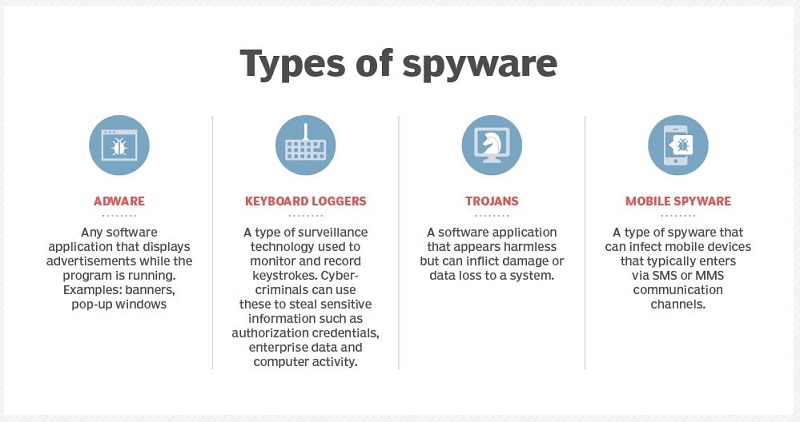
Adware:
Adware is responsible for collecting data regarding your browsing habits and history. That data will later be used to target you with relevant advertisements. Various third-party advertisers are willing to pay a lot for stolen data as the probability of earning a hefty revenue from targeted advertisements is very high.
One recent example of this spyware is the UltimaSMS Adware that spread through the Google Play Store and corrupted over 151 Android apps downloaded over 10.5 million times. It targeted the Gulf region and Middle Eastern countries.
Trojan:
Masked as docile updates, attachments, or files, trojans are explicitly used to steal your data or sensitive information and induce adware into your device.
FluBot, which targeted Android devices in August, is an example of such spyware. It acted as a spyware and SMS spammer as well. Another example is the Android Joker malware that spread via the Google Play Store in June, infecting over 1700 apps.
Keyboard loggers:
Cybercriminals use a monitoring procedure to steal personally identifiable information, log-in details, and other sensitive data from any organization.
Employers can also use this procedure to monitor employees’ activities, parents to oversee their children’s internet usage, device proprietors to trace any unlawful activity on their devices, or law enforcement agencies to investigate computer use incidents.
Keylogging software can be downloaded on purpose or unconsciously and utilized as a remote access Trojan.
Mobile spyware:
The ability to get transferred through SMS or MMS text message services and not requiring any user interaction to perform commands makes mobile spyware the most dangerous.
After getting affected by mobile spyware, the device’s camera and microphone can spy on nearby activity and record calls and browsing history. In addition, the location of the owner can also be tracked via Global Positioning System (GPS).
Spyware in Canada – How to Tell if You Have Been Infected?
Several signatures can easily indicate that your device has been infiltrated by spyware in Canada. You have been infected with spyware if:
- Your device has become slow.
- Your device experiences sudden crashes or freezes.
- You are experiencing annoying advertisements in the browser.
- You see various unexpected error messages.
- Your browser is acting weird and redirecting to new search engines.
These signs also indicate the presence of other malware, so you must dig deep into the issues and determine the root cause of the problem.
How to Detect Spyware on Your Computer in Canada?
To detect spyware on your computer in Canada, follow these steps:
- Install and Run Anti-Spyware Software: Use reputable anti-spyware tools to scan and detect malicious software.
- Monitor Device Performance: Look for signs like slow performance, frequent crashes, or unusual behaviour.
- Check for Unfamiliar Programs: Regularly review installed programs and remove any you don’t recognize.
- Examine Browser Settings: Look for changes in your homepage, search engine, or new toolbars/extensions you didn’t install.
- Monitor Network Activity: Use a firewall or network monitoring tool to identify unusual or excessive data transmission.
- Review Task Manager/Activity Monitor: Check for unfamiliar processes running in the background.
- Update Operating System and Software: Ensure all software is up-to-date to protect against known vulnerabilities.
- Run Regular Security Scans: Schedule regular scans with your antivirus and anti-spyware software.
- Check Browser History: Look for unusual websites or activities you didn’t initiate.
- Inspect Email Accounts: Be wary of unexpected emails sent from your account, which can indicate spyware.
How to Detect Spyware on Your Phone in Canada?
Follow these steps to detect spyware on your phone in Canada:
- Install and Run Mobile Security Apps: Use reputable mobile security apps to scan and detect spyware.
- Monitor Battery Usage: Check for unusually high battery drain, indicating background spyware activity.
- Check Data Usage: Look for unexpected spikes in data usage, which can signal spyware transmitting data.
- Review Installed Apps: Regularly review and remove any unfamiliar or suspicious apps.
- Examine App Permissions: Check and look for apps requesting excessive or unnecessary access.
- Look for Unusual Behavior: Notice any unexpected pop-ups, slow performance, or unusual phone behavior.
- Check for Rooting/Jailbreaking: Ensure your device has not been rooted or jailbroken without your knowledge, as this can increase spyware risk.
- Monitor Network Activity: Use a network monitoring app to detect unusual network traffic.
- Check for Unusual Text Messages: Be wary of strange text messages, especially those with links or from unknown numbers.
- Update Operating System and Apps: Keep your phone’s operating system and apps updated to protect against vulnerabilities.
How to Remove Spyware from Your Device in Canada?
Removing spyware in Canada is possible through solutions that can identify and remove malicious files. The first step of this procedure is to ensure that your device is completely cleared of infection.
Doing this will ensure the personal information and data you will set up on the device will be completely safe from getting stolen. Purchasing security software with spyware removal, the ability to clean the affected devices, and repair system files that the spyware may have infected.
Once your device is cleaned up, informing your bank regarding any potentially fraudulent activity on your credit card is essential. In addition, if the spyware has affected an organization, legal and regulatory violations need to be reported to the appropriate law enforcement agency.
Top Spyware Removal Tools in Canada
Here are some top spyware removal tools in Canada:
| Top Spyware Removal Tools | Additional Information |
|---|---|
| Malwarebytes | Known for robust spyware detection and removal |
| Spybot – Search & Destroy | Comprehensive spyware scanning and removal features |
| AdwCleaner | Effective at removing adware and spyware |
| SUPERAntiSpyware | Specializes in detecting and removing spyware, adware, and malware |
| HitmanPro | Utilizes multiple virus detection engines |
| Norton Power Eraser | Aggressively targets and removes spyware |
| Bitdefender Antivirus | Powerful spyware detection as part of antivirus suite |
| Emsisoft Anti-Malware | Dual-engine scanning technology |
| Kaspersky Anti-Virus | Strong spyware protection features |
| McAfee Total Protection | Extensive spyware detection and removal capabilities |
Spyware: How To Detect And Protect Yourself Against It?
To know how to prevent Spyware, here are a few tips that you can use to protect yourself against spyware in Canada:
- Encrypted Communication Tools: Use encrypted communication tools like Signal, WhatsApp, and Telegram to protect your messages with end-to-end encryption, ensuring only the intended recipient can read them. This makes it difficult for spyware to intercept and decipher your communications.
- Two-Factor Authentication (2FA): Enable two-factor authentication (2FA) on your accounts to add an extra layer of security. With 2FA, even if spyware captures your password, the attacker would still need a second form of identification, such as a code from your phone.
- Regularly Updating Firmware and Software: Keep your device’s firmware and software updated to patch security vulnerabilities that spyware can exploit. Enable automatic updates to ensure you always have the latest security patches.
- Virtual Private Network (VPN): Use a VPN to encrypt your internet traffic, making it harder for spyware to monitor your online activities. A VPN adds an extra layer of security, protecting your data from interception.
- Regular Security Audits: Perform regular security audits by checking for unknown devices on your network, reviewing app permissions, and ensuring all security settings are properly configured. This helps identify and address potential vulnerabilities.
- Behavioural Monitoring Tools: Utilize security solutions with behavioural monitoring to detect unusual activities that may indicate spyware presence. These tools can identify unauthorized data transmissions and access attempts.
- Data Backup and Recovery: Regularly back up your data to a secure location. In the event of spyware infection, recent backups allow you to restore your data without significant loss, minimizing the attack’s impact.
What Are the Common Spyware Tactics in Canada?
Safeguarding your digital life requires understanding spyware’s various tactics to breach security. Spyware often exploits software backdoors, which are vulnerabilities allowing unauthorized access.
Phishing attempts trick users into clicking malicious links while spoofing disguises emails from trusted sources. Manipulative marketing can mislead users into downloading seemingly helpful tools that are spyware.
Additionally, spyware can be hidden in software packages bundled with legitimate programs. Trojans masquerade as harmless software to steal data, and some mobile apps contain hidden spyware, leading to inadvertent downloads.
What are Examples of Spyware?
In my experience, I’ve seen a variety of spyware wreak havoc on devices. Common culprits include keylogging software, which stealthily records every keystroke, and Adware, which bombards users with unwanted ads.
Android spyware file names often masquerade as harmless apps, making them particularly insidious. For instance, CoolWebSearch hijacks web browsers, while Gator gathers personal data under the guise of a helpful tool.
Recognizing these types of spyware by name and understanding what does spyware do is the first step to safeguarding your digital life against such intrusive software.
Community Discussion about Spyware – User Insights
On Reddit, users have discussed their experience regarding Spyware. Here is a summary of one conversation where a user asked for suggestions on how to remove spyware from his phone.
Query:
A user suspects their phone is being spied on after a friend used it. They report unusual behaviours such as dropped calls, increased usage, and the phone lighting up unexpectedly. They seek advice on how to check for spyware without performing a factory reset.
Community Responses:
- Going through installed apps and removing any unfamiliar ones.
- Performing a factory reset if unsure what to do next.
- Uninstalling unfamiliar apps, restarting the phone, and checking settings for privacy and security options.
- Backing up important data and performing a factory reset.
- Downloading Malwarebytes, running a scan, and using app pinning to restrict access.
- Conducting a privacy checkup in iPhone settings and changing passwords.
- Using AdGuard Pro to inspect network traffic for suspicious activity.
Spyware vs. Malware: What’s the Difference in Canada?
Many people think that spyware and malware are similar, though it is not the case. Spyware and malware are both types of malicious software, but they differ in their behaviour and objectives.
Spyware is specifically designed to monitor and collect information about a user’s activities without their consent. It often runs covertly in the background, capturing sensitive data such as passwords, credit card numbers, and browsing habits.
Malware, on the other hand, is a broader category that comprises any software intentionally designed to cause harm to a computer, server, or network. This includes a variety of malicious software types such as viruses, worms, ransomware, trojans, and, indeed, spyware.
While spyware focuses on stealthily gathering information, other types of malware can have different objectives, such as disrupting system operations, encrypting files for ransom, or spreading networks to exploit vulnerabilities.
FAQs
Does spyware still exist in Canada?
Yes, spyware still exists and remains a significant cybersecurity threat. It continues to evolve, becoming more sophisticated in its methods of infiltrating systems and stealing information. Vigilant security practices and updated protective software are essential to defend against spyware.
How do I detect spyware in Canada?
Detecting spyware involves using reputable antivirus or anti-spyware software to scan your device regularly. Look for signs like slow performance, unexpected pop-ups, or unfamiliar programs. Monitoring network activity for unusual behavior can also help identify spyware infections.
What spyware is used by the government?
Governments sometimes use sophisticated spyware like Pegasus, developed by the NSO Group, for surveillance purposes. Such spyware can remotely access smartphones, capturing messages, calls, and other sensitive data. Its use often raises concerns about privacy and human rights violations.
Can spyware watch you?
Yes, spyware can watch you by accessing your device’s camera and microphone without your knowledge. It can record video audio and monitor your activities, potentially capturing sensitive and private moments. Ensuring strong security measures and regularly updating your software can help mitigate this risk.
Can I scan my phone for spyware?
Yes, you can scan your phone for spyware using reputable mobile security apps available for both Android and iOS devices. These apps can detect and remove malicious software, providing real-time protection. Regularly updating your phone’s operating system and apps enhances security against spyware.
Can spyware track your location?
Yes, spyware can track your location by accessing your device’s GPS and location services. It can continuously monitor and report your whereabouts without your consent. Using security software and adjusting your device’s privacy settings can help protect against this type of surveillance.
What should I do if I suspect a Spyware infection in Canada?
If you suspect spyware in Canada, run a thorough scan using reputable security software. Remove unfamiliar programs and reset device settings. Inform your bank about potential fraud and report any legal or regulatory violations to the appropriate authorities.
Are Tracking Cookies Spyware?
Tracking cookies can be spyware if used for malicious purposes. First-party cookies from reputable websites are generally not harmful, but third-party cookies from unknown sources may track your online activities for nefarious reasons.
How does Spyware impact my device’s performance?
Spyware can consume system resources, leading to slow performance, crashes, or overheating. It can also change system settings and disrupt normal device operation.
Final Thoughts
Spyware is malicious software designed to secretly monitor and collect information about your computer activities. It can track your online behaviour, capture sensitive information like passwords and credit card numbers, and even record keystrokes.
To understand Spyware: How To Detect And Protect Yourself Against It, you should install reputable antivirus and anti-spyware software to detect and remove malicious programs. Keep your operating system and software updated to patch security vulnerabilities. Additionally, be cautious about downloading files from unknown sources and avoid clicking on suspicious links or email attachments.
