Using a VPN-enabled router is a secure and effective way to safeguard your online activities from unwanted access in Canada. When you connect your devices to a VPN-enabled router, all traffic is encrypted and secure. In this article, we’ll explore the advantages of having a router VPN for your home network and how you can set up a secure VPN router for home network devices in Canada.
Utilizing a Virtual Private Network (VPN) is a reliable approach to safeguard and encrypt internet traffic and activity on a single device. However, if you wish to secure all devices on your network, a viable alternative is to set up the VPN on your router in Canada.
Premium VPNs like ExpressVPN offer easy-to-follow setup guides to configure VPN settings on a Wi-Fi router. This way, all your devices can benefit from the same VPN connection and network.
Without further ado, let’s find out how to configure VPN on home network router in Canada.
What are the benefits of setting up a VPN on my home router In Canada
Here are some of the key benefits of setting up a VPN on my home router in Canada:
Secure Every Device: VPN providers often restrict the number of devices that can be simultaneously connected to their service. However, premium VPNs, such as ExpressVPN offer a solution that allows you to surpass that limit in Canada.
Every group of devices you connect counts as just one device towards the maximum limit set by your VPN provider. This means that regardless of how many devices are in a group, it will only be counted as one device.
With ExpressVPN router setup, you can even safeguard devices that do not natively support VPN software, such as gaming consoles, smart TVs, and streaming devices like Roku, Apple TV, Firestick, and other similar devices. Essentially, any device that has access to the internet can be protected with ExpressVPN.
Powerful Security Features: Standard routers are not designed to support VPN connections efficiently. Their CPU lacks the necessary strength to handle encryption protocols properly, resulting in significantly reduced internet speeds. However, ExpressVPN stands out from the rest with its powerful hardware, specially engineered to optimize VPN connections.
With ExpressVPN, you can enjoy enhanced security while maintaining fast internet speeds, even with full encryption. This means that you don’t have to compromise on internet speed when prioritizing online security with a VPN in Canada.
Split-tunneling Feature: Most VPN providers do not provide the option of split-tunneling to their users. However, with ExpressVPN, you have the ability to determine which websites you want to be accessible via the VPN connection and which ones you don’t.
Moreover, ExpressVPN allows you to bypass the specific ports utilized by your online games to optimize your gaming performance, while still keeping all other internet traffic protected by the VPN service. In essence, ExpressVPN’s split-tunneling feature enables you to customize your VPN usage according to your specific needs, providing a level of flexibility and control that is not commonly found in other VPN providers.
Streaming on Smart TVs, Streaming Devices, and Game Consoles: Although many VPN providers have created their own customized software that can be used on various operating systems, however, not all devices are capable of supporting VPN connections.
If your VPN provider does not offer a VPN client for your particular platform, or if you desire to use VPN on devices such as media players, gaming consoles, or smart TVs, then the only feasible solution is to make use of a VPN router in Canada.
Convenient and User-friendly: Our recommended ExpressVPN eliminates the need for installing VPN software on numerous devices to keep them protected. The developers of ExpressVPN prioritized the whole development process, ensuring that every aspect of the process is secure and straightforward.
If the VPN connection drops, ExpressVPN reconnects again to the VPN server automatically as soon as it can, guaranteeing continuous protection. With ExpressVPN, you can rest easy while the system takes care of everything.
Access Your Secure Network from Anywhere: By running a VPN server on ExpressVPN, you can securely connect to your home network from any location around the world.
This allows you to access devices like IoT devices, IP cameras, and NAS without the need to expose them to the internet and potential hackers.
User-friendly Interface: ExpressvPN makes connecting to any VPN server around the world simple. The VPN router’s pre-integrated regions are updated daily, enabling you to connect to all available regions effortlessly.
The VPN routers’ interface is designed to be intuitive and user-friendly, providing a unique experience that you may not have encountered before. And this is what makes it one of the best VPN routers for home network.
How to Setup router VPN for Home Network In Canada 2023 [Quick Guide]
See the detailed VPN home network setup guide below:
1. Open your router’s firmware
First of all, you should access your router’s firmware by entering its IP address in a web browser. Although most routers use the default IP address of 192.168.1.1, this may vary. To confirm the correct IP address, you can open a command prompt and enter “ipconfig.”
The Default Gateway entry will lead you to your router’s IP address, which you can then enter in the browser’s search bar. You’ll then be prompted to enter my router’s username and passcode in order to sign in to your router account.
Once logged in, you should navigate to the advanced settings section available on the sidebar to locate the VPN settings or VPN service settings. For instance, the setting on the router we tested these steps with had this setting located in the Advanced Setup section.
2. Enable the VPN service
After accessing the router’s advanced settings, enable the VPN service by selecting the appropriate option. If you are using a Netgear router, you will be presented with a choice to set up either a Dynamic DNS (DDNS) account or a static IP address, both of which are compatible with the VPN service in Canada.
A static IP address will allow you to maintain the same IP address, while a DDNS account can automatically update your IP address if your ISP will give you a new dynamic address. In this scenario, you should choose the option to set up a DDNS account.
3. Sign up for a free DDNS account
Next, sign up for a free DDNS account through Netgear, and then proceed to the Dynamic DNS setting in the router. Using the credentials for the account, sign in to the Dynamic DNS setting within the router.
4. Return to the settings for VPN
Once you have successfully signed in with the DDNS account, proceed to the VPN settings and download the configuration file required for Windows.
5. Install a VPN client
The next step involves installing a VPN client on the relevant devices, depending on their operating system in Canada. If you are using a Windows PC, you will then download and install the dedicated designed client for Windows.
However, you can also get other client packages that are available for Mac and mobile devices. For the Netgear router, the recommended option is OpenVPN, which is an open-source VPN service and protocol. Therefore, you have to install the OpenVPN client on your device and drop the VPN configuration file into it.
6. Rename the network connection for the new VPN network
To proceed further, verify and rename the previously named network connection so that it differentiates from the new VPN network.
7. Look for OpenVPN Tap
In the Change adapter options section, search for a connection that includes the text “OpenVPN Tap,” and then rename it as NETGEAR-VPN.
8. Connect
To establish the connection, double-click on the VPN client icon that appears in the System Tray. A status window will appear and confirm that the connection has been established successfully. Now, you can proceed to access any website. By checking the VPN client status window, you can see the transmission and receipt of data.
Note: It’s worth noting that the process may vary depending on the make and model of your router. Some routers may require the installation of DD-WRT, a program that adds additional features not available in the router’s default firmware.
Best Router VPN for Home Network In Canada – Detail Analysis in 2023
1. ExpressVPN – Best VPN Router For Home Network In Canada
Key features:
- Enable easy-to-follow VPN router configuration
- 3000+ servers in 105 countries, including 25+ US server locations
- Simultaneous Connections: 5 devices
- Unlimited bandwidth for Ultra HD and 4K streaming
- Encryption: AES 256-Bit Protocol, IKEv2, OpenVPN, Lightway Protocol
ExpressVPN is the best router for home network in Canada 2023. This top-performing VPN service provider offers user-friendly setup guides for routers that you can find on its official website. It offers fast speeds, exceptional security features, top-notch encryption, and advanced privacy features in Canada.
In addition, ExpressVPN offers an expansive network of over 3000 servers situated across 105 countries, including more than 25 server locations in the US. With such a wide array of servers at your disposal, you can easily locate a less congested server, which ensures optimal speeds for high bandwidth activities such as gaming and streaming. Simply configure ExpressVPN on your router and enjoy secure VPN access on all of your devices.
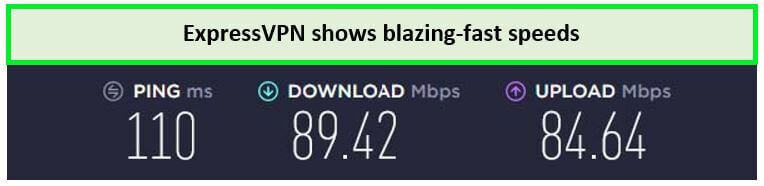
ExpressVPN is remarkably fast and that’s evident from the results of the ExpressVPN speed test in Canada. In our tests using a 100 Mbps connection, it achieved remarkable download and upload speeds of 89.42 Mbps and 84.64 Mbps, respectively.
{%CAPTION%}
Due to its versatility and cross-platform compatibility, ExpressVPN works seamlessly across a multitude of operating systems and devices, such as Android, macOS, iOS, Linux, and Windows. You can also set up any fast VPN protocol on your router and use your ExpressVPN configuration on various streaming devices, including Firestick, Roku, Apple TV, smart TVs, and gaming consoles.
With ExpressVPN, you can connect up to 5 devices simultaneously using a single account. Nonetheless, by following the setup instructions offered by the company, you can configure ExpressVPN on your router in Canada and potentially expand this connection limit.
ExpressVPN offers advanced security features such as AES 256-bit encryption, a strict no-logs policy, a kill switch, and obfuscated servers, which collectively provide users with a secure and private internet experience.
ExpressVPN offers comprehensive solutions for online security and unrestricted streaming and torrenting experiences. With its advanced features, including router VPN for streaming and router VPN for torrenting, you can enjoy fast and secure connections across all your devices, ensuring seamless access to your favorite content while maintaining your privacy.
You can subscribe to ExpressVPN for CA$ 9.18/mo (US$ 6.67/mo) - Save up to 49% with exclusive 1-year plans + 3 months free, including a 30-day money-back guarantee. Furthermore, smartphone users can benefit from a 7-day ExpressVPN Canada free trial.
For further information, please read our detailed ExpressVPN review Canada.
- Provides easy-to-follow configurations for all major routers
- Secure your entire home network with stable connections
- Works with all major operating systems and devices
- No bandwidth throttling
- More expensive than its competitors
FAQs – Router VPN for Home Network In Canada
Can any router be a VPN router in Canada?
No, not all routers can work as VPN routers in Canada. It depends on the router setting and software that how old it is. Today, many routers are smart and intelligent devices that are capable of doing way more than only offering an internet connection. If your router is compatible with VPN, you can install VPN software on it although there is a range of routers available today that have built-in VPN features in Canada.
Do I need a special router for a VPN connection in Canada?
Hypothetically, yes, you do need a special router for a VPN connection in Canada. A VPN router would be the best. Most of the time a VPN router is the same router that you already have at home if it has the updated software and offers the VPN service settings. So, other than just providing an internet connection, it also secures your entire household’s online traffic in Canada.
You can easily set up your VPN provider on most routers. Or you can directly buy a router with built-in VPN for home network.
How does using a router with VPN capabilities enhance my home network security in Canada?
VPNs offer secure connectivity between users and networks by establishing an encrypted connection in Canada. This helps prevent eavesdropping and reduces the chances of remote users falling prey to malware attacks. VPNs are primarily employed to enhance privacy on the internet by encrypting user data, thus rendering it unreadable to hackers in Canada.
Moreover, since VPN encryption operates through the router, it provides an additional layer of security that persists even if the router’s own encryption is compromised.
Conclusion
In today’s digital age, securing your online activity and data has become a necessity in Canada. Using a VPN for your router is one way to ensure that all devices on your network are protected from cyber threats, while also allowing you to bypass geographic restrictions on content.
However, with so many VPN services available, selecting the best VPN for your router can be a daunting task. In this article, we have discussed the best VPN for routers and how it can be beneficial for you in Canada. Moreover, we have also provided an easy guide on how to use a secure VPN router for home network devices in Canada.
ExpressVPN is the best VPN for routers in Canada, due to its advanced features, top-notch performance, and affordable pricing.
