
How can I watch Channel 5 in Canada? This is a common question asked by people who are traveling abroad or living in Canada. Due to geo-restrictions, Channel 5 is only available to viewers in the UK. However, with the right tools, you can easily bypass these restrictions and enjoy your favorite shows from anywhere in the world.
Channel 5 is a popular free-to-air television channel in the UK, which offers a wide range of programs, including dramas, documentaries, reality shows, news, and sports. Some programs that are available on Channel 5 are “GPs: Behind Closed Doors,” “The Yorkshire Vet,” and “The Drowning,“. Whether you are a fan of crime dramas, nature shows, or reality TV, Channel 5 has something for everyone.
One of the best VPNs to watch Channel 5 in Canada is ExpressVPN. You can connect to a server in the UK, which will give you a UK IP address in Canada and allow you to access Channel 5 from anywhere in the world. ExpressVPN is fast, secure, and easy to use, making it the perfect choice for streaming Channel 5 in Canada.
For those seeking guidance on how to utilize a VPN, we have included a set of “Quick Steps” to assist you.
Quick Steps – How to Watch Channel 5 in Canada?
Here’s a quick guide on how to watch Channel 5 in Canada using a VPN:
- Begin by subscribing to a suitable VPN provider. We suggest ExpressVPN.
- Install the compatible app version for your device after downloading it.
- Launch the app and sign in.
- Connect to a UK server provided by the VPN.
- Access Channel 5 and attempt to stream video content.
Why Do You Need a VPN to Watch Channel 5 in Canada?
Using a VPN can help you bypass geo-blocking and watch your favorite Channel 5 shows from anywhere because it runs servers in different countries. Without a VPN, your computer connects directly to the server from your real location, leading to restrictions. If you attempt to access Channel 5 in Canada without a VPN, you will receive an error message.
“Sorry, but you appear to be trying to stream My5 from outside the UK, which is not supported.”
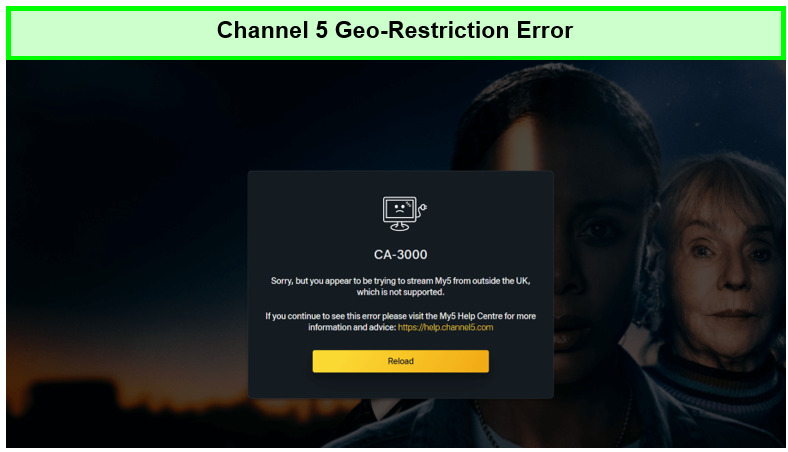
We get the following error when trying to watch shows on My5 in Canada without using a VPN.
A VPN encrypts your internet connection, making it more secure and protecting you from hackers and cybercriminals. A VPN helps you avoid ISP throttling, which can slow down your internet connection and disrupt your streaming experience. Nonetheless, A VPN offers privacy and anonymity, preventing your ISP and other third parties from tracking your online activities.
ExpressVPN is a highly reliable VPN service that offers fast and secures connections to servers in the UK and other countries worldwide. It is an excellent choice for streaming Channel 5 in Canada, as it provides top-notch encryption, a no-logs policy, and excellent customer support.
3 Best VPNs to watch Channel 5 in Canada [In-depth Analysis]
We tested 40+ MY5 VPN services based on their fast speeds and unblocking capabilities and came across these 3 VPNs that lived up to these criteria. Following are the three best VPNs for Channel 5 in Canada:
1. ExpressVPN – Best VPN to Watch Channel 5 in Canada
Key Features:
- 3000+ servers in 105 countries
- UK servers: Available in Docklands, East London, Wembley, and London
- MediaStreamer feature (Smart DNS) for streaming video on Smart TVs and similar streaming devices
- 89.42 Mbps on a 100 Mbps base connection
- 5 simultaneous connections
- 30-day money-back guarantee
ExpressVPN is the best VPN to watch Channel 5 in Canada because of its remarkable speed and unmatched unblocking strength. It offers 3000+ servers in 105 countries and among these, various servers are located in London, Docklands, East London, and Wembley. also making itself one of the best VPN for UK as well
After connecting to its UK- London server, we could easily unblock Channel 5 and enjoyed binging “Ben Fogle and the Lost City” in HD video quality.
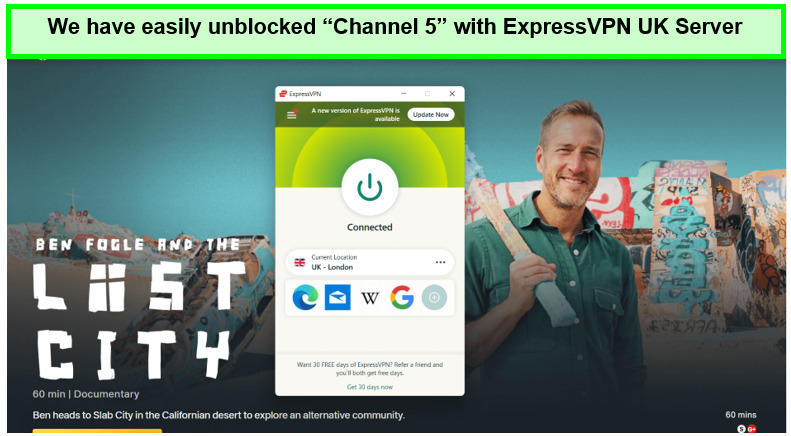
We experienced no stutters on the connection while watching the documentary on Channel 5 in Canada.
We could easily unblock Channel 5 in Canada and stream other streaming services, such as you can watch BBC iPlayer with ExpressVPN in Canada, Sky Sports, BT Sport, UK TVPlayer, and Channel 4 in Canada. We even unblocked Absolute Radio in Canada and enjoyed listening to it.
ExpressVPN that works with channel 5 UK best, and also offers a Smart DNS service called “MediaStreamer” that allows its users to unblock geo-restricted content on devices that are not user-friendly for VPN configuration, such as Apple TV, Smart TVs, Roku, router, and more.
On a 100 Mbps connection, we connected to the London server to check out the ExpressVPN speed test in Canada, we recorded an exceptional downloading speed of 89.42 Mbps and an upload speed of 84.64 Mbps.
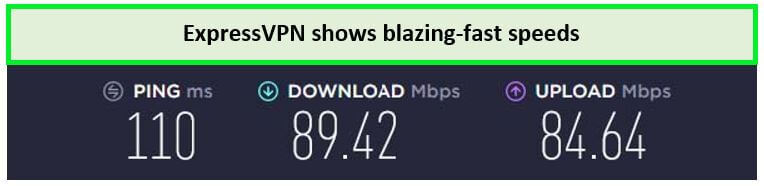
ExpressVPN London server offers the fastest speeds on its for streaming Channel 5 in Canada.
Moreover, ExpressVPN is compatible with Windows, iOS, macOS, Linux, and other major operating systems. Similarly, you can use ExpressVPN on Firestick in Canada, Smart TV, Chromecast, Android TV, and NVidia Shield to stream Channel 5 onto big screens.
Operating from the British Virgin Islands, ExpressVPN relies on AES-256-bit encryption, RAM servers, zero-log policy, and private DNS to ensure online security, privacy, and data protection.
As for pricing, ExpressVPN costs just CA$ 9.18/mo (US$ 6.67/mo) - Save up to 49% with exclusive 1-year plans + 3 months free. It also offers a risk-free 30-day money-back guarantee for users who want to check out all its features risk-free. Mobile users are lucky to get an Expressvpn Canada free trial.
To buy its subscription, you can register for ExpressVPN subscriptions through PayPal. However, with a money-back guarantee, you can always cancel your ExpressVPN subscription in Canada in case you change your mind.
Learn more about this VPN in our detailed ExpressVPN review Canada.
- Unblocks Channel 5, Channel 4, BBC iPlayer, and more
- Fast speed for streaming
- MediaStreamer feature
- Responsive 24/7 Live chat support
- Free trial for mobile users only.
2. Surfshark – Best Budget VPN to Watch Channel 5
Key Features:
- 3200+ servers in 100 countries
- UK servers: Available in Manchester, London, & Glasgow
- Unlimited Simultaneous connections
- 85.42 Mbps on a 100 Mbps internet connection
- Unlimited bandwidth for Ultra HD streaming
- 30-day money-back guarantee
Surfshark is the most affordable VPN to watch Channel 5 in Canada. At an affordable cost of CA$3.43/mo (US$ 2.49/mo) - Save up to 77% with exclusive 2-year plan + 30-day money-back guarantee, you can enjoy access to over 3200+ servers in 100 countries and various servers in 4 UK locations.
We connected to Surfshark’s Manchester server and could watch “Lie With Me” on MY5 in Canada without buffering.
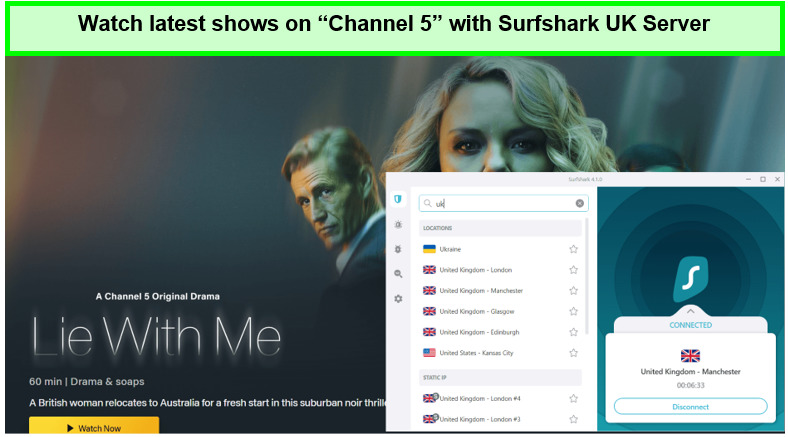
Watch Lie With Me in Ultra HD using Surfshark in Canada.
Besides Channel 5, You can watch Netflix UK, BBC iPlayer, Channel 4, and Sky sports in Canada using this one of the best cheap VPN Canada services.
Being a low-cost VPN does not mean we have to compromise on speed. When we tested Surfshark for speed in Canada on a 100 Mbps connection, it delivered a decent download speed of 85.42 Mbps and an upload speed of 48.64 Mbps, good enough for watching Channel 5 in Canada.
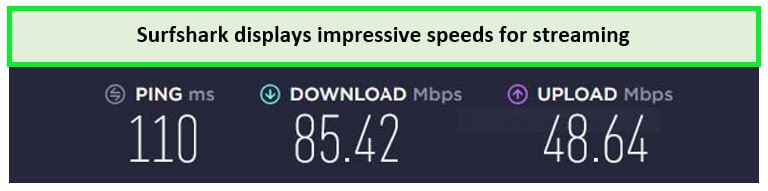
Surfshark delivered decent speeds to quickly access Channel 5 in Canada.
Perhaps the feature that sets Surfshark apart from the rest of the VPN providers is its ability to support unlimited simultaneous connections on a single account. This means that you can set up Surfshark on Roku in Canada, Windows, Android, iOS, router, Mac, Chromebook, Firestick, Surfshark on Apple TV in Canada, PS4, and more simultaneously.
Also operating from the safe jurisdiction of the Netherlands, Surfshark utilizes military-grade AES-256-Bit encryption, CleanWeb, Multi-Hop, and DNS/IP leak protection to hide your actual location, IP address, and internet traffic from anyone prying on you. Surfshark has just introduced a unique feature known as “Whitelisting.” A great cyber security feature.
In addition of being extremely cost-effective, Surfshark also comes with a 30-day money-back guarantee and a free trial of 7 days.
To learn more about this service, you can always read our Surfshark review in Canada.
- Budget-friendly VPN with Unlimited connections
- Packs a good number of servers in the UK
- Unblocks most UK platforms like Sky Sports, Channel 4, and more
- No-logging policy
- Newly introduced Whitelisting feature
- Customer service needs improvement
3. NordVPN – large server network to watch Channel 5
Key Features:
- 6000+ servers in 61 countries
- UK servers: 440+ available in London
- 6 simultaneous connections
- 83.82 Mbps speed on a 100 Mbps connection
- Unlimited bandwidth for Ultra HD streaming
- 30-day money-back guarantee
NordVPN has the largest server network to watch Channel 5 in Canada. NordVPN offers 6000+ servers in 61 countries, including 440+ servers in the United Kingdom.
We connected to the UK server of NordVPN to check its unblocking ability, and we had no trouble getting to Channel 5. We watched “Rich House and Poor House” without any buffer.
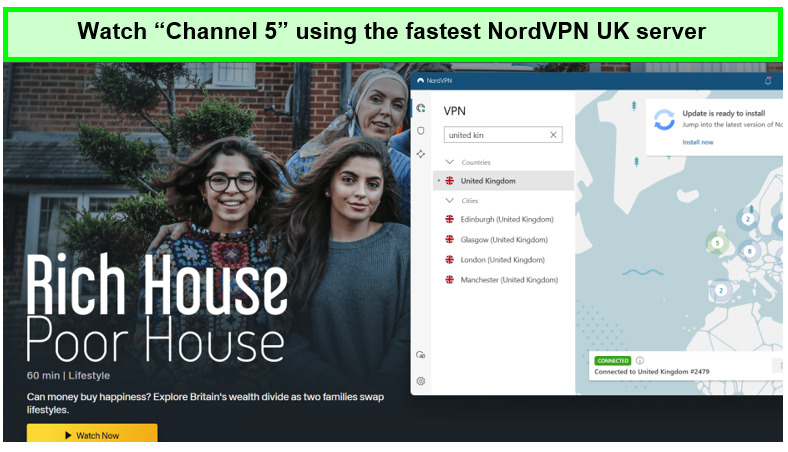
We experienced no delays on our connection while streaming Channel 5 in Canada with NordVPN.
It’s interesting to note that NordVPN’s UK servers unblocked several other British websites in Canada, including Channel 4, BT Sport, and BBC iPlayer with NordVPN in Canada.
If we talk about NordVPN speeds in Canada, it offers a download speed of 83.82 Mbps and an upload speed of 44.64 Mbps on a 100 Mbps connection. With such speeds, you’ll be able to watch your favorite content in HD quality.
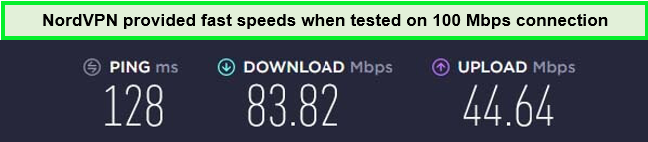
NordVPN UK servers performed incredibly well while getting over Channel 5 geo-restrictions.
NordVPN is compatible with multiple devices, including Windows, Linux, Android, iOS, and many others. Plus, you can install NordVPN on Kodi in Canada, Roku, and Firestick as well.
Security-wise, NordVPN is the most secure VPN for channel 5 out of all the VPNs on this list. It offers AES-256-bit encryption, Kill Switch, NordLynx, Split tunneling, and double VPN. It does not keep logs of its users due to its strict no-logging policy.
With a single NordVPN subscription, you can connect up to six devices simultaneously, this VPN subscription will cost only CA$5.49/mo (US$ 3.99/mo) - Save up to 63% with exclusive 2-year plan + 3 months free for a friend, and all of its premium subscriptions come with a 30-day money-back guarantee.
To learn more about this provider, read our NordVPN review Canada.
- Over 5000 servers, including 440+ server locations in the UK
- Reliably unblock Channel 5
- Easily unblocks UK TV channels, channel 5 and Channel 4 in Canada
- Fast streaming speeds
- Strong security and privacy features
- Slow desktop apps
How to Sign up for Channel 5 in Canada
Since Channel 5 is a free-to-stream channel, you only have to enter a UK-based postal code to sign up for Channel 5 in Canada. Here’s how to do it:
- Subscribe to a premium VPN (ExpressVPN is the best Channel 5 VPN).
- Download the VPN app and connect to its UK server.
- Visit the Channel 5 website.
- Click on the Register at the upper right corner of the dialogue box.
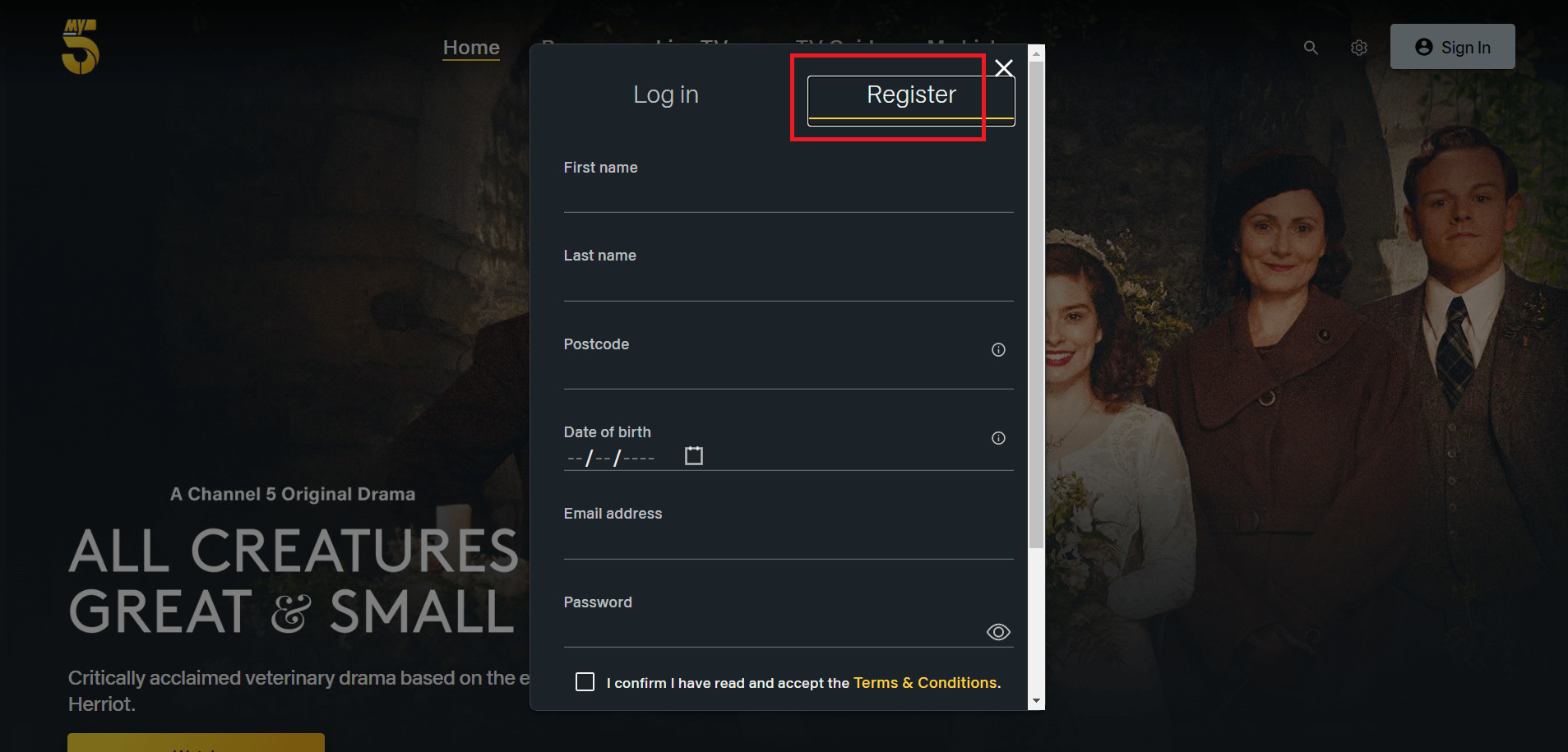
5. Fill up your details (enter any random UK postcode).
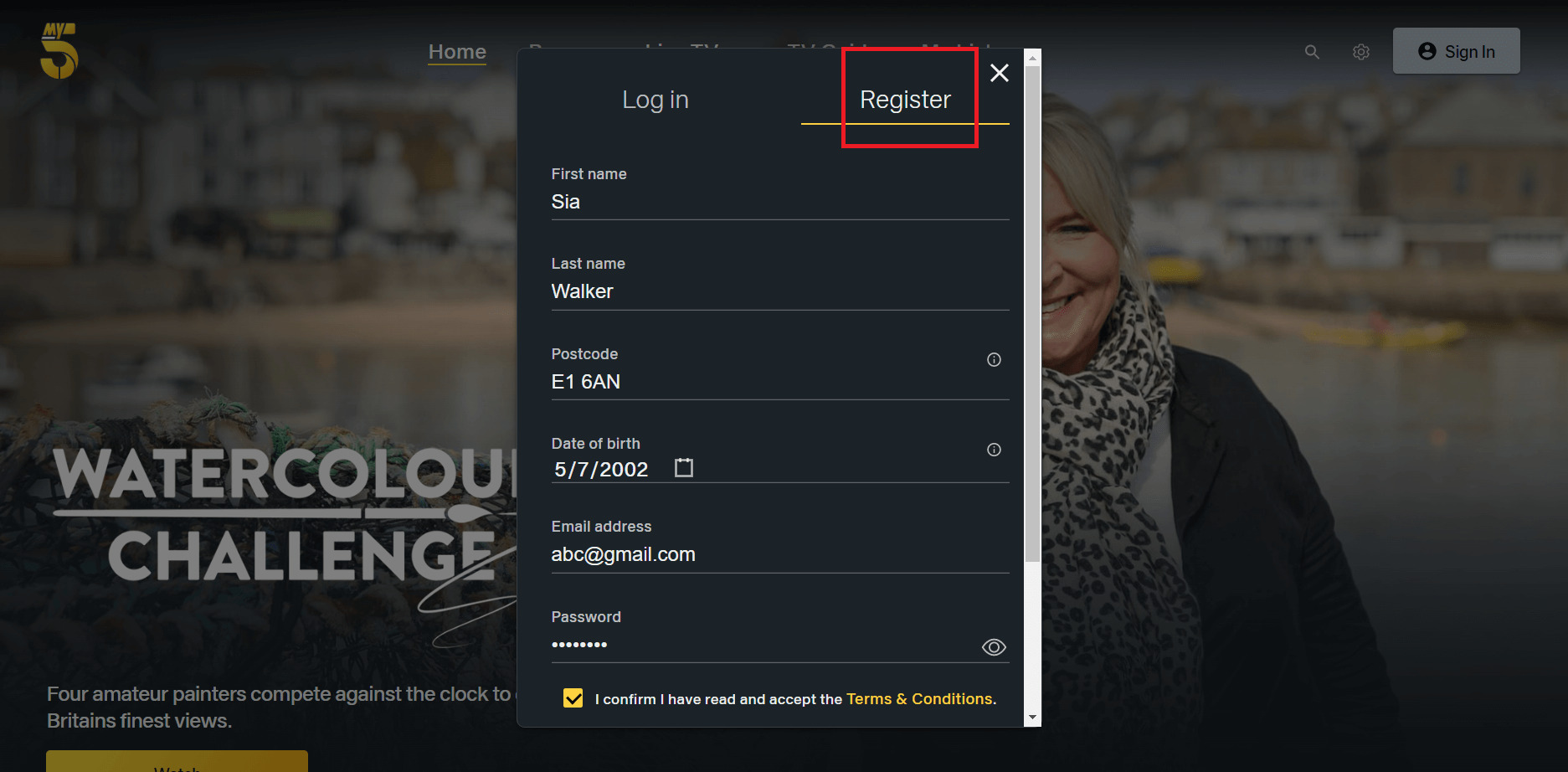
6. Voila! You’ve successfully made an account on My5. Now you can watch Channel 5 in Canada.

How much does Channel 5/ My5 Cost?
Channel 5, also known as My5, is a free-to-watch streaming service in the UK. But if you want to access Channel 5/My5 in Canada, you have to buy a reliable VPN first to unblock its services in Canada.
My5 Compatible Devices?
You can watch my5 in Canada on the following devices:
- Roku boxes
- iOS (Apple)
- Android smartphones and tablet
- Freesat
- Freeview
- NowTV
- YouView
- Apple TV
- Android TV
- Amazon Fire TV stick
- Sony Android TVs 2016-18
- Samsung TV 2016
- Blu-ray players
- PS4
Besides these, learn how to watch My5 in Canada from any device with an internet browser and enjoy streaming on Channel 5 Online at the My5 website.
How can I Watch Channel 5 on iOS in Canada?
Since Channel 5 is a geo-restricted service, you need to connect to a UK VPN server in order to download its iOS app. Here’s how:
- Subscribe to ExpressVPN and install it on your device.
- Connect to ExpressVPN’s UK server.
- Visit the Apple ID, then Settings, and Change the region to the UK.
- Visit App Store and search for Channel 5 app.
- Download the app and enjoy streaming Channel 5 in Canada!
How can I Watch Channel 5 on Android in Canada
Follow these simple steps to watch Channel 5 in Canada on your android device:
- Get ExpressVPN and download its app on your Android device.
- Connect yourself to an ExpressVPN UK server.
- After this, visit Google Play Store > Profile.
- Enter a new Gmail ID in Add another account with the UK as the region.
- Quit Play Store, Reopen it, and search for Channel 5 app.
- Install the app, launch it on your Android device, and enjoy watching Channel 5 in Canada!
Note: Using similar steps you can easily install MY5 on Kodi
How to Watch Channel 5 on Streaming Devices?
Here is how to watch channel 5 in Canada:
- Subscribe to a high-speed VPN such as ExpressVPN.
- Install ExpressVPN and connect it to your router.
- Connect to a UK server, such as the Docklands server.
- Go to the Channel 5 website or app.
- Sign in with your account details and start streaming Channel 5.
How to Watch Channel 5 on Kodi
Here’s how to watch Channel 5 in Canada on Kodi:
- Open Kodi Krypton > Click on Settings on the top left.
- Click on File Manager > and then double-click Add Source.
- When the box pops up, click on the ‘None’ option.
- Here you need to insert the repository URL: https://mavericktv.net/mavrepo/ > Press OK.
- Type the name of the repository in the given field. Maverick Repo > Press OK to close the box.
- Go to the Main Menu by pressing on the ‘Esc’ key > Select the Add-ons menu on your left.
- Now select the Package Installer icon (Box-shaped icon), which appears on the top.
- Choose Install from Zip File > When the box appears, click on Maverick Repo.
- Now click on repository.maverickrepo-3.4.zip > Wait for the repository to install.
- Now Go to Install from Repository > Then click MaverickTV Repo.
- Click on the Video Add-ons button > Select SkyNet > and Press Install.
- Now go back to Kodi Main Menu > select Add-ons menu > Click on Video Add-ons.
- There will be a list of add-ons on your right. Find and click on SkyNet.
- Skynet IPTV > Maverick IPTV > Channel 5.
What Should I Watch on My5?
Some of the most famous shows on Channel 5 include:
- The Blacklist
- The Adventure of Paddington
- law & Order
- Witness Number 3
- All Creatures Greater and Small
- What Women Want
- Criminal Minds
- Wentworth
- Suspects
- Rich House Poor House
What’s the New Drama on Channel 5?
Here is the list of new dramas currently airing on Channel 5:
- House at the End of the Street
- Viruman
- Thirteen Lives
- Men
- Joyride
- Rouge Agent
- Both Sides of the Blade
FAQs
Is Channel 5 Available in Canada?
Channel 5, 5USA, and 5Select are all British streaming Channels and are only available in the UK. Use ExpressVPN to overcome these geographical limitations and watch Channel 5 in Canada.
Can I use the VPN to unblock MY5 streaming service in Canada?
Indeed yes! With ExpressVPN, you can stream MY5 and a wide range of TV channels in Canada, including Sky Go, ITV, BBC iPlayer, Channel 4, Hulu, Netflix, Amazon Prime Video, Disney+, Hotstar, HBO, and much more, making it a great value for money.
Will I get into trouble for using a VPN to stream My5 in Canada?
Using a VPN to stream My5 in Canada is not illegal, but it may go against My5’s terms of service. However, it is unlikely that you will get into trouble for using a VPN to stream My5. Nevertheless, it is always recommended to use a reliable VPN like ExpressVPN to ensure your privacy and security while streaming.
Can I watch Channel 5 in Canada?
Yes, you can watch Channel 5 in Canada by using a VPN. By connecting to a UK server with a VPN, such as ExpressVPN, you can bypass geo-restrictions and access Channel 5 from anywhere in the world. Simply sign up for a VPN, connect to a UK server, and start streaming Channel 5 on your preferred device.
Is it illegal to watch Channel 5 in Canada with a VPN?
No, definitely not! Watching channel 5 using a VPN is not illegal, although it’s against their terms and conditions. Connect to Channel 5 using a reliable VPN like ExpressVPN and register yourself with a random username and postcode.
Can I use a free VPN with channel 5 in Canada?
Yes, but it is not recommended as we haven’t come across any free services that provide reliable service, unblock geo-restricted channels, or have customer service. Most importantly, free VPNs make a profit by storing your personal information and selling it to other parties.
Conclusion
If you’re wondering how to watch Channel 5 in Canada, the solution is simple – use a VPN. With a VPN, such as ExpressVPN, you can easily bypass geo-restrictions and access Channel 5 in Canada. Whether you’re an ex-pat, a frequent traveler, or just a fan of British TV, a VPN can provide you with the freedom to watch your favorite shows on your own terms.
We highly recommend ExpressVPN for streaming Channel 5 in Canada. Not only does it offer lightning-fast speeds, but it also has servers in multiple locations. ExpressVPN has top-notch security features, so you can rest assured that your online activity is safe and private. Just sign up for ExpressVPN today and start streaming your favorite shows in no time!