Are you trying to use your VPN in Qatar, but it suddenly stops working? It happens when your VPN fails to get past the restrictions imposed by the Qatari government. This is, infact, one major concern of Qatari citizens.
You can openly use VPNs in Qatar as they are legal in the country, but the government bans some sites and online content to meet the cyber regulations and policies. The Qatari Internet Service Providers can block your VPN immediately, even if you try to access a blocked or banned webpage. Many countries impose strict policies for digital content, and Qatar is one of them. With VPNs as powerful agents, you can unblock restricted content globally. However, accessing to get a Qatar IP address with a VPN server for free is not an option.
Are you still worried about your VPN not working in Qatar? Let’s discuss a quick solution to avoid these restrictions with your VPN.
Why is VPN Not Working in Qatar?
Qatar follows strict cyber laws and policies. The Qatari government authorities ban websites and apps containing content against their religious values and political movements. For instance, LGTBQ, pornography, gambling, dating, etc., fall under the blocked content category.
Qatari residents have restricted access to the internet and social media apps. They can’t post anything which goes against national laws and regulations. To apparently lift the ban on the sites and apps, the citizens practice self-censorship by hiding their identities from the authorities.
Although VPNs are legal in Qatar, they are constantly tracked and observed by the government. When local citizens try to access blocked content or apps via VPNs, the government blocks them straightaway. The VPNs that use PPTP and OpenVPN, as well as L2TP protocols, are blocked more often.
The officials monitor the network constantly and quickly identify VPNs with weak and insecure protocols. They trace the IP addresses generated by VPNs that block their services.
VPN not working in Qatar: A Quick Fix
If your VPN is not working in Qatar, you might need a new premium VPN to produce IP addresses that the Qatari authorities can’t identify and block. With the powerful and secure protocols of this VPN, you should be able to access any website without disruptions or issues. For this purpose, you can connect to the best VPNs for Qatar.
We recommend ExpressVPN, one of the most reliable, secure, and fast VPNs that incredibly get around restrictions and censors. ExpressVPN uses a self-developed Lightway protocol, considered the fastest protocol offered by a VPN, that ensures ultra-fast and guarded traffic transmission. Its advanced encryption and vast server network empower users to enjoy connections without delays, providing unrestricted access to a plethora of streaming content. The best VPN for streaming serves as a comprehensive solution, enabling users to break free from geographical barriers and censorship restrictions.
Moreover, coupled with military-grade AES-256 encryption and a no-logs policy, this VPN is best for security and privacy protection. With top-notch features and world-class services, you can entirely rely on ExpressVPN at $6.67/mo - Save up to 49% with exclusive 1-year plans + 3 months free to use unrestricted internet in Qatar.
To apply a quick fix solution for your VPN not working in Qatar, follow the simple steps given ahead:
- Search and decide on a VPN to unlock services in Qatar (We suggest ExpressVPN).
- Create your account and get a subscription plan on ExpressVPN.

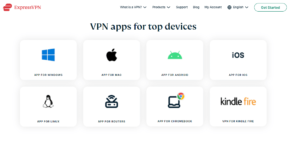
- Install the ExpressVPN app for your device.
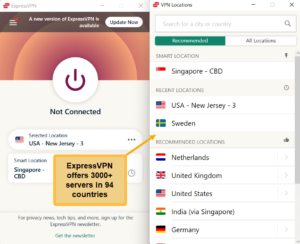
- Launch the app and try to connect to the nearest server available.
- Enjoy secure and boundless web browsing and downloading in Qatar without being monitored or identified.
FAQs – VPN not working in Qatar
Are VPNs blocked in Qatar?
Yes, VPNs with weak protocols and security get blocked in Qatar when you try to access banned sites and apps. Despite the strict online censorship, it’s completely legal to use VPNs in Qatar. However, you should expect some trouble downloading and using VPNs in Qatar due to ISP restrictions.
Which VPN is working in Qatar?
ExpressVPN works best in Qatar with lightning-fast speed, super secure protocols, and a privacy protection mechanism. It masks your data using powerful AES-256 encryption and hides your activities on the network. With robust features, ExpressVPN can protect you from ISP tracking, allowing you to use blocked apps anonymously and privately.
Which free VPN works in Qatar?
Although free VPNs work in Qatar, we don’t recommend this practice. Free VPNs don’t come with effective security protocols and basic privacy protection techniques that can expose you on the network and get you blocked. By using free VPNs, you can put your privacy at high risk.
Free VPNs don’t follow a no-logs policy. Therefore, they collect and sell your data to third parties and advertisers. Additionally, such VPNs often contain viruses and trojans that can’t let you browse or download safely. You can access only limited content with data caps using these VPNs.
This is why we only recommend you use the best Qatar VPN, like ExpressVPN.
Conclusion
Due to the strict online censorship and government restrictions in countries like Qatar, users can’t browse, post, or use certain content directly. Even using ordinary VPNs doesn’t help much because of continuous government tracking. Your VPN can easily get traced and blocked by the ISP.
Is your VPN not working in Qatar? Then try ExpressVPN, the most trusted and efficient unblocking tool for all devices and platforms. It’s the best VPN for streaming and bypassing censorship so that you can enjoy its connection without any delays.
Upgrade your browsing experience in Qatar with world-class ExpressVPN services and top-notch features!