Is your Stan not working with VPN? You might think it is strange since we always recommend you use a reliable VPN to stream Stan in the USA. The question is, why did your VPN stop working?
Stan is a purely Australia-exclusive OTT platform for the people of down under to stream movies and shows, both original and on-demand. If you’re on a trip outside the country or simply want to explore Stan content, using a VPN is how you can achieve this. But what matters is, which VPN is the best VPN for Stan, to avoid Stan VPN not working.
If you have not already, try using ExpressVPN, as this VPN service provides foolproof protection against the Stan VPN ban, made possible by its secure infrastructure. Firstly, it will disguise your original IP with an AU IP address once you connect to an Australian server. Next, it will reroute your traffic to an encrypted tunnel to prevent detection by Stan.
If you want answers to queries like why is Stan not working with VPN, or want to avoid ExpressVPN not working with Stan, stay tuned to this blog for all the necessary details.
Stan not working with VPN: Quick guide
There are several reasons for Stan not working with VPN, but the one that takes place most often is your original location being leaked. This results in easy detection by geo-blockers and firewalls, thus putting you at risk for a Stan VPN ban.
Below, we have listed some streamlined Stan VPN detection workaround methods for you to try and get past the ban.
- Delete your browser cookies
When you accept browser cookies while using different websites, you are basically providing them access to your information, including your location. Websites offer cookies to get a better understanding of the user that has logged on so that they can be assisted naturally. This is one of the ways your location might be leaking, resulting in Stan with VPN not working.
Delete all your browser cookies so that Stan cannot detect your original location and your VPN is able to work effectively, helping you unblock Stan anywhere.
- Try connecting to a different VPN server
Some VPN servers work better in terms of speed as compared to others. It could be due to the distance between the server and the user or simply the programming of the server. In any case, a slower server could be the reason why you are left wondering, “why is my VPN not working with Stan.”
A simple and easy fix for this is to switch to another VPN server in the same location or a different city located in the same country from which you want to obtain an IP address.
- Contact a support team through your VPN
The reason behind Stan VPN not working could be much more complicated than a slower server or your location being leaked. This is why reaching out to the VPN’s customer support is a wise option to choose. However, if your VPN does not offer a live chat option, you might have to wait for quite some time in order to get your solution.
- Uninstall and reinstall your VPN software
A classic fix for why is Stan not working with VPN is to simply uninstall and reinstall your Stan VPN software. What this will do is resolve all glitches and connectivity issues that were being faced by the application, providing you with satisfactory results after reinstallation.
- Upgrade to a Premium VPN
If you are using a free Stan VPN to unblock Stan outside Australia, it is inevitable that you will face issues with Stan not working. Free VPNs come with limited features and unblocking capabilities and are sooner or later bound to give you a hard time.
To avoid any of these issues, the smart move to make is to get a premium VPN in the first place or upgrade to a premium VPN service. We guarantee that with a reliable, subscription-based VPN like ExpressVPN, you will not have to worry about Stan not working with ExpressVPN ever.
Why is Stan not working with my VPN?
As mentioned before, Stan is an exclusive Australian video streaming platform, which means it cannot be accessed outside Australian territories. If you are trying to access Stan in US or anywhere else, without a VPN, your efforts will be in vain. But if you are connected to a VPN and still cannot access Stan outside Australia, you need to look deeper.
Stan with VPN not working could be caused by the leaking of your true location and your original IP. How does this happen? For one, your VPN could not be performing as effectively as it claims in hiding your true location. And second, your VPN might have been previously blacklisted by Stan, which is why it is unable to penetrate through the geo-restrictions.
To avoid both cases of Stan VPN not working, you can swap your currently installed VPN with a premium and reliable VPN service such as ExpressVPN.
Best VPN to Avoid Stan VPN error – In-depth analysis
The best VPN for Stan can be hard to find, especially if you are mainly interested in the streaming part and not the unblocking part. To make your streaming process easier, we have selected ExpressVPN as the best VPN to avoid the Stan VPN error from the entire market of VPNs.
1. ExpressVPN – best VPN for Stan

Key Features:
- MediaStreamer feature
- Servers: 3000+ servers in 105+ countries, with 4 Australian servers (Sydney, Melbourne, Perth)
- Speed: 89.42 Mbps for downloading and 84.64 Mbps for uploading
- Simultaneous connections allowed: 5 devices
- No limit on bandwidth for Ultra HD & HD streaming
- Price of the best deal: $6.67/mo - Save up to 49% with exclusive 1-year plans + 3 months free
ExpressVPN is the best VPN for Stan and the VPN that will help you avoid Stan errors. It comes with ultra-secure programming for keeping your location disguised successfully. Additionally, it helps you unblock Stan with accelerated speeds. ExpressVPN hosts a server base of 3000+ servers in 105
+ countries. Out of these, 4 are located in Australia.
We connected to the Melbourne server in Australia to see if Stan could be unblocked. The good news is that we had an amazing time streaming Stan originals and on-demand movies and shows without any errors from the VPN ban or slowed speeds.
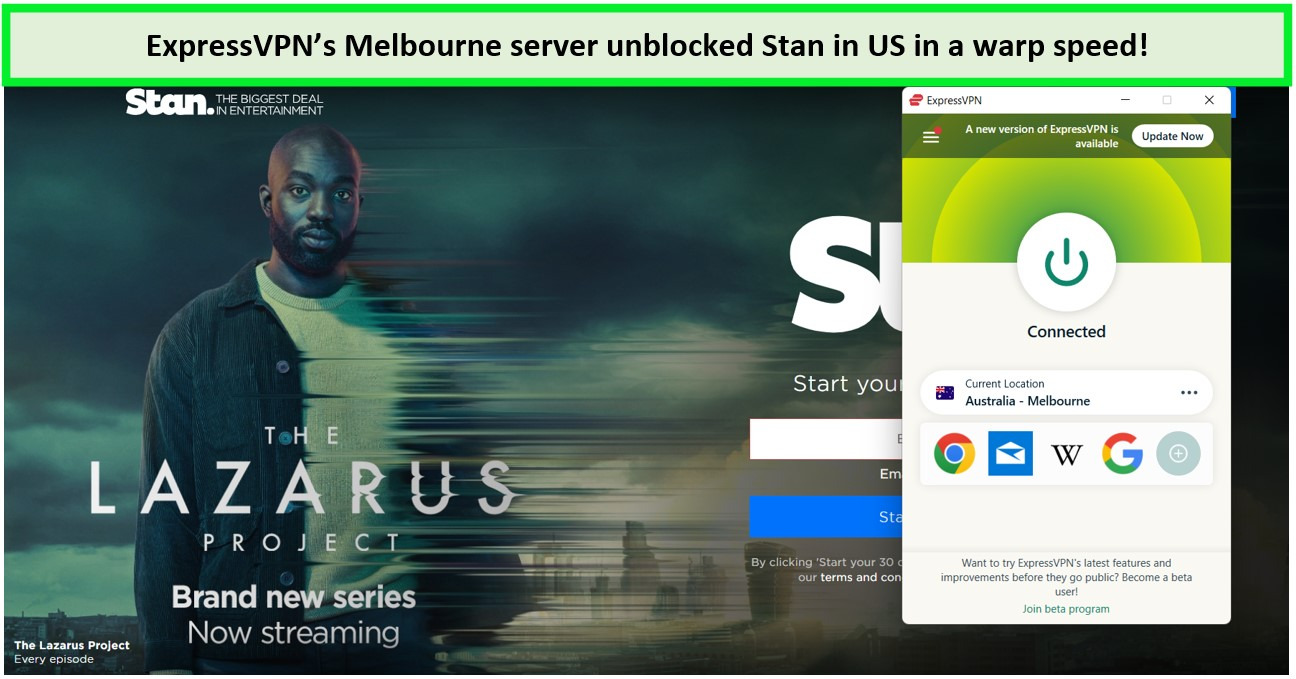
Prevent issues like Stan not working with VPN using ExpressVPN.
Using the MediaStreamer feature, we tried unblocking streaming services other than Stan which are available in Australia. We were elated to see that we could unblock Hayu with ExpressVPN, as well as Binge, Foxtel, Apple TV+, and many more. On top of easy unblocking, HD and 4k streaming quality was attained.
Wanting to learn more about the blazing-fast speed rates, we proceeded to perform an ExpressVPN speed test. The speed test results displayed download and upload speed ranges in Mbps, which were 89.42 Mbps and 84.64 Mbps respectively. The ping rate was also determined, turning out to be 110 ms, which is almost negligible.
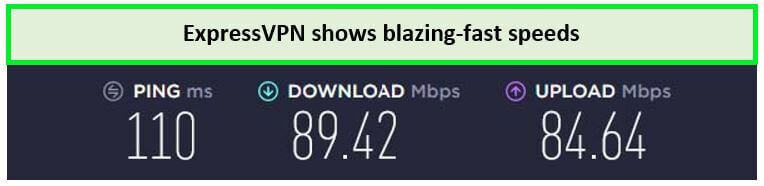
This speed is enough to stream in high resolution.
Satisfied with the excellent speeds, we next installed the ExpressVPN software on a number of different devices. The devices installed with Windows, Android, iOS, Mac, and Linux operating systems were found compatible. Moreover, on TVs like Samsung Smart TV and gaming consoles like Xbox and PlayStation, ExpressVPN was found compatible too.
Moving on to security and privacy protocols, ExpressVPN offers 256-bit AES encryption, a zero-log policy, an automatic kill switch (Network Lock), and the Lightway protocol. All of these features are available with all pricing plans, including the best-selling deal of ExpressVPN, which costs $6.67/mo - Save up to 49% with exclusive 1-year plans + 3 months free.
To talk about some bonus features, it is important to mention that you get a 7-day ExpressVPN free trial to review the service, and a 30-day money-back guarantee if you want to cancel your subscription in case of ExpressVPN Stan not working on your device. Moreover, a 24/7 live chat option to troubleshoot if you face ExpressVPN not working with Stan issues.
Read in detail about other features in our ExpressVPN review.
- Unblock Stan, Netflix, Disney Plus, etc.
- MediaStreamer for seamless unblocking
- Widespread server network
- Highly secure and functional Australian servers
- HD and 4k streaming quality
- No buffering or server disconnections
- Lightway protocol for excellent speeds
- Costly when compared to alternative VPNs
- No labels on streaming servers
How does Stan detect my VPN?
Stan detects the location of each device using its IP address. So if you are logged in from anywhere other than Australia, you will not be able to stream using Stan. The way around this is to get a VPN. Although, even your VPN may not be able to grant you access to Stan, especially if it is not a premium service.
Using a low-quality VPN puts you at risk of lP leaking. So if your VPN is leaking your true location Stan will detect it and render your VPN useless. It might even blacklist your server. To avoid getting blacklisted, you must opt for a reliable VPN with a lot of servers, so that even if you get blacklisted for any reason, you can automatically shift to another server.
ExpressVPN is a premium VPN that offers 4 servers in Australia and comes with IP and DNS leak protection. So essentially, you will never have to face issues like Stan not working with ExpressVPN if you opt for this service.
FAQs
Does Stan block VPNs?
Yes, Stan does block VPNs so you have to remain careful. However, technically speaking, Stan can only block the IP address that your VPN is providing you with if it detects abnormal activity. Once your VPN-provided IP address is blocked, you will not be able to stream Stan anymore since your true IP will be shown.
To avoid this, you must opt for a VPN that offers multiple Australian IP addresses so that no one IP raises doubt for Stan detectors due to multiple users of the same IP. Even if your IP is detected, your VPN must allow you to automatically jump to another server that offers a different IP, thus avoiding getting banned.
What to do if Stan blocks my VPN?
If Stan blocks your VPN, the simplest solution is to upgrade your VPN service. But you must keep in mind that the new service you choose must be the best VPN for Stan, like ExpressVPN. Which offers multiple IP addresses in Australia and 4 servers, so even if your IP is blocked, you can instantly utilize another one to keep logged on to Stan.
VPNs that don’t work with Stan?
There are 3 VPNs that you must avoid at all costs since they do not work with Stan. These are Hola VPN, Hoxx VPN, and HideMyAss.
- Hola VPN: You must avoid using Hola VPN for Stan since it is not a reliable service. As mentioned in the Terms and Conditions of Hola VPN, it can access your personal data and keep logs of it. This means that your privacy is at risk and you can easily be phished, scammed, or threatened online if your information gets leaked to third parties while using Hola VPN.
- Hoxx VPN: Hoxx VPN should be avoided while selecting a VPN for Stan since it does not offer any premium security and encryption features of privacy protocols. Your IP and DNS information is more than likely to get leaked, resulting in a Stan VPN ban, thus putting all your efforts to unblock Stan down the drain.
- HideMyAss: HideMyAss is a VPN that offers fairly better services, but you must not use it to unblock Stan as it is ineffective when the matter boils down to your security. HideMyAss has been reviewed to reveal that it fails multiple security tests and does not even offer protocols like WireGuard for safety assurance.
Conclusion
Stan is an Australia-based OTT platform for movies and TV shows streaming that cannot be accessed in US, UK, or any other territory including the US. To gain access, you need a VPN. if you already have a VPN installed but still cannot stream Stan, it is most probably due to the fact that your VPN is not hiding your original location very effectively.
Avoid issues like Stan not working with VPN by opting for our top-recommended service, ExpressVPN, and get to stream local Australian content as much as you like.
For any more queries on VPN troubleshooting while using Stan or having the same error of Crave not working with VPN, leave your comments below and we will get right back to you.