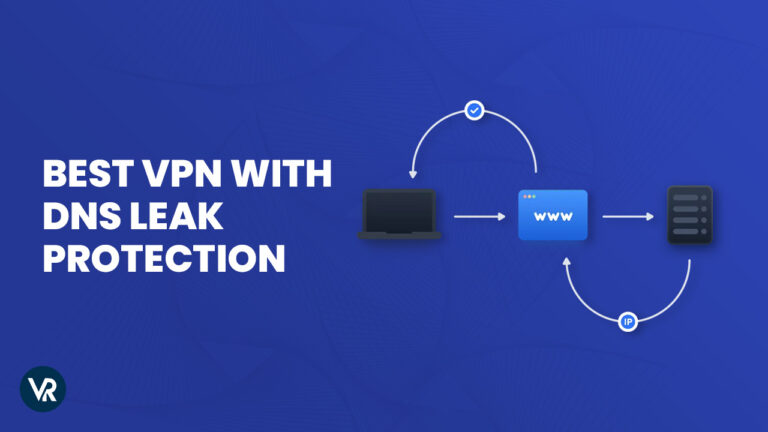
A DNS leak is a security vulnerability where, despite the use of a VPN to safeguard user data, requests inadvertently go to an ISP’s DNS servers. It can undermine your VPN’s protection and expose your information to scrutiny by the ISP or your geo-restricted streaming service. This can be avoided by using the best VPN with DNS leak protection.
With the assistance of the best VPNs, you can establish secure Tunnel management that encrypts your internet connection and hides your online activities. This ensures you can explore a plethora of streaming services and informative websites without risking your IP address or DNS leaking.
What VPNs don’t leak DNS? After testing 65+ VPN providers, I have come to the conclusion that ExpressVPN is the best VPN with DNS Leak Protection thanks to its robust DNS Leak protection feature, capable Kill switch, and AES-256 bit encryption. Join me to learn more about the best DNS VPNs.
3 Best VPN with DNS Leak Protection in 2024 – [Quick Overview]
What to know what is the best VPN with DNS leak protection? Here is a short introduction to my selection of the 3 best VPNs with DNS Leak Protection:
ExpressVPN: Best VPN with DNS Leak protection:
Offers ultra-fast connectivity with high-security standards and strong DNS leak protection across all of its extensive servers in 105 countries.
➔ Get a special ExpressVPN offer today: $6.67/mo - Save up to 49% with exclusive 1-year plans + 3 months free.
Surfshark: Budget-friendly VPN for DNS protection:
Offers a durable Camouflage Mode to ensure your DNS stays hidden along with ultra-fast streaming speeds without any lag at an affordable cost.
➔ Get a special Surfshark offer today: $2.49/mo .
NordVPN: Largest server network for DNS protection:
With 6000+ servers in 61 locations, it provides quick connectivity with no compromise on security measures and strong protection against DNS leaks.
➔ Get a special NordVPN offer today: $3.99/mo - Save up to 63% with exclusive 2-year plan + 3 months free for a friend.
Jump straight to learn:
Best VPN with DNS leak Protection – Detailed Analysis | FAQs
Why do You Need a VPN with DNS Leak Protection?
You need a VPN with DNS leak protection due to increased cyber surveillance. A DNS leak undermines the purpose of a VPN by potentially exposing private information like browsing history, IP address, and location to ISPs and cyber criminals. A robust VPN with a kill switch and DNS leak protection change your IP address into a secure IP, ensuring your data remains secure.
DNS leaks reveal your browsing details to ISP DNS servers despite using VPNs. This exposure can occur through misconfigured VPNs or specific Windows features. A dependable VPN prevents this, securing your online presence and enabling a secure IP address.
When seeking out which VPN has no DNS leak, ExpressVPN is the ideal solution for preventing DNS leaks. It offers unmatched encryption, a strict privacy policy, and effective DNS leak protection, ensuring your online activities and data are always protected and private.
Best VPN with DNS Leak Protection [In-depth Analysis 2024]
I tested numerous VPN services through the DNS Leak test guide and shortlisted the best VPN with DNS leak protection. Let’s discuss them in detail:
1. ExpressVPN – Best VPN with DNS Leak Protection


- Ultra-fast servers in 105 Countries
- Excellent unblocking capability for Netflix, Hulu & more
- Best-in-class encryption trusted security, and advanced protection features that block ads, trackers, and harmful sites.
- Connect up to 8 devices simultaneously
- 24/7 customer support through live chat
- 30-day money-back guarantee
ExpressVPN is the best VPN with DNS leak protection because of its exceptional features and top-tier security measures.
ExpressVPN offers a wide range of servers in 105 countries. It has the largest country coverage in this list which is why I believe it is the best VPN with servers.
Does ExpressVPN have DNS leak protection? Yes, ExpressVPN has very capable DNS leak protection. I put it through multiple tests using multiple servers and never once did it leak my information to the VPN leak test check tool.
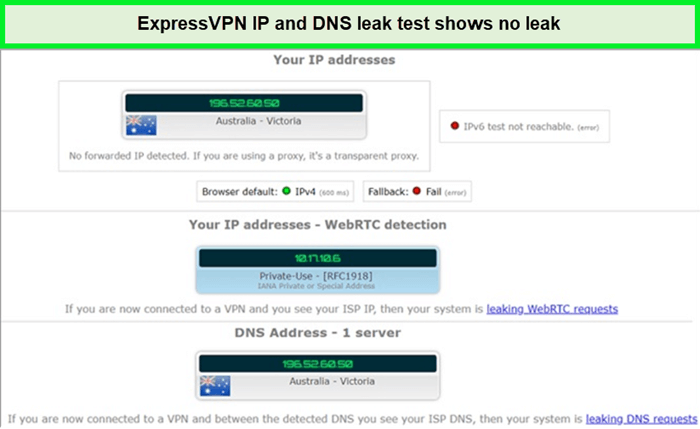
ExpressVPN servers ensure your actual IP address remains out of sight, as I found out during my DNS leak ExpressVPN tests.
My streaming tests proved you can connect with any of its servers worldwide and still be met with high security and stable speeds throughout your session. It allowed me to unblock many geo-restricted versions of sought-after services like Netflix, Amazon Prime, and Hulu.
I conducted an ExpressVPN speed test to put it through its paces. I was happy to see a download speed of 89.42 Mbps and an upload speed of 84.64 Mbps on my 100 Mbps connection through ExpressVPN, the fastest DNS server USA.
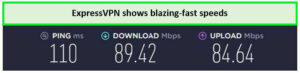
I witnessed quick streaming and lightning-fast speeds with the fastest DNS servers provided by ExpressVPN.
ExpressVPN’s accelerated P2P networking is perfect for torrenting, allowing you to quickly but securely share large files across the internet. It also provides access to exceptional security features like AES-256 encryption, a strict no-logs policy, and a very capable ExpressVPN kill switch called Network Lock to protect you from IP and DNS leaks.
ExpressVPN stands out as the best VPN for DNS leak protection due to its large server network, strong security features, high-speed servers for streaming, wide device compatibility, and reasonable pricing. It’s an all-encompassing solution for anyone serious about their online privacy and security.
The cost of ExpressVPN is quite reasonable and is accompanied by a 30-day money-back guarantee on all plans. If you want to try the service out without commitment, you can do so through the ExpressVPN free trial on your mobile device.
Exclusive Deal
VPNRanks readers can enjoy exclusive VPN deals! $6.67/mo - Save up to 49% with exclusive 1-year plans + 3 months free.
Learn more about this provider in my detailed ExpressVPN review USA.
- Network Lock to ensure no DNS leaks are recorded
- AES-256 encryption protocols for higher security
- Exceptionally fast servers
- No lags or connectivity issues throughout
- An expensive option for a VPN service
2. Surfshark – Budget-friendly VPN for DNS protection

- 3,200+ servers in 100 countries
- RAM-only servers (no hard disks)
- Unlimited simultaneous connections
- Unblocks Netflix and More
- 24/7 Customer Service
Surfshark is a budget-friendly VPN for DNS protection, thanks to its low prices and excellent DNS protection features. It provides ultra-fast connections, minimal buffering, and 3200+ servers in over 100 locations.
In my testing, I was amazed at how Surfshark’s ultra-fast DNS servers performed flawlessly, completely secure from any leaks or delays. This experience convinced me that Surfshark truly offers the best services at affordable prices.
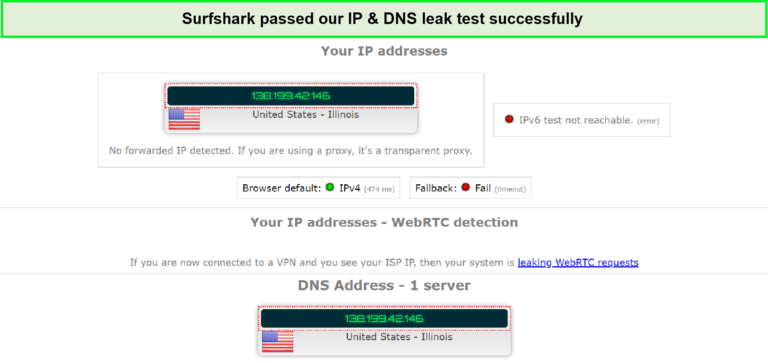
Surfshark servers cleverly hid my IP and DNS information.
Using Surfshark for Netflix, I was able to stream some great shows in HD without the risk of DNS leaks. All in all, I managed to unblock HBO Max, Hulu, BBC iPlayer, and Netflix with Surfshark.
I conducted a Surfshark speed test to check its speeds on my 100 Mbps internet connection. I received download speeds of 81.32 Mbps and upload speeds of 76.12 Mbps.
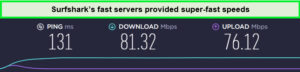
I got excellent Surfshark speed test results.
To keep you safe, Surfshark offers state-of-the-art features, including AES-256 GCM encryption, an automated kill switch, a stringent no-logs policy, and a stealth mode dubbed Camouflage.
The ability to exclude some apps and websites from the VPN while encrypting others at the same time is one of its most defining qualities and the reason why I consider it to be the best VPN with a whitelister.
Through its advanced SmartDNS feature, I was able to use Surfshark on Roku alongside other unusual devices like PS4, and Kodi. It also allows for unlimited simultaneous connections, ensuring every device in my household stays protected.
It is available at a very reasonable cost, backed by a 30-day money-back guarantee. Still, if you do not want to shell out the money immediately, you can first test the service without monetary commitment through the Surfshark free trial on your mobile device.
Exclusive Deal
VPNRanks readers can enjoy exclusive VPN deals! $2.49/mo - Save up to 77% with exclusive 2-year plan + 30-day money-back guarantee
For more details, please refer to my comprehensive Surfshark review USA.
- Complete DNS and DDoS protection
- Connect unlimited devices at once without any compromise on security
- Affordable deals on the best services
- Skeptical security standards
- Inadequate response from customer support
3.NordVPN – Largest server network for DNS protection

- 6000 servers in 60 countries
- WireGuard protocol (NordLynx)
- 6 Simultaneous Connection
- DoubleVPN
- 24/7/365 Live Chat Support
- 30 Days Money Back Guarantee
NordVPN is the largest network for DNS protection thanks to its large server network and robust DNS leak protection features. You can safeguard your online activity using its network of 6000 servers in 61 countries.
Does NordVPN have DNS leak protection? Yes, it most certainly does! In my NordVPN DNS leak tests, I was thoroughly impressed with NordVPN’s lightning-fast DNS servers, which are remarkably fast and demonstrate an unwavering commitment to security, effectively preventing any leaks or delays.
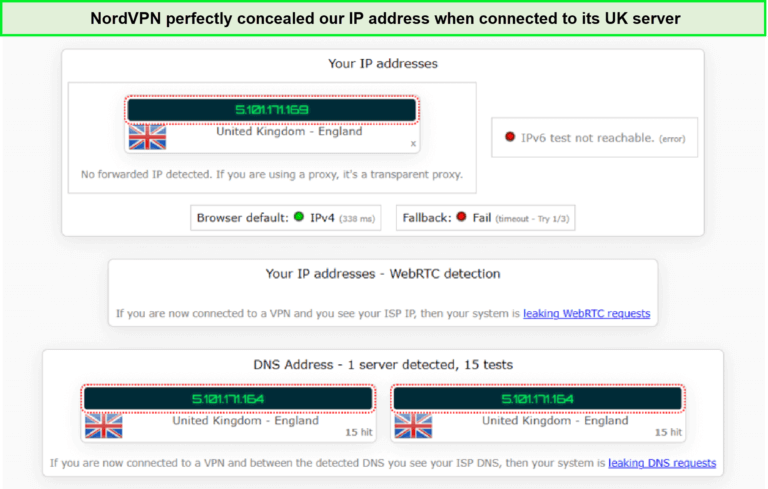
My NordVPN DNS leak test has was successful.
I also tested its streaming capabilities and was happy with its ability to unblock many streaming services while effectively protecting DNS and IP information. I was able to unblock HBO Max, Hulu, BBC iPlayer, and Netflix with NordVPN.
It offers an easy-to-use interface and allows connecting to virtually any server with no more effort than a single click which is why I consider it as one of the best VPNs with one-click.
I conducted a NordVPN speed test, and obtained download speeds of 83.82 Mbps and upload speeds of 44.64 Mbps on my connection with 100 Mbps thanks to its fast DNS servers USA.
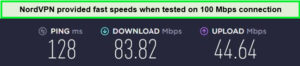
NordVPN speed test showed impressive results on my speed test.
NordVPN seamlessly integrates with a diverse array of platforms and devices, providing easy-to-install apps for Windows, iOS, MacOS, Linux, and Android. Thanks to its cutting-edge SmartDNS technology, I was able to effortlessly use NordVPN with Roku. The same feature allowed me to use the VPN on PS4 backed by DNS leak NordVPN protection.
As my DNS leak test NordVPN showed, this provider offers a variety of other security features, including top-tier AES-256 GCM encryption and a strict NordVPN no-logs policy.
NordVPN is available at reasonable prices and offers many different plans, all of which are backed by a 30-day money-back guarantee. Still, if you want to try the service out without paying, you can do so by availing of the NordVPN free trial on your mobile device.
Exclusive Deal
VPNRanks readers can enjoy exclusive VPN deals! $3.99/mo - Save up to 63% with exclusive 2-year plan + 3 months free for a friend.
To learn more about this provider, please refer to my NordVPN review USA,
- Dual the amount of security with the DoubleVPN feature
- According to DNS or IP breach tests, no issues were recorded
- Blazing fast speeds and no compromise in protection
- Malware issues and threats aren’t circumvented
How to Identify and Fix a DNS Leak?
To identify and fix a DNS leak, configure your VPN to exclusively use its own DNS servers. This adjustment ensures your computer only connects through the VPN’s DNS servers, preventing any connection to your ISP’s DNS servers.
Entering a URL on any device, be it a computer, smartphone, or tablet, causes the device to make a DNS server request for the corresponding IP address. DNS leaks can happen here. If your traffic is leaking, it’s because the anonymity network isn’t able to properly route it.
You need to first identify whether there is a DNS leak on your network. You can easily find it out by visiting a number of websites that can easily find it out for free. You will easily know whether there’s a leak if you find your country’s name and your IP address in the results.
What is DNS leak protection? If you’re using a VPN with DNS leak protection, your browser won’t send the DNS request directly to the VPN server but instead through the VPN to the anonymous DNS server.
Since you’re just utilizing the VPN’s DNS server and not your ISPs, your ISP won’t know what you’re up to.
There are three main ways to Fix a DNS Leak:
- Employ a VPN application that includes integrated DNS leak protection: Investing in DNS leak protection VPNs is the easiest, quickest, and most cost-effective method.
- Utilize VPNCheck (Pro version) software: Also an easy method but requires significant investment into buying the software.
- Modify DNS servers and acquire a static IP address: Very complex manual configuration method. Not recommended for anyone who is not an advanced user of cybersecurity technologies.
How do I stop DNS leaks without VPN?
To stop DNS leaks without a VPN, set up a firewall on your computer. A firewall can block data, including DNS requests, from leaving your computer. By disabling the DNS process, a firewall ensures your information remains secure and does not exit your computer.
To stop DNS leaks without a VPN, consider these methods:
- Install a Firewall: Configure a firewall to block data, including DNS requests, from leaving your computer. This method effectively prevents DNS leaks by disabling the DNS process.
- Use an Anonymous Web Browser: Opt for browsers like Tor, which provide complete anonymity without requiring DNS configuration changes on your system.
- Configure a Nonexistent DNS Server: Set your DNS server to an invalid address. While this requires alternative methods for domain name resolution, such as using a proxy, it ensures your computer’s IP address remains hidden.
Other Handy VPN Guides by VPNRanks
- Best Mac VPNs: Seamlessly connect to global servers and enjoy fast speeds on your Mac.
- Best VPN for Windows: Keep your Windows PC safe on public Wi-Fi networks with a trusted VPN.
- Best VPN for Kodi: Say hello to buffer-free playback and high-definition streaming.
- Best VPN for Nvidia Shield TV: Navigate the streaming universe with confidence on Nvidia Shield TV.
- Best VPN for Crypto Trading: Stay ahead of cyber threats and safeguard your trades with a top-tier VPN.
- Best VPN for Binance: Maximize your crypto gains on Binance with the unbeatable performance of a VPN.
FAQs – Best VPN with DNS Leak Protection
How do I stop VPN DNS leaks?
To prevent VPN DNS leaks, configure your VPN so that it exclusively uses its own DNS servers. This action ensures that your computer bypasses the ISP’s DNS servers, relying solely on the DNS servers provided by the VPN.
Does NordVPN have DNS leak protection?
Yes, NordVPN offers DNS leak protection. It is crucial to select a VPN service that enables DNS leak protection by default and utilizes its own DNS servers for all queries.
NordVPN ensures DNS leak protection by routing all DNS requests through an encrypted tunnel, resolving them via the same server to which you are connected.
Does VPN protect DNS requests?
A VPN does protect DNS requests. By employing a “Full-Tunnel” VPN, all internet traffic, including DNS requests, is encrypted and directed through the VPN.
This encryption takes DNS requests out of the ISP’s reach, though it may restrict access to local network resources.
Does a VPN protect from DNS hijackingin USA?
Yes, a VPN can protect against DNS hijacking by encrypting your internet traffic and routing it through a secure tunnel, which significantly reduces the risk of attackers intercepting your DNS queries.
What Is DNS Protection?
DNS protection secures your DNS queries to prevent interception or manipulation by third parties. It is a crucial aspect of online privacy, ensuring that your internet activities and the websites you visit are not exposed.
Does ExpressVPN have DNS leak protection?
ExpressVPN provides DNS leak protection across its applications. Although there is a potential risk of DNS traffic being redirected outside the VPN tunnel by malicious actors, ExpressVPN’s apps are designed to offer DNS leak protection.
However, it’s important to note that other applications and manual configurations might not be as secure.
Conclusion
In conclusion, DNS leaks pose a real threat, potentially exposing sensitive data like browsing history and IP locations to ISPs and cyber threats. This vulnerability compromises the privacy and security that VPNs aim to provide, leaving users exposed to monitoring and potential data exploitation.
The importance of DNS leak protection cannot be overstated. It ensures that DNS requests are securely routed through the best VPN with DNS Leak Protection, keeping them hidden from external observers. This layer of protection is essential for maintaining online privacy and safeguarding personal information from surveillance and cyber risks.
ExpressVPN stands out as the best solution for DNS leak protection. Its advanced security features and strong encryption offer reliable protection against DNS leaks, ensuring your internet activities remain private and secure. Choosing ExpressVPN means opting for a trusted guardian of your digital privacy, enabling safe and unrestricted internet access.