Finding your Xfinity IP address in Australia is a critical first step for accessing your router’s settings—a task that might seem daunting but is actually quite straightforward. I’m here to guide you through locating your router’s gateway IP address effortlessly.
Most Xfinity routers default to 10.0.0.1, or 192.168. 0.1 but if you’ve made changes to your network settings, this may no longer be the case. Fear not, as by visiting the router’s web interface, you can not only discover your current IP address but also adjust configurations to better suit your connectivity needs.
It’s essential for anyone looking to manage their network settings effectively, whether it’s implementing parental controls, securing your Wi-Fi network, installing one of the best VPN apps or setting up custom DNS servers. If you’re also in need of the default login credentials, keep in mind that many Xfinity routers share the same usernames and passwords, which you can easily find with a quick search.
This guide will show you how to find your router’s Xfinity IP address. Once you have the IP, you can log into your router’s web panel and modify the settings as needed.
Xfinity IP Address in Australia: How to find out your Xfinity router gateway IP
Most Xfinity routers use the same default gateway IP address in Australia, username, and password. In case you have changed your default Xfinity IP address for router and forgot it, you can easily find it by following the simple steps as explained below.
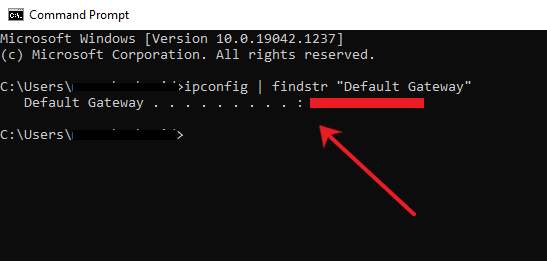
1. Find IP address for Xfinity router in Australia on Windows
To locate the IP address of your Xfinity router on a Windows computer, follow these steps:
- Press the Windows key + R to bring up the Run dialog box.
- Enter “cmd” and hit Enter to open the Command Prompt.
- In the Command Prompt, type “ipconfig | findstr /i “Gateway”” and press Enter.
- Search for the “Default Gateway” listed under the network adapter that connects to your Xfinity router.
2. Find Xfinity router IP address in Australia on Linux
- Launch a terminal by pressing Ctrl+Alt+T or by searching for “Terminal” in the applications menu.
- In the terminal window, type ip route | grep default and press Enter.
- The IP address displayed next to “default via” is your Xfinity Comcast router IP address.
3. Find Xfinity router IP in Australia on macOS
- Open Terminal.app.
- Enter the command: netstat -nr | grep default.
- Press Enter to display your default Xfinity router’s IP address. For example:
joe$ netstat -nr | grep default
default 192.168.1.1 UGSc 50 46 en1
4. Find Xfinity gateway IP address in Australia through Router’s Configuration Page
- To find your Xfinity Comcast modem IP address, access your router’s configuration page.
- Connect your device to the same network as your Xfinity router, using either a wired or wireless connection.
- Open a web browser and type your Xfinity router gateway IP address, typically “192.168.0.1” or “10.0.0.1.” If these do not work, refer to your router’s manual or the manufacturer’s website for the correct default gateway IP.
- Press Enter to bring up the router’s login page.
- Enter the username and password for your router.
- Once logged in, navigate through the router’s settings or advanced options to find the network information section.
- Look for the IP address associated with your Xfinity service, which may be listed as the WAN IP address, Internet IP address, or public IP address.
- Note the IP address, as this is your Xfinity IP address.
5. Find Xfinity modem IP address in Australia using the Xfinity Account Portal:
- Open a web browser on your device and go to the Xfinity website.
- Sign in to your Xfinity account using your username and password.
- Once logged in, navigate to the account or settings section of the portal.
- Look for the network or internet settings options.
- Within the network settings, you should find the IP address associated with your Xfinity service.
- Take note of the IP address displayed, as that is your Xfinity IP address.
Xfinity IP Address in Australia: How to login to your Xfinity router
Here’s how you can log in to your Xfinity router in Australia:
- Open your browser and type your default gateway IP address that you got from the steps mentioned above.
- Enter your default username and password.
- That’s it, you can now access your Xfinity router’s settings.
What should you do if you can’t find your Xfinity IP address in Australia?
If you can’t find your Xfinity IP address in Australia, consider these troubleshooting steps:
- Restart your router to resolve connectivity issues, which might help you access the Xfinity router settings IP configuration page or Xfinity account portal.
- Ensure your device is connected to the Xfinity network, either through Wi-Fi or Ethernet.
- Check that you are entering the correct default gateway IP address when trying to access the router’s configuration page.
- As a last resort, perform a factory reset on your router. Be aware that this will erase any customized settings and restore the router to its default configuration.
Xfinity IP Address: How to Reset My Comcast Xfinity Router in Australia?
To reset your Comcast Xfinity router in Australia, follow these steps:
- Find the Reset Button: Identify the recessed reset button located at the bottom of your router.
- Press and Hold: Use a paperclip or similar tool to press and hold the reset button for about 30-40 seconds.
- Observe the Lights: Wait until the router’s lights turn off and then back on, signaling that the reset is complete.
- Reset Complete: Your router has been successfully restored to its factory default settings.
What steps can you take to prevent your Xfinity IP address from being blacklisted in Australia?
Here are some steps you can take to ensure that your Xfinity IP address is safe from being blacklisted or blocked in Australia:
- Use Updated Software: Ensure all software, including your operating system and applications, are up-to-date to protect your Xfinity IP address. Updates often contain security patches that fix vulnerabilities.
- Follow Email Best Practices: Use double opt-in for email subscriptions and regularly cleanse your email lists to prevent your Xfinity IP address from being blacklisted as spam.
- Monitor IP Reputation: Keep an eye on the reputation of your Xfinity IP address using IP reputation monitoring services to detect and respond to blacklisting or suspicious activities quickly.
- Employ a VPN: Protect your Xfinity IP address by using the best VPN for Comcast in Australia, like ExpressVPN, which secures your internet connection and masks your IP address, providing an additional layer of security.
- Prevent Malware Infections: Use up-to-date antivirus software to prevent malware infections that could compromise your Xfinity IP address and lead to blacklisting.
- Implement Strong Security: Secure your network by using strong passwords, enabling firewalls, and using encryption protocols like WPA2 to prevent unauthorized access to your Xfinity IP address.
- Be Cautious Online: Exercise caution in your online activities to avoid exposing your Xfinity IP address to threats that could lead to blacklisting.
- Utilize IP Whitelisting: If possible, whitelist your Xfinity IP address with frequently accessed services to reduce the risk of blacklisting.
- Avoid Suspicious Behavior: Engage in responsible online activities and steer clear of actions like spamming or participating in botnets to protect your Xfinity IP address from blacklisting.
- Check IP Blacklist Databases: Periodically check IP blacklist databases to see if your Xfinity IP address is listed and take immediate action to resolve any issues and get delisted if necessary.
Understanding Your Xfinity IP Address in Australia: Insights from Reddit Users
In order to provide a well-rounded knowledge article for my users, I researched many different avenues to get the most complete information possible about Xfinity IP address.
Xfinity IP address and Set Up
Reddit users have shared their experiences and concerns regarding Xfinity’s practice of assigning IP addresses. Most acknowledge that Comcast, Xfinity’s parent company, typically assigns a public IPv4 address to each customer.
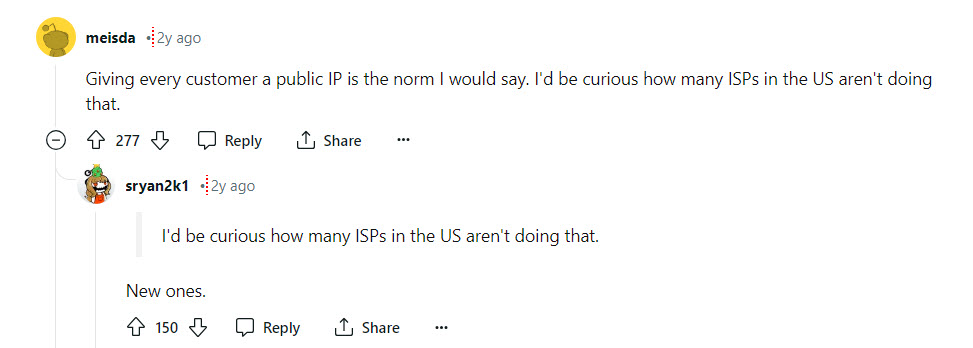
This setup is preferred for its ease in configuring home networks and devices that require external access, such as security cameras or personal servers. However, with the growing scarcity of IPv4 addresses, the discussion also turns towards the future necessity of adopting IPv6, which offers a much larger address space and could potentially solve many current IP-related issues.
Navigating Xfinity’s Network Settings: User Tips and Tricks
Redditors have also provided practical advice on how to manage and discover your IP settings with Xfinity services. Some suggest using dynamic DNS services if your IP changes frequently, which is a common scenario with ISPs that do not assign static IPs.
Others share specific commands and tools to check your public IP address, such as visiting websites like “whatismyip.com” or using command prompt instructions. These insights can be particularly helpful for less tech-savvy users who need straightforward methods to access their network information.
The Future of Internet Protocol: Transitioning to IPv6 with Xfinity
As the internet continues to evolve, the transition from IPv4 to IPv6 becomes increasingly important. Reddit users discuss the slow adoption of IPv6 and its implications for everyday users. They emphasize the benefits of IPv6, notably its ability to provide a virtually unlimited number of IP addresses, which simplifies networking requirements and enhances security.
FAQs: Xfinity IP Address in Australia
How do I find my Xfinity Gateway IP address in Australia?
To find your Xfinity Gateway IP address in Australia, sign in to your Xfinity account using your username and password. Once logged in, go to the account or settings section of the portal. Then, navigate to the network or internet settings options where you will find the IP address associated with your Xfinity service listed.
How do I know which Xfinity Gateway I have?
To determine which Xfinity Gateway you have, check the make and model information located on the bottom of your device. Alternatively, you can log in to your Xfinity account to view the make and model details of your gateway. If you do not have an Xfinity Gateway, refer to the instructions for activating other wireless gateway devices.
How do I access my Xfinity router Gateway in Australia?
To access your Xfinity router Gateway in Australia, use a device connected to your network to open a web browser and navigate to the Admin Tool at http://10.0.0.1. If you have previously changed your Admin Tool ID and password, log in using your updated credentials.
How do I find my Xfinity IP address?
To find your Xfinity IP address, sign into your Xfinity account using your username and password. After logging in, navigate to the account or settings section of the portal. Then, check the network or internet settings options where you will find the IP address associated with your Xfinity service.
What is Xfinity IP login?
Xfinity IP login refers to the default router IP addresses used for logging into an Xfinity router, which are typically 192.168.1.1, 192.168.100.1, or 10.0.0.1.
What is the IP address of Xfinity Admin?
The IP address for the Xfinity Admin is 10.0.0.1. You can access the Admin Tool by entering http://10.0.0.1 into a web browser, which directs you to the wireless gateway’s administration site.
How do I access my Xfinity Gateway router?
To access your Xfinity Gateway router, open a web browser and navigate to the Admin Tool at http://10.0.0.1, which is the administration site for the wireless gateway. Log in using the default credentials: Username: admin and Password: password (case sensitive).
What is the default login for Comcast Xfinity routers in Australia?
Most Xfinity routers in Australia have default login details like ‘admin’ as username and ‘password’ as password. Other possible login combinations are ‘root’ and ‘root’, or cusadmin’ and ‘highspeed’. If these don’t work, you can check the back of your router and user manual.
What is the IP address for Xfinity wifi?
The default IP address of Xfinity routers is usually “192.168.1.1”, “192.168.100.1”, or “10.1.10.1”. If these don’t work, you can check your IP address by following the steps mentioned above, or you can check your router box and user manual. Most routers have the IP address with username and password printed on a sticker on the device.
Wrapping Up
Understanding the intricacies of managing your home network is crucial, and I’ve provided the steps to locate your Xfinity IP address in Australia for that very purpose. Knowing this allows for seamless router configuration and troubleshooting. If my guidance doesn’t resolve your issues or you’re unsure about the process,
I recommend seeking support from Xfinity’s customer service or potentially considering a reliable VPN service for added security and privacy on your network. Always ensure your firmware is up to date for the best performance and security. My aim is to empower you with the knowledge to maintain a secure and efficient home network.