Brave Browser is a privacy-focused browser that blocks unwanted ads, trackers, and more. However, even with its built-in shields and privacy-focused design, integrating the best brave browser VPNs can further enhance your online experience. Here, I have the best VPN for Brave Browser in UAE to keep your activities across the web safe.
The best VPN in UAE not only shields your browsing from ISP monitoring but also encrypts your data, safeguarding it against unauthorized access. Although there are VPN browser extensions for Brave, many are limited to proxy functionalities, lacking comprehensive encryption and advanced features. For robust privacy, the optimal solution involves pairing Brave with a dedicated VPN app.
When you pair Brave Browser with a reliable VPN like ExpressVPN, your protection goes beyond just the browser. This combo encrypts your data, hides your real IP address, and strengthens all the apps on your device that use the internet. This complete strategy also brings extra security features, such as leak protection, a kill switch, and improved ad-blocking.
Quick Overview – Best VPN for Brave Browser in UAE
I’ve tested 45+ VPN extensions on Brave Browser, but all of them couldn’t meet my expectations. So, I narrowed to only the best VPN for Brave Browser in UAE to save you time in doing the extra research while selecting. Have a look:
ExpressVPN: Best VPN for Brave Browser in UAE
Offers a fully compatible browser extension with strong encryption, protocols, and incredibly fast speed for Brave browsing. Includes a 30-day money-back guarantee.
➔ Get a special ExpressVPN offer: USD 6.67/mo (US$ 6.67/mo)
Surfshark: Budget-friendly VPN for Brave Browser in UAE
Protects all your devices using the Brave browser with unlimited connections, extending privacy across your digital landscape.
➔ Get a special Surfshark offer: USD 2.49/mo (US$ 2.49/mo)
NordVPN: Secure VPN for Brave Browser in UAE
Enhanced security with Onion Over Tor servers for Brave’s Tor Windows, adding an extra layer of protection.
➔ Get a special NordVPN offer: USD 3.99/mo (US$ 3.99/mo)
CyberGhost: User-friendly VPN with Ultimate Privacy on Brave Browser in UAE
Offers optimized servers for streaming and torrenting with optimal encryption, and threat detection to access your favorite content smoothly while using Brave.
➔ Get a special CyberGhost offer: USD 2.03/mo (US$ 2.03/mo) - Save up to 84% with exclusive 2-year plans + 4 months free
Private Internet Access: Reliable Privacy-Oriented VPN for Brave Browser in UAE
It is one of the few VPNs that fine-tune your speed and security settings while browsing with Brave, providing a personalized online experience.
➔ Get a special PIA offer: USD 2.11/mo (US$ 2.11/mo)
Best VPN for Brave Browser in UAE – Quick Comparison
Here’s a side-by-side comparison table of all the best VPNs for Brave Browser in UAE:
| VPNs |  |
 |
 |
 |
 |
|---|---|---|---|---|---|
| Ranking for Brave Browser | 1 | 2 | 3 | 4 | 5 |
| Country Servers | 105 countries | 100+ countries | 61+ countries | 100+ countries | 84+ servers |
| Encryption Type | AES-256 bit | AES-256 bit | AES-256 bit | AES-256 bit | AES-256 bit |
| Obfuscated servers | Yes | Yes | Yes | No | No |
| Brave Browser extension | Yes | Yes | Yes | No | No |
| VPN Protocols | Lightway (WireGuard), OpenVPN | WireGuard, OpenVPN, IKEv2 | OpenVPN, NordLynx | WireGuard, OpenVPN | WireGuard, OpenVPN |
| Unblocks Streaming Platforms | Netflix, BBC iPlayer, Hulu, and More | Netflix, BBC iPlayer, Hulu, and More | Netflix, BBC iPlayer, Hulu, and More | Netflix, BBC iPlayer, Hulu, and More | Netflix, BBC iPlayer, and More |
| Kill Switch | ✅ | ✅ | ✅ | ✅ | ✅ |
| Split tunnelling | Windows, Mac, Android, and routers | known as Bypasser (Windows and Android) | Windows and Androids only | Windows and macOS | Windows, Linux, and macOS |
| IP adresses | Dynamic IP | Static IP | Dynamic IP | Static IP | Static IP |
| Pricing | USD 6.67/mo (US$ 6.67/mo) - Save up to 49% with exclusive 1-year plans + 3 months free | USD 2.49/mo (US$ 2.49/mo) - Save up to 77% with exclusive 2-year plan + 30-day money-back guarantee | USD 3.99/mo (US$ 3.99/mo) - Save up to 63% with exclusive 2-year plan + 3 months free for a friend | USD 2.03/mo (US$ 2.03/mo) - Save up to 84% with exclusive 2-year plans + 4 months free | USD 2.11/mo (US$ 2.11/mo) |
Why Do You Need a VPN for Brave Browser in UAE?
You need a VPN for Brave Browser in UAE to keep your browsing activities private from your ISPs. Most ISPs track their customers’ online movement even if they use private or incognito mode. So, a Brave VPN will protect your data from intruders or prevent your browsing activities from being tracked online.
With a VPN for Brave Browser in UAE, you can also get super-fast browsing speed and access to worldwide geo-restricted streaming sites and web content. Here you can see how I tried accessing HBO Max using Brave browser but was unable to do so:

If you access HBO Max, you’ll face the same geo-restriction error as I did in UAE.
So, does Brave browser VPN work? Although Brave is a secure browser, you still need a VPN for protection against cyber threats and attacks on all devices and platforms. The built-in tracking feature of Brave may not work for blocking advanced trackers online.
Moreover, public Wi-Fi networks can become carriers for bugs and expose your information. Using a VPN for Brave can encrypt your data on the web, detect malicious entities, and block trackers. The best thing is that you can enjoy unlimited browsing without bandwidth limitations with a VPN.
5 Best VPNs for Brave Browser in UAE [Detailed Analysis – 2024]
For your ease, I have narrowed down the list to the top 5 best VPNs for Brave Browser in UAE that are best for secure browsing. I ensured the VPNs I’m picking out offer robust security, solid IP/DNS leak protection, a kill switch, the fastest speeds, and more. Most of these VPNs also offer a strict no-logs policy.
Have a go through my in-depth analysis of each of these VPNs:
1. ExpressVPN – Best VPN for Brave Browser in UAE

- Ultra-fast servers in 105 Countries
- Excellent unblocking capability for Netflix, Hulu & more
- Best-in-class encryption trusted security, and advanced protection features that block ads, trackers, and harmful sites.
- Connect up to 8 devices simultaneously
- 24/7 customer support through live chat
- 30-day money-back guarantee
ExpressVPN is the best VPN for Brave Browser in UAE, with a complete feature-packed extension compatible with the browser. It has an extensive network of 3000+ servers spread across 105 countries, which ensures the best quality and uninterrupted browsing.
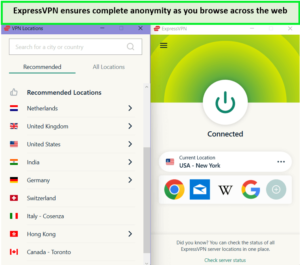
ExpressVPN’s servers have the finest security measures as you stream or browse the web in UAE.
ExpressVPN can integrate privacy and security settings in the desktop app extension. It protects your entire device with a Brave extension connection using a Threat Manager, AES-256 encryption, and leak protection. Your data remains safe even when your connection drops using its kill switch.
Although the Brave browser extension provides instant VPN protection with identity masking and location spoofing, it lacks numerous features that come with a VPN app. Therefore, installing a Brave VPN desktop app to direct the extension and make it work with rich security and privacy features is always recommended.
Apart from that, ExpressVPN is considered one of the best Chrome VPN extensions in UAE becasue when I used it on Chrome, it did not slow the speed of my searching and also ensured that the online activity remained safe and secure.
I tested ExpressVPN’s speed in UAE, and it gave a download speed of 89.42 Mbps and 84.64 upload speed on a 100 Mbps connection. This means the VPN is pretty fast on regular and Brave browsers.
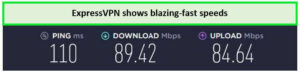
These speed results are enough to stream videos in high resolution in UAE.
You may also opt for an ExpressVPN free trial in UAE if you want to test the feature on iOS and Android phones. It offers 24/7 live chat support for users and a 30-day money-back guarantee to claim a refund if you don’t like the services.
Check out my ExpressVPN review in UAE for more information on this provider.
Exclusive Deal
VPNRanks readers can enjoy a special ExpressVPN offer! USD 6.67/mo (US$ 6.67/mo) - Save up to 49% with exclusive 1-year plans + 3 months free
- Available browser extension for Brave Browser, which is also compatible with Edge and Firefox
- Extensive server network across the globe
- Provides unlimited bandwidth and high-speed connections
- Easy and user-friendly apps
- 24/7 live chat support
- Overall best performance in all department
- Doesn’t offer a free plan
2. Surfshark – Budget-friendly VPN for Brave Browser in UAE

- 3,200+ servers in 100 countries
- RAM-only servers (no hard disks)
- Unlimited simultaneous connections
- Unblocks Netflix and More
- 24/7 Customer Service
Surfshark is the best budget-friendly VPN for Brave Browser in UAE that brings highly affordable top-tier security only for USD 2.49/mo (US$ 2.49/mo) - Save up to 77% with exclusive 2-year plan + 30-day money-back guarantee. It offers 3200+ servers in 100 countries, including 600+ servers in UAE alone.
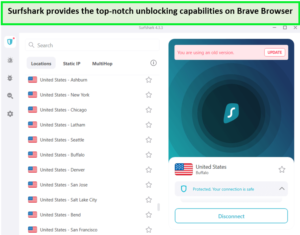
Surfshark’s servers are quick and efficient in unblocking most geo-restricted sites in UAE.
Connection issues and unnecessarily blocking pages like Google are users’ top concerns. However, none of these problems occurred when I switched to a full-fledged Surfshark Windows app. Surfshark offers compatibility with various operating systems, including Windows and Linux.
With Surfshark, your Brave activities can’t be recorded, following a no-logs policy. Apart from that, it offers advanced features like MultiHop that encrypts your data more than once. With Surfshark’s Camouflage Mode, your identity is protected while browsing the internet.
According to my Surfshark speed test in UAE, it provided 81.32 Mbps download speed and 76.12 upload speed on a 100 Mbps base connection.
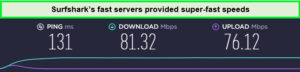
It performs more consistently than many rivals in UAE.
Surfshark offers a 30-day money-back guarantee to claim a refund if you are unhappy with the VPN performance without further investigation. Furthermore, you can also opt for Surfshark’s free trial in UAE, which mobile users are entitled to.
Check out my detailed Surfshark review in UAE to know more about this VPN’s features.
Exclusive Deal
VPNRanks readers can enjoy a special Surfshark offer! USD 2.49/mo (US$ 2.49/mo) - Save up to 77% with exclusive 2-year plan + 30-day money-back guarantee
- Available extension for Brave, Firefox, and Chrome
- Unlimited bandwidth stream 4k contents
- Connect unlimited simultaneous connections
- 24/7 live chat and mail support
- Excellent security due to Multi-Hop features
- It takes a bit of time to connect to servers
3. NordVPN – Secure VPN for Brave Browser in UAE

- 6000 servers in 60 countries
- WireGuard protocol (NordLynx)
- 6 Simultaneous Connection
- DoubleVPN
- 24/7/365 Live Chat Support
- 30 Days Money Back Guarantee
NordVPN has the largest server network for Brave Browser in UAE, boasting about 6000+ servers in 61 countries. It offers an ultra-secure connection with a lightweight extension or Brave browser to protect your internet traffic. NordVPN also has a Threat Protection feature that blocks malicious ads and suspicious websites while browsing.
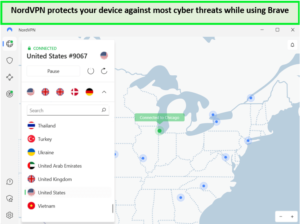
NordVPN’s servers shield your devices against potential cyberattacks in UAE.
The NordLynx protocol provides a super-fast and smooth browsing experience with unlimited bandwidth. It also comes with advanced security features like military-grade AES 256-bit encryption and a kill switch that provides you with guaranteed identity masking on the internet.
With its DoubleVPN technology, your IP and data are encrypted twice, protecting your information while ensuring a high level of privacy. NordVPN’s proxy extension protects you from getting your IP address revealed by disabling the WebRTC protocol.
NordVPN also offers browser extensions for Chrome, Edge, and Firefox to hide identity and activities and block threats on the internet. The VPN extension is compatible with the Brave browser, but I don’t find it useful as a stand-alone service. I couldn’t select a specific server within the chosen country using VPN’s proxy extensions.
The speed test of NordVPN in UAE showed a tremendous result, offering a download speed of 83.82 Mbps and an upload speed of 44.64 Mbps on a 100 Mbps connection.
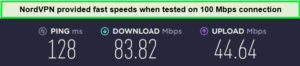
These speed results are enough to load videos in 4K quality without buffering in UAE.
NordVPN offers a 30-day money-back guarantee that lets you explore t
he service and request a refund within a month. To test these features, you can opt for NordVPN’s free trial in UAE.
For more information, refer to my NordVPN review in UAE.
Exclusive Deal
VPNRanks readers can enjoy a special NordVPN offer! USD 3.99/mo (US$ 3.99/mo) - Save up to 63% with exclusive 2-year plan + 3 months free for a friend
- Brave compatible NordVPN extension
- Massive server network across the globe
- Offers fast browsing, streaming, and torrenting
- 24/7 live chat support
- P2P specialized servers and Onion Over featured VPN
- No-logs policy
- Kill switch isn’t activated automatically
4. CyberGhost – User-friendly VPN with Ultimate Privacy on Brave Browser in UAE

- 11651 Servers Servers in 100 Countries
- 7 Simultaneous Logins
- 45 Days Money-Back Guarantee
- Strict No Logs Policy
- 24/7 Live Chat Support
- Strong Protocols & Encryption
CyberGhost is the most user-friendly VPN with privacy-enriched features for Brave Browser in UAE.
The VPN even offers optimized servers specifically for torrenting, streaming, and privacy. Its NoSpy servers ensure no third party can meddle with your connection since the VPN is located in the safe jurisdiction of Romania (not a part of 14 Eyes Alliance). To reassure the users, CyberGhost’s no-logs policy is quite strict.
The VPN has one of the largest server networks for Brave Browser, consisting of 11651+ servers in 100 countries and 1392 servers in UAE. Apart from the huge server network, you can also add a layer of privacy by using CyberGhost’s ad, tracker, and malware blocker.
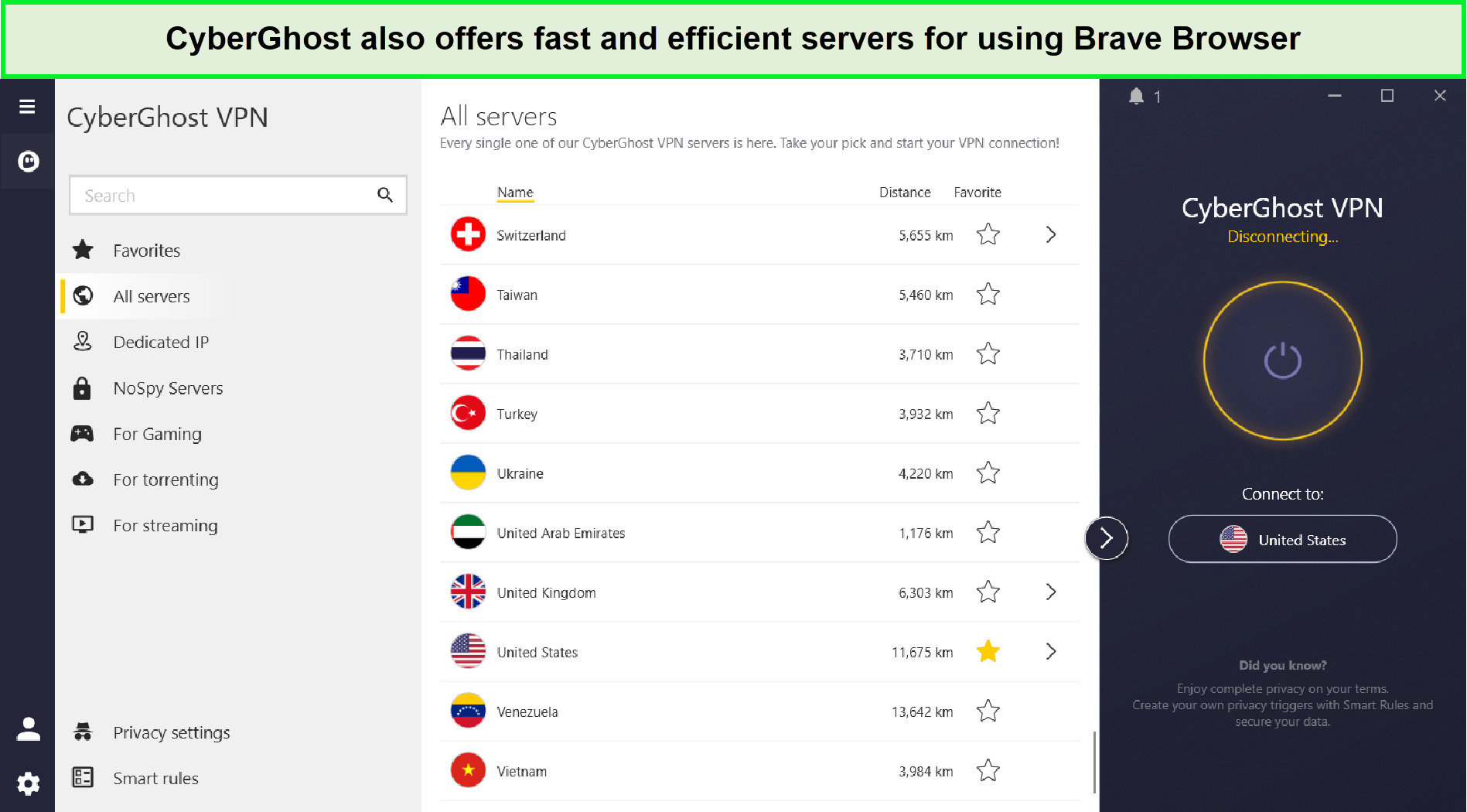
CyberGhost has a huge server network to use Brave Browser in UAE.
Since Brave lets slip a few ads, CyberGhost’s ad blocker can take care of them. You can just enable its “Block Content” feature in Settings, and you’ll be good to go. Other features include AES 256-bit encryption, a kill switch, and DNS/IP leak protection.
In terms of accessing geo-restricted sites, CyberGhost is capable of unblocking a bunch of them. You can use CyberGhost with Netflix in UAE with its optimized streaming-specific Netflix US servers. Similarly, torrenting with CyberGhost is also super easy, thanks to its P2P-optimized servers.
In my CyberGhost speeds tests in UAE, I received a download speed of 75.12 Mbps and an upload speed of 39.48 Mbps on a 100 Mbps internet connection.
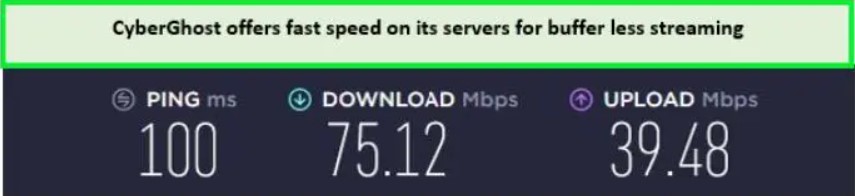
My CyberGhost speed tests gave satisfactory results in UAE.
CyberGhost offers a fantastic 45-day money-back guarantee so you can test the services. You may also opt for CyberGhost’s free trial in UAE for iOS and Android phones.
For more information, refer to my CyberGhost review in UAE.
Exclusive Deal
VPNRanks readers can enjoy a special CyberGhost offer! USD 2.03/mo (US$ 2.03/mo) - Save up to 84% with exclusive 2-year plans + 4 months free
- Chrome extension for Brave Browser
- Huge server network globally
- Offers optimized servers for browsing, streaming, and torrenting
- 7 simultaneous connections
- 24/7 live chat support
- A few servers are slow
5. Private Internet Access – Reliable Privacy-Oriented VPN for Brave Browser in UAE

- Does Not Keep Any Logs
- 24/7 Customer Support
- 7 Days Money Back Guarantee
- 35000+ Servers in 84 Countries
- SOCKS 5 proxy
- Compatible with Leading Devices
Private Internet Access is a reliable privacy-oriented VPN for the Brave Browser in UAE. It gives you a free hand in terms of customizing features. Its advanced kill switch can prevent data leaks even when manually disconnecting the VPN.
It is entirely up to you whether you want to enable PIA MACE. Since it’ll help you block malware, ads, and trackers, I recommend you enable it for your enhanced safety. It is capable of operating at the DNS level, so it can prevent requests from reaching your device. Using MACE, you can also block microphone and camera access requests.
In terms of servers, Private Internet Access offers 35000+ servers in 84 countries and servers across all 50 states in UAE.
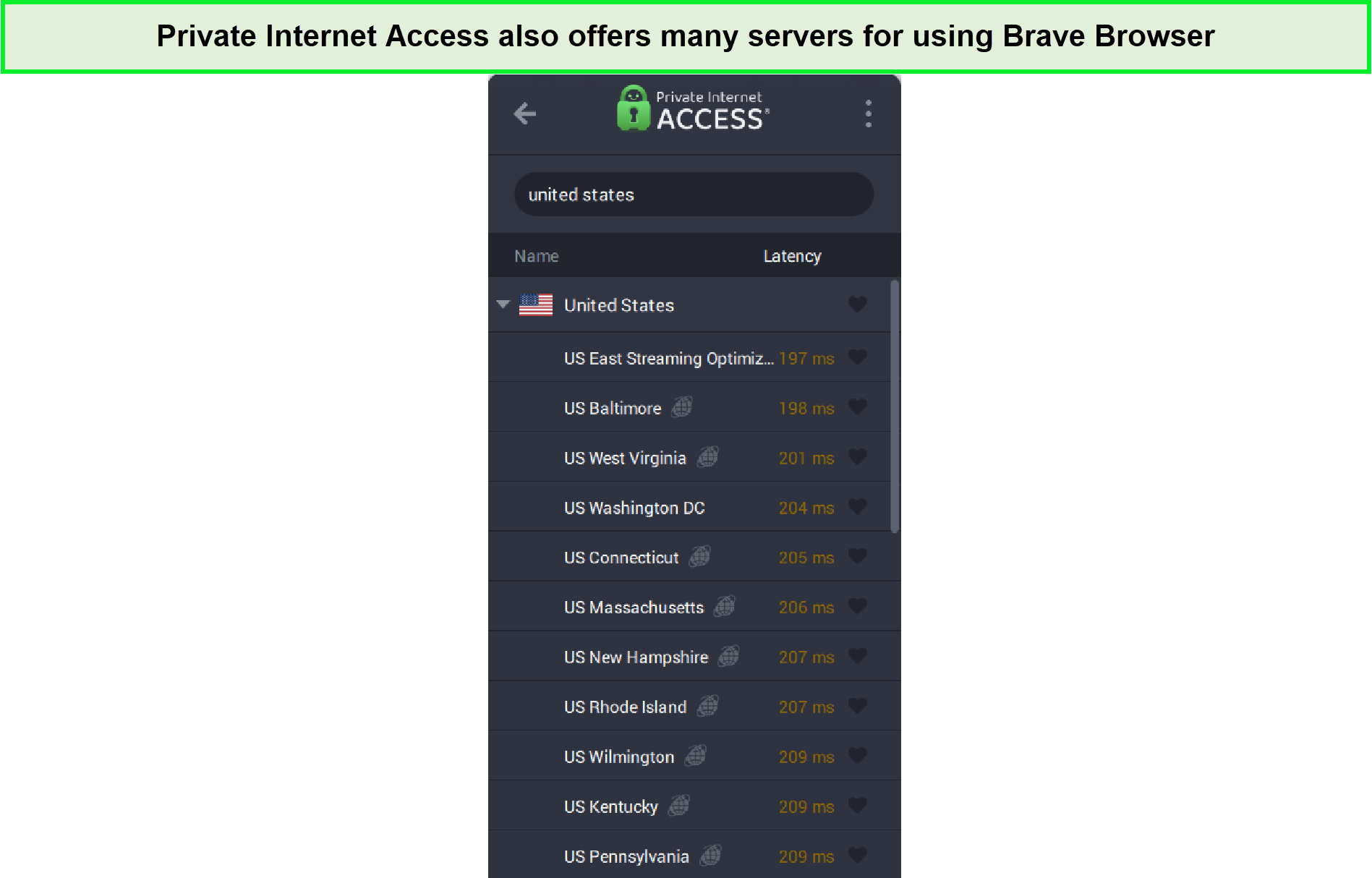
PIA offers many servers for using Brave Browser with ease in UAE.
In my PIA speed tests in UAE, I received a download speed of 65.78 Mbps and an upload speed of 57.16 Mbps on a 100 Mbps internet connection.
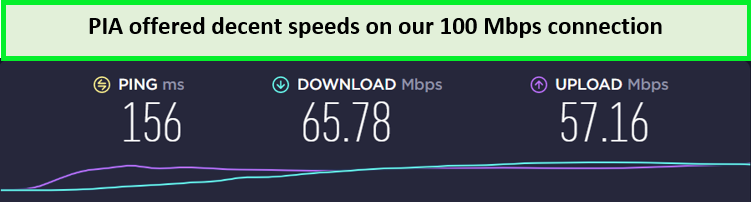
PIA offers decent speed, suitable for browsing the internet in UAE.
Private Internet Access offers an amazing 30-day money-back guarantee so you can test the services. You may also opt for PIA’s free trial in UAE for iOS and Android phones.
For more information, refer to my PIA review in UAE.
Exclusive Deal
VPNRanks readers can enjoy a special PIA offer! USD 2.11/mo (US$ 2.11/mo)
- Chrome extension for Brave Browser
- Customizable features for privacy
- Unlimited simultaneous connections
- 24/7 live chat support
- Monthly plans are expensive
- Headquartered in UAE
How to Choose the Best VPN for Brave Browser in UAE
While you’re going to buy a Brave browser VPN extension, there are certain features that you can’t miss. I observed many VPNs with an extension for Brave, but it functions like a proxy extension with no data encryption. Here I have mentioned the important features for you to consider:
- Strong Security Features: The VPN you select must have at least a kill switch, AES-256 encryption, and a leak detection and protection mechanism. All the VPNs that are included in the list are highly secure.
- No-logs Policy: A no-logs policy ensures that the VPN does not record user activities or data, which is important for user safety. All the VPNs added here follow a strict no-logs policy.
- Ensured anonymity: A trustworthy VPN ought to mask your IP address efficiently. It should be done in such a way that the geo-blocking detectors fail to detect them.
- Brave Browser extensions: If a VPN offers native browser extensions for Brave then it is good to go. So that you don’t have to look for a browser extension to work with your preferred devices.
- Servers: The larger the server network, the greater the flexibility you have when it comes to accessing content. I looked for VPNs that, ideally, have thousands of servers spread across dozens of countries. In particular, this had to include servers in the likes of the US, Canada, UK, and Australia.
- Fast Speeds: Smooth browsing and torrenting require fast servers with no lags and buffering. Therefore, you should prioritize fast servers to complement your browsing. I have chosen VPNs that showed super-fast browsing results.
- User-friendly: A reliable VPN offers easy-to-use apps so that even novice users can use the VPN without issues. The VPNs I’ve picked out all offer user-friendly apps.
- Customer Support: Active and responsive customer support makes users feel more heard and valued. I have observed great customer support service for all VPNs added to this list.
- Unblocking Capabilities on Browsers: Currently, half of VPN users prefer VPNs that can easily unblock the platform on browsers. A good VPN not only opens the platform by removing the geo-restriction barriers but also offers fast speeds to the users.
- Trustworthy Money-back guarantee: VPNs with a money-back guarantee are more trustworthy and credible. Users can try such VPNs for a period freely and claim a refund. All my VPNs offer a 30-day money-back guarantee.
How to Install a VPN on Brave Browser in UAE
Follow the steps below to install a VPN on the Brave Browser in UAE:
- Subscribe to a trustworthy Brave Browser VPN. I highly recommend ExpressVPN.
- Download and install the VPN app on your device.
- Connect to any server of your choice.
- Launch Brave and enjoy an anonymous and private browsing experience!
Note: The same installation procedure applies if you’re looking for how to enable VPN in Brave Browser Android.
How to Set Up Brave Browser on Your Device in UAE?
You can set up Brave Browser on a bunch of devices like desktop, iOS, or Android. You may also use Brave Search using any browser by typing in the address search.brave.com and setting it as your default search engine.
Needless to say, Brave is a trustworthy browser that can help secure any of your devices. It offers native apps from Android, iOS, Windows, and Mac. Wondering how to set up Brave Browser on a specific device? Read on!
How to set up a Brave Browser VPN on Android in UAE?
Brave Browser is a safe option to avoid solicited ads from bombarding your phone. Since Brave doesn’t offer any mobile extensions, you can use a VPN for additional safety. Here are the steps you need to follow:
- Subscribe to a reliable VPN service. I highly recommend ExpressVPN.
- Install the ExpressVPN app on your Android device.
- Connect to any nearby server to get faster speeds.
- Access any content on Brave Browser safely!
How to set up a Brave Browser VPN on iOS in UAE?
To access content safely across the web on Brave using your iPhone, I believe you need to utilize the best VPN for your iPhone for the job. Otherwise, you’ll be leaving the room open for data risks. Follow the steps given below to set up Brave Browser on your iPhone:
- Subscribe to a reliable Brave Browser VPN. I highly recommend ExpressVPN.
- Download and install the ExpressVPN app on your iPhone.
- Toggle the GPS spoofing feature and change your location.
- Select any server you want to connect to.
- Start browsing on Brave Browser without any issues!
How to set up a Brave Browser VPN on Windows in UAE?
Windows’ extension for Brave Browser has a set of quite expensive features. You’ll get better loading speeds as Brave will block most unwanted ads. To enhance your security, I recommend using the best VPN for Windows. Follow the steps given below to set up Brave Browser on Windows:
- Subscribe to a Windows VPN. I highly recommend ExpressVPN.
- Download the ExpressVPN setup and register/log in.
- Connect to any server. I recommend letting the Smart Location feature pick one for you.
- Launch the Brave Browser and surf the web without any restrictions!
How to set up a Brave Browser VPN on Mac in UAE?
For Safari users, Brave Browser is a good alternative. Specifically when it offers stronger anti-tracking and ad-blocking features. With the best Mac VPN, you’ll be completely anonymous. Here’s what you need to do to set up Brave on Mac:
- Subscribe to a reliable Brave Browser VPN. I highly recommend ExpressVPN.
- Install the VPN on your Mac.
- Connect to any server of choice.
- Launch Brave Browser and enjoy geo-restricted content with ease!
Can I Use a Free VPN for Brave Browser in UAE?
Exercise caution with free VPNs for the Brave browser, as they often prioritize neither your safety nor your privacy, potentially leading to adverse outcomes.
Consider a less-than-ideal VPN scenario: it lacks robust security features, leaving you vulnerable. Furthermore, such a provider might harvest your data for profit. In a worst-case scenario, the VPN could serve as a conduit for malware.
Moreover, expect limited data allowances, a scant selection of servers, and intrusive ads that detract from your browsing experience. Additionally, don’t count on a free VPN to circumvent geographical restrictions, limiting access to broader content libraries like Netflix’s.
Is a Brave Browser Safe to Use?
When considering the safety of the Brave Browser, it is highly regarded as one of the most secure browsers available. Brave prioritizes user privacy by blocking unwanted ads and trackers and preventing fingerprinting.
However, despite Brave’s impressive variety of security features, it does not make you invisible online. Your internet service provider (ISP), government agencies, and potential cybercriminals can still track your online activities and IP address. To combat this, using the best VPN for Brave Browser in UAE like ExpressVPN becomes crucial.
Brave Browser Not Working with VPN in UAE? Quick Fixes
Using a Brave Browser with a VPN can help you immensely in saving your devices from cyberattacks. However, in case your VPN isn’t working with Brave Browser and you’re facing some error, that can be worrisome. Based on my experience, here are a few tips and tricks you can rely on to save the day:
- Restart your device: Starting with the basics, you might want to restart your device as some cached data may be causing the error. You can also reboot your router to be on the safe side.
- Check if your IP is leaking: You may want to ensure your IP isn’t leaking with the VPN you’re using. That’s why you ought to opt for a VPN offering a kill switch and IP/DNS leak protection.
- Connect to another VPN server: Perhaps the server you’re connecting to is under maintenance or down for some other reason. You can explore your chances by connecting to another server and then using the Brave VPN extension.
- Get in touch with customer support: You can contact the VPN’s or Brave Browser’s customer support. Explain your issue to them, and they should be able to help you through their 24/7 live chat.
- Opt for a different VPN provider: If nothing has worked out so far, you can opt for another VPN. I highly recommend ExpressVPN since it is the best VPN for Brave Browser in UAE based on our testing.
Other Essential VPN Guides by VPNRanks
- Best VPN for iPad in UAE: Ensure unmatched data protection and privacy on iPad.
- Best VPN for Android in UAE: Enhance the safety of your Android devices.
- Best VPN for iPhone in UAE: Elevate your internet privacy and data protection on iPhone.
- Best VPN for Mac in UAE: Guarantee flawless safety and privacy on your Mac.
- Best VPN With Port Forwarding in UAE: Beyond Encryption: Elevate Your Online Odyssey with the Best VPN and Port Forwarding Synergy
- Best VPN for 4chan in UAE: Enhance your 4chan experience with the best VPN, ensuring privacy, security, and unrestricted access to the platform’s content.
FAQs – Best VPN for Brave Browser in UAE
Can I use VPN with Brave browser in UAE?
Yes, you can easily use a VPN with the Brave browser. Upon Brave browser VPN downloading, simply click on “VPN” in the address bar to activate protection for this device and up to five devices spanning desktop, Android, and iOS. If you already have a subscription, you can also secure your devices by visiting account.brave.com.
Does Brave have a VPN?
Yes, Brave offers a VPN as part of its subscription service called Brave VPN. To access it, you’ll need a Brave Premium account, which you can create at https://account.brave.com. With Brave VPN, you can effectively block unwanted trackers, and viruses, and enhance your device’s security.
How VPN works in Brave browser in UAE?
In Brave Browser, the VPN encrypts your internet connection, ensuring privacy and security. It masks your IP address, enhancing anonymity and bypassing geographical restrictions. Users have control over server location and can toggle the VPN feature as needed.
Which VPN is best for Brave browser in UAE?
When it comes to safeguarding your online privacy while using the Brave browser, ExpressVPN emerges as the optimal choice. With its cutting-edge encryption protocols, this VPN ensures your data remains secure and protected from prying eyes. Its extensive network of servers worldwide guarantees fast and reliable connections, allowing for seamless browsing experiences.
Does ExpressVPN work with Brave browser in UAE?
ExpressVPN‘s Brave browser extension is designed for speed, ensuring fast download rates and seamless streaming experiences. Enjoy uninterrupted browsing and streaming with our optimized VPN extension for Brave browser.
Does Surfshark work with Brave in UAE?
Surfshark VPN is the perfect solution, compatible with any platform your privacy browser can handle. It offers browser extensions that seamlessly integrate with Brave, Firefox, and Chrome for enhanced privacy and security.
Does NordVPN work on Brave in UAE?
Yes, NordVPN is an excellent choice for pairing with the Brave browser. It offers exceptional security, privacy features, and user-friendly apps, including dedicated extensions for Brave. With the added benefit of 6 simultaneous connections, you can safeguard all your smart devices seamlessly.
Does Brave browser track IP in UAE?
Brave Browser emphasizes privacy and typically does not track users’ IP addresses. However, it’s important to review their latest privacy policies and settings to ensure your desired level of privacy.
Do VPNs for Brave block malware?
Yes, VPNs for Brave can block trackers and encrypt every connection across the web. In this way, you can avoid malware-infected websites and, consequently, data-stealing malware i.e. keyloggers and Remote Access Trojans, etc. If you use a trustworthy VPN like ExpressVPN, you can definitely stay on the safe side.
Does Brave have a built-in VPN?
Brave offers a built-in firewall and VPN, though it’s a premium service accessible only on Android and iOS platforms at present. This feature secures data transmission between your device and the internet by encryption.
How to add a VPN extension in Brave browser in UAE?
Once you download Brave, launch the browser and click on the “VPN” icon next to the address bar. Similarly, on your mobile, launch Brave, tap “Settings” and toggle the VPN option. Now, enjoy safe browsing on your device! In case you face any issues, feel free to get in touch with customer support.
Does Brave have a free VPN?
Brave does not offer a built-in free VPN. However, they do have a premium VPN service available for Android and iOS devices.
Is Brave browser safe from ISP?
Brave Browser enhances user privacy by using encryption and features like Tor integration. However, it’s not completely immune to ISP tracking. Utilizing the browser’s built-in features and additional privacy tools can help mitigate ISP tracking, but absolute safety depends on various factors including browsing habits and configuration.
Wrapping Up!
Brave Browser has proven itself to be one of the most secure browsers in 2024. It offers basic security features that may not be enough for online privacy protection and threat prevention.
Complimenting the best browser VPN with Brave can help yield maximum security and advanced user protection. Hopefully, you also know how to use Brave VPN. Reading up on the best VPN browser for Barve review may also help you.
On top of this, using the best VPN for Brave Browser in UAE can protect all your devices working on different platforms. All in all, I highly recommend trying ExpressVPN with Brave browser to enhance your browsing experience with its feature-rich apps, quality service, and incredibly fast servers.
